> ## Documentation Index
> Fetch the complete documentation index at: https://notes.kodekloud.com/llms.txt
> Use this file to discover all available pages before exploring further.
# Demo AnalysisRun
> Explains using Argo Rollouts AnalysisTemplate and AnalysisRun to validate application health during canary and blue-green rollouts, including placements, blocking behavior, and examples.
In this lesson we trigger an AnalysisRun using the AnalysisTemplate we defined earlier. AnalysisRuns verify application health during rollouts and can be integrated with Argo Rollouts in several ways depending on strategy (Canary or Blue-Green) and whether the analysis should block the rollout or run concurrently.
Key concepts:
* AnalysisTemplate: reusable template that defines metrics and success conditions.
* AnalysisRun: an execution of an AnalysisTemplate.
* Placement: where the AnalysisRun is started (background, inline, pre-promotion, post-promotion).
* Blocking vs non-blocking: whether the rollout waits for the AnalysisRun to finish.
If you're using a canary strategy, analysis can run in the background while the canary advances through its steps, or it can be run inline and block the rollout at a particular step.
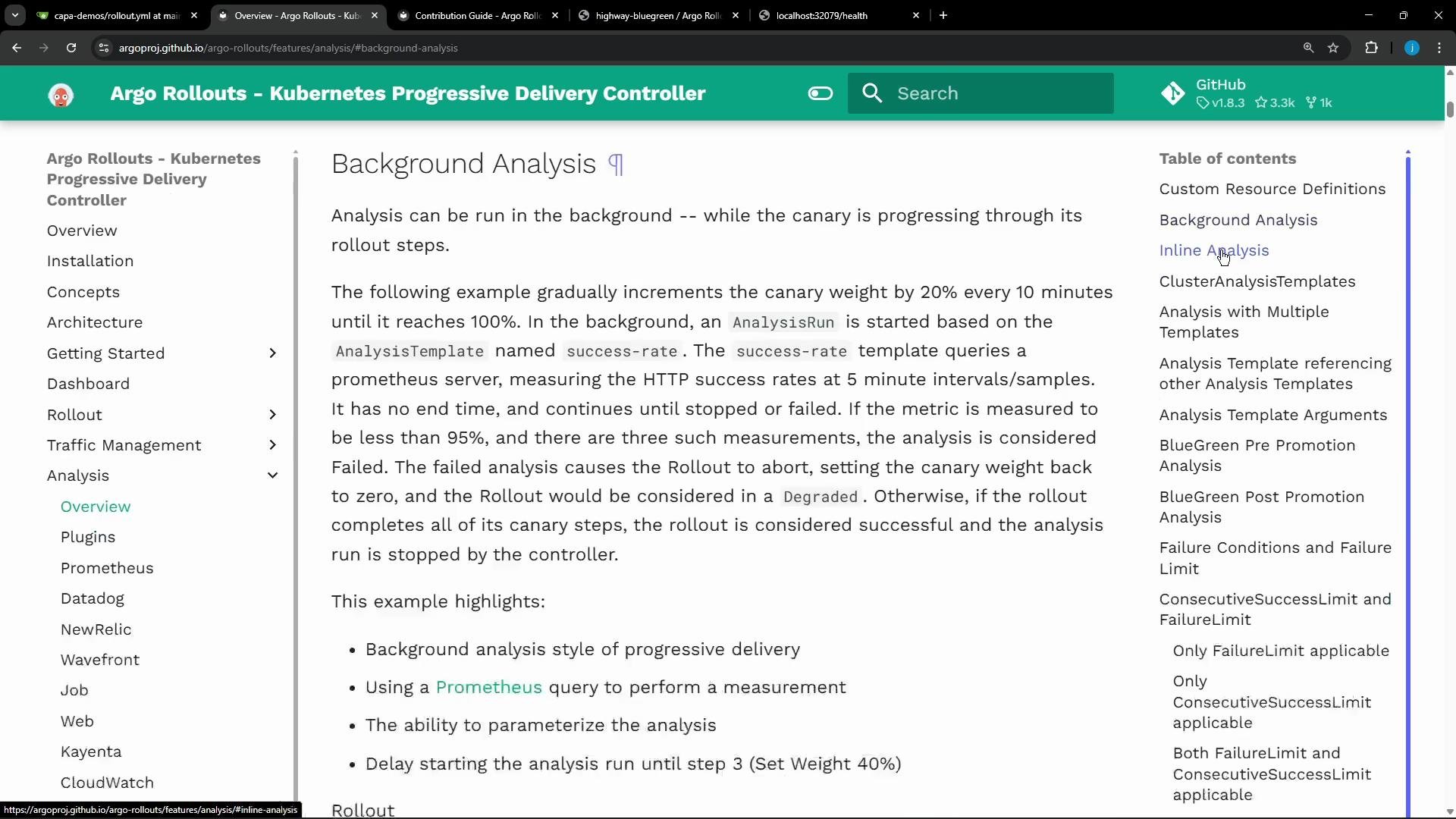 * Background analysis: declared at the top-level of the canary block so it runs independently while steps execute.
* Inline analysis: tied to a specific step and blocks progression until the AnalysisRun completes.
Example — inline analysis as a canary step:
```yaml theme={null}
apiVersion: argoproj.io/v1alpha1
kind: Rollout
metadata:
name: guestbook
spec:
...
strategy:
canary:
steps:
- setWeight: 20
- pause: {duration: 5m}
- analysis:
templates:
- templateName: success-rate
args:
- name: service-name
value: guestbook-svc.default.svc.cluster.local
```
Example — delay analysis until a later step (start at higher traffic percentage):
```yaml theme={null}
apiVersion: argoproj.io/v1alpha1
kind: Rollout
metadata:
name: guestbook
spec:
...
strategy:
canary:
analysis:
templates:
- templateName: success-rate
startingStep: 2 # delay starting analysis run until setWeight: 40%
args:
- name: service-name
value: guestbook-svc.default.svc.cluster.local
steps:
- setWeight: 20
- pause: {duration: 10m}
- setWeight: 40
- pause: {duration: 10m}
- setWeight: 60
- pause: {duration: 10m}
- setWeight: 80
- pause: {duration: 10m}
```
For blue-green deployments you typically place analysis in pre-promotion and/or post-promotion hooks:
* Pre-promotion analysis: runs while the preview service is available and blocks promotion until it succeeds.
* Post-promotion analysis: runs after traffic is switched to the new version; can block or gate additional work depending on configuration.
Example — post-promotion analysis:
```yaml theme={null}
apiVersion: argoproj.io/v1alpha1
kind: Rollout
metadata:
name: guestbook
spec:
...
strategy:
blueGreen:
activeService: active-svc
previewService: preview-svc
scaleDownDelaySeconds: 600 # 10 minutes
postPromotionAnalysis:
templates:
- templateName: smoke-tests
args:
- name: service-name
value: preview-svc.default.svc.cluster.local
```
Example — pre-promotion analysis (blocks promotion until successful):
```yaml theme={null}
apiVersion: argoproj.io/v1alpha1
kind: Rollout
metadata:
name: guestbook
spec:
...
strategy:
blueGreen:
activeService: active-svc
previewService: preview-svc
prePromotionAnalysis:
templates:
- templateName: smoke-tests
args:
- name: service-name
value: preview-svc.default.svc.cluster.local
```
You reference the AnalysisTemplate by name and pass any required args. Below is the AnalysisTemplate used in this lesson: it performs HTTP GETs against a service-health endpoint and treats HTTP 2xx responses as success.
kubectl describe output for the AnalysisTemplate (trimmed for clarity):
```bash theme={null}
$ kubectl -n argo-analysis-lab describe analysistemplate http-health-check
Name: http-health-check
Namespace: argo-analysis-lab
API Version: argoproj.io/v1alpha1
Kind: AnalysisTemplate
Spec:
Args:
Name: service-name
Metrics:
Count: 3
Interval: 5s
Name: health-check
Provider:
Web:
Method: GET
URL: http://{{args.service-name}}.argo-analysis-lab.svc.cluster.local/health
Success Condition: result.code >= 200 && result.code < 300
```
In this lesson we configured the `highway-bluegreen` Rollout to use `prePromotionAnalysis` against the preview service. Relevant portion of the Rollout spec we applied (trimmed):
```yaml theme={null}
spec:
replicas: 5
selector:
matchLabels:
app: highway-bluegreen
strategy:
blueGreen:
activeService: highway-bluegreen-active
autoPromotionEnabled: false
previewService: highway-bluegreen-preview
prePromotionAnalysis:
templates:
- templateName: http-health-check
args:
- name: service-name
value: highway-bluegreen-preview
template:
metadata:
labels:
app: highway-bluegreen
spec:
containers:
- image: siddharth67/highway-animation:blue
name: highway-bluegreen
ports:
- containerPort: 3000
```
Note: Setting autoPromotionEnabled: false prevents automatic promotion even after a successful pre-promotion analysis. The Rollout will pause and require a manual promotion action (via UI or `kubectl argo rollouts promote`).
When we deployed the new (green) version, the Rollout created the preview ReplicaSet and automatically triggered a pre-promotion AnalysisRun. The template ran the health-check metric three times (Count: 3) and recorded three successful measurements.
* Background analysis: declared at the top-level of the canary block so it runs independently while steps execute.
* Inline analysis: tied to a specific step and blocks progression until the AnalysisRun completes.
Example — inline analysis as a canary step:
```yaml theme={null}
apiVersion: argoproj.io/v1alpha1
kind: Rollout
metadata:
name: guestbook
spec:
...
strategy:
canary:
steps:
- setWeight: 20
- pause: {duration: 5m}
- analysis:
templates:
- templateName: success-rate
args:
- name: service-name
value: guestbook-svc.default.svc.cluster.local
```
Example — delay analysis until a later step (start at higher traffic percentage):
```yaml theme={null}
apiVersion: argoproj.io/v1alpha1
kind: Rollout
metadata:
name: guestbook
spec:
...
strategy:
canary:
analysis:
templates:
- templateName: success-rate
startingStep: 2 # delay starting analysis run until setWeight: 40%
args:
- name: service-name
value: guestbook-svc.default.svc.cluster.local
steps:
- setWeight: 20
- pause: {duration: 10m}
- setWeight: 40
- pause: {duration: 10m}
- setWeight: 60
- pause: {duration: 10m}
- setWeight: 80
- pause: {duration: 10m}
```
For blue-green deployments you typically place analysis in pre-promotion and/or post-promotion hooks:
* Pre-promotion analysis: runs while the preview service is available and blocks promotion until it succeeds.
* Post-promotion analysis: runs after traffic is switched to the new version; can block or gate additional work depending on configuration.
Example — post-promotion analysis:
```yaml theme={null}
apiVersion: argoproj.io/v1alpha1
kind: Rollout
metadata:
name: guestbook
spec:
...
strategy:
blueGreen:
activeService: active-svc
previewService: preview-svc
scaleDownDelaySeconds: 600 # 10 minutes
postPromotionAnalysis:
templates:
- templateName: smoke-tests
args:
- name: service-name
value: preview-svc.default.svc.cluster.local
```
Example — pre-promotion analysis (blocks promotion until successful):
```yaml theme={null}
apiVersion: argoproj.io/v1alpha1
kind: Rollout
metadata:
name: guestbook
spec:
...
strategy:
blueGreen:
activeService: active-svc
previewService: preview-svc
prePromotionAnalysis:
templates:
- templateName: smoke-tests
args:
- name: service-name
value: preview-svc.default.svc.cluster.local
```
You reference the AnalysisTemplate by name and pass any required args. Below is the AnalysisTemplate used in this lesson: it performs HTTP GETs against a service-health endpoint and treats HTTP 2xx responses as success.
kubectl describe output for the AnalysisTemplate (trimmed for clarity):
```bash theme={null}
$ kubectl -n argo-analysis-lab describe analysistemplate http-health-check
Name: http-health-check
Namespace: argo-analysis-lab
API Version: argoproj.io/v1alpha1
Kind: AnalysisTemplate
Spec:
Args:
Name: service-name
Metrics:
Count: 3
Interval: 5s
Name: health-check
Provider:
Web:
Method: GET
URL: http://{{args.service-name}}.argo-analysis-lab.svc.cluster.local/health
Success Condition: result.code >= 200 && result.code < 300
```
In this lesson we configured the `highway-bluegreen` Rollout to use `prePromotionAnalysis` against the preview service. Relevant portion of the Rollout spec we applied (trimmed):
```yaml theme={null}
spec:
replicas: 5
selector:
matchLabels:
app: highway-bluegreen
strategy:
blueGreen:
activeService: highway-bluegreen-active
autoPromotionEnabled: false
previewService: highway-bluegreen-preview
prePromotionAnalysis:
templates:
- templateName: http-health-check
args:
- name: service-name
value: highway-bluegreen-preview
template:
metadata:
labels:
app: highway-bluegreen
spec:
containers:
- image: siddharth67/highway-animation:blue
name: highway-bluegreen
ports:
- containerPort: 3000
```
Note: Setting autoPromotionEnabled: false prevents automatic promotion even after a successful pre-promotion analysis. The Rollout will pause and require a manual promotion action (via UI or `kubectl argo rollouts promote`).
When we deployed the new (green) version, the Rollout created the preview ReplicaSet and automatically triggered a pre-promotion AnalysisRun. The template ran the health-check metric three times (Count: 3) and recorded three successful measurements.
![A screenshot of a "health-check" analysis dialog showing "Analysis passed" with 3 successes and a table listing three "[object Object]" entries and timestamps. The panel also shows pass requirement checks (no measurement failures, fewer than 5 consecutive errors, no inconclusive measurements).](https://mintcdn.com/kodekloud-c4ac6d9a/v7HW2PPNQOGxY8Ve/images/Prep-Course-Certified-Argo-Project-Associate-CAPA/Argo-Rollouts/Demo-AnalysisRun/health-check-analysis-passed-3-successes.jpg?fit=max&auto=format&n=v7HW2PPNQOGxY8Ve&q=85&s=c764e0bbf62cc7d6b53aed4510cd3170) Because the health checks passed, the AnalysisRun succeeded. Because `autoPromotionEnabled` was set to `false`, the Rollout remained paused awaiting a manual promotion.
Because the health checks passed, the AnalysisRun succeeded. Because `autoPromotionEnabled` was set to `false`, the Rollout remained paused awaiting a manual promotion.
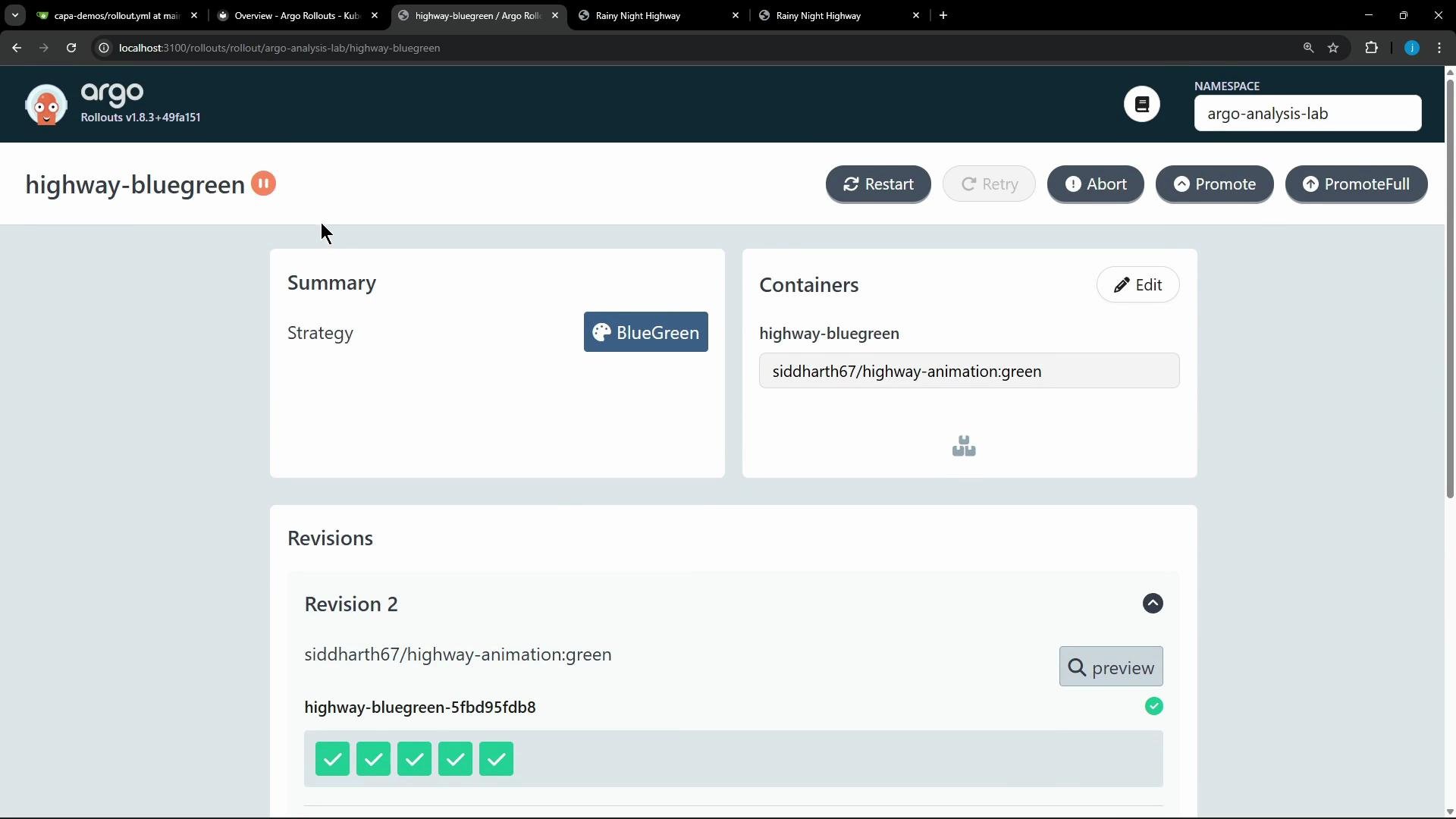 You can inspect the Rollout and see the paused state, the revisions (stable/active and preview), and the successful AnalysisRun:
```bash theme={null}
$ kubectl argo rollouts get rollout highway-bluegreen -n argo-analysis-lab
Name: highway-bluegreen
Namespace: argo-analysis-lab
Status: || Paused
Message: BlueGreenPause
Strategy: BlueGreen
Images: siddharth67/highway-animation:blue (stable, active)
siddharth67/highway-animation:green (preview)
Replicas:
Desired: 5
Current: 10
Updated: 5
Ready: 5
Available: 5
NAME KIND STATUS INFO
◎ highway-bluegreen Rollout || Paused 30m
├─ # revision:2
│ └─ highway-bluegreen-5fbd95fdb8 ReplicaSet ✓ Healthy preview
│ ├─ (5) Pods ✓ Running ready:1/1
│ └─ highway-bluegreen-5fbd95fdb8-2-pre AnalysisRun ✓ Successful
├─ # revision:1
│ └─ highway-bluegreen-f84596cdc ReplicaSet ✓ Healthy stable,active
│ ├─ (5) Pods ✓ Running ready:1/1
```
After reviewing the AnalysisRun results, an administrator can manually promote the preview to active (UI or `kubectl argo rollouts promote`). Promotion switches the active service to route production traffic to the new revision (green) only when the analysis has validated health.
This workflow enables progressive and safe promotion: only when an AnalysisRun passes do you promote the preview into production. Error handling (abort/rollback) is out of scope for this lesson but is supported by Argo Rollouts and should be part of production policies.
Blocking analyses (inline or pre-promotion) will pause rollouts until the AnalysisRun completes. Use background analysis when you want non-blocking monitoring, and use pre/post-promotion for stricter gates.
Summary table — Analysis placements and behavior
| Placement | Strategy | Blocks rollout? | Typical use case |
| -------------: | :--------: | :-------------: | -------------------------------------------------- |
| background | Canary | No | Continuous monitoring during phased traffic shifts |
| inline (step) | Canary | Yes | Gate a specific step until checks pass |
| delayed start | Canary | Depends on step | Start analysis at higher traffic percentages |
| pre-promotion | Blue-Green | Yes | Validate preview before switching active service |
| post-promotion | Blue-Green | Optional | Validate new active after promotion |
Useful links and references
* [Argo Rollouts documentation — AnalysisRun and AnalysisTemplate](https://argoproj.github.io/argo-rollouts/features/analysis/)
* [Argo Rollouts GitHub](https://github.com/argoproj/argo-rollouts)
Success condition used by the AnalysisTemplate:
```text theme={null}
result.code >= 200 && result.code < 300
```
You can inspect the Rollout and see the paused state, the revisions (stable/active and preview), and the successful AnalysisRun:
```bash theme={null}
$ kubectl argo rollouts get rollout highway-bluegreen -n argo-analysis-lab
Name: highway-bluegreen
Namespace: argo-analysis-lab
Status: || Paused
Message: BlueGreenPause
Strategy: BlueGreen
Images: siddharth67/highway-animation:blue (stable, active)
siddharth67/highway-animation:green (preview)
Replicas:
Desired: 5
Current: 10
Updated: 5
Ready: 5
Available: 5
NAME KIND STATUS INFO
◎ highway-bluegreen Rollout || Paused 30m
├─ # revision:2
│ └─ highway-bluegreen-5fbd95fdb8 ReplicaSet ✓ Healthy preview
│ ├─ (5) Pods ✓ Running ready:1/1
│ └─ highway-bluegreen-5fbd95fdb8-2-pre AnalysisRun ✓ Successful
├─ # revision:1
│ └─ highway-bluegreen-f84596cdc ReplicaSet ✓ Healthy stable,active
│ ├─ (5) Pods ✓ Running ready:1/1
```
After reviewing the AnalysisRun results, an administrator can manually promote the preview to active (UI or `kubectl argo rollouts promote`). Promotion switches the active service to route production traffic to the new revision (green) only when the analysis has validated health.
This workflow enables progressive and safe promotion: only when an AnalysisRun passes do you promote the preview into production. Error handling (abort/rollback) is out of scope for this lesson but is supported by Argo Rollouts and should be part of production policies.
Blocking analyses (inline or pre-promotion) will pause rollouts until the AnalysisRun completes. Use background analysis when you want non-blocking monitoring, and use pre/post-promotion for stricter gates.
Summary table — Analysis placements and behavior
| Placement | Strategy | Blocks rollout? | Typical use case |
| -------------: | :--------: | :-------------: | -------------------------------------------------- |
| background | Canary | No | Continuous monitoring during phased traffic shifts |
| inline (step) | Canary | Yes | Gate a specific step until checks pass |
| delayed start | Canary | Depends on step | Start analysis at higher traffic percentages |
| pre-promotion | Blue-Green | Yes | Validate preview before switching active service |
| post-promotion | Blue-Green | Optional | Validate new active after promotion |
Useful links and references
* [Argo Rollouts documentation — AnalysisRun and AnalysisTemplate](https://argoproj.github.io/argo-rollouts/features/analysis/)
* [Argo Rollouts GitHub](https://github.com/argoproj/argo-rollouts)
Success condition used by the AnalysisTemplate:
```text theme={null}
result.code >= 200 && result.code < 300
```