> ## Documentation Index
> Fetch the complete documentation index at: https://notes.kodekloud.com/llms.txt
> Use this file to discover all available pages before exploring further.
# Argo Workflow DAG
> Explains Argo Workflows DAGs, modeling task dependencies, enabling parallel fan in and fan out, using depends expressions, and failFast behavior for workflow control.
In this lesson we cover Argo Workflows DAGs — how they model complex task dependencies, enable parallelism, and control execution behavior.
What is a DAG (Directed Acyclic Graph)?
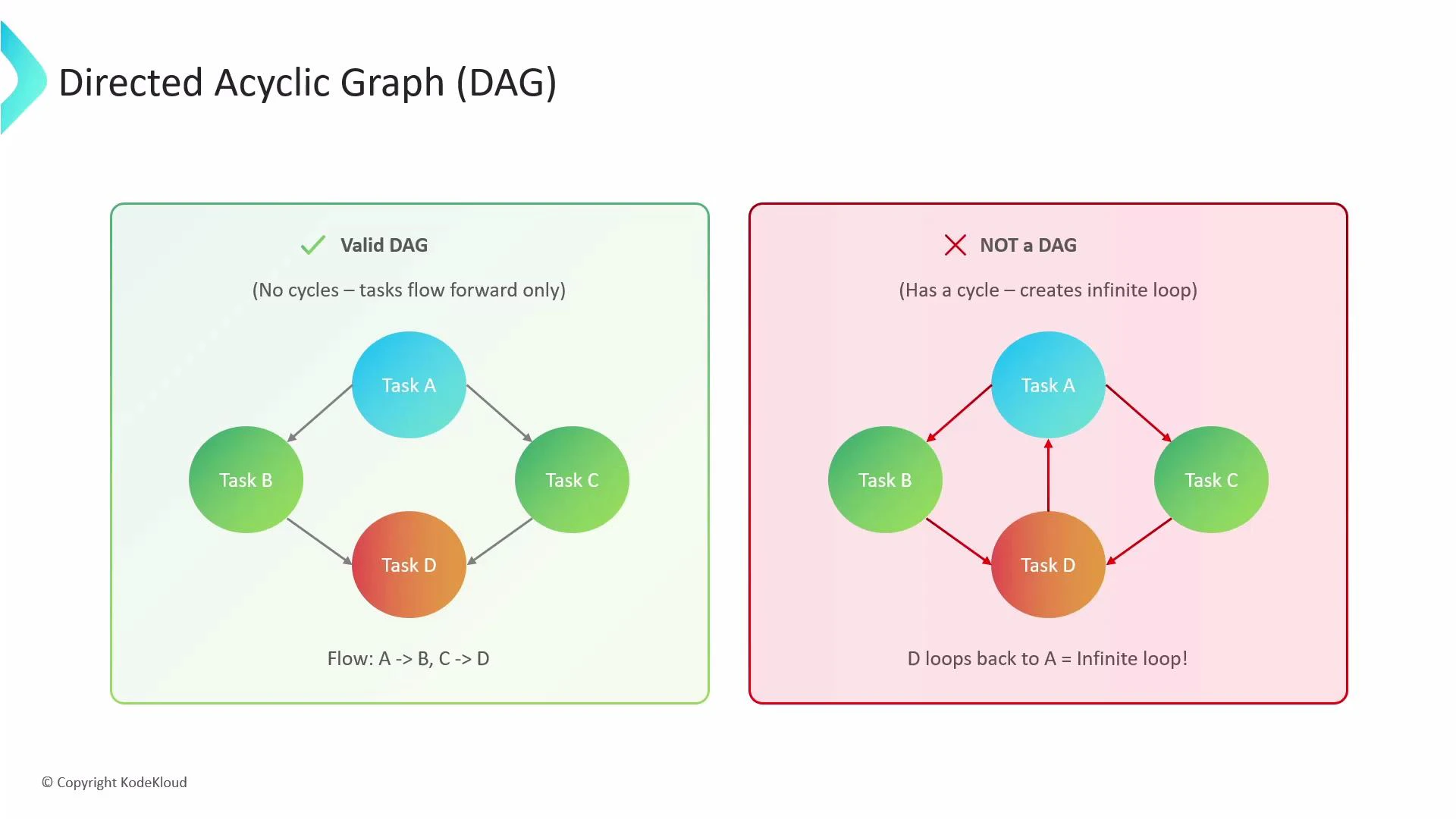
* Directed: dependencies flow in one direction.
* Acyclic: cycles are not allowed — a task cannot depend on another task that eventually depends back on the original (prevents infinite loops).
A DAG lets you express workflows as a graph of tasks and dependencies instead of a single linear sequence. This enables common orchestration patterns such as fan-out (one task triggers many) and fan-in (many tasks must complete before one runs).
 Why use DAGs in Argo Workflows?
* Make complex dependencies explicit and easy to read.
* Enable parallel execution of independent tasks, improving throughput.
* Prevent infinite loops by design.
* Allow more efficient scheduling and faster end-to-end completion by running independent tasks concurrently.
Quick reference: DAG properties and common use cases
| Feature | Use case | Example |
| --------------------- | ----------------------------------------- | ---------------------------------------------------- |
| Directed, Acyclic | Prevent cycles and model dependency flow | Data pipelines, ETL jobs |
| Parallelism / Fan-out | Run independent tasks concurrently | Parallel data transforms |
| Fan-in | Wait until multiple tasks finish | Aggregation or reduce step |
| failFast | Stop scheduling new tasks after a failure | Fail-fast CI pipelines |
| depends expression | Complex boolean dependency logic | Conditional task runs based on multiple predecessors |
Classic fan-out / fan-in example
In this pattern:
* Task A runs first.
* When A succeeds, tasks B and C run in parallel (fan-out).
* Task D runs only after both B and C finish successfully (fan-in).
Example Workflow:
```yaml theme={null}
apiVersion: argoproj.io/v1alpha1
kind: Workflow
metadata:
generateName: dag-fan-in-out-
spec:
entrypoint: main
templates:
- name: main
dag:
tasks:
- name: A
template: echo-message
arguments:
parameters:
- name: message
value: "Task A"
- name: B
template: echo-message
dependencies: ["A"]
arguments:
parameters:
- name: message
value: "Task B"
- name: C
template: echo-message
dependencies: ["A"]
arguments:
parameters:
- name: message
value: "Task C"
- name: D
template: echo-message
dependencies: ["B", "C"]
arguments:
parameters:
- name: message
value: "Task D"
- name: echo-message
inputs:
parameters:
- name: message
container:
image: busybox
command: ["sh", "-c", "echo {{inputs.parameters.message}}"]
```
Execution behavior:
* Task A starts first (no dependencies).
* After A completes, the controller starts B and C in parallel.
* Task D waits until both B and C have succeeded.
Enhanced dependency logic with boolean `depends` expressions
Argo supports a `depends` expression (string) that lets you specify boolean logic and check node outcomes such as Succeeded, Failed, Skipped, Error, Omitted, and Deemed. This is useful when you need conditional execution beyond simple "all predecessors succeeded".
Example using boolean `depends` expressions:
```yaml theme={null}
apiVersion: argoproj.io/v1alpha1
kind: Workflow
metadata:
generateName: dag-depends-expr-
spec:
entrypoint: main
templates:
- name: main
dag:
tasks:
- name: A
template: succeeds
- name: B
template: fails
- name: C-runs-if-either-succeeds
depends: "A.Succeeded || B.Succeeded"
template: echo-message
arguments:
parameters:
- name: message
value: "Task C ran!"
- name: D-runs-if-both-succeed
depends: "A.Succeeded && B.Succeeded"
template: echo-message
arguments:
parameters:
- name: message
value: "Task D ran!"
- name: succeeds
container:
image: busybox
command: ["sh", "-c", "echo 'I succeeded.'"]
- name: fails
container:
image: busybox
command: ["sh", "-c", "echo 'I failed.'; exit 1"]
- name: echo-message
inputs:
parameters:
- name: message
container:
image: busybox
command: ["sh", "-c", "echo {{inputs.parameters.message}}"]
```
How this evaluates:
* A and B run in parallel. If A succeeds and B fails:
* C (`A.Succeeded || B.Succeeded`) evaluates to true and runs.
* D (`A.Succeeded && B.Succeeded`) evaluates to false and is skipped.
Conversion: `dependencies` array -> `depends` expression
You cannot use `dependencies` (array) and `depends` (expression) on the same task. To convert an array-style dependency to a `depends` expression, join the nodes with the operator you need.
Example:
* Original (array-style):
```yaml theme={null}
- name: my-task
dependencies: ["A", "B", "C"]
template: do-something
```
* Equivalent `depends` expression (all must succeed):
```yaml theme={null}
- name: my-task
depends: "A.Succeeded && B.Succeeded && C.Succeeded"
template: do-something
```
You can replace `&&` with `||` or build more complex expressions with parentheses and NOT as needed.
The `depends` field is a string expression evaluated by the controller. It is mutually exclusive with the `dependencies` array — use one or the other.
Fail-fast behavior in DAGs
By default, DAGs stop scheduling any new tasks when a task fails — this is "fail-fast". Tasks already running continue to completion, but no new tasks that depend on failed nodes will start. The DAG will be marked as failed.
Control this behavior with the `failFast` flag on the DAG. Set `failFast: false` when you want independent branches to keep running even if another branch fails.
Example showing `failFast` (default behavior shown as true here):
```yaml theme={null}
apiVersion: argoproj.io/v1alpha1
kind: Workflow
metadata:
generateName: dag-fail-fast-
spec:
entrypoint: main
templates:
- name: main
dag:
# If one task fails, immediately stop scheduling new tasks in the DAG.
failFast: true
tasks:
- name: long-running-task
template: long-sleep
- name: immediate-failure
template: fails
- name: long-sleep
container:
image: busybox
command: ["sh", "-c", "echo 'Long sleep...'; sleep 300"]
- name: fails
container:
image: busybox
command: ["sh", "-c", "echo 'I am about to fail...'; exit 1"]
```
When to set failFast: false
* Use false for environments where long-running independent branches must complete (e.g., batch processing), and you prefer to gather results even if one branch fails.
Links and references
* Official Argo Workflows docs: [https://argoproj.github.io/argo-workflows/](https://argoproj.github.io/argo-workflows/)
* Argo Workflows DAG docs: [https://argoproj.github.io/argo-workflows/workflow-types/dag/](https://argoproj.github.io/argo-workflows/workflow-types/dag/)
* Kubernetes Concepts: [https://kubernetes.io/docs/concepts/overview/what-is-kubernetes/](https://kubernetes.io/docs/concepts/overview/what-is-kubernetes/)
Why use DAGs in Argo Workflows?
* Make complex dependencies explicit and easy to read.
* Enable parallel execution of independent tasks, improving throughput.
* Prevent infinite loops by design.
* Allow more efficient scheduling and faster end-to-end completion by running independent tasks concurrently.
Quick reference: DAG properties and common use cases
| Feature | Use case | Example |
| --------------------- | ----------------------------------------- | ---------------------------------------------------- |
| Directed, Acyclic | Prevent cycles and model dependency flow | Data pipelines, ETL jobs |
| Parallelism / Fan-out | Run independent tasks concurrently | Parallel data transforms |
| Fan-in | Wait until multiple tasks finish | Aggregation or reduce step |
| failFast | Stop scheduling new tasks after a failure | Fail-fast CI pipelines |
| depends expression | Complex boolean dependency logic | Conditional task runs based on multiple predecessors |
Classic fan-out / fan-in example
In this pattern:
* Task A runs first.
* When A succeeds, tasks B and C run in parallel (fan-out).
* Task D runs only after both B and C finish successfully (fan-in).
Example Workflow:
```yaml theme={null}
apiVersion: argoproj.io/v1alpha1
kind: Workflow
metadata:
generateName: dag-fan-in-out-
spec:
entrypoint: main
templates:
- name: main
dag:
tasks:
- name: A
template: echo-message
arguments:
parameters:
- name: message
value: "Task A"
- name: B
template: echo-message
dependencies: ["A"]
arguments:
parameters:
- name: message
value: "Task B"
- name: C
template: echo-message
dependencies: ["A"]
arguments:
parameters:
- name: message
value: "Task C"
- name: D
template: echo-message
dependencies: ["B", "C"]
arguments:
parameters:
- name: message
value: "Task D"
- name: echo-message
inputs:
parameters:
- name: message
container:
image: busybox
command: ["sh", "-c", "echo {{inputs.parameters.message}}"]
```
Execution behavior:
* Task A starts first (no dependencies).
* After A completes, the controller starts B and C in parallel.
* Task D waits until both B and C have succeeded.
Enhanced dependency logic with boolean `depends` expressions
Argo supports a `depends` expression (string) that lets you specify boolean logic and check node outcomes such as Succeeded, Failed, Skipped, Error, Omitted, and Deemed. This is useful when you need conditional execution beyond simple "all predecessors succeeded".
Example using boolean `depends` expressions:
```yaml theme={null}
apiVersion: argoproj.io/v1alpha1
kind: Workflow
metadata:
generateName: dag-depends-expr-
spec:
entrypoint: main
templates:
- name: main
dag:
tasks:
- name: A
template: succeeds
- name: B
template: fails
- name: C-runs-if-either-succeeds
depends: "A.Succeeded || B.Succeeded"
template: echo-message
arguments:
parameters:
- name: message
value: "Task C ran!"
- name: D-runs-if-both-succeed
depends: "A.Succeeded && B.Succeeded"
template: echo-message
arguments:
parameters:
- name: message
value: "Task D ran!"
- name: succeeds
container:
image: busybox
command: ["sh", "-c", "echo 'I succeeded.'"]
- name: fails
container:
image: busybox
command: ["sh", "-c", "echo 'I failed.'; exit 1"]
- name: echo-message
inputs:
parameters:
- name: message
container:
image: busybox
command: ["sh", "-c", "echo {{inputs.parameters.message}}"]
```
How this evaluates:
* A and B run in parallel. If A succeeds and B fails:
* C (`A.Succeeded || B.Succeeded`) evaluates to true and runs.
* D (`A.Succeeded && B.Succeeded`) evaluates to false and is skipped.
Conversion: `dependencies` array -> `depends` expression
You cannot use `dependencies` (array) and `depends` (expression) on the same task. To convert an array-style dependency to a `depends` expression, join the nodes with the operator you need.
Example:
* Original (array-style):
```yaml theme={null}
- name: my-task
dependencies: ["A", "B", "C"]
template: do-something
```
* Equivalent `depends` expression (all must succeed):
```yaml theme={null}
- name: my-task
depends: "A.Succeeded && B.Succeeded && C.Succeeded"
template: do-something
```
You can replace `&&` with `||` or build more complex expressions with parentheses and NOT as needed.
The `depends` field is a string expression evaluated by the controller. It is mutually exclusive with the `dependencies` array — use one or the other.
Fail-fast behavior in DAGs
By default, DAGs stop scheduling any new tasks when a task fails — this is "fail-fast". Tasks already running continue to completion, but no new tasks that depend on failed nodes will start. The DAG will be marked as failed.
Control this behavior with the `failFast` flag on the DAG. Set `failFast: false` when you want independent branches to keep running even if another branch fails.
Example showing `failFast` (default behavior shown as true here):
```yaml theme={null}
apiVersion: argoproj.io/v1alpha1
kind: Workflow
metadata:
generateName: dag-fail-fast-
spec:
entrypoint: main
templates:
- name: main
dag:
# If one task fails, immediately stop scheduling new tasks in the DAG.
failFast: true
tasks:
- name: long-running-task
template: long-sleep
- name: immediate-failure
template: fails
- name: long-sleep
container:
image: busybox
command: ["sh", "-c", "echo 'Long sleep...'; sleep 300"]
- name: fails
container:
image: busybox
command: ["sh", "-c", "echo 'I am about to fail...'; exit 1"]
```
When to set failFast: false
* Use false for environments where long-running independent branches must complete (e.g., batch processing), and you prefer to gather results even if one branch fails.
Links and references
* Official Argo Workflows docs: [https://argoproj.github.io/argo-workflows/](https://argoproj.github.io/argo-workflows/)
* Argo Workflows DAG docs: [https://argoproj.github.io/argo-workflows/workflow-types/dag/](https://argoproj.github.io/argo-workflows/workflow-types/dag/)
* Kubernetes Concepts: [https://kubernetes.io/docs/concepts/overview/what-is-kubernetes/](https://kubernetes.io/docs/concepts/overview/what-is-kubernetes/)