> ## Documentation Index
> Fetch the complete documentation index at: https://notes.kodekloud.com/llms.txt
> Use this file to discover all available pages before exploring further.
# Argo Workflow Data Processing
> Explains building scalable containerized data processing pipelines with Argo Workflows on Kubernetes, covering parallel fan-out, dependency management, retries, resource control, and best practices.
In this lesson, we explore how Argo Workflows enables scalable, container-based data processing pipelines on Kubernetes.
Argo Workflows lets you define complex, fault-tolerant pipelines where each step runs as a container. This makes it easy to mix tools and languages — for example, using Bash for downloads, Python/pandas for transformations, and Spark for heavy compute — and orchestrate them as a single reproducible workflow.
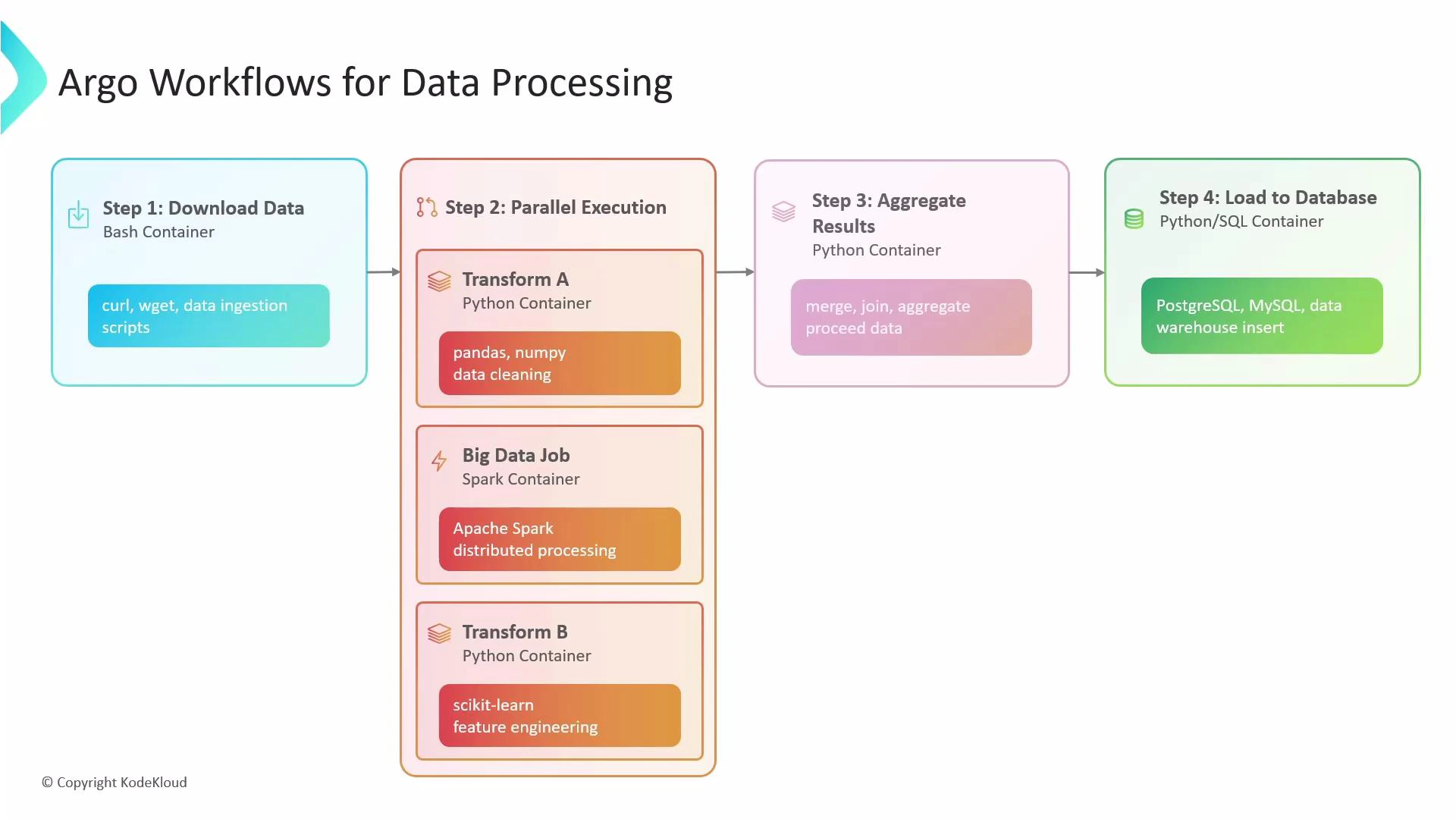
A typical Argo data pipeline may:
* Ingest data (e.g., curl/wget in a small container).
* Fan out to multiple transformers in parallel (Python for cleaning, Spark for heavy processing, Python for feature engineering).
* Merge parallel outputs into one dataset.
* Aggregate results and load into a SQL database (PostgreSQL/MySQL).
This single workflow can download data, run parallel processing, aggregate the outputs, and load results into a database — all orchestrated by Argo Workflows.
 ## What Argo does behind the scenes
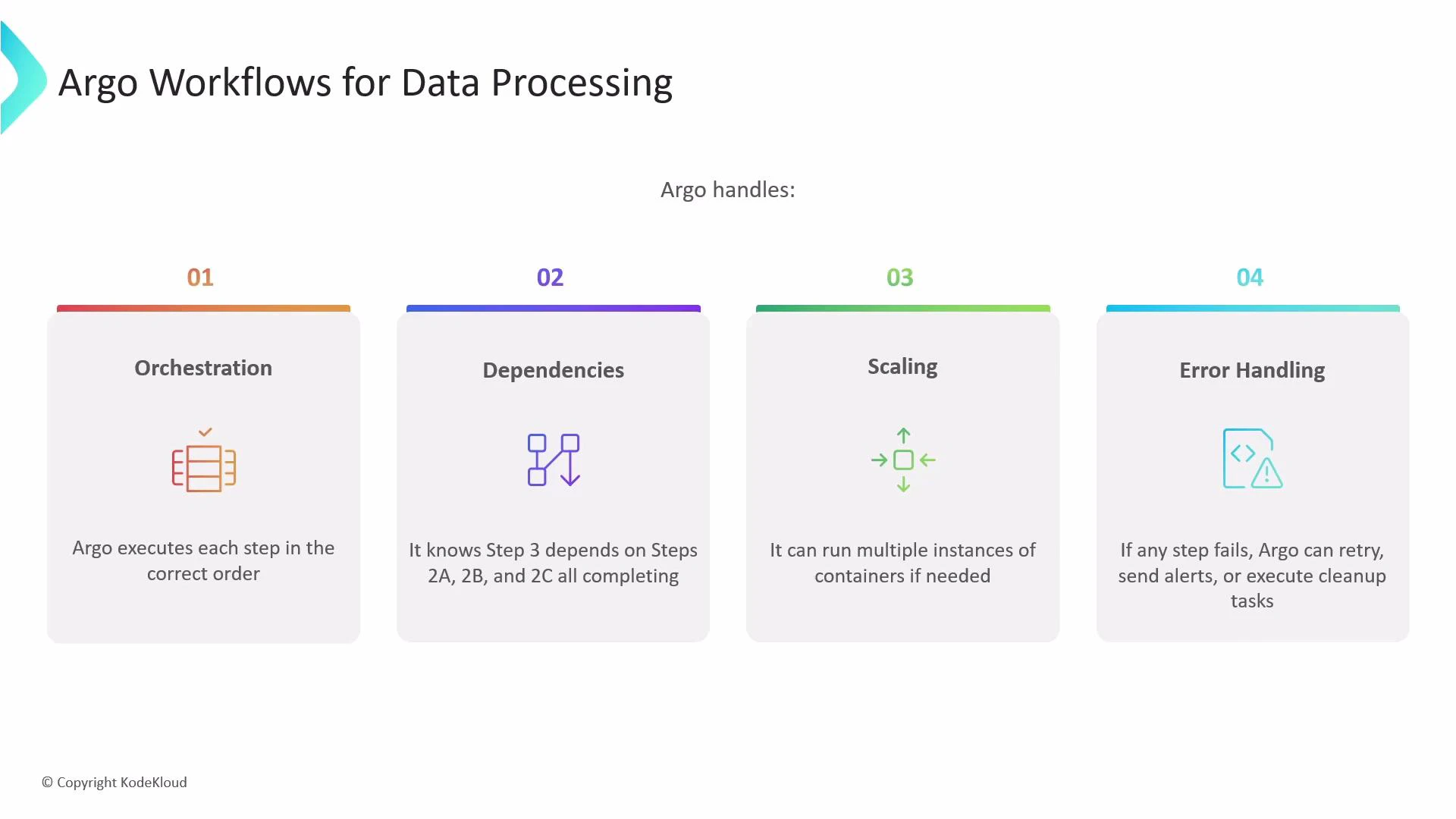
Argo Workflows orchestrates execution of containerized tasks according to your workflow definition. It:
* Executes tasks in the order you define.
* Tracks and enforces dependencies (e.g., a merge step waits for all transformers).
* Scales by running multiple container instances in parallel.
* Handles failures with retries, alerts, and cleanup options.
## What Argo does behind the scenes
Argo Workflows orchestrates execution of containerized tasks according to your workflow definition. It:
* Executes tasks in the order you define.
* Tracks and enforces dependencies (e.g., a merge step waits for all transformers).
* Scales by running multiple container instances in parallel.
* Handles failures with retries, alerts, and cleanup options.
 Because every step is a container, you are not locked into any single runtime: Python, Spark, Bash, and other tools can be combined seamlessly in one workflow.
Note: Argo Workflows is the Argo project focused on running containerized workflows. Argo CD is a separate Argo project that provides GitOps for Kubernetes deployments (see [GitOps with ArgoCD](https://learn.kodekloud.com/user/courses/gitops-with-argocd)). This article focuses on Argo Workflows for pipeline orchestration.
## Key features at a glance
| Feature | Use case | Example |
| -------------- | ----------------------------------------- | -------------------------------- |
| Orchestration | Execute container steps in order | Download → Transform → Aggregate |
| Dependencies | Ensure merge waits for all parallel tasks | Step waits on 2a, 2b, 2c |
| Scaling | Run many container instances concurrently | Fan-out file processing |
| Error handling | Retries, backoff, cleanup hooks | Retry failed step 3 times |
## withItems: parallel fan-out for batch processing
withItems lets you fan out over a static list (file names, table names, endpoints) and run multiple instances of a template — effectively a for-each loop that executes in parallel by default.
How it works: given items A, B, and C, Argo creates three independent instances of the referenced template (three pods). Each instance receives its item value via the {{item}} placeholder.
Example: process multiple files in parallel
This workflow demonstrates a top-level template that fans out over S3 file paths and invokes a processing template for each item.
```yaml theme={null}
apiVersion: argoproj.io/v1alpha1
kind: Workflow
metadata:
generateName: process-files-
spec:
entrypoint: process-all-files
templates:
- name: process-all-files
withItems:
- "s3://my-bucket/raw/data-file-A.csv"
- "s3://my-bucket/raw/data-file-B.csv"
- "s3://my-bucket/raw/data-file-C.csv"
template: process-file
- name: process-file
container:
image: my-data-processing-image:v1.0
command: ["python", "/app/process.py", "--input-file", "{{item}}"]
```
Tips:
* Use {{item}} inside the referenced template to access the value.
* Each withItems iteration starts a separate pod (unless limited by parallelism).
Example: a playful "cosmic" loop using cowsay
This example demonstrates withItems with a steps template. Argo will start a pod for each list item, substituting {{item}} accordingly.
```yaml theme={null}
apiVersion: argoproj.io/v1alpha1
kind: Workflow
metadata:
generateName: cosmic-moo-loop-
spec:
entrypoint: moo-madness
templates:
- name: moo-madness
steps:
- - name: cosmic-cow
template: moo-wisdom
withItems:
- "Galaxy"
- "Universe"
- "Cosmos"
- "Nebula"
- "Orbit"
- name: moo-wisdom
container:
image: rancher/cowsay
command: ["sh", "-c"]
args:
- "cowsay 'Greetings from the {{item}} System!' && sleep 8"
```
The parent step is considered complete only after all parallel pods finish successfully.
## Controlling concurrency with parallelism
Uncontrolled parallelism can overload cluster resources or downstream systems (databases, APIs). Use the workflow-level spec.parallelism field to throttle how many tasks run concurrently across the entire workflow.
Example: limit the cosmic loop to 2 concurrent pods
```yaml theme={null}
apiVersion: argoproj.io/v1alpha1
kind: Workflow
metadata:
generateName: cosmic-moo-loop-
spec:
entrypoint: moo-madness
parallelism: 2
templates:
- name: moo-madness
steps:
- - name: cosmic-cow
template: moo-wisdom
withItems:
- "Galaxy"
- "Universe"
- "Cosmos"
- "Nebula"
- "Orbit"
- name: moo-wisdom
container:
image: rancher/cowsay
command: ["sh", "-c"]
args:
- "cowsay 'Greetings from the {{item}} System!' && sleep 8"
```
This throttling ensures only two loop iterations are active at any time while the rest queue. Adjust parallelism to match your cluster capacity and downstream rate limits.
Warning: Setting parallelism too high can exhaust node CPU/memory or overwhelm downstream services. Use resource requests/limits on containers and test with smaller parallelism before scaling up.
## Best practices for data processing pipelines
* Use small, focused containers for each step (single responsibility).
* Define resource requests and limits for heavy workloads (Spark, large Python jobs).
* Use artifact storage (S3/GCS) or persistent volumes to pass large data between steps instead of base64-encoded outputs.
* Use retry/backoff strategies and timeouts for unreliable external systems.
* Monitor and log at each step; consider sidecar log aggregators or central observability.
## References and further reading
* [Argo Workflows Documentation](https://argoproj.github.io/argo-workflows/)
* [Kubernetes Concepts](https://kubernetes.io/docs/concepts/)
* [Docker Hub](https://hub.docker.com/)
* [Terraform Registry](https://registry.terraform.io/)
For GitOps workflows and Kubernetes app delivery, see [GitOps with ArgoCD](https://learn.kodekloud.com/user/courses/gitops-with-argocd).
Because every step is a container, you are not locked into any single runtime: Python, Spark, Bash, and other tools can be combined seamlessly in one workflow.
Note: Argo Workflows is the Argo project focused on running containerized workflows. Argo CD is a separate Argo project that provides GitOps for Kubernetes deployments (see [GitOps with ArgoCD](https://learn.kodekloud.com/user/courses/gitops-with-argocd)). This article focuses on Argo Workflows for pipeline orchestration.
## Key features at a glance
| Feature | Use case | Example |
| -------------- | ----------------------------------------- | -------------------------------- |
| Orchestration | Execute container steps in order | Download → Transform → Aggregate |
| Dependencies | Ensure merge waits for all parallel tasks | Step waits on 2a, 2b, 2c |
| Scaling | Run many container instances concurrently | Fan-out file processing |
| Error handling | Retries, backoff, cleanup hooks | Retry failed step 3 times |
## withItems: parallel fan-out for batch processing
withItems lets you fan out over a static list (file names, table names, endpoints) and run multiple instances of a template — effectively a for-each loop that executes in parallel by default.
How it works: given items A, B, and C, Argo creates three independent instances of the referenced template (three pods). Each instance receives its item value via the {{item}} placeholder.
Example: process multiple files in parallel
This workflow demonstrates a top-level template that fans out over S3 file paths and invokes a processing template for each item.
```yaml theme={null}
apiVersion: argoproj.io/v1alpha1
kind: Workflow
metadata:
generateName: process-files-
spec:
entrypoint: process-all-files
templates:
- name: process-all-files
withItems:
- "s3://my-bucket/raw/data-file-A.csv"
- "s3://my-bucket/raw/data-file-B.csv"
- "s3://my-bucket/raw/data-file-C.csv"
template: process-file
- name: process-file
container:
image: my-data-processing-image:v1.0
command: ["python", "/app/process.py", "--input-file", "{{item}}"]
```
Tips:
* Use {{item}} inside the referenced template to access the value.
* Each withItems iteration starts a separate pod (unless limited by parallelism).
Example: a playful "cosmic" loop using cowsay
This example demonstrates withItems with a steps template. Argo will start a pod for each list item, substituting {{item}} accordingly.
```yaml theme={null}
apiVersion: argoproj.io/v1alpha1
kind: Workflow
metadata:
generateName: cosmic-moo-loop-
spec:
entrypoint: moo-madness
templates:
- name: moo-madness
steps:
- - name: cosmic-cow
template: moo-wisdom
withItems:
- "Galaxy"
- "Universe"
- "Cosmos"
- "Nebula"
- "Orbit"
- name: moo-wisdom
container:
image: rancher/cowsay
command: ["sh", "-c"]
args:
- "cowsay 'Greetings from the {{item}} System!' && sleep 8"
```
The parent step is considered complete only after all parallel pods finish successfully.
## Controlling concurrency with parallelism
Uncontrolled parallelism can overload cluster resources or downstream systems (databases, APIs). Use the workflow-level spec.parallelism field to throttle how many tasks run concurrently across the entire workflow.
Example: limit the cosmic loop to 2 concurrent pods
```yaml theme={null}
apiVersion: argoproj.io/v1alpha1
kind: Workflow
metadata:
generateName: cosmic-moo-loop-
spec:
entrypoint: moo-madness
parallelism: 2
templates:
- name: moo-madness
steps:
- - name: cosmic-cow
template: moo-wisdom
withItems:
- "Galaxy"
- "Universe"
- "Cosmos"
- "Nebula"
- "Orbit"
- name: moo-wisdom
container:
image: rancher/cowsay
command: ["sh", "-c"]
args:
- "cowsay 'Greetings from the {{item}} System!' && sleep 8"
```
This throttling ensures only two loop iterations are active at any time while the rest queue. Adjust parallelism to match your cluster capacity and downstream rate limits.
Warning: Setting parallelism too high can exhaust node CPU/memory or overwhelm downstream services. Use resource requests/limits on containers and test with smaller parallelism before scaling up.
## Best practices for data processing pipelines
* Use small, focused containers for each step (single responsibility).
* Define resource requests and limits for heavy workloads (Spark, large Python jobs).
* Use artifact storage (S3/GCS) or persistent volumes to pass large data between steps instead of base64-encoded outputs.
* Use retry/backoff strategies and timeouts for unreliable external systems.
* Monitor and log at each step; consider sidecar log aggregators or central observability.
## References and further reading
* [Argo Workflows Documentation](https://argoproj.github.io/argo-workflows/)
* [Kubernetes Concepts](https://kubernetes.io/docs/concepts/)
* [Docker Hub](https://hub.docker.com/)
* [Terraform Registry](https://registry.terraform.io/)
For GitOps workflows and Kubernetes app delivery, see [GitOps with ArgoCD](https://learn.kodekloud.com/user/courses/gitops-with-argocd).