> ## Documentation Index
> Fetch the complete documentation index at: https://notes.kodekloud.com/llms.txt
> Use this file to discover all available pages before exploring further.
# ArgoWorkflow Template Definitions Types
> Overview of Argo Workflows template types, explaining definitions and invokers like container, script, resource, HTTP, plugin, steps, and DAG
In this lesson/article we will learn about template types in Argo Workflows.
Templates can be thought of like functions: they define the instructions to execute. The spec of a workflow includes an entrypoint field that specifies the "main" template — the template executed first.
There are nine template types in total, split into two categories: template definitions and template invokers. Below is a brief overview of each.
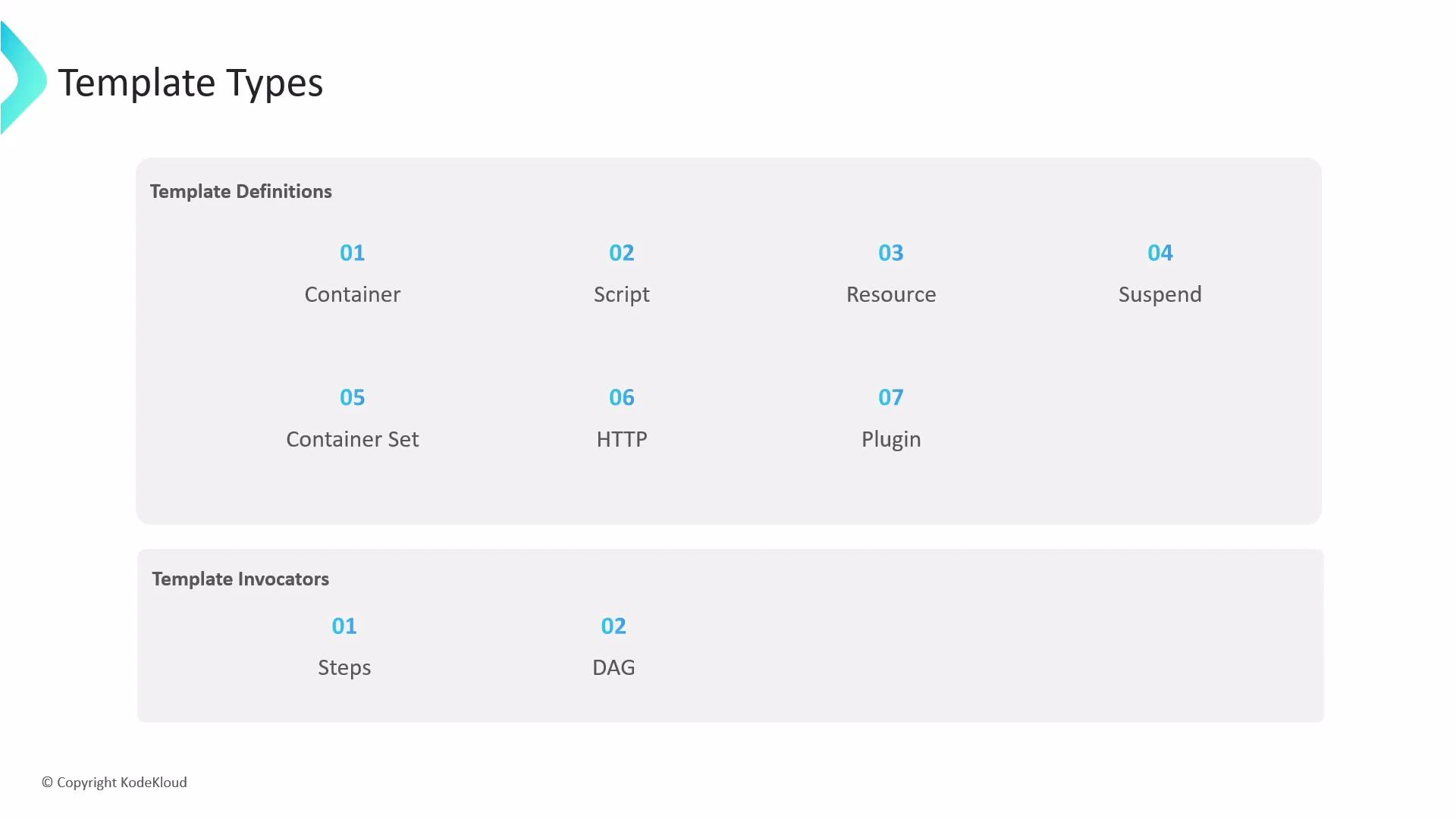 Container template (definition)
* The container template is the most common template type. It schedules a Kubernetes container and its spec follows the same container fields as a Kubernetes Pod container (image, command, args, env, resources, volume mounts, etc.). Use it whenever you want to run a container image directly.
Script template (definition)
* The script template is a convenience wrapper around a container. It provides the same container fields (image, command) and adds a source field where you can embed a script directly. Argo writes the source into a file inside the container and executes it using the provided command.
When using a script template, make sure the command you provide runs the interpreter (for example, `python`) and that the image includes that interpreter. The script content is placed into a file and executed inside the container.
Example script template:
```yaml theme={null}
apiVersion: argoproj.io/v1alpha1
kind: Workflow
metadata:
generateName: random-number-
spec:
entrypoint: random-number
templates:
- name: random-number
script:
image: python:3.6-alpine
command: [python]
source: |
import random
i = random.randint(100, 2000)
print(i)
```
Resource template (definition)
* Use resource templates to create, apply, delete, or patch Kubernetes resources from within an Argo workflow. The manifest to manage is provided inline in the manifest field.
Example that creates a ConfigMap:
```yaml theme={null}
apiVersion: argoproj.io/v1alpha1
kind: Workflow
metadata:
generateName: k8s-resource-
spec:
entrypoint: k8s-resource
templates:
- name: k8s-resource
resource:
action: create
manifest: |
apiVersion: v1
kind: ConfigMap
metadata:
generateName: dev-env-
data:
key: value
```
Suspend template (definition)
* A suspend template pauses workflow execution. You can suspend for a duration (using the duration field) or indefinitely until a manual resume. Resuming can be done via the CLI, the API, or the UI.
Example suspend template and resume command:
```yaml theme={null}
apiVersion: argoproj.io/v1alpha1
kind: Workflow
metadata:
generateName: delay-
spec:
entrypoint: delay
templates:
- name: delay
suspend:
duration: "20s"
```
CLI resume (example):
```bash theme={null}
argo -n argo resume delay-xyzb
```
ContainerSet template (definition)
* The containerSet template runs multiple containers in the same pod (useful when you want sidecars or co-located containers that share volumes and localhost networking). The field is containerSet and contains an array of containers.
Example:
```yaml theme={null}
apiVersion: argoproj.io/v1alpha1
kind: Workflow
metadata:
generateName: container-set-template-
spec:
entrypoint: main
templates:
- name: main
containerSet:
containers:
- name: a
image: rancher/cowsay
command: [cowsay]
args: ["Container A!!!!"]
- name: b
image: rancher/cowsay
command: [cowsay]
args: ["Container B!!!!"]
```
HTTP template (definition)
* An HTTP template performs HTTP(S) requests. The response body is automatically exported into the template's result output parameter. You can specify the URL, method (defaults to GET), headers, and body.
Example:
```yaml theme={null}
apiVersion: argoproj.io/v1alpha1
kind: Workflow
metadata:
generateName: http-template-example-
spec:
entrypoint: fetch-todo-item
templates:
- name: fetch-todo-item
http:
url: "https://x.y.com/todos/1"
method: "GET"
headers:
- name: "Content-Type"
value: "application/json"
```
Plugin template (definition)
* Plugin templates let Argo workflows use executor plugins, extending behavior without modifying Argo core. Built-in and third-party plugins are supported. In the example below, the ArgoCD plugin is used to trigger a sync of applications, so no container is executed; Argo connects to an ArgoCD server and performs the action.
Example using the ArgoCD plugin:
```yaml theme={null}
apiVersion: argoproj.io/v1alpha1
kind: Workflow
metadata:
generateName: argocd-example-
spec:
entrypoint: main
templates:
- name: main
plugin:
argocd:
serverUrl: https://my-argocd.com/
actions:
- sync:
project: highway-animation
apps:
- highway-animation
- health-check-app
```
Template invokers
* Steps and DAG templates are the two invoker types. They don't execute work themselves but define how other templates (definitions) are invoked and composed into a workflow. Use Steps for sequential/parallel step-based flows and DAG for dependency-based execution graphs.
With these template types you can express a wide variety of orchestration patterns — from simple container tasks to complex multi-resource automation and integrations with other systems.
Container template (definition)
* The container template is the most common template type. It schedules a Kubernetes container and its spec follows the same container fields as a Kubernetes Pod container (image, command, args, env, resources, volume mounts, etc.). Use it whenever you want to run a container image directly.
Script template (definition)
* The script template is a convenience wrapper around a container. It provides the same container fields (image, command) and adds a source field where you can embed a script directly. Argo writes the source into a file inside the container and executes it using the provided command.
When using a script template, make sure the command you provide runs the interpreter (for example, `python`) and that the image includes that interpreter. The script content is placed into a file and executed inside the container.
Example script template:
```yaml theme={null}
apiVersion: argoproj.io/v1alpha1
kind: Workflow
metadata:
generateName: random-number-
spec:
entrypoint: random-number
templates:
- name: random-number
script:
image: python:3.6-alpine
command: [python]
source: |
import random
i = random.randint(100, 2000)
print(i)
```
Resource template (definition)
* Use resource templates to create, apply, delete, or patch Kubernetes resources from within an Argo workflow. The manifest to manage is provided inline in the manifest field.
Example that creates a ConfigMap:
```yaml theme={null}
apiVersion: argoproj.io/v1alpha1
kind: Workflow
metadata:
generateName: k8s-resource-
spec:
entrypoint: k8s-resource
templates:
- name: k8s-resource
resource:
action: create
manifest: |
apiVersion: v1
kind: ConfigMap
metadata:
generateName: dev-env-
data:
key: value
```
Suspend template (definition)
* A suspend template pauses workflow execution. You can suspend for a duration (using the duration field) or indefinitely until a manual resume. Resuming can be done via the CLI, the API, or the UI.
Example suspend template and resume command:
```yaml theme={null}
apiVersion: argoproj.io/v1alpha1
kind: Workflow
metadata:
generateName: delay-
spec:
entrypoint: delay
templates:
- name: delay
suspend:
duration: "20s"
```
CLI resume (example):
```bash theme={null}
argo -n argo resume delay-xyzb
```
ContainerSet template (definition)
* The containerSet template runs multiple containers in the same pod (useful when you want sidecars or co-located containers that share volumes and localhost networking). The field is containerSet and contains an array of containers.
Example:
```yaml theme={null}
apiVersion: argoproj.io/v1alpha1
kind: Workflow
metadata:
generateName: container-set-template-
spec:
entrypoint: main
templates:
- name: main
containerSet:
containers:
- name: a
image: rancher/cowsay
command: [cowsay]
args: ["Container A!!!!"]
- name: b
image: rancher/cowsay
command: [cowsay]
args: ["Container B!!!!"]
```
HTTP template (definition)
* An HTTP template performs HTTP(S) requests. The response body is automatically exported into the template's result output parameter. You can specify the URL, method (defaults to GET), headers, and body.
Example:
```yaml theme={null}
apiVersion: argoproj.io/v1alpha1
kind: Workflow
metadata:
generateName: http-template-example-
spec:
entrypoint: fetch-todo-item
templates:
- name: fetch-todo-item
http:
url: "https://x.y.com/todos/1"
method: "GET"
headers:
- name: "Content-Type"
value: "application/json"
```
Plugin template (definition)
* Plugin templates let Argo workflows use executor plugins, extending behavior without modifying Argo core. Built-in and third-party plugins are supported. In the example below, the ArgoCD plugin is used to trigger a sync of applications, so no container is executed; Argo connects to an ArgoCD server and performs the action.
Example using the ArgoCD plugin:
```yaml theme={null}
apiVersion: argoproj.io/v1alpha1
kind: Workflow
metadata:
generateName: argocd-example-
spec:
entrypoint: main
templates:
- name: main
plugin:
argocd:
serverUrl: https://my-argocd.com/
actions:
- sync:
project: highway-animation
apps:
- highway-animation
- health-check-app
```
Template invokers
* Steps and DAG templates are the two invoker types. They don't execute work themselves but define how other templates (definitions) are invoked and composed into a workflow. Use Steps for sequential/parallel step-based flows and DAG for dependency-based execution graphs.
With these template types you can express a wide variety of orchestration patterns — from simple container tasks to complex multi-resource automation and integrations with other systems.