> ## Documentation Index
> Fetch the complete documentation index at: https://notes.kodekloud.com/llms.txt
> Use this file to discover all available pages before exploring further.
# Demo Daemoned
> Describes running daemon containers in Argo Workflows to provide short‑lived background services like Redis for other steps, with automatic lifecycle management and cleanup.
This article describes how to run background (daemon) containers in Argo Workflows and why you might choose them. Daemon containers allow a workflow to start a container that continues running in the background while subsequent steps execute. This pattern is useful for bringing up short-lived supporting services—such as databases, caches, or test fixtures—that other steps use during the workflow run. Argo automatically terminates daemon containers when the workflow exits the scope (for example, when the workflow completes or is terminated).
Here is a minimal example that launches a background Redis instance used by a test step:
```yaml theme={null}
apiVersion: argoproj.io/v1alpha1
kind: Workflow
metadata:
name: daemon-workflow
namespace: argo
spec:
entrypoint: main
templates:
- name: main
steps:
- - name: start-database
template: mock-database
- name: run-tests
template: test-step
- name: mock-database
daemon: true # This keeps the container running in the background
container:
image: redis:alpine
command: [redis-server]
readinessProbe:
tcpSocket:
port: 6379
initialDelaySeconds: 5
periodSeconds: 5
- name: test-step
container:
image: alpine
command: [sh, -c]
args: ["echo 'Testing against database...'; sleep 60"]
```
How it works
* templates.main: defines two parallel steps: `start-database` (launches the daemon) and `run-tests` (executes the tests).
* templates.mock-database: sets `daemon: true`. Argo starts this container and does not wait for it to finish—so the container runs in the background for the workflow’s lifetime. The `readinessProbe` lets other steps know when Redis is accepting connections.
* templates.test-step: an example step that prints a message and sleeps for 60 seconds. While this step runs, the Redis daemon remains available so tests can connect to it.
Daemon containers are intended for short-lived supporting services used only during a workflow run. Use `daemon: true` for ephemeral helpers; for long-lived or production-facing services, use Kubernetes Deployments or StatefulSets instead.
Observing the daemon lifecycle
* While the workflow is running, you will see a pod for the mock-database in the Running state.
* When the workflow completes (or is terminated), Argo transitions the daemon pod to Completed and cleans it up automatically.
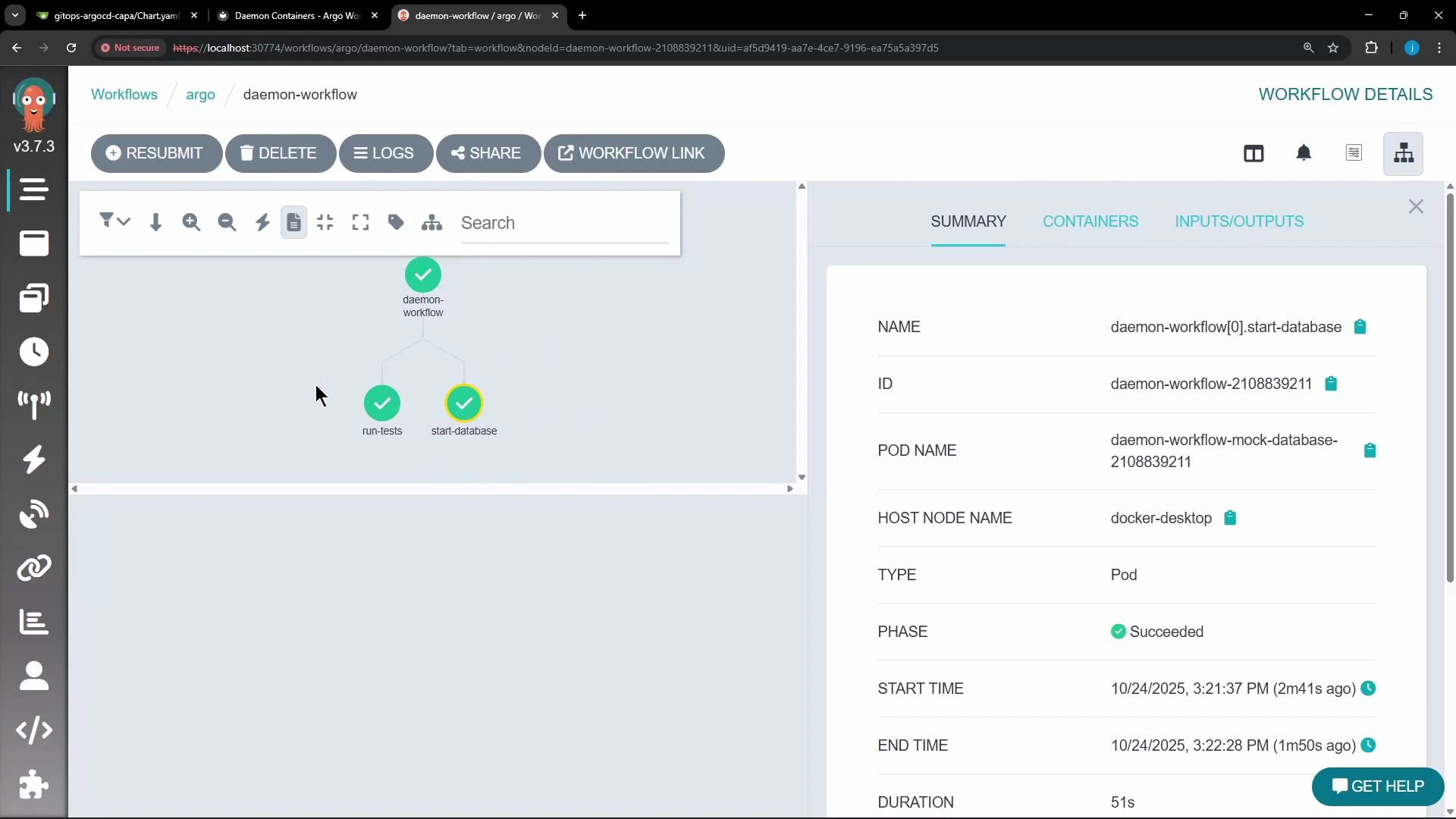 For troubleshooting or verification, run kubectl in the workflow namespace (for example, `argo`):
```bash theme={null}
kubectl get pods -n argo
```
You should observe the database pod marked Running while the workflow steps are executing, and then Completed after the workflow finishes. Using `daemon: true` ensures a specific container remains available to other steps for the workflow's lifetime.
| Resource Type | When to use | Example pattern |
| --------------------------------- | ------------------------------------------------------------------------------------------------- | --------------------------------------------------------- |
| Daemon container (`daemon: true`) | Short-lived support services scoped to a workflow run (tests, ephemeral caches) | Background Redis for an integration test |
| Sidecar container | Per-pod companion processes that must share lifecycle with the primary container | Logging agent or proxy alongside an application container |
| Deployment/StatefulSet | Long-running, production services that require scaling, persistence, or stable network identities | Production Redis cluster or database |
Additional resources and references
* Argo Workflows documentation: [https://argoproj.github.io/argo-workflows/](https://argoproj.github.io/argo-workflows/)
* Redis: [https://redis.io/](https://redis.io/)
* kubectl CLI reference: [https://kubernetes.io/docs/reference/kubectl/overview/](https://kubernetes.io/docs/reference/kubectl/overview/)
Do not rely on daemon containers for production services or long-lived state. Daemon containers are cleaned up when the workflow exits; for persistent, scalable services use Kubernetes Deployments, StatefulSets, or external managed services.
For troubleshooting or verification, run kubectl in the workflow namespace (for example, `argo`):
```bash theme={null}
kubectl get pods -n argo
```
You should observe the database pod marked Running while the workflow steps are executing, and then Completed after the workflow finishes. Using `daemon: true` ensures a specific container remains available to other steps for the workflow's lifetime.
| Resource Type | When to use | Example pattern |
| --------------------------------- | ------------------------------------------------------------------------------------------------- | --------------------------------------------------------- |
| Daemon container (`daemon: true`) | Short-lived support services scoped to a workflow run (tests, ephemeral caches) | Background Redis for an integration test |
| Sidecar container | Per-pod companion processes that must share lifecycle with the primary container | Logging agent or proxy alongside an application container |
| Deployment/StatefulSet | Long-running, production services that require scaling, persistence, or stable network identities | Production Redis cluster or database |
Additional resources and references
* Argo Workflows documentation: [https://argoproj.github.io/argo-workflows/](https://argoproj.github.io/argo-workflows/)
* Redis: [https://redis.io/](https://redis.io/)
* kubectl CLI reference: [https://kubernetes.io/docs/reference/kubectl/overview/](https://kubernetes.io/docs/reference/kubectl/overview/)
Do not rely on daemon containers for production services or long-lived state. Daemon containers are cleaned up when the workflow exits; for persistent, scalable services use Kubernetes Deployments, StatefulSets, or external managed services.