> ## Documentation Index
> Fetch the complete documentation index at: https://notes.kodekloud.com/llms.txt
> Use this file to discover all available pages before exploring further.
# Demo Generate and Consume Artifacts
> Demonstrates an Argo Workflow that generates a file artifact, uploads it to MinIO, and passes and consumes that artifact in a later step.
This lesson shows an Argo Workflow that produces a file in one step and consumes it in a later step. It demonstrates creating a file, uploading it as an artifact to an artifact repository (MinIO in this example), and then downloading and reading that artifact in the consumer step.
Overview
* The generate step creates `/tmp/hello.txt` and declares it as an output artifact.
* The consume step accepts that artifact as an input artifact (passed via `arguments`) and prints its contents.
* The templates run in sequence: `generate` finishes first, then `consume` runs and receives the artifact produced by `generate`.
Use standard temporary paths such as /tmp inside container scripts to avoid confusion. This example uses /tmp consistently for both producer and consumer.
Full workflow (single, corrected YAML)
```yaml theme={null}
apiVersion: argoproj.io/v1alpha1
kind: Workflow
metadata:
generateName: artifact-
namespace: argo
spec:
entrypoint: main
templates:
- name: main
steps:
# This step runs first to generate the artifact
- - name: generate
template: generate-file
# This step runs after 'generate' is complete and receives the artifact
- - name: consume
template: consume-file
arguments:
artifacts:
# Pass the output artifact from the 'generate' step
- name: message-from-producer
from: "{{steps.generate.outputs.artifacts.my-generated-artifact}}"
- name: generate-file
script:
image: busybox
command: ["sh", "-c"]
source: "echo 'Hello from an artifact!' > /tmp/hello.txt"
outputs:
artifacts:
# Define the output artifact
- name: my-generated-artifact
path: /tmp/hello.txt
- name: consume-file
inputs:
artifacts:
# Define the input artifact (it will be populated from the previous step)
- name: message-from-producer
path: /tmp/message.txt
container:
image: busybox
command: ["sh", "-c"]
args: ["echo '---'; echo 'Consumer received:'; cat /tmp/message.txt; echo '---'"]
```
Key pieces explained
| Component | Purpose | Example / Notes |
| ----------------------------------- | -------------------------------------------------------------------------------------------- | -------------------------------------------------------------------- |
| outputs.artifacts (producer) | Declares artifacts to upload after the step completes | name: `my-generated-artifact`, path: `/tmp/hello.txt` |
| arguments.artifacts + from (caller) | Passes a previously produced artifact into another template | `from: "{{steps.generate.outputs.artifacts.my-generated-artifact}}"` |
| inputs.artifacts (consumer) | Declares the artifact the template expects and the local path where Argo will materialize it | name: `message-from-producer`, path: `/tmp/message.txt` |
How artifacts are stored (MinIO and default compression)
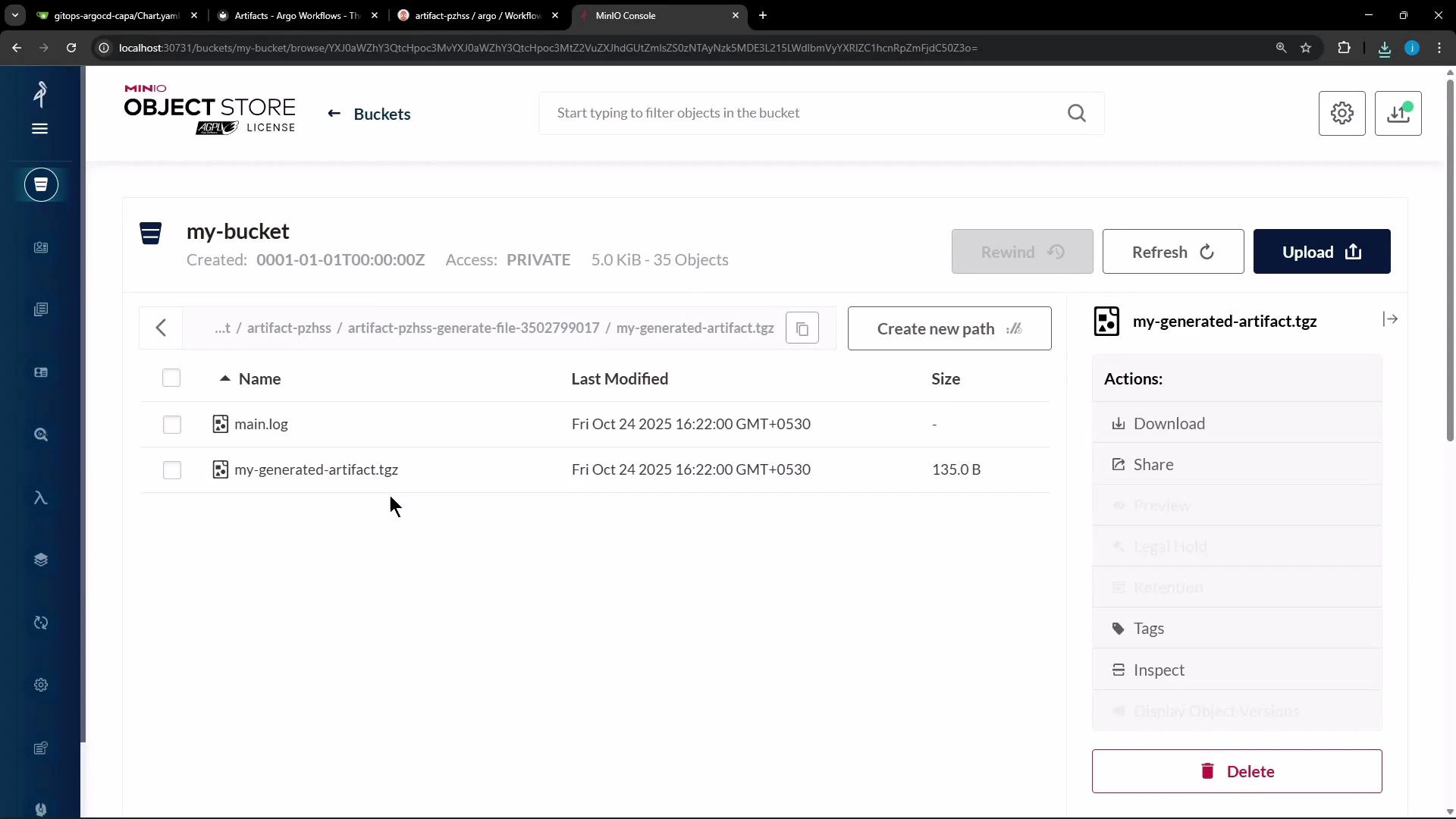
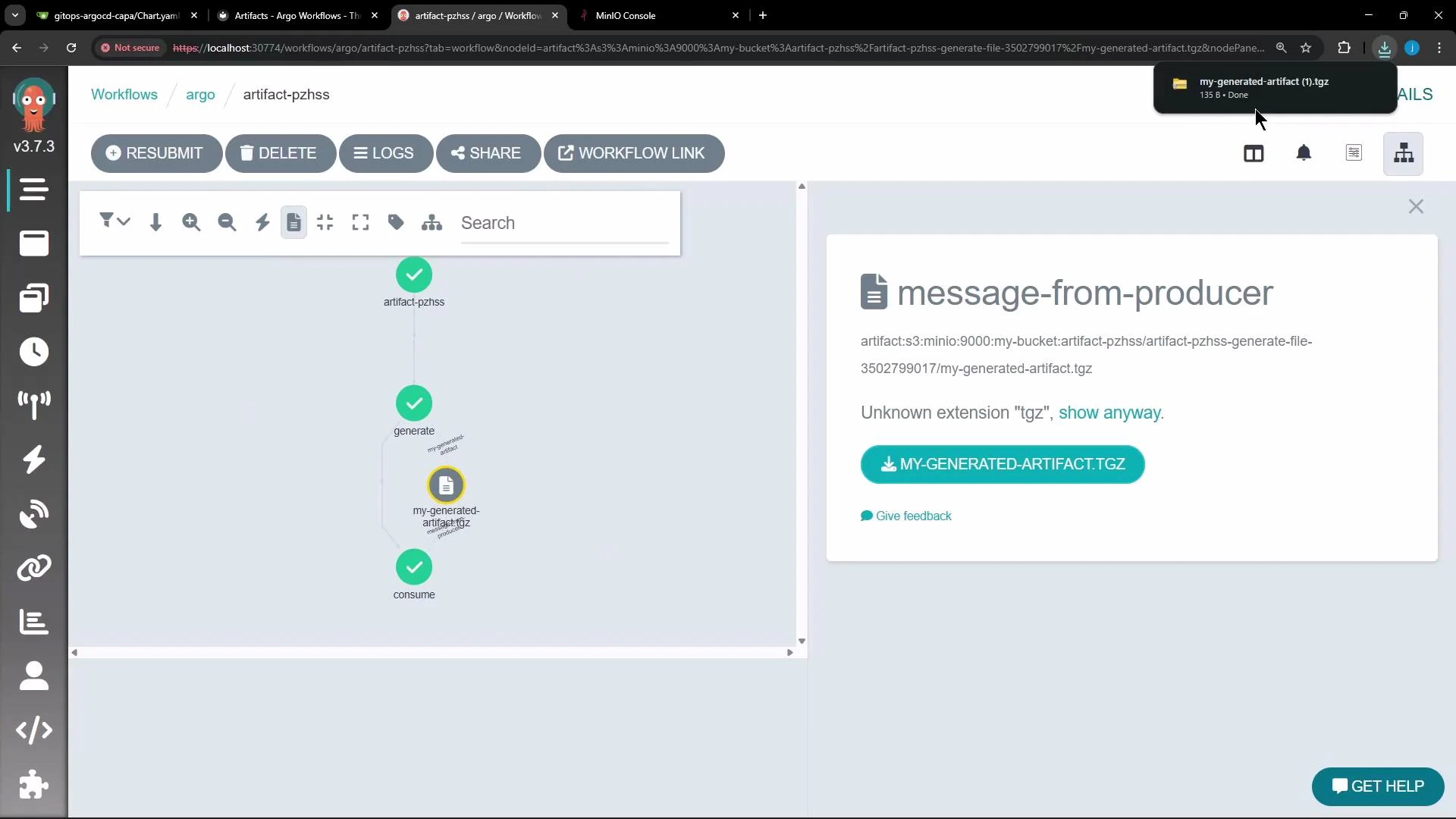
When the `generate` step completes, Argo uploads the artifact to the configured artifact repository (MinIO in this demo). By default Argo archives artifacts as a tar + gzip, so objects stored in MinIO often appear as compressed tarballs (for example, `.tgz` or `.tar.gz`). You can download these archived artifacts from the MinIO console or the Argo Workflows UI.
 Argo Workflows UI exposes artifact details and offers a direct download option for the archived artifact:
 Customizing archive behavior
Argo allows you to control how artifacts are archived before upload. Typical choices:
| Archive mode | Behavior | Use case |
| ------------------------- | ------------------------------------ | ------------------------------------------------------------------------------- |
| tar + gzip (default) | Archive and gzip the artifact | Default for most small files and directories |
| none | Upload the file/directory as-is | When repository layout must match container output exactly (e.g., build caches) |
| tar with compressionLevel | Control gzip compression level (0–9) | Tune size vs CPU for large textual logs or binary blobs |
Example configuration snippets for outputs.artifacts
```yaml theme={null}
outputs:
artifacts:
# default behavior - tar + gzip (default compression)
- name: hello-art-1
path: /tmp/hello_world.txt
# disable archiving entirely - upload the file / directory as-is
- name: hello-art-2
path: /tmp/hello_world.txt
archive:
none: {}
# customize tar/gzip compression (compressionLevel: 0 disables compression)
- name: hello-art-3
path: /tmp/hello_world.txt
archive:
tar:
compressionLevel: 0
```
Guidance for choosing archive options
* Use `archive: none` when the consumer must see the exact file/directory structure your container produced (for caching or large build outputs).
* Use `tar` with a `compressionLevel` when you need to tune upload size vs CPU cost. For textual logs, higher compression helps; for already-compressed binaries, consider lower compression or disabling it.
What to expect when the workflow runs
* `generate` completes and Argo uploads `/tmp/hello.txt` to the artifact repository as a tar+gzip by default (e.g., `my-generated-artifact.tgz`).
* The `consume` step is scheduled; Argo downloads the artifact, materializes it at `/tmp/message.txt` inside the consumer container, and the consumer prints:
```text theme={null}
---
Consumer received:
Hello from an artifact!
---
```
References and further reading
* [Argo Workflows Documentation](https://argoproj.github.io/argo-workflows/)
* [MinIO — High Performance Object Storage](https://min.io/)
Customizing archive behavior
Argo allows you to control how artifacts are archived before upload. Typical choices:
| Archive mode | Behavior | Use case |
| ------------------------- | ------------------------------------ | ------------------------------------------------------------------------------- |
| tar + gzip (default) | Archive and gzip the artifact | Default for most small files and directories |
| none | Upload the file/directory as-is | When repository layout must match container output exactly (e.g., build caches) |
| tar with compressionLevel | Control gzip compression level (0–9) | Tune size vs CPU for large textual logs or binary blobs |
Example configuration snippets for outputs.artifacts
```yaml theme={null}
outputs:
artifacts:
# default behavior - tar + gzip (default compression)
- name: hello-art-1
path: /tmp/hello_world.txt
# disable archiving entirely - upload the file / directory as-is
- name: hello-art-2
path: /tmp/hello_world.txt
archive:
none: {}
# customize tar/gzip compression (compressionLevel: 0 disables compression)
- name: hello-art-3
path: /tmp/hello_world.txt
archive:
tar:
compressionLevel: 0
```
Guidance for choosing archive options
* Use `archive: none` when the consumer must see the exact file/directory structure your container produced (for caching or large build outputs).
* Use `tar` with a `compressionLevel` when you need to tune upload size vs CPU cost. For textual logs, higher compression helps; for already-compressed binaries, consider lower compression or disabling it.
What to expect when the workflow runs
* `generate` completes and Argo uploads `/tmp/hello.txt` to the artifact repository as a tar+gzip by default (e.g., `my-generated-artifact.tgz`).
* The `consume` step is scheduled; Argo downloads the artifact, materializes it at `/tmp/message.txt` inside the consumer container, and the consumer prints:
```text theme={null}
---
Consumer received:
Hello from an artifact!
---
```
References and further reading
* [Argo Workflows Documentation](https://argoproj.github.io/argo-workflows/)
* [MinIO — High Performance Object Storage](https://min.io/)