> ## Documentation Index
> Fetch the complete documentation index at: https://notes.kodekloud.com/llms.txt
> Use this file to discover all available pages before exploring further.
# Demo Template ContainerSet
> Explains Argo Workflows containerSet templates that run multiple containers in one pod for shared networking, storage and lifecycle, and how to inspect their logs in the UI.
In this lesson we examine a containerSet template example in Argo Workflows. A `containerSet` template runs multiple containers inside a single Kubernetes Pod (similar to sidecars), allowing the containers to share the same network namespace, volumes, and lifecycle. This pattern is useful when containers must communicate over localhost, share mounted storage, or depend on the same init/wait logic.
Below is a minimal workflow that defines a single template named `main`. The template type is `containerSet` and declares two containers (`a` and `b`) that run together in the same pod:
```yaml theme={null}
apiVersion: argoproj.io/v1alpha1
kind: Workflow
metadata:
generateName: container-set-template-
spec:
entrypoint: main
templates:
- name: main
containerSet:
containers:
- name: a
image: rancher/cowsay
command: [cowsay]
args: ["Container A!!!!"]
- name: b
image: rancher/cowsay
command: [cowsay]
args: ["Container B!!!!"]
```
Key points about this example:
* Both containers (`a` and `b`) are created in a single pod and run concurrently.
* Containers can use different images and commands.
* Pods created by `containerSet` will also show the template name (here `main`) and any init containers in the UI and Kubernetes API.
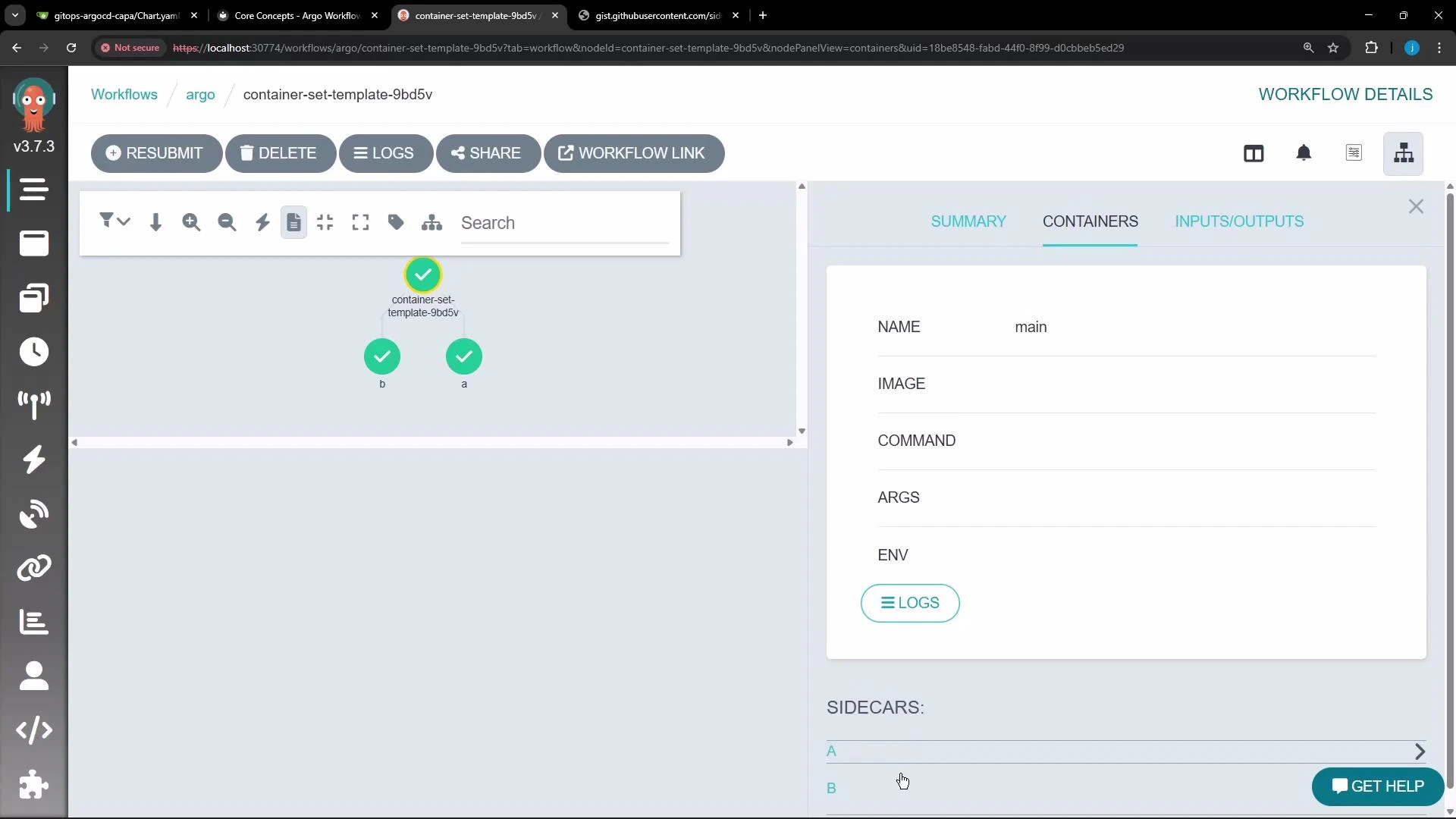 When you open this workflow in the Argo UI, the graph shows the `container-set-template-...` node and its child containers (`a`, `b`) because both ran inside the same pod. The right-hand pane lists template metadata such as `NAME`, `IMAGE`, `COMMAND`, `ARGS`, and environment variables.
Inspecting logs and individual container output
* The Argo UI exposes logs for each container in the pod through the Logs modal.
* Use the container dropdown to switch between logs for `init`, `wait` (if present), and each container from the `containerSet` (e.g., `a`, `b`).
When you open this workflow in the Argo UI, the graph shows the `container-set-template-...` node and its child containers (`a`, `b`) because both ran inside the same pod. The right-hand pane lists template metadata such as `NAME`, `IMAGE`, `COMMAND`, `ARGS`, and environment variables.
Inspecting logs and individual container output
* The Argo UI exposes logs for each container in the pod through the Logs modal.
* Use the container dropdown to switch between logs for `init`, `wait` (if present), and each container from the `containerSet` (e.g., `a`, `b`).
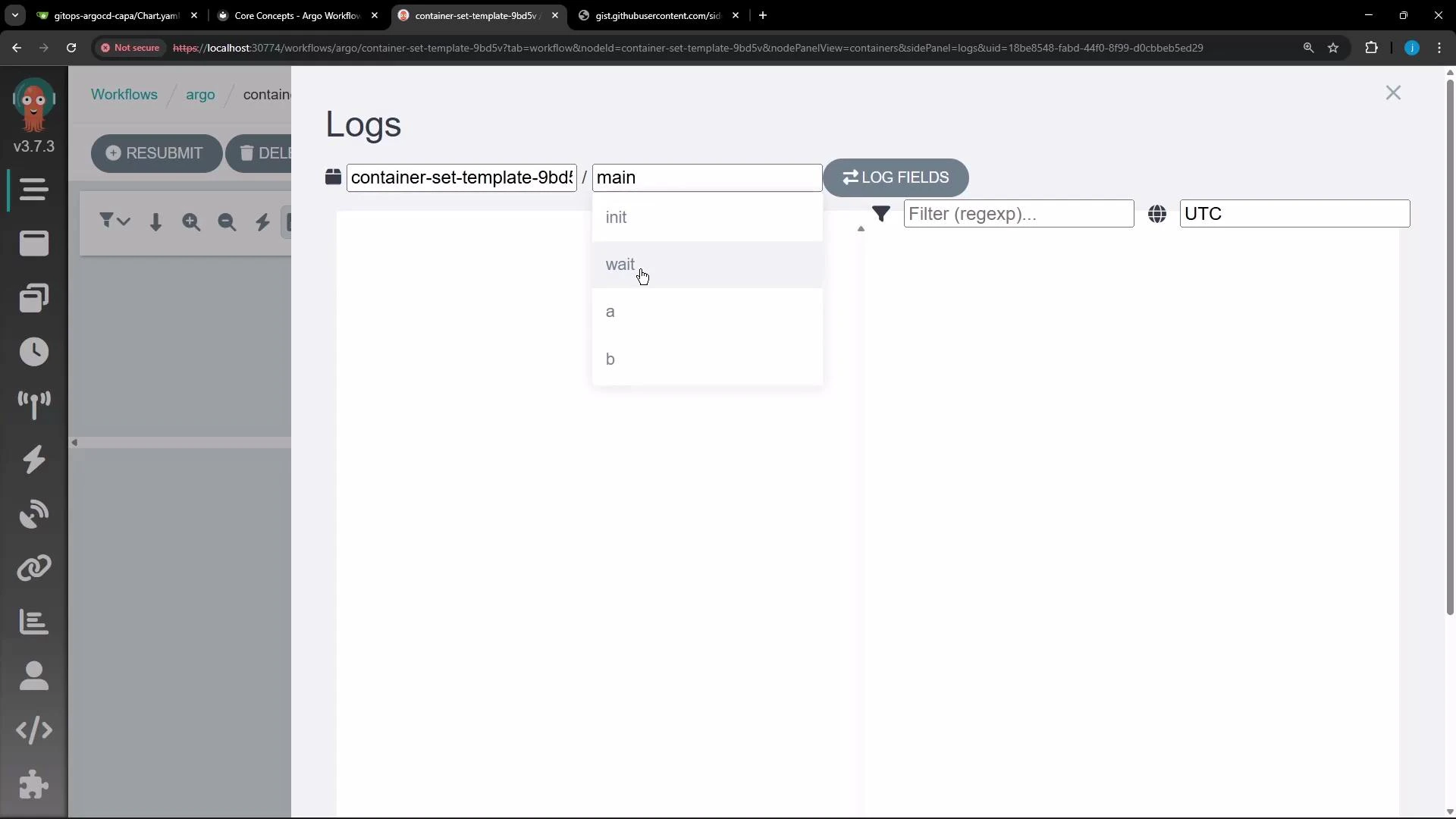 Container set templates run multiple containers in the same pod (sidecars). Use the Logs dropdown in the Argo UI to select logs for each container (init, wait, a, b, etc.). Choose `containerSet` when containers must share networking, storage, or lifecycle; choose separate templates when you need separate pods or separate scheduling/scaling behavior.
When to use containerSet vs separate templates
| Resource Pattern | Use Case | Behavior |
| -------------------------- | ------------------------------------------------------------------------------------------------------------- | --------------------------------------------------------------------------------------------------- |
| containerSet | Multiple cooperating containers that must share the same pod resources (localhost networking, shared volumes) | All containers run in one pod, start concurrently (plus init containers), share network and storage |
| Separate templates / steps | Sequential tasks, parallel tasks in separate pods, or workloads requiring independent scaling | Each template runs in its own pod; containers do not share pod-level resources |
Best practices and considerations
* Use `containerSet` when containers need low-latency local communication or shared volume access.
* Avoid `containerSet` if you require independent lifecycle, autoscaling, or separate scheduling for containers.
* Remember to include any required init containers (for setup) or a `wait` sidecar if you need coordination before/after the main containers run.
References and further reading
* Argo Workflows Templates: containerSet (see official docs) — [https://argoproj.github.io/argo-workflows/](https://argoproj.github.io/argo-workflows/) (search for "containerSet")
* Kubernetes Pods and Containers — [https://kubernetes.io/docs/concepts/workloads/pods/](https://kubernetes.io/docs/concepts/workloads/pods/) (background on shared namespaces and volumes)
This example demonstrates how `containerSet` enables sidecar-like behavior inside Argo Workflows and how to inspect and debug those containers via the Argo UI.
Container set templates run multiple containers in the same pod (sidecars). Use the Logs dropdown in the Argo UI to select logs for each container (init, wait, a, b, etc.). Choose `containerSet` when containers must share networking, storage, or lifecycle; choose separate templates when you need separate pods or separate scheduling/scaling behavior.
When to use containerSet vs separate templates
| Resource Pattern | Use Case | Behavior |
| -------------------------- | ------------------------------------------------------------------------------------------------------------- | --------------------------------------------------------------------------------------------------- |
| containerSet | Multiple cooperating containers that must share the same pod resources (localhost networking, shared volumes) | All containers run in one pod, start concurrently (plus init containers), share network and storage |
| Separate templates / steps | Sequential tasks, parallel tasks in separate pods, or workloads requiring independent scaling | Each template runs in its own pod; containers do not share pod-level resources |
Best practices and considerations
* Use `containerSet` when containers need low-latency local communication or shared volume access.
* Avoid `containerSet` if you require independent lifecycle, autoscaling, or separate scheduling for containers.
* Remember to include any required init containers (for setup) or a `wait` sidecar if you need coordination before/after the main containers run.
References and further reading
* Argo Workflows Templates: containerSet (see official docs) — [https://argoproj.github.io/argo-workflows/](https://argoproj.github.io/argo-workflows/) (search for "containerSet")
* Kubernetes Pods and Containers — [https://kubernetes.io/docs/concepts/workloads/pods/](https://kubernetes.io/docs/concepts/workloads/pods/) (background on shared namespaces and volumes)
This example demonstrates how `containerSet` enables sidecar-like behavior inside Argo Workflows and how to inspect and debug those containers via the Argo UI.