> ## Documentation Index
> Fetch the complete documentation index at: https://notes.kodekloud.com/llms.txt
> Use this file to discover all available pages before exploring further.
# Demo Template Steps
> Demonstrates Argo Workflows steps template using a Cosmic Moo example showing sequential step groups and parallel tasks calling a cow-says container
This example demonstrates the Argo Workflows "steps" template using a small workflow named "Cosmic Moo". The entrypoint template is `triple-moo`. The steps template models a list of lists: each outer list element (a step group) runs sequentially, and each item inside an inner list runs in parallel with the other items in that same group.
Key concepts:
* Outer list elements = sequential groups (one group runs after the previous completes).
* Inner list items = tasks that run in parallel within their group.
The steps template structure is a list of lists. Each top-level list element is a step group executed sequentially; items inside that group (an inner list) execute in parallel.
## Example workflow
In this workflow:
* The first step group contains a single step `first-moo` that runs first.
* After `first-moo` completes, the second step group runs two items in parallel: `parallel-moo-a` and `parallel-moo-b`.
* All steps call the `cow-says` template and pass a `message` parameter.
YAML:
```yaml theme={null}
apiVersion: argoproj.io/v1alpha1
kind: Workflow
metadata:
generateName: cosmic-moo-
spec:
entrypoint: triple-moo
templates:
- name: triple-moo
steps:
# First group (runs first)
- - name: first-moo
template: cow-says
arguments:
parameters:
- name: message
value: "Cosmic Ranch!"
# Second group (runs after the first group completes). Items here run in parallel.
- - name: parallel-moo-a
template: cow-says
arguments:
parameters:
- name: message
value: "Galaxy Moo!"
- name: parallel-moo-b
template: cow-says
arguments:
parameters:
- name: message
value: "Milky Whey!"
- name: cow-says
inputs:
parameters:
- name: message
container:
image: rancher/cowsay
command: ["cowsay"]
args: ["{{inputs.parameters.message}}"]
```
## How execution proceeds
1. Argo executes the first outer list element — the group containing `first-moo`.
2. Once `first-moo` succeeds, Argo proceeds to the next outer list element.
3. The next group contains `parallel-moo-a` and `parallel-moo-b`; those run concurrently.
Table: steps template summary
| Component | Behavior | Example |
| ------------------------------- | ------------------------------------------ | ------------------------------------------------------- |
| Outer list element (step group) | Runs sequentially, one group after another | The first group runs before the second group |
| Inner list items | Run in parallel within the same group | `parallel-moo-a` and `parallel-moo-b` run concurrently |
| Template reference | Defines the work each step performs | `cow-says` template runs the `rancher/cowsay` container |
## Sample logs
When you inspect the logs for `first-moo`, you'll see the cowsay output such as:
```text theme={null}
< Cosmic Ranch! >
-----------------
\ ^__^
\ (oo)\_______
(__)\ )\/\
||----w |
|| |
```
Each parallel task (`parallel-moo-a` and `parallel-moo-b`) will produce its own cowsay output when they run.
## Previewing the execution graph
You can preview how the workflow will execute before submitting it using the Argo Workflows UI. Paste the YAML into the UI and choose the graph view to see the sequence and parallelism visually.
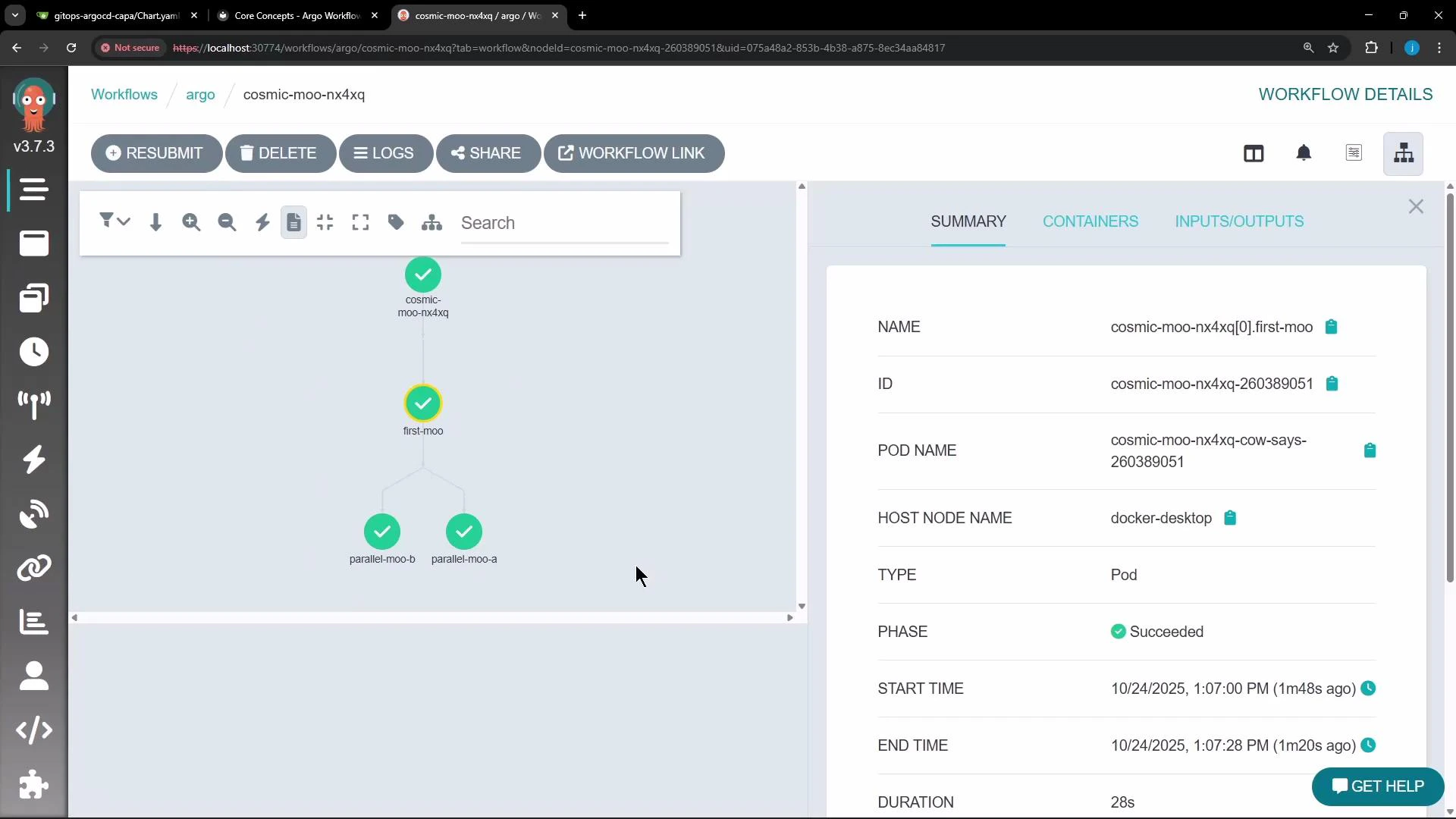 This rendered graph helps you visualize which steps run sequentially and which run in parallel.
## Links and references
* Argo Workflows: [https://argoproj.github.io/argo-workflows/](https://argoproj.github.io/argo-workflows/)
* Argo Workflows concepts: [https://argoproj.github.io/argo-workflows/workflows/what-is-workflow/](https://argoproj.github.io/argo-workflows/workflows/what-is-workflow/)
* Docker image used in example: [https://hub.docker.com/r/rancher/cowsay](https://hub.docker.com/r/rancher/cowsay)
This rendered graph helps you visualize which steps run sequentially and which run in parallel.
## Links and references
* Argo Workflows: [https://argoproj.github.io/argo-workflows/](https://argoproj.github.io/argo-workflows/)
* Argo Workflows concepts: [https://argoproj.github.io/argo-workflows/workflows/what-is-workflow/](https://argoproj.github.io/argo-workflows/workflows/what-is-workflow/)
* Docker image used in example: [https://hub.docker.com/r/rancher/cowsay](https://hub.docker.com/r/rancher/cowsay)