> ## Documentation Index
> Fetch the complete documentation index at: https://notes.kodekloud.com/llms.txt
> Use this file to discover all available pages before exploring further.
# Demo when Conditional
> Using Argo Workflows when condition to run or skip steps based on workflow parameters or other steps' outputs, with examples and best practices.
In this lesson you'll learn how to use the `when` condition in Argo Workflows to run steps conditionally based on workflow parameters or the outputs of other steps. Conditional execution helps you skip unnecessary work (for example, skipping tests for production-only runs) and keep your pipelines efficient.
Overview
* The workflow below uses a `main` entrypoint with three sequential steps: `build`, `test`, and `deploy`.
* The `test` step contains a `when` expression that only allows it to run when the `environment` parameter is not `production`.
* The `environment` parameter is declared at the workflow level and defaults to `"production"`.
Complete workflow example
```yaml theme={null}
metadata:
generateName: when-condition-
namespace: argo
spec:
entrypoint: main
arguments:
parameters:
- name: environment
value: "production"
templates:
- name: main
steps:
- - name: build
template: build-step
- name: test
template: test-step
when: "{{workflow.parameters.environment}} != production" # Only run in non-prod
- name: deploy
template: deploy-step
- name: build-step
container:
image: alpine
command: [sh, -c]
args: ["echo 'Building application...'"]
- name: test-step
container:
image: alpine
command: [sh, -c]
args: ["echo 'Running tests...'"]
- name: deploy-step
container:
image: alpine
command: [sh, -c]
args: ["echo 'Deploying to {{workflow.parameters.environment}}'"]
```
How it works
* The `when` expression on the `test` step evaluates the value of `{{workflow.parameters.environment}}`.
* With the default value `"production"`, the expression `production != production` evaluates to false; therefore the `test` step is skipped.
* When a `when` condition evaluates to false the UI and logs show the step as "skipped" and provide the evaluation result.
Example UI evaluation output:
```text theme={null}
when 'production' != 'production' evaluated false
```
Override the parameter to run the `test` step
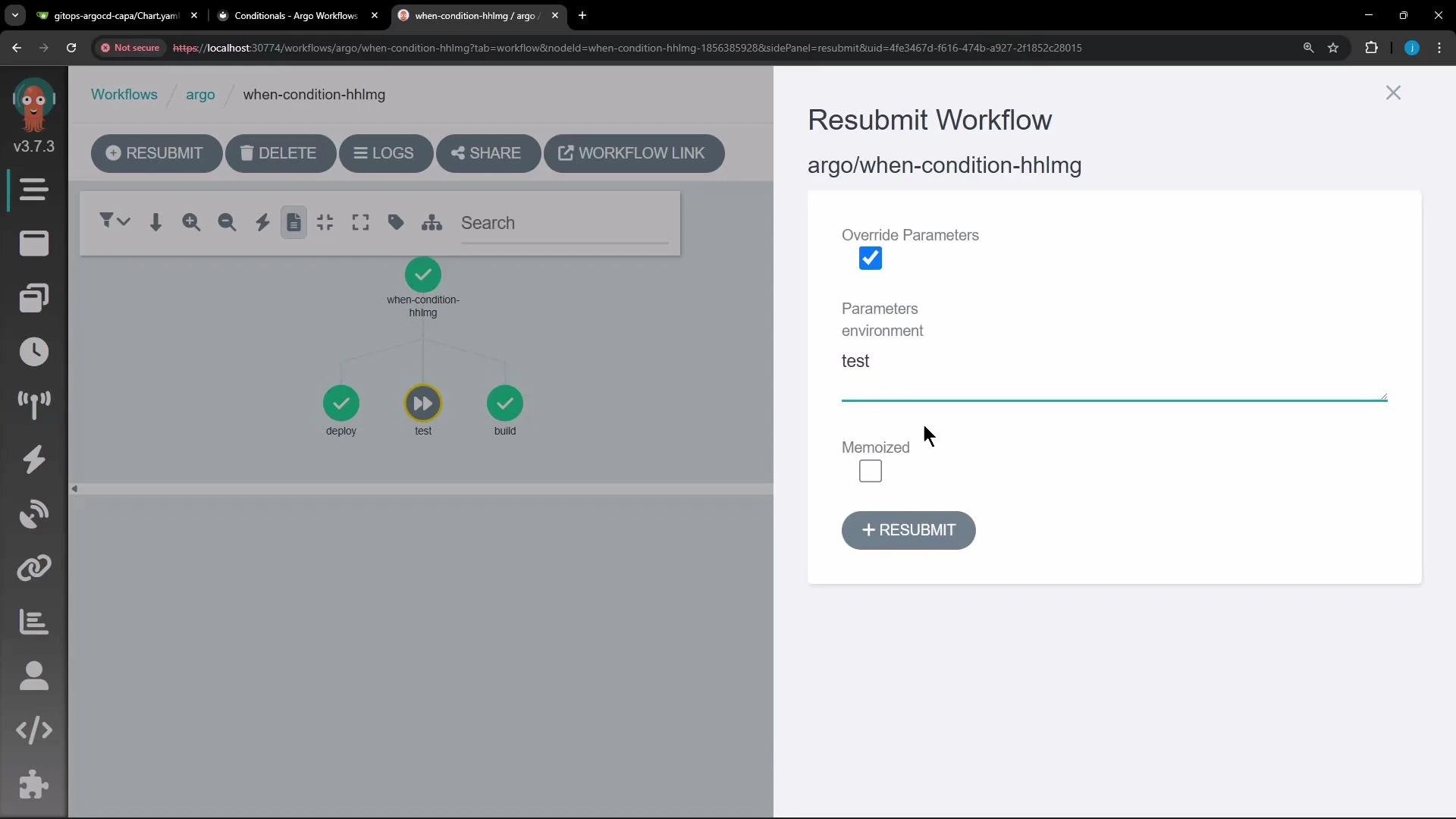
* In the Argo Workflows web UI you can resubmit a workflow and change parameters in the resubmit panel before clicking RESUBMIT.
* From the CLI you can override parameters when submitting a workflow. Example:
```bash theme={null}
argo submit when-condition.yaml -p environment=test
```
This causes the `when` expression to evaluate as `test != production` (true), so the `test` step will execute alongside `build` and `deploy`.
 Result after resubmission
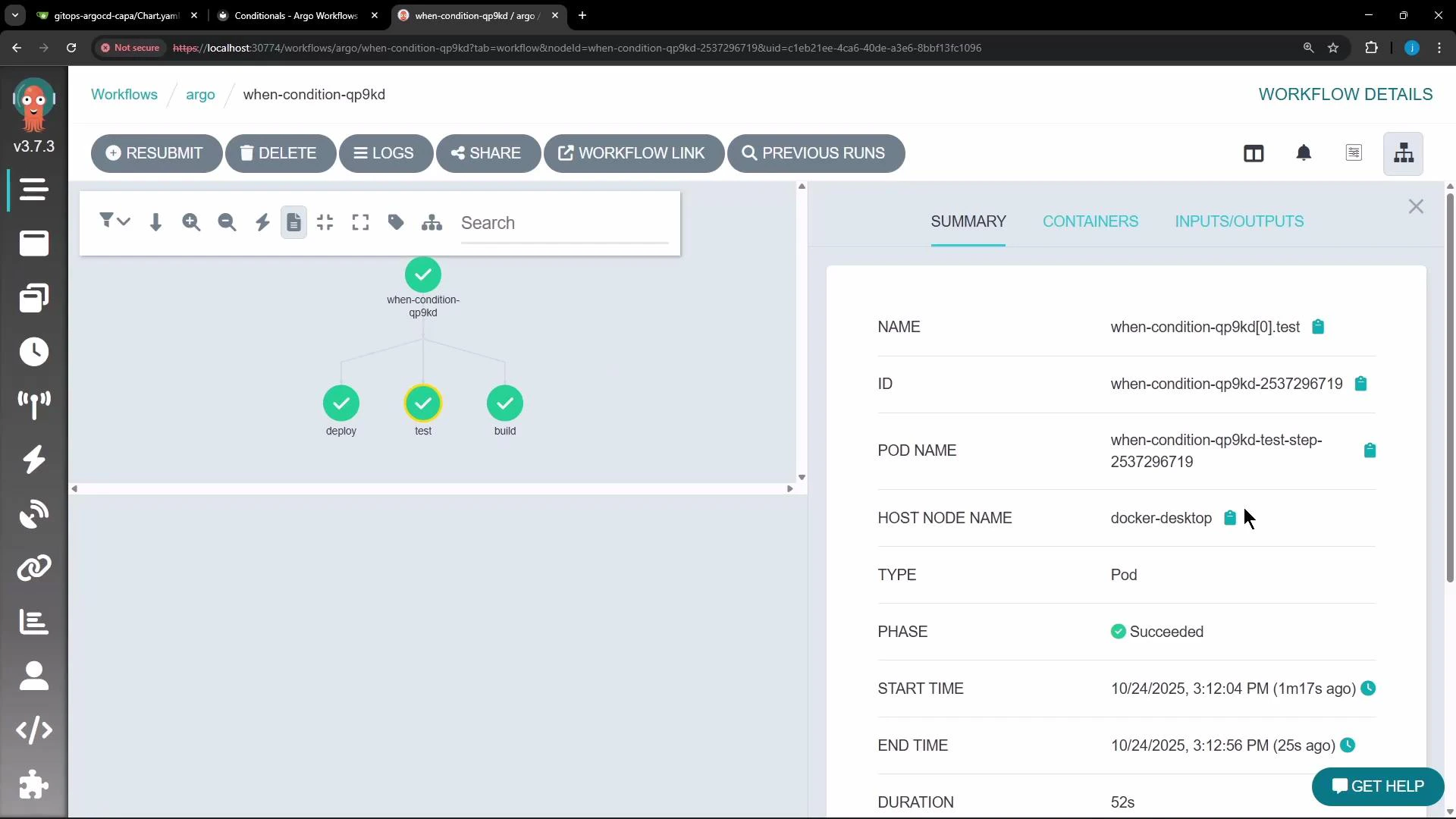
* After resubmitting with `environment` set to a non-`production` value (for example, `test`), the `when` expression evaluates to true.
* The workflow graph then shows all three steps (`build`, `test`, `deploy`) as completed.
Result after resubmission
* After resubmitting with `environment` set to a non-`production` value (for example, `test`), the `when` expression evaluates to true.
* The workflow graph then shows all three steps (`build`, `test`, `deploy`) as completed.
 Quick reference: behavior by `environment` value
| environment parameter | When expression outcome | Result |
| --------------------: | -------------------------------- | -------------- |
| production | production != production → false | `test` skipped |
| test | test != production → true | `test` runs |
| staging | staging != production → true | `test` runs |
Best practices and tips
Use `when` to make pipelines declarative and efficient: reference workflow parameters and the outputs of previous steps to implement conditional logic. Expressions must evaluate to a boolean-like result (true/false). For more details, see the Argo Workflows documentation: [Argo Workflows – Conditional Execution](https://argoproj.github.io/argo-workflows/workflow-expressions/#when-conditions).
Common pitfalls
Be careful with quoting and whitespace in `when` expressions. If your parameter values contain spaces or special characters, quote them appropriately in the expression or ensure values are pre-normalized to avoid unexpected evaluation results.
That’s how you use the `when` condition in Argo Workflows to control step execution based on parameters or outputs.
Quick reference: behavior by `environment` value
| environment parameter | When expression outcome | Result |
| --------------------: | -------------------------------- | -------------- |
| production | production != production → false | `test` skipped |
| test | test != production → true | `test` runs |
| staging | staging != production → true | `test` runs |
Best practices and tips
Use `when` to make pipelines declarative and efficient: reference workflow parameters and the outputs of previous steps to implement conditional logic. Expressions must evaluate to a boolean-like result (true/false). For more details, see the Argo Workflows documentation: [Argo Workflows – Conditional Execution](https://argoproj.github.io/argo-workflows/workflow-expressions/#when-conditions).
Common pitfalls
Be careful with quoting and whitespace in `when` expressions. If your parameter values contain spaces or special characters, quote them appropriately in the expression or ensure values are pre-normalized to avoid unexpected evaluation results.
That’s how you use the `when` condition in Argo Workflows to control step execution based on parameters or outputs.