> ## Documentation Index
> Fetch the complete documentation index at: https://notes.kodekloud.com/llms.txt
> Use this file to discover all available pages before exploring further.
# Demo Application Custom Health Check
> Guide to add Argo CD custom Lua health checks for ConfigMap driven demos to mark application health based on ConfigMap values and resolve degraded states
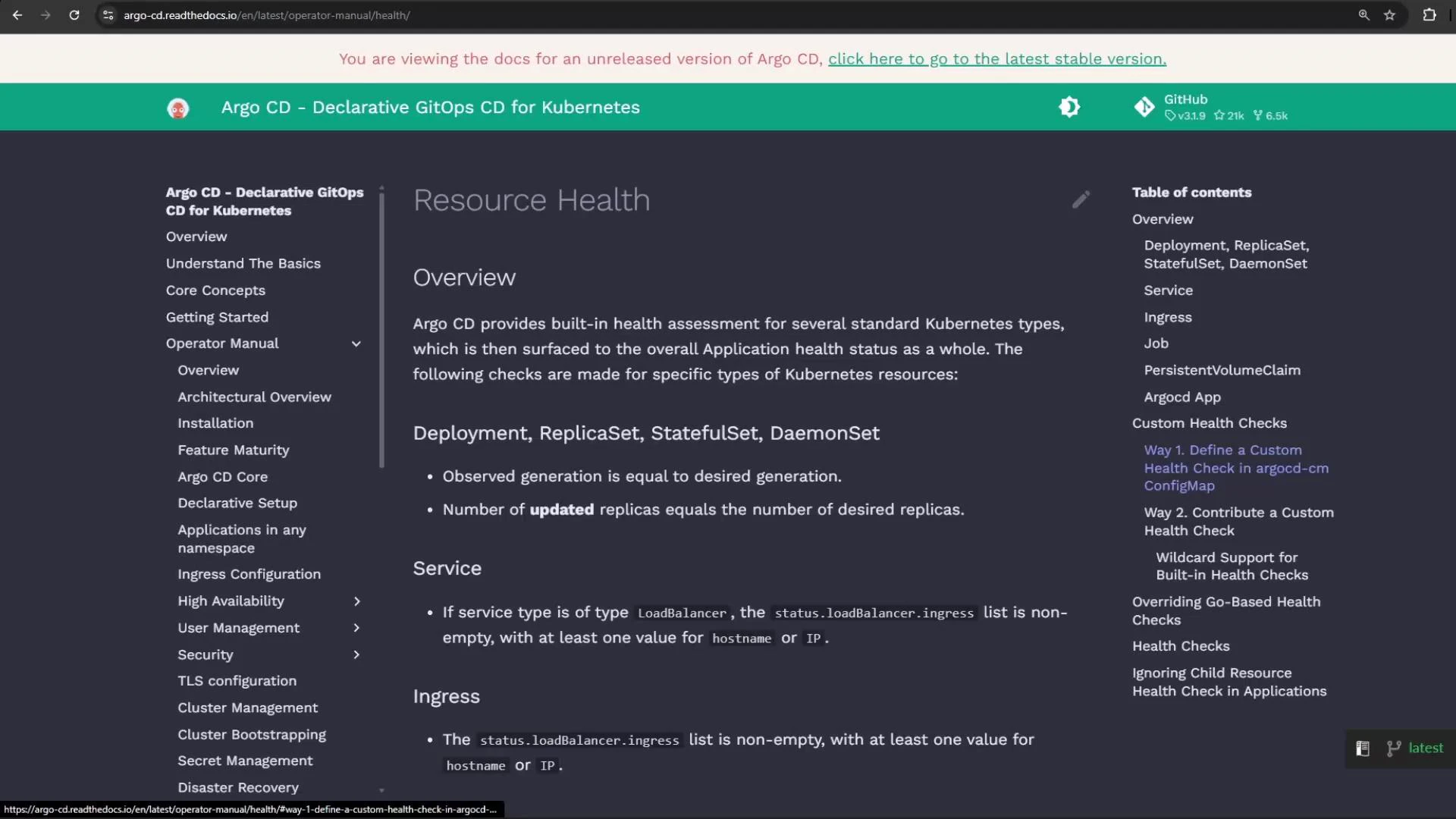
This guide shows how to add a custom health check in Argo CD that validates a ConfigMap and influences the health status of an Argo CD Application. Argo CD includes many built-in health assessments for standard Kubernetes resources, but you can extend these checks by adding small Lua scripts to the Argo CD config (argocd-cm ConfigMap).
 ## How Argo CD custom health checks work
Custom health checks are Lua snippets stored in the argocd-cm ConfigMap under keys following a naming convention. Argo CD executes these scripts for matching resources and expects a table with at least a `status` field (e.g., "Healthy", "Degraded", "Progressing") and an optional `message`.
Key naming examples:
| Key format | Applies to | Example |
| --------------------------------------------------- | ------------------------- | -------------------------------------------------------- |
| resource.customizations.health.\\_\ | Resources in an API group | `resource.customizations.health.argoproj.io_Application` |
| resource.customizations.health.\ | Core group resources | `resource.customizations.health.ConfigMap` |
Example: a Lua health script for the Argo CD Application resource that reads the Application status if present:
```yaml theme={null}
apiVersion: v1
kind: ConfigMap
metadata:
name: argocd-cm
namespace: argocd
labels:
app.kubernetes.io/name: argocd-cm
app.kubernetes.io/part-of: argocd
data:
resource.customizations.health.argoproj.io_Application: |
hs = {}
hs.status = "Progressing"
hs.message = ""
if obj.status ~= nil then
if obj.status.health ~= nil then
hs.status = obj.status.health.status
if obj.status.health.message ~= nil then
hs.message = obj.status.health.message
end
end
end
return hs
```
## Demo application overview
This demo repository contains an application named `health-check` that demonstrates a ConfigMap-driven scenario:
* ConfigMap: `moving-shapes-colors` — defines color values for shapes.
* Deployment: `random-shapes` — loads the ConfigMap via `envFrom`.
* Service: exposes the application.
Example ConfigMap used by the application (note the TRIANGLE\_COLOR intentionally set to "white", which we use to trigger a Degraded health state):
```yaml theme={null}
apiVersion: v1
kind: ConfigMap
metadata:
name: moving-shapes-colors
data:
CIRCLE_COLOR: "pink"
OVAL_COLOR: "lightgreen"
SQUARE_COLOR: "orange"
TRIANGLE_COLOR: "white" # using white will produce a Degraded message in Argo CD
RECTANGLE_COLOR: "blue"
```
Deployment that consumes the ConfigMap via envFrom:
```yaml theme={null}
apiVersion: apps/v1
kind: Deployment
metadata:
name: random-shapes
spec:
selector:
matchLabels:
app: random-shapes
replicas: 1
template:
metadata:
labels:
app: random-shapes
spec:
containers:
- name: random-shapes
image: siddharth67/php-random-shapes:v1
imagePullPolicy: Always
envFrom:
- configMapRef:
name: moving-shapes-colors
```
## Create the Argo CD Application
Create an Argo CD Application that points to the `health-check` path in the git repo, targets the namespace `health-check`, and asks Argo CD to create the namespace. If you are not logged in to the argocd server the create command can fail — log in first if necessary.
Attempt to create the app (may fail if not logged in):
```bash theme={null}
argocd app create health-check-app \
--repo http://host.docker.internal:5000/kk-org/gitops-argocd-capa \
--path ./health-check \
--dest-server https://kubernetes.default.svc \
--dest-namespace health-check \
--project default \
--revision HEAD \
--sync-policy none \
--sync-option CreateNamespace=true
```
If it fails due to authentication, log in to Argo CD (example):
```bash theme={null}
argocd login localhost:31148 --plaintext --insecure
# Enter Username: admin
# Enter Password:
```
Re-run the create command after successful login:
```bash theme={null}
argocd app create health-check-app \
--repo http://host.docker.internal:5000/kk-org/gitops-argocd-capa \
--path ./health-check \
--dest-server https://kubernetes.default.svc \
--dest-namespace health-check \
--project default \
--revision HEAD \
--sync-policy none \
--sync-option CreateNamespace=true
# application 'health-check-app' created
```
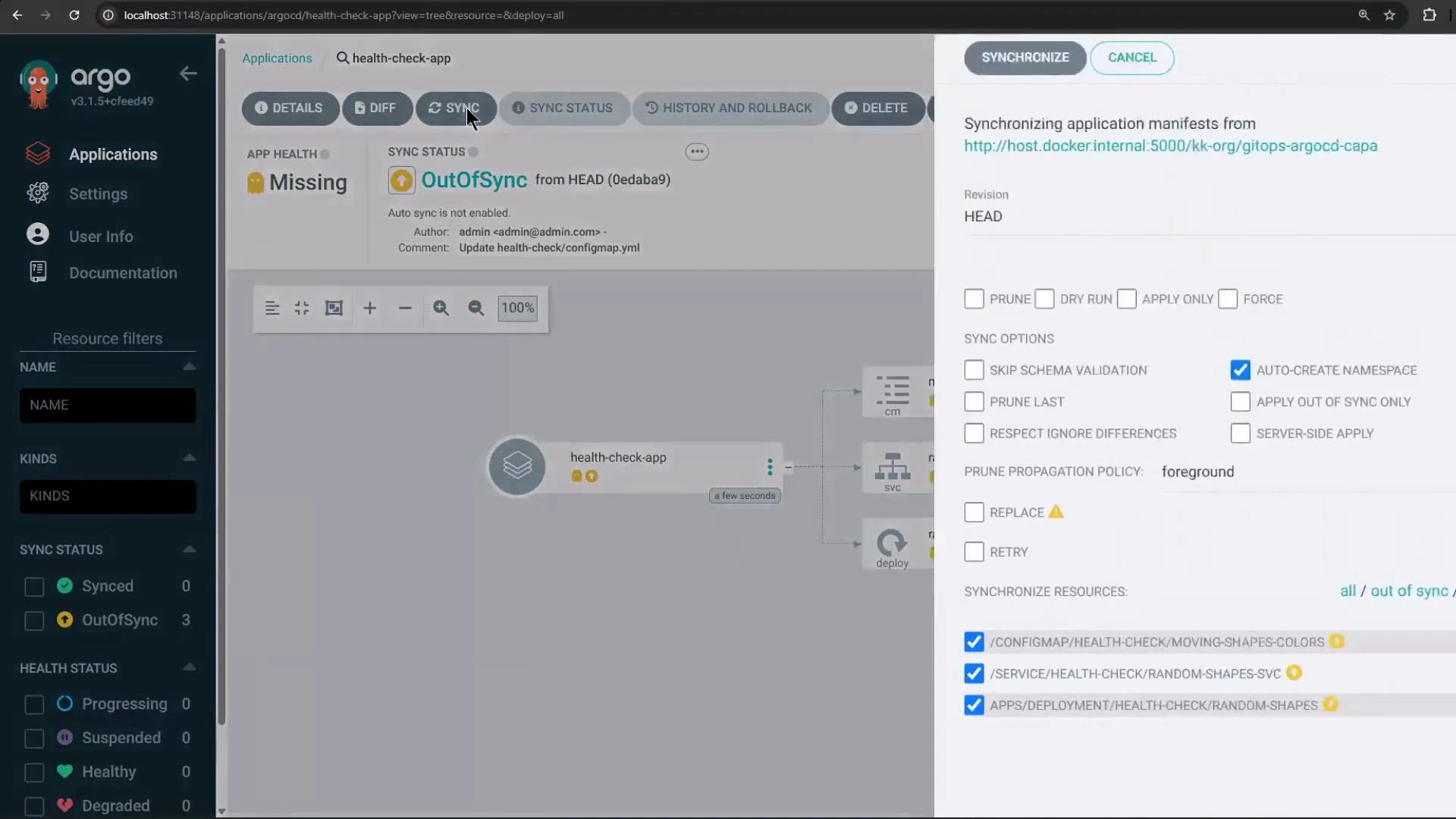
Back in the Argo CD UI you should now see the new application in OutOfSync / Missing state (before sync):
## How Argo CD custom health checks work
Custom health checks are Lua snippets stored in the argocd-cm ConfigMap under keys following a naming convention. Argo CD executes these scripts for matching resources and expects a table with at least a `status` field (e.g., "Healthy", "Degraded", "Progressing") and an optional `message`.
Key naming examples:
| Key format | Applies to | Example |
| --------------------------------------------------- | ------------------------- | -------------------------------------------------------- |
| resource.customizations.health.\\_\ | Resources in an API group | `resource.customizations.health.argoproj.io_Application` |
| resource.customizations.health.\ | Core group resources | `resource.customizations.health.ConfigMap` |
Example: a Lua health script for the Argo CD Application resource that reads the Application status if present:
```yaml theme={null}
apiVersion: v1
kind: ConfigMap
metadata:
name: argocd-cm
namespace: argocd
labels:
app.kubernetes.io/name: argocd-cm
app.kubernetes.io/part-of: argocd
data:
resource.customizations.health.argoproj.io_Application: |
hs = {}
hs.status = "Progressing"
hs.message = ""
if obj.status ~= nil then
if obj.status.health ~= nil then
hs.status = obj.status.health.status
if obj.status.health.message ~= nil then
hs.message = obj.status.health.message
end
end
end
return hs
```
## Demo application overview
This demo repository contains an application named `health-check` that demonstrates a ConfigMap-driven scenario:
* ConfigMap: `moving-shapes-colors` — defines color values for shapes.
* Deployment: `random-shapes` — loads the ConfigMap via `envFrom`.
* Service: exposes the application.
Example ConfigMap used by the application (note the TRIANGLE\_COLOR intentionally set to "white", which we use to trigger a Degraded health state):
```yaml theme={null}
apiVersion: v1
kind: ConfigMap
metadata:
name: moving-shapes-colors
data:
CIRCLE_COLOR: "pink"
OVAL_COLOR: "lightgreen"
SQUARE_COLOR: "orange"
TRIANGLE_COLOR: "white" # using white will produce a Degraded message in Argo CD
RECTANGLE_COLOR: "blue"
```
Deployment that consumes the ConfigMap via envFrom:
```yaml theme={null}
apiVersion: apps/v1
kind: Deployment
metadata:
name: random-shapes
spec:
selector:
matchLabels:
app: random-shapes
replicas: 1
template:
metadata:
labels:
app: random-shapes
spec:
containers:
- name: random-shapes
image: siddharth67/php-random-shapes:v1
imagePullPolicy: Always
envFrom:
- configMapRef:
name: moving-shapes-colors
```
## Create the Argo CD Application
Create an Argo CD Application that points to the `health-check` path in the git repo, targets the namespace `health-check`, and asks Argo CD to create the namespace. If you are not logged in to the argocd server the create command can fail — log in first if necessary.
Attempt to create the app (may fail if not logged in):
```bash theme={null}
argocd app create health-check-app \
--repo http://host.docker.internal:5000/kk-org/gitops-argocd-capa \
--path ./health-check \
--dest-server https://kubernetes.default.svc \
--dest-namespace health-check \
--project default \
--revision HEAD \
--sync-policy none \
--sync-option CreateNamespace=true
```
If it fails due to authentication, log in to Argo CD (example):
```bash theme={null}
argocd login localhost:31148 --plaintext --insecure
# Enter Username: admin
# Enter Password:
```
Re-run the create command after successful login:
```bash theme={null}
argocd app create health-check-app \
--repo http://host.docker.internal:5000/kk-org/gitops-argocd-capa \
--path ./health-check \
--dest-server https://kubernetes.default.svc \
--dest-namespace health-check \
--project default \
--revision HEAD \
--sync-policy none \
--sync-option CreateNamespace=true
# application 'health-check-app' created
```
Back in the Argo CD UI you should now see the new application in OutOfSync / Missing state (before sync):
 ## Sync the application and verify resources
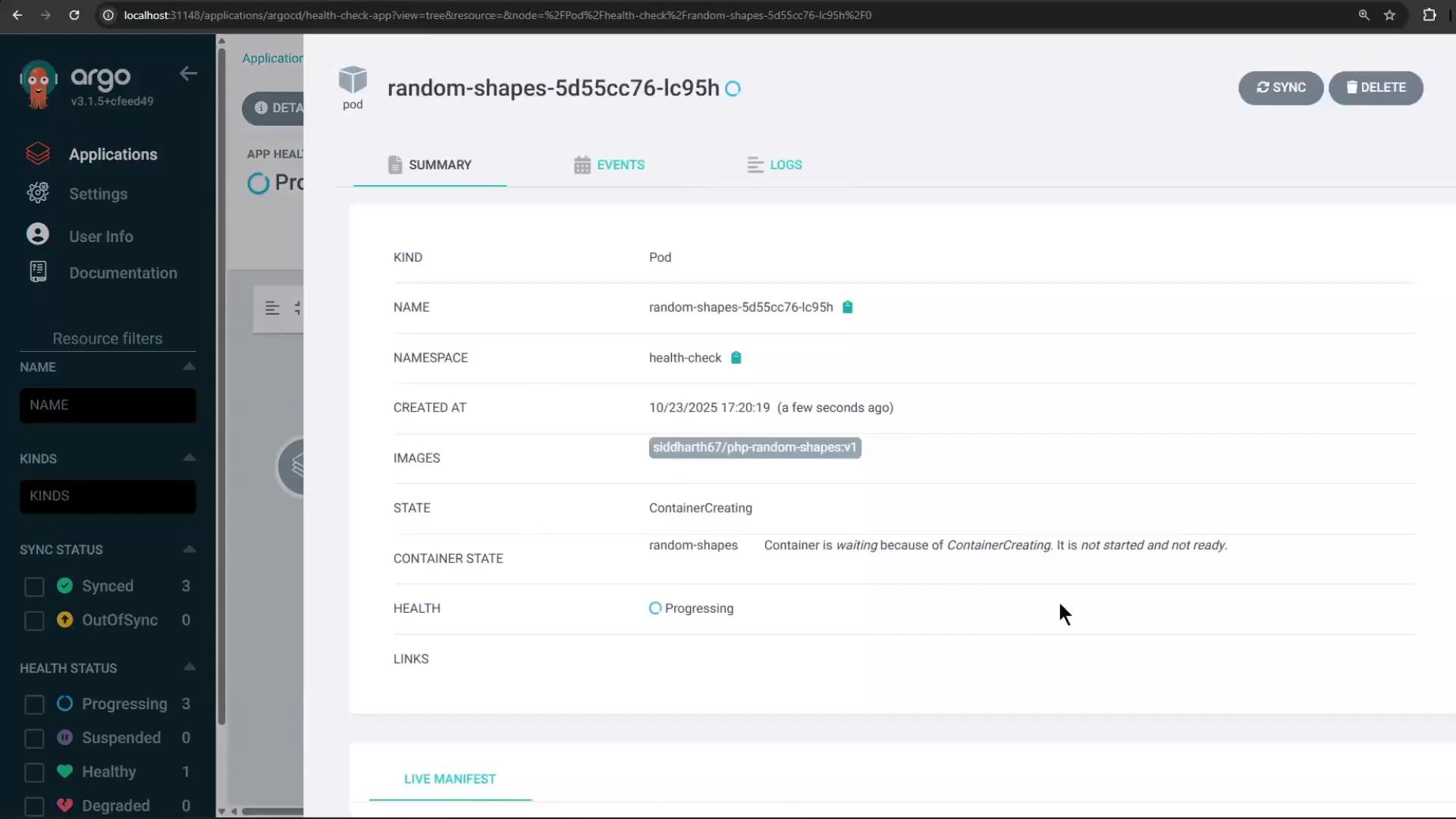
Sync the application. Argo CD will create the namespace, then the ConfigMap, the Service, and finally the Deployment. The pod will initially show states like ContainerCreating / Progressing in the UI:
## Sync the application and verify resources
Sync the application. Argo CD will create the namespace, then the ConfigMap, the Service, and finally the Deployment. The pod will initially show states like ContainerCreating / Progressing in the UI:
 You can also verify namespace and pod status with kubectl:
```bash theme={null}
kubectl get namespaces
# Example output:
# NAME STATUS AGE
# default Active 16h
# argocd Active 4h47m
# health-check Active 27s
kubectl -n health-check get pods
# Example output:
# NAME READY STATUS RESTARTS AGE
# random-shapes-5d55cc76-lc95h 1/1 Running 0 34s
```
## Add a custom health check for ConfigMap
In this demo the triangle becomes invisible when `TRIANGLE_COLOR` is `white`. We'll use that condition to mark the application as Degraded by adding a custom health check. Edit the argocd-cm ConfigMap in the `argocd` namespace and add a Lua snippet under the key `resource.customizations.health.ConfigMap`. The script below sets `Degraded` when `TRIANGLE_COLOR` equals `white` and returns a helpful message.
```yaml theme={null}
apiVersion: v1
kind: ConfigMap
metadata:
name: argocd-cm
namespace: argocd
data:
resource.customizations.health.ConfigMap: |
hs = {}
hs.status = "Healthy"
hs.message = ""
-- If the triangle color is white, mark as Degraded
if obj.data ~= nil and obj.data.TRIANGLE_COLOR == "white" then
hs.status = "Degraded"
hs.message = "Use any color other than white for TRIANGLE_COLOR"
end
return hs
```
Custom health checks are Lua scripts executed by Argo CD. Be careful with Lua equality operators: `==` tests equality, `~=` tests inequality.
Apply the change by editing the ConfigMap:
```bash theme={null}
kubectl -n argocd edit configmap argocd-cm
# paste the resource.customizations.health.ConfigMap entry and save
```
After saving the ConfigMap, refresh the Application in the Argo CD UI. Because the deployed ConfigMap `moving-shapes-colors` has `TRIANGLE_COLOR` set to `white`, Argo CD will evaluate the health hook and mark the ConfigMap (and the Application) as Degraded with the message you supplied ("Use any color other than white for TRIANGLE\_COLOR").
## Resolve the degraded state
To resolve the degraded state, change the `TRIANGLE_COLOR` value either in the Git repo and sync, or edit the deployed ConfigMap directly and then restart pods if necessary so they pick up the change.
Example: edit the deployed ConfigMap in the `health-check` namespace:
```bash theme={null}
kubectl -n health-check edit configmap moving-shapes-colors
# change TRIANGLE_COLOR: white -> TRIANGLE_COLOR: red
```
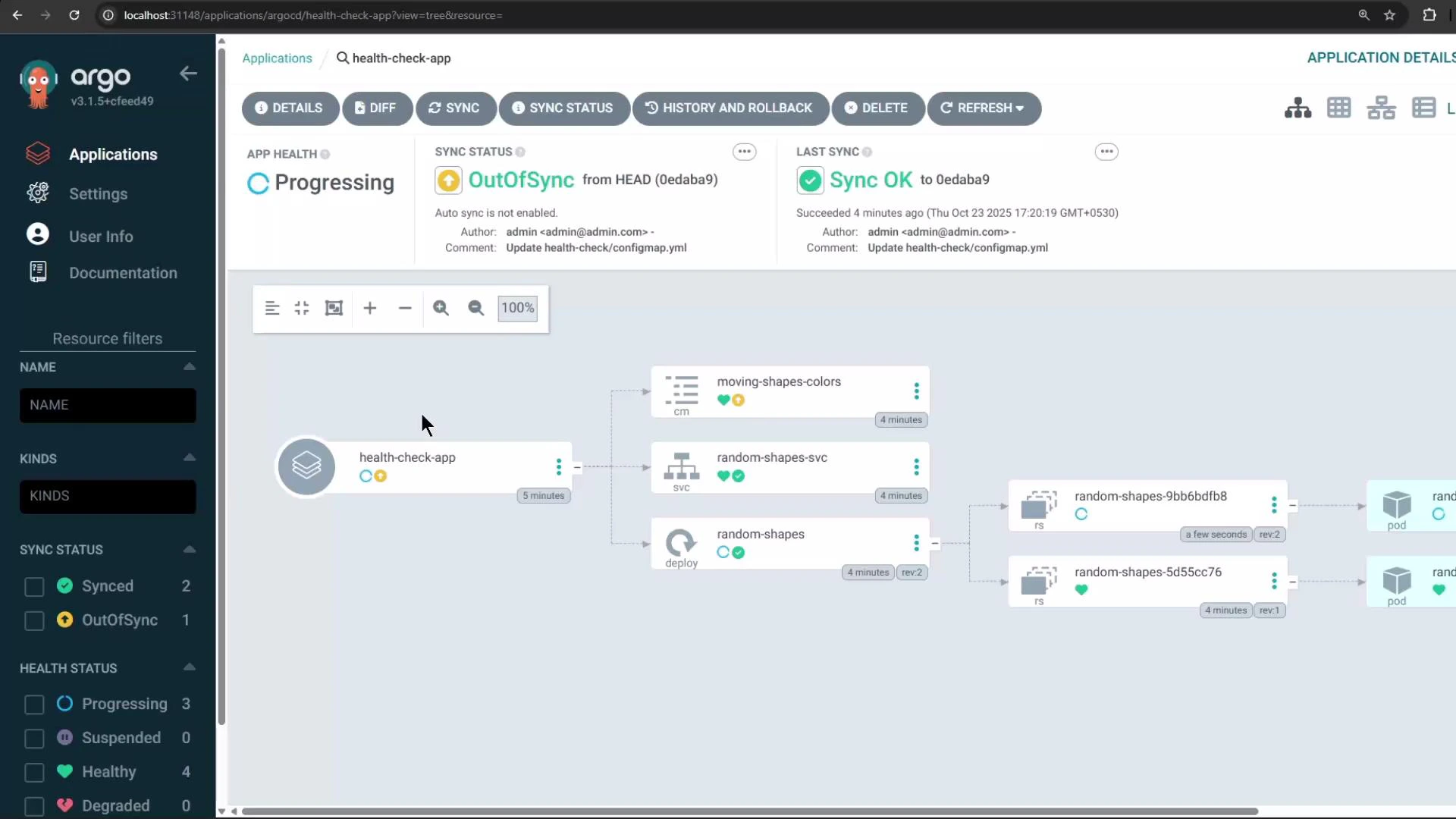
Once the ConfigMap no longer matches the Degraded condition, Argo CD's custom health check will evaluate to Healthy and the application health will return to Healthy.
The Argo CD UI resource tree will then display the ConfigMap, Service, Deployment/pods, and overall application health:
You can also verify namespace and pod status with kubectl:
```bash theme={null}
kubectl get namespaces
# Example output:
# NAME STATUS AGE
# default Active 16h
# argocd Active 4h47m
# health-check Active 27s
kubectl -n health-check get pods
# Example output:
# NAME READY STATUS RESTARTS AGE
# random-shapes-5d55cc76-lc95h 1/1 Running 0 34s
```
## Add a custom health check for ConfigMap
In this demo the triangle becomes invisible when `TRIANGLE_COLOR` is `white`. We'll use that condition to mark the application as Degraded by adding a custom health check. Edit the argocd-cm ConfigMap in the `argocd` namespace and add a Lua snippet under the key `resource.customizations.health.ConfigMap`. The script below sets `Degraded` when `TRIANGLE_COLOR` equals `white` and returns a helpful message.
```yaml theme={null}
apiVersion: v1
kind: ConfigMap
metadata:
name: argocd-cm
namespace: argocd
data:
resource.customizations.health.ConfigMap: |
hs = {}
hs.status = "Healthy"
hs.message = ""
-- If the triangle color is white, mark as Degraded
if obj.data ~= nil and obj.data.TRIANGLE_COLOR == "white" then
hs.status = "Degraded"
hs.message = "Use any color other than white for TRIANGLE_COLOR"
end
return hs
```
Custom health checks are Lua scripts executed by Argo CD. Be careful with Lua equality operators: `==` tests equality, `~=` tests inequality.
Apply the change by editing the ConfigMap:
```bash theme={null}
kubectl -n argocd edit configmap argocd-cm
# paste the resource.customizations.health.ConfigMap entry and save
```
After saving the ConfigMap, refresh the Application in the Argo CD UI. Because the deployed ConfigMap `moving-shapes-colors` has `TRIANGLE_COLOR` set to `white`, Argo CD will evaluate the health hook and mark the ConfigMap (and the Application) as Degraded with the message you supplied ("Use any color other than white for TRIANGLE\_COLOR").
## Resolve the degraded state
To resolve the degraded state, change the `TRIANGLE_COLOR` value either in the Git repo and sync, or edit the deployed ConfigMap directly and then restart pods if necessary so they pick up the change.
Example: edit the deployed ConfigMap in the `health-check` namespace:
```bash theme={null}
kubectl -n health-check edit configmap moving-shapes-colors
# change TRIANGLE_COLOR: white -> TRIANGLE_COLOR: red
```
Once the ConfigMap no longer matches the Degraded condition, Argo CD's custom health check will evaluate to Healthy and the application health will return to Healthy.
The Argo CD UI resource tree will then display the ConfigMap, Service, Deployment/pods, and overall application health:
 ## Summary
* Add custom health checks by editing `argocd-cm` and providing Lua scripts under `resource.customizations.health.*`.
* Use `resource.customizations.health.ConfigMap` to apply checks for core ConfigMap resources.
* Argo CD executes these Lua checks and surfaces any custom `status` and `message` in the UI for the resource and its parent Application.
## Links and references
* Argo CD Resource Health docs: [https://argo-cd.readthedocs.io/en/stable/operator-manual/resource\_customizations/](https://argo-cd.readthedocs.io/en/stable/operator-manual/resource_customizations/)
* Kubernetes Concepts: [https://kubernetes.io/docs/concepts/overview/what-is-kubernetes/](https://kubernetes.io/docs/concepts/overview/what-is-kubernetes/)
## Summary
* Add custom health checks by editing `argocd-cm` and providing Lua scripts under `resource.customizations.health.*`.
* Use `resource.customizations.health.ConfigMap` to apply checks for core ConfigMap resources.
* Argo CD executes these Lua checks and surfaces any custom `status` and `message` in the UI for the resource and its parent Application.
## Links and references
* Argo CD Resource Health docs: [https://argo-cd.readthedocs.io/en/stable/operator-manual/resource\_customizations/](https://argo-cd.readthedocs.io/en/stable/operator-manual/resource_customizations/)
* Kubernetes Concepts: [https://kubernetes.io/docs/concepts/overview/what-is-kubernetes/](https://kubernetes.io/docs/concepts/overview/what-is-kubernetes/)