> ## Documentation Index
> Fetch the complete documentation index at: https://notes.kodekloud.com/llms.txt
> Use this file to discover all available pages before exploring further.
# Demo ApplicationSet Cluster Generator
> How to use Argo CD ApplicationSet generators, especially list and clusters, to automatically create and deploy Applications across multiple clusters, with an nginx demo
In this guide you'll learn how a single ApplicationSet can generate multiple Argo CD Applications across several clusters by using generators. We focus on the list and clusters generators, showing examples and a practical demo that deploys an nginx application to all clusters known to Argo CD.
ApplicationSets use generators to produce parameter sets which are rendered into the ApplicationSet template. Generators available include list, clusters, git, matrix, merge, and others. This article demonstrates the list and clusters generators and walks through deploying an nginx app across multiple clusters using the clusters generator.
## Overview: ApplicationSet generators
Use generators to produce parameter combinations for the ApplicationSet template. Typical use-cases:
| Generator | Use case |
| --------- | ------------------------------------------------------------------------------------------ |
| list | Explicitly enumerate targets (key/value pairs). Best for small, known sets. |
| clusters | Discover clusters from Argo CD cluster secrets. Great for many clusters managed centrally. |
| git | Generate parameters from Git repo contents or branches. |
| matrix | Combine multiple generators to create Cartesian products of parameters. |
| merge | Merge results from multiple generators into a single parameter set. |
For more detail see the official ApplicationSet documentation: [Argo CD ApplicationSet Controller](https://argoproj.github.io/argo-cd/operator-manual/applicationset/).
## List generator
The list generator allows you to explicitly list cluster-like elements (key/value pairs). It's ideal when you have a finite, known set of targets and you want precise control over each generated Application.
Example ApplicationSet using the list generator:
```yaml theme={null}
apiVersion: argoproj.io/v1alpha1
kind: ApplicationSet
metadata:
name: guestbook
namespace: argocd
spec:
goTemplate: true
goTemplateOptions: ["missingkey=error"]
generators:
- list:
elements:
- cluster: engineering-dev
url: https://kubernetes.default.svc
# - cluster: engineering-prod
# url: https://kubernetes.default.svc
template:
metadata:
name: '{{ .cluster }}-guestbook'
spec:
project: my-project
source:
repoURL: https://github.com/argoproj/argo-cd.git
targetRevision: HEAD
path: applicationset/examples/list-generator/guestbook/{{ .cluster }}
destination:
server: '{{ .url }}'
namespace: guestbook
```
Key points:
* The generator emits parameters (here `.cluster` and `.url`) for each listed element.
* The template uses those parameters to produce distinct Application resources. For example, with `cluster: engineering-dev` the application name becomes `engineering-dev-guestbook`.
* Add another element (e.g., `engineering-prod`) to generate an additional Application.
## Cluster generator
The clusters generator discovers clusters registered with Argo CD (stored as cluster Secrets in the argocd namespace) and generates parameters from those secrets. This is the recommended approach if you manage many clusters and prefer automatic discovery.
A basic clusters generator that selects clusters by label:
```yaml theme={null}
apiVersion: argoproj.io/v1alpha1
kind: ApplicationSet
metadata:
name: guestbook
namespace: argocd
spec:
goTemplate: true
goTemplateOptions: ["missingkey=error"]
generators:
- clusters:
selector:
matchLabels:
staging: "true"
```
The clusters generator exposes parameters such as `.name`, `.server`, and metadata fields that come from the cluster Secrets Argo CD creates when you add clusters.
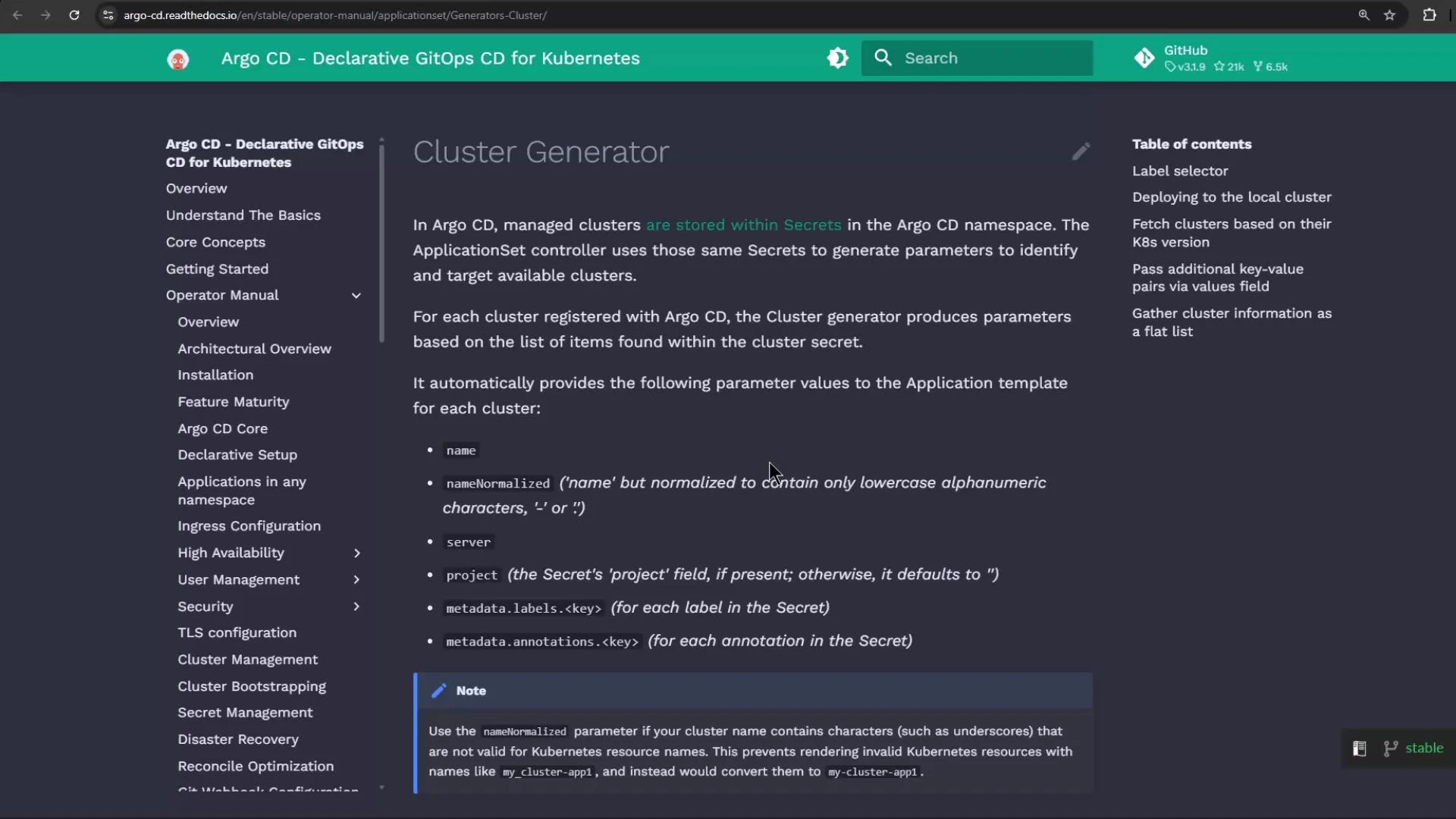 Argo CD stores cluster connection details as Secrets labeled with `argocd.argoproj.io/secret-type: cluster`. An illustrative (decoded) example of such a Secret:
```yaml theme={null}
kind: Secret
metadata:
labels:
argocd.argoproj.io/secret-type: cluster
data:
# In Kubernetes these fields are base64-encoded; shown here decoded for readability.
config: '{"tlsClientConfig":{"insecure":false}}'
name: "in-cluster2"
server: "https://kubernetes.default.svc"
# (...)
```
The clusters generator reads cluster Secrets in the argocd namespace and exposes fields like `.name` and `.server`. Reference these generated parameters in your ApplicationSet template to target destinations automatically.
When you manage dozens of clusters, the clusters generator significantly reduces maintenance compared to manually updating a list generator.
## Example: Deploy nginx to all clusters
This ApplicationSet example uses the clusters generator to deploy an nginx application to every cluster Argo CD knows about:
```yaml theme={null}
apiVersion: argoproj.io/v1alpha1
kind: ApplicationSet
metadata:
name: common-nginx-server
namespace: argocd
spec:
goTemplate: true
generators:
- clusters: {}
template:
metadata:
name: '{{ .name }}-nginx-server'
spec:
project: default
source:
repoURL: http://host.docker.internal:5000/kk-org/gitops-argocd-capa
targetRevision: HEAD
path: ./nginx-app
destination:
server: '{{ .server }}'
namespace: nginx-server
syncPolicy:
automated: {}
syncOptions:
- CreateNamespace=true
```
Notes:
* `generators: - clusters: {}` tells Argo CD to generate one Application per discovered cluster.
* The template uses `.name` for each generated Application’s name and `.server` for the destination cluster server URL (both supplied by cluster Secrets).
## Applying the ApplicationSet and troubleshooting
If you attempt to apply an ApplicationSet before the ApplicationSet CRD and controller are installed, the apply will fail with a "no matches for kind" error.
Example failure when CRDs are missing:
```console theme={null}
kubectl -n argocd apply -f https://gist.github.com/sidd-harth/e798ef3d63308fcffa72df5a1e8ec5c5/raw/28e91e353b3a96c6e164e8f5243de58a47f15aec/application-set-nginx.yml
error: resource mapping not found for name: "common-nginx-server" namespace: "argocd" from "https://gist.github.com/sidd-harth/e798ef3d63308fcffa72df5a1e8ec5c5/raw/28e91e353b3a96c6e164e8f5243de58a47f15aec/application-set-nginx.yml": no matches for kind "ApplicationSet" in version "argoproj.io/v1alpha1"
ensure CRDs are installed first
```
Check for CRDs:
```console theme={null}
kubectl get crds
No resources found
```
If you target the wrong kubecontext (for example, a cluster without Argo CD installed), kubectl will not find the ApplicationSet CRD. Switch to the context that hosts Argo CD (e.g., your Docker Desktop or kind cluster) and re-run the apply after ensuring the ApplicationSet CRD and controller are installed.
After switching to the correct context and ensuring the CRDs/controller are present, applying the ApplicationSet should succeed and create the ApplicationSet resource:
```console theme={null}
kubectl -n argocd apply -f https://gist.github.com/sidd-harth/e798ef3d63308fcffa72df5a1e8ec5c5/raw/28e91e353b3a96c6e164e8f5243de58a47f15aec/application-set-nginx.yml
applicationset.argoproj.io/common-nginx-server created
kubectl get applicationsets -n argocd
NAME AGE
common-nginx-server 1m
kubectl describe applicationset common-nginx-server -n argocd
# (excerpted)
Repo URL: http://host.docker.internal:5000/kk-org/gitops-argocd-capa
Target Revision: HEAD
Sync Policy:
Automated:
Sync Options:
CreateNamespace=true
Status:
Conditions:
- Type: ParametersGenerated
Status: "True"
Reason: ParametersGenerated
Message: Successfully generated parameters for all Applications
- Type: ResourcesUpToDate
Status: "True"
Reason: ApplicationSetUpToDate
Message: ApplicationSet up to date
Events:
Type Reason Age From Message
---- ------ --- ---- -------
Normal created 18s applicationset-controller created Application "in-cluster-nginx-server"
Normal created 17s applicationset-controller created Application "kind-argo-cluster-1-nginx-server"
```
The events show that Applications were generated — one per discovered cluster.
## Verify in the Argo CD UI
Inspect the generated Applications in the Argo CD web UI. Use search and filters to locate the nginx applications deployed across your clusters.
Argo CD stores cluster connection details as Secrets labeled with `argocd.argoproj.io/secret-type: cluster`. An illustrative (decoded) example of such a Secret:
```yaml theme={null}
kind: Secret
metadata:
labels:
argocd.argoproj.io/secret-type: cluster
data:
# In Kubernetes these fields are base64-encoded; shown here decoded for readability.
config: '{"tlsClientConfig":{"insecure":false}}'
name: "in-cluster2"
server: "https://kubernetes.default.svc"
# (...)
```
The clusters generator reads cluster Secrets in the argocd namespace and exposes fields like `.name` and `.server`. Reference these generated parameters in your ApplicationSet template to target destinations automatically.
When you manage dozens of clusters, the clusters generator significantly reduces maintenance compared to manually updating a list generator.
## Example: Deploy nginx to all clusters
This ApplicationSet example uses the clusters generator to deploy an nginx application to every cluster Argo CD knows about:
```yaml theme={null}
apiVersion: argoproj.io/v1alpha1
kind: ApplicationSet
metadata:
name: common-nginx-server
namespace: argocd
spec:
goTemplate: true
generators:
- clusters: {}
template:
metadata:
name: '{{ .name }}-nginx-server'
spec:
project: default
source:
repoURL: http://host.docker.internal:5000/kk-org/gitops-argocd-capa
targetRevision: HEAD
path: ./nginx-app
destination:
server: '{{ .server }}'
namespace: nginx-server
syncPolicy:
automated: {}
syncOptions:
- CreateNamespace=true
```
Notes:
* `generators: - clusters: {}` tells Argo CD to generate one Application per discovered cluster.
* The template uses `.name` for each generated Application’s name and `.server` for the destination cluster server URL (both supplied by cluster Secrets).
## Applying the ApplicationSet and troubleshooting
If you attempt to apply an ApplicationSet before the ApplicationSet CRD and controller are installed, the apply will fail with a "no matches for kind" error.
Example failure when CRDs are missing:
```console theme={null}
kubectl -n argocd apply -f https://gist.github.com/sidd-harth/e798ef3d63308fcffa72df5a1e8ec5c5/raw/28e91e353b3a96c6e164e8f5243de58a47f15aec/application-set-nginx.yml
error: resource mapping not found for name: "common-nginx-server" namespace: "argocd" from "https://gist.github.com/sidd-harth/e798ef3d63308fcffa72df5a1e8ec5c5/raw/28e91e353b3a96c6e164e8f5243de58a47f15aec/application-set-nginx.yml": no matches for kind "ApplicationSet" in version "argoproj.io/v1alpha1"
ensure CRDs are installed first
```
Check for CRDs:
```console theme={null}
kubectl get crds
No resources found
```
If you target the wrong kubecontext (for example, a cluster without Argo CD installed), kubectl will not find the ApplicationSet CRD. Switch to the context that hosts Argo CD (e.g., your Docker Desktop or kind cluster) and re-run the apply after ensuring the ApplicationSet CRD and controller are installed.
After switching to the correct context and ensuring the CRDs/controller are present, applying the ApplicationSet should succeed and create the ApplicationSet resource:
```console theme={null}
kubectl -n argocd apply -f https://gist.github.com/sidd-harth/e798ef3d63308fcffa72df5a1e8ec5c5/raw/28e91e353b3a96c6e164e8f5243de58a47f15aec/application-set-nginx.yml
applicationset.argoproj.io/common-nginx-server created
kubectl get applicationsets -n argocd
NAME AGE
common-nginx-server 1m
kubectl describe applicationset common-nginx-server -n argocd
# (excerpted)
Repo URL: http://host.docker.internal:5000/kk-org/gitops-argocd-capa
Target Revision: HEAD
Sync Policy:
Automated:
Sync Options:
CreateNamespace=true
Status:
Conditions:
- Type: ParametersGenerated
Status: "True"
Reason: ParametersGenerated
Message: Successfully generated parameters for all Applications
- Type: ResourcesUpToDate
Status: "True"
Reason: ApplicationSetUpToDate
Message: ApplicationSet up to date
Events:
Type Reason Age From Message
---- ------ --- ---- -------
Normal created 18s applicationset-controller created Application "in-cluster-nginx-server"
Normal created 17s applicationset-controller created Application "kind-argo-cluster-1-nginx-server"
```
The events show that Applications were generated — one per discovered cluster.
## Verify in the Argo CD UI
Inspect the generated Applications in the Argo CD web UI. Use search and filters to locate the nginx applications deployed across your clusters.
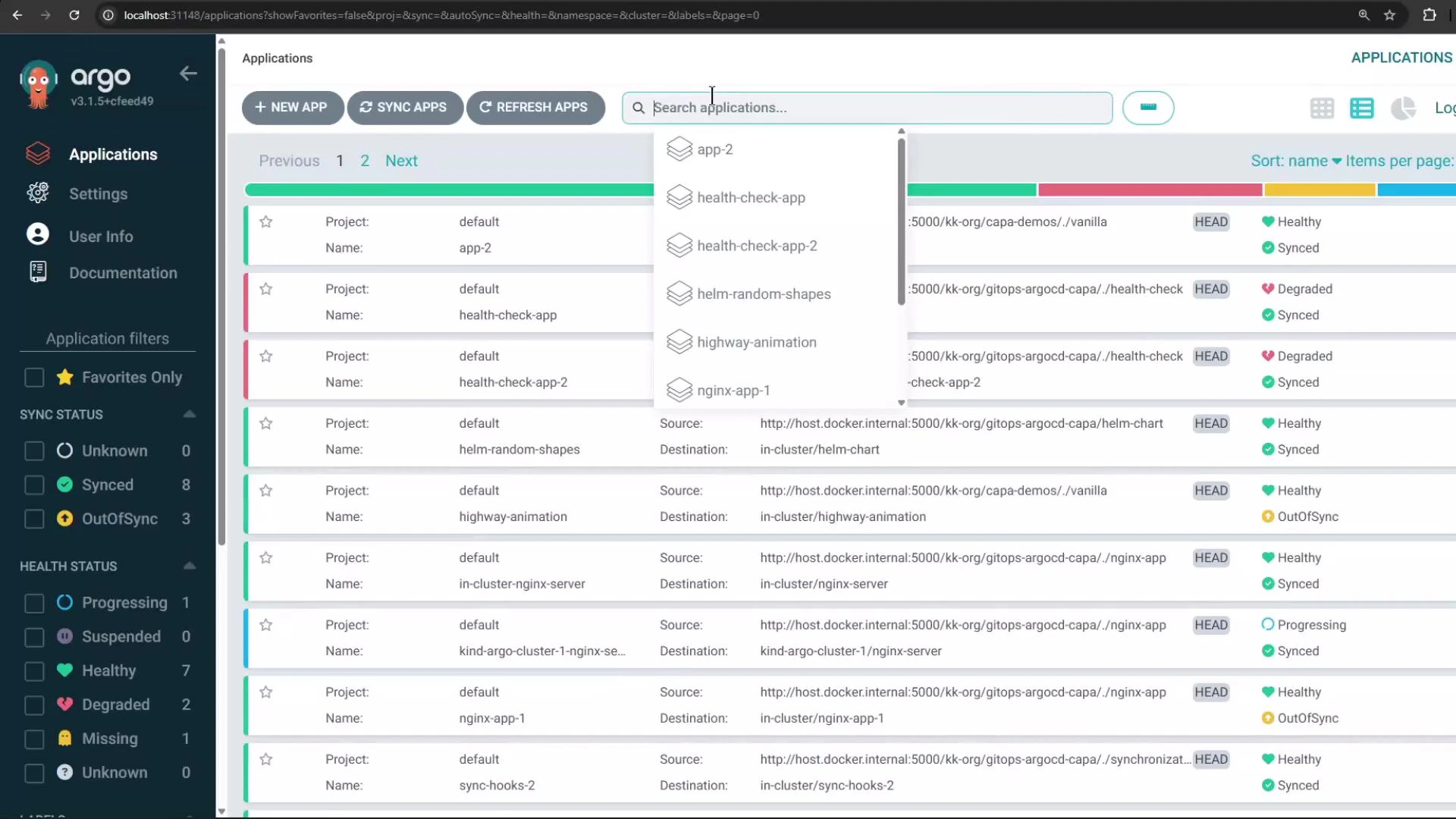 In this example the UI shows multiple nginx Applications — one for the in-cluster destination and another for the kind cluster. Using a single ApplicationSet with the clusters generator lets you create identical Applications targeted to multiple clusters automatically.
## Further reading and references
* Official ApplicationSet docs: [https://argoproj.github.io/argo-cd/operator-manual/applicationset/](https://argoproj.github.io/argo-cd/operator-manual/applicationset/)
* Argo CD documentation: [https://argo-cd.readthedocs.io/](https://argo-cd.readthedocs.io/)
* ApplicationSet controller repo and examples: [https://github.com/argoproj-labs/applicationset](https://github.com/argoproj-labs/applicationset)
That's all for this lesson — you should now be able to choose between the list and clusters generators and deploy workloads across multiple clusters using a single ApplicationSet.
In this example the UI shows multiple nginx Applications — one for the in-cluster destination and another for the kind cluster. Using a single ApplicationSet with the clusters generator lets you create identical Applications targeted to multiple clusters automatically.
## Further reading and references
* Official ApplicationSet docs: [https://argoproj.github.io/argo-cd/operator-manual/applicationset/](https://argoproj.github.io/argo-cd/operator-manual/applicationset/)
* Argo CD documentation: [https://argo-cd.readthedocs.io/](https://argo-cd.readthedocs.io/)
* ApplicationSet controller repo and examples: [https://github.com/argoproj-labs/applicationset](https://github.com/argoproj-labs/applicationset)
That's all for this lesson — you should now be able to choose between the list and clusters generators and deploy workloads across multiple clusters using a single ApplicationSet.