> ## Documentation Index
> Fetch the complete documentation index at: https://notes.kodekloud.com/llms.txt
> Use this file to discover all available pages before exploring further.
# Demo Create and Test ArgoCD Project
> Creating and testing ArgoCD projects to restrict source repositories destinations Kubernetes kinds, manage roles and tokens, and observe how project-level policies affect application creation and synchronization.
In this lesson you'll create a new ArgoCD Project, restrict what applications in that project may do, and observe how those project-level restrictions affect application creation and synchronization.
What you'll learn
* What an ArgoCD Project is and why it matters
* How to restrict source repositories, cluster destinations, and Kubernetes kinds
* How to create project roles and short-lived tokens
* How to test a restricted project by creating and syncing an application
Relevant links and references
* [Argo CD documentation — Projects](https://argo-cd.readthedocs.io/en/stable/operator-manual/project/)
* [Kubernetes API concepts](https://kubernetes.io/docs/concepts/overview/what-is-kubernetes/)
## What is a Project?
A Project is a logical grouping of applications in ArgoCD. Projects scope what applications in that group are allowed to use — including which Git repos they can pull from, which cluster destinations and namespaces they can deploy to, and which Kubernetes API kinds they may create. Use projects to enforce team boundaries and reduce blast radius (for example, disallow non-operator teams from creating cluster-scoped resources like ClusterRole).
ArgoCD ships with a `default` project that is highly permissive (it can pull from any repository, deploy to any destination, and create cluster-level resources). You can modify the `default` project but you cannot delete it.
## Default / Permissive Project Behavior
A very permissive project specification (the typical default after fresh install):
```yaml theme={null}
spec:
sourceRepos:
- '*'
destinations:
- namespace: '*'
server: '*'
```
To allow cluster-scoped resources by default, a project can include a cluster resource allow list:
```yaml theme={null}
spec:
sourceRepos:
- '*'
destinations:
- namespace: '*'
server: '*'
clusterResourceWhitelist:
- group: '*'
kind: '*'
```
## Key Project Fields (at a glance)
| Field | Purpose | Example |
| --------------------------------------------------- | ----------------------------------------------- | ----------------------------------------------------------------- |
| sourceRepos | Whitelist/deny repositories the project can use | `- 'https://github.com/example/*'` |
| destinations | Allowed server URL and namespace pairs | `- namespace: 'default' server: 'https://kubernetes.default.svc'` |
| clusterResourceWhitelist / clusterResourceBlacklist | Allow or deny specific cluster-scoped API kinds | `- group: rbac.authorization.k8s.io kind: ClusterRole` |
| roles | Define project-level roles and policies | `argocd proj role create` |
## Controlling Allowed and Denied Repositories
You control repository access with `sourceRepos`. Patterns may be negated using a leading `!` to explicitly deny matches.
CLI examples to add/remove repository patterns:
```bash theme={null}
argocd proj add-source
argocd proj remove-source
# To add or remove a denied (negated) source:
argocd proj add-source !
argocd proj remove-source !
```
Example YAML using negation patterns:
```yaml theme={null}
spec:
sourceRepos:
# Do not use the test repo in argoproj
- '!ssh://git@github.com:argoproj/test'
# Nor any GitLab repo under group/
- '!https://gitlab.com/group/**'
# Any other repo is fine though
- '*'
```
## Controlling Destinations and Namespaces
Destination entries define allowed (or denied) server/namespace pairs. You can negate `namespace` or `server` with a `!` prefix:
```yaml theme={null}
spec:
destinations:
# Do not allow any app to be installed in `kube-system`
- namespace: '!kube-system'
server: '*'
# Do not allow any cluster whose server URL matches team1-*
- namespace: '*'
server: '!http://team1-*'
# Any other namespace or server is allowed
- namespace: '*'
server: '*'
```
If a project has no allowed destinations configured, application creation will fail with an InvalidSpecError.
## Project Roles and Tokens
Projects can define roles and issue short-lived tokens bound to those roles. Tokens are useful for automation or cross-team access with limited scope.
Typical workflow:
```bash theme={null}
PROJ=myproject
APP=guestbook-default
ROLE=get-role
# Create role
argocd proj role create $PROJ $ROLE
# Create a token for the role, expires in 10 minutes
argocd proj role create-token $PROJ $ROLE -e 10m
# List and inspect role
argocd proj role list $PROJ
argocd proj role get $PROJ $ROLE
# Trying to access the app will fail until the role is granted permissions:
argocd app get $APP --auth-token $JWT
# Grant the role permission to get the specific application
argocd proj role add-policy $PROJ $ROLE --action get --permission allow --object $APP
argocd app get $APP --auth-token $JWT
# Modify policies to use a wildcard (grant access to all apps)
argocd proj role remove-policy $PROJ $ROLE -a get -o $APP
argocd proj role add-policy $PROJ $ROLE -a get --permission allow -o '*'
argocd app get $APP --auth-token $JWT
# Revoke the token when done
argocd proj role delete-token $PROJ $ROLE
# The token no longer works:
argocd app get $APP --auth-token $JWT
```
## Sync Windows and Global Project Mapping
Projects can be referenced by selectors and sync windows can be applied globally by mapping applications (by label selectors) to a project.
Example that matches apps labeled `opt: prod` and maps them to `proj-global-test`:
```yaml theme={null}
- labelSelector:
matchExpressions:
- key: opt
operator: In
values:
- prod
projectName: proj-global-test
```
ConfigMap snippet that might be stored in ArgoCD settings:
```yaml theme={null}
data:
globalProjects: |-
- labelSelector:
matchExpressions:
- key: opt
operator: In
values:
- prod
projectName: proj-global-test
kind: ConfigMap
```
## UI: Viewing and Editing Projects
In the ArgoCD UI navigate to Settings → Projects to view and edit projects. The UI shows project fields such as allowed source repositories, destinations, cluster resource allow/deny lists, roles, and sync windows.
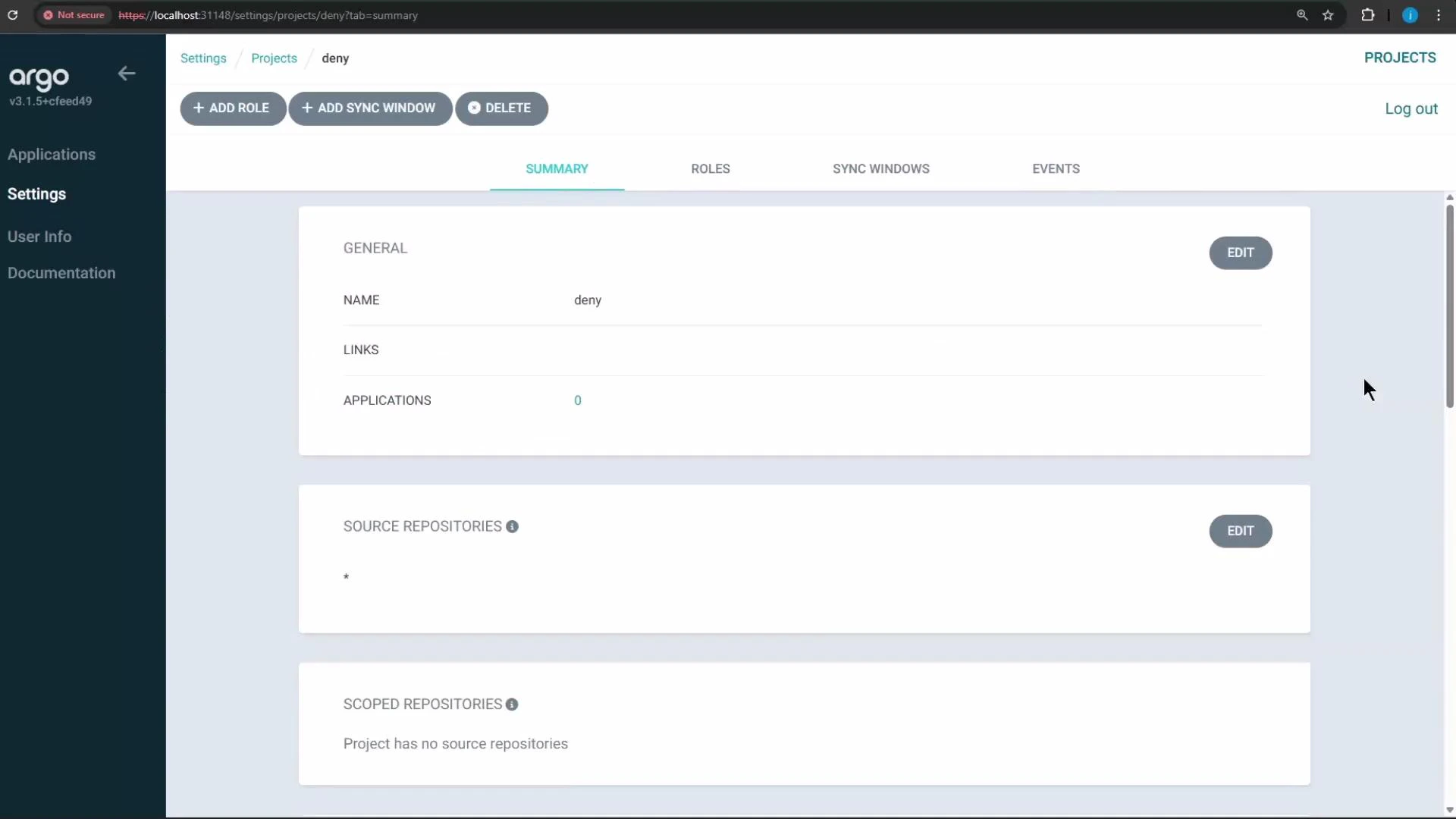 The UI in this environment auto-saves project edits, so you may not see an explicit "Save" button after changes.
## Creating a Restricted Project (example)
We'll create a project named `deny` and restrict it so users in that project cannot create ClusterRole resources. This is achieved by adding an entry to the project's cluster resource denial list for kind `ClusterRole` in the `rbac.authorization.k8s.io` API group.
Testing approach
1. Create or update the `deny` project to include a rule that denies ClusterRole.
2. Create an application in the `deny` project whose repository includes a Deployment, Service, and a ClusterRole manifest.
3. Attempt to sync the application and observe the sync failure caused by the denied ClusterRole.
Note: if the project does not allow your desired destination (server/namespace), application creation will fail — update the project's destinations first, then create the app.
### Create the application (CLI example)
```bash theme={null}
argocd app create testing-project \
--repo http://host.docker.internal:5000/kk-org/pod-metadata \
--path ./manifests \
--dest-namespace default \
--project deny \
--dest-server https://kubernetes.default.svc
```
Example repository manifest (one file under ./manifests):
```yaml theme={null}
apiVersion: apps/v1
kind: Deployment
metadata:
name: highway-animation
namespace: highway-animation
spec:
replicas: 1
selector:
matchLabels:
app: highway-animation
template:
metadata:
labels:
app: highway-animation
spec:
containers:
- name: highway-animation
image: siddharth67/highway-animation:blue
ports:
- containerPort: 3000
env:
- name: POD_COUNT
value: "1"
```
If the project lacks a matching destination, you'll see an error similar to:
```text theme={null}
{"level":"fatal","msg":"rpc error: code = InvalidArgument desc = application spec for testing-project is invalid: InvalidSpecError: application destination server 'https://kubernetes.default.svc' and namespace 'default' do not match any of the allowed destinations in project 'deny'"}
```
To resolve that, add an appropriate destination entry to the `deny` project (for testing you can allow the cluster/namespace you intend to use) and re-run the `argocd app create` command.
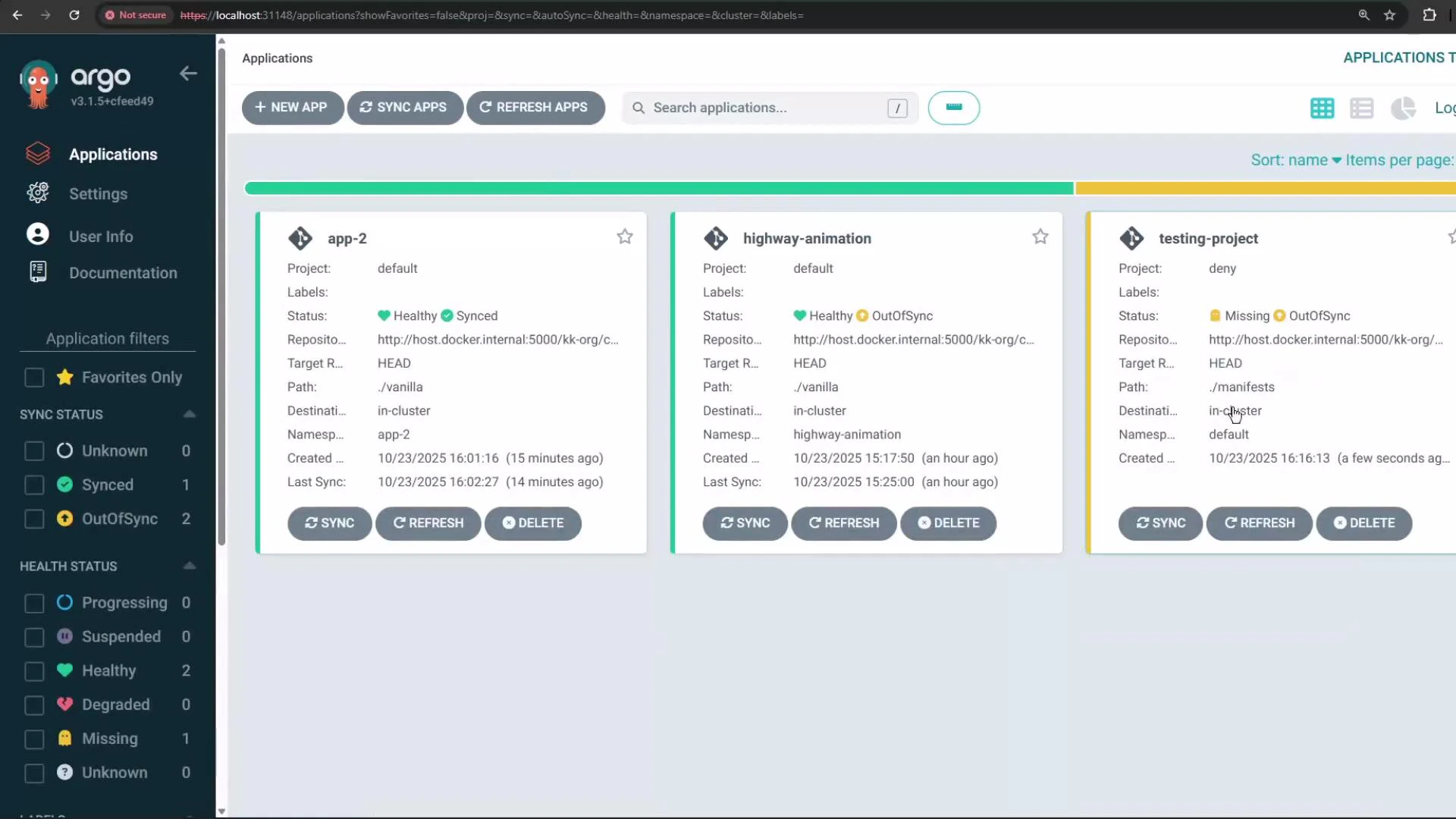
Once the app is created, it will appear in the ArgoCD UI with its sync and health status.
The UI in this environment auto-saves project edits, so you may not see an explicit "Save" button after changes.
## Creating a Restricted Project (example)
We'll create a project named `deny` and restrict it so users in that project cannot create ClusterRole resources. This is achieved by adding an entry to the project's cluster resource denial list for kind `ClusterRole` in the `rbac.authorization.k8s.io` API group.
Testing approach
1. Create or update the `deny` project to include a rule that denies ClusterRole.
2. Create an application in the `deny` project whose repository includes a Deployment, Service, and a ClusterRole manifest.
3. Attempt to sync the application and observe the sync failure caused by the denied ClusterRole.
Note: if the project does not allow your desired destination (server/namespace), application creation will fail — update the project's destinations first, then create the app.
### Create the application (CLI example)
```bash theme={null}
argocd app create testing-project \
--repo http://host.docker.internal:5000/kk-org/pod-metadata \
--path ./manifests \
--dest-namespace default \
--project deny \
--dest-server https://kubernetes.default.svc
```
Example repository manifest (one file under ./manifests):
```yaml theme={null}
apiVersion: apps/v1
kind: Deployment
metadata:
name: highway-animation
namespace: highway-animation
spec:
replicas: 1
selector:
matchLabels:
app: highway-animation
template:
metadata:
labels:
app: highway-animation
spec:
containers:
- name: highway-animation
image: siddharth67/highway-animation:blue
ports:
- containerPort: 3000
env:
- name: POD_COUNT
value: "1"
```
If the project lacks a matching destination, you'll see an error similar to:
```text theme={null}
{"level":"fatal","msg":"rpc error: code = InvalidArgument desc = application spec for testing-project is invalid: InvalidSpecError: application destination server 'https://kubernetes.default.svc' and namespace 'default' do not match any of the allowed destinations in project 'deny'"}
```
To resolve that, add an appropriate destination entry to the `deny` project (for testing you can allow the cluster/namespace you intend to use) and re-run the `argocd app create` command.
Once the app is created, it will appear in the ArgoCD UI with its sync and health status.
 ## Attempting to Synchronize the Application
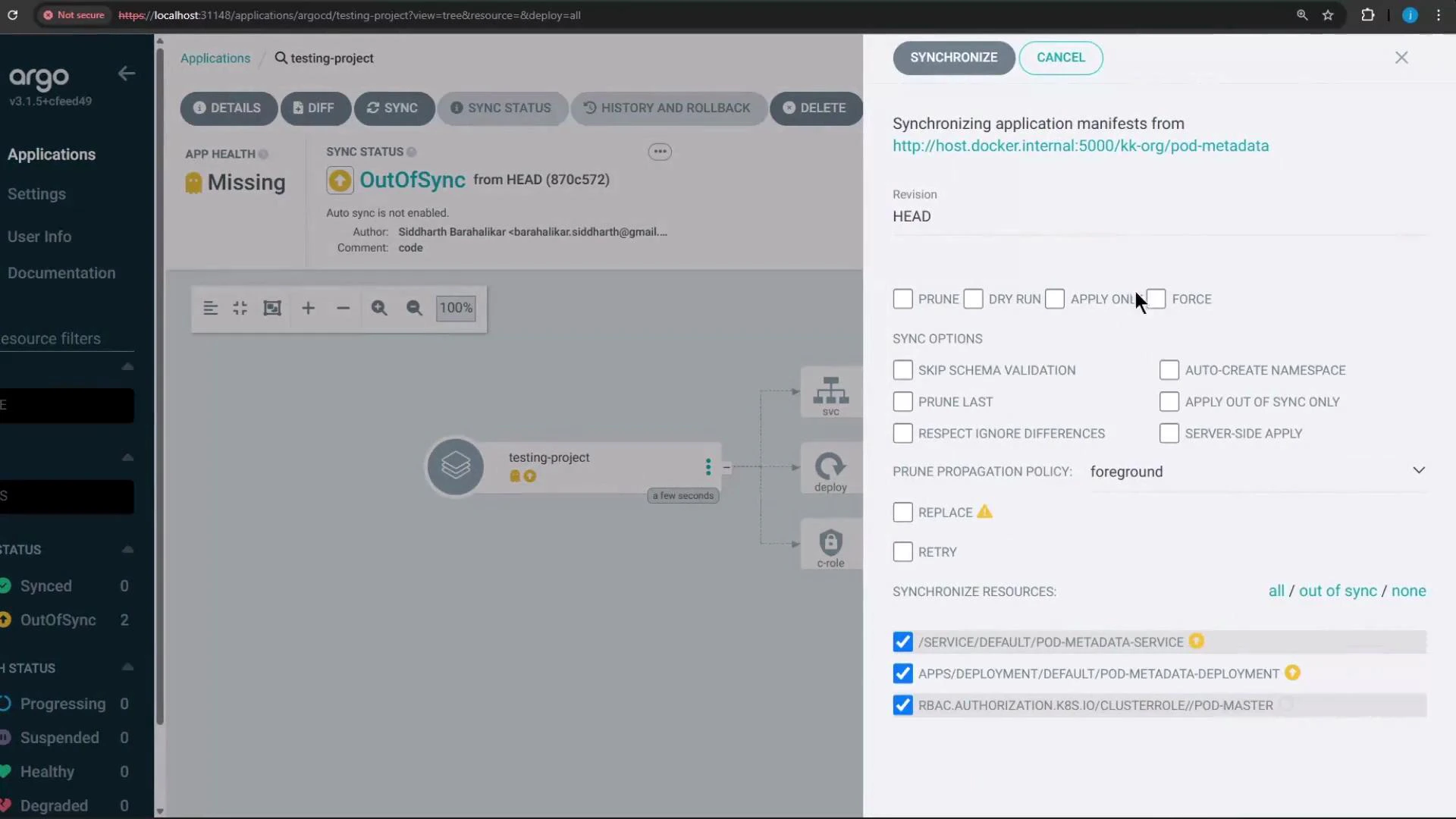
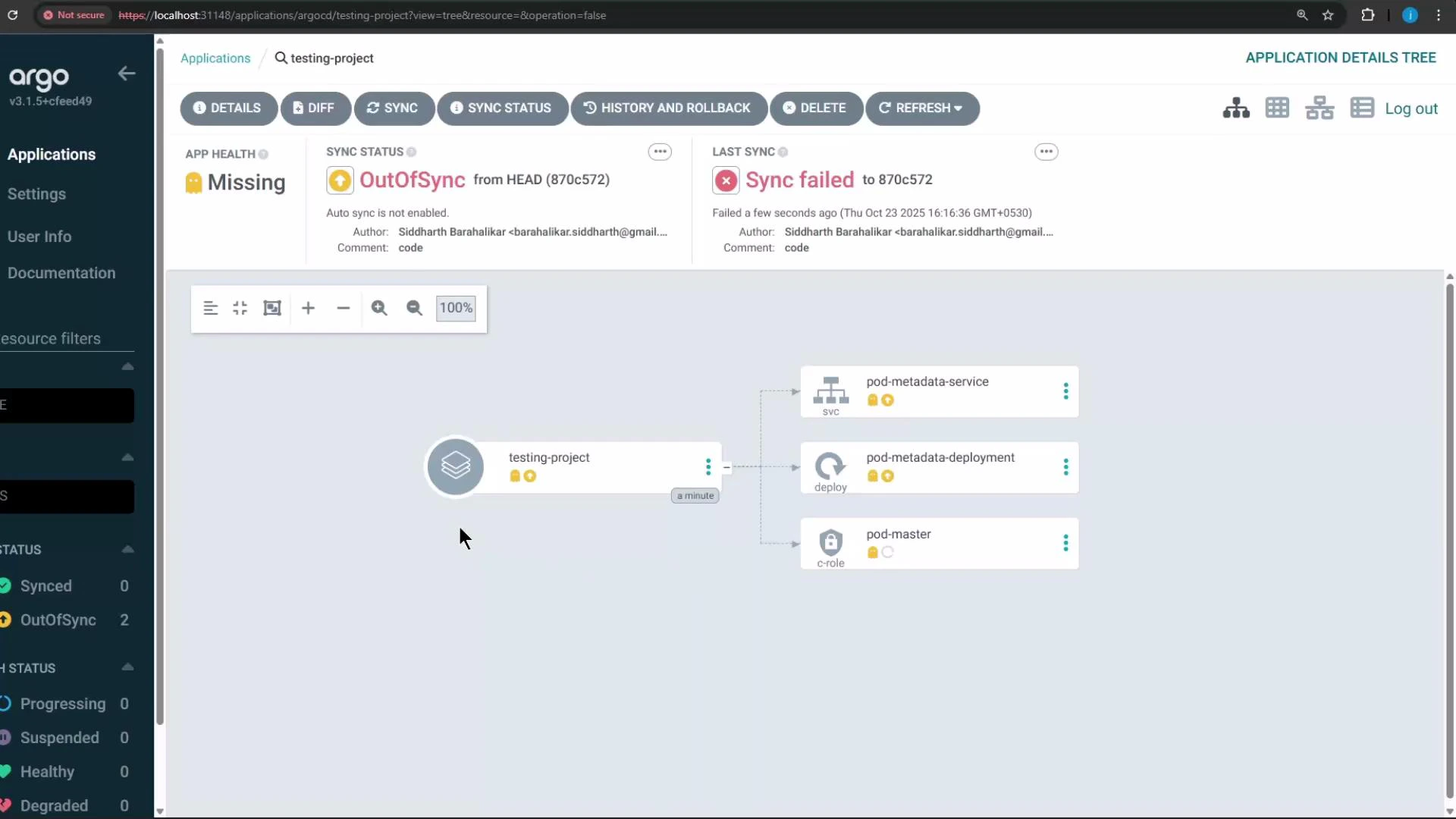
Try synchronizing the `testing-project` application. Because the repository contains a ClusterRole manifest and the `deny` project blocks ClusterRole creation, synchronization will fail and the UI will indicate the blocked resource(s).
When you click Synchronize in the UI, the operation will fail and report that the ClusterRole (rbac.authorization.k8s.io) is not permitted by the project's rules.
## Attempting to Synchronize the Application
Try synchronizing the `testing-project` application. Because the repository contains a ClusterRole manifest and the `deny` project blocks ClusterRole creation, synchronization will fail and the UI will indicate the blocked resource(s).
When you click Synchronize in the UI, the operation will fail and report that the ClusterRole (rbac.authorization.k8s.io) is not permitted by the project's rules.
 The sync failure details clearly show the ClusterRole was blocked by the project's cluster resource denial list.
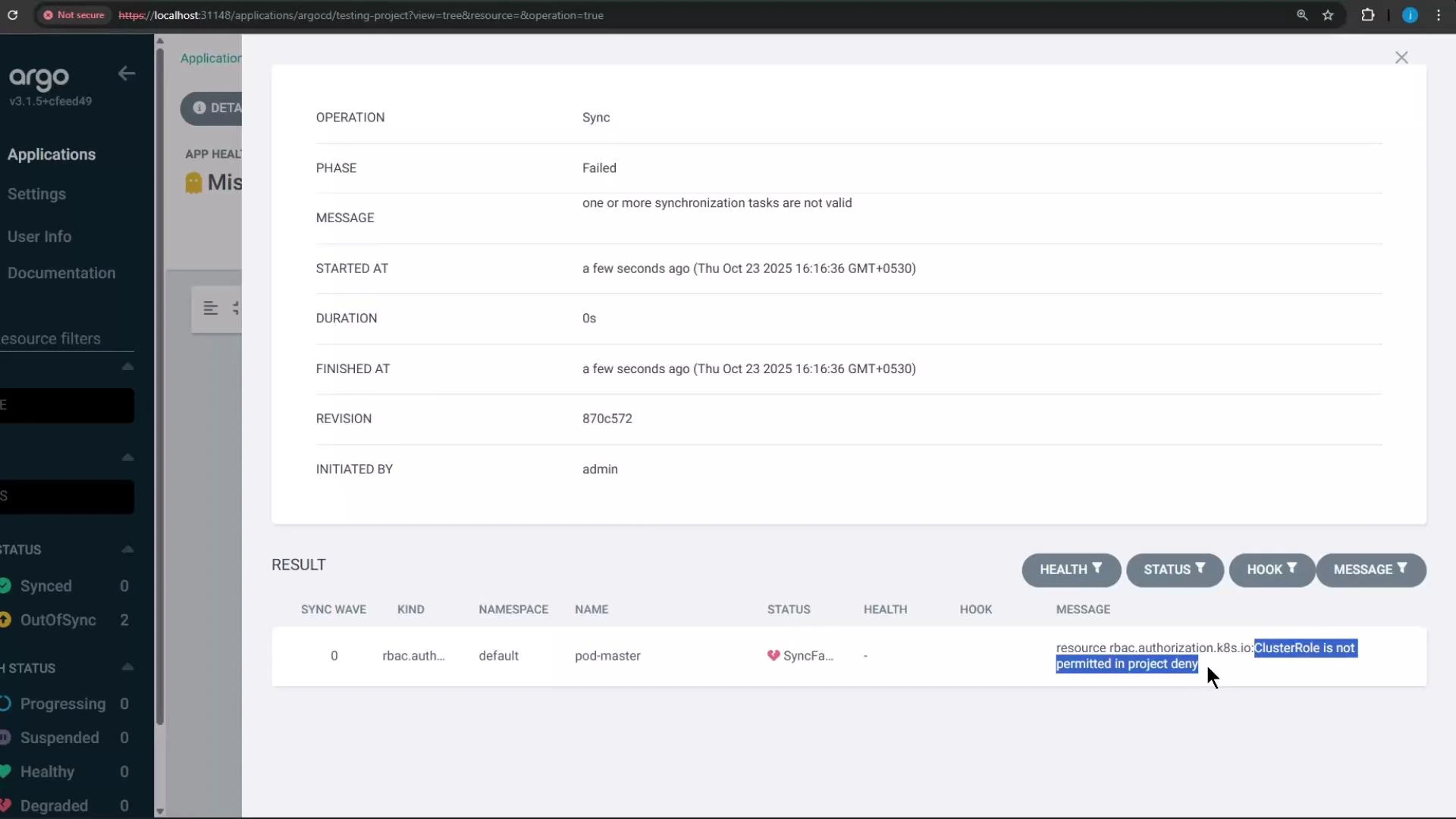 Because a disallowed resource prevented synchronization, the application tree will show no resources were successfully applied.
 ## Troubleshooting Tips
* If application creation fails with InvalidSpecError, confirm the project's `destinations` include the requested `server` and `namespace`.
* If sync fails and the UI shows a blocked resource, check the project's clusterResourceWhitelist/clusterResourceBlacklist for the resource's API group/kind.
* Use `argocd proj role list` and `argocd proj role get` to debug role and policy settings when tokens fail.
## Summary
* Projects let you scope repositories, cluster destinations, and permitted Kubernetes kinds for applications.
* Use projects to enforce team boundaries and reduce blast radius (e.g., prevent non-operators from creating ClusterRole).
* Manage projects via the CLI or UI, create project-level roles and tokens, and define sync windows and selectors for global project mapping.
That's all for now.
## Troubleshooting Tips
* If application creation fails with InvalidSpecError, confirm the project's `destinations` include the requested `server` and `namespace`.
* If sync fails and the UI shows a blocked resource, check the project's clusterResourceWhitelist/clusterResourceBlacklist for the resource's API group/kind.
* Use `argocd proj role list` and `argocd proj role get` to debug role and policy settings when tokens fail.
## Summary
* Projects let you scope repositories, cluster destinations, and permitted Kubernetes kinds for applications.
* Use projects to enforce team boundaries and reduce blast radius (e.g., prevent non-operators from creating ClusterRole).
* Manage projects via the CLI or UI, create project-level roles and tokens, and define sync windows and selectors for global project mapping.
That's all for now.