> ## Documentation Index
> Fetch the complete documentation index at: https://notes.kodekloud.com/llms.txt
> Use this file to discover all available pages before exploring further.
# Demo Deploy Apps using HELM Chart
> Guide to deploying Helm charts with Argo CD, explaining Helm-specific options, values override mechanisms, precedence, and examples using a simple random shapes chart.
In this lesson you'll learn how to deploy Helm charts with Argo CD and how Argo CD exposes Helm-specific options: value files, inline `values`, `valuesObject`, and Helm `parameters`. The examples use a simple Helm chart that renders a ConfigMap and a Deployment from chart defaults in `values.yaml`. You'll also see how Argo CD merges and applies overrides and the defined order of precedence.
## Argo CD Application spec (Helm)
A typical Argo CD Application that references a Helm chart includes Helm-specific fields under `spec.source.helm`. The minimal Application spec looks like this:
```yaml theme={null}
apiVersion: argoproj.io/v1alpha1
kind: Application
metadata:
name: guestbook
# You'll usually want to add your resources to the argocd namespace.
namespace: argocd
# Add this finalizer ONLY if you want these to cascade delete.
finalizers:
# The default behaviour is foreground cascading deletion
- resources-finalizer.argocd.argoproj.io
labels:
name: guestbook
spec:
# The project the application belongs to.
project: default
# Source of the application manifests
source:
repoURL: https://github.com/argoproj/argocd-example-apps.git
targetRevision: HEAD # If repoURL is a Git repo, this is branch/tag/commit. If repoURL is a Helm repo, this can be the chart version.
path: guestbook # Path inside the repo when using a Git source
```
Scroll to `spec.source.helm` to configure Helm-specific behavior. Argo CD accepts multiple ways to pass Helm values and options:
* `valueFiles`: list of values files (relative to `spec.source.path`)
* `values`: inline YAML block
* `valuesObject`: native key/value map (preferred over `values`)
* `parameters`: Helm name/value list (highest precedence)
Below are common Helm source options you'll use.
### Example: valueFiles / values / valuesObject
Use `valueFiles` to reference files in the chart directory (relative to `spec.source.path`). You can also provide `values` as an inline YAML document or `valuesObject` as a native map. `valuesObject` takes precedence over `values`.
```yaml theme={null}
# The path is relative to the spec.source.path directory defined above
valueFiles:
- values-prod.yaml
# Ignore locally missing valueFiles when installing Helm chart. Defaults to false
ignoreMissingValueFiles: false
# Values file as block (YAML). Prefer to use valuesObject if possible (see below)
values: |
ingress:
enabled: true
path: /
hosts:
- mydomain.example.com
annotations:
kubernetes.io/ingress.class: nginx
kubernetes.io/tls-acme: "true"
labels: {}
tls:
- secretName: mydomain-tls
hosts:
- mydomain.example.com
# Values as a native object. This takes precedence over `values`
valuesObject:
ingress:
enabled: true
path: /
hosts:
- mydomain.example.com
annotations:
kubernetes.io/ingress.class: nginx
kubernetes.io/tls-acme: "true"
labels: {}
tls:
- secretName: mydomain-tls
hosts:
- mydomain.example.com
```
### Other Helm options
Argo CD supports additional Helm options that affect templating and installation:
```yaml theme={null}
# Skip custom resource definition installation if chart contains CRDs
skipCrds: false
# Skip schema validation if chart contains JSON schema validation. Defaults to false
skipSchemaValidation: false
# Optional Helm version to template with. If omitted, Argo CD will decide which Helm binary to use automatically.
# Valid values: 'v2' or 'v3'
version: v3
# You can specify the Kubernetes version to pass to Helm when templating manifests.
# The value must be semver formatted.
kubeVersion: "1.30.0"
# You can specify additional API versions to pass to Helm when templating.
# Format: [group]/version/kind (or just version/kind)
apiVersions:
- traefik.io/v1alpha1/TLSOption
- v1/Service
# Optional namespace to template with. If left empty, defaults to the app's destination.
namespace: custom-namespace
```
Argo CD also supports other customization tools such as Kustomize. This lesson focuses on Helm, but here is a reference Kustomize block for completeness:
```yaml theme={null}
kustomize:
# Optional kustomize version. Note: version must be configured in argocd-cm ConfigMap
version: v3.5.4
namePrefix: prod-
nameSuffix: -some-suffix
commonLabels:
foo: bar
commonAnnotations:
beep: boop-${ARGOCD_APP_REVISION}
commonAnnotationsEnvsubst: true
labelWithoutSelector: false
labelIncludeTemplates: false
forceCommonLabels: false
forceCommonAnnotations: false
images:
- quay.io/argoprojlabs/argocd-e2e-container:0.2
- my-app=gcr.io/my-repo/my-app:0.1
namespace: custom-namespace
replicas:
- name: kustomize-guestbook-ui
count: 4
components:
- ./component
```
***
## Example Helm chart (repo) — values and templates
The demo repository contains a simple Helm chart (v1.0.0) with a `values.yaml` and templates that render a ConfigMap and a Deployment.
Default `values.yaml` (chart defaults):
```yaml theme={null}
replicaCount: 1
image:
repository: siddharth67/php-random-shapes:v1
pullPolicy: IfNotPresent
# Overrides the image tag whose default is the chart appVersion.
tag: ""
imagePullSecrets: []
nameOverride: ""
fullnameOverride: ""
service:
type: ClusterIP
port: 80
targetPort: 80
color:
circle: black
oval: black
triangle: black
rectangle: black
square: black
```
`templates/configmap.yaml` (reads color values from chart values):
```yaml theme={null}
apiVersion: v1
kind: ConfigMap
metadata:
name: {{ .Release.Name }}-configmap
data:
CIRCLE_COLOR: {{ .Values.color.circle }}
OVAL_COLOR: {{ .Values.color.oval }}
SQUARE_COLOR: {{ .Values.color.square }}
TRIANGLE_COLOR: {{ .Values.color.triangle }}
RECTANGLE_COLOR: {{ .Values.color.rectangle }}
```
`templates/deployment.yaml` (uses values for replicas, image, envFrom configmap):
```yaml theme={null}
apiVersion: apps/v1
kind: Deployment
metadata:
name: {{ .Release.Name }}-deploy
labels:
{{- include "random-shapes.labels" . | nindent 4 }}
spec:
replicas: {{ .Values.replicaCount }}
selector:
matchLabels:
{{- include "random-shapes.selectorLabels" . | nindent 6 }}
template:
metadata:
{{- with .Values.podAnnotations }}
annotations:
{{- toYaml . | nindent 8 }}
{{- end }}
labels:
{{- include "random-shapes.selectorLabels" . | nindent 8 }}
spec:
containers:
- name: {{ .Chart.Name }}
image: "{{ .Values.image.repository }}"
imagePullPolicy: {{ .Values.image.pullPolicy }}
envFrom:
- configMapRef:
name: {{ .Release.Name }}-configmap
```
When Argo CD detects this chart in a repo, the UI pre-populates fields from the chart's default `values.yaml`. If you don't provide any overrides, Argo CD will deploy using those chart defaults.
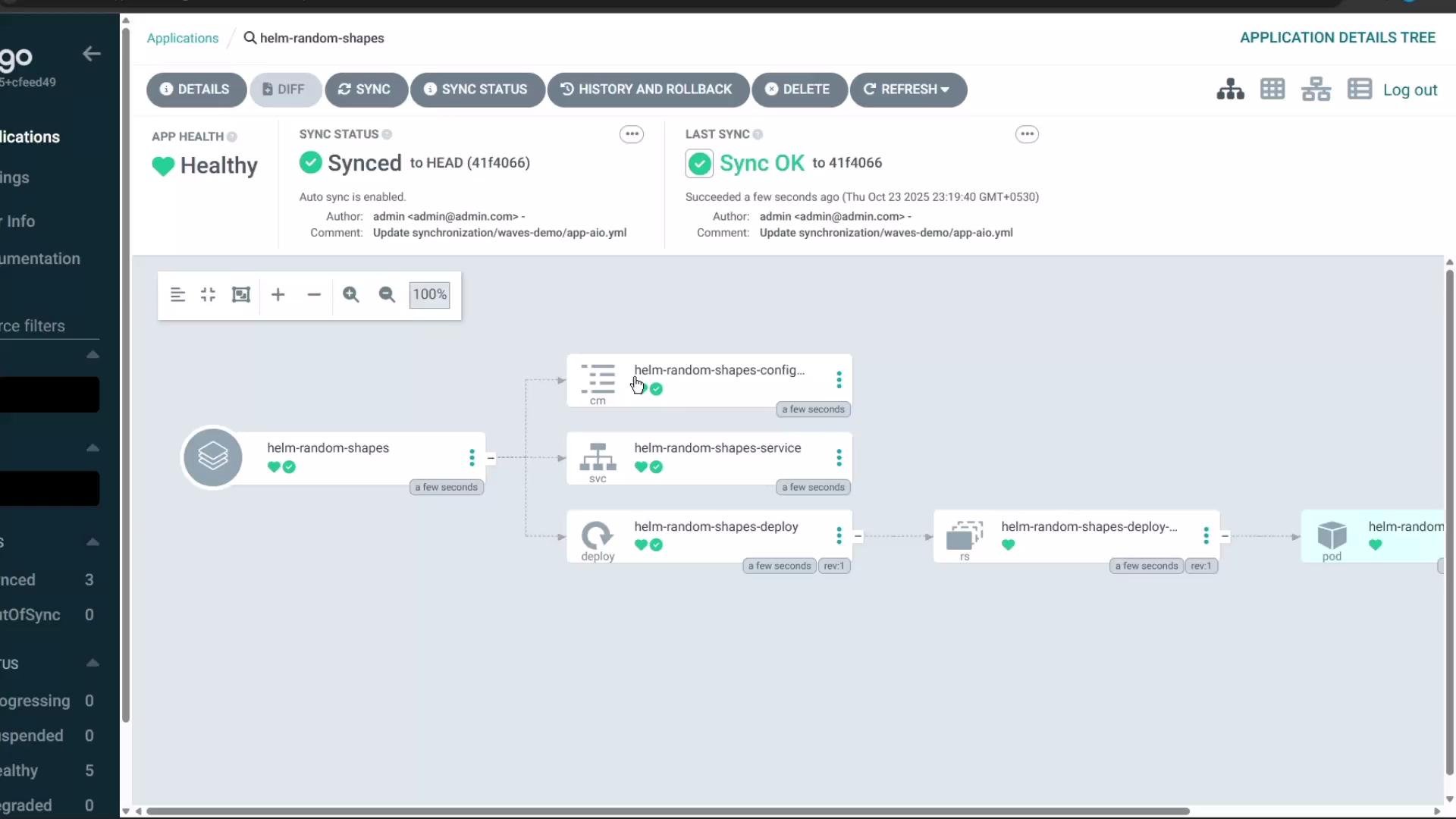
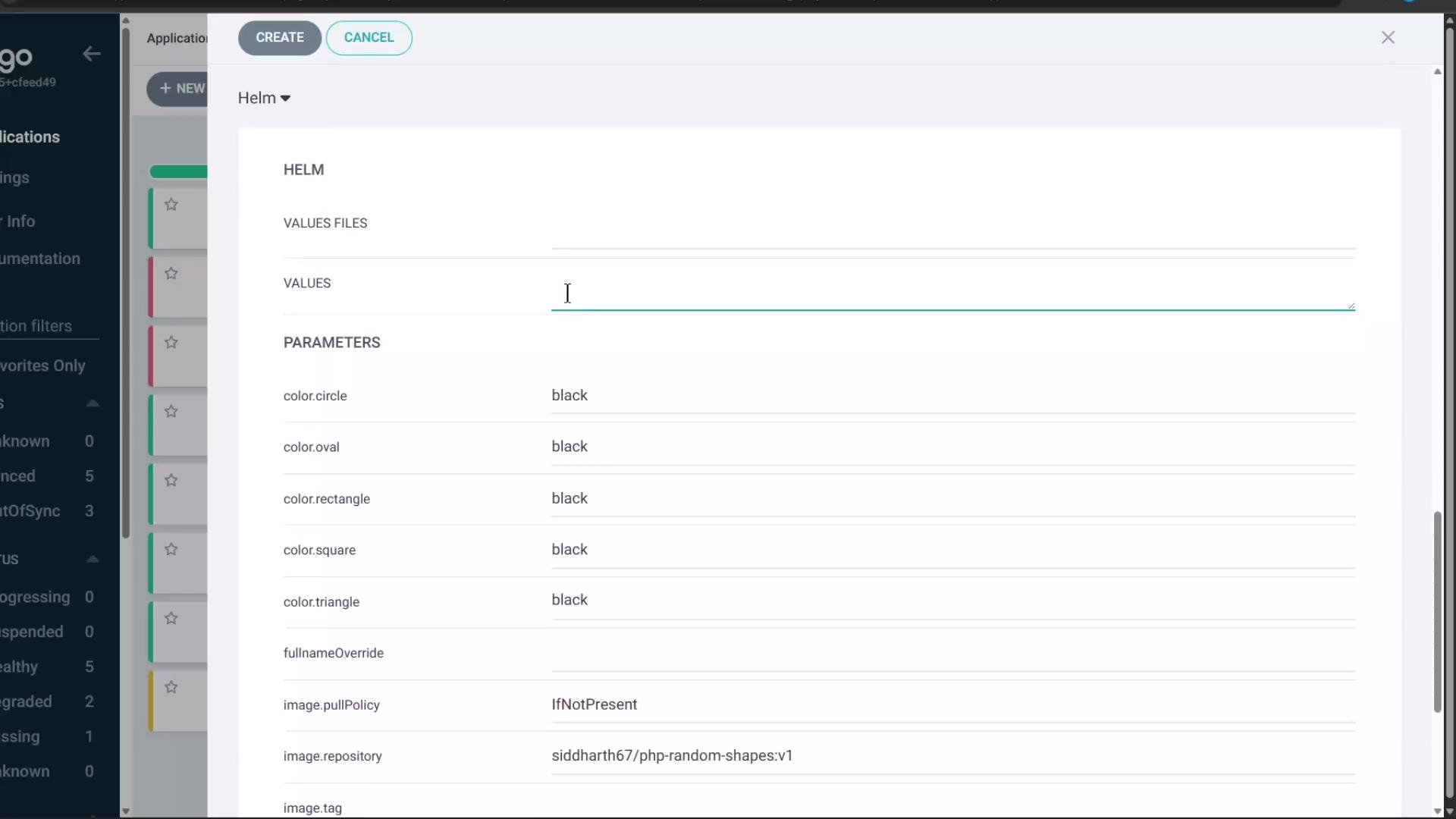 Create the Application in Argo CD with your desired sync options (for example, automatic sync, auto-create namespace, destination server set to in-cluster). By default the chart renders with the chart's default values (all shapes black, service type ClusterIP, image from `values.yaml`). The Deployment and Pod should appear in the target namespace (for example, `helm-chart`).
Here is the Application resource tree showing the deployed resources:
Create the Application in Argo CD with your desired sync options (for example, automatic sync, auto-create namespace, destination server set to in-cluster). By default the chart renders with the chart's default values (all shapes black, service type ClusterIP, image from `values.yaml`). The Deployment and Pod should appear in the target namespace (for example, `helm-chart`).
Here is the Application resource tree showing the deployed resources:
 ***
## Updating values from the Argo CD UI
Argo CD offers multiple ways to change Helm values after the Application has been created:
* Upload a `values.yaml` file to the Application
* Edit `values` (YAML block)
* Edit `valuesObject` (map form)
* Edit `parameters` (name/value list — highest precedence)
Example inline `values` override added in the UI or to the Application manifest:
```yaml theme={null}
color:
circle: red
service:
type: NodePort
```
After saving, Argo CD re-renders the manifests and applies the updated resources. For example, the ConfigMap will change to reflect the override:
```yaml theme={null}
apiVersion: v1
kind: ConfigMap
metadata:
name: helm-random-shapes-configmap
namespace: helm-chart
data:
CIRCLE_COLOR: red
OVAL_COLOR: black
RECTANGLE_COLOR: black
SQUARE_COLOR: black
TRIANGLE_COLOR: black
```
If you change service type to NodePort, the Service manifest updates accordingly:
```yaml theme={null}
apiVersion: v1
kind: Service
metadata:
name: helm-random-shapes-service
namespace: helm-chart
spec:
type: NodePort
ports:
- name: http
nodePort: 31592
port: 80
protocol: TCP
targetPort: 80
selector:
app.kubernetes.io/instance: helm-random-shapes
app.kubernetes.io/name: random-shapes-chart
```
Updating a ConfigMap consumed by a Deployment (via envFrom) does not automatically restart running pods. To make pods pick up the new environment variables, perform a rollout restart on the Deployment, or use Argo CD reconciliation policies to trigger pod replacement.
Example command to restart the deployment so new pods pick up updated ConfigMap values:
```bash theme={null}
kubectl rollout restart deployment helm-random-shapes-deploy -n helm-chart
```
After the rollout, new pods will read the updated environment variables and the application behavior (e.g., circle color) will change accordingly.
***
## Overriding using Parameters (highest precedence)
Argo CD exposes Helm `parameters` (a list of name/value pairs) that take the highest precedence when templating. Parameters are useful for single-value overrides or when you prefer a flat list.
Example `parameters` entry:
```yaml theme={null}
parameters:
- name: "color.circle"
value: "green"
```
If the same key is present in both `values` (or `valuesObject`) and `parameters`, the value from `parameters` will be used. For example:
* `values` sets `color.circle: red`
* `parameters` sets `color.circle: green`
* Result in rendered manifests: `CIRCLE_COLOR: green`
***
Precedence summary: when multiple Helm override mechanisms are used, Argo CD applies them in a defined order — last overrides win. Use the precedence table below to decide where to place your overrides.
## Helm values precedence (Argo CD ordering)
From lowest to highest precedence:
| Precedence rank | Source / Mechanism | Notes |
| --------------- | --------------------------------------- | ------------------------------------------------------------------ |
| 1 (lowest) | chart defaults (`values.yaml` in chart) | Used only if not overridden |
| 2 | valueFiles (`valueFiles` list) | Files processed in listed order; later files override earlier ones |
| 3 | `values` (inline YAML block) | Raw YAML block in Application spec |
| 4 | `valuesObject` (map) | Native object; overrides `values` |
| 5 (highest) | `parameters` (name/value list) | Highest precedence; last parameter entry wins for duplicate names |
Additional notes on duplicates and ordering:
* If the same parameter is supplied multiple times, the last occurrence wins.
* If `valueFiles` includes multiple files, the last file in the list has the highest priority among them.
* If a single values file contains duplicate keys, the last occurrence in the file wins.
* `valuesObject` overrides `values` when both are present.
* `parameters` override everything else.
Examples:
valueFiles ordering:
```yaml theme={null}
valueFiles:
- values-file-1.yaml
- values-file-2.yaml
```
If `values-file-1.yaml` contains `param1: value1` and `values-file-2.yaml` contains `param1: value2`, the effective value is `value2`.
parameters duplicate example:
```yaml theme={null}
parameters:
- name: "param1"
value: value2
- name: "param1"
value: value1
```
Effective result: `param1=value1` (last parameter entry wins).
values block duplicate example:
```yaml theme={null}
values: |
param1: value2
param1: value5
```
Effective result: `param1=value5` (last value in the block wins).
***
## Additional example — Helm chart from a Helm repo
When using a Helm repository as `repoURL`, set `spec.source.chart` and `spec.source.targetRevision` (chart version). Example Application:
```yaml theme={null}
apiVersion: argoproj.io/v1alpha1
kind: Application
metadata:
name: sealed-secrets
namespace: argocd
spec:
project: default
source:
chart: sealed-secrets
repoURL: https://bitnami-labs.github.io/sealed-secrets
targetRevision: 1.16.1
helm:
releaseName: sealed-secrets
destination:
server: "https://kubernetes.default.svc"
namespace: kubeseal
```
When using a Git repo as `repoURL`, `targetRevision` is a Git revision (branch/tag/commit), and `path` points to the chart inside the repository.
***
## References and further reading
* Argo CD Official Docs: [https://argo-cd.readthedocs.io/](https://argo-cd.readthedocs.io/)
* Helm Documentation: [https://helm.sh/docs/](https://helm.sh/docs/)
* Kubernetes Concepts: [https://kubernetes.io/docs/concepts/](https://kubernetes.io/docs/concepts/)
This walkthrough covered deploying a Helm chart with Argo CD, how to update Helm values via UI or manifests, and how Argo CD determines which override mechanism wins during templating.
***
## Updating values from the Argo CD UI
Argo CD offers multiple ways to change Helm values after the Application has been created:
* Upload a `values.yaml` file to the Application
* Edit `values` (YAML block)
* Edit `valuesObject` (map form)
* Edit `parameters` (name/value list — highest precedence)
Example inline `values` override added in the UI or to the Application manifest:
```yaml theme={null}
color:
circle: red
service:
type: NodePort
```
After saving, Argo CD re-renders the manifests and applies the updated resources. For example, the ConfigMap will change to reflect the override:
```yaml theme={null}
apiVersion: v1
kind: ConfigMap
metadata:
name: helm-random-shapes-configmap
namespace: helm-chart
data:
CIRCLE_COLOR: red
OVAL_COLOR: black
RECTANGLE_COLOR: black
SQUARE_COLOR: black
TRIANGLE_COLOR: black
```
If you change service type to NodePort, the Service manifest updates accordingly:
```yaml theme={null}
apiVersion: v1
kind: Service
metadata:
name: helm-random-shapes-service
namespace: helm-chart
spec:
type: NodePort
ports:
- name: http
nodePort: 31592
port: 80
protocol: TCP
targetPort: 80
selector:
app.kubernetes.io/instance: helm-random-shapes
app.kubernetes.io/name: random-shapes-chart
```
Updating a ConfigMap consumed by a Deployment (via envFrom) does not automatically restart running pods. To make pods pick up the new environment variables, perform a rollout restart on the Deployment, or use Argo CD reconciliation policies to trigger pod replacement.
Example command to restart the deployment so new pods pick up updated ConfigMap values:
```bash theme={null}
kubectl rollout restart deployment helm-random-shapes-deploy -n helm-chart
```
After the rollout, new pods will read the updated environment variables and the application behavior (e.g., circle color) will change accordingly.
***
## Overriding using Parameters (highest precedence)
Argo CD exposes Helm `parameters` (a list of name/value pairs) that take the highest precedence when templating. Parameters are useful for single-value overrides or when you prefer a flat list.
Example `parameters` entry:
```yaml theme={null}
parameters:
- name: "color.circle"
value: "green"
```
If the same key is present in both `values` (or `valuesObject`) and `parameters`, the value from `parameters` will be used. For example:
* `values` sets `color.circle: red`
* `parameters` sets `color.circle: green`
* Result in rendered manifests: `CIRCLE_COLOR: green`
***
Precedence summary: when multiple Helm override mechanisms are used, Argo CD applies them in a defined order — last overrides win. Use the precedence table below to decide where to place your overrides.
## Helm values precedence (Argo CD ordering)
From lowest to highest precedence:
| Precedence rank | Source / Mechanism | Notes |
| --------------- | --------------------------------------- | ------------------------------------------------------------------ |
| 1 (lowest) | chart defaults (`values.yaml` in chart) | Used only if not overridden |
| 2 | valueFiles (`valueFiles` list) | Files processed in listed order; later files override earlier ones |
| 3 | `values` (inline YAML block) | Raw YAML block in Application spec |
| 4 | `valuesObject` (map) | Native object; overrides `values` |
| 5 (highest) | `parameters` (name/value list) | Highest precedence; last parameter entry wins for duplicate names |
Additional notes on duplicates and ordering:
* If the same parameter is supplied multiple times, the last occurrence wins.
* If `valueFiles` includes multiple files, the last file in the list has the highest priority among them.
* If a single values file contains duplicate keys, the last occurrence in the file wins.
* `valuesObject` overrides `values` when both are present.
* `parameters` override everything else.
Examples:
valueFiles ordering:
```yaml theme={null}
valueFiles:
- values-file-1.yaml
- values-file-2.yaml
```
If `values-file-1.yaml` contains `param1: value1` and `values-file-2.yaml` contains `param1: value2`, the effective value is `value2`.
parameters duplicate example:
```yaml theme={null}
parameters:
- name: "param1"
value: value2
- name: "param1"
value: value1
```
Effective result: `param1=value1` (last parameter entry wins).
values block duplicate example:
```yaml theme={null}
values: |
param1: value2
param1: value5
```
Effective result: `param1=value5` (last value in the block wins).
***
## Additional example — Helm chart from a Helm repo
When using a Helm repository as `repoURL`, set `spec.source.chart` and `spec.source.targetRevision` (chart version). Example Application:
```yaml theme={null}
apiVersion: argoproj.io/v1alpha1
kind: Application
metadata:
name: sealed-secrets
namespace: argocd
spec:
project: default
source:
chart: sealed-secrets
repoURL: https://bitnami-labs.github.io/sealed-secrets
targetRevision: 1.16.1
helm:
releaseName: sealed-secrets
destination:
server: "https://kubernetes.default.svc"
namespace: kubeseal
```
When using a Git repo as `repoURL`, `targetRevision` is a Git revision (branch/tag/commit), and `path` points to the chart inside the repository.
***
## References and further reading
* Argo CD Official Docs: [https://argo-cd.readthedocs.io/](https://argo-cd.readthedocs.io/)
* Helm Documentation: [https://helm.sh/docs/](https://helm.sh/docs/)
* Kubernetes Concepts: [https://kubernetes.io/docs/concepts/](https://kubernetes.io/docs/concepts/)
This walkthrough covered deploying a Helm chart with Argo CD, how to update Helm values via UI or manifests, and how Argo CD determines which override mechanism wins during templating.