> ## Documentation Index
> Fetch the complete documentation index at: https://notes.kodekloud.com/llms.txt
> Use this file to discover all available pages before exploring further.
# Demo Multi Cluster Application Deployment
> How to register remote Kubernetes clusters with Argo CD and deploy applications to them, including adding clusters, creating applications, and verifying deployments.
This guide shows how to register a remote Kubernetes cluster with Argo CD and deploy an application to that cluster. By default, Argo CD manages resources in the cluster where it is installed (the control plane). To deploy to other clusters you must add them as destinations so Argo CD can authenticate and talk to them.
Before you begin:
* Ensure your local kubeconfig contains contexts for both the Argo CD control cluster and any target clusters (e.g., KinD).
* Ensure the `argocd` CLI is installed and authenticated against your Argo CD server (`argocd login`).
## 1) Identify the kubeconfig context to add
List your current kubeconfig contexts to identify the context name you will add to Argo CD:
```bash theme={null}
kubectl config get-contexts
CURRENT NAME CLUSTER AUTHINFO NAMESPACE
* docker-desktop docker-desktop docker-desktop
kind-argo-cluster-1 kind-argo-cluster-1 kind-argo-cluster-1
```
In this example:
* `docker-desktop` is the control cluster where Argo CD runs.
* `kind-argo-cluster-1` is the KinD cluster we will add as a destination.
## 2) Argo CD cluster commands
Use the `argocd cluster` subcommands to manage cluster destinations. Common commands:
| Command | Use case | Example |
| ------------------------- | --------------------------------------- | ----------------------------------------------------------------------------- |
| List clusters | Show registered clusters | `argocd cluster list -o json` |
| Add cluster | Register a context from your kubeconfig | `argocd cluster add ` |
| Get cluster info | Inspect cluster details | `argocd cluster get -o wide` |
| Remove cluster | Unregister a cluster | `argocd cluster rm ` |
| Update cluster properties | Rename or set properties | `argocd cluster set --name --namespace '*'` |
Running `argocd cluster add` creates a ServiceAccount (commonly `argocd-manager`) on the target cluster with cluster-wide privileges and generates a long-lived token. Only register clusters you trust and for which this level of access is acceptable.
## 3) Add the KinD cluster to Argo CD
Add the KinD context (must exist in your kubeconfig). The CLI will create a ServiceAccount, ClusterRole, ClusterRoleBinding, and a bearer token secret on the target cluster, then register the cluster with Argo CD:
```bash theme={null}
# Add the 'kind-argo-cluster-1' context to Argo CD
argocd cluster add kind-argo-cluster-1
```
Example (abridged) output:
```json theme={null}
{"level":"info","msg":"ServiceAccount \"argocd-manager\" created in namespace \"kube-system\"","time":"2025-10-23T17:29:59Z"}
{"level":"info","msg":"ClusterRole \"argocd-manager-role\" created","time":"2025-10-23T17:29:59Z"}
{"level":"info","msg":"ClusterRoleBinding \"argocd-manager-role-binding\" created","time":"2025-10-23T17:29:59Z"}
{"level":"info","msg":"Created bearer token secret \"argocd-manager-long-lived-token\" for ServiceAccount \"argocd-manager\"","time":"2025-10-23T17:29:59Z"}
Cluster 'https://172.26.60.148:38449' added
```
Argo CD stores the target cluster's connection data (API server URL, CA, token) as a Kubernetes Secret in the Argo CD namespace of the control cluster.
Switch back to the control cluster and list secrets in the Argo CD namespace to view the stored cluster secret:
```bash theme={null}
# Switch to the cluster where Argo CD is installed (control plane)
kubectl config use-context docker-desktop
Switched to context "docker-desktop".
# List secrets in the argocd namespace
kubectl -n argocd get secrets
NAME TYPE DATA AGE
argocd-initial-admin-secret Opaque 1 10h
argocd-notifications-secret Opaque 0 10h
argocd-redis Opaque 1 10h
argocd-secret Opaque 5 10h
cluster-172.26.60.148-931191031 Opaque 3 46s
```
The `cluster--` secret contains the API server URL, CA data, and token Argo CD uses to communicate with the KinD cluster.
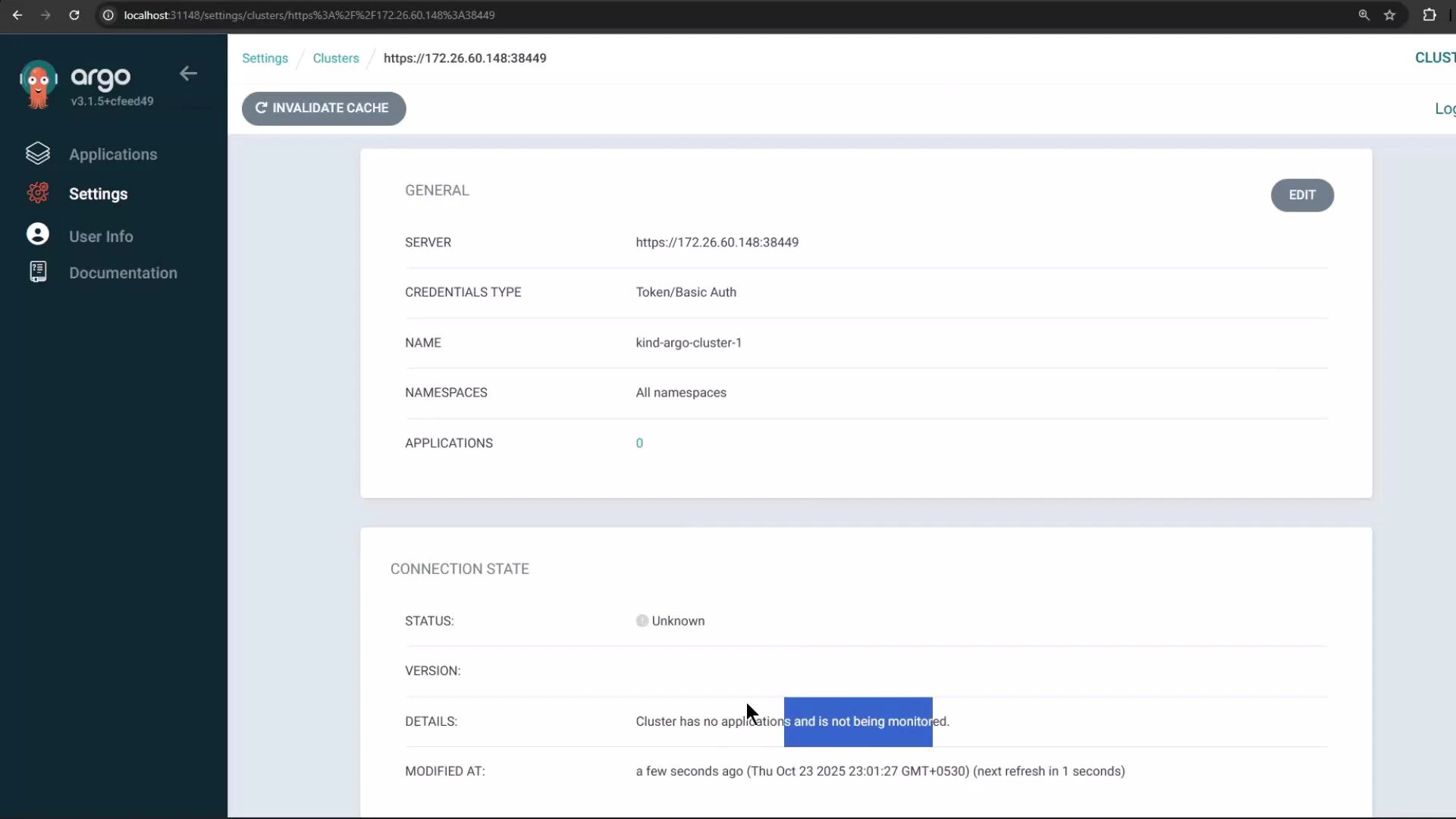 If you open the Argo CD UI (Settings → Clusters) the new cluster may show a Connection status of "Unknown" initially. This often happens when Argo CD has not yet created or is not actively monitoring any applications on that cluster.
## 4) Create an application that targets the remote cluster
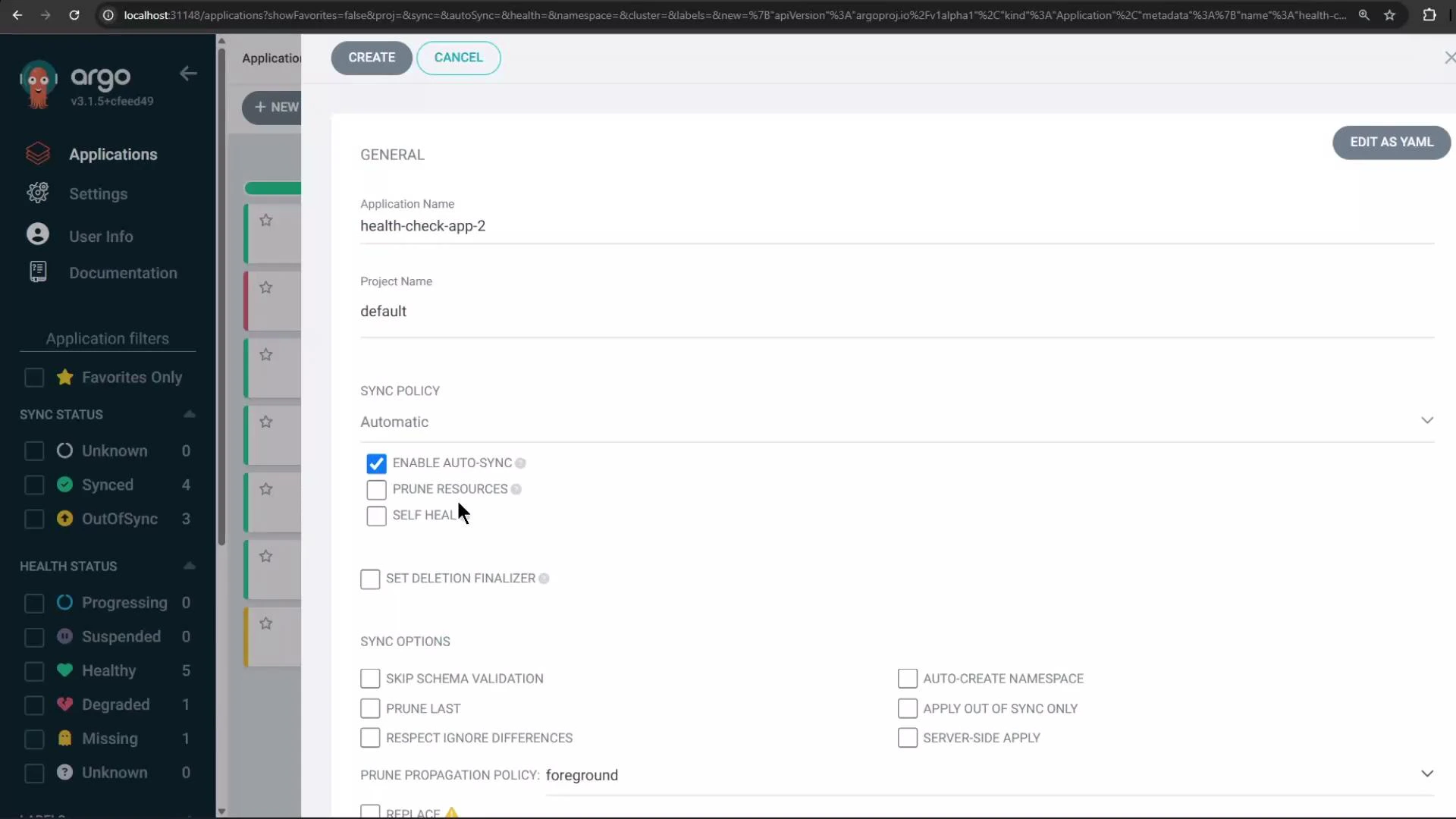
In the Argo CD Create Application form you can:
* Set the Git repository and path containing the manifests.
* Choose the destination cluster (the KinD cluster) and the target namespace.
* Enable Automatic Sync and check "Auto-create namespace" so Argo CD will create the namespace on the destination if missing.
If you open the Argo CD UI (Settings → Clusters) the new cluster may show a Connection status of "Unknown" initially. This often happens when Argo CD has not yet created or is not actively monitoring any applications on that cluster.
## 4) Create an application that targets the remote cluster
In the Argo CD Create Application form you can:
* Set the Git repository and path containing the manifests.
* Choose the destination cluster (the KinD cluster) and the target namespace.
* Enable Automatic Sync and check "Auto-create namespace" so Argo CD will create the namespace on the destination if missing.
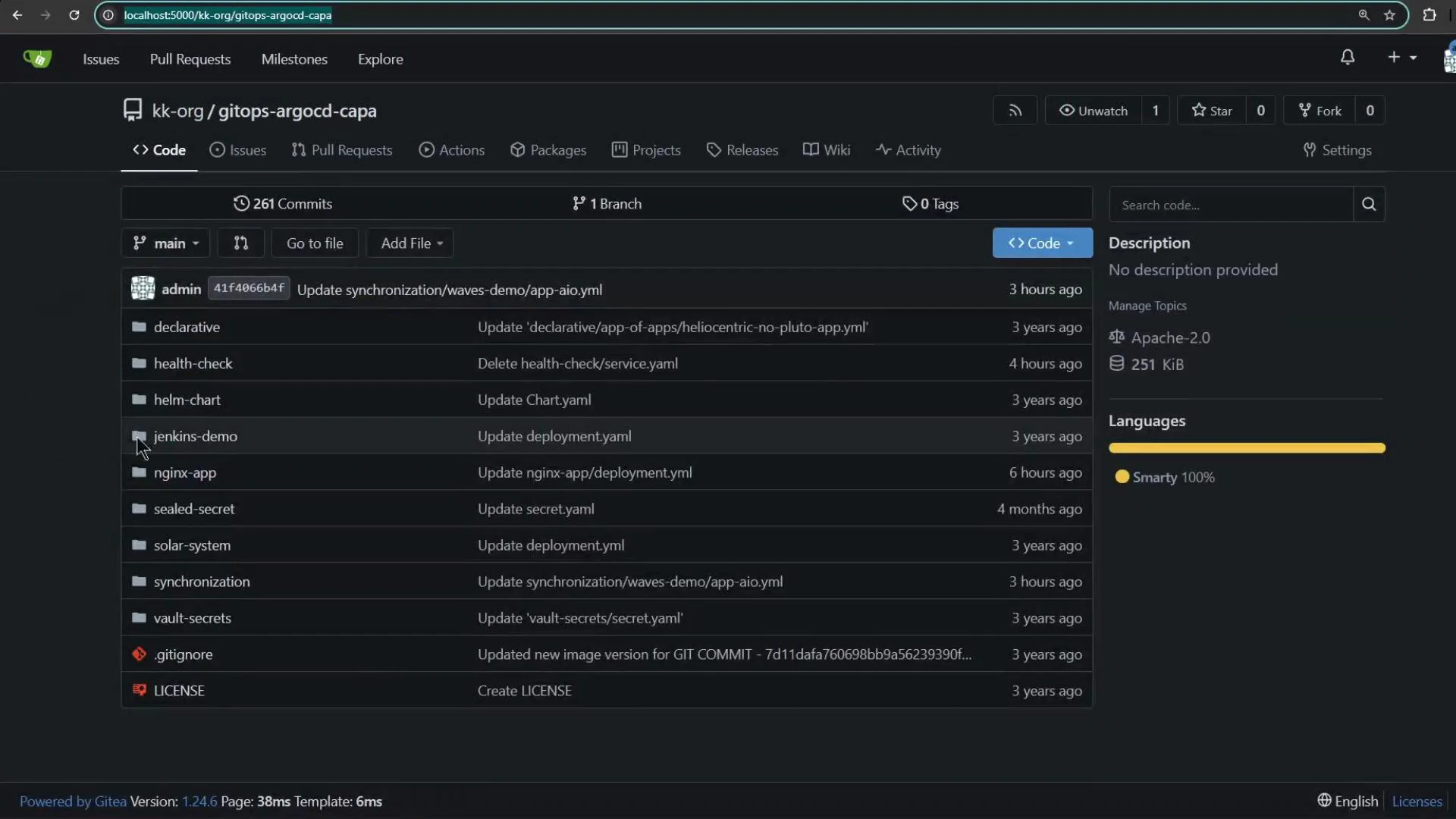
 Select the repository and the path where the application manifests live. In this demo the repo contains a folder for the Health Check app:
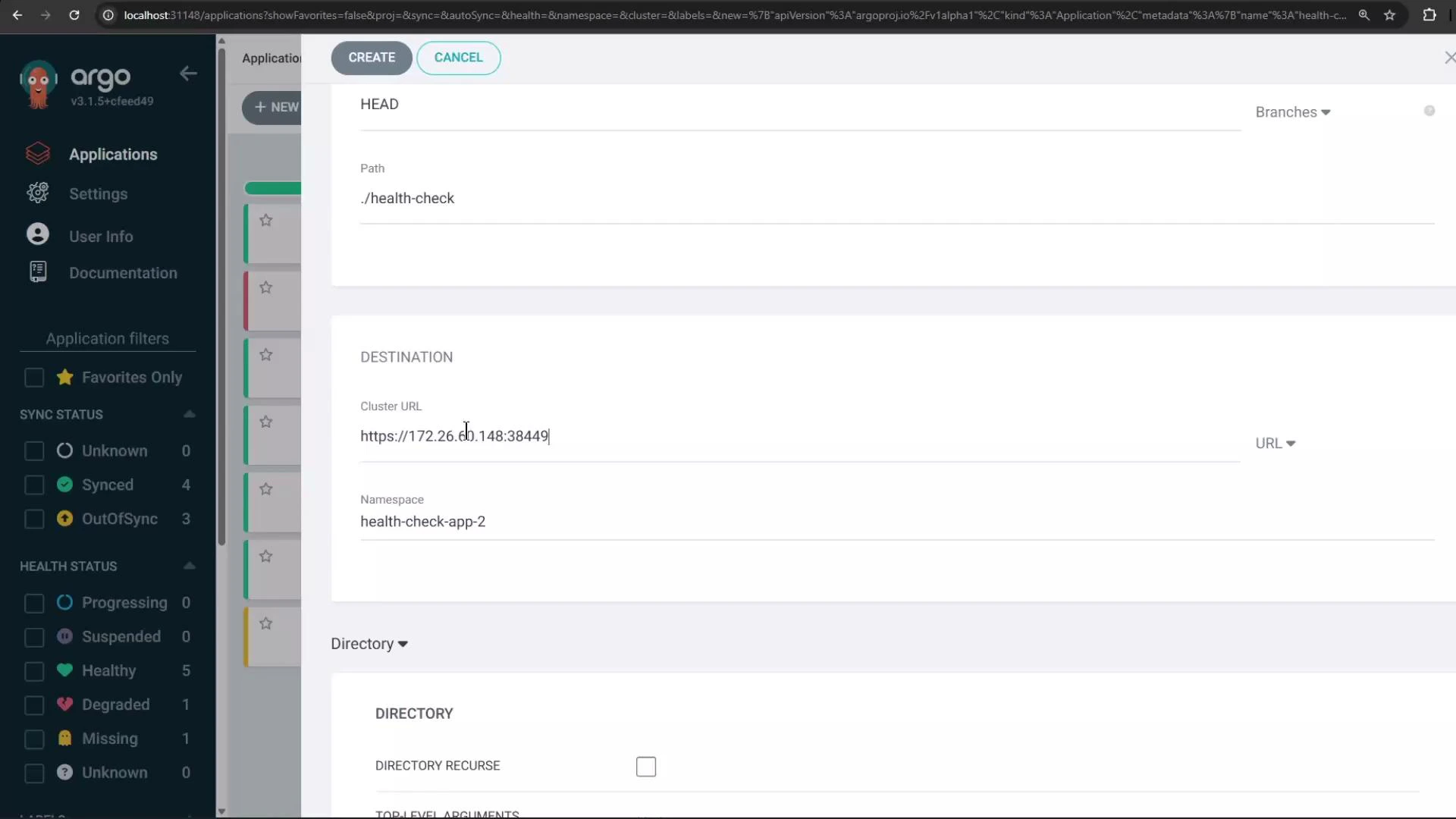
 Choose the correct path (for example `./health-check`) and select the destination cluster and namespace (`health-check-app-2` in this example):
 ## 5) Application sync and health checks
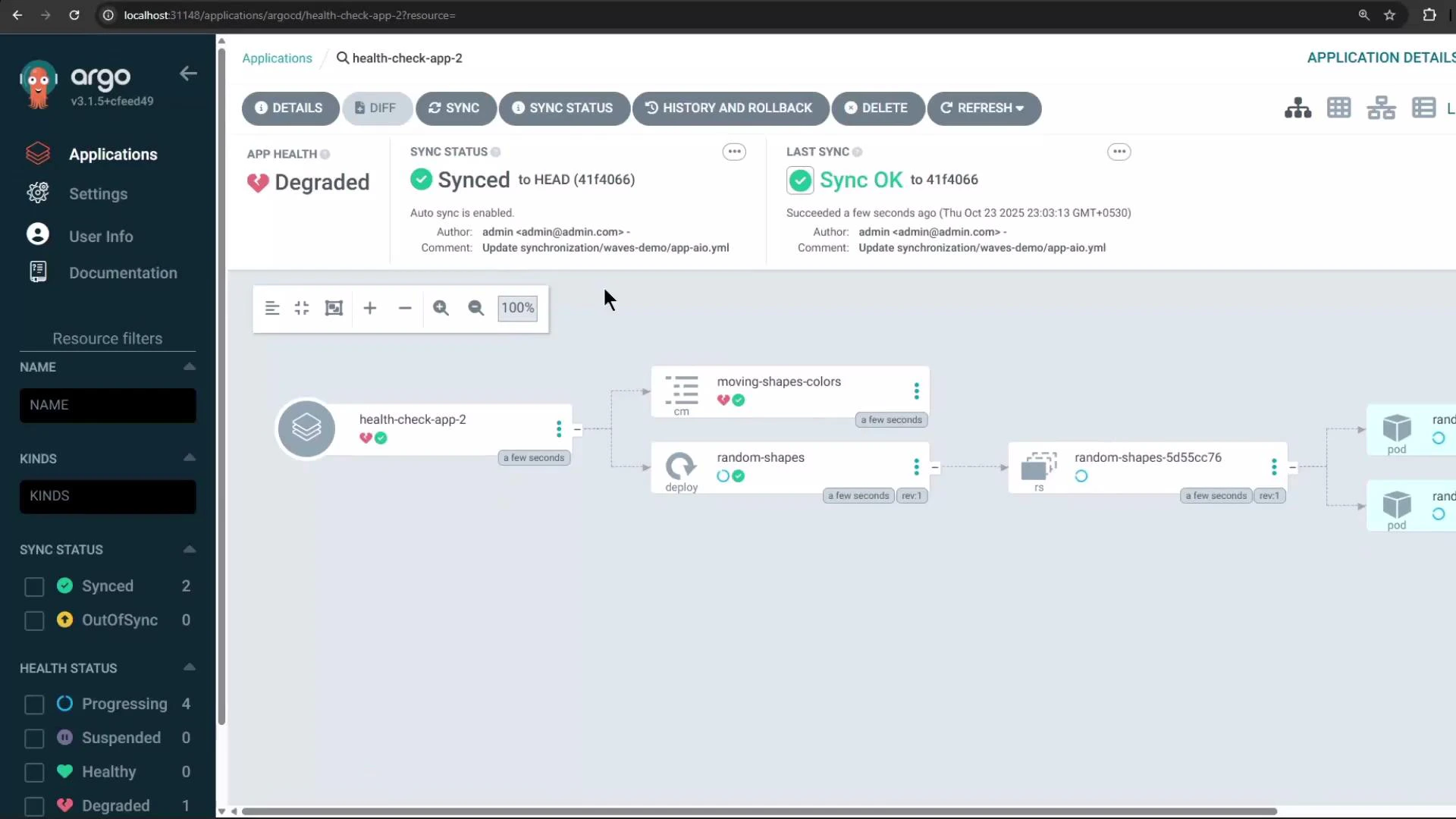
After creation, Argo CD syncs manifests to the target cluster. This example app uses a ConfigMap-based health check: certain data values determine whether a resource is healthy. If a monitored value is considered unhealthy (for example `TRIANGLE_COLOR: "white"`), Argo CD will show the application's health as Degraded even if it is successfully synced.
Example ConfigMap excerpt:
```yaml theme={null}
apiVersion: v1
kind: ConfigMap
metadata:
name: moving-shapes-colors
namespace: health-check-app-2
annotations:
argocd.argoproj.io/tracking-id: health-check-app-2:/ConfigMap:health-check-app-2/moving-shapes-colors
data:
CIRCLE_COLOR: "pink"
OVAL_COLOR: "lightgreen"
RECTANGLE_COLOR: "blue"
SQUARE_COLOR: "orange"
TRIANGLE_COLOR: "white"
```
Because `TRIANGLE_COLOR` is set to `white` and the health check treats that as unhealthy, the application appears Degraded while its sync status is Synced:
## 5) Application sync and health checks
After creation, Argo CD syncs manifests to the target cluster. This example app uses a ConfigMap-based health check: certain data values determine whether a resource is healthy. If a monitored value is considered unhealthy (for example `TRIANGLE_COLOR: "white"`), Argo CD will show the application's health as Degraded even if it is successfully synced.
Example ConfigMap excerpt:
```yaml theme={null}
apiVersion: v1
kind: ConfigMap
metadata:
name: moving-shapes-colors
namespace: health-check-app-2
annotations:
argocd.argoproj.io/tracking-id: health-check-app-2:/ConfigMap:health-check-app-2/moving-shapes-colors
data:
CIRCLE_COLOR: "pink"
OVAL_COLOR: "lightgreen"
RECTANGLE_COLOR: "blue"
SQUARE_COLOR: "orange"
TRIANGLE_COLOR: "white"
```
Because `TRIANGLE_COLOR` is set to `white` and the health check treats that as unhealthy, the application appears Degraded while its sync status is Synced:
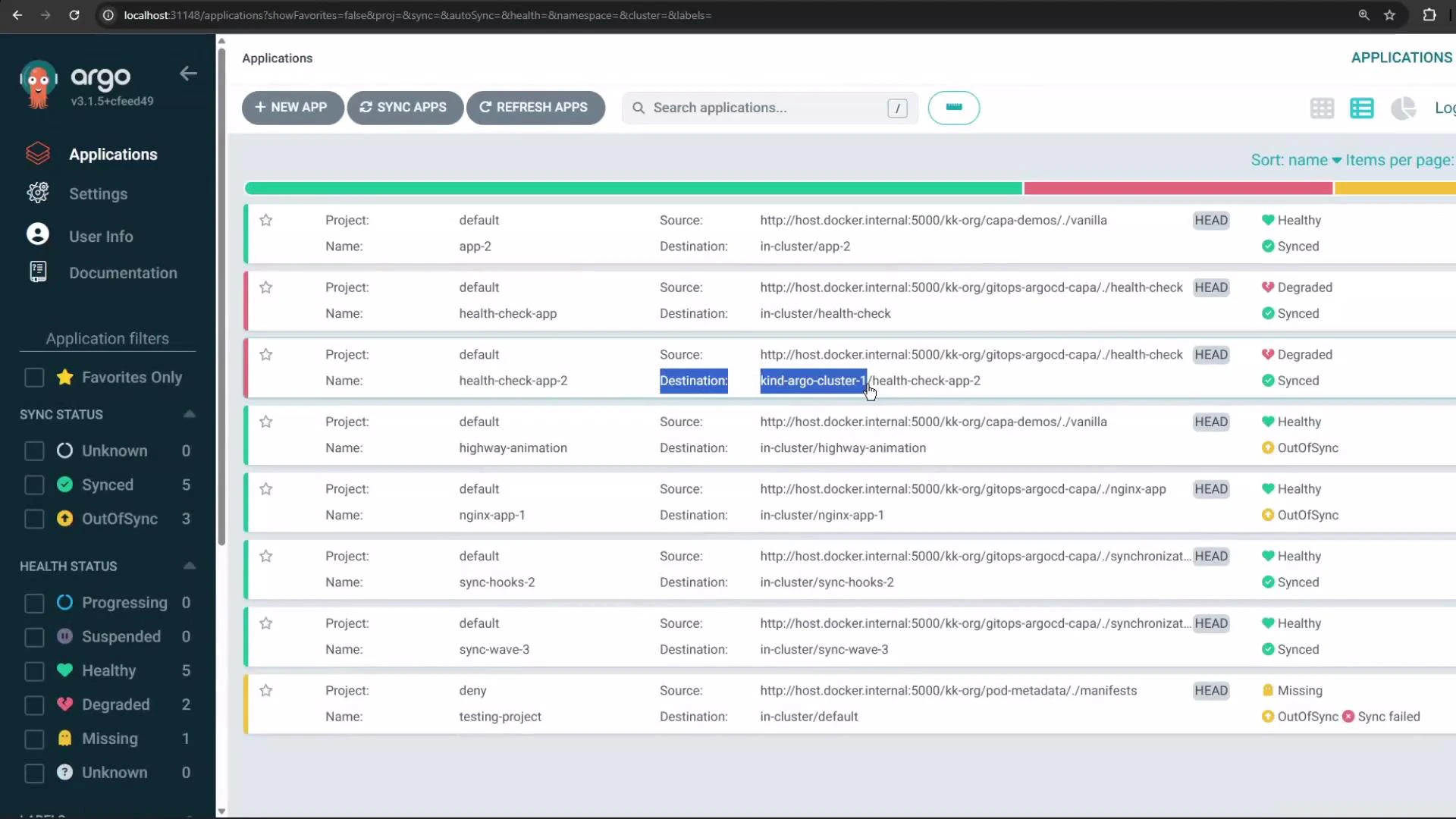
 From the Applications list you can confirm the destination cluster for this app is the KinD cluster (different from apps targeting the control cluster):
 ## 6) Verify the application on the remote cluster
Switch your kubectl context to the KinD cluster and confirm the namespace and resources were created by Argo CD:
```bash theme={null}
# Switch to the KinD cluster
kubectl config use-context kind-argo-cluster-1
Switched to context "kind-argo-cluster-1".
# List namespaces on the KinD cluster
kubectl get ns
NAME STATUS AGE
default Active 75m
health-check-app-2 Active 79s
kube-node-lease Active 75m
kube-public Active 75m
kube-system Active 75m
local-path-storage Active 73m
```
You can also inspect pods and other resources in `health-check-app-2` to confirm the sync succeeded. Pods may briefly show `ContainerCreating` while images are pulled.
## Summary
* Use `argocd cluster add ` to register remote clusters with Argo CD. This creates a ServiceAccount and stores cluster credentials as a Secret in the Argo CD control cluster.
* Registered clusters appear as destinations in the Argo CD UI and can be targeted by Applications, either from the UI or via Application CRs.
* A cluster showing Connection status "Unknown" may simply have no managed applications yet — creating an application that targets it causes Argo CD to actively monitor it.
* Health checks can mark an otherwise-synced application as Degraded based on resource content (ConfigMaps, status probes, etc.).
## Links and references
* Argo CD documentation: [https://argo-cd.readthedocs.io/](https://argo-cd.readthedocs.io/)
* Kubernetes kubectl: [https://kubernetes.io/docs/reference/kubectl/](https://kubernetes.io/docs/reference/kubectl/)
* Argo CD CLI reference: [https://argo-cd.readthedocs.io/en/stable/cli\_commands/](https://argo-cd.readthedocs.io/en/stable/cli_commands/)
## 6) Verify the application on the remote cluster
Switch your kubectl context to the KinD cluster and confirm the namespace and resources were created by Argo CD:
```bash theme={null}
# Switch to the KinD cluster
kubectl config use-context kind-argo-cluster-1
Switched to context "kind-argo-cluster-1".
# List namespaces on the KinD cluster
kubectl get ns
NAME STATUS AGE
default Active 75m
health-check-app-2 Active 79s
kube-node-lease Active 75m
kube-public Active 75m
kube-system Active 75m
local-path-storage Active 73m
```
You can also inspect pods and other resources in `health-check-app-2` to confirm the sync succeeded. Pods may briefly show `ContainerCreating` while images are pulled.
## Summary
* Use `argocd cluster add ` to register remote clusters with Argo CD. This creates a ServiceAccount and stores cluster credentials as a Secret in the Argo CD control cluster.
* Registered clusters appear as destinations in the Argo CD UI and can be targeted by Applications, either from the UI or via Application CRs.
* A cluster showing Connection status "Unknown" may simply have no managed applications yet — creating an application that targets it causes Argo CD to actively monitor it.
* Health checks can mark an otherwise-synced application as Degraded based on resource content (ConfigMaps, status probes, etc.).
## Links and references
* Argo CD documentation: [https://argo-cd.readthedocs.io/](https://argo-cd.readthedocs.io/)
* Kubernetes kubectl: [https://kubernetes.io/docs/reference/kubectl/](https://kubernetes.io/docs/reference/kubectl/)
* Argo CD CLI reference: [https://argo-cd.readthedocs.io/en/stable/cli\_commands/](https://argo-cd.readthedocs.io/en/stable/cli_commands/)