> ## Documentation Index
> Fetch the complete documentation index at: https://notes.kodekloud.com/llms.txt
> Use this file to discover all available pages before exploring further.
# Demo Reconciliation Timeout
> How to shorten Argo CD repository reconciliation interval, patch argocd-cm timeout.reconciliation, restart argocd-repo-server, and enable Auto-Sync so changes apply faster.
This guide explains how Argo CD polls Git/Helm repositories, how to shorten the reconciliation/polling interval, and how to ensure the change takes effect by restarting the repo server. Use this to make Argo CD detect commits faster than the default interval.
What you'll learn:
* Default Argo CD polling behavior
* How to configure `timeout.reconciliation` in `argocd-cm`
* How to restart `argocd-repo-server` so the new interval is used
* How to enable Auto-Sync so detected changes are applied automatically
Default behavior
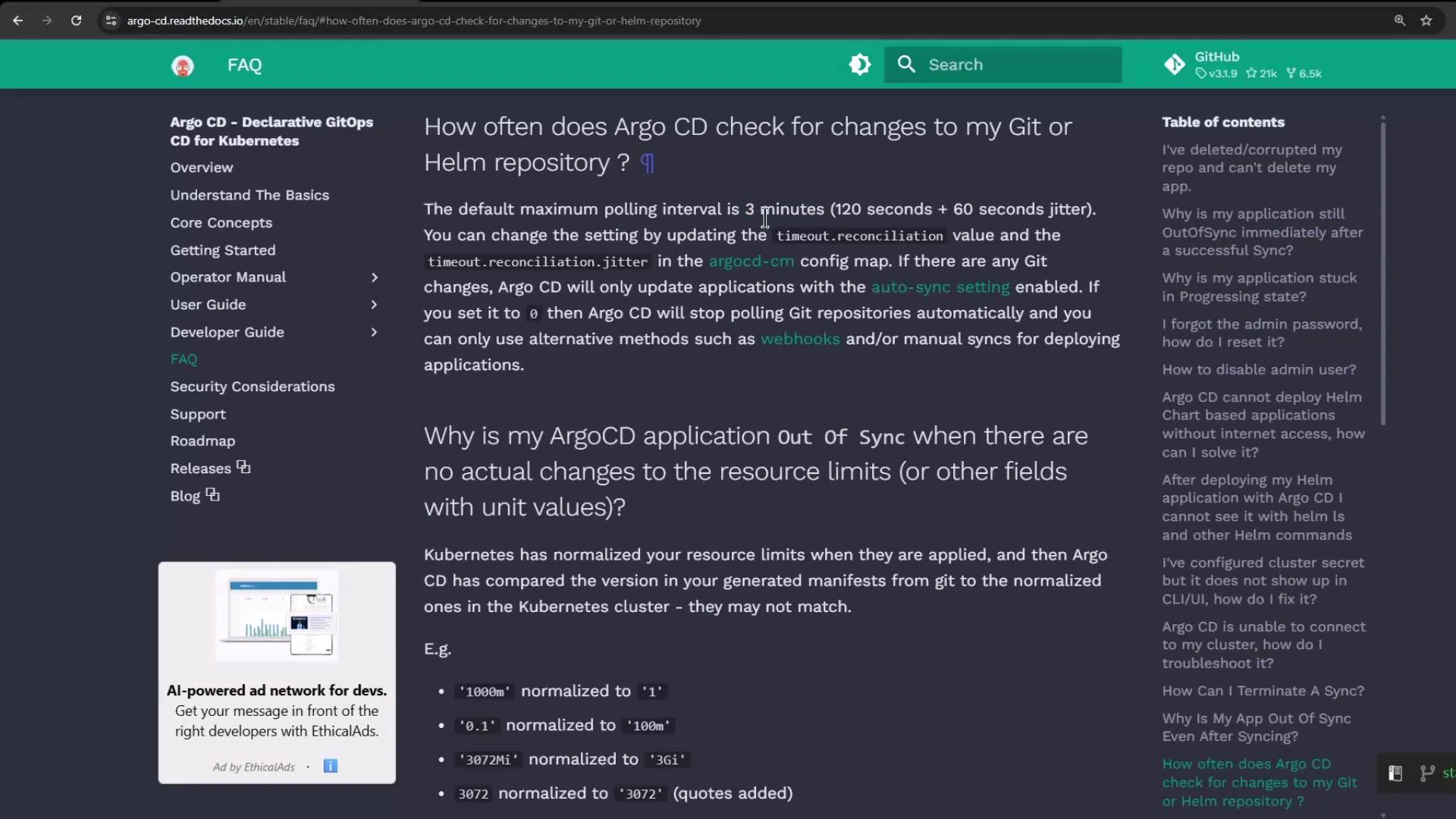
By default, Argo CD checks Git or Helm repositories at intervals up to 3 minutes (see the Argo CD FAQ). If you need faster detection of commits, adjust the reconciliation timeout.
 Create a sample application
Create an Argo CD Application that points to a Git repository containing a simple Deployment manifest. Example source/destination settings:
```yaml theme={null}
# Application source/destination (example)
source:
repoURL: "http://host.docker.internal:5000/kk-org/gitops-argocd-capa"
targetRevision: "HEAD"
path: "./nginx-app"
destination:
server: "https://kubernetes.default.svc"
namespace: "nginx-app-1"
```
The repository contains a Deployment manifest that initially sets `replicas: 1` and deploys into `nginx-app-1`.
Change the desired state in Git
When you update the manifest in Git (for example, scale to 2 replicas), commit the change. Argo CD will eventually show the application as OutOfSync (desired state: 2 replicas; live cluster: 1 replica).
Example updated Deployment (scale to 2 replicas):
```yaml theme={null}
apiVersion: apps/v1
kind: Deployment
metadata:
name: nginx
labels:
app: nginx
spec:
replicas: 2
selector:
matchLabels:
app: nginx
template:
metadata:
labels:
app: nginx
spec:
containers:
- name: nginx
image: nginx
imagePullPolicy: Always
ports:
- containerPort: 80
```
Refresh vs automatic polling
* Manual Refresh: Clicking Refresh in the Argo CD UI re-evaluates the application immediately and shows OutOfSync status.
* Polling: If you don't refresh manually, Argo CD polls repositories based on the reconciliation timeout (default up to 3 minutes). Detection may therefore take up to that interval.
Configure a shorter reconciliation timeout
Add the `timeout.reconciliation` key to the `argocd-cm` ConfigMap to change the polling interval. For example, set it to `60s` to poll about every 60 seconds.
Check whether the key exists:
```bash theme={null}
kubectl -n argocd get configmap argocd-cm -o yaml | grep -i timeout.reconciliation || true
```
If missing, patch the ConfigMap (example sets 60 seconds):
```bash theme={null}
kubectl -n argocd patch configmap argocd-cm --patch '{"data":{"timeout.reconciliation":"60s"}}'
```
Verify the key:
```bash theme={null}
kubectl -n argocd get configmap argocd-cm -o yaml | grep -i timeout.reconciliation
# expected output:
# timeout.reconciliation: 60s
```
How the change takes effect
The repo-server process reads this value as the environment variable ARGOCD\_RECONCILIATION\_TIMEOUT. Updating the ConfigMap does not automatically update the environment of running pods — you must restart the repo-server deployment.
After patching `argocd-cm` you need to restart the repo server so it picks up
the new `timeout.reconciliation` value: kubectl -n argocd rollout restart
deployment argocd-repo-server
Restart repo-server and watch pods
Restart the deployment:
```bash theme={null}
kubectl -n argocd rollout restart deployment argocd-repo-server
```
Watch the new pods come up:
```bash theme={null}
kubectl -n argocd get pods -w
```
Once the new repo-server pod is Running, Argo CD will use the new reconciliation timeout (for example, \~60s) to poll repositories.
Enable Auto-Sync (optional)
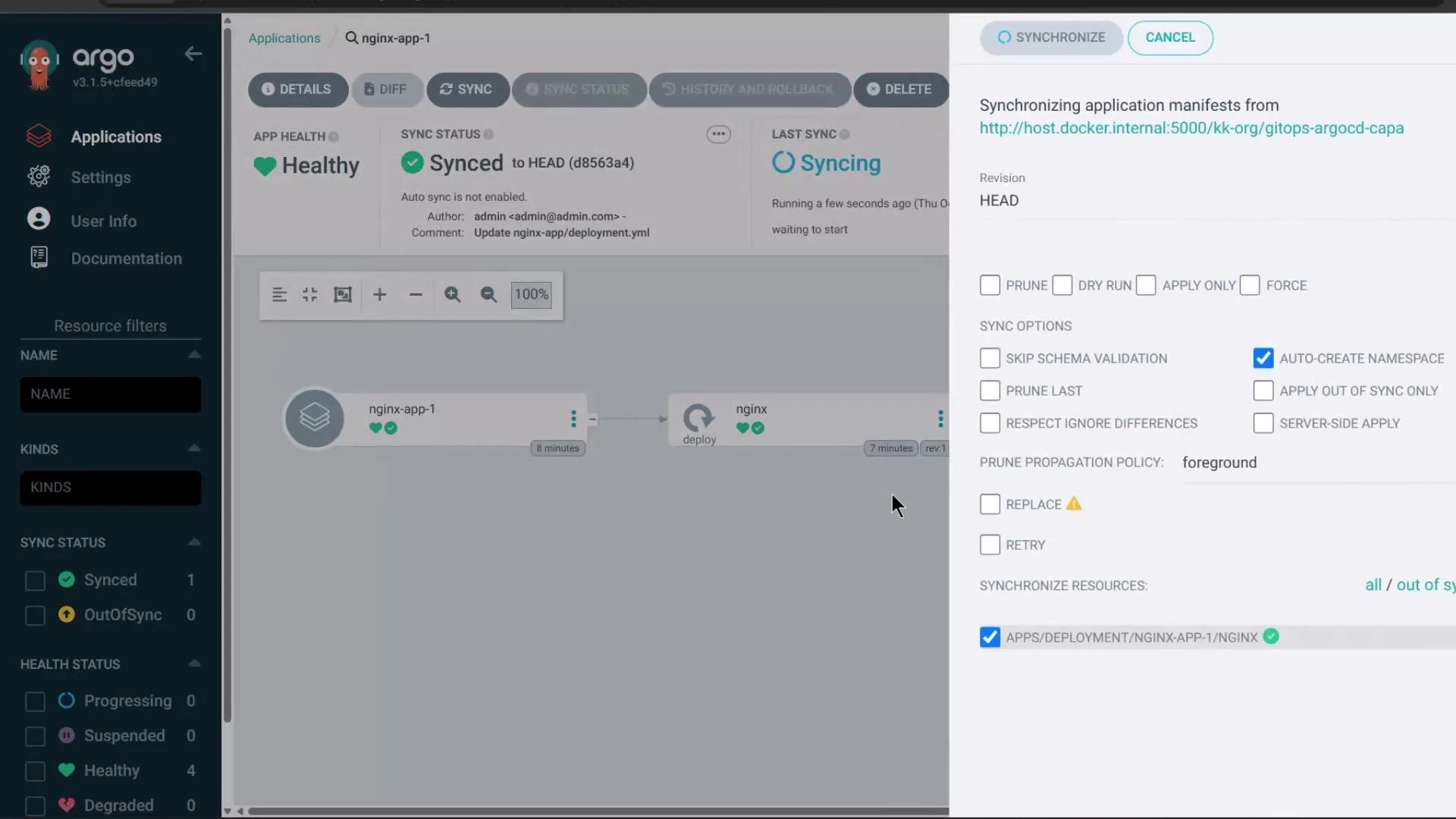
If you want Argo CD to automatically apply changes it detects, enable Auto-Sync for the application (in the UI or via YAML). In the UI, open the Application, edit sync settings and enable Auto-Sync and any additional options (prune, self-heal, etc.).
Example UI screenshot:
Create a sample application
Create an Argo CD Application that points to a Git repository containing a simple Deployment manifest. Example source/destination settings:
```yaml theme={null}
# Application source/destination (example)
source:
repoURL: "http://host.docker.internal:5000/kk-org/gitops-argocd-capa"
targetRevision: "HEAD"
path: "./nginx-app"
destination:
server: "https://kubernetes.default.svc"
namespace: "nginx-app-1"
```
The repository contains a Deployment manifest that initially sets `replicas: 1` and deploys into `nginx-app-1`.
Change the desired state in Git
When you update the manifest in Git (for example, scale to 2 replicas), commit the change. Argo CD will eventually show the application as OutOfSync (desired state: 2 replicas; live cluster: 1 replica).
Example updated Deployment (scale to 2 replicas):
```yaml theme={null}
apiVersion: apps/v1
kind: Deployment
metadata:
name: nginx
labels:
app: nginx
spec:
replicas: 2
selector:
matchLabels:
app: nginx
template:
metadata:
labels:
app: nginx
spec:
containers:
- name: nginx
image: nginx
imagePullPolicy: Always
ports:
- containerPort: 80
```
Refresh vs automatic polling
* Manual Refresh: Clicking Refresh in the Argo CD UI re-evaluates the application immediately and shows OutOfSync status.
* Polling: If you don't refresh manually, Argo CD polls repositories based on the reconciliation timeout (default up to 3 minutes). Detection may therefore take up to that interval.
Configure a shorter reconciliation timeout
Add the `timeout.reconciliation` key to the `argocd-cm` ConfigMap to change the polling interval. For example, set it to `60s` to poll about every 60 seconds.
Check whether the key exists:
```bash theme={null}
kubectl -n argocd get configmap argocd-cm -o yaml | grep -i timeout.reconciliation || true
```
If missing, patch the ConfigMap (example sets 60 seconds):
```bash theme={null}
kubectl -n argocd patch configmap argocd-cm --patch '{"data":{"timeout.reconciliation":"60s"}}'
```
Verify the key:
```bash theme={null}
kubectl -n argocd get configmap argocd-cm -o yaml | grep -i timeout.reconciliation
# expected output:
# timeout.reconciliation: 60s
```
How the change takes effect
The repo-server process reads this value as the environment variable ARGOCD\_RECONCILIATION\_TIMEOUT. Updating the ConfigMap does not automatically update the environment of running pods — you must restart the repo-server deployment.
After patching `argocd-cm` you need to restart the repo server so it picks up
the new `timeout.reconciliation` value: kubectl -n argocd rollout restart
deployment argocd-repo-server
Restart repo-server and watch pods
Restart the deployment:
```bash theme={null}
kubectl -n argocd rollout restart deployment argocd-repo-server
```
Watch the new pods come up:
```bash theme={null}
kubectl -n argocd get pods -w
```
Once the new repo-server pod is Running, Argo CD will use the new reconciliation timeout (for example, \~60s) to poll repositories.
Enable Auto-Sync (optional)
If you want Argo CD to automatically apply changes it detects, enable Auto-Sync for the application (in the UI or via YAML). In the UI, open the Application, edit sync settings and enable Auto-Sync and any additional options (prune, self-heal, etc.).
Example UI screenshot:
 Test the change end-to-end
1. Commit a change in Git (e.g., change replicas to 3).
2. With `timeout.reconciliation: 60s` and repo-server restarted, Argo CD should detect the change and begin synchronization within roughly one minute.
3. Watch pods in the target namespace:
```bash theme={null}
kubectl -n nginx-app-1 get pods -w
```
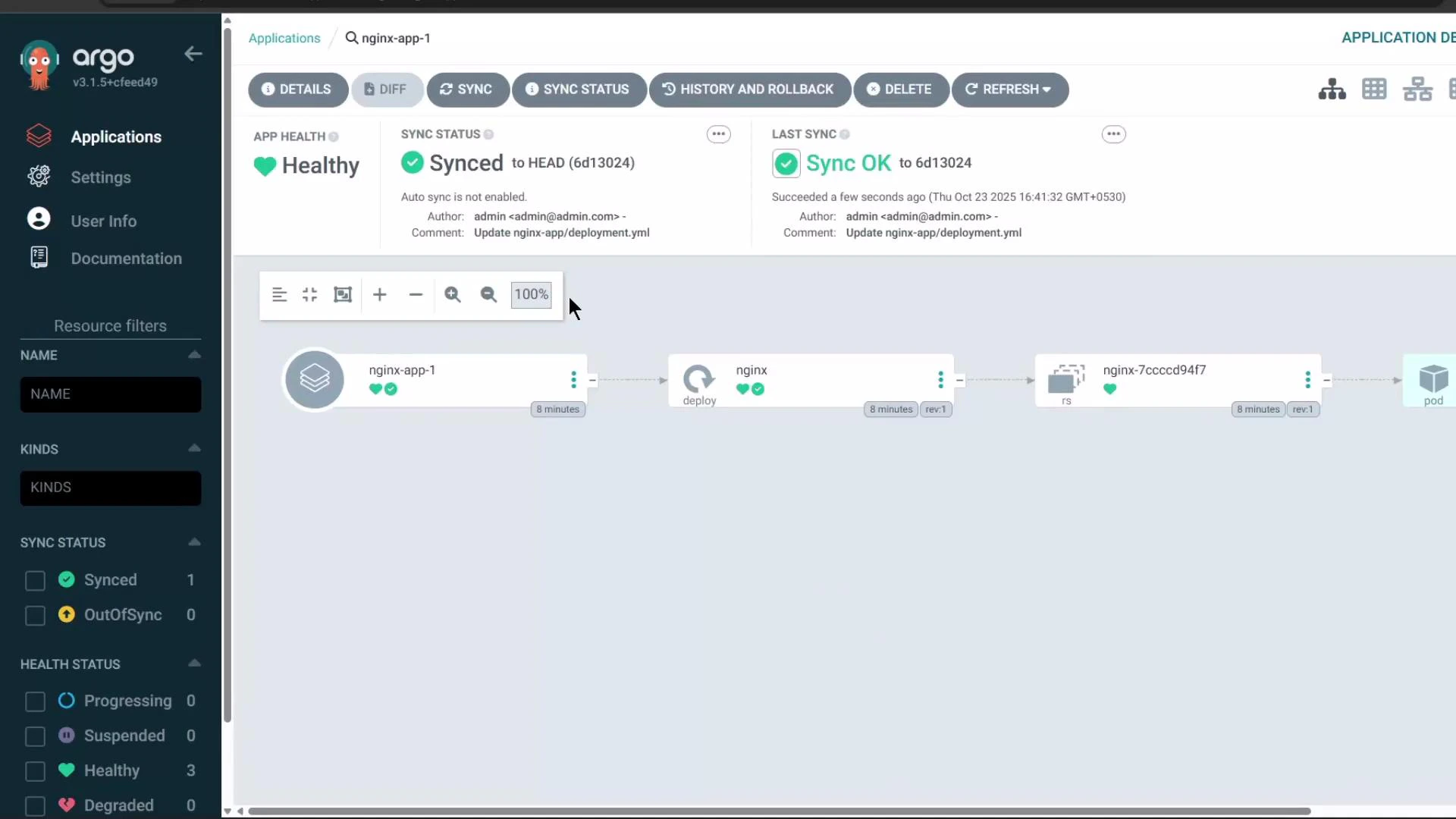
When sync completes, the live state should match the desired state in Argo CD (pods scaled per the manifest). Example resource view:
Test the change end-to-end
1. Commit a change in Git (e.g., change replicas to 3).
2. With `timeout.reconciliation: 60s` and repo-server restarted, Argo CD should detect the change and begin synchronization within roughly one minute.
3. Watch pods in the target namespace:
```bash theme={null}
kubectl -n nginx-app-1 get pods -w
```
When sync completes, the live state should match the desired state in Argo CD (pods scaled per the manifest). Example resource view:
 Quick reference — commands and purpose
| Command | Purpose |
| ------------------------------------------------------------------------------------------------- | ----------------------------------------------- |
| `kubectl -n argocd get configmap argocd-cm -o yaml \| grep -i timeout.reconciliation` | Check current reconciliation timeout key |
| `kubectl -n argocd patch configmap argocd-cm --patch '{"data":{"timeout.reconciliation":"60s"}}'` | Add or update reconciliation timeout to 60s |
| `kubectl -n argocd rollout restart deployment argocd-repo-server` | Restart repo-server so it reads the new timeout |
| `kubectl -n argocd get pods -w` | Watch Argo CD pods during restart |
| `kubectl -n nginx-app-1 get pods -w` | Observe app pod scaling as sync occurs |
Summary
* Default reconciliation/polling interval: up to 3 minutes.
* Shorten polling by adding `timeout.reconciliation` (e.g., `"60s"`) to `argocd-cm`.
* Patch the ConfigMap and restart the `argocd-repo-server` deployment so pods pick up the new setting.
* Enable Auto-Sync to have Argo CD automatically apply detected changes.
Links and references
* [Argo CD Documentation — FAQ](https://argo-cd.readthedocs.io/en/stable/faq/)
* [Argo CD — Application Concepts](https://argo-cd.readthedocs.io/en/stable/user-guide/argo-cd-overview/)
* Kubernetes docs: [kubectl reference](https://kubernetes.io/docs/reference/kubectl/)
Quick reference — commands and purpose
| Command | Purpose |
| ------------------------------------------------------------------------------------------------- | ----------------------------------------------- |
| `kubectl -n argocd get configmap argocd-cm -o yaml \| grep -i timeout.reconciliation` | Check current reconciliation timeout key |
| `kubectl -n argocd patch configmap argocd-cm --patch '{"data":{"timeout.reconciliation":"60s"}}'` | Add or update reconciliation timeout to 60s |
| `kubectl -n argocd rollout restart deployment argocd-repo-server` | Restart repo-server so it reads the new timeout |
| `kubectl -n argocd get pods -w` | Watch Argo CD pods during restart |
| `kubectl -n nginx-app-1 get pods -w` | Observe app pod scaling as sync occurs |
Summary
* Default reconciliation/polling interval: up to 3 minutes.
* Shorten polling by adding `timeout.reconciliation` (e.g., `"60s"`) to `argocd-cm`.
* Patch the ConfigMap and restart the `argocd-repo-server` deployment so pods pick up the new setting.
* Enable Auto-Sync to have Argo CD automatically apply detected changes.
Links and references
* [Argo CD Documentation — FAQ](https://argo-cd.readthedocs.io/en/stable/faq/)
* [Argo CD — Application Concepts](https://argo-cd.readthedocs.io/en/stable/user-guide/argo-cd-overview/)
* Kubernetes docs: [kubectl reference](https://kubernetes.io/docs/reference/kubectl/)