> ## Documentation Index
> Fetch the complete documentation index at: https://notes.kodekloud.com/llms.txt
> Use this file to discover all available pages before exploring further.
# Demo Sync Hook 1
> Explains using Argo CD sync hooks to order and run Jobs like migrations and cleanup during application synchronization.
Sync hooks control the order and lifecycle of resources applied by Argo CD during a synchronization. They let you run Jobs and other resources at specific points in the synchronization process (for example, to run database migrations before deploying an application or to clean up temporary resources afterward).
Common hook phases:
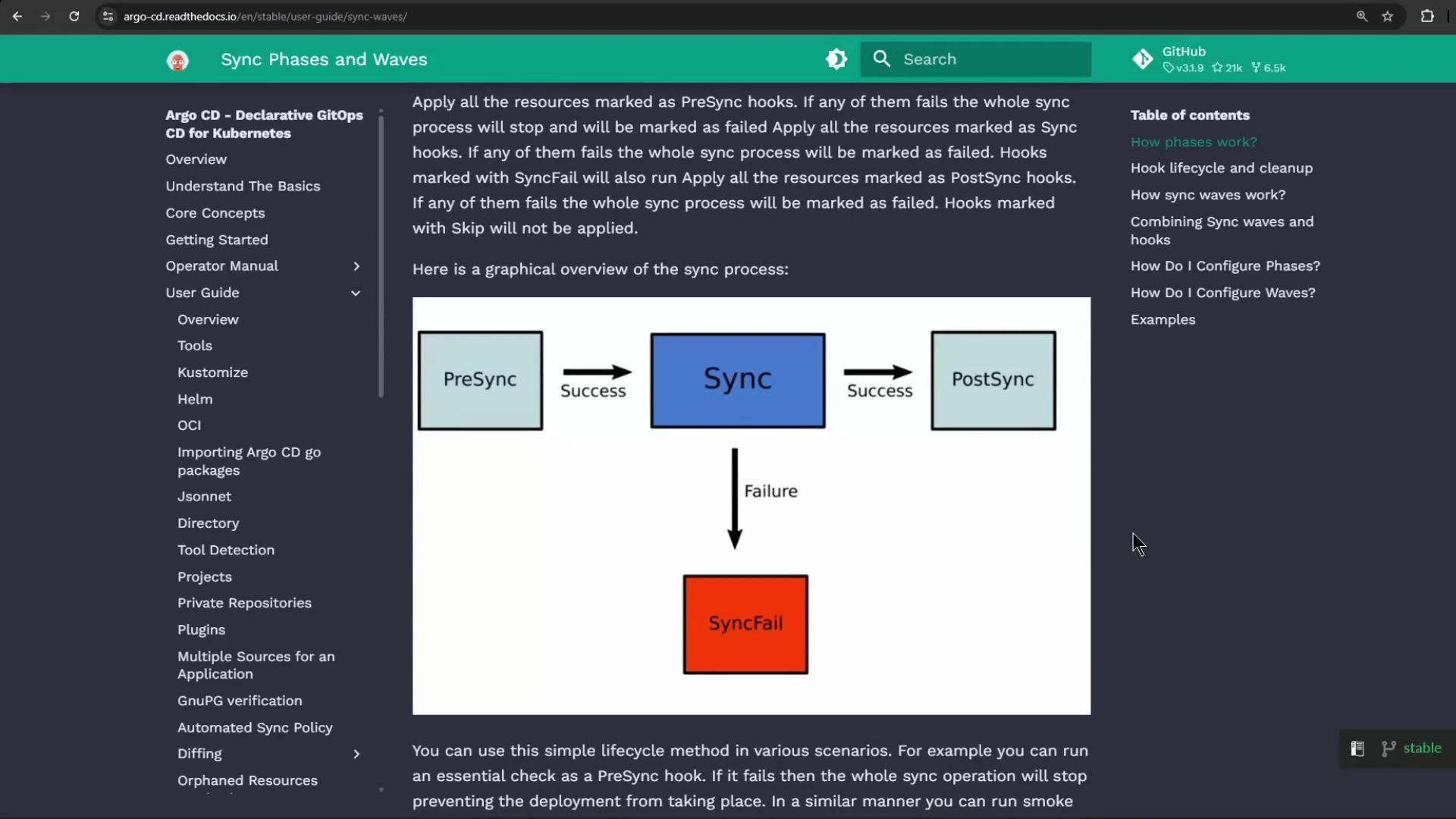
* PreSync — run before the main sync step.
* Sync — the normal synchronization of non-hooked resources.
* PostSync — run after a successful sync.
* SyncFail — run when a sync fails.
* PreDelete / PostDelete — run during deletion lifecycles.
The typical sync flow looks like this: the operation begins with PreSync; if PreSync succeeds it proceeds to Sync; if Sync fails, SyncFail hooks run; if Sync succeeds it proceeds to PostSync. Hook cleanup lifecycles (how and when hook resources are removed) are configurable and will be covered elsewhere.
| Hook Phase | When it runs | Typical use case |
| ---------------------- | ------------------------------------ | ----------------------------------------------------------- |
| PreSync | Before regular resources are applied | Run migrations or prepare state required by other resources |
| Sync | Regular resource application phase | Deploy Deployments, Services, etc. |
| PostSync | After a successful sync | Run cleanup tasks or post-deploy verification |
| SyncFail | After a sync failure | Rollback-related tasks or notifications |
| PreDelete / PostDelete | During resource deletion | Cleanup external state or revoke credentials |
 Example scenario
In my GitOps Argo CD Kappa project I have a repository path synchronization/hooks containing three Kubernetes manifests:
* An Nginx Deployment
* A database migration Job
* A cleanup Job
Below is the db-migration Job manifest used in this demo:
```yaml theme={null}
# db-migration-job.yaml
apiVersion: batch/v1
kind: Job
metadata:
name: db-migration-job
spec:
template:
spec:
containers:
- name: db-migration
image: alpine:3.12
command:
- /bin/sh
- -c
- |
echo 'Running Database Migration...' \
&& sleep 15 \
&& echo 'Database Migration Complete.'
restartPolicy: Never
backoffLimit: 2
```
(Note: the cleanup Job in the repository initially had an incomplete annotation; I fixed that and committed the changes.)
Application configuration used to deploy these manifests (example settings):
| Field | Value (example) |
| --------------------- | ---------------------------------------------------------------- |
| Application name | syncHooks0 |
| Project | default |
| Sync policy | Automatic |
| Auto-create namespace | Enabled |
| Repository URL | (my repo URL) |
| Path | ./synchronization/hooks |
| Destination cluster | [https://kubernetes.default.svc](https://kubernetes.default.svc) |
| Destination namespace | sync-hooks-0 |
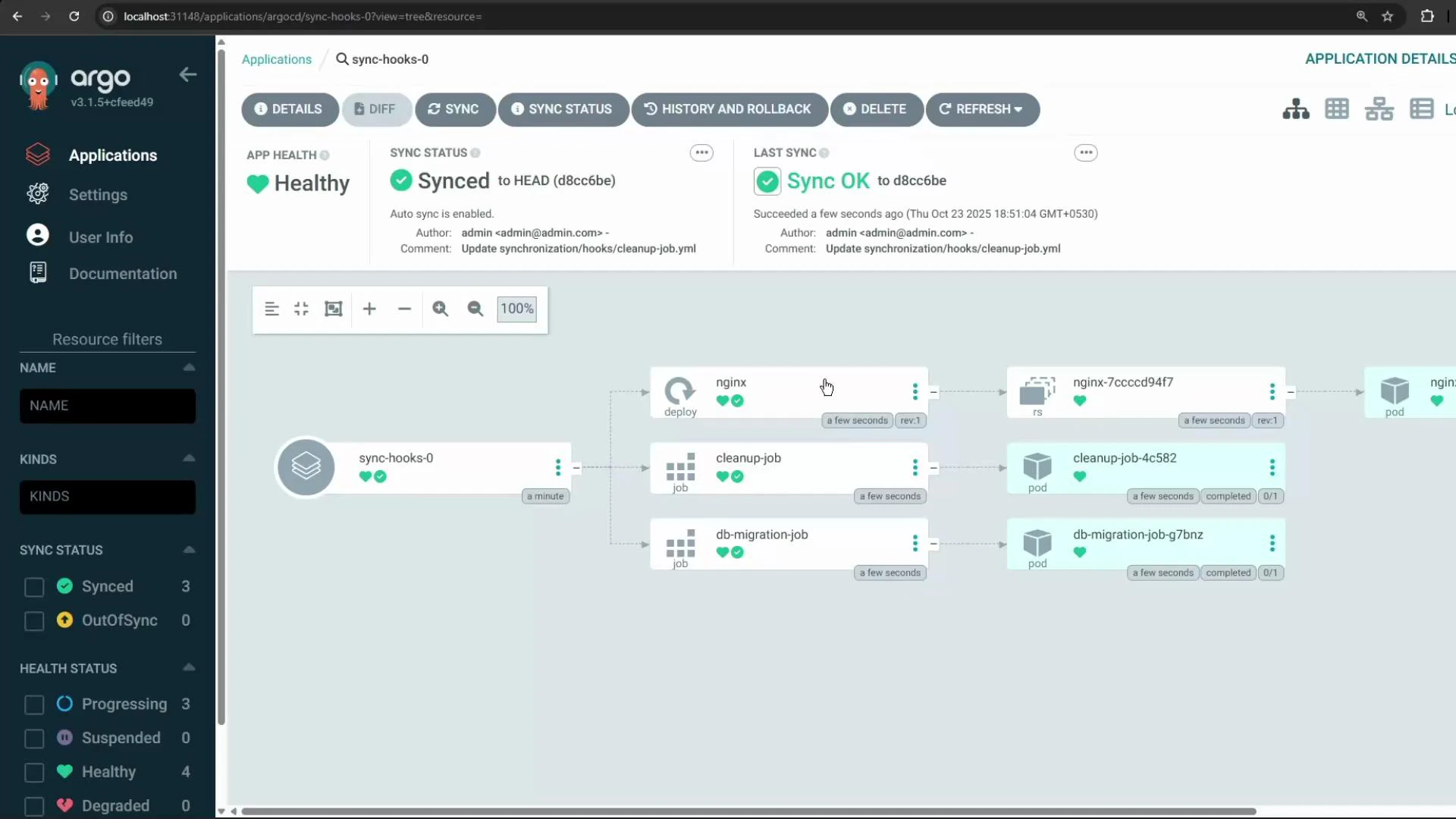
When I created the Application, Argo CD started applying the manifests. Because none of the resources had hook annotations initially, Argo CD applied the three manifests concurrently. The result was that the cleanup Job, the migration Job, and the Nginx deployment were all created at the same time.
Example scenario
In my GitOps Argo CD Kappa project I have a repository path synchronization/hooks containing three Kubernetes manifests:
* An Nginx Deployment
* A database migration Job
* A cleanup Job
Below is the db-migration Job manifest used in this demo:
```yaml theme={null}
# db-migration-job.yaml
apiVersion: batch/v1
kind: Job
metadata:
name: db-migration-job
spec:
template:
spec:
containers:
- name: db-migration
image: alpine:3.12
command:
- /bin/sh
- -c
- |
echo 'Running Database Migration...' \
&& sleep 15 \
&& echo 'Database Migration Complete.'
restartPolicy: Never
backoffLimit: 2
```
(Note: the cleanup Job in the repository initially had an incomplete annotation; I fixed that and committed the changes.)
Application configuration used to deploy these manifests (example settings):
| Field | Value (example) |
| --------------------- | ---------------------------------------------------------------- |
| Application name | syncHooks0 |
| Project | default |
| Sync policy | Automatic |
| Auto-create namespace | Enabled |
| Repository URL | (my repo URL) |
| Path | ./synchronization/hooks |
| Destination cluster | [https://kubernetes.default.svc](https://kubernetes.default.svc) |
| Destination namespace | sync-hooks-0 |
When I created the Application, Argo CD started applying the manifests. Because none of the resources had hook annotations initially, Argo CD applied the three manifests concurrently. The result was that the cleanup Job, the migration Job, and the Nginx deployment were all created at the same time.
 Desired ordering for this demo:
1. Run the migration Job first.
2. When the migration Job completes successfully, create the Nginx Deployment.
3. After the Deployment is ready, run the cleanup Job.
To enforce this ordering, add Argo CD hook annotations to the manifests so that Argo CD executes Jobs at the appropriate sync phases (for example, marking the migration Job as PreSync and the cleanup Job as PostSync). Hooks control execution timing and can also be configured with deletion/cleanup policies.
Example annotations you can add to achieve the ordering:
* Mark the migration Job as PreSync:
```yaml theme={null}
metadata:
annotations:
argocd.argoproj.io/hook: PreSync
```
* Leave the Nginx Deployment as a regular resource (applied during Sync).
* Mark the cleanup Job as PostSync:
```yaml theme={null}
metadata:
annotations:
argocd.argoproj.io/hook: PostSync
```
You can also control hook deletion behavior with annotations such as:
```yaml theme={null}
metadata:
annotations:
argocd.argoproj.io/hook-delete-policy: HookSucceeded
```
(See the Argo CD docs for other deletion-policy options.)
By default, Argo CD applies resources concurrently. Use hook annotations (for example, `argocd.argoproj.io/hook: PreSync` or `PostSync`) to enforce ordering for tasks like database migrations or cleanup. For full details and advanced hook lifecycle options, refer to the Argo CD Sync Hooks documentation: [https://argo-cd.readthedocs.io/en/stable/user-guide/hooks/](https://argo-cd.readthedocs.io/en/stable/user-guide/hooks/)
Desired ordering for this demo:
1. Run the migration Job first.
2. When the migration Job completes successfully, create the Nginx Deployment.
3. After the Deployment is ready, run the cleanup Job.
To enforce this ordering, add Argo CD hook annotations to the manifests so that Argo CD executes Jobs at the appropriate sync phases (for example, marking the migration Job as PreSync and the cleanup Job as PostSync). Hooks control execution timing and can also be configured with deletion/cleanup policies.
Example annotations you can add to achieve the ordering:
* Mark the migration Job as PreSync:
```yaml theme={null}
metadata:
annotations:
argocd.argoproj.io/hook: PreSync
```
* Leave the Nginx Deployment as a regular resource (applied during Sync).
* Mark the cleanup Job as PostSync:
```yaml theme={null}
metadata:
annotations:
argocd.argoproj.io/hook: PostSync
```
You can also control hook deletion behavior with annotations such as:
```yaml theme={null}
metadata:
annotations:
argocd.argoproj.io/hook-delete-policy: HookSucceeded
```
(See the Argo CD docs for other deletion-policy options.)
By default, Argo CD applies resources concurrently. Use hook annotations (for example, `argocd.argoproj.io/hook: PreSync` or `PostSync`) to enforce ordering for tasks like database migrations or cleanup. For full details and advanced hook lifecycle options, refer to the Argo CD Sync Hooks documentation: [https://argo-cd.readthedocs.io/en/stable/user-guide/hooks/](https://argo-cd.readthedocs.io/en/stable/user-guide/hooks/)