> ## Documentation Index
> Fetch the complete documentation index at: https://notes.kodekloud.com/llms.txt
> Use this file to discover all available pages before exploring further.
# Demo Sync Wave 1
> Using Argo CD sync waves and hooks to enforce deterministic resource synchronization order for migrations, namespace creation, database and frontend deployment, and cleanup
In this lesson we explain how to use Argo CD sync waves together with sync hooks to control resource synchronization order. You'll learn why hooks alone are not enough when you need strict sequencing (for example, run schema migration → data migration → namespace creation → PostgreSQL → frontend → cleanup) and how to combine hook phases and numeric sync-wave annotations to enforce that order.
The repository contains a folder `waves-demo` under the `synchronization` path. That YAML contains multiple resources in a single manifest: two migration jobs (schema and data), a Namespace, frontend and PostgreSQL deployments and services, and a cleanup job.
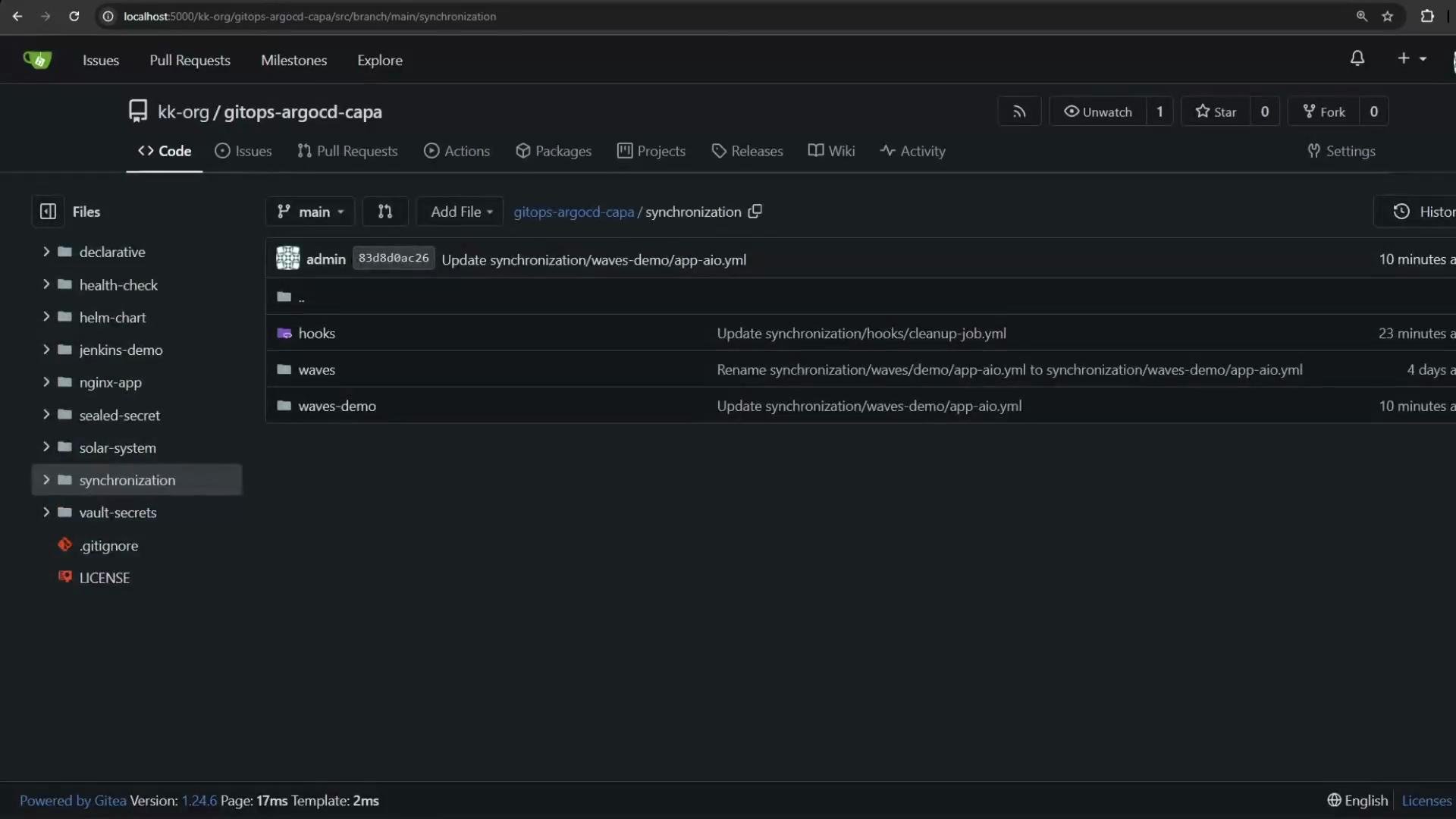 High-level resource order in the manifest:
* Schema migration job — currently annotated as a PreSync hook.
* Namespace `app-namespace`.
* Data migration job — also a PreSync hook.
* Frontend deployment + frontend service.
* PostgreSQL deployment + PostgreSQL service.
* Cleanup job — annotated as a PostSync hook.
Baseline (trimmed) excerpt: the two jobs, the namespace, and a few deployment/service fragments. Note both migration jobs are PreSync hooks in this baseline, which causes them to run in parallel when Argo CD syncs the app.
```yaml theme={null}
# Baseline: both migration jobs use PreSync (they will run in parallel)
apiVersion: batch/v1
kind: Job
metadata:
name: schema-migration-job
namespace: app-namespace
annotations:
argocd.argoproj.io/hook: PreSync
spec:
template:
spec:
containers:
- name: schema-migrator
image: nginx:alpine
command:
- /bin/sh
- -c
- |
echo 'Running schema migration...'
sleep 1
echo 'Schema migration complete.'
restartPolicy: Never
backoffLimit: 2
---
apiVersion: v1
kind: Namespace
metadata:
name: app-namespace
---
apiVersion: batch/v1
kind: Job
metadata:
name: data-migration-job
namespace: app-namespace
annotations:
argocd.argoproj.io/hook: PreSync
spec:
template:
spec:
containers:
- name: data-migrator
image: nginx:alpine
command:
- /bin/sh
- -c
- |
echo 'Running data migration...'
sleep 1
echo 'Data migration complete.'
restartPolicy: Never
backoffLimit: 2
---
# (further front-end & postgresql deployments/services omitted here for brevity)
```
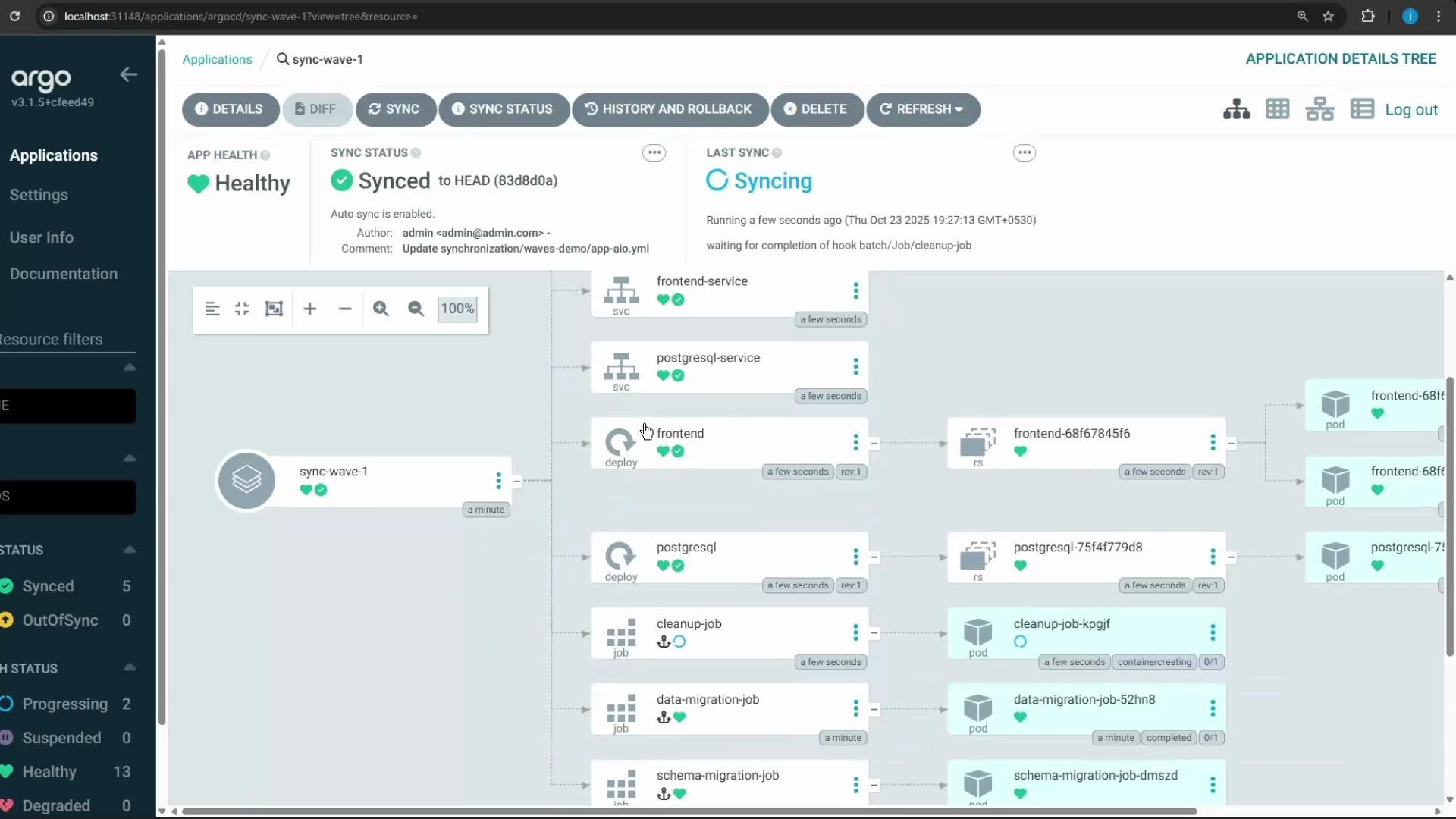
If you deploy this baseline manifest as-is (without ordering), both PreSync jobs run concurrently. The frontend and PostgreSQL deployments are also created in parallel unless you control their order. The Argo CD UI will reflect concurrent sync activity:
High-level resource order in the manifest:
* Schema migration job — currently annotated as a PreSync hook.
* Namespace `app-namespace`.
* Data migration job — also a PreSync hook.
* Frontend deployment + frontend service.
* PostgreSQL deployment + PostgreSQL service.
* Cleanup job — annotated as a PostSync hook.
Baseline (trimmed) excerpt: the two jobs, the namespace, and a few deployment/service fragments. Note both migration jobs are PreSync hooks in this baseline, which causes them to run in parallel when Argo CD syncs the app.
```yaml theme={null}
# Baseline: both migration jobs use PreSync (they will run in parallel)
apiVersion: batch/v1
kind: Job
metadata:
name: schema-migration-job
namespace: app-namespace
annotations:
argocd.argoproj.io/hook: PreSync
spec:
template:
spec:
containers:
- name: schema-migrator
image: nginx:alpine
command:
- /bin/sh
- -c
- |
echo 'Running schema migration...'
sleep 1
echo 'Schema migration complete.'
restartPolicy: Never
backoffLimit: 2
---
apiVersion: v1
kind: Namespace
metadata:
name: app-namespace
---
apiVersion: batch/v1
kind: Job
metadata:
name: data-migration-job
namespace: app-namespace
annotations:
argocd.argoproj.io/hook: PreSync
spec:
template:
spec:
containers:
- name: data-migrator
image: nginx:alpine
command:
- /bin/sh
- -c
- |
echo 'Running data migration...'
sleep 1
echo 'Data migration complete.'
restartPolicy: Never
backoffLimit: 2
---
# (further front-end & postgresql deployments/services omitted here for brevity)
```
If you deploy this baseline manifest as-is (without ordering), both PreSync jobs run concurrently. The frontend and PostgreSQL deployments are also created in parallel unless you control their order. The Argo CD UI will reflect concurrent sync activity:
 When strict ordering is required (for example: schema migration → data migration → create namespace → PostgreSQL → frontend → cleanup), hooks alone are insufficient because multiple resources annotated with the same hook (e.g., PreSync) will run concurrently. Sync Waves provide the missing sequencing control.
Argo CD supports a numeric annotation `argocd.argoproj.io/sync-wave` (string value) that defines relative ordering. Argo CD processes resources by increasing wave number (lowest first). The default wave is `"0"`. Negative values run earlier than zero (for example, `"-2"` → `"-1"` → `"0"`). See the Argo CD sync waves documentation for details: [https://argo-cd.readthedocs.io/en/stable/user-guide/sync-waves/](https://argo-cd.readthedocs.io/en/stable/user-guide/sync-waves/)
When strict ordering is required (for example: schema migration → data migration → create namespace → PostgreSQL → frontend → cleanup), hooks alone are insufficient because multiple resources annotated with the same hook (e.g., PreSync) will run concurrently. Sync Waves provide the missing sequencing control.
Argo CD supports a numeric annotation `argocd.argoproj.io/sync-wave` (string value) that defines relative ordering. Argo CD processes resources by increasing wave number (lowest first). The default wave is `"0"`. Negative values run earlier than zero (for example, `"-2"` → `"-1"` → `"0"`). See the Argo CD sync waves documentation for details: [https://argo-cd.readthedocs.io/en/stable/user-guide/sync-waves/](https://argo-cd.readthedocs.io/en/stable/user-guide/sync-waves/)
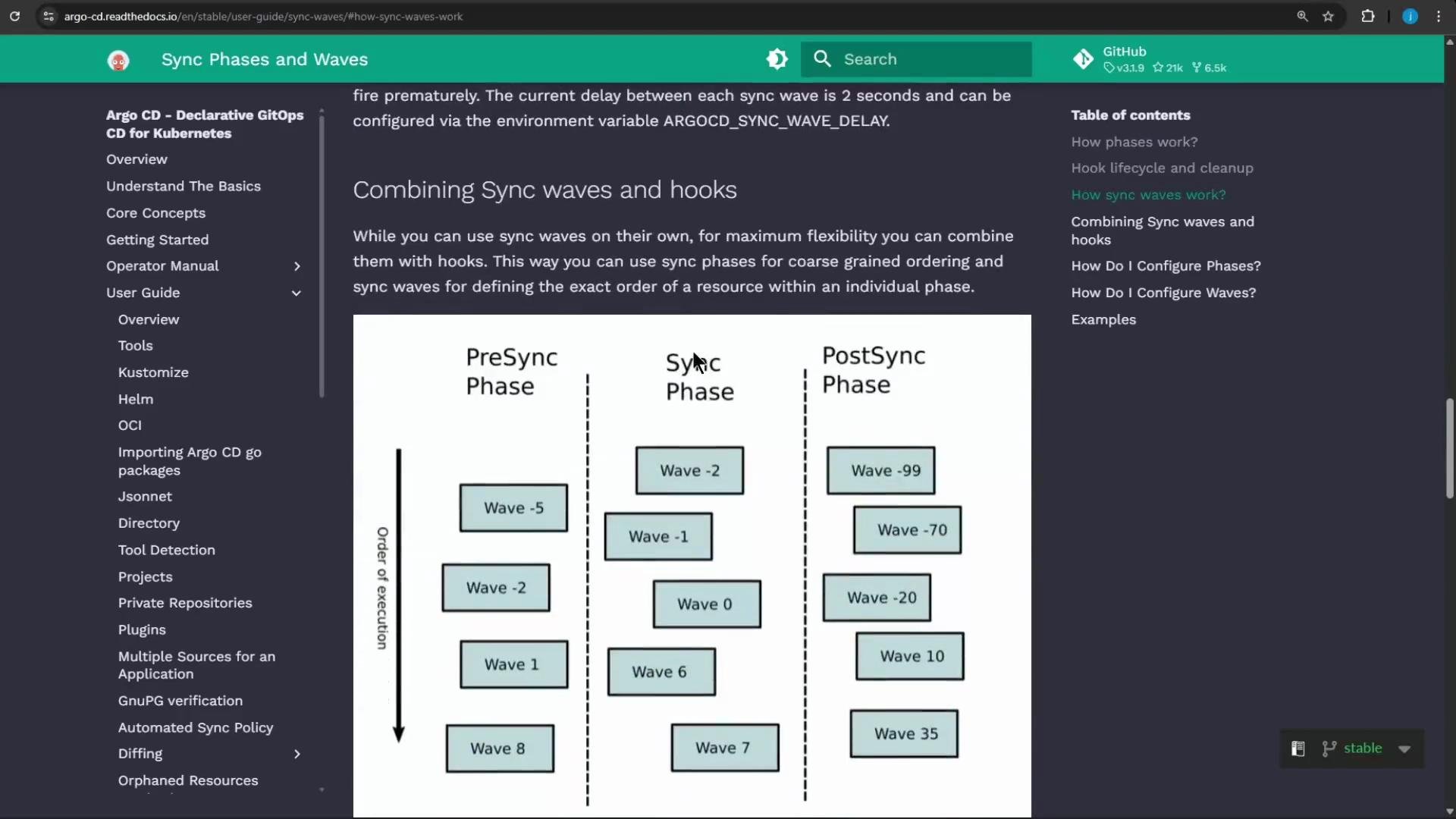 Sync waves and hook phases (PreSync/Sync/PostSync) are combinable: Argo CD groups resources by hook phase and wave, then processes groups in increasing wave order within each phase. Use this to implement precise, deterministic sync sequences.
Updated manifest: apply sync-wave annotations to enforce ordering. The planned sequence:
* schema migration job: PreSync, sync-wave "-2" (first)
* data migration job: PreSync, sync-wave "-1" (after schema)
* Namespace: sync-wave "0" (create namespace before sync-phase resources)
* PostgreSQL deployment & service: sync-wave "1"
* Frontend deployment & service: sync-wave "2"
* Cleanup job: PostSync hook (runs after the sync phase finishes)
```yaml theme={null}
# 1) Schema Migration Job - run first (PreSync, wave -2)
apiVersion: batch/v1
kind: Job
metadata:
name: schema-migration-job
namespace: app-namespace
annotations:
argocd.argoproj.io/hook: PreSync
argocd.argoproj.io/sync-wave: "-2"
spec:
template:
spec:
containers:
- name: schema-migrator
image: nginx:alpine
command:
- /bin/sh
- -c
- |
echo 'Running schema migration...'
sleep 1
echo 'Schema migration complete.'
restartPolicy: Never
backoffLimit: 2
---
# 2) Namespace created next (wave 0)
apiVersion: v1
kind: Namespace
metadata:
name: app-namespace
annotations:
argocd.argoproj.io/sync-wave: "0"
---
# 3) Data Migration Job - after schema migration (PreSync, wave -1)
apiVersion: batch/v1
kind: Job
metadata:
name: data-migration-job
namespace: app-namespace
annotations:
argocd.argoproj.io/hook: PreSync
argocd.argoproj.io/sync-wave: "-1"
spec:
template:
spec:
containers:
- name: data-migrator
image: nginx:alpine
command:
- /bin/sh
- -c
- |
echo 'Running data migration...'
sleep 1
echo 'Data migration complete.'
restartPolicy: Never
backoffLimit: 2
---
# 4) PostgreSQL Deployment (wave 1)
apiVersion: apps/v1
kind: Deployment
metadata:
name: postgresql
namespace: app-namespace
annotations:
argocd.argoproj.io/sync-wave: "1"
spec:
replicas: 1
selector:
matchLabels:
app: postgresql
template:
metadata:
labels:
app: postgresql
spec:
containers:
- name: postgresql-container
image: nginx:alpine
ports:
- containerPort: 80
---
# 5) PostgreSQL Service (wave 1)
apiVersion: v1
kind: Service
metadata:
name: postgresql-service
namespace: app-namespace
annotations:
argocd.argoproj.io/sync-wave: "1"
spec:
selector:
app: postgresql
ports:
- protocol: TCP
port: 80
targetPort: 80
type: ClusterIP
---
# 6) Frontend Deployment (wave 2)
apiVersion: apps/v1
kind: Deployment
metadata:
name: frontend
namespace: app-namespace
annotations:
argocd.argoproj.io/sync-wave: "2"
spec:
replicas: 2
selector:
matchLabels:
app: frontend
template:
metadata:
labels:
app: frontend
spec:
containers:
- name: frontend-container
image: nginx:alpine
ports:
- containerPort: 80
---
# 7) Frontend Service (wave 2)
apiVersion: v1
kind: Service
metadata:
name: frontend-service
namespace: app-namespace
annotations:
argocd.argoproj.io/sync-wave: "2"
spec:
selector:
app: frontend
ports:
- protocol: TCP
port: 80
targetPort: 80
type: ClusterIP
---
# 8) Cleanup Job - run after sync finishes (PostSync)
apiVersion: batch/v1
kind: Job
metadata:
name: cleanup-job
namespace: app-namespace
annotations:
argocd.argoproj.io/hook: PostSync
spec:
template:
spec:
containers:
- name: cleaner
image: nginx:alpine
command:
- /bin/sh
- -c
- |
echo 'Performing post-sync cleanup...'
sleep 1
echo 'Cleanup complete.'
restartPolicy: Never
backoffLimit: 1
```
How to deploy with Argo CD CLI
Create the Argo CD application pointing at the repository and path. Example:
```bash theme={null}
argocd app create sync-wave-demo \
--repo http://host.docker.internal:5000/kk-org/gitops-argocd-capa \
--path ./synchronization/waves-demo \
--dest-server https://kubernetes.default.svc \
--dest-namespace sync-wave-demo \
--project default \
--revision HEAD \
--sync-policy auto \
--sync-option CreateNamespace=true
```
Important notes:
* Commit the updated manifest (with sync-wave annotations) to Git before Argo CD can apply the new ordering.
* If any PreSync hooks target the Namespace (i.e., run jobs in `app-namespace`), ensure the Namespace exists before the PreSync phase. Options:
* Use --sync-option CreateNamespace=true when creating the Argo CD app, or
* Make the Namespace a PreSync resource with an earlier wave value than the jobs.
Remember: multiple resources with the same hook phase and the same sync-wave value will be synced in parallel. Assign distinct sync-wave numbers to achieve strict, sequential ordering.
Summary
* Hooks (PreSync/PostSync) control when resources run relative to the main sync phase, but resources sharing the same hook run concurrently.
* Sync waves (argocd.argoproj.io/sync-wave) provide an ordered sequence within each hook phase and the sync phase.
* Combine hooks and sync waves to implement complex GitOps workflows: migrations, namespace creation, database-first deployments, followed by frontend, and finishing with cleanup.
Resource ordering quick reference
| Resource | Hook Phase | sync-wave | Purpose |
| ------------------------------- | ---------- | --------------: | ---------------------------------------- |
| schema-migration-job | PreSync | "-2" | Run schema migration first |
| data-migration-job | PreSync | "-1" | Run data migration after schema |
| Namespace (app-namespace) | (Sync) | "0" | Ensure namespace exists before resources |
| postgresql (Deployment/Service) | Sync | "1" | Bring up the database first |
| frontend (Deployment/Service) | Sync | "2" | Deploy frontend after DB is ready |
| cleanup-job | PostSync | (PostSync hook) | Cleanup after sync phase finishes |
Links and references
* Argo CD sync waves: [https://argo-cd.readthedocs.io/en/stable/user-guide/sync-waves/](https://argo-cd.readthedocs.io/en/stable/user-guide/sync-waves/)
* Argo CD hooks and sync options: [https://argo-cd.readthedocs.io/en/stable/operations/notifications/](https://argo-cd.readthedocs.io/en/stable/operations/notifications/) (see hooks and app options)
* Argo CD CLI guide: [https://argo-cd.readthedocs.io/en/stable/cli\_installation/](https://argo-cd.readthedocs.io/en/stable/cli_installation/)
Sync waves and hook phases (PreSync/Sync/PostSync) are combinable: Argo CD groups resources by hook phase and wave, then processes groups in increasing wave order within each phase. Use this to implement precise, deterministic sync sequences.
Updated manifest: apply sync-wave annotations to enforce ordering. The planned sequence:
* schema migration job: PreSync, sync-wave "-2" (first)
* data migration job: PreSync, sync-wave "-1" (after schema)
* Namespace: sync-wave "0" (create namespace before sync-phase resources)
* PostgreSQL deployment & service: sync-wave "1"
* Frontend deployment & service: sync-wave "2"
* Cleanup job: PostSync hook (runs after the sync phase finishes)
```yaml theme={null}
# 1) Schema Migration Job - run first (PreSync, wave -2)
apiVersion: batch/v1
kind: Job
metadata:
name: schema-migration-job
namespace: app-namespace
annotations:
argocd.argoproj.io/hook: PreSync
argocd.argoproj.io/sync-wave: "-2"
spec:
template:
spec:
containers:
- name: schema-migrator
image: nginx:alpine
command:
- /bin/sh
- -c
- |
echo 'Running schema migration...'
sleep 1
echo 'Schema migration complete.'
restartPolicy: Never
backoffLimit: 2
---
# 2) Namespace created next (wave 0)
apiVersion: v1
kind: Namespace
metadata:
name: app-namespace
annotations:
argocd.argoproj.io/sync-wave: "0"
---
# 3) Data Migration Job - after schema migration (PreSync, wave -1)
apiVersion: batch/v1
kind: Job
metadata:
name: data-migration-job
namespace: app-namespace
annotations:
argocd.argoproj.io/hook: PreSync
argocd.argoproj.io/sync-wave: "-1"
spec:
template:
spec:
containers:
- name: data-migrator
image: nginx:alpine
command:
- /bin/sh
- -c
- |
echo 'Running data migration...'
sleep 1
echo 'Data migration complete.'
restartPolicy: Never
backoffLimit: 2
---
# 4) PostgreSQL Deployment (wave 1)
apiVersion: apps/v1
kind: Deployment
metadata:
name: postgresql
namespace: app-namespace
annotations:
argocd.argoproj.io/sync-wave: "1"
spec:
replicas: 1
selector:
matchLabels:
app: postgresql
template:
metadata:
labels:
app: postgresql
spec:
containers:
- name: postgresql-container
image: nginx:alpine
ports:
- containerPort: 80
---
# 5) PostgreSQL Service (wave 1)
apiVersion: v1
kind: Service
metadata:
name: postgresql-service
namespace: app-namespace
annotations:
argocd.argoproj.io/sync-wave: "1"
spec:
selector:
app: postgresql
ports:
- protocol: TCP
port: 80
targetPort: 80
type: ClusterIP
---
# 6) Frontend Deployment (wave 2)
apiVersion: apps/v1
kind: Deployment
metadata:
name: frontend
namespace: app-namespace
annotations:
argocd.argoproj.io/sync-wave: "2"
spec:
replicas: 2
selector:
matchLabels:
app: frontend
template:
metadata:
labels:
app: frontend
spec:
containers:
- name: frontend-container
image: nginx:alpine
ports:
- containerPort: 80
---
# 7) Frontend Service (wave 2)
apiVersion: v1
kind: Service
metadata:
name: frontend-service
namespace: app-namespace
annotations:
argocd.argoproj.io/sync-wave: "2"
spec:
selector:
app: frontend
ports:
- protocol: TCP
port: 80
targetPort: 80
type: ClusterIP
---
# 8) Cleanup Job - run after sync finishes (PostSync)
apiVersion: batch/v1
kind: Job
metadata:
name: cleanup-job
namespace: app-namespace
annotations:
argocd.argoproj.io/hook: PostSync
spec:
template:
spec:
containers:
- name: cleaner
image: nginx:alpine
command:
- /bin/sh
- -c
- |
echo 'Performing post-sync cleanup...'
sleep 1
echo 'Cleanup complete.'
restartPolicy: Never
backoffLimit: 1
```
How to deploy with Argo CD CLI
Create the Argo CD application pointing at the repository and path. Example:
```bash theme={null}
argocd app create sync-wave-demo \
--repo http://host.docker.internal:5000/kk-org/gitops-argocd-capa \
--path ./synchronization/waves-demo \
--dest-server https://kubernetes.default.svc \
--dest-namespace sync-wave-demo \
--project default \
--revision HEAD \
--sync-policy auto \
--sync-option CreateNamespace=true
```
Important notes:
* Commit the updated manifest (with sync-wave annotations) to Git before Argo CD can apply the new ordering.
* If any PreSync hooks target the Namespace (i.e., run jobs in `app-namespace`), ensure the Namespace exists before the PreSync phase. Options:
* Use --sync-option CreateNamespace=true when creating the Argo CD app, or
* Make the Namespace a PreSync resource with an earlier wave value than the jobs.
Remember: multiple resources with the same hook phase and the same sync-wave value will be synced in parallel. Assign distinct sync-wave numbers to achieve strict, sequential ordering.
Summary
* Hooks (PreSync/PostSync) control when resources run relative to the main sync phase, but resources sharing the same hook run concurrently.
* Sync waves (argocd.argoproj.io/sync-wave) provide an ordered sequence within each hook phase and the sync phase.
* Combine hooks and sync waves to implement complex GitOps workflows: migrations, namespace creation, database-first deployments, followed by frontend, and finishing with cleanup.
Resource ordering quick reference
| Resource | Hook Phase | sync-wave | Purpose |
| ------------------------------- | ---------- | --------------: | ---------------------------------------- |
| schema-migration-job | PreSync | "-2" | Run schema migration first |
| data-migration-job | PreSync | "-1" | Run data migration after schema |
| Namespace (app-namespace) | (Sync) | "0" | Ensure namespace exists before resources |
| postgresql (Deployment/Service) | Sync | "1" | Bring up the database first |
| frontend (Deployment/Service) | Sync | "2" | Deploy frontend after DB is ready |
| cleanup-job | PostSync | (PostSync hook) | Cleanup after sync phase finishes |
Links and references
* Argo CD sync waves: [https://argo-cd.readthedocs.io/en/stable/user-guide/sync-waves/](https://argo-cd.readthedocs.io/en/stable/user-guide/sync-waves/)
* Argo CD hooks and sync options: [https://argo-cd.readthedocs.io/en/stable/operations/notifications/](https://argo-cd.readthedocs.io/en/stable/operations/notifications/) (see hooks and app options)
* Argo CD CLI guide: [https://argo-cd.readthedocs.io/en/stable/cli\_installation/](https://argo-cd.readthedocs.io/en/stable/cli_installation/)