> ## Documentation Index
> Fetch the complete documentation index at: https://notes.kodekloud.com/llms.txt
> Use this file to discover all available pages before exploring further.
# Multi Cluster Application Deployment
> Guide for registering external Kubernetes clusters with Argo CD to enable GitOps multi-cluster application deployments, RBAC setup, and credential storage.
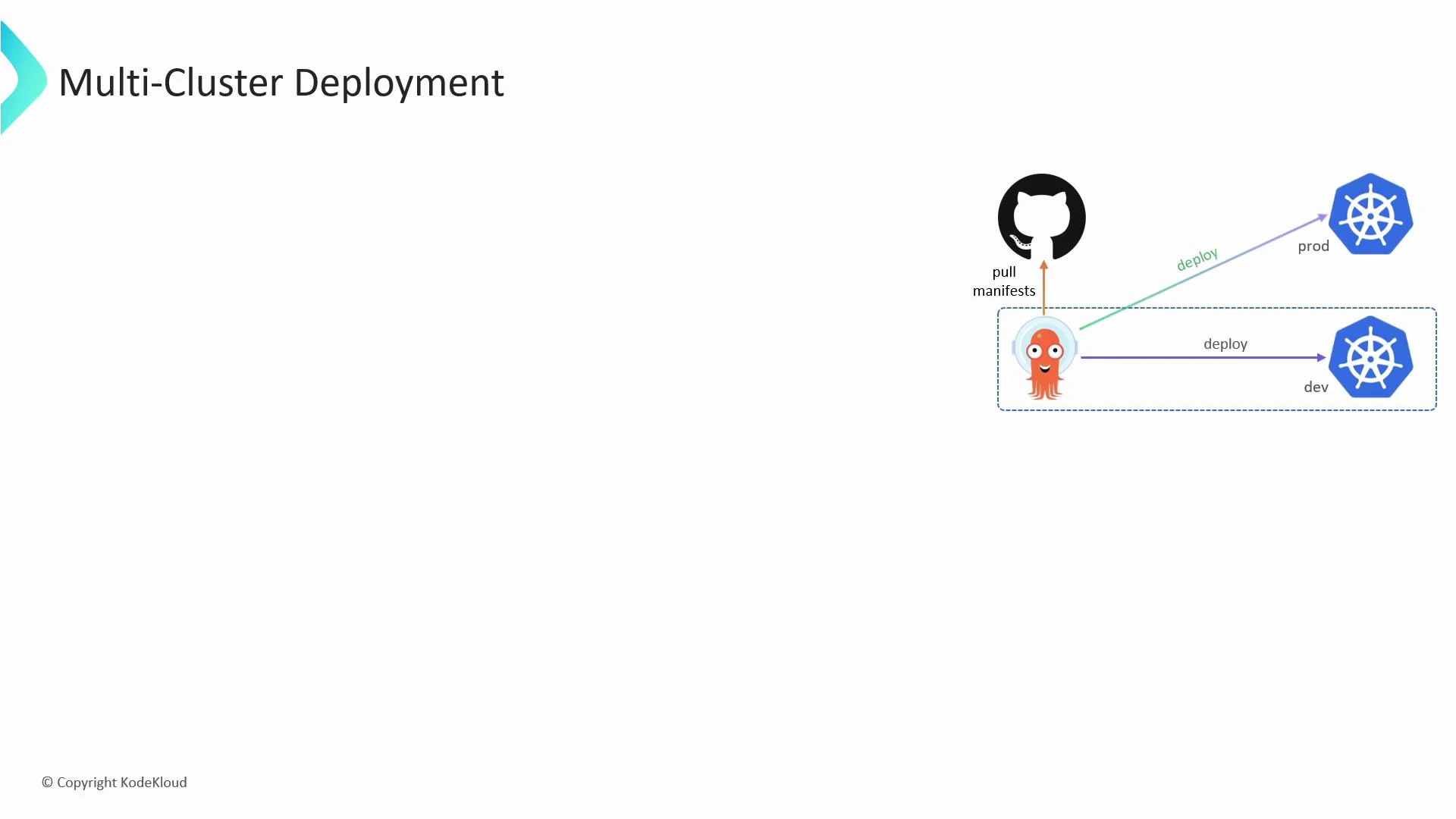
Learn how Argo CD can manage applications across multiple Kubernetes clusters — not just the cluster where Argo CD itself runs. This guide shows the recommended sequence: prepare your kubeconfig, register the external cluster with Argo CD, and verify that the cluster is available as a deployment destination.
Argo CD supports multi-cluster deployments by storing external cluster credentials in its own namespace and using a dedicated service account on each external cluster to apply manifests.
 ## Overview — steps to add an external cluster
1. Add the external cluster details (server, certificates, user credentials, context) to your local kubeconfig.
2. Use the argocd CLI to register that kubeconfig context with Argo CD (`argocd cluster add`).
3. Confirm Argo CD created the required ServiceAccount, ClusterRole, and ClusterRoleBinding on the target cluster.
4. Verify the cluster appears in Argo CD’s cluster list and inspect the stored secret if needed.
Before running the commands below, ensure you have access to the target cluster API endpoint and appropriate client certificates or tokens. You can also use cloud provider IAM auth (e.g., EKS, GKE) depending on your environment.
## Example commands
Add the cluster server, user credentials, and context into kubeconfig:
```bash theme={null}
$ kubectl config set-cluster prod --server=https://1.2.3.4 --certificate-authority=prod.crt
Cluster "prod" set.
$ kubectl config set-credentials admin --client-certificate=admin.crt --client-key=admin.key
User "admin" set.
$ kubectl config set-context admin-prod --cluster=prod --user=admin --namespace=prod-app
Context "admin-prod" set.
```
Register the context with Argo CD (this will create a service account and RBAC bindings on the external cluster):
```bash theme={null}
$ argocd cluster add admin-prod
WARNING: This will create a service account `argocd-manager` on the cluster referenced by context `admin-prod` with full cluster level admin privileges. Do you want to continue [y/N]? y
INFO[0011] ServiceAccount "argocd-manager" created in namespace "kube-system"
INFO[0011] ClusterRole "argocd-manager-role" created
INFO[0011] ClusterRoleBinding "argocd-manager-role-binding" created
Cluster 'https://1.2.3.4' added
```
Check the clusters that Argo CD knows about:
```bash theme={null}
$ argocd cluster list
SERVER NAME VERSION STATUS MESSAGE PROJECT
https://1.2.3.4 admin-prod 1.21 Successful
https://kubernetes.default.svc in-cluster 1.20 Successful
```
Argo CD stores the cluster credentials as Kubernetes Secrets in the argocd namespace. You can inspect a secret like this:
```Expected Output: theme={null}
bash
$ kubectl describe secret cluster-1.2.3.4-1827028835 -n argocd
....Data
config: 3017 bytes # user token/cert
name: 54 bytes # context name
server: 21 bytes # server url
```
When you run `argocd cluster add`, Argo CD will create an `argocd-manager` ServiceAccount with cluster-admin level permissions by default. Limit access and scope where possible — for production, prefer restricting RBAC to the minimum required privileges.
## Quick reference — commands and purpose
| Command | Purpose | Notes |
| ------------------------------------------ | -------------------------------------------- | ------------------------------------------------------------------------- |
| `kubectl config set-cluster` | Add cluster endpoint & CA to kubeconfig | Provide the API server URL and CA cert |
| `kubectl config set-credentials` | Add user credentials (cert/key or token) | Use client certs or bearer token |
| `kubectl config set-context` | Create a kubeconfig context for the cluster | Include namespace if you want a default namespace |
| `argocd cluster add ` | Register the kubeconfig context with Argo CD | Creates ServiceAccount, ClusterRole, ClusterRoleBinding on target cluster |
| `argocd cluster list` | List clusters registered in Argo CD | Shows status and server URL |
| `kubectl describe secret -n argocd` | Inspect stored cluster credentials | Secrets store the kubeconfig/config data |
## Verification and troubleshooting
* Use `argocd cluster list` to confirm the cluster status shows Successful.
* If a cluster shows errors, check the target cluster’s kube-apiserver reachability, certificate validity, and whether the created ServiceAccount/RBAC objects exist in the target cluster’s `kube-system` namespace.
* Inspect Argo CD logs for errors: `kubectl -n argocd logs deploy/argocd-server` or check the repo-server and application-controller logs for sync problems.
## Links and references
* [Argo CD documentation — multi-cluster setup](https://argo-cd.readthedocs.io/en/stable/)
* [Kubernetes kubeconfig documentation](https://kubernetes.io/docs/concepts/configuration/organize-cluster-access-kubeconfig/)
* [kubectl config command reference](https://kubernetes.io/docs/reference/generated/kubectl/kubectl-commands#config)
* [Kubernetes ServiceAccount concept](https://kubernetes.io/docs/tasks/configure-pod-container/configure-service-account/)
* [Kubernetes Secrets](https://kubernetes.io/docs/concepts/configuration/secret/)
This workflow lets Argo CD act as a single control plane for application deployment across multiple Kubernetes clusters, enabling consistent GitOps-driven rollouts to dev, staging, and production clusters.
## Overview — steps to add an external cluster
1. Add the external cluster details (server, certificates, user credentials, context) to your local kubeconfig.
2. Use the argocd CLI to register that kubeconfig context with Argo CD (`argocd cluster add`).
3. Confirm Argo CD created the required ServiceAccount, ClusterRole, and ClusterRoleBinding on the target cluster.
4. Verify the cluster appears in Argo CD’s cluster list and inspect the stored secret if needed.
Before running the commands below, ensure you have access to the target cluster API endpoint and appropriate client certificates or tokens. You can also use cloud provider IAM auth (e.g., EKS, GKE) depending on your environment.
## Example commands
Add the cluster server, user credentials, and context into kubeconfig:
```bash theme={null}
$ kubectl config set-cluster prod --server=https://1.2.3.4 --certificate-authority=prod.crt
Cluster "prod" set.
$ kubectl config set-credentials admin --client-certificate=admin.crt --client-key=admin.key
User "admin" set.
$ kubectl config set-context admin-prod --cluster=prod --user=admin --namespace=prod-app
Context "admin-prod" set.
```
Register the context with Argo CD (this will create a service account and RBAC bindings on the external cluster):
```bash theme={null}
$ argocd cluster add admin-prod
WARNING: This will create a service account `argocd-manager` on the cluster referenced by context `admin-prod` with full cluster level admin privileges. Do you want to continue [y/N]? y
INFO[0011] ServiceAccount "argocd-manager" created in namespace "kube-system"
INFO[0011] ClusterRole "argocd-manager-role" created
INFO[0011] ClusterRoleBinding "argocd-manager-role-binding" created
Cluster 'https://1.2.3.4' added
```
Check the clusters that Argo CD knows about:
```bash theme={null}
$ argocd cluster list
SERVER NAME VERSION STATUS MESSAGE PROJECT
https://1.2.3.4 admin-prod 1.21 Successful
https://kubernetes.default.svc in-cluster 1.20 Successful
```
Argo CD stores the cluster credentials as Kubernetes Secrets in the argocd namespace. You can inspect a secret like this:
```Expected Output: theme={null}
bash
$ kubectl describe secret cluster-1.2.3.4-1827028835 -n argocd
....Data
config: 3017 bytes # user token/cert
name: 54 bytes # context name
server: 21 bytes # server url
```
When you run `argocd cluster add`, Argo CD will create an `argocd-manager` ServiceAccount with cluster-admin level permissions by default. Limit access and scope where possible — for production, prefer restricting RBAC to the minimum required privileges.
## Quick reference — commands and purpose
| Command | Purpose | Notes |
| ------------------------------------------ | -------------------------------------------- | ------------------------------------------------------------------------- |
| `kubectl config set-cluster` | Add cluster endpoint & CA to kubeconfig | Provide the API server URL and CA cert |
| `kubectl config set-credentials` | Add user credentials (cert/key or token) | Use client certs or bearer token |
| `kubectl config set-context` | Create a kubeconfig context for the cluster | Include namespace if you want a default namespace |
| `argocd cluster add ` | Register the kubeconfig context with Argo CD | Creates ServiceAccount, ClusterRole, ClusterRoleBinding on target cluster |
| `argocd cluster list` | List clusters registered in Argo CD | Shows status and server URL |
| `kubectl describe secret -n argocd` | Inspect stored cluster credentials | Secrets store the kubeconfig/config data |
## Verification and troubleshooting
* Use `argocd cluster list` to confirm the cluster status shows Successful.
* If a cluster shows errors, check the target cluster’s kube-apiserver reachability, certificate validity, and whether the created ServiceAccount/RBAC objects exist in the target cluster’s `kube-system` namespace.
* Inspect Argo CD logs for errors: `kubectl -n argocd logs deploy/argocd-server` or check the repo-server and application-controller logs for sync problems.
## Links and references
* [Argo CD documentation — multi-cluster setup](https://argo-cd.readthedocs.io/en/stable/)
* [Kubernetes kubeconfig documentation](https://kubernetes.io/docs/concepts/configuration/organize-cluster-access-kubeconfig/)
* [kubectl config command reference](https://kubernetes.io/docs/reference/generated/kubectl/kubectl-commands#config)
* [Kubernetes ServiceAccount concept](https://kubernetes.io/docs/tasks/configure-pod-container/configure-service-account/)
* [Kubernetes Secrets](https://kubernetes.io/docs/concepts/configuration/secret/)
This workflow lets Argo CD act as a single control plane for application deployment across multiple Kubernetes clusters, enabling consistent GitOps-driven rollouts to dev, staging, and production clusters.