> ## Documentation Index
> Fetch the complete documentation index at: https://notes.kodekloud.com/llms.txt
> Use this file to discover all available pages before exploring further.
# Demo API Entity
> Shows how to model API entities in Backstage, link providers and consumers, reference OpenAPI specs, and configure backend access for fetching external raw API definitions
In this lesson you'll learn how to model an API in Backstage's Software Catalog and how to link that API with the components that provide and consume it. We'll use an authentication service (`auth-service`) that provides an API (`auth-api`) and show how a consumer component (for example, `shopping-cart`) can declare it consumes that API.
Existing component entity for the authentication service (already imported into Backstage):
```yaml theme={null}
apiVersion: backstage.io/v1beta1
kind: Component
metadata:
name: auth-service
description: authentication service
tags:
- javascript
links:
- url: https://google.com
title: Admin Dashboard
icon: dashboard
type: admin-dashboard
spec:
type: service
lifecycle: production
owner: guests
```
Why use a separate API entity?
* Separating the API into its own `API` entity lets Backstage display API docs, ownership, and relationships independently of implementation.
* It enables discoverability: teams can find APIs and see providers and consumers in the relations graph.
Ways to link Component and API
* Reference the provider from the `API` entity using `spec.apiProvidedBy`.
* Reference the API from the provider `Component` using `spec.providesApis` (a list).
* Both approaches are valid; choose what fits your workflow.
Comparison
| Method | Where declared | When to use |
| -------------------- | ------------------ | ---------------------------------------------------------------------------------------------------- |
| `spec.apiProvidedBy` | `API` entity | When you prefer API-centric ownership and want the API descriptor to reference its provider directly |
| `spec.providesApis` | `Component` entity | When you want the component to list all APIs it provides (useful for multi-API components) |
| `spec.consumesApis` | `Component` entity | For components that consume one or more APIs |
Example: API entity that references the provider via `apiProvidedBy` and embeds an inline OpenAPI definition (shortened for clarity):
```yaml theme={null}
apiVersion: backstage.io/v1alpha1
kind: API
metadata:
name: auth-api
description: Verify user authentication status
spec:
type: openapi
lifecycle: production
owner: guests
apiProvidedBy: auth-service
definition: |
openapi: "3.0.0"
info:
version: "1.0.0"
title: Authentication Service API
license:
name: MIT
servers:
- url: https://auth.example.com/v1
paths:
/signup:
post:
summary: Create a new user account
/login:
post:
summary: User login
```
Alternatively, declare the API on the provider component using `providesApis`:
```yaml theme={null}
apiVersion: backstage.io/v1beta1
kind: Component
metadata:
name: auth-service
description: authentication service
spec:
type: service
lifecycle: production
owner: guests
providesApis:
- auth-api
```
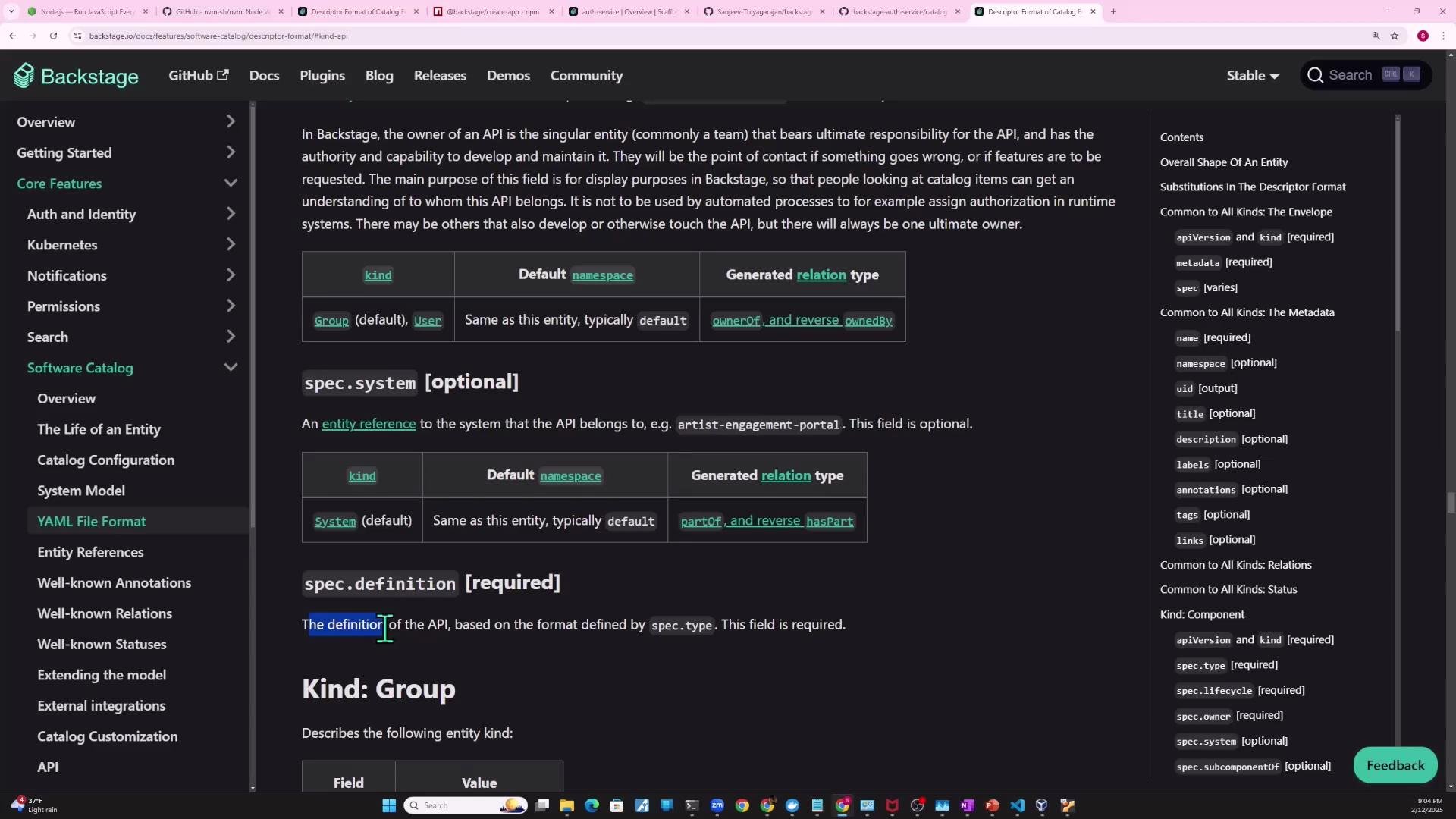
This associates `auth-service` with the `auth-api` API entity shown earlier. Note: the `definition` field must follow the format described by `spec.type` (for `openapi`, that means supplying an OpenAPI document). For more details, consult the Software Catalog descriptor docs:
* [Software Catalog descriptor format](https://backstage.io/docs/features/software-catalog/descriptor-format)
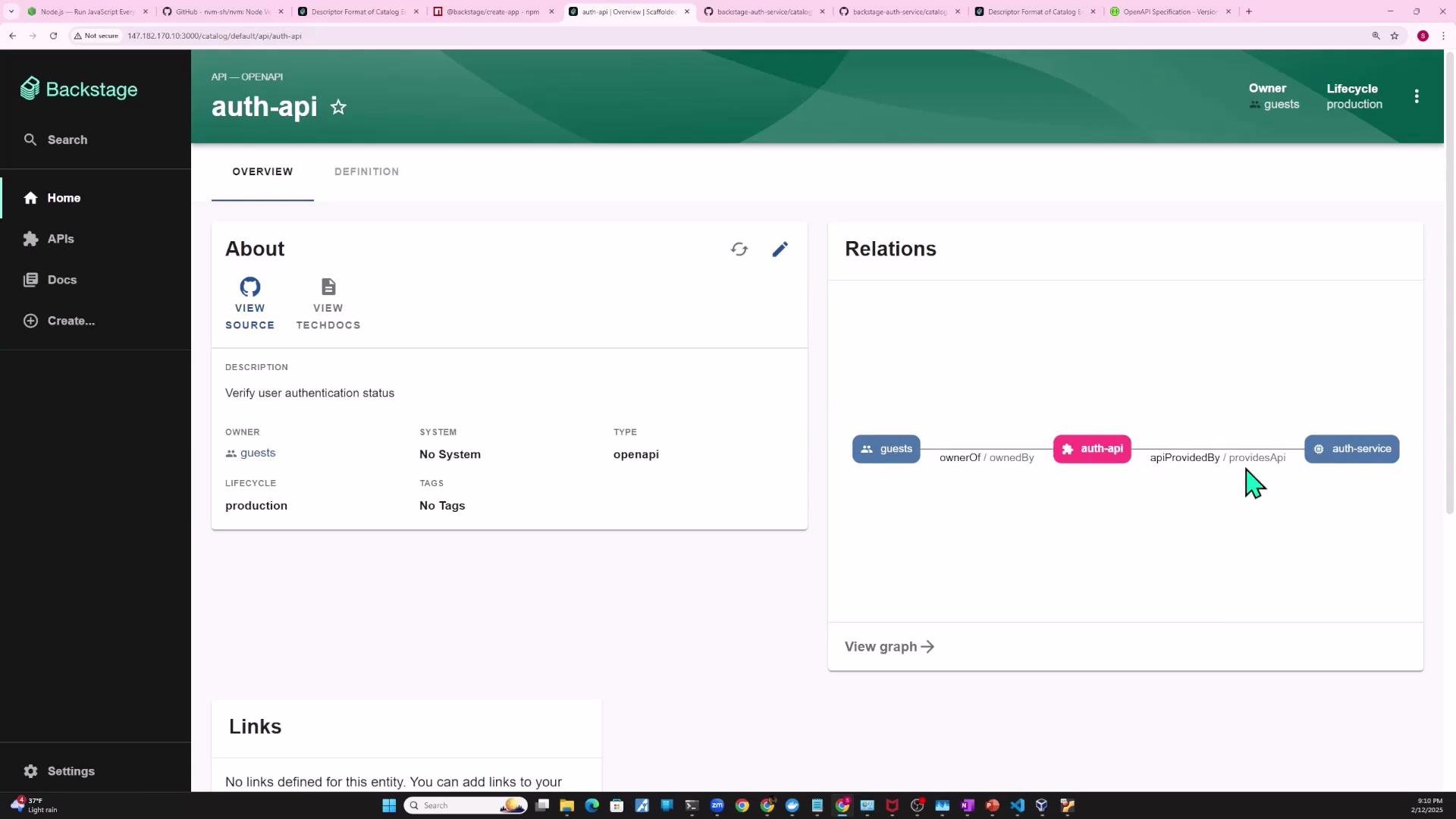
 Viewing relations in the Backstage UI
* After creating an `API` entity and linking it to `auth-service`, the API details page will show relations such as `auth-service -> auth-api`.
* Relations make it easy to see ownership and IoC (who provides and who consumes an API).
Viewing relations in the Backstage UI
* After creating an `API` entity and linking it to `auth-service`, the API details page will show relations such as `auth-service -> auth-api`.
* Relations make it easy to see ownership and IoC (who provides and who consumes an API).
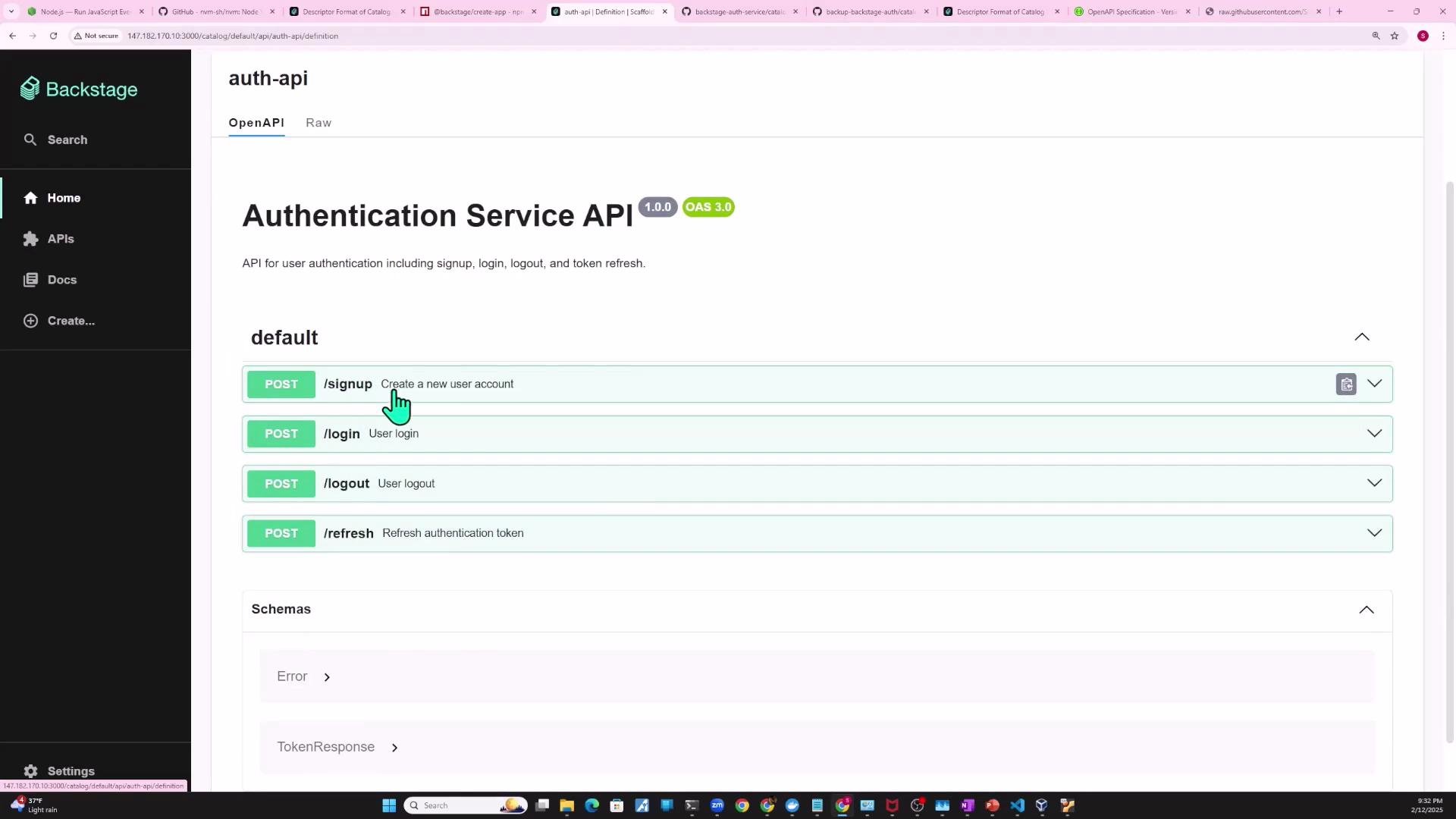
 Definition property and referencing an external OpenAPI spec
* Small projects sometimes embed OpenAPI content inline using `definition: |`.
* For production or team projects, store the OpenAPI spec in the repository (for example, `openapi/auth-api-spec.yaml`) and reference that file from the catalog descriptor so Backstage can fetch and render it.
Preferred pattern: reference the raw file using `$text` (or `$json` / `$text` depending on parsing needs). When referencing GitHub-hosted raw files, use the `raw.githubusercontent.com` URL.
Correct example referencing a raw OpenAPI file with `$text`:
```yaml theme={null}
apiVersion: backstage.io/v1alpha1
kind: API
metadata:
name: auth-api
description: Verify user authentication status
spec:
type: openapi
lifecycle: production
owner: guests
apiProvidedBy: auth-service
definition:
$text: https://raw.githubusercontent.com/Sanjeev-Thiyagarajan/backstage-auth-service/main/openapi/auth-api-spec.yaml
```
Permission to read external raw hosts
* Backstage must be allowed to fetch external raw files. If the host is not permitted in your backend config, you'll see an error like this:
```text theme={null}
Error: Processor PlaceholderProcessor threw an error while preprocessing; caused by Error: Placeholder $json could not read location https://raw.githubusercontent.com/Sanjeev-Thiyagarajan/backstage-auth-service/main/openapi/auth-api-spec.yaml, NotAllowedError: Reading from 'https://raw.githubusercontent.com/Sanjeev-Thiyagarajan/backstage-auth-service/main/openapi/auth-api-spec.yaml' is not allowed. You may need to configure an integration for the target host, or add it to the configured list of allowed hosts at 'backend.reading.allow'
```
Add hosts you trust and only do this for required sources. Changes to the backend configuration require restarting the backend process.
Add the host to `backend.reading.allow` in your `app-config.yaml` so Backstage can read raw files. Example:
```yaml theme={null}
backend:
reading:
allow:
- host: raw.githubusercontent.com
integrations:
github:
# integration config if required by your setup, e.g.:
# - host: github.com
# token: ${GITHUB_TOKEN}
```
After updating `app-config.yaml`, restart the Backstage backend; otherwise changes won't take effect and the raw file will still be blocked.
Once allowed and the backend is restarted, Backstage will fetch the raw OpenAPI spec and render the API definition using its OpenAPI viewer — endpoints, paths, and request/response models will be shown in the API’s definition pane.
Definition property and referencing an external OpenAPI spec
* Small projects sometimes embed OpenAPI content inline using `definition: |`.
* For production or team projects, store the OpenAPI spec in the repository (for example, `openapi/auth-api-spec.yaml`) and reference that file from the catalog descriptor so Backstage can fetch and render it.
Preferred pattern: reference the raw file using `$text` (or `$json` / `$text` depending on parsing needs). When referencing GitHub-hosted raw files, use the `raw.githubusercontent.com` URL.
Correct example referencing a raw OpenAPI file with `$text`:
```yaml theme={null}
apiVersion: backstage.io/v1alpha1
kind: API
metadata:
name: auth-api
description: Verify user authentication status
spec:
type: openapi
lifecycle: production
owner: guests
apiProvidedBy: auth-service
definition:
$text: https://raw.githubusercontent.com/Sanjeev-Thiyagarajan/backstage-auth-service/main/openapi/auth-api-spec.yaml
```
Permission to read external raw hosts
* Backstage must be allowed to fetch external raw files. If the host is not permitted in your backend config, you'll see an error like this:
```text theme={null}
Error: Processor PlaceholderProcessor threw an error while preprocessing; caused by Error: Placeholder $json could not read location https://raw.githubusercontent.com/Sanjeev-Thiyagarajan/backstage-auth-service/main/openapi/auth-api-spec.yaml, NotAllowedError: Reading from 'https://raw.githubusercontent.com/Sanjeev-Thiyagarajan/backstage-auth-service/main/openapi/auth-api-spec.yaml' is not allowed. You may need to configure an integration for the target host, or add it to the configured list of allowed hosts at 'backend.reading.allow'
```
Add hosts you trust and only do this for required sources. Changes to the backend configuration require restarting the backend process.
Add the host to `backend.reading.allow` in your `app-config.yaml` so Backstage can read raw files. Example:
```yaml theme={null}
backend:
reading:
allow:
- host: raw.githubusercontent.com
integrations:
github:
# integration config if required by your setup, e.g.:
# - host: github.com
# token: ${GITHUB_TOKEN}
```
After updating `app-config.yaml`, restart the Backstage backend; otherwise changes won't take effect and the raw file will still be blocked.
Once allowed and the backend is restarted, Backstage will fetch the raw OpenAPI spec and render the API definition using its OpenAPI viewer — endpoints, paths, and request/response models will be shown in the API’s definition pane.
 Define consumers of the API
* To mark that a component consumes an API, add `spec.consumesApis` to the consuming component. This is a list of API names.
Example: `shopping-cart` component declares it consumes the `auth-api`:
```yaml theme={null}
apiVersion: backstage.io/v1beta1
kind: Component
metadata:
name: shopping-cart
description: shopping cart service
spec:
type: service
lifecycle: production
owner: ecommerce-team
consumesApis:
- auth-api
```
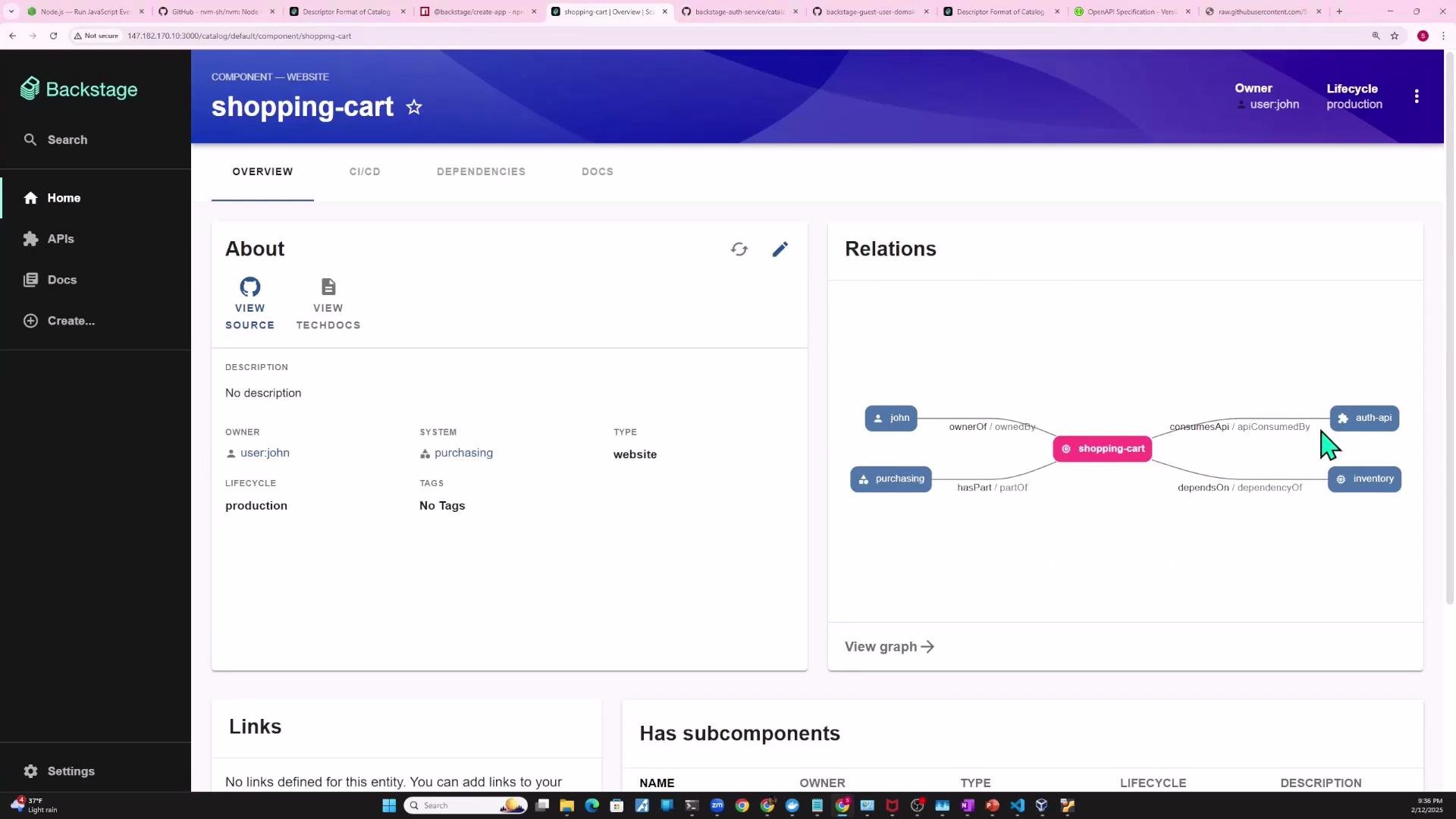
Backstage will then show `shopping-cart` as a consumer of `auth-api`, and the `auth-api` page will list `shopping-cart` among its consumers.
Define consumers of the API
* To mark that a component consumes an API, add `spec.consumesApis` to the consuming component. This is a list of API names.
Example: `shopping-cart` component declares it consumes the `auth-api`:
```yaml theme={null}
apiVersion: backstage.io/v1beta1
kind: Component
metadata:
name: shopping-cart
description: shopping cart service
spec:
type: service
lifecycle: production
owner: ecommerce-team
consumesApis:
- auth-api
```
Backstage will then show `shopping-cart` as a consumer of `auth-api`, and the `auth-api` page will list `shopping-cart` among its consumers.
 Quick reference checklist
| Task | How to do it | Example |
| ---------------------------------- | -------------------------------------------------------------------------------- | -------------------------------------------------------------- |
| Represent an API | Create a separate `API` entity | `kind: API`, `metadata.name: auth-api` |
| Link API to provider | Use `spec.apiProvidedBy` on the `API`, or `spec.providesApis` on the `Component` | `apiProvidedBy: auth-service` or `providesApis: [auth-api]` |
| Mark a consumer | Use `spec.consumesApis` on the consuming component | `consumesApis: [auth-api]` |
| Reference external OpenAPI file | Use `$text` (or `$json`) pointing to raw file URL | `definition: { $text: https://raw.githubusercontent.com/... }` |
| Allow Backstage to fetch raw files | Add host to `backend.reading.allow` and restart backend | `host: raw.githubusercontent.com` in `app-config.yaml` |
Links and references
* Backstage Software Catalog descriptor format: [https://backstage.io/docs/features/software-catalog/descriptor-format](https://backstage.io/docs/features/software-catalog/descriptor-format)
* Backstage docs — APIs and OpenAPI support: [https://backstage.io/docs/features/software-catalog/descriptor-format#api-entities](https://backstage.io/docs/features/software-catalog/descriptor-format#api-entities)
* GitHub raw files: `https://raw.githubusercontent.com/`
With these patterns you can model APIs and their relationships in Backstage so teams can discover, document, and manage APIs and their consumers/providers across your organization.
Quick reference checklist
| Task | How to do it | Example |
| ---------------------------------- | -------------------------------------------------------------------------------- | -------------------------------------------------------------- |
| Represent an API | Create a separate `API` entity | `kind: API`, `metadata.name: auth-api` |
| Link API to provider | Use `spec.apiProvidedBy` on the `API`, or `spec.providesApis` on the `Component` | `apiProvidedBy: auth-service` or `providesApis: [auth-api]` |
| Mark a consumer | Use `spec.consumesApis` on the consuming component | `consumesApis: [auth-api]` |
| Reference external OpenAPI file | Use `$text` (or `$json`) pointing to raw file URL | `definition: { $text: https://raw.githubusercontent.com/... }` |
| Allow Backstage to fetch raw files | Add host to `backend.reading.allow` and restart backend | `host: raw.githubusercontent.com` in `app-config.yaml` |
Links and references
* Backstage Software Catalog descriptor format: [https://backstage.io/docs/features/software-catalog/descriptor-format](https://backstage.io/docs/features/software-catalog/descriptor-format)
* Backstage docs — APIs and OpenAPI support: [https://backstage.io/docs/features/software-catalog/descriptor-format#api-entities](https://backstage.io/docs/features/software-catalog/descriptor-format#api-entities)
* GitHub raw files: `https://raw.githubusercontent.com/`
With these patterns you can model APIs and their relationships in Backstage so teams can discover, document, and manage APIs and their consumers/providers across your organization.