> ## Documentation Index
> Fetch the complete documentation index at: https://notes.kodekloud.com/llms.txt
> Use this file to discover all available pages before exploring further.
# Demo Integrations Entity Provider
> Guide to configuring Backstage GitHub entity provider to automatically discover and import catalog-info.yaml files from repositories into the Backstage software catalog
In this lesson we'll set up an entity provider so Backstage can scan a location (for example, your GitHub account or organization) and automatically import matching entity files (typically `catalog-info.yaml`). This streamlines onboarding by avoiding manual registration of each component.
Quick overview
* Install the GitHub entity provider plugin on the backend.
* Register the plugin in the backend bootstrap file.
* Add GitHub integration credentials to `app-config.yaml`.
* Configure one or more `catalog.providers.github` entries that point to your GitHub account or organization.
* Restart the backend and verify entities are imported automatically.
What the entity files look like
A typical entity file that Backstage imports (`catalog-info.yaml`):
```yaml theme={null}
apiVersion: backstage.io/v1alpha1
kind: Component
metadata:
name: podcast-api
description: Podcast API
spec:
type: service
lifecycle: experimental
owner: tools@example
```
Step 1 — Install the GitHub entity provider plugin
From the repo root, add the provider module to the backend package:
```bash theme={null}
yarn --cwd packages/backend add @backstage/plugin-catalog-backend-module-github
```
Yarn will add the dependency to `packages/backend/package.json`. If you see peer dependency warnings, review and resolve them as needed.
Step 2 — Register the plugin in your backend bootstrap file
Open `packages/backend/src/index.ts` and add the GitHub module to the backend modules that are started. Place this near other `backend.add(import(...))` entries.
Example (TypeScript):
```typescript theme={null}
// packages/backend/src/index.ts
// ... other imports and bootstrap code ...
// search plugin
backend.add(import('@backstage/plugin-search-backend'));
// search engine
// See https://backstage.io/docs/features/search/search-engines
backend.add(import('@backstage/plugin-search-backend-module-pg'));
// search collators
backend.add(import('@backstage/plugin-search-backend-module-catalog'));
backend.add(import('@backstage/plugin-search-backend-module-techdocs'));
// kubernetes
backend.add(import('@backstage/plugin-kubernetes-backend'));
// catalog plugin (if not already present)
backend.add(import('@backstage/plugin-catalog-backend'));
// GitHub entity provider module
backend.add(import('@backstage/plugin-catalog-backend-module-github'));
backend.start();
```
Ensure you add the GitHub module just once. Many Backstage projects already include `@backstage/plugin-catalog-backend`; the new step is adding the `_module_github` provider module to enable GitHub-backed discovery.
Step 3 — Add GitHub integration credentials
Configure your GitHub integration in `app-config.yaml` or `app-config.local.yaml`:
```yaml theme={null}
integrations:
github:
- host: github.com
# Replace with a Personal Access Token (PAT) that has repo read access
token: ghp_REPLACE_WITH_YOUR_TOKEN
```
Do not commit real tokens to version control. Use `app-config.local.yaml` or environment variables for secrets in development/production.
Step 4 — Configure a GitHub entity provider in app-config.yaml
Under `catalog.providers.github` you define provider entries. Each provider includes:
* provider ID (the key under `github:`)
* `organization` (GitHub user or org)
* `catalogPath` (path within the repo to find the entity file)
* optional `filters` (branch and repository regex)
* optional `schedule` to control polling frequency and timeout
Example provider that scans the repo root for `catalog-info.yaml` on the `main` branch every 20 minutes:
```yaml theme={null}
catalog:
providers:
github:
sanjeevAccount:
organization: 'Sanjeev-Thiyagarajan'
# Path to the catalog file, relative to the repo root
catalogPath: '/catalog-info.yaml'
filters:
branch: 'main'
repository: '.*' # Regex: matches all repositories
schedule:
frequency: { minutes: 20 }
timeout: { minutes: 2 }
import:
entityFilename: catalog-info.yaml
pullRequestBranchName: backstage-integration
rules:
- allow: [Component, System, API, Resource, Location, Group, User, Domain]
```
Configuration reference
| Option | Purpose | Example |
| ----------------------- | ---------------------------------------- | -------------------- |
| `organization` | GitHub account or organization to scan | `shopping-hub` |
| `catalogPath` | Path in each repo to the entity file | `/catalog-info.yaml` |
| `filters.branch` | Branch name to scan | `main` |
| `filters.repository` | Regex to match repository names | `'.*'` |
| `schedule.frequency` | How often to poll (example uses minutes) | `{ minutes: 20 }` |
| `schedule.timeout` | Timeout for each scan run | `{ minutes: 2 }` |
| `import.entityFilename` | Filename used when creating locations | `catalog-info.yaml` |
* The provider ID (e.g., `sanjeevAccount`) is the key under `github:` and can be any camelCase identifier.
* `catalogPath` is relative to the repository root; default is `/catalog-info.yaml`.
* Use `filters.repository` regex to limit which repos are scanned.
* Be conservative with schedule frequency to avoid hitting GitHub API rate limits.
How Backstage discovers entity files
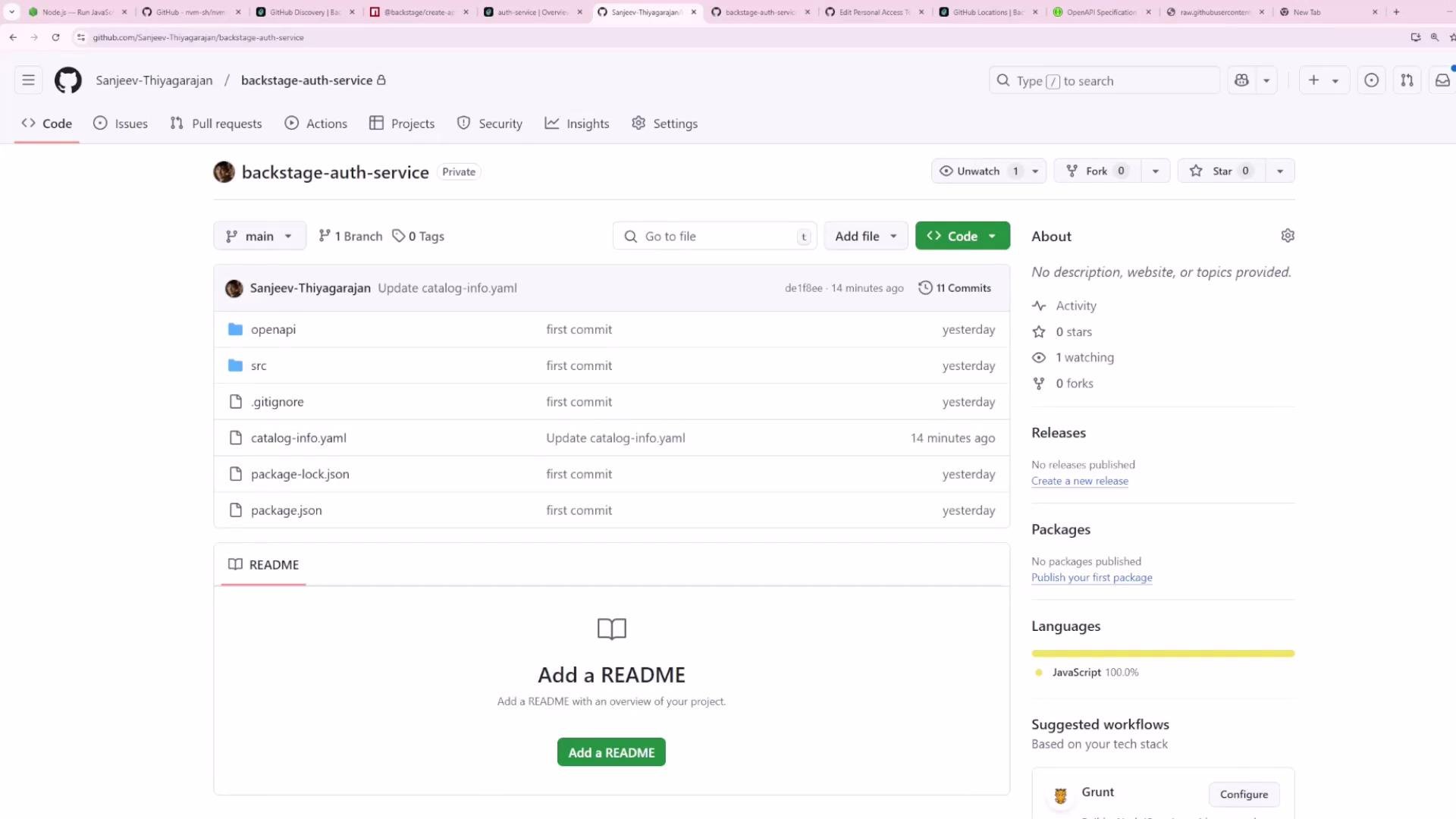
Backstage scans repositories in the configured organization/account and looks for the `catalogPath`. For example, if a repository contains `catalog-info.yaml` at the root on the `main` branch, Backstage will import it automatically.
 Filtering and schedule examples
To scan only the `main` branch and all repositories:
```yaml theme={null}
filters:
branch: 'main'
repository: '.*'
```
To poll every 20 minutes with a 2 minute timeout:
```yaml theme={null}
schedule:
frequency: { minutes: 20 }
timeout: { minutes: 2 }
```
Step 5 — What happens when a repo doesn't match the configured path
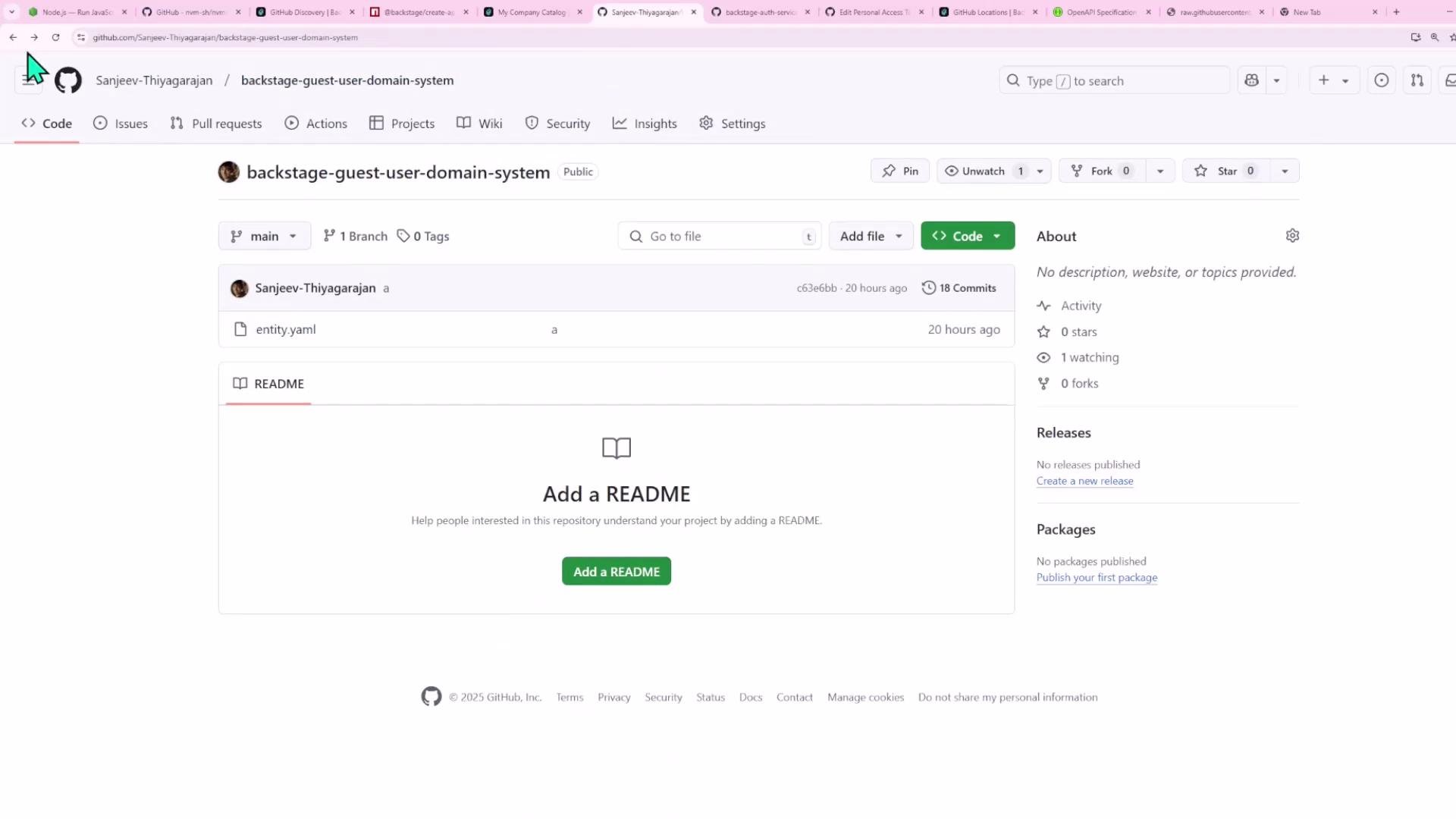
If a repository uses a different filename (for example `entity.yaml`) or places the entity file in another path, the GitHub provider will not import it. Options:
* Update the repository to include `catalog-info.yaml` at the configured `catalogPath`.
* Change the provider's `catalogPath` to match the repo layout.
* Use additional provider entries to cover different layouts.
Filtering and schedule examples
To scan only the `main` branch and all repositories:
```yaml theme={null}
filters:
branch: 'main'
repository: '.*'
```
To poll every 20 minutes with a 2 minute timeout:
```yaml theme={null}
schedule:
frequency: { minutes: 20 }
timeout: { minutes: 2 }
```
Step 5 — What happens when a repo doesn't match the configured path
If a repository uses a different filename (for example `entity.yaml`) or places the entity file in another path, the GitHub provider will not import it. Options:
* Update the repository to include `catalog-info.yaml` at the configured `catalogPath`.
* Change the provider's `catalogPath` to match the repo layout.
* Use additional provider entries to cover different layouts.
 Step 6 — Restart the backend and verify
Restart your local backend:
```bash theme={null}
yarn dev
```
On startup Backstage will begin scanning on the configured schedule and create catalog locations for discovered entity files. Repositories containing `catalog-info.yaml` on the `main` branch will appear in the Backstage Catalog UI.
Example: adding an additional organization provider
You can add multiple providers to scan other accounts or organizations. Example: add `shopping-hub` alongside your personal account:
```yaml theme={null}
catalog:
providers:
github:
sanjeevAccount:
organization: 'Sanjeev-Thiyagarajan'
catalogPath: '/catalog-info.yaml'
filters:
branch: 'main'
repository: '.*'
schedule:
frequency: { minutes: 20 }
timeout: { minutes: 2 }
shoppingHub:
organization: 'shopping-hub'
catalogPath: '/catalog-info.yaml'
filters:
branch: 'main'
repository: '.*'
schedule:
frequency: { minutes: 20 }
timeout: { minutes: 2 }
import:
entityFilename: catalog-info.yaml
pullRequestBranchName: backstage-integration
```
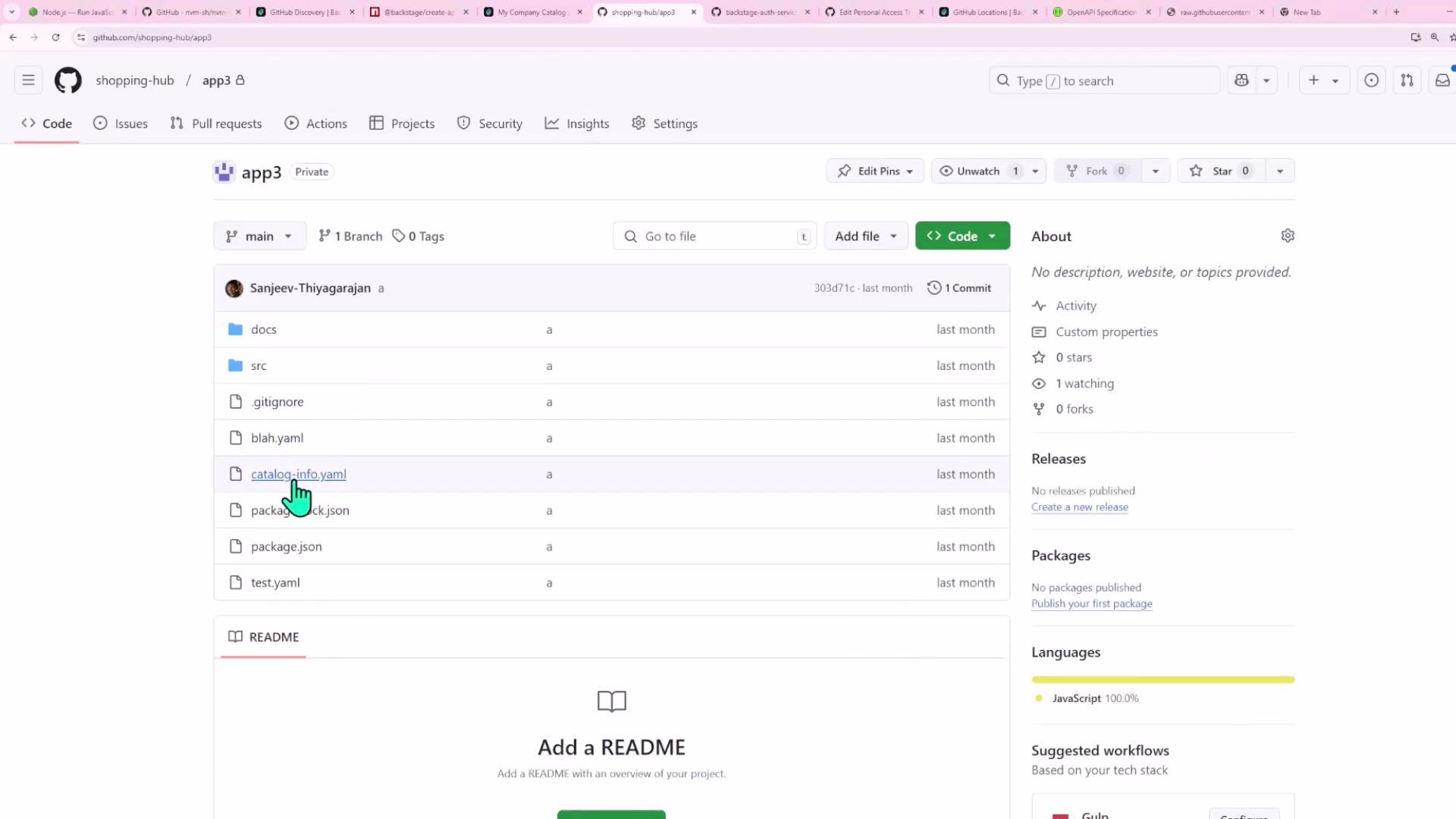
After restarting, Backstage will also scan `shopping-hub` and import repositories that contain `catalog-info.yaml`.
Step 6 — Restart the backend and verify
Restart your local backend:
```bash theme={null}
yarn dev
```
On startup Backstage will begin scanning on the configured schedule and create catalog locations for discovered entity files. Repositories containing `catalog-info.yaml` on the `main` branch will appear in the Backstage Catalog UI.
Example: adding an additional organization provider
You can add multiple providers to scan other accounts or organizations. Example: add `shopping-hub` alongside your personal account:
```yaml theme={null}
catalog:
providers:
github:
sanjeevAccount:
organization: 'Sanjeev-Thiyagarajan'
catalogPath: '/catalog-info.yaml'
filters:
branch: 'main'
repository: '.*'
schedule:
frequency: { minutes: 20 }
timeout: { minutes: 2 }
shoppingHub:
organization: 'shopping-hub'
catalogPath: '/catalog-info.yaml'
filters:
branch: 'main'
repository: '.*'
schedule:
frequency: { minutes: 20 }
timeout: { minutes: 2 }
import:
entityFilename: catalog-info.yaml
pullRequestBranchName: backstage-integration
```
After restarting, Backstage will also scan `shopping-hub` and import repositories that contain `catalog-info.yaml`.
 Result in the Backstage catalog
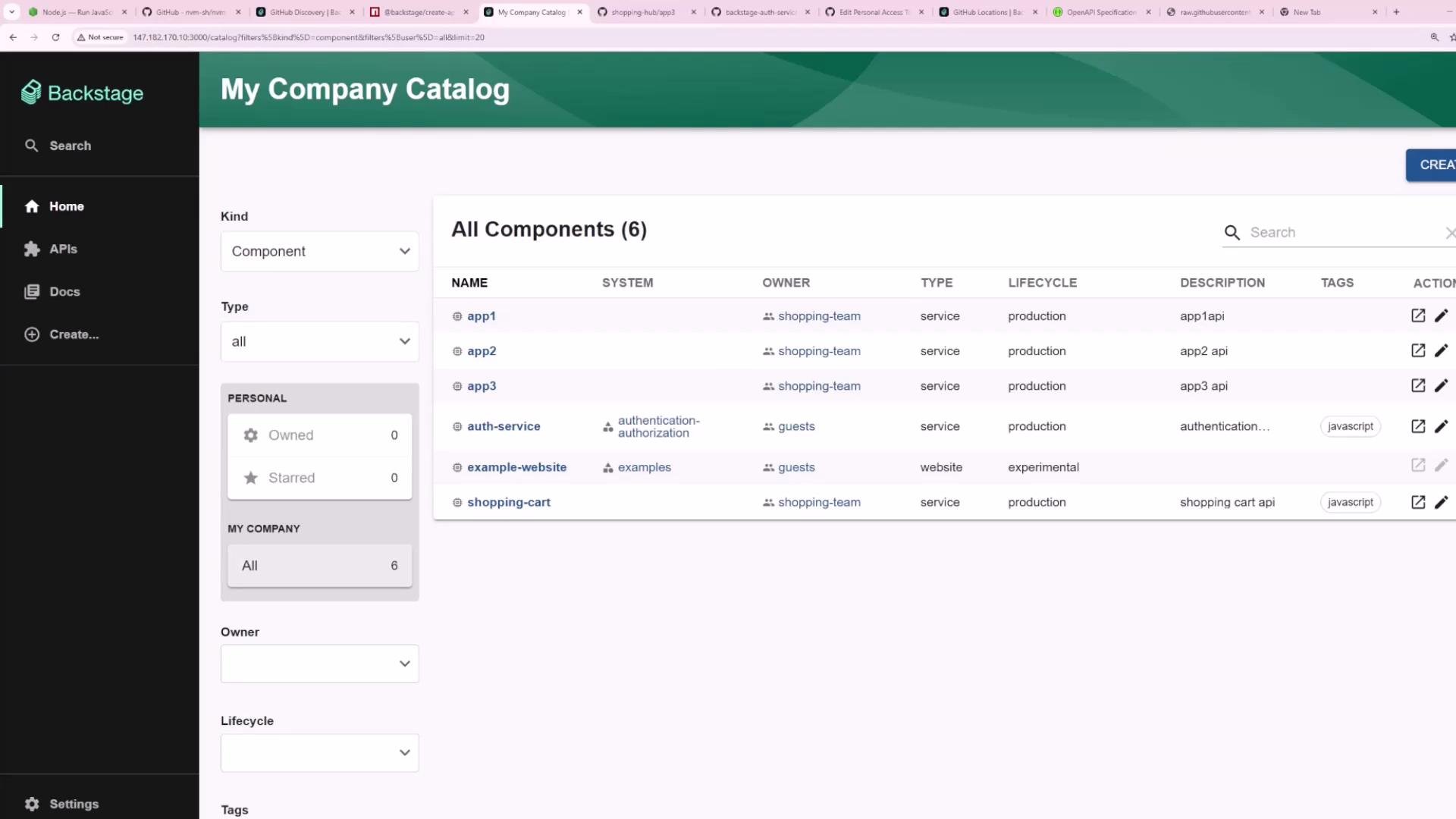
When discovery finds matching entity files, they appear in the Backstage Catalog UI as components, systems, APIs, etc.
Result in the Backstage catalog
When discovery finds matching entity files, they appear in the Backstage Catalog UI as components, systems, APIs, etc.
 Other providers and storage options
Backstage supports additional built-in or community provider modules:
* GitLab
* S3 (object storage)
* Custom or organization-specific SCM providers
Check provider-specific docs for required credentials and module names.
Final tips
* Store secrets like PATs in `app-config.local.yaml` or environment variables — never commit them.
* Start with a conservative polling schedule (30–60 minutes) to reduce GitHub API usage.
* Use repository filters to scope discovery and avoid importing irrelevant repositories.
Troubleshooting & useful links
* If entities don’t appear, check backend logs for provider startup messages and any GitHub API errors.
* Verify that the person/team using the PAT has access to the target repositories or organization.
* Confirm the `catalogPath` and branch match the actual repo layout.
References
* Backstage Integrations docs: [https://backstage.io/docs/integrations](https://backstage.io/docs/integrations)
* Backstage Catalog provider modules: [https://backstage.io/docs/features/software-catalog/providers](https://backstage.io/docs/features/software-catalog/providers)
Other providers and storage options
Backstage supports additional built-in or community provider modules:
* GitLab
* S3 (object storage)
* Custom or organization-specific SCM providers
Check provider-specific docs for required credentials and module names.
Final tips
* Store secrets like PATs in `app-config.local.yaml` or environment variables — never commit them.
* Start with a conservative polling schedule (30–60 minutes) to reduce GitHub API usage.
* Use repository filters to scope discovery and avoid importing irrelevant repositories.
Troubleshooting & useful links
* If entities don’t appear, check backend logs for provider startup messages and any GitHub API errors.
* Verify that the person/team using the PAT has access to the target repositories or organization.
* Confirm the `catalogPath` and branch match the actual repo layout.
References
* Backstage Integrations docs: [https://backstage.io/docs/integrations](https://backstage.io/docs/integrations)
* Backstage Catalog provider modules: [https://backstage.io/docs/features/software-catalog/providers](https://backstage.io/docs/features/software-catalog/providers)