> ## Documentation Index
> Fetch the complete documentation index at: https://notes.kodekloud.com/llms.txt
> Use this file to discover all available pages before exploring further.
# Relationships
> How to model and declare relationships between Backstage catalog entities to express ownership, memberships, dependencies, APIs, systems, and domain hierarchies for visualization and impact analysis
This article explains how to model relationships between Backstage catalog entities. Backstage lets you define and visualize how components, systems, APIs, resources, users, and groups relate to each other. Establishing these relationships enables impact analysis (what changes affect what), clarifies ownership, and makes navigating your software catalog easier.
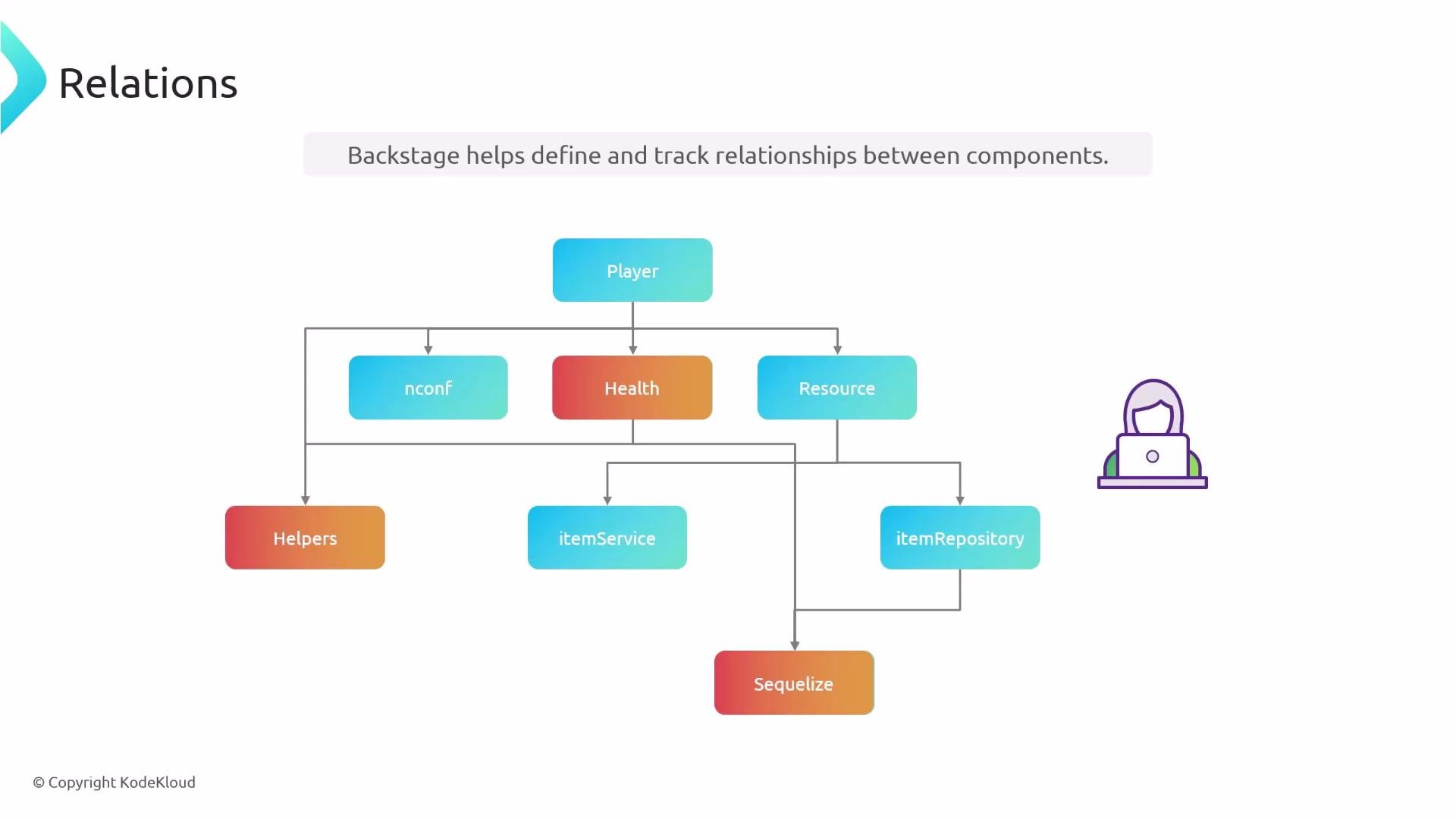 Below we cover the most common relationship types and show the YAML fields used to express them in Backstage.
Callouts, code examples, and diagrams are placed alongside each relationship type to help you author correct catalog descriptors.
Summary of common relationships
| Relationship | Backstage field(s) | Typical use |
| ----------------------- | -------------------------------------------------- | ------------------------------------------------------- |
| User ↔ Group membership | `memberOf`, `members` | Assign users to teams or groups |
| Group hierarchy | `parent`, `children` | Model organizational group structure |
| Ownership | `owner` / `ownedBy` (use `user:` prefix for users) | Declare responsible team or person |
| Component ↔ API | `providesApis`, `consumesApis`, `apiProvidedBy` | Map API providers and consumers |
| Direct dependency | `dependsOn` | Hard dependency on components, resources, systems, etc. |
| System membership | `system` | Assign components/APIs/resources to a System |
| Domain hierarchy | `domain`, `subdomainOf` | Group systems into domains and subdomains |
***
## User ↔ Group (memberOf / members)
Users and groups are connected either through the user's `memberOf` list or the group's `members` list. You only need to declare the relationship on one side — Backstage will infer and display the link from either perspective.
Define membership on whichever source of truth your organization maintains. Use `memberOf` on `User` entities or `members` on `Group` entities — you do not need both.
Example: user declares membership
```yaml theme={null}
apiVersion: backstage.io/v1alpha1
kind: User
metadata:
name: jdoe
spec:
profile:
displayName: Jenny Doe
email: jenny-doe@example.com
picture: https://example.com/staff/jenny-with-party-hat.jpeg
memberOf: [infrastructure, auth]
```
Example: group declares members
```yaml theme={null}
apiVersion: backstage.io/v1alpha1
kind: Group
metadata:
name: infrastructure
description: The infra business unit
spec:
type: business-unit
children: []
profile:
displayName: Infrastructure
email: infrastructure@example.com
picture: https://example.com/groups/bu-infrastructure.jpeg
members: [jdoe]
```
Choose the approach that matches your identity source (e.g., LDAP, SCIM, or a managed team registry).
***
## Group hierarchy (parent / children)
Groups can be nested to represent organizational structure. Use `parent` to reference a single parent group and `children` to list any number of child groups.
Example: group with parent and children
```yaml theme={null}
apiVersion: backstage.io/v1alpha1
kind: Group
metadata:
name: infrastructure
description: The infra business unit
spec:
type: business-unit
parent: ops
children: [cloud, onPrem]
profile:
displayName: Infrastructure
email: infrastructure@example.com
picture: https://example.com/groups/bu-infrastructure.jpeg
members: [jdoe]
```
A group may have only one `parent` but can list multiple `children`. Model parents where applicable to reflect reporting or organizational ownership.
***
## Ownership (owner / ownedBy)
Declare who is responsible for an entity using `owner` (or `ownedBy` in some contexts). By default, `owner` refers to a Group name. Prefix with `user:` to indicate an individual user.
Example: component owned by a team (default)
```yaml theme={null}
apiVersion: backstage.io/v1beta1
kind: Component
metadata:
name: auth-service
description: Authentication service
tags:
- javascript
links:
- url: https://google.com
title: Admin Dashboard
icon: dashboard
type: admin-dashboard
spec:
type: service
lifecycle: production
owner: auth-team
system: authentication-authorization
```
Example: component owned by an individual user
```yaml theme={null}
apiVersion: backstage.io/v1beta1
kind: Component
metadata:
name: auth-service
description: Authentication service
tags:
- javascript
spec:
type: service
lifecycle: production
owner: user:jdoe
system: authentication-authorization
```
Use clear ownership to speed incident response and clarify who to contact for changes.
***
## Component ↔ API (providesApis / consumesApis / apiProvidedBy)
Map which components provide APIs and which components consume them. This separation helps identify API providers and consumers in the catalog visualization.
Example: component declares provided APIs and API entity declares the provider
```yaml theme={null}
apiVersion: backstage.io/v1beta1
kind: Component
metadata:
name: auth-service
description: Authentication service
tags:
- javascript
spec:
type: service
lifecycle: production
owner: guests
system: authentication-authorization
providesApis:
- auth-api
```
```yaml theme={null}
apiVersion: backstage.io/v1alpha1
kind: API
metadata:
name: auth-api
description: Verify user authentication status
spec:
type: openapi
lifecycle: production
owner: guests
apiProvidedBy: auth-service
definition:
$text: https://raw.githubusercontent.com/Sanjeev-Thiyagarajan/backstage-auth/main/openapi/auth-api-spec.yaml
```
Example: component consuming an API
```yaml theme={null}
apiVersion: backstage.io/v1beta1
kind: Component
metadata:
name: shopping-cart
description: Shopping cart service
annotations:
backstage.io/techdocs-ref: dir:.
tags:
- javascript
links:
- url: https://google.com
title: Admin Dashboard
icon: dashboard
type: admin-dashboard
spec:
type: service
lifecycle: production
owner: shopping-team
consumesApis:
- auth-api
```
`consumesApis` accepts a list so a component can consume multiple APIs.
***
## dependsOn (component/resource/other entity dependencies)
Use `dependsOn` to declare hard, direct dependencies required for an entity to function. Each dependency item is typed so you can reference different entity kinds using `type: name` in the mapping (e.g., `component: auth-service`, `resource: auth-db`).
Example: shopping-cart depends on auth-service component
```yaml theme={null}
apiVersion: backstage.io/v1beta1
kind: Component
metadata:
name: shopping-cart
description: Shopping cart service
annotations:
backstage.io/techdocs-ref: dir:.
tags:
- javascript
spec:
dependsOn:
- component: auth-service
type: service
lifecycle: production
owner: shopping-team
consumesApis:
- auth-api
```
Even when `consumesApis` is present, add `dependsOn` for a direct relationship to the provider component—particularly important when the dependency is not expressed as an API (for example, a shared library or internal package).
Example: component depends on a resource (database)
```yaml theme={null}
apiVersion: backstage.io/v1beta1
kind: Component
metadata:
name: auth-service
description: Authentication service
tags:
- javascript
spec:
dependsOn:
- resource: auth-db
type: service
lifecycle: production
owner: guests
system: authentication-authorization
providesApis:
- auth-api
```
```yaml theme={null}
apiVersion: backstage.io/v1alpha1
kind: Resource
metadata:
name: auth-db
description: Stores user details
spec:
type: database
owner: user:jdoe
system: authentication-authorization
```
***
## System membership and Domains
Systems group cooperating entities (components, APIs, resources). Use the `system` property on components, APIs, and resources to indicate which System they belong to.
Example: component assigned to a system
```yaml theme={null}
apiVersion: backstage.io/v1alpha1
kind: Component
metadata:
name: auth-service
description: Authentication service
tags:
- javascript
spec:
system: user-management
type: service
lifecycle: production
owner: auth-team
```
Systems belong to Domains. Use the `domain` property on a System to assign it to a Domain. Domains can also be nested with `subdomainOf` to express broader organizational or product grouping.
```yaml theme={null}
apiVersion: backstage.io/v1alpha1
kind: Domain
metadata:
name: user-management
description: Everything about users
spec:
owner: guests
```
```yaml theme={null}
apiVersion: backstage.io/v1alpha1
kind: System
metadata:
name: authentication-authorization
description: Handles user authentication and profiles
spec:
owner: guests
domain: user-management
```
Domains can be organized hierarchically:
Below we cover the most common relationship types and show the YAML fields used to express them in Backstage.
Callouts, code examples, and diagrams are placed alongside each relationship type to help you author correct catalog descriptors.
Summary of common relationships
| Relationship | Backstage field(s) | Typical use |
| ----------------------- | -------------------------------------------------- | ------------------------------------------------------- |
| User ↔ Group membership | `memberOf`, `members` | Assign users to teams or groups |
| Group hierarchy | `parent`, `children` | Model organizational group structure |
| Ownership | `owner` / `ownedBy` (use `user:` prefix for users) | Declare responsible team or person |
| Component ↔ API | `providesApis`, `consumesApis`, `apiProvidedBy` | Map API providers and consumers |
| Direct dependency | `dependsOn` | Hard dependency on components, resources, systems, etc. |
| System membership | `system` | Assign components/APIs/resources to a System |
| Domain hierarchy | `domain`, `subdomainOf` | Group systems into domains and subdomains |
***
## User ↔ Group (memberOf / members)
Users and groups are connected either through the user's `memberOf` list or the group's `members` list. You only need to declare the relationship on one side — Backstage will infer and display the link from either perspective.
Define membership on whichever source of truth your organization maintains. Use `memberOf` on `User` entities or `members` on `Group` entities — you do not need both.
Example: user declares membership
```yaml theme={null}
apiVersion: backstage.io/v1alpha1
kind: User
metadata:
name: jdoe
spec:
profile:
displayName: Jenny Doe
email: jenny-doe@example.com
picture: https://example.com/staff/jenny-with-party-hat.jpeg
memberOf: [infrastructure, auth]
```
Example: group declares members
```yaml theme={null}
apiVersion: backstage.io/v1alpha1
kind: Group
metadata:
name: infrastructure
description: The infra business unit
spec:
type: business-unit
children: []
profile:
displayName: Infrastructure
email: infrastructure@example.com
picture: https://example.com/groups/bu-infrastructure.jpeg
members: [jdoe]
```
Choose the approach that matches your identity source (e.g., LDAP, SCIM, or a managed team registry).
***
## Group hierarchy (parent / children)
Groups can be nested to represent organizational structure. Use `parent` to reference a single parent group and `children` to list any number of child groups.
Example: group with parent and children
```yaml theme={null}
apiVersion: backstage.io/v1alpha1
kind: Group
metadata:
name: infrastructure
description: The infra business unit
spec:
type: business-unit
parent: ops
children: [cloud, onPrem]
profile:
displayName: Infrastructure
email: infrastructure@example.com
picture: https://example.com/groups/bu-infrastructure.jpeg
members: [jdoe]
```
A group may have only one `parent` but can list multiple `children`. Model parents where applicable to reflect reporting or organizational ownership.
***
## Ownership (owner / ownedBy)
Declare who is responsible for an entity using `owner` (or `ownedBy` in some contexts). By default, `owner` refers to a Group name. Prefix with `user:` to indicate an individual user.
Example: component owned by a team (default)
```yaml theme={null}
apiVersion: backstage.io/v1beta1
kind: Component
metadata:
name: auth-service
description: Authentication service
tags:
- javascript
links:
- url: https://google.com
title: Admin Dashboard
icon: dashboard
type: admin-dashboard
spec:
type: service
lifecycle: production
owner: auth-team
system: authentication-authorization
```
Example: component owned by an individual user
```yaml theme={null}
apiVersion: backstage.io/v1beta1
kind: Component
metadata:
name: auth-service
description: Authentication service
tags:
- javascript
spec:
type: service
lifecycle: production
owner: user:jdoe
system: authentication-authorization
```
Use clear ownership to speed incident response and clarify who to contact for changes.
***
## Component ↔ API (providesApis / consumesApis / apiProvidedBy)
Map which components provide APIs and which components consume them. This separation helps identify API providers and consumers in the catalog visualization.
Example: component declares provided APIs and API entity declares the provider
```yaml theme={null}
apiVersion: backstage.io/v1beta1
kind: Component
metadata:
name: auth-service
description: Authentication service
tags:
- javascript
spec:
type: service
lifecycle: production
owner: guests
system: authentication-authorization
providesApis:
- auth-api
```
```yaml theme={null}
apiVersion: backstage.io/v1alpha1
kind: API
metadata:
name: auth-api
description: Verify user authentication status
spec:
type: openapi
lifecycle: production
owner: guests
apiProvidedBy: auth-service
definition:
$text: https://raw.githubusercontent.com/Sanjeev-Thiyagarajan/backstage-auth/main/openapi/auth-api-spec.yaml
```
Example: component consuming an API
```yaml theme={null}
apiVersion: backstage.io/v1beta1
kind: Component
metadata:
name: shopping-cart
description: Shopping cart service
annotations:
backstage.io/techdocs-ref: dir:.
tags:
- javascript
links:
- url: https://google.com
title: Admin Dashboard
icon: dashboard
type: admin-dashboard
spec:
type: service
lifecycle: production
owner: shopping-team
consumesApis:
- auth-api
```
`consumesApis` accepts a list so a component can consume multiple APIs.
***
## dependsOn (component/resource/other entity dependencies)
Use `dependsOn` to declare hard, direct dependencies required for an entity to function. Each dependency item is typed so you can reference different entity kinds using `type: name` in the mapping (e.g., `component: auth-service`, `resource: auth-db`).
Example: shopping-cart depends on auth-service component
```yaml theme={null}
apiVersion: backstage.io/v1beta1
kind: Component
metadata:
name: shopping-cart
description: Shopping cart service
annotations:
backstage.io/techdocs-ref: dir:.
tags:
- javascript
spec:
dependsOn:
- component: auth-service
type: service
lifecycle: production
owner: shopping-team
consumesApis:
- auth-api
```
Even when `consumesApis` is present, add `dependsOn` for a direct relationship to the provider component—particularly important when the dependency is not expressed as an API (for example, a shared library or internal package).
Example: component depends on a resource (database)
```yaml theme={null}
apiVersion: backstage.io/v1beta1
kind: Component
metadata:
name: auth-service
description: Authentication service
tags:
- javascript
spec:
dependsOn:
- resource: auth-db
type: service
lifecycle: production
owner: guests
system: authentication-authorization
providesApis:
- auth-api
```
```yaml theme={null}
apiVersion: backstage.io/v1alpha1
kind: Resource
metadata:
name: auth-db
description: Stores user details
spec:
type: database
owner: user:jdoe
system: authentication-authorization
```
***
## System membership and Domains
Systems group cooperating entities (components, APIs, resources). Use the `system` property on components, APIs, and resources to indicate which System they belong to.
Example: component assigned to a system
```yaml theme={null}
apiVersion: backstage.io/v1alpha1
kind: Component
metadata:
name: auth-service
description: Authentication service
tags:
- javascript
spec:
system: user-management
type: service
lifecycle: production
owner: auth-team
```
Systems belong to Domains. Use the `domain` property on a System to assign it to a Domain. Domains can also be nested with `subdomainOf` to express broader organizational or product grouping.
```yaml theme={null}
apiVersion: backstage.io/v1alpha1
kind: Domain
metadata:
name: user-management
description: Everything about users
spec:
owner: guests
```
```yaml theme={null}
apiVersion: backstage.io/v1alpha1
kind: System
metadata:
name: authentication-authorization
description: Handles user authentication and profiles
spec:
owner: guests
domain: user-management
```
Domains can be organized hierarchically:
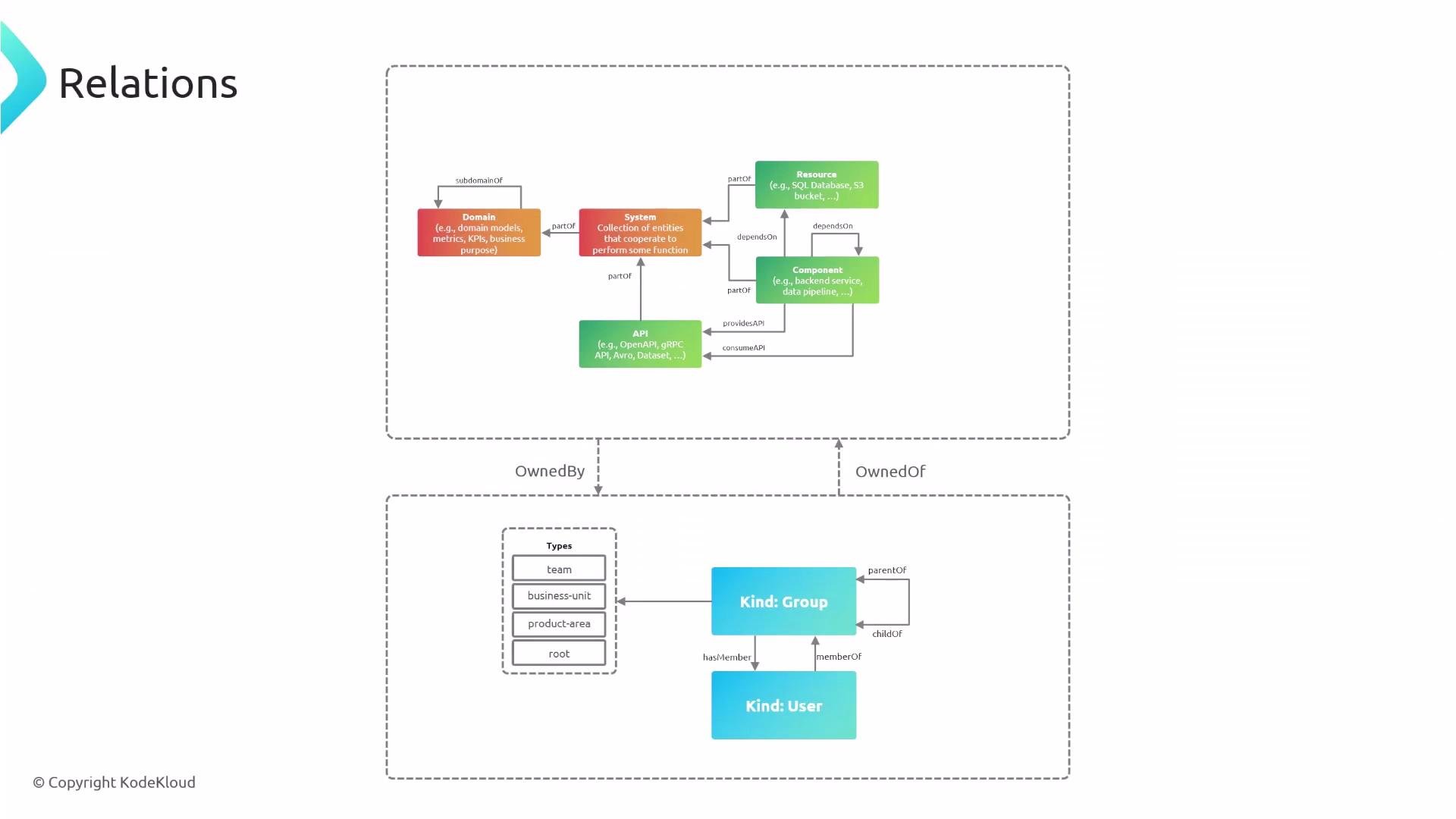 Example: domain that is a subdomain of another domain
```yaml theme={null}
apiVersion: backstage.io/v1alpha1
kind: Domain
metadata:
name: ecommerce
description: Everything encompassing ecommerce app
spec:
owner: guests
```
```yaml theme={null}
apiVersion: backstage.io/v1alpha1
kind: Domain
metadata:
name: user-management
description: Everything about users
spec:
owner: guests
subdomainOf: ecommerce
```
***
With relationships defined (membership, ownership, API mappings, direct dependencies, system membership, and domain hierarchies), Backstage can visualize impact, trace ownership, and help you reason about architecture and change management across your software catalog.
Links and references
* Backstage Catalog documentation: [https://backstage.io/docs/features/software-catalog](https://backstage.io/docs/features/software-catalog)
* Backstage entity model: [https://backstage.io/docs/features/software-catalog/entity-model](https://backstage.io/docs/features/software-catalog/entity-model)
Example: domain that is a subdomain of another domain
```yaml theme={null}
apiVersion: backstage.io/v1alpha1
kind: Domain
metadata:
name: ecommerce
description: Everything encompassing ecommerce app
spec:
owner: guests
```
```yaml theme={null}
apiVersion: backstage.io/v1alpha1
kind: Domain
metadata:
name: user-management
description: Everything about users
spec:
owner: guests
subdomainOf: ecommerce
```
***
With relationships defined (membership, ownership, API mappings, direct dependencies, system membership, and domain hierarchies), Backstage can visualize impact, trace ownership, and help you reason about architecture and change management across your software catalog.
Links and references
* Backstage Catalog documentation: [https://backstage.io/docs/features/software-catalog](https://backstage.io/docs/features/software-catalog)
* Backstage entity model: [https://backstage.io/docs/features/software-catalog/entity-model](https://backstage.io/docs/features/software-catalog/entity-model)