> ## Documentation Index
> Fetch the complete documentation index at: https://notes.kodekloud.com/llms.txt
> Use this file to discover all available pages before exploring further.
# Demo Creating a Template
> Guide to building a Backstage Scaffolder template that provisions Node.js Express starter repositories with ESLint, Prettier, Jest, GitHub Actions, and automatic catalog registration
In this guide you'll learn how to create a Backstage Scaffolder template that provisions a starter Node.js API repository (Express) with your organization conventions baked in. The template will:
* scaffold a repository with ESLint, Prettier, Jest, GitHub Actions CI, and a sample Express app
* create the GitHub repository
* register the new component in the Backstage catalog
This enables developers to create new services quickly with the correct tooling and guardrails in place.
## Organization requirements (example)
Use these as a checklist when building the skeleton (blueprint) repository.
| Requirement | Example |
| ------------- | ------------------------------------ |
| Linter | ESLint |
| Formatter | Prettier |
| Testing | Jest |
| CI/CD | GitHub Actions (`.github/workflows`) |
| API framework | Express.js |
## High-level flow
1. Platform team creates a skeleton (blueprint) repository that contains:
* `package.json`, ESLint & Prettier config, tests, GitHub workflows
* a sample Express app (`src/`), and a `catalog-info.yaml`
2. Upload the skeleton to GitHub (e.g., `backstage-express-api-blueprint`).
3. Create a Scaffolder `Template` YAML that:
* renders a multi-page form for the developer (project name, owner, repo location)
* fetches the skeleton, templates values into files, publishes the repo, and registers the component
4. Developer uses the template through Backstage Create UI — Backstage runs the template and provisions the repo and catalog entry.
Design templates so platform-spec decisions (lint, test, CI) are enforced by the skeleton. Use consistent parameter names (e.g., `name`, `owner`) to simplify templating and avoid parsing pitfalls.
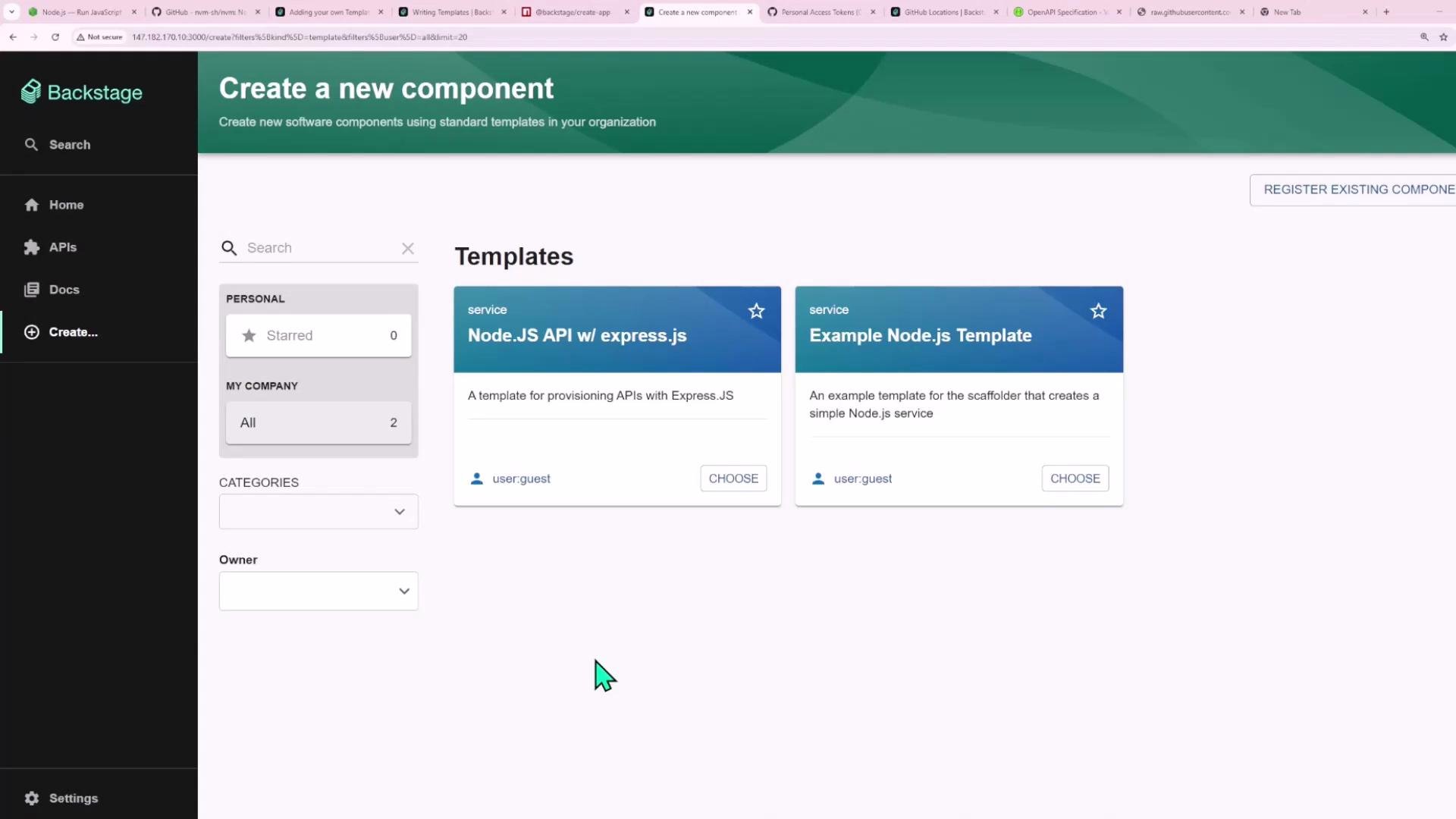
This is what the template tile will look like inside Backstage:
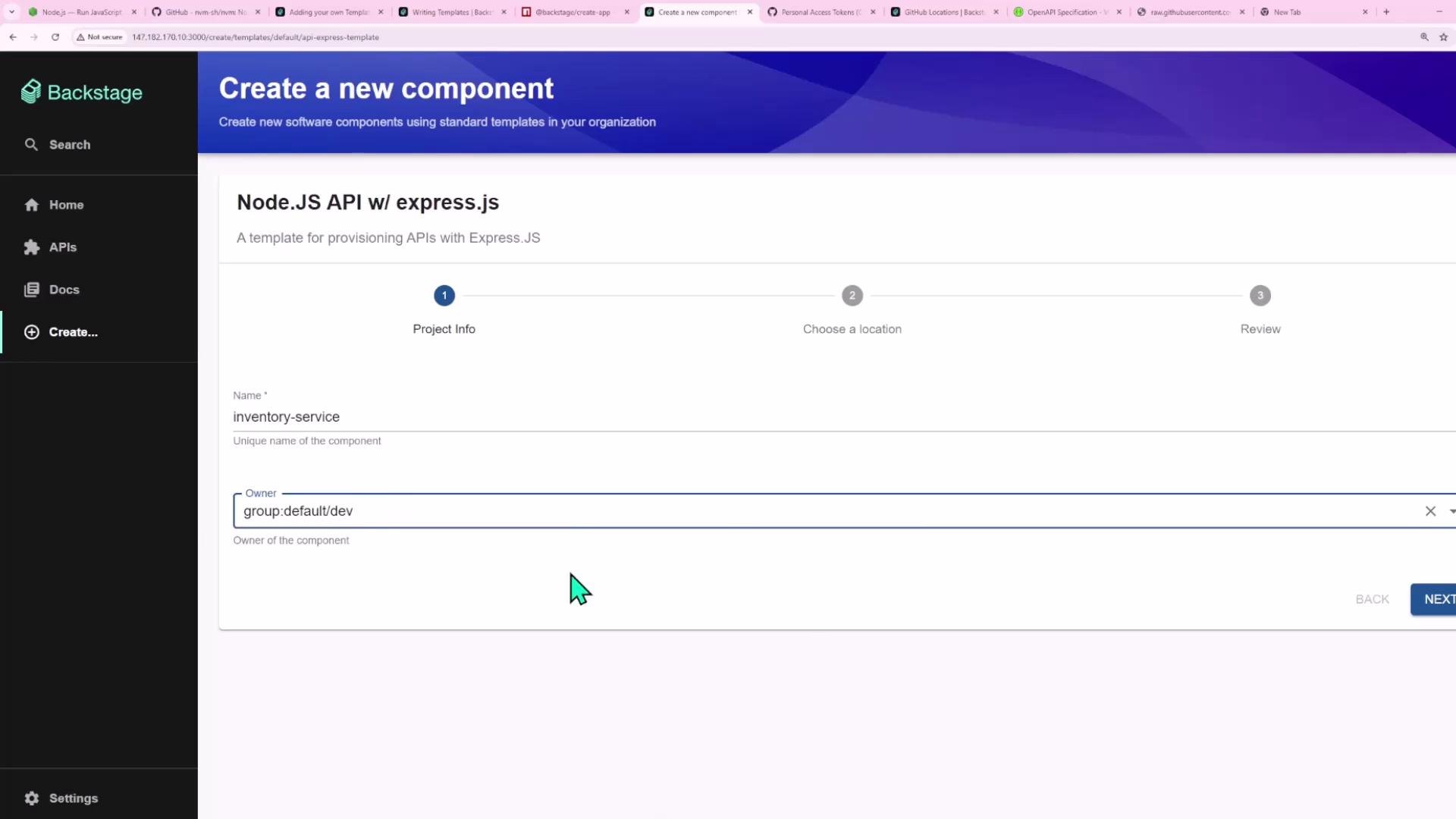
 Developer fills in the template form (example):
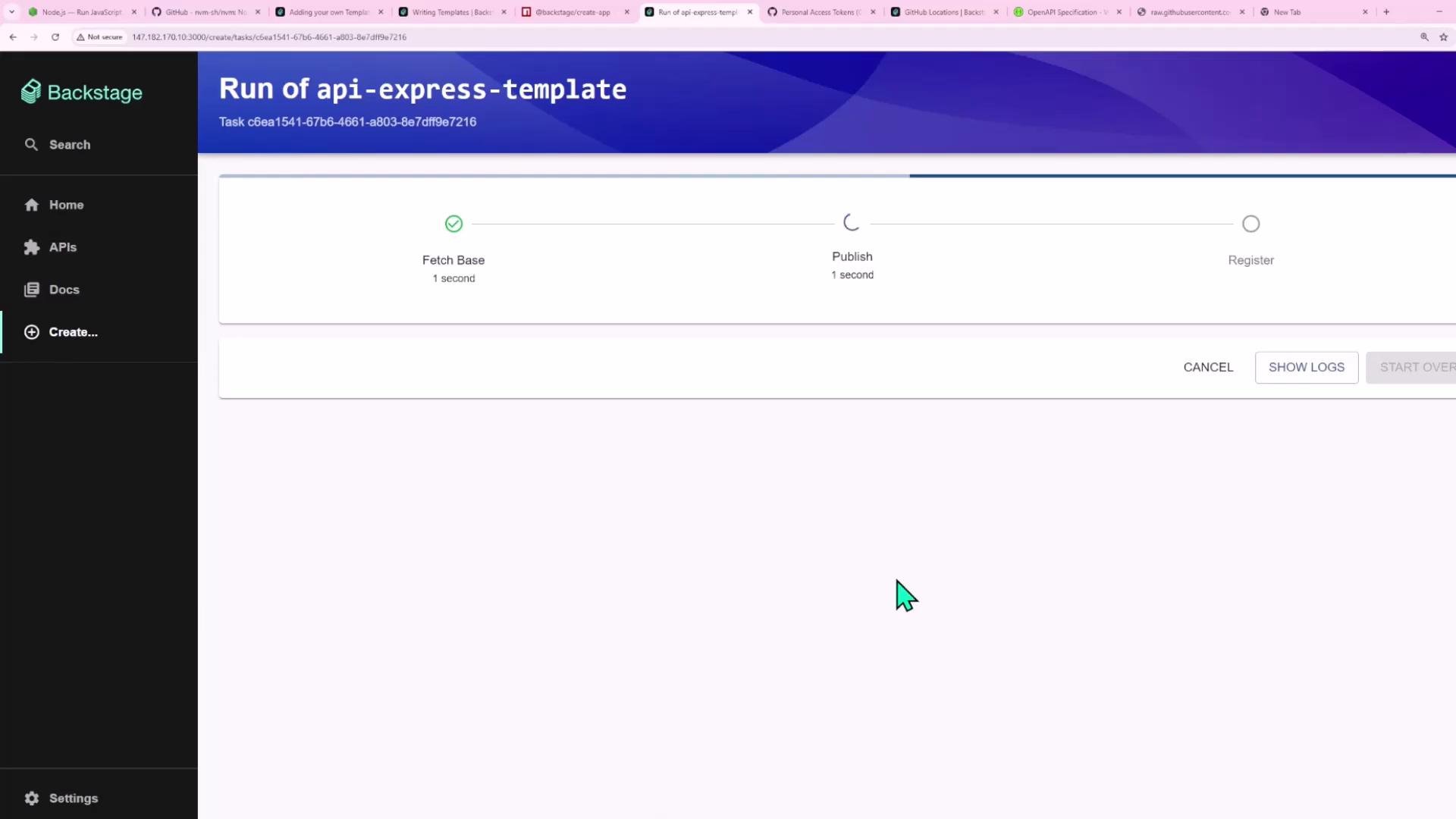
 Backstage runs the template and shows run progress (fetch, publish, register):
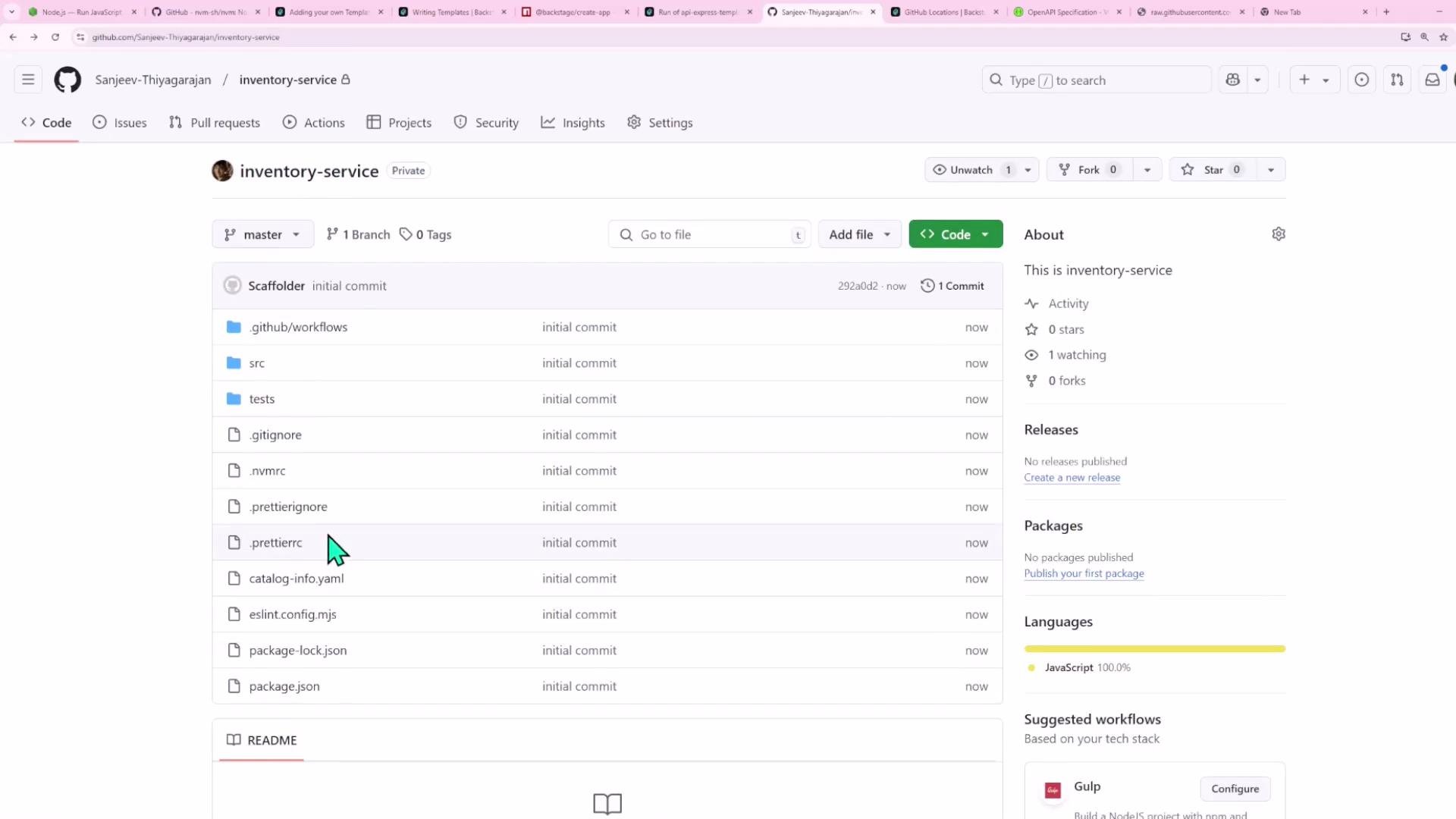
 After completion, the new repository appears in GitHub with the skeleton files (package.json, `.github/workflows`, `src/`, tests, etc.):
 The scaffolder injects the provided values (for example, `inventory-service` in `package.json` and `catalog-info.yaml`):
```yaml theme={null}
apiVersion: backstage.io/v1alpha1
kind: Component
metadata:
name: "inventory-service"
spec:
type: service
owner: group:default/dev
lifecycle: experimental
dependsOn:
- "resource:inventory-service-ec2"
```
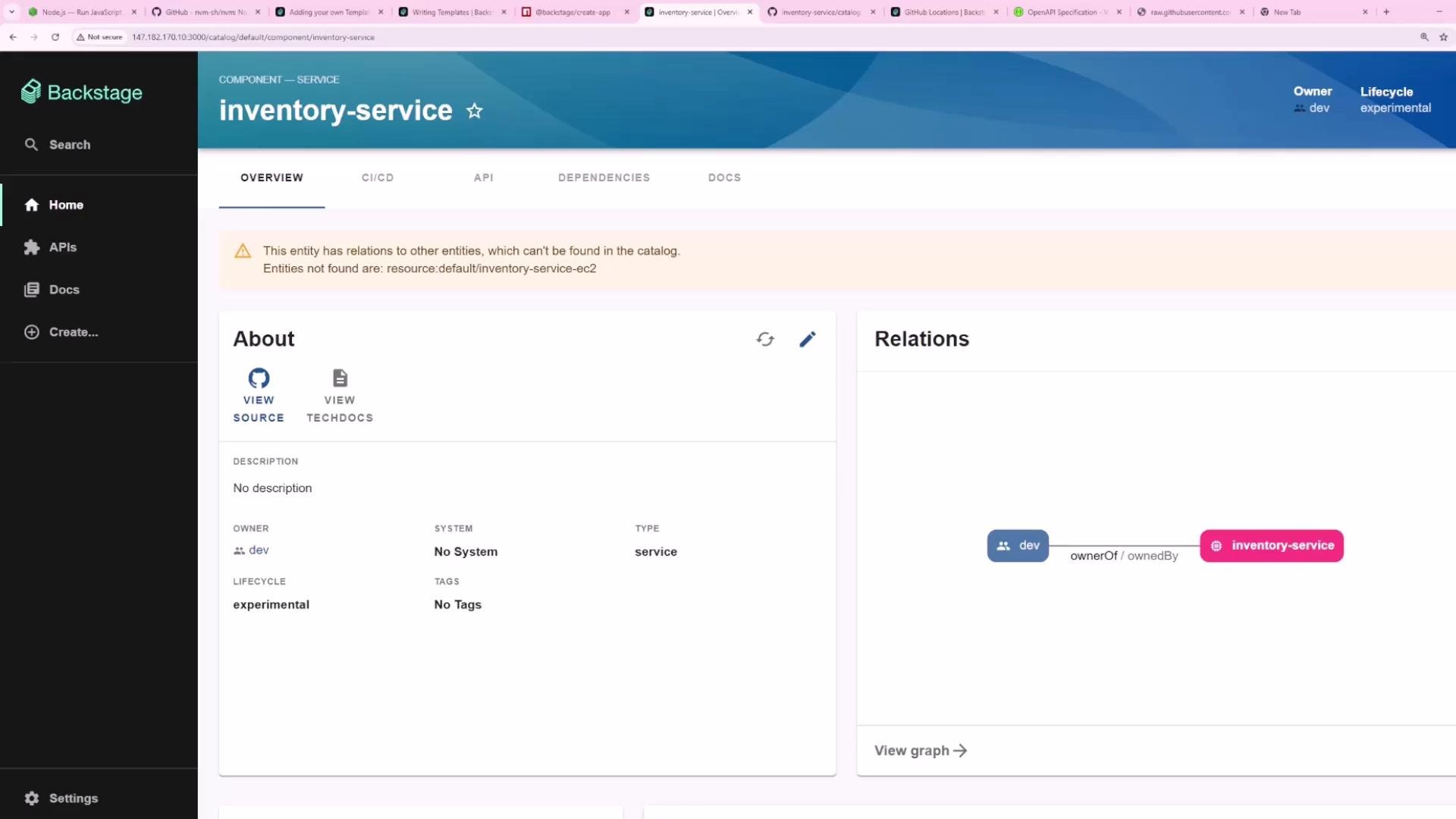
Backstage catalog shows the registered component:
The scaffolder injects the provided values (for example, `inventory-service` in `package.json` and `catalog-info.yaml`):
```yaml theme={null}
apiVersion: backstage.io/v1alpha1
kind: Component
metadata:
name: "inventory-service"
spec:
type: service
owner: group:default/dev
lifecycle: experimental
dependsOn:
- "resource:inventory-service-ec2"
```
Backstage catalog shows the registered component:
 ## Template Form Playground
Backstage includes a Template Form Playground to design and test scaffolder form UI interactively. Use it to verify pages, required fields, and UI widgets like `OwnerPicker` and `RepoUrlPicker`.
A minimal playground example (two parameter pages and one fetch step):
```yaml theme={null}
# Playground example showing two parameter pages and a single fetch step
parameters:
- title: Fill in some steps
required:
- name
properties:
name:
title: Name
type: string
description: Unique name of the component
owner:
title: Owner
type: string
description: Owner of the component
ui:field: OwnerPicker
ui:options:
catalogFilter:
kind: Group
- title: Choose a location
required:
- repoUrl
properties:
repoUrl:
title: Repository Location
type: string
ui:field: RepoUrlPicker
ui:options:
allowedHosts:
- github.com
steps:
- id: fetch-base
name: Fetch Base
action: fetch:template
```
The Template Form Playground validates as you type and can show transient validation errors. If you see unexpected errors, edit the YAML in an external editor and paste it back into the playground.
## Create the actual template file (api-template.yaml)
Below is a consolidated, working example of a scaffolder Template for a Node.js Express API. Important notes:
* Use parameter names without hyphens (e.g., prefer `name` over `project-name`).
* The `fetch:template` step downloads a skeleton and applies `values` to files in the skeleton.
* `publish:github` needs repository creation permissions on the GitHub token configured in Backstage.
* `catalog:register` needs the `catalog-info.yaml` path inside the new repo.
```yaml theme={null}
apiVersion: scaffolder.backstage.io/v1beta3
kind: Template
metadata:
name: api-express-template
title: Node.JS API w/ express.js
description: A template for provisioning APIs with Express.JS
spec:
owner: user:guest
type: service
parameters:
- title: Project Info
required:
- name
- owner
properties:
name:
title: Name
type: string
description: Unique name of the component
ui:autofocus: true
owner:
title: Owner
type: string
description: Owner of the component
ui:field: OwnerPicker
ui:options:
catalogFilter:
kind: [User, Group]
- title: Choose Location
required:
- repoUrl
properties:
repoUrl:
title: Repository Location
type: string
ui:field: RepoUrlPicker
ui:options:
allowedHosts:
- github.com
# Steps executed by the scaffolder backend
steps:
- id: fetch-base
name: Fetch Base
action: fetch:template
input:
# URL of the skeleton repository or a relative path (if the template bundle contains the skeleton)
url: https://github.com/Sanjeev-Thiyagarajan/backstage-express-api-blueprint
values:
name: ${{ parameters.name }}
owner: ${{ parameters.owner }}
- id: publish
name: Publish
action: publish:github
input:
allowedHosts: ["github.com"]
description: ${{ parameters.name }}
repoUrl: ${{ parameters.repoUrl }}
- id: register
name: Register
action: catalog:register
input:
repoContentsUrl: ${{ steps.publish.output.repoContentsUrl }}
catalogInfoPath: '/catalog-info.yaml'
output:
links:
- title: Repository
url: ${{ steps.publish.output.remoteUrl }}
- title: Open in Catalog
icon: catalog
entityRef: ${{ steps.register.output.entityRef }}
```
### Notes about the template and skeleton
* `fetch:template` downloads a skeleton and applies templating replacements using `values`.
* Provide `values` for each placeholder used inside the skeleton (e.g., package.json, catalog-info.yaml).
* Avoid hyphens in parameter names to prevent parsing ambiguities.
* Ensure the GitHub token used by Backstage has repository creation and workflow write permissions if your skeleton includes GitHub Actions.
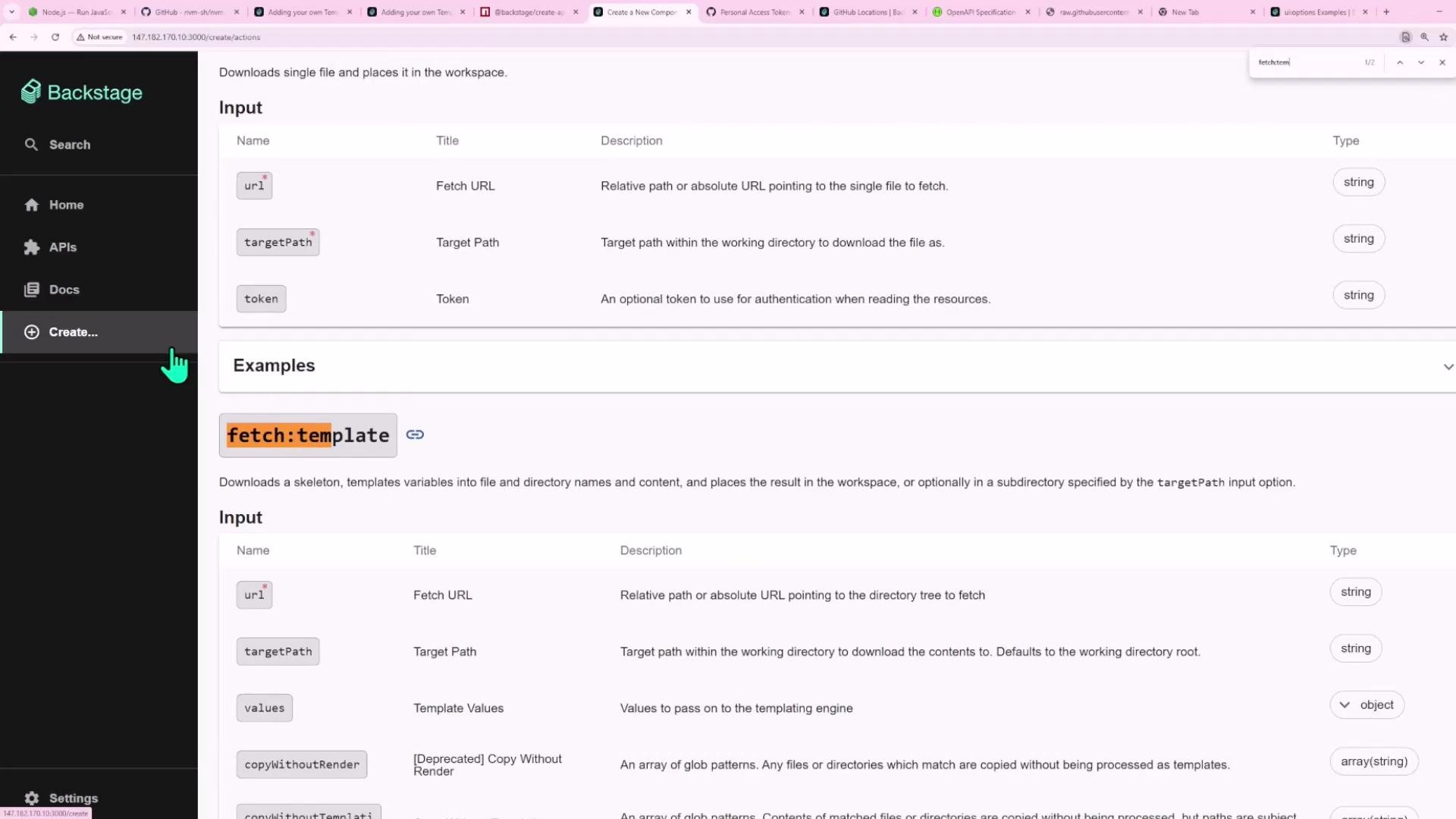
Fetch template docs (reference image):
## Template Form Playground
Backstage includes a Template Form Playground to design and test scaffolder form UI interactively. Use it to verify pages, required fields, and UI widgets like `OwnerPicker` and `RepoUrlPicker`.
A minimal playground example (two parameter pages and one fetch step):
```yaml theme={null}
# Playground example showing two parameter pages and a single fetch step
parameters:
- title: Fill in some steps
required:
- name
properties:
name:
title: Name
type: string
description: Unique name of the component
owner:
title: Owner
type: string
description: Owner of the component
ui:field: OwnerPicker
ui:options:
catalogFilter:
kind: Group
- title: Choose a location
required:
- repoUrl
properties:
repoUrl:
title: Repository Location
type: string
ui:field: RepoUrlPicker
ui:options:
allowedHosts:
- github.com
steps:
- id: fetch-base
name: Fetch Base
action: fetch:template
```
The Template Form Playground validates as you type and can show transient validation errors. If you see unexpected errors, edit the YAML in an external editor and paste it back into the playground.
## Create the actual template file (api-template.yaml)
Below is a consolidated, working example of a scaffolder Template for a Node.js Express API. Important notes:
* Use parameter names without hyphens (e.g., prefer `name` over `project-name`).
* The `fetch:template` step downloads a skeleton and applies `values` to files in the skeleton.
* `publish:github` needs repository creation permissions on the GitHub token configured in Backstage.
* `catalog:register` needs the `catalog-info.yaml` path inside the new repo.
```yaml theme={null}
apiVersion: scaffolder.backstage.io/v1beta3
kind: Template
metadata:
name: api-express-template
title: Node.JS API w/ express.js
description: A template for provisioning APIs with Express.JS
spec:
owner: user:guest
type: service
parameters:
- title: Project Info
required:
- name
- owner
properties:
name:
title: Name
type: string
description: Unique name of the component
ui:autofocus: true
owner:
title: Owner
type: string
description: Owner of the component
ui:field: OwnerPicker
ui:options:
catalogFilter:
kind: [User, Group]
- title: Choose Location
required:
- repoUrl
properties:
repoUrl:
title: Repository Location
type: string
ui:field: RepoUrlPicker
ui:options:
allowedHosts:
- github.com
# Steps executed by the scaffolder backend
steps:
- id: fetch-base
name: Fetch Base
action: fetch:template
input:
# URL of the skeleton repository or a relative path (if the template bundle contains the skeleton)
url: https://github.com/Sanjeev-Thiyagarajan/backstage-express-api-blueprint
values:
name: ${{ parameters.name }}
owner: ${{ parameters.owner }}
- id: publish
name: Publish
action: publish:github
input:
allowedHosts: ["github.com"]
description: ${{ parameters.name }}
repoUrl: ${{ parameters.repoUrl }}
- id: register
name: Register
action: catalog:register
input:
repoContentsUrl: ${{ steps.publish.output.repoContentsUrl }}
catalogInfoPath: '/catalog-info.yaml'
output:
links:
- title: Repository
url: ${{ steps.publish.output.remoteUrl }}
- title: Open in Catalog
icon: catalog
entityRef: ${{ steps.register.output.entityRef }}
```
### Notes about the template and skeleton
* `fetch:template` downloads a skeleton and applies templating replacements using `values`.
* Provide `values` for each placeholder used inside the skeleton (e.g., package.json, catalog-info.yaml).
* Avoid hyphens in parameter names to prevent parsing ambiguities.
* Ensure the GitHub token used by Backstage has repository creation and workflow write permissions if your skeleton includes GitHub Actions.
Fetch template docs (reference image):
 ## Make the skeleton template-ready
Replace hard-coded values in the skeleton repo with templating placeholders so the scaffolder can inject values at runtime.
package.json (template-ready):
```json theme={null}
{
"name": "${{ values.name }}",
"version": "1.0.0",
"description": "",
"main": "index.js",
"scripts": {
"start": "node src/index.js",
"test": "jest",
"test:ci": "jest --ci",
"dev": "nodemon src/index.js",
"format": "prettier --write",
"format:check": "prettier --check",
"lint": "eslint .",
"lint:fix": "eslint --fix ."
},
"type": "module",
"dependencies": {
"express": "^4.21.2"
},
"devDependencies": {
"jest": "^29.7.0",
"nodemon": "^2.0.20",
"prettier": "^2.8.8",
"eslint": "^9.17.0"
}
}
```
catalog-info.yaml (template-ready):
```yaml theme={null}
apiVersion: backstage.io/v1alpha1
kind: Component
metadata:
name: ${{ values.name | dump }}
spec:
type: service
owner: ${{ values.owner }}
lifecycle: experimental
```
## Uploading the template to Backstage
You can make templates available to Backstage in several ways:
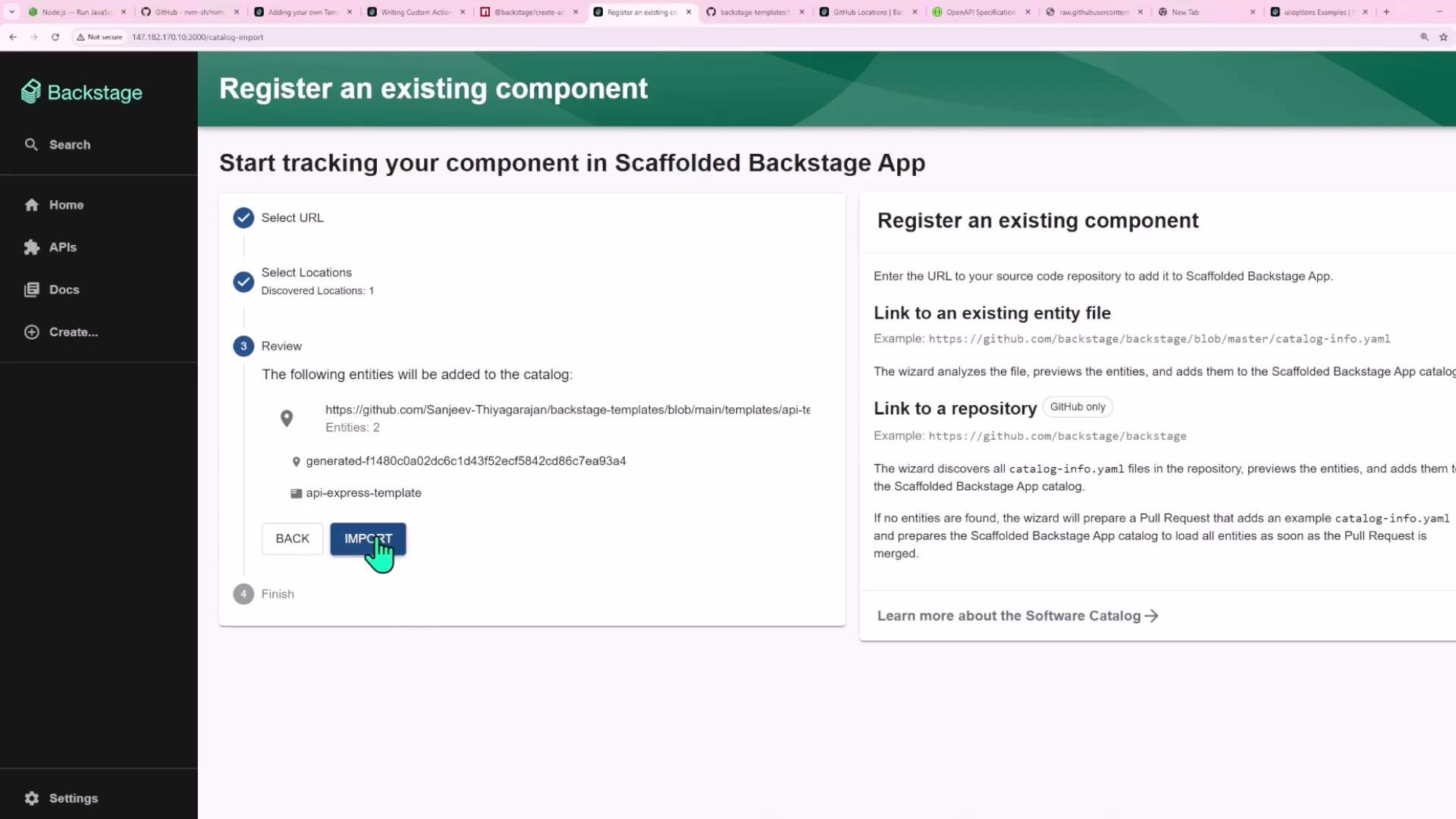
* Add the template YAML to a location listed in `app-config.yaml` (file or URL).
* Register it through the Backstage UI: Create → Manage Templates → Register an existing component.
* Use an entity provider to discover templates dynamically from a repository.
If you register via the UI and see "template not of allowed kind for that location", ensure your catalog integration `rules` include `Template`.
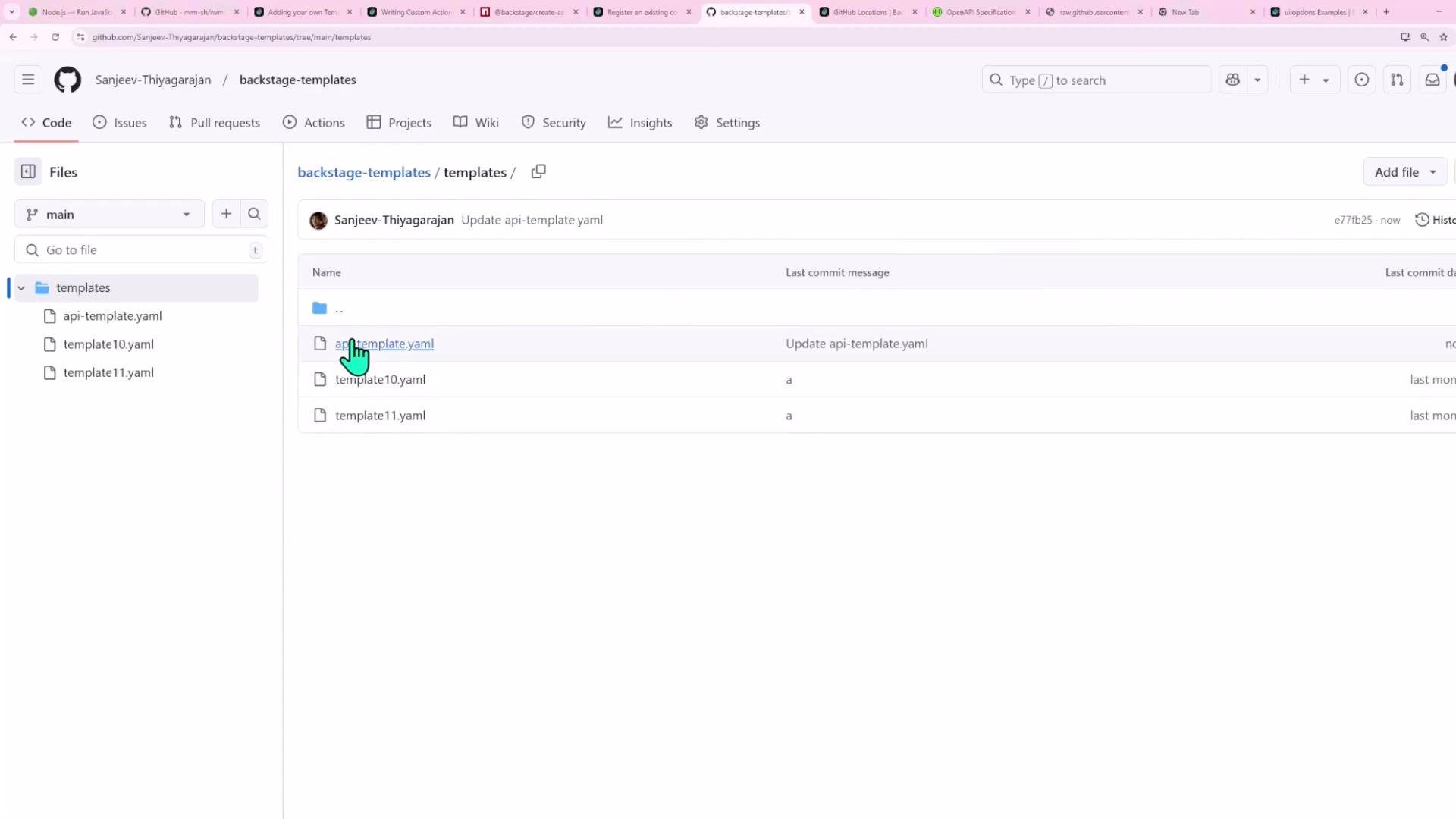
Store templates in a dedicated repo (recommended) — for example `backstage-templates` with a `templates/` directory:
## Make the skeleton template-ready
Replace hard-coded values in the skeleton repo with templating placeholders so the scaffolder can inject values at runtime.
package.json (template-ready):
```json theme={null}
{
"name": "${{ values.name }}",
"version": "1.0.0",
"description": "",
"main": "index.js",
"scripts": {
"start": "node src/index.js",
"test": "jest",
"test:ci": "jest --ci",
"dev": "nodemon src/index.js",
"format": "prettier --write",
"format:check": "prettier --check",
"lint": "eslint .",
"lint:fix": "eslint --fix ."
},
"type": "module",
"dependencies": {
"express": "^4.21.2"
},
"devDependencies": {
"jest": "^29.7.0",
"nodemon": "^2.0.20",
"prettier": "^2.8.8",
"eslint": "^9.17.0"
}
}
```
catalog-info.yaml (template-ready):
```yaml theme={null}
apiVersion: backstage.io/v1alpha1
kind: Component
metadata:
name: ${{ values.name | dump }}
spec:
type: service
owner: ${{ values.owner }}
lifecycle: experimental
```
## Uploading the template to Backstage
You can make templates available to Backstage in several ways:
* Add the template YAML to a location listed in `app-config.yaml` (file or URL).
* Register it through the Backstage UI: Create → Manage Templates → Register an existing component.
* Use an entity provider to discover templates dynamically from a repository.
If you register via the UI and see "template not of allowed kind for that location", ensure your catalog integration `rules` include `Template`.
Store templates in a dedicated repo (recommended) — for example `backstage-templates` with a `templates/` directory:
 Registering a template via the UI:
 ## GitHub authentication & permissions
* The GitHub integration token used by Backstage must have permissions to create repositories if you use `publish:github`.
* If your skeleton includes GitHub Actions workflows, ensure the token has the required workflow permissions to push workflows.
* Configure the token in Backstage integrations (e.g., `app-config.yaml`) so `publish:github` works.
## Create a component with the template
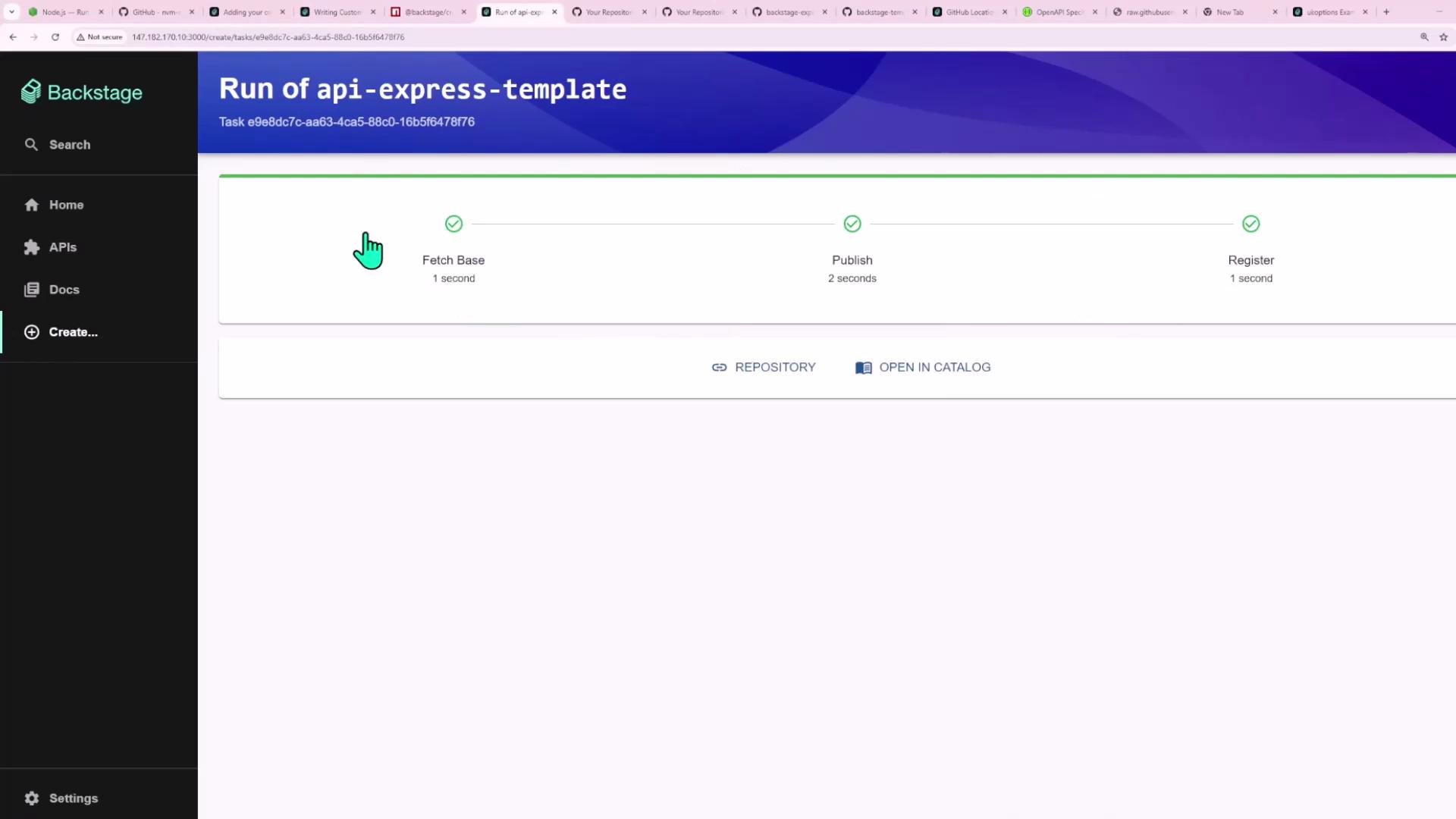
Once the template is registered, use the Create flow to provision a component. Example run progress:
## GitHub authentication & permissions
* The GitHub integration token used by Backstage must have permissions to create repositories if you use `publish:github`.
* If your skeleton includes GitHub Actions workflows, ensure the token has the required workflow permissions to push workflows.
* Configure the token in Backstage integrations (e.g., `app-config.yaml`) so `publish:github` works.
## Create a component with the template
Once the template is registered, use the Create flow to provision a component. Example run progress:
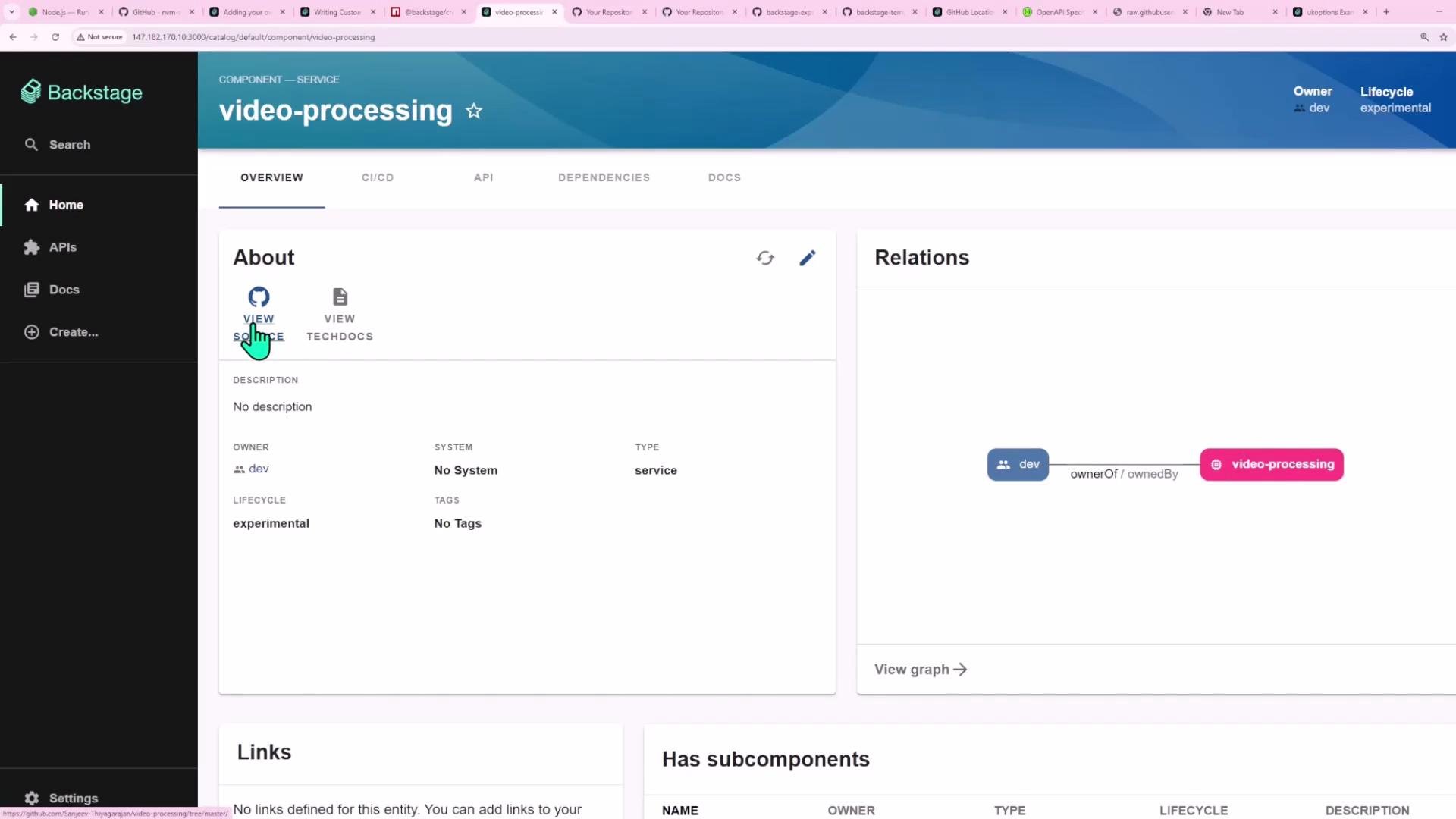
 The created component page shows ownership and relations:
 Resulting package.json example (after templating):
```json theme={null}
{
"name": "video-processing",
"version": "1.0.0",
"main": "index.js",
"scripts": {
"start": "node src/index.js",
"test": "jest",
"test:ci": "jest --ci",
"dev": "nodemon src/index.js",
"format": "prettier --write",
"format:check": "prettier --check",
"lint": "eslint .",
"lint:fix": "eslint --fix ."
},
"type": "module",
"dependencies": {
"express": "^4.21.2"
},
"devDependencies": {
"@eslint/js": "^9.17.0",
"eslint": "^9.17.0",
"eslint-config-prettier": "^9.1.0",
"eslint-plugin-jest": "^28.10.0",
"globals": "^15.14.0",
"jest": "^29.7.0",
"nodemon": "^2.0.20",
"prettier": "^2.8.8"
}
}
```
Resulting `catalog-info.yaml` example:
```yaml theme={null}
apiVersion: backstage.io/v1alpha1
kind: Component
metadata:
name: "video-processing"
spec:
type: service
owner: group:default/dev
lifecycle: experimental
```
## Recap / tips
* Design the user interface with `parameters`; reuse Backstage UI widgets using `ui:field` (e.g., `OwnerPicker`, `RepoUrlPicker`).
* Use `fetch:template` to download and template a skeleton; map `parameters` to `values`.
* Use `publish:github` to create and push the repository (requires appropriately permissioned GitHub token).
* Use `catalog:register` to add the new component to Backstage.
* Avoid hyphens in parameter names; prefer `name`, `owner`.
* If the Template Form Playground behaves oddly, edit YAML in an external editor and paste it back.
This pattern enables platform teams to bake best practices and guardrails into starter repositories so developers can quickly create production-ready services.
## Links and references
* Backstage Scaffolder docs: [https://backstage.io/docs/features/software-templates/using-templates](https://backstage.io/docs/features/software-templates/using-templates)
* Backstage Scaffolder actions (fetch, publish, register): [https://backstage.io/docs/features/software-templates/actions](https://backstage.io/docs/features/software-templates/actions)
* Backstage Catalog entities: [https://backstage.io/docs/features/software-catalog/overview](https://backstage.io/docs/features/software-catalog/overview)
Resulting package.json example (after templating):
```json theme={null}
{
"name": "video-processing",
"version": "1.0.0",
"main": "index.js",
"scripts": {
"start": "node src/index.js",
"test": "jest",
"test:ci": "jest --ci",
"dev": "nodemon src/index.js",
"format": "prettier --write",
"format:check": "prettier --check",
"lint": "eslint .",
"lint:fix": "eslint --fix ."
},
"type": "module",
"dependencies": {
"express": "^4.21.2"
},
"devDependencies": {
"@eslint/js": "^9.17.0",
"eslint": "^9.17.0",
"eslint-config-prettier": "^9.1.0",
"eslint-plugin-jest": "^28.10.0",
"globals": "^15.14.0",
"jest": "^29.7.0",
"nodemon": "^2.0.20",
"prettier": "^2.8.8"
}
}
```
Resulting `catalog-info.yaml` example:
```yaml theme={null}
apiVersion: backstage.io/v1alpha1
kind: Component
metadata:
name: "video-processing"
spec:
type: service
owner: group:default/dev
lifecycle: experimental
```
## Recap / tips
* Design the user interface with `parameters`; reuse Backstage UI widgets using `ui:field` (e.g., `OwnerPicker`, `RepoUrlPicker`).
* Use `fetch:template` to download and template a skeleton; map `parameters` to `values`.
* Use `publish:github` to create and push the repository (requires appropriately permissioned GitHub token).
* Use `catalog:register` to add the new component to Backstage.
* Avoid hyphens in parameter names; prefer `name`, `owner`.
* If the Template Form Playground behaves oddly, edit YAML in an external editor and paste it back.
This pattern enables platform teams to bake best practices and guardrails into starter repositories so developers can quickly create production-ready services.
## Links and references
* Backstage Scaffolder docs: [https://backstage.io/docs/features/software-templates/using-templates](https://backstage.io/docs/features/software-templates/using-templates)
* Backstage Scaffolder actions (fetch, publish, register): [https://backstage.io/docs/features/software-templates/actions](https://backstage.io/docs/features/software-templates/actions)
* Backstage Catalog entities: [https://backstage.io/docs/features/software-catalog/overview](https://backstage.io/docs/features/software-catalog/overview)