> ## Documentation Index
> Fetch the complete documentation index at: https://notes.kodekloud.com/llms.txt
> Use this file to discover all available pages before exploring further.
# Demo Importing Templates with Entity Providers
> Explains using Backstage entity providers to automatically discover and register template YAML files from repositories, configuring catalogPath globs and provider settings to scale template management
In this lesson you'll learn how to import Backstage templates automatically using entity providers so you don't have to register each template manually. This approach scales much better when you maintain many templates in a repository.
## Template descriptor example
Below is an example Template descriptor (Node.js Express API) you might store as a YAML file inside your templates repository.
```yaml theme={null}
apiVersion: scaffolder.backstage.io/v1beta3
# https://backstage.io/docs/features/software-catalog/descriptor-format#kind-template
kind: Template
metadata:
name: api-express-template
title: Node.JS API w/ express.js
description: A template for provisioning APIs with Express.JS
spec:
owner: user:guest
type: service
# These parameters are used to generate the input form in the frontend, and are
# used to gather input data for the execution of the template.
parameters:
- title: Project Info
required:
- name
properties:
name:
title: Name
type: string
description: Unique name of the component
'ui:autofocus': true
'ui:options':
rows: 5
owner:
title: Owner
type: string
description: Owner of the component
```
For more on descriptor fields and supported kinds, see the Backstage descriptor format documentation: [Descriptor format — Backstage](https://backstage.io/docs/features/software-catalog/descriptor-format).
## Why use entity providers?
Previously you might manually import a template by copying a template file URL and using "Register Existing Component" in Backstage. That works for a few templates but becomes tedious and error-prone at scale.
Entity providers solve this by scanning configured locations (for example, GitHub repositories or organizations) and registering any entity descriptors they find — including `kind: Template` files. Providers can be configured to search specific paths or globs, filter repositories, and run on a schedule.
## Scaffolder and auth settings
To enable the Scaffolder and its runner/publisher behavior you typically configure scaffolder-related settings in `app-config.yaml`. Example:
```yaml theme={null}
scaffolder:
builder: 'local' # Alternatives: 'external'
generator:
runIn: 'docker' # Alternatives: 'local'
publisher:
type: 'local' # Alternatives: 'googleGcs' or 'awsS3'. See documentation for details.
auth:
# see https://backstage.io/docs/auth/ to learn about auth providers
providers:
# See https://backstage.io/docs/auth/guest/provider
guest: {}
```
See Backstage Scaffolder docs for full configuration options: [Scaffolder — Backstage](https://backstage.io/docs/features/software-templates/scaffolder-overview).
## Default GitHub provider behavior
Many examples use a GitHub provider that looks for a single file path such as `/catalog-info.yaml`. If your templates are stored under different filenames or a dedicated `templates/` folder, the provider won't find or register them unless you adjust `catalogPath`.
Example of providers configured to look for `/catalog-info.yaml`:
```yaml theme={null}
github:
shoppingHub:
organization: 'shopping-hub'
catalogPath: '/catalog-info.yaml'
filters:
branch: 'main'
repository: '.*'
schedule:
frequency: { minutes: 20 }
timeout: { minutes: 2 }
sanjeevAccount:
organization: 'Sanjeev-Thiyagarajan'
catalogPath: '/catalog-info.yaml'
filters:
branch: 'main'
repository: '.*'
schedule:
frequency: { minutes: 20 }
timeout: { minutes: 2 }
```
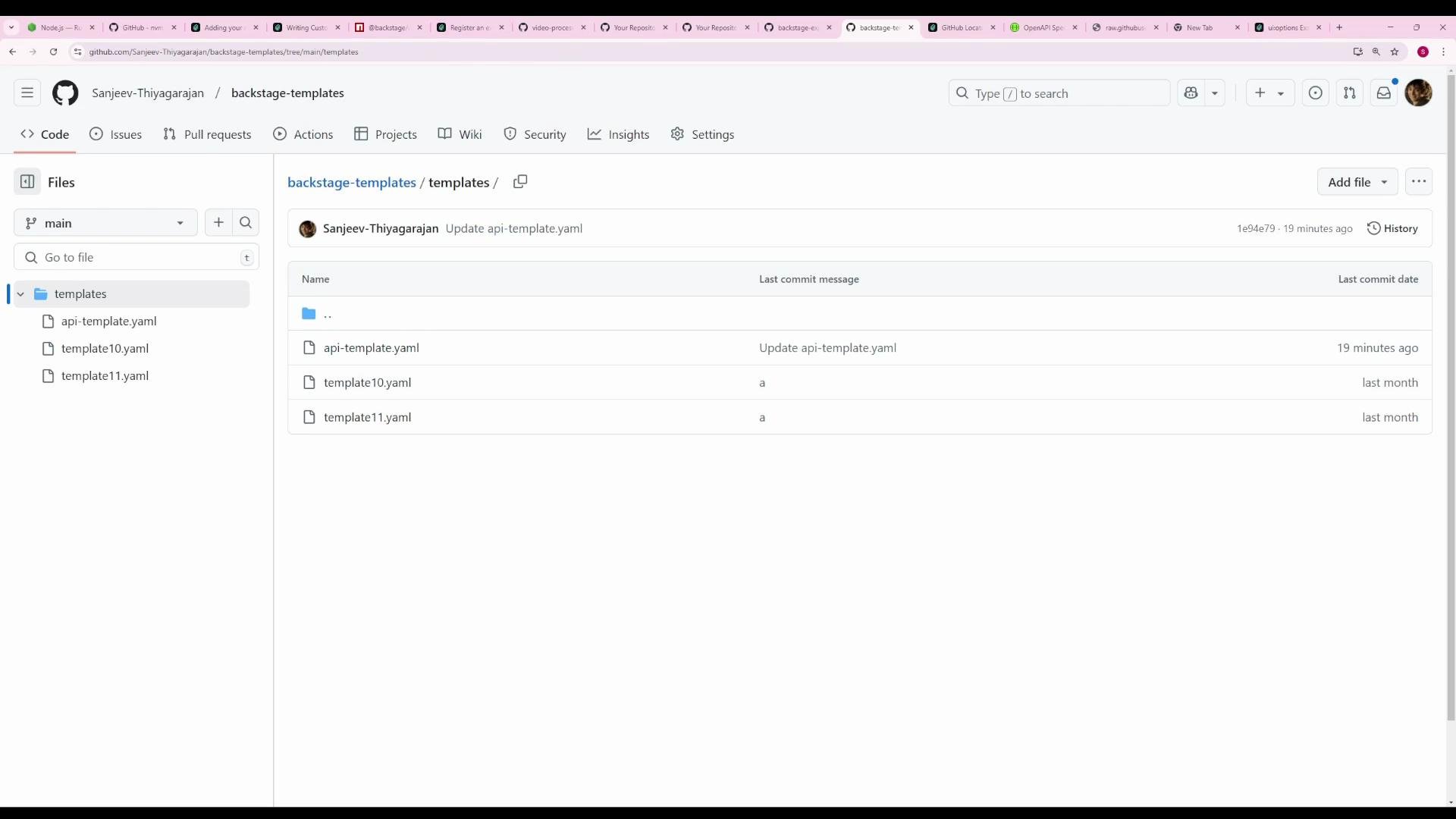
If your repository uses a layout like `templates/api-template.yaml`, `templates/template10.yaml`, etc., the provider above will not discover them.
 ## Configure a provider to discover template files under a folder
Add a new GitHub provider (name it as you like) and set `catalogPath` to a glob that matches YAML files under your `templates/` directory. Example:
```yaml theme={null}
github:
shoppingHub:
organization: 'shopping-hub'
catalogPath: '/catalog-info.yaml'
filters:
branch: 'main'
repository: '.*'
schedule:
frequency: { minutes: 20 }
timeout: { minutes: 2 }
sanjeevAccount:
organization: 'Sanjeev-Thiyagarajan'
catalogPath: '/catalog-info.yaml'
filters:
branch: 'main'
repository: '.*'
schedule:
frequency: { minutes: 20 }
timeout: { minutes: 2 }
github-templates:
organization: 'Sanjeev-Thiyagarajan'
catalogPath: 'templates/**/*.yaml'
filters:
branch: 'main'
repository: 'backstage-templates'
schedule:
frequency: { minutes: 20 }
timeout: { minutes: 2 }
```
This `github-templates` provider will:
* Search any folder under `templates/` for files that end with `.yaml`.
* Only scan the `backstage-templates` repository on the `main` branch.
* Register any valid entity descriptors it finds, including Template entities.
Use a glob like `templates/**/*.yaml` in `catalogPath` when your repository stores many template files under a common folder. Ensure the YAML files contain valid entity descriptors (for templates, `kind: Template`).
## Quick reference — GitHub provider settings
| Field | Purpose | Example |
| -------------- | -------------------------------------------------- | ------------------------------------------------------------------------- |
| `organization` | GitHub organization or owner to scan | `shopping-hub` |
| `catalogPath` | File path or glob to locate entity descriptors | `templates/**/*.yaml` |
| `filters` | Limit by `branch` and `repository` (regex allowed) | `branch: 'main'` `repository: 'backstage-templates'` |
| `schedule` | How often to rescan | `frequency: { minutes: 20 }` (wrap curly braces in code when used inline) |
## Apply and verify
1. Add the new provider configuration to your `app-config.yaml` (or environment-specific config).
2. Restart the Backstage backend so the new provider configuration is picked up.
* On startup you will see logs indicating providers are being scanned. Example log snippets:
```text theme={null}
[backend]: 2025-02-14T04:23:45.901Z backstage info Found 2 new secrets in config that will be redacted
[app]: [webpack-dev-middleware] wait until bundle finished: callback
```
3. After the provider runs its scan, open the Backstage Create flow. Discovered templates appear alongside other catalog entities and are immediately usable.
4. The provider schedule keeps templates in sync automatically, so changes in your templates repository will be discovered on the next scan.
## Further reading
* Backstage software catalog and descriptor format: [https://backstage.io/docs/features/software-catalog/descriptor-format](https://backstage.io/docs/features/software-catalog/descriptor-format)
* Backstage scaffolder docs: [https://backstage.io/docs/features/software-templates/scaffolder-overview](https://backstage.io/docs/features/software-templates/scaffolder-overview)
* Backstage auth providers: [https://backstage.io/docs/auth/](https://backstage.io/docs/auth/)
## Configure a provider to discover template files under a folder
Add a new GitHub provider (name it as you like) and set `catalogPath` to a glob that matches YAML files under your `templates/` directory. Example:
```yaml theme={null}
github:
shoppingHub:
organization: 'shopping-hub'
catalogPath: '/catalog-info.yaml'
filters:
branch: 'main'
repository: '.*'
schedule:
frequency: { minutes: 20 }
timeout: { minutes: 2 }
sanjeevAccount:
organization: 'Sanjeev-Thiyagarajan'
catalogPath: '/catalog-info.yaml'
filters:
branch: 'main'
repository: '.*'
schedule:
frequency: { minutes: 20 }
timeout: { minutes: 2 }
github-templates:
organization: 'Sanjeev-Thiyagarajan'
catalogPath: 'templates/**/*.yaml'
filters:
branch: 'main'
repository: 'backstage-templates'
schedule:
frequency: { minutes: 20 }
timeout: { minutes: 2 }
```
This `github-templates` provider will:
* Search any folder under `templates/` for files that end with `.yaml`.
* Only scan the `backstage-templates` repository on the `main` branch.
* Register any valid entity descriptors it finds, including Template entities.
Use a glob like `templates/**/*.yaml` in `catalogPath` when your repository stores many template files under a common folder. Ensure the YAML files contain valid entity descriptors (for templates, `kind: Template`).
## Quick reference — GitHub provider settings
| Field | Purpose | Example |
| -------------- | -------------------------------------------------- | ------------------------------------------------------------------------- |
| `organization` | GitHub organization or owner to scan | `shopping-hub` |
| `catalogPath` | File path or glob to locate entity descriptors | `templates/**/*.yaml` |
| `filters` | Limit by `branch` and `repository` (regex allowed) | `branch: 'main'` `repository: 'backstage-templates'` |
| `schedule` | How often to rescan | `frequency: { minutes: 20 }` (wrap curly braces in code when used inline) |
## Apply and verify
1. Add the new provider configuration to your `app-config.yaml` (or environment-specific config).
2. Restart the Backstage backend so the new provider configuration is picked up.
* On startup you will see logs indicating providers are being scanned. Example log snippets:
```text theme={null}
[backend]: 2025-02-14T04:23:45.901Z backstage info Found 2 new secrets in config that will be redacted
[app]: [webpack-dev-middleware] wait until bundle finished: callback
```
3. After the provider runs its scan, open the Backstage Create flow. Discovered templates appear alongside other catalog entities and are immediately usable.
4. The provider schedule keeps templates in sync automatically, so changes in your templates repository will be discovered on the next scan.
## Further reading
* Backstage software catalog and descriptor format: [https://backstage.io/docs/features/software-catalog/descriptor-format](https://backstage.io/docs/features/software-catalog/descriptor-format)
* Backstage scaffolder docs: [https://backstage.io/docs/features/software-templates/scaffolder-overview](https://backstage.io/docs/features/software-templates/scaffolder-overview)
* Backstage auth providers: [https://backstage.io/docs/auth/](https://backstage.io/docs/auth/)