> ## Documentation Index
> Fetch the complete documentation index at: https://notes.kodekloud.com/llms.txt
> Use this file to discover all available pages before exploring further.
# Demo Progressive Delivery with Argo Rollouts
> Guide to Argo Rollouts for Kubernetes, demonstrating canary progressive delivery, image updates, promotion, rollback, and attaching rollouts to existing Deployments via workloadRef
Deploying new versions to production can be risky: push a bad image and all pods may be replaced at once, causing user-facing errors. Progressive delivery gives you control over how a new version is introduced — shift a small percentage of traffic first, observe health and metrics, then gradually increase exposure. If anything looks wrong, abort and traffic returns to the stable revision.
Argo Rollouts implements progressive delivery for Kubernetes as a drop-in replacement for Deployments. This walkthrough shows how to:
* Verify Argo Rollouts is running
* Create a Rollout (canary strategy with weights and pauses)
* Perform a canary release by updating the image and promoting
* Attach a Rollout to an existing Deployment using `workloadRef`
***
## Verify Argo Rollouts is running
Confirm the Argo Rollouts controller and dashboard are up:
```bash theme={null}
controlplane ➜ kubectl get pods -n argo-rollouts
NAME READY STATUS RESTARTS AGE
argo-rollouts-5f64f8d68-1xr9s 1/1 Running 0 10m
argo-rollouts-dashboard-755bbc64c-59rhx 1/1 Running 0 10m
```
***
## Create a Rollout — basic structure
A `Rollout` resource closely resembles a `Deployment`. The main difference is the `strategy` section, which defines canary or blue/green progressive delivery behavior.
Here is a minimal Rollout that behaves like a regular Deployment:
```yaml theme={null}
apiVersion: argoproj.io/v1alpha1
kind: Rollout
metadata:
name: rollout-demo
namespace: canary-demo
spec:
replicas: 4
selector:
matchLabels:
app: rollout-demo
template:
metadata:
labels:
app: rollout-demo
spec:
containers:
- name: demo
image: argoproj/rollouts-demo:blue
ports:
- containerPort: 8080
```
To enable canary-style progressive delivery, add a `strategy.canary.steps` sequence. The example below progresses 25% → pause → 50% → pause → 75% → pause → 100%:
```yaml theme={null}
apiVersion: argoproj.io/v1alpha1
kind: Rollout
metadata:
name: rollout-demo
namespace: canary-demo
spec:
replicas: 4
selector:
matchLabels:
app: rollout-demo
template:
metadata:
labels:
app: rollout-demo
spec:
containers:
- name: demo
image: argoproj/rollouts-demo:blue
ports:
- containerPort: 8080
strategy:
canary:
steps:
- setWeight: 25
- pause: {}
- setWeight: 50
- pause: {}
- setWeight: 75
- pause: {}
- setWeight: 100
```
Apply the Rollout:
```bash theme={null}
controlplane ➜ kubectl apply -f rollout.yaml
rollout.argoproj.io/rollout-demo created
```
Inspect the rollout using the Argo Rollouts kubectl plugin:
```bash theme={null}
controlplane ➜ kubectl argo rollouts get rollout rollout-demo -n canary-demo
Name: rollout-demo
Namespace: canary-demo
Status: Healthy
Strategy: Canary
Step: 1/4
SetWeight: 0
ActualWeight: 0
Images: argoproj/rollouts-demo:blue (stable)
Replicas:
Desired: 4
Current: 4
Ready: 4
Available: 4
```
***
## Promote and update the image (canary release)
Promoting a rollout advances it to the next defined step. Running `promote` with no image change will not progress a revision (there is no new revision to advance):
```bash theme={null}
controlplane ➜ kubectl argo rollouts promote rollout-demo -n canary-demo
rollout 'rollout-demo' promoted
```
To create a canary release, update the container image (for example, `blue` → `yellow`) in `rollout.yaml`, then apply the change:
```bash theme={null}
# edit rollout.yaml: containers[0].image = argoproj/rollouts-demo:yellow
controlplane ➜ kubectl apply -f rollout.yaml
rollout.argoproj.io/rollout-demo configured
```
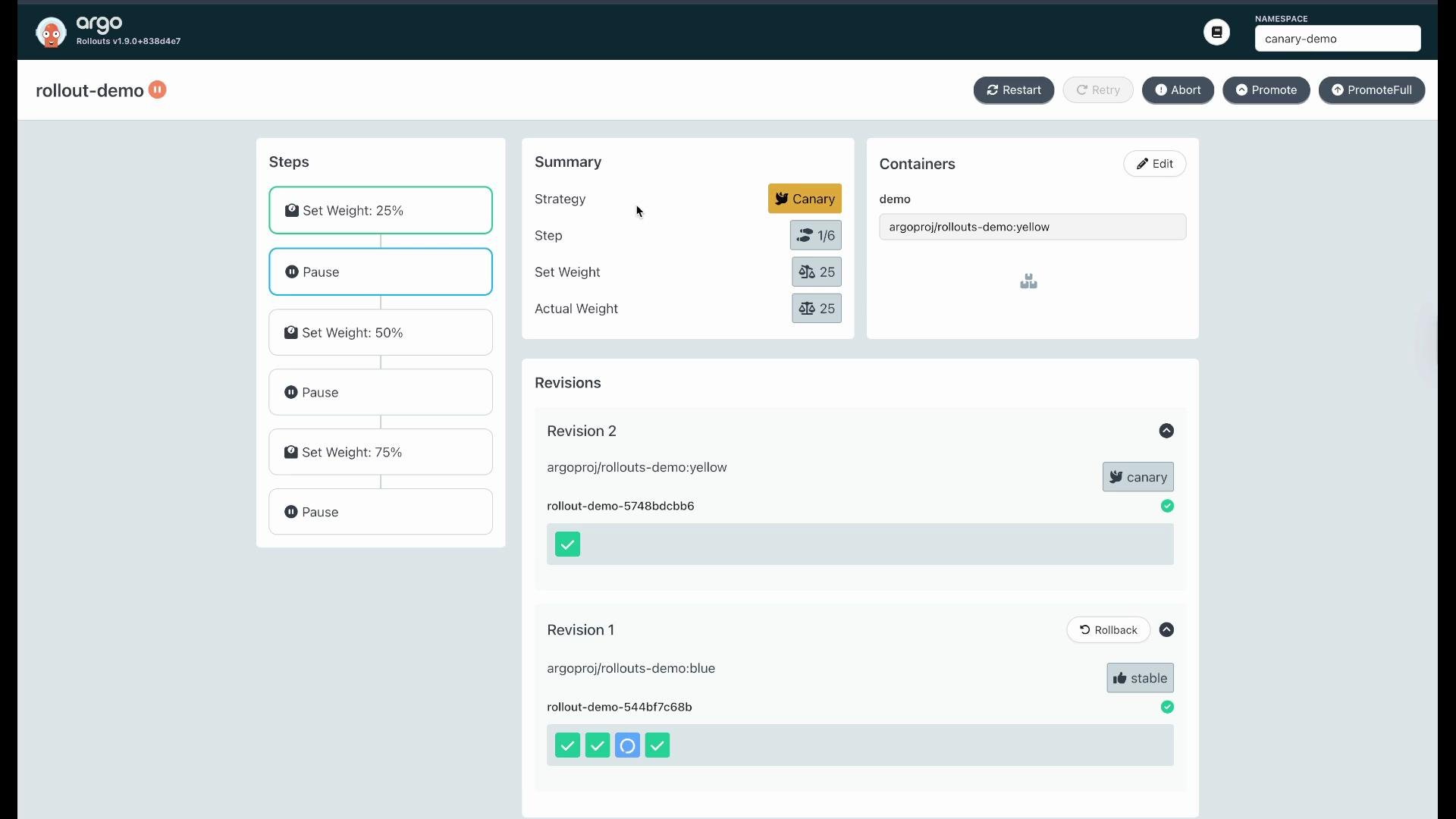
After applying the updated image the Rollout creates a new revision and will advance to the first step (setWeight: 25). One pod (25%) runs the new `yellow` image while the others remain on `blue`:
```bash theme={null}
controlplane ➜ kubectl argo rollouts get rollout rollout-demo -n canary-demo
Name: rollout-demo
Namespace: canary-demo
Status: Degraded/Healthy (depends on checks)
Strategy: Canary
Step: 1/4
SetWeight: 25
ActualWeight: 25
Images: argoproj/rollouts-demo:yellow (canary), argoproj/rollouts-demo:blue (stable)
Replicas:
Desired: 4
Current: 4
Ready: 4
Available: 4
```
You can also inspect pods directly to confirm which revision is running:
```bash theme={null}
controlplane ➜ kubectl get pods -n canary-demo
NAME READY STATUS AGE
rollout-demo-544bf7c68b-6jh2n 1/1 Running 5m
rollout-demo-544bf7c68b-6lzjz 1/1 Running 5m
rollout-demo-544bf7c68b-7l7dr 1/1 Running 5m
rollout-demo-544bf7c68b-bpbwd 1/1 Running 42s
controlplane ➜ kubectl describe pod -n canary-demo rollout-demo-544bf7c68b-bpbwd | grep -i image
Image: argoproj/rollouts-demo:yellow
```
The Argo Rollouts UI also visualizes canary progress and revision distribution. Example UI view:
 ***
## Promote to additional steps (CLI or UI)
Use CLI promote to move through the next pause or next weight:
```bash theme={null}
controlplane ➜ kubectl argo rollouts promote rollout-demo -n canary-demo
rollout 'rollout-demo' promoted
```
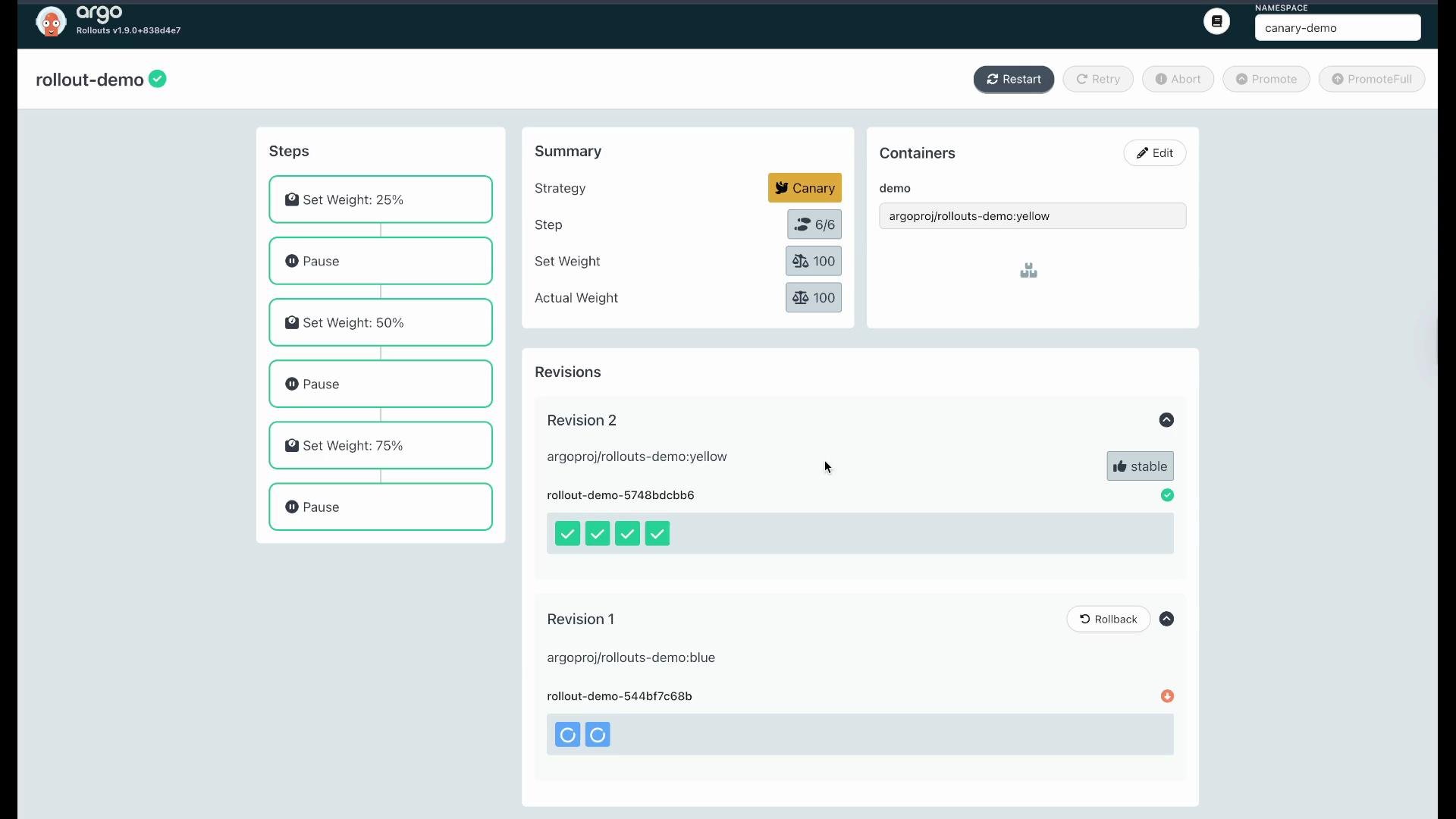
Each promote advances to the next step you defined (50% → 75% → 100%). When the Rollout reaches 100% and checks look good, the new revision becomes the stable revision.
You may also use the UI's "Promote Full" option to advance all remaining steps at once.
***
## Rollback
If the canary revision shows regressions, you can roll back from the Argo Rollouts dashboard to the previous stable revision. The UI provides an immediate way to revert so traffic returns to the stable revision.
***
## Promote to additional steps (CLI or UI)
Use CLI promote to move through the next pause or next weight:
```bash theme={null}
controlplane ➜ kubectl argo rollouts promote rollout-demo -n canary-demo
rollout 'rollout-demo' promoted
```
Each promote advances to the next step you defined (50% → 75% → 100%). When the Rollout reaches 100% and checks look good, the new revision becomes the stable revision.
You may also use the UI's "Promote Full" option to advance all remaining steps at once.
***
## Rollback
If the canary revision shows regressions, you can roll back from the Argo Rollouts dashboard to the previous stable revision. The UI provides an immediate way to revert so traffic returns to the stable revision.
 ***
## Manage existing workloads with workloadRef
If you already have an existing `Deployment`, you can let a `Rollout` reference that Deployment via `workloadRef`. This allows adding progressive delivery to an existing workload without replacing the resource.
Create a Deployment (example uses `replicas: 0` initially):
```yaml theme={null}
apiVersion: apps/v1
kind: Deployment
metadata:
name: demo-app
namespace: canary-demo
spec:
replicas: 0
selector:
matchLabels:
app: demo-app
template:
metadata:
labels:
app: demo-app
spec:
containers:
- name: demo-app
image: argoproj/rollouts-demo:blue
ports:
- containerPort: 8080
```
Apply the Deployment:
```bash theme={null}
controlplane ➜ kubectl apply -f deployment.yaml
deployment.apps/demo-app created
```
Create a Rollout that references the existing Deployment via `workloadRef`, and define a canary strategy:
```yaml theme={null}
apiVersion: argoproj.io/v1alpha1
kind: Rollout
metadata:
name: demo-app-rollout
namespace: canary-demo
spec:
replicas: 4
workloadRef:
apiVersion: apps/v1
kind: Deployment
name: demo-app
strategy:
canary:
steps:
- setWeight: 10
- pause: {}
- setWeight: 50
- pause: {}
- setWeight: 100
```
Apply the Rollout:
```bash theme={null}
controlplane ➜ kubectl apply -f workloadref-rollout.yaml
rollout.argoproj.io/demo-app-rollout created
```
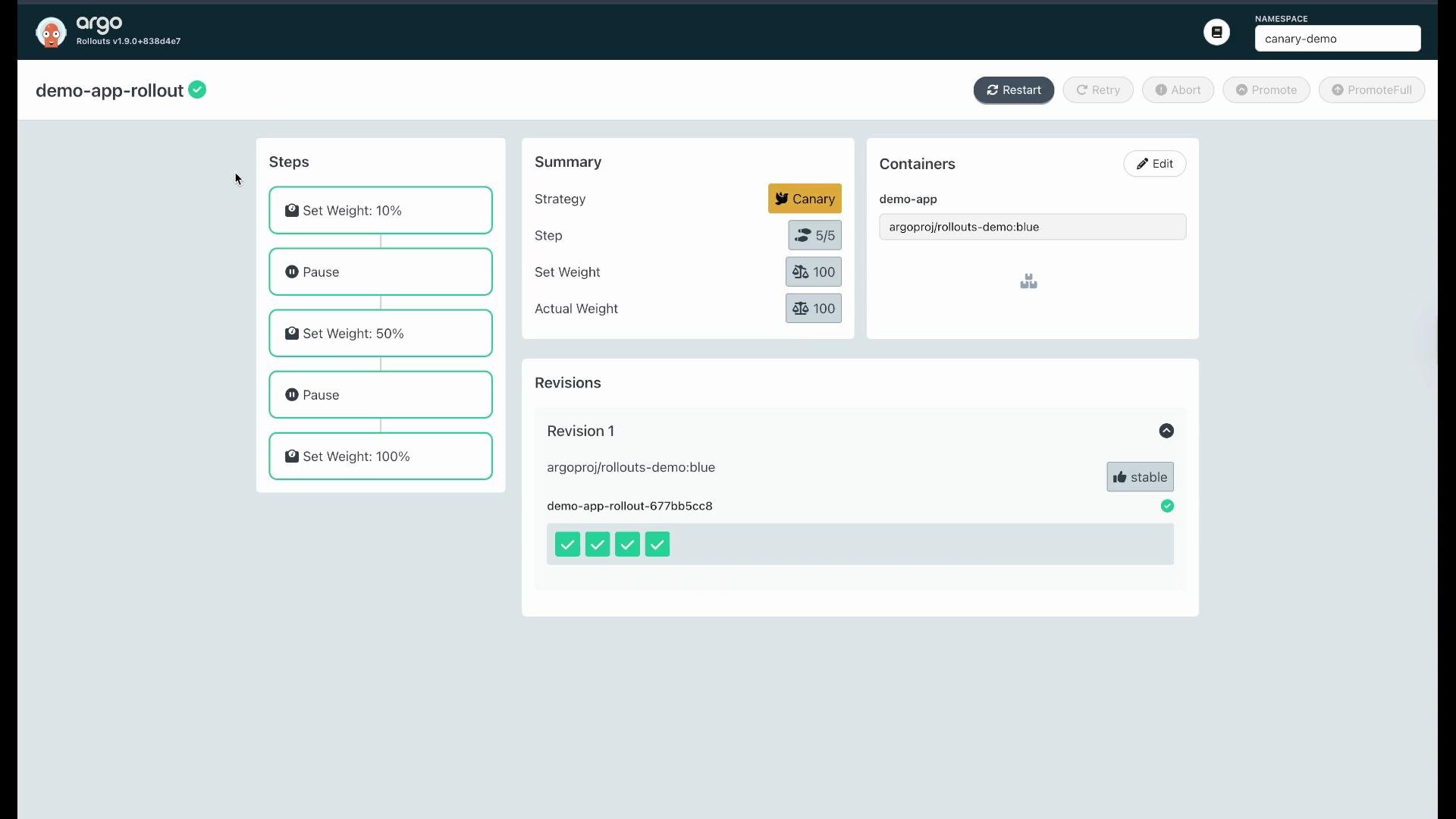
The Rollout will reconcile and manage the referenced Deployment, scaling it to the number of replicas configured by the Rollout (for example, from `replicas: 0` up to 4) and shifting traffic according to canary steps:
```bash theme={null}
controlplane ➜ kubectl get pods -n canary-demo
NAME READY STATUS AGE
demo-app-677bb5c8-6cxs5 1/1 Running 53s
demo-app-677bb5c8-c4xg4 1/1 Running 53s
demo-app-677bb5c8-rbxg4 1/1 Running 53s
demo-app-677bb5c8-sbkm4 1/1 Running 53s
```
***
## Manage existing workloads with workloadRef
If you already have an existing `Deployment`, you can let a `Rollout` reference that Deployment via `workloadRef`. This allows adding progressive delivery to an existing workload without replacing the resource.
Create a Deployment (example uses `replicas: 0` initially):
```yaml theme={null}
apiVersion: apps/v1
kind: Deployment
metadata:
name: demo-app
namespace: canary-demo
spec:
replicas: 0
selector:
matchLabels:
app: demo-app
template:
metadata:
labels:
app: demo-app
spec:
containers:
- name: demo-app
image: argoproj/rollouts-demo:blue
ports:
- containerPort: 8080
```
Apply the Deployment:
```bash theme={null}
controlplane ➜ kubectl apply -f deployment.yaml
deployment.apps/demo-app created
```
Create a Rollout that references the existing Deployment via `workloadRef`, and define a canary strategy:
```yaml theme={null}
apiVersion: argoproj.io/v1alpha1
kind: Rollout
metadata:
name: demo-app-rollout
namespace: canary-demo
spec:
replicas: 4
workloadRef:
apiVersion: apps/v1
kind: Deployment
name: demo-app
strategy:
canary:
steps:
- setWeight: 10
- pause: {}
- setWeight: 50
- pause: {}
- setWeight: 100
```
Apply the Rollout:
```bash theme={null}
controlplane ➜ kubectl apply -f workloadref-rollout.yaml
rollout.argoproj.io/demo-app-rollout created
```
The Rollout will reconcile and manage the referenced Deployment, scaling it to the number of replicas configured by the Rollout (for example, from `replicas: 0` up to 4) and shifting traffic according to canary steps:
```bash theme={null}
controlplane ➜ kubectl get pods -n canary-demo
NAME READY STATUS AGE
demo-app-677bb5c8-6cxs5 1/1 Running 53s
demo-app-677bb5c8-c4xg4 1/1 Running 53s
demo-app-677bb5c8-rbxg4 1/1 Running 53s
demo-app-677bb5c8-sbkm4 1/1 Running 53s
```
 ***
A common YAML mistake is using `step` (singular) instead of the required `steps` (plural) under `spec.strategy.canary`. If you see an error like `unknown field "spec.strategy.canary.step"`, verify you have `steps:` and that each step entry is properly indented.
***
## Quick reference
| Action | Command / Note |
| ---------------------------- | --------------------------------------------------------- |
| Check Argo Rollouts pods | `kubectl get pods -n argo-rollouts` |
| Inspect a rollout | `kubectl argo rollouts get rollout -n ` |
| Promote canary to next step | `kubectl argo rollouts promote -n ` |
| Attach Rollout to Deployment | use `spec.workloadRef` in the Rollout manifest |
| UI promote / rollback | Available in Argo Rollouts dashboard |
***
## Next steps & references
Practice the walkthrough: verify Argo Rollouts is installed, create a canary Rollout, update images to trigger revisions, promote step-by-step, and roll back if needed. Add observability and automated analysis (metrics, alerts) to make promotion decisions safer.
* Argo Rollouts documentation: [https://argoproj.github.io/argo-rollouts/](https://argoproj.github.io/argo-rollouts/)
* Argo Rollouts GitHub: [https://github.com/argoproj/argo-rollouts](https://github.com/argoproj/argo-rollouts)
Now you have a compact, hands-on guide: verify Argo Rollouts, create and apply a canary Rollout, perform controlled image updates and promotions, roll back when necessary, and attach Rollouts to pre-existing Deployments with `workloadRef`.
***
A common YAML mistake is using `step` (singular) instead of the required `steps` (plural) under `spec.strategy.canary`. If you see an error like `unknown field "spec.strategy.canary.step"`, verify you have `steps:` and that each step entry is properly indented.
***
## Quick reference
| Action | Command / Note |
| ---------------------------- | --------------------------------------------------------- |
| Check Argo Rollouts pods | `kubectl get pods -n argo-rollouts` |
| Inspect a rollout | `kubectl argo rollouts get rollout -n ` |
| Promote canary to next step | `kubectl argo rollouts promote -n ` |
| Attach Rollout to Deployment | use `spec.workloadRef` in the Rollout manifest |
| UI promote / rollback | Available in Argo Rollouts dashboard |
***
## Next steps & references
Practice the walkthrough: verify Argo Rollouts is installed, create a canary Rollout, update images to trigger revisions, promote step-by-step, and roll back if needed. Add observability and automated analysis (metrics, alerts) to make promotion decisions safer.
* Argo Rollouts documentation: [https://argoproj.github.io/argo-rollouts/](https://argoproj.github.io/argo-rollouts/)
* Argo Rollouts GitHub: [https://github.com/argoproj/argo-rollouts](https://github.com/argoproj/argo-rollouts)
Now you have a compact, hands-on guide: verify Argo Rollouts, create and apply a canary Rollout, perform controlled image updates and promotions, roll back when necessary, and attach Rollouts to pre-existing Deployments with `workloadRef`.