> ## Documentation Index
> Fetch the complete documentation index at: https://notes.kodekloud.com/llms.txt
> Use this file to discover all available pages before exploring further.
# Demo Tekton Pipelines
> A hands on demo of Tekton Pipelines showing how to create reusable Tasks, Pipelines, and run builds and deployments in Kubernetes using tkn and the Tekton Dashboard
[Tekton](https://tekton.dev/docs/) is a Kubernetes-native CI/CD system. Rather than running an external CI server, Tekton runs as custom resources inside your cluster: controllers, Pipelines, Tasks, TaskRuns, and PipelineRuns all live in Kubernetes.
Key concepts at a glance:
| Resource | Purpose | Example / Notes |
| --------------------: | ------------------------------------------------------------------------ | -------------------------------------- |
| Task | A unit of work composed of one or more steps (containers or scripts). | Use for build/test/deploy steps. |
| Pipeline | A sequence that wires Tasks together and passes parameters between them. | Orchestrates Tasks and their ordering. |
| TaskRun / PipelineRun | Concrete executions (instances) of a Task or Pipeline. | `tkn` shows logs and status for runs. |
In this guide you'll:
* Verify Tekton is running in your cluster.
* Create a minimal Task and run it.
* Make the Task reusable with parameters.
* Build a multi-step Task (clone → build → test).
* Add a deploy Task and wire everything into a Pipeline.
* Run the Pipeline and view logs.
You need `kubectl` access to the cluster and the `tkn` CLI installed/configured to follow the examples that use `tkn` commands and `--showlog`. See the Tekton docs and Kubernetes docs linked in the References section below.
Examples assume resources are created in the `ci-pipelines` namespace. Create it beforehand if it doesn't exist: `kubectl create namespace ci-pipelines`. Ensure your user has the necessary RBAC permissions to create Tekton resources and view logs.
## Verify Tekton Pipelines is running
Check the Tekton pods in the `tekton-pipelines` namespace:
```bash theme={null}
kubectl get pods -n tekton-pipelines
```
Example output:
```plaintext theme={null}
NAME READY STATUS RESTARTS AGE
tekton-dashboard-7c54d984dd-rj9gv 1/1 Running 0 31m
tekton-events-controller-5cbc777ccd-hd47v 1/1 Running 0 31m
tekton-pipelines-controller-5f567589-1g9v 1/1 Running 0 31m
tekton-pipelines-webhook-75cd84877-mfknj 1/1 Running 0 31m
```
If the controllers and webhook are up and Running, you're ready to create Tasks.
## Create a minimal Task
Create `hello-task.yaml` with a single step that prints a message:
```yaml theme={null}
apiVersion: tekton.dev/v1
kind: Task
metadata:
name: hello-task
namespace: ci-pipelines
spec:
steps:
- name: say-hello
image: alpine:3.18
script: |
echo "Hello from KodeKloud!"
```
Apply the Task:
```bash theme={null}
kubectl apply -f hello-task.yaml
# task.tekton.dev/hello-task created
```
Start the Task and stream logs with `tkn`:
```bash theme={null}
tkn task start hello-task -n ci-pipelines --showlog
```
Example output:
```plaintext theme={null}
TaskRun started: hello-task-run-qxq4n
Waiting for logs to be available...
[say-hello] Hello from KodeKloud!
```
This TaskRun is an instantiation of the Task we defined.
## Make the Task reusable with a parameter
Replace the hard-coded message with a `message` parameter so the Task can be reused:
```yaml theme={null}
apiVersion: tekton.dev/v1
kind: Task
metadata:
name: hello-task
namespace: ci-pipelines
spec:
params:
- name: message
type: string
default: "Hello from KodeKloud!"
steps:
- name: say-hello
image: alpine:3.18
script: |
echo "$(params.message)"
```
Apply the updated Task:
```bash theme={null}
kubectl apply -f hello-task.yaml
# task.tekton.dev/hello-task configured
```
Start the Task without passing a parameter — it will use the default:
```bash theme={null}
tkn task start hello-task -n ci-pipelines --showlog
```
Output:
```plaintext theme={null}
TaskRun started: hello-task-run-qx4h
Waiting for logs to be available...
[say-hello] Hello from KodeKloud!
```
Pass a custom message using `-p`:
```bash theme={null}
tkn task start hello-task -n ci-pipelines -p message="Hello from Nourhan!" --showlog
```
Output:
```plaintext theme={null}
TaskRun started: hello-task-run-rzjzf
Waiting for logs to be available...
[say-hello] Hello from Nourhan!
```
Note: the `-p` parameter format is `-p name="value"`.
## Create a multi-step build Task
A realistic CI Task runs multiple sequential steps (clone → build → test). Define a `build-task` that accepts an `app-name` parameter and runs three steps that print indicative messages:
`build-task.yaml`:
```yaml theme={null}
apiVersion: tekton.dev/v1
kind: Task
metadata:
name: build-task
namespace: ci-pipelines
spec:
params:
- name: app-name
type: string
steps:
- name: clone
image: alpine:3.18
script: |
echo "Cloning repo for $(params.app-name)"
- name: build
image: alpine:3.18
script: |
echo "Building $(params.app-name)"
- name: test
image: python:3.11-alpine
script: |
echo "Running tests for $(params.app-name)"
```
Apply the Task:
```bash theme={null}
kubectl apply -f build-task.yaml
# task.tekton.dev/build-task created
```
Start the TaskRun and pass `app-name`:
```bash theme={null}
tkn task start build-task -n ci-pipelines -p app-name="web-server" --showlog
```
Output (steps run sequentially):
```plaintext theme={null}
TaskRun started: build-task-run-sk277
Waiting for logs to be available...
[clone] Cloning repo for web-server
[build] Building web-server
[test] Running tests for web-server
```
Each step runs in sequence; choose images tailored to the step (e.g., a git image for clone, build tool images for compilation, test runners for tests).
## Create a deploy Task
Create a Task that deploys a named app to an environment. It accepts `app-name` and `environment` (default `staging`).
`deploy-task.yaml`:
```yaml theme={null}
apiVersion: tekton.dev/v1
kind: Task
metadata:
name: deploy-task
namespace: ci-pipelines
spec:
params:
- name: app-name
type: string
- name: environment
type: string
default: staging
steps:
- name: deploy
image: alpine:3.18
script: |
echo "Deploying $(params.app-name) to $(params.environment)"
```
Apply it:
```bash theme={null}
kubectl apply -f deploy-task.yaml
# task.tekton.dev/deploy-task created
```
## Wire Tasks into a Pipeline
Create a Pipeline that runs `build-task` first, then `deploy-task`. The Pipeline accepts `app-name` and `target-env`, and passes them into the Tasks.
`pipeline.yaml`:
```yaml theme={null}
apiVersion: tekton.dev/v1
kind: Pipeline
metadata:
name: ci-pipeline
namespace: ci-pipelines
spec:
params:
- name: app-name
type: string
- name: target-env
type: string
default: staging
tasks:
- name: build
taskRef:
name: build-task
params:
- name: app-name
value: $(params.app-name)
- name: deploy
runAfter:
- build
taskRef:
name: deploy-task
params:
- name: app-name
value: $(params.app-name)
- name: environment
value: $(params.target-env)
```
Apply the Pipeline:
```bash theme={null}
kubectl apply -f pipeline.yaml
# pipeline.tekton.dev/ci-pipeline created
```
Start a PipelineRun and stream logs:
```bash theme={null}
tkn pipeline start ci-pipeline \
-n ci-pipelines \
-p app-name="webserver" \
-p target-env="prod" \
--showlog
```
Expected output:
```plaintext theme={null}
PipelineRun started: ci-pipeline-run-vjx7b
Waiting for logs to be available...
[build : clone] Cloning repo for webserver
[build : build] Building webserver
[build : test] Running tests for webserver
[deploy : deploy] Deploying webserver to prod
```
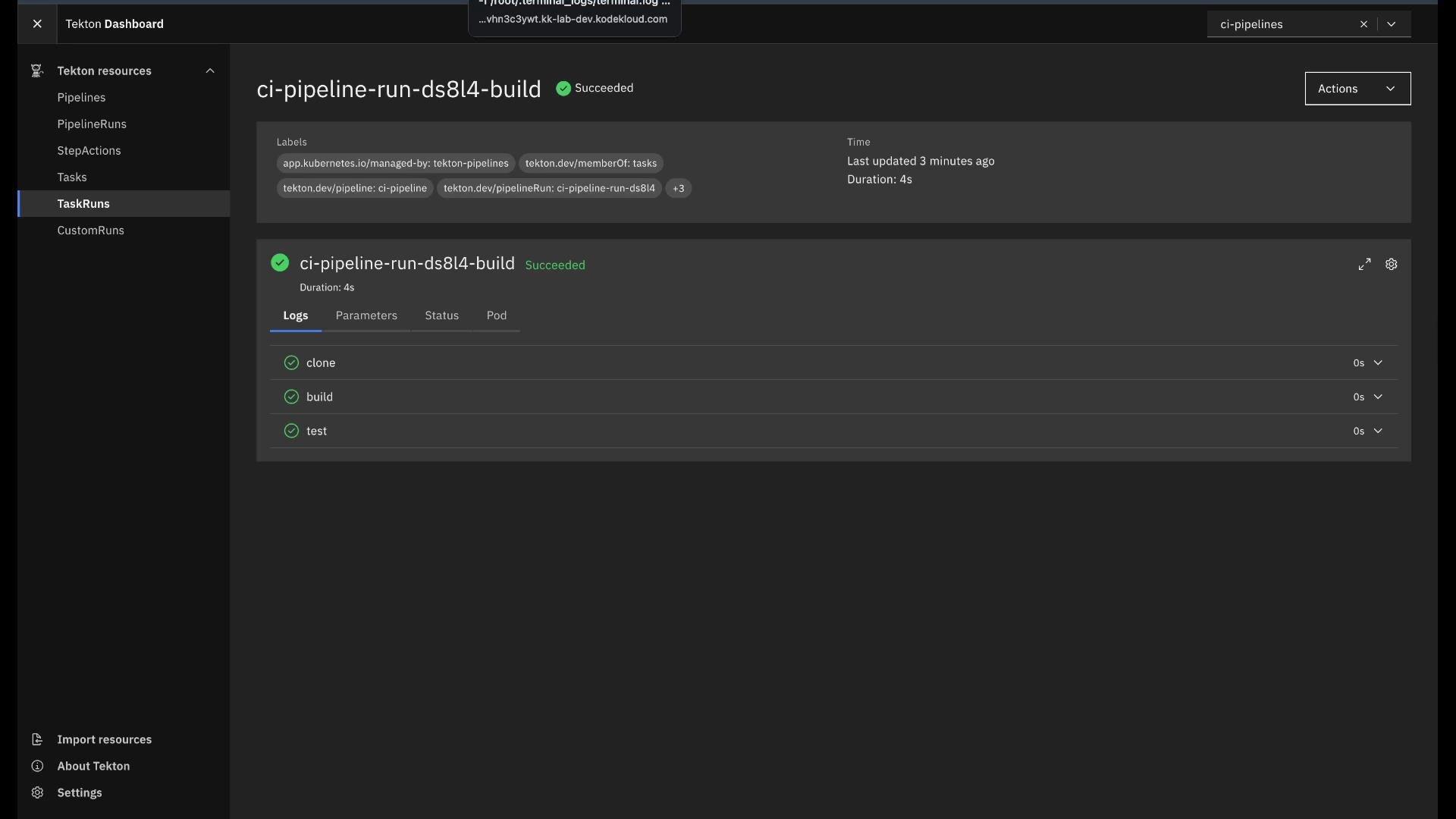
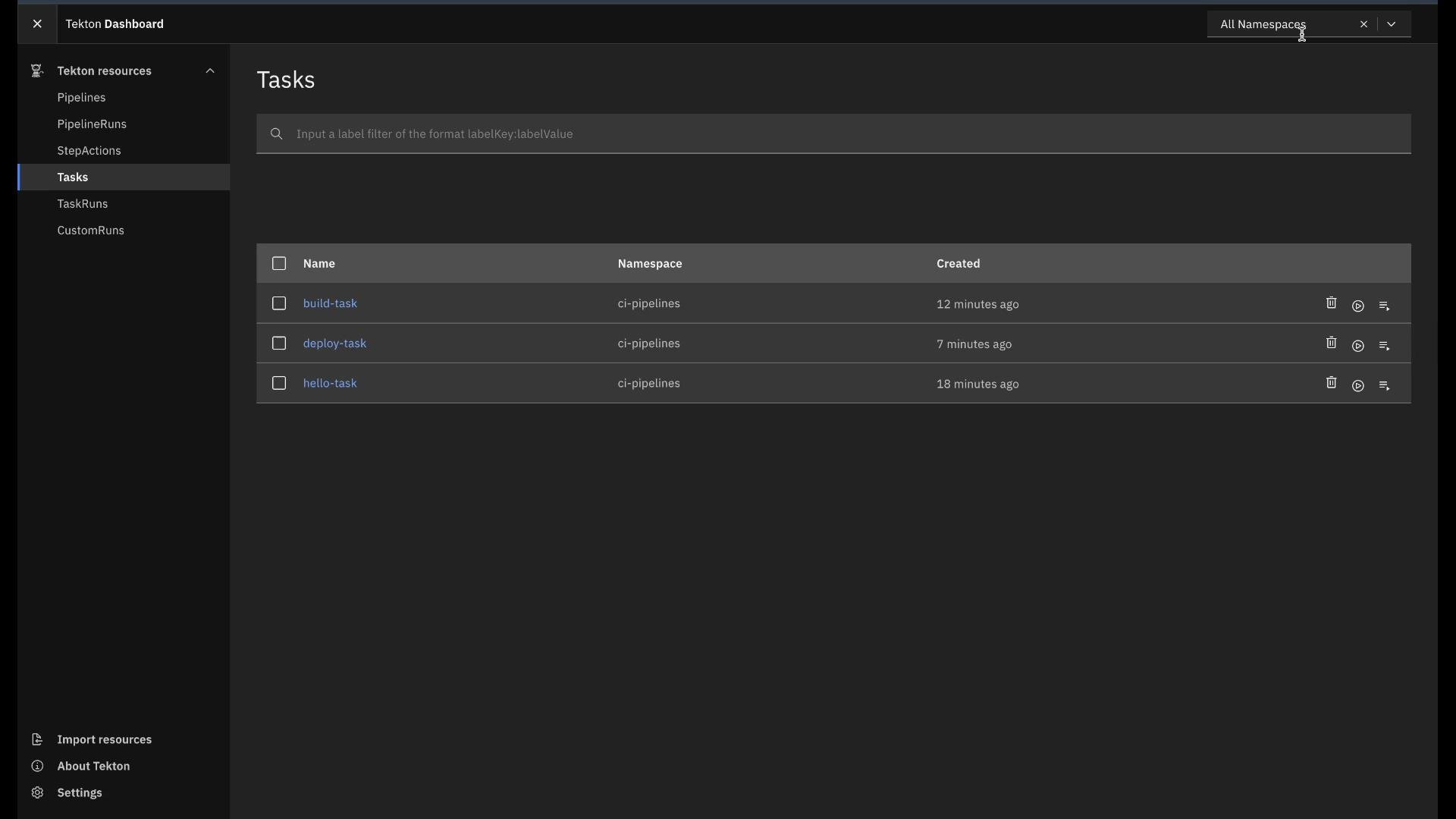 The PipelineRun executed the `build` Task (three sequential steps) followed by the `deploy` Task. You can inspect TaskRun logs and statuses from the CLI or Dashboard.
 ## Tekton Dashboard
Tekton provides a [Dashboard](https://tekton.dev/docs/dashboard/) UI for visualizing pipelines and runs. From the Dashboard you can:
* View Pipelines, PipelineRuns, Tasks, and TaskRuns.
* Inspect logs, parameters, statuses, and related Pods.
* Instantiate TaskRuns and PipelineRuns (subject to cluster RBAC).
The Dashboard complements CLI workflows and is useful for debugging and auditing CI/CD runs.
## Next steps and extensions
Once you master Tasks and Pipelines:
* Replace demo `echo` scripts with real clone/build/test/deploy steps.
* Add Workspaces to share files/artifacts between steps.
* Integrate image registries, results, conditions, or custom cluster resources.
* Secure access via RBAC and configure Tekton Triggers for event-driven runs.
## Links and References
* [Tekton Pipelines documentation](https://tekton.dev/docs/)
* [Tekton CLI (`tkn`)](https://tekton.dev/docs/cli/)
* [Tekton Dashboard](https://tekton.dev/docs/dashboard/)
* [kubectl reference](https://kubernetes.io/docs/reference/kubectl/overview/)
## Tekton Dashboard
Tekton provides a [Dashboard](https://tekton.dev/docs/dashboard/) UI for visualizing pipelines and runs. From the Dashboard you can:
* View Pipelines, PipelineRuns, Tasks, and TaskRuns.
* Inspect logs, parameters, statuses, and related Pods.
* Instantiate TaskRuns and PipelineRuns (subject to cluster RBAC).
The Dashboard complements CLI workflows and is useful for debugging and auditing CI/CD runs.
## Next steps and extensions
Once you master Tasks and Pipelines:
* Replace demo `echo` scripts with real clone/build/test/deploy steps.
* Add Workspaces to share files/artifacts between steps.
* Integrate image registries, results, conditions, or custom cluster resources.
* Secure access via RBAC and configure Tekton Triggers for event-driven runs.
## Links and References
* [Tekton Pipelines documentation](https://tekton.dev/docs/)
* [Tekton CLI (`tkn`)](https://tekton.dev/docs/cli/)
* [Tekton Dashboard](https://tekton.dev/docs/dashboard/)
* [kubectl reference](https://kubernetes.io/docs/reference/kubectl/overview/)