> ## Documentation Index
> Fetch the complete documentation index at: https://notes.kodekloud.com/llms.txt
> Use this file to discover all available pages before exploring further.
# CRD Design Patterns Versioning Status and Printer Columns
> Guide to making Kubernetes CustomResourceDefinitions production-ready by applying versioning, status subresource, printer columns, scale integration, validation, and a checklist for safe operability
Now that you can author CustomResourceDefinitions (CRDs), move beyond prototypes and make them production-ready. This guide covers four essential patterns that keep CRDs maintainable, discoverable, and safe in production:
* API versioning using `served` and `storage` flags
* The `status` subresource to separate controller-managed state from user intent
* Additional printer columns to improve `kubectl get` output
* The `scale` subresource for `kubectl scale` and Horizontal Pod Autoscaler (HPA) integration
By the end you'll have a practical checklist to validate CRDs before they run in production.
## Example: costly lack of versioning
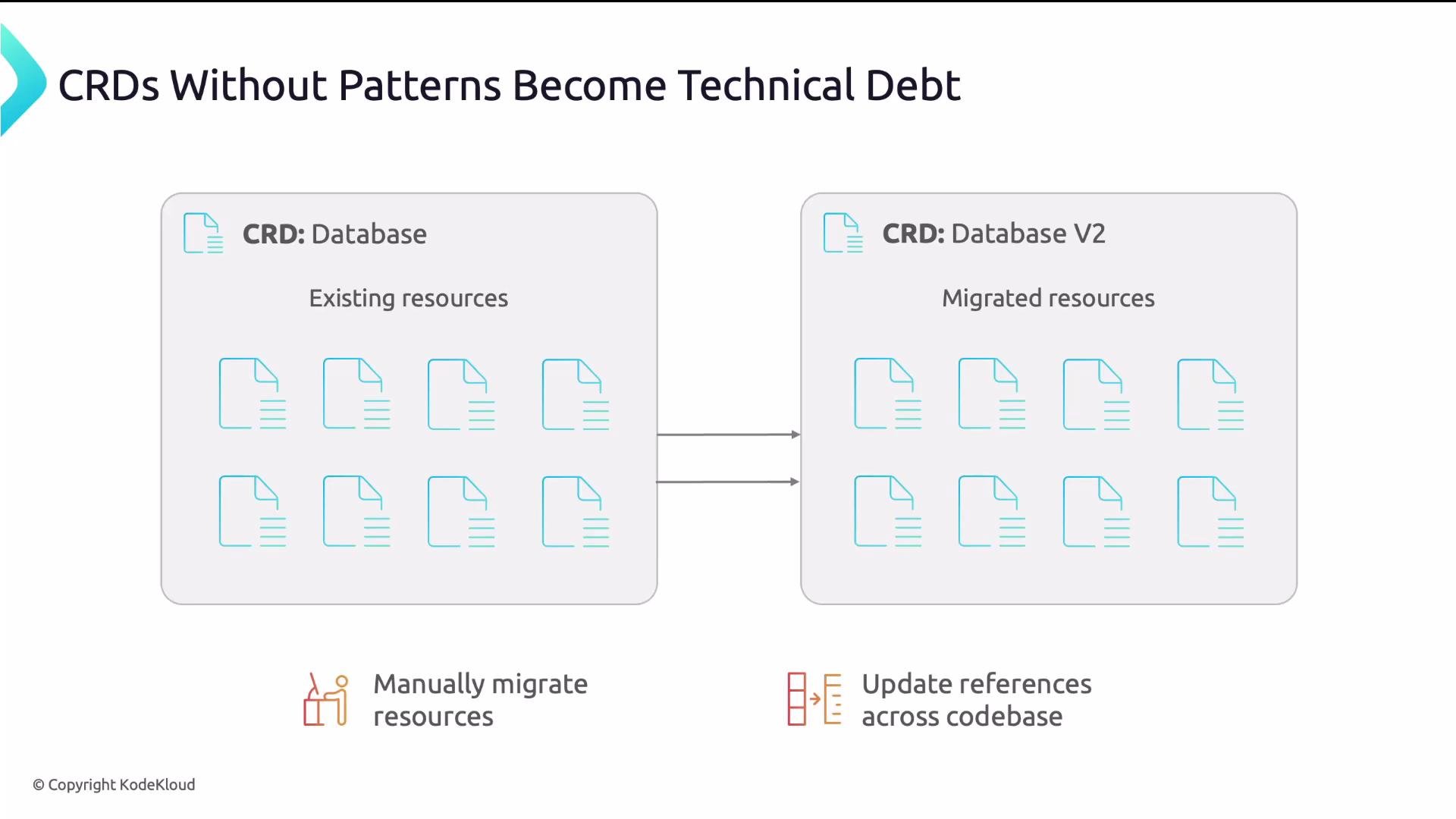
A team created a `Database` CRD with a single `v1` version and no `status` subresource. Six months later they added a new required `backup` field to the schema. Because existing resources were stored without it, applying the change broke those resources. The team had to:
1. Create a new CRD `database.v2`
2. Manually migrate resources
3. Update callers across the codebase
This single oversight cost three weeks of engineering time and created operational risk that proper versioning would have avoided.
 ## Common problems when design patterns are skipped
* No versioning strategy: adding or changing required fields can invalidate existing resources and break clients.
* No `status` separation: users or kubectl can accidentally overwrite controller-managed `status` fields, creating race conditions.
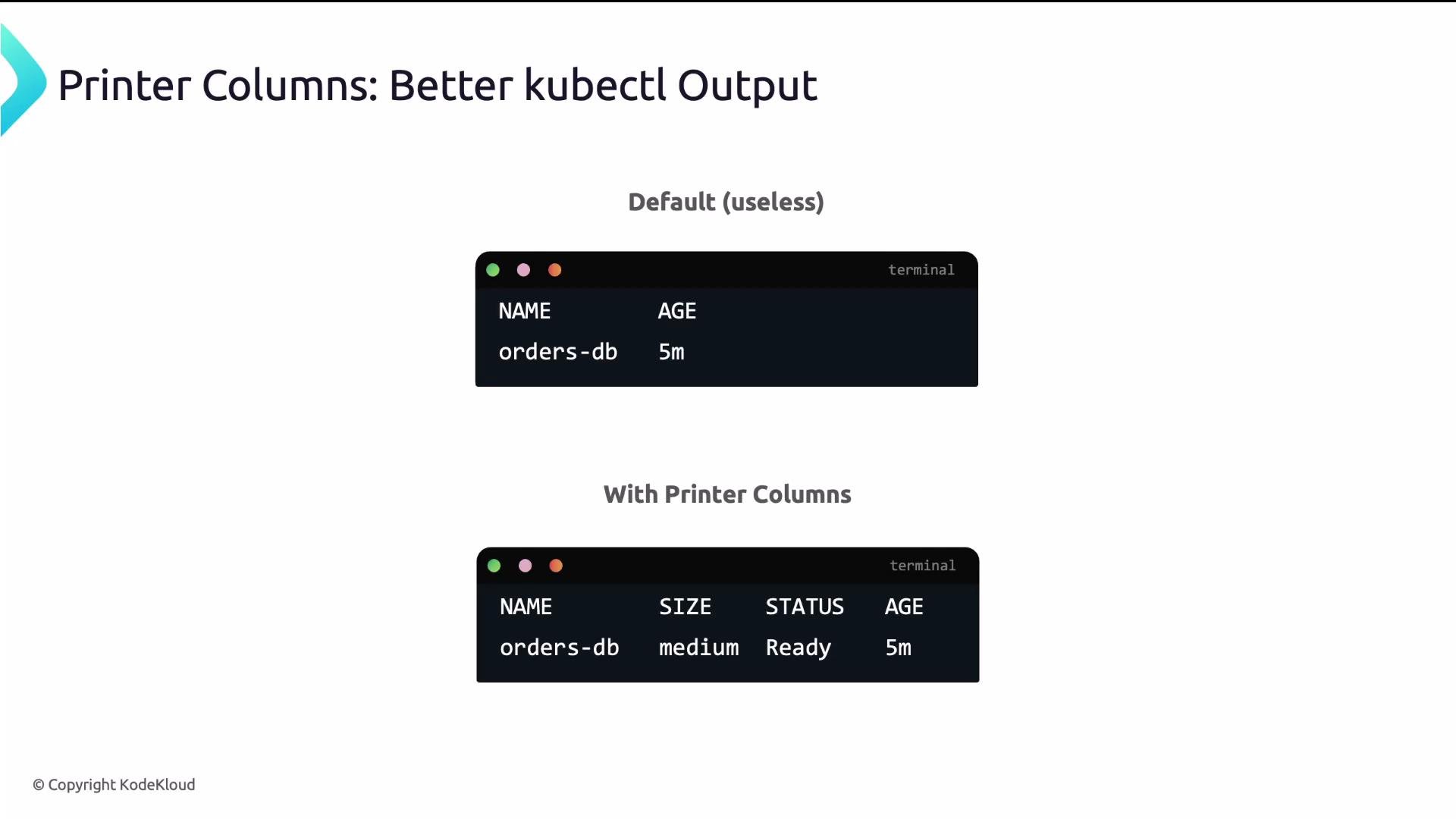
* Poor `kubectl` UX: default `kubectl get` shows only `NAME` and `AGE` — forcing extra commands to check health, size, or replicas.
Kubernetes provides built-in patterns for each problem. Below we explain them in sequence and show how to apply them.
## API versioning
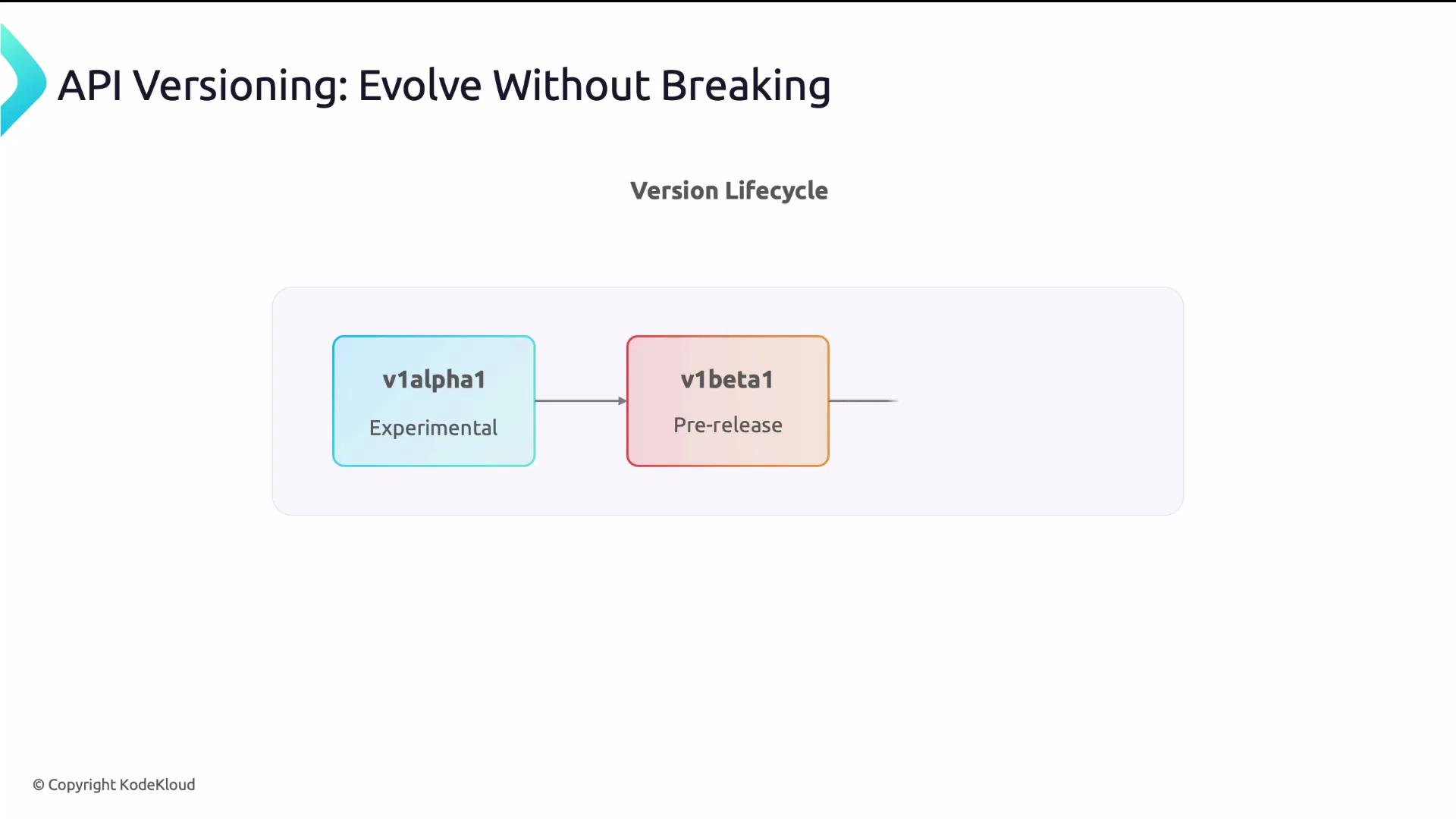
Kubernetes versioning commonly follows: `v1alpha1` (experimental) → `v1beta1` (pre-release) → `v1` (stable). Plan versioning from day one even if you only ship a single version initially.
Two flags control each CRD version’s runtime behavior:
| Flag | Effect |
| --------------- | ------------------------------------------------------------------------------------------------------------ |
| `served: true` | The API server accepts requests for this version. |
| `storage: true` | Resources are stored in etcd using this version’s representation. Only one version can have `storage: true`. |
Typical evolution:
1. Start with `v1alpha1` (`served: true`, `storage: true`).
2. Add `v1beta1` as `served: true`, set `v1beta1` to `storage: true`, and switch `v1alpha1` to `storage: false`. The API server migrates stored resources.
3. Promote to `v1` once stable and repeat the migration process.
Use `deprecated` and `deprecationWarning` to notify users when a version will be removed:
```yaml theme={null}
served: true
storage: true
deprecated: true
deprecationWarning: "This version will be removed in a future release; please migrate to v1."
```
For non-trivial schema changes between versions, implement a conversion webhook to transform objects across versions. For small additive changes (e.g., optional fields), a webhook may not be necessary.
Resources:
* Kubernetes CRD versioning and conversion docs: [https://kubernetes.io/docs/tasks/extend-kubernetes/custom-resources/custom-resource-definitions/#conversion](https://kubernetes.io/docs/tasks/extend-kubernetes/custom-resources/custom-resource-definitions/#conversion)
## Common problems when design patterns are skipped
* No versioning strategy: adding or changing required fields can invalidate existing resources and break clients.
* No `status` separation: users or kubectl can accidentally overwrite controller-managed `status` fields, creating race conditions.
* Poor `kubectl` UX: default `kubectl get` shows only `NAME` and `AGE` — forcing extra commands to check health, size, or replicas.
Kubernetes provides built-in patterns for each problem. Below we explain them in sequence and show how to apply them.
## API versioning
Kubernetes versioning commonly follows: `v1alpha1` (experimental) → `v1beta1` (pre-release) → `v1` (stable). Plan versioning from day one even if you only ship a single version initially.
Two flags control each CRD version’s runtime behavior:
| Flag | Effect |
| --------------- | ------------------------------------------------------------------------------------------------------------ |
| `served: true` | The API server accepts requests for this version. |
| `storage: true` | Resources are stored in etcd using this version’s representation. Only one version can have `storage: true`. |
Typical evolution:
1. Start with `v1alpha1` (`served: true`, `storage: true`).
2. Add `v1beta1` as `served: true`, set `v1beta1` to `storage: true`, and switch `v1alpha1` to `storage: false`. The API server migrates stored resources.
3. Promote to `v1` once stable and repeat the migration process.
Use `deprecated` and `deprecationWarning` to notify users when a version will be removed:
```yaml theme={null}
served: true
storage: true
deprecated: true
deprecationWarning: "This version will be removed in a future release; please migrate to v1."
```
For non-trivial schema changes between versions, implement a conversion webhook to transform objects across versions. For small additive changes (e.g., optional fields), a webhook may not be necessary.
Resources:
* Kubernetes CRD versioning and conversion docs: [https://kubernetes.io/docs/tasks/extend-kubernetes/custom-resources/custom-resource-definitions/#conversion](https://kubernetes.io/docs/tasks/extend-kubernetes/custom-resources/custom-resource-definitions/#conversion)
 ## Status subresource
Without a dedicated `status` subresource, a single `PUT` can overwrite both `spec` and `status`. This allows users or controllers to inadvertently clobber controller-managed state.
When you enable `status`, the API server exposes two distinct endpoints:
* Update `spec` only:
* `PUT /apis///namespaces///`
* Update `status` only:
* `PUT /apis///namespaces////status`
This enforces a clean separation of concerns: `spec` is user intent and `status` is controller-observed state.
Enable status simply in the CRD version:
```yaml theme={null}
subresources:
status: {}
```
## Status subresource
Without a dedicated `status` subresource, a single `PUT` can overwrite both `spec` and `status`. This allows users or controllers to inadvertently clobber controller-managed state.
When you enable `status`, the API server exposes two distinct endpoints:
* Update `spec` only:
* `PUT /apis///namespaces///`
* Update `status` only:
* `PUT /apis///namespaces////status`
This enforces a clean separation of concerns: `spec` is user intent and `status` is controller-observed state.
Enable status simply in the CRD version:
```yaml theme={null}
subresources:
status: {}
```
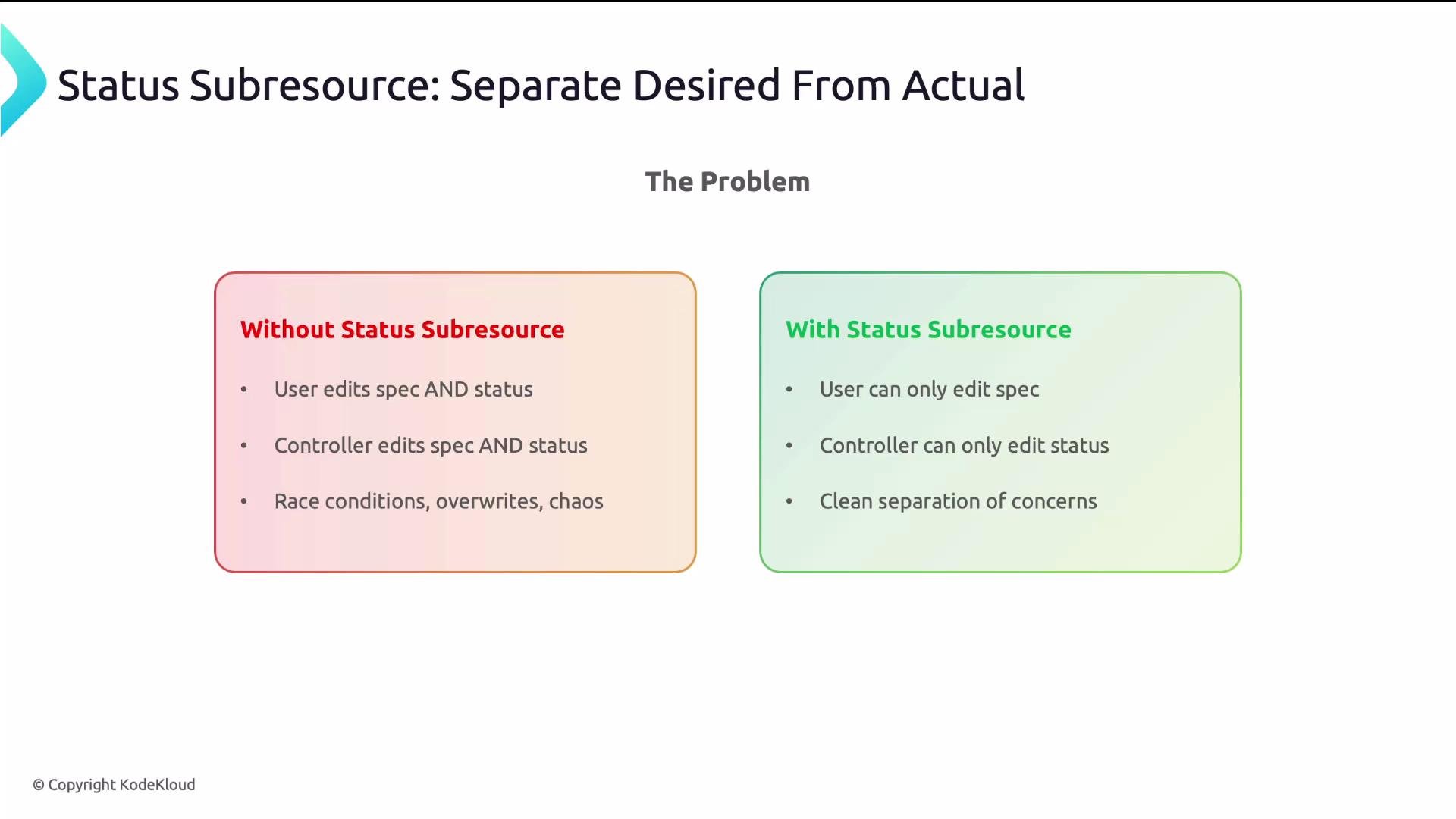 Always enable the `status` subresource for controller-managed CRs. Without it, controllers and users can overwrite each other’s fields, causing hard-to-debug race conditions.
### Observed generation pattern
Use `metadata.generation` and `status.observedGeneration` to communicate reconciliation progress.
* `metadata.generation` increments when the `spec` changes.
* The controller sets `status.observedGeneration` to the last `generation` it has reconciled.
When they differ, users and tools know the controller has not processed the latest change.
Example `status` snippet:
```yaml theme={null}
status:
phase: Ready
conditions:
- type: Available
status: "True"
reason: ProvisioningComplete
lastTransitionTime: "2024-01-15T10:30:00Z"
observedGeneration: 3
endpoint: db.prod.svc:5432
```
Principle: `spec` is what you want; `status` is what you have. Controllers reconcile the difference.
## Additional printer columns
Printer columns give operators a quick glance at important fields in `kubectl get` output (e.g., size, phase, replicas).
Add them to the CRD `versions` entry. Each column requires `name`, `type`, and a `jsonPath` referencing resource fields (you can use `.spec` and `.status`).
Example:
```yaml theme={null}
additionalPrinterColumns:
- name: Size
type: string
jsonPath: .spec.size
- name: Status
type: string
jsonPath: .status.phase
- name: Age
type: date
jsonPath: .metadata.creationTimestamp
```
This improves day-to-day observability and reduces the number of kubectl calls operators must run.
Always enable the `status` subresource for controller-managed CRs. Without it, controllers and users can overwrite each other’s fields, causing hard-to-debug race conditions.
### Observed generation pattern
Use `metadata.generation` and `status.observedGeneration` to communicate reconciliation progress.
* `metadata.generation` increments when the `spec` changes.
* The controller sets `status.observedGeneration` to the last `generation` it has reconciled.
When they differ, users and tools know the controller has not processed the latest change.
Example `status` snippet:
```yaml theme={null}
status:
phase: Ready
conditions:
- type: Available
status: "True"
reason: ProvisioningComplete
lastTransitionTime: "2024-01-15T10:30:00Z"
observedGeneration: 3
endpoint: db.prod.svc:5432
```
Principle: `spec` is what you want; `status` is what you have. Controllers reconcile the difference.
## Additional printer columns
Printer columns give operators a quick glance at important fields in `kubectl get` output (e.g., size, phase, replicas).
Add them to the CRD `versions` entry. Each column requires `name`, `type`, and a `jsonPath` referencing resource fields (you can use `.spec` and `.status`).
Example:
```yaml theme={null}
additionalPrinterColumns:
- name: Size
type: string
jsonPath: .spec.size
- name: Status
type: string
jsonPath: .status.phase
- name: Age
type: date
jsonPath: .metadata.creationTimestamp
```
This improves day-to-day observability and reduces the number of kubectl calls operators must run.
 ## Scale subresource
If your CR exposes replicas, enable the `scale` subresource so `kubectl scale` works and the HPA can target your CR.
The `scale` mapping wires your CR fields into the standard kubernetes Scale API:
```yaml theme={null}
subresources:
status: {}
scale:
specReplicasPath: .spec.replicas
statusReplicasPath: .status.replicas
labelSelectorPath: .status.selector
```
What these fields do:
* `specReplicasPath`: where users set the desired count.
* `statusReplicasPath`: where the controller reports current count.
* `labelSelectorPath` (optional): HPA uses this to locate pods if needed.
With this in place you can run:
```bash theme={null}
kubectl scale database orders-db --replicas=3
kubectl autoscale database orders-db --min=1 --max=5
```
The HPA can then autoscale based on CPU, memory, or custom metrics.
Resources:
* HPA documentation: [https://kubernetes.io/docs/tasks/run-application/horizontal-pod-autoscale/](https://kubernetes.io/docs/tasks/run-application/horizontal-pod-autoscale/)
## Production-ready CRD example
A consolidated CRD that applies versioning, `status`, printer columns, and schema validation:
```yaml theme={null}
apiVersion: apiextensions.k8s.io/v1
kind: CustomResourceDefinition
metadata:
name: databases.platform.acme.io
spec:
group: platform.acme.io
scope: Namespaced
names:
plural: databases
kind: Database
shortNames:
- db
versions:
- name: v1
served: true
storage: true
subresources:
status: {}
additionalPrinterColumns:
- name: Size
type: string
jsonPath: .spec.size
- name: Status
type: string
jsonPath: .status.phase
- name: Age
type: date
jsonPath: .metadata.creationTimestamp
schema:
openAPIV3Schema:
type: object
required: ["spec"]
properties:
spec:
type: object
required: ["size"]
properties:
size:
type: string
enum: ["small", "medium", "large"]
```
## Design checklist
Use this checklist before promoting a CRD to production:
| Area | Recommendation |
| ------------- | --------------------------------------------------------------------------------- |
| Short names | Provide `shortNames` (e.g., `db`) for quick `kubectl` usage. |
| Versioning | Implement `served` and `storage` flags and plan upgrade/migration paths. |
| Status | Enable `subresources.status` to separate user intent from controller state. |
| Observability | Add `additionalPrinterColumns` for common fields (status, size, age). |
| Scaling | Consider `subresources.scale` when exposing replicas for `kubectl scale` and HPA. |
| Validation | Use `openAPIV3Schema` for input validation and guardrails. |
Plan for versioning and status separation from day one. These patterns prevent expensive migrations and help CRDs behave like native Kubernetes APIs.
## Key takeaways
* Version your APIs early and make upgrades deliberate.
* Enable the `status` subresource to prevent accidental overwrites and enable safe controller updates.
* Improve operator experience with `additionalPrinterColumns`.
* Enable `scale` for resources that manage replicas so `kubectl scale` and HPA work naturally.
* A well-designed CRD should feel and behave like a native Kubernetes API—discoverable, safe, and operable at scale.
Further reading:
* Kubernetes CRD docs: [https://kubernetes.io/docs/tasks/extend-kubernetes/custom-resources/custom-resource-definitions/](https://kubernetes.io/docs/tasks/extend-kubernetes/custom-resources/custom-resource-definitions/)
* CRD Conversion webhooks: [https://kubernetes.io/docs/tasks/extend-kubernetes/custom-resources/custom-resource-definitions/#webhook-conversion](https://kubernetes.io/docs/tasks/extend-kubernetes/custom-resources/custom-resource-definitions/#webhook-conversion)
## Scale subresource
If your CR exposes replicas, enable the `scale` subresource so `kubectl scale` works and the HPA can target your CR.
The `scale` mapping wires your CR fields into the standard kubernetes Scale API:
```yaml theme={null}
subresources:
status: {}
scale:
specReplicasPath: .spec.replicas
statusReplicasPath: .status.replicas
labelSelectorPath: .status.selector
```
What these fields do:
* `specReplicasPath`: where users set the desired count.
* `statusReplicasPath`: where the controller reports current count.
* `labelSelectorPath` (optional): HPA uses this to locate pods if needed.
With this in place you can run:
```bash theme={null}
kubectl scale database orders-db --replicas=3
kubectl autoscale database orders-db --min=1 --max=5
```
The HPA can then autoscale based on CPU, memory, or custom metrics.
Resources:
* HPA documentation: [https://kubernetes.io/docs/tasks/run-application/horizontal-pod-autoscale/](https://kubernetes.io/docs/tasks/run-application/horizontal-pod-autoscale/)
## Production-ready CRD example
A consolidated CRD that applies versioning, `status`, printer columns, and schema validation:
```yaml theme={null}
apiVersion: apiextensions.k8s.io/v1
kind: CustomResourceDefinition
metadata:
name: databases.platform.acme.io
spec:
group: platform.acme.io
scope: Namespaced
names:
plural: databases
kind: Database
shortNames:
- db
versions:
- name: v1
served: true
storage: true
subresources:
status: {}
additionalPrinterColumns:
- name: Size
type: string
jsonPath: .spec.size
- name: Status
type: string
jsonPath: .status.phase
- name: Age
type: date
jsonPath: .metadata.creationTimestamp
schema:
openAPIV3Schema:
type: object
required: ["spec"]
properties:
spec:
type: object
required: ["size"]
properties:
size:
type: string
enum: ["small", "medium", "large"]
```
## Design checklist
Use this checklist before promoting a CRD to production:
| Area | Recommendation |
| ------------- | --------------------------------------------------------------------------------- |
| Short names | Provide `shortNames` (e.g., `db`) for quick `kubectl` usage. |
| Versioning | Implement `served` and `storage` flags and plan upgrade/migration paths. |
| Status | Enable `subresources.status` to separate user intent from controller state. |
| Observability | Add `additionalPrinterColumns` for common fields (status, size, age). |
| Scaling | Consider `subresources.scale` when exposing replicas for `kubectl scale` and HPA. |
| Validation | Use `openAPIV3Schema` for input validation and guardrails. |
Plan for versioning and status separation from day one. These patterns prevent expensive migrations and help CRDs behave like native Kubernetes APIs.
## Key takeaways
* Version your APIs early and make upgrades deliberate.
* Enable the `status` subresource to prevent accidental overwrites and enable safe controller updates.
* Improve operator experience with `additionalPrinterColumns`.
* Enable `scale` for resources that manage replicas so `kubectl scale` and HPA work naturally.
* A well-designed CRD should feel and behave like a native Kubernetes API—discoverable, safe, and operable at scale.
Further reading:
* Kubernetes CRD docs: [https://kubernetes.io/docs/tasks/extend-kubernetes/custom-resources/custom-resource-definitions/](https://kubernetes.io/docs/tasks/extend-kubernetes/custom-resources/custom-resource-definitions/)
* CRD Conversion webhooks: [https://kubernetes.io/docs/tasks/extend-kubernetes/custom-resources/custom-resource-definitions/#webhook-conversion](https://kubernetes.io/docs/tasks/extend-kubernetes/custom-resources/custom-resource-definitions/#webhook-conversion)