> ## Documentation Index
> Fetch the complete documentation index at: https://notes.kodekloud.com/llms.txt
> Use this file to discover all available pages before exploring further.
# Demo Workflow Automation with Argo Workflows
> Guide demonstrating Argo Workflows usage in Kubernetes, including simple tasks, steps, DAGs, kubectl execution, parameters, templates, and RBAC considerations
Argo Workflows is a Kubernetes-native workflow orchestration engine for running complex, containerized job sequences (data pipelines, automation, kubectl, Python, Bash, etc.). It is often compared with other CNCF projects — here’s a quick comparison to clarify roles:
| Project | Typical use case | Key focus |
| -------------- | -------------------------------------- | ----------------------------------------------------------- |
| Argo CD | GitOps — sync cluster state to Git | Continuous delivery / cluster reconciliation |
| Tekton | CI/CD pipelines | Build, test, and push artifacts |
| Argo Workflows | General-purpose workflow orchestration | Orchestrate multi-step tasks and dependencies in Kubernetes |
This guide assumes Argo Workflows is already installed in your Kubernetes cluster. If you need installation instructions, refer to the official docs: [Argo Workflows installation](https://argoproj.github.io/argo-workflows/installation/).
In this article we build progressively more advanced workflows to demonstrate common Argo constructs:
* A simple container task
* Steps (sequential and parallel), with parameters
* DAG-based dependencies
* Running `kubectl` from inside a workflow (with RBAC considerations)
***
## 1) Simple “hello” workflow
Create `hello-workflow.yaml`. Notice `generateName` gives each submission a unique suffix:
```yaml theme={null}
apiVersion: argoproj.io/v1alpha1
kind: Workflow
metadata:
generateName: hello-world-
namespace: argo
spec:
entrypoint: hello
templates:
- name: hello
container:
image: alpine:3.18
command: [echo]
args: ["Hello from KodeKloud!"]
```
Submit and watch the run with the Argo CLI:
```bash theme={null}
argo submit hello-workflow.yaml -n argo --watch
```
Or inspect pods and logs with kubectl:
```bash theme={null}
kubectl get pods -n argo
kubectl logs -n argo
```
When the workflow completes you’ll see a generated name, `Succeeded` status, and the steps that ran.
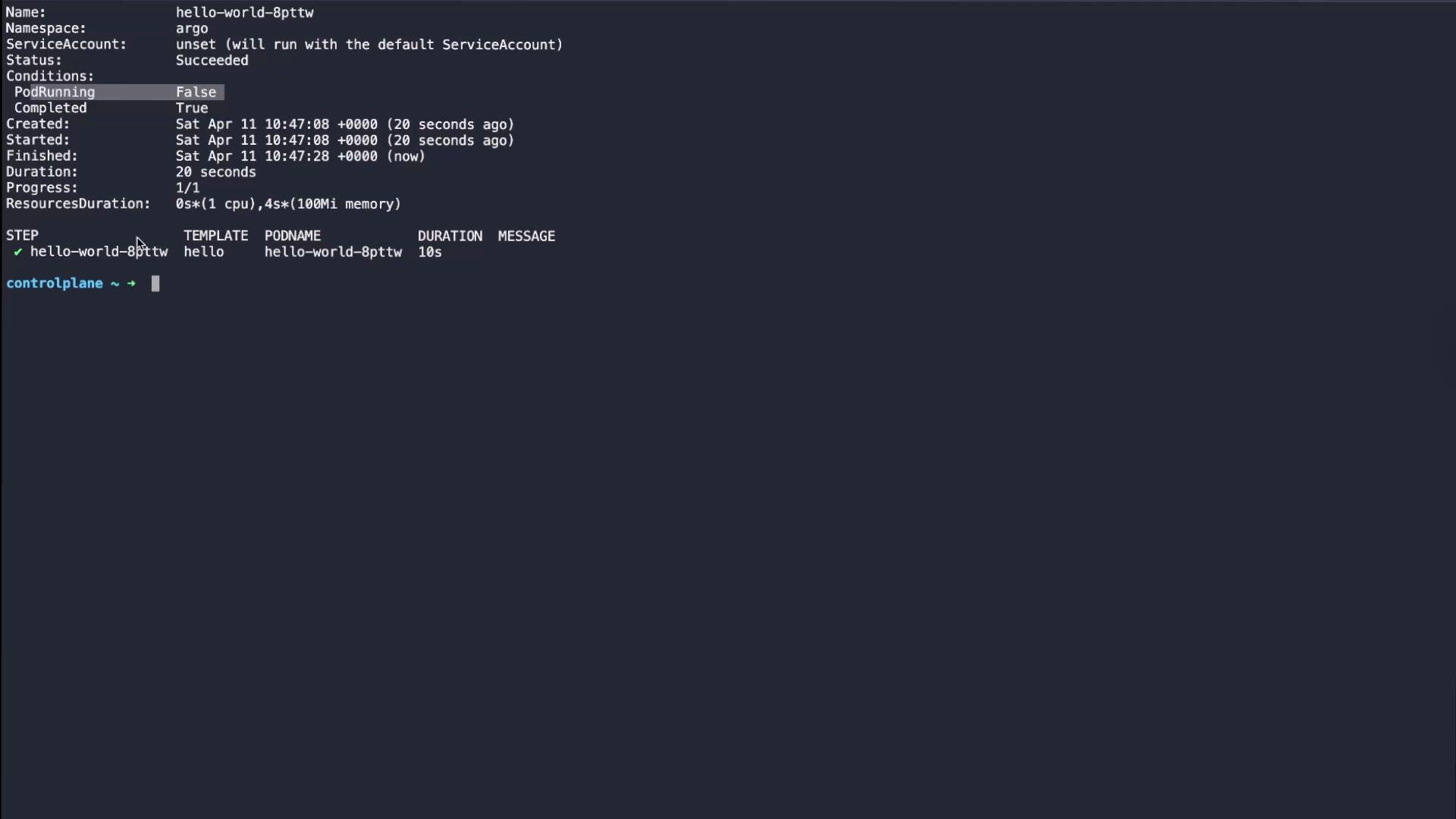 Example `argo get` output (abridged):
```plaintext theme={null}
Name: hello-world-8pttw
Namespace: argo
ServiceAccount: unset (will run with the default ServiceAccount)
Status: Succeeded
Created: Sat Apr 11 10:47:08 +0000 (20 seconds ago)
Finished: Sat Apr 11 10:47:28 +0000 (now)
Duration: 20 seconds
Progress: 1/1
STEP TEMPLATE PODNAME DURATION
✔ hello-world-8pttw hello hello-world-8pttw 10s
```
Example pod logs:
```bash theme={null}
kubectl logs hello-world-8pttw -n argo
time="2026-04-11T10:47:16.379Z" level=info msg="capturing logs" argo=true
Hello from KodeKloud!
time="2026-04-11T10:47:17.380Z" level=info msg="sub-process exited" argo=true error=""
```
***
## 2) Steps: sequential and parallel steps, with parameters
Use `steps` when you want ordered or grouped tasks. Steps are an array of arrays:
* Each inner array represents tasks that run in parallel.
* Outer array elements run sequentially.
Create `steps-workflow.yaml`. This example defines a reusable `print-message` template that accepts a `message` parameter, and a `pipeline` entrypoint that runs two sequential steps:
```yaml theme={null}
apiVersion: argoproj.io/v1alpha1
kind: Workflow
metadata:
generateName: steps-demo-
namespace: argo
spec:
entrypoint: pipeline
templates:
- name: pipeline
steps:
- - name: step-one
template: print-message
arguments:
parameters:
- name: message
value: "Hello from KodeKloud!"
- - name: step-two
template: print-message
arguments:
parameters:
- name: message
value: "Hello from Nourhan!"
- name: print-message
inputs:
parameters:
- name: message
container:
image: alpine:3.18
command: [echo]
args: ["{{inputs.parameters.message}}"]
```
Submit:
```bash theme={null}
argo submit steps-workflow.yaml -n argo --watch
```
Notes:
* With the YAML above, `step-one` runs first, then `step-two`.
* To run `step-one` and `step-two` in parallel, place them in the same inner array (see the parallel example below).
Parallel example (only the `pipeline.steps` portion shown):
```yaml theme={null}
# parallel example (only the pipeline.steps portion shown)
steps:
- - name: step-one
template: print-message
arguments:
parameters:
- name: message
value: "Hello from KodeKloud!"
- name: step-two
template: print-message
arguments:
parameters:
- name: message
value: "Hello from Nourhan!"
```
Argo will show progress while steps execute (e.g., 1/2, 2/2) and list completed steps when finished.
***
## 3) DAG (Directed Acyclic Graph) workflows
DAGs express explicit dependencies between tasks. Tasks with no dependencies start immediately; dependent tasks wait for their dependencies to succeed. Use DAGs for complex pipelines where dependency relationships matter (e.g., build → tests → deploy).
Example `dag-workflow.yaml` models a build → tests → deploy pipeline. `test-unit` and `test-integration` both depend on `build` and run in parallel; `deploy` depends on both tests:
```yaml theme={null}
apiVersion: argoproj.io/v1alpha1
kind: Workflow
metadata:
generateName: dag-demo-
namespace: argo
spec:
entrypoint: pipeline
templates:
- name: pipeline
dag:
tasks:
- name: build
template: run-step
arguments:
parameters:
- name: message
value: "Building"
- name: test-unit
template: run-step
dependencies: [build]
arguments:
parameters:
- name: message
value: "Unit testing"
- name: test-integration
template: run-step
dependencies: [build]
arguments:
parameters:
- name: message
value: "Integration testing"
- name: deploy
template: run-step
dependencies: [test-unit, test-integration]
arguments:
parameters:
- name: message
value: "Deploying"
- name: run-step
inputs:
parameters:
- name: message
container:
image: alpine:3.18
command: [echo]
args: ["{{inputs.parameters.message}}"]
```
Submit the DAG:
```bash theme={null}
argo submit dag-workflow.yaml -n argo --watch
```
Expected execution order:
* `build` runs first.
* `test-unit` and `test-integration` start once `build` completes (they run concurrently).
* `deploy` runs after both tests succeed.
Example `argo get` summary when finished:
```plaintext theme={null}
Name: dag-demo-btns6
Namespace: argo
Status: Succeeded
Duration: 30 seconds
Progress: 4/4
STEP TEMPLATE DURATION
✔ build run-step 3s
✔ test-integration run-step 4s
✔ test-unit run-step 4s
✔ deploy run-step 4s
```
***
## 4) Running kubectl from a workflow (RBAC considerations)
Workflows can run images that include `kubectl` to query or modify cluster resources. To interact with the cluster, the workflow’s ServiceAccount must have the proper RBAC permissions.
Example `kubectl-workflow.yaml` uses `bitnami/kubectl` to check a deployment rollout and then list pods in the `argo` namespace:
```yaml theme={null}
apiVersion: argoproj.io/v1alpha1
kind: Workflow
metadata:
generateName: kubectl-pipeline-
namespace: argo
spec:
entrypoint: pipeline
serviceAccountName: default
templates:
- name: pipeline
steps:
- - name: check-rollout
template: rollout-status
- - name: get-pods
template: list-pods
- name: rollout-status
container:
image: bitnami/kubectl:latest
command: [kubectl]
args: [rollout, status, deployment/nginx-app, -n, argo]
- name: list-pods
container:
image: bitnami/kubectl:latest
command: [kubectl]
args: [get, pods, -n, argo]
```
Submit and watch:
```bash theme={null}
argo submit kubectl-workflow.yaml -n argo --watch
```
View combined logs from the latest workflow run:
```bash theme={null}
argo logs -n argo @latest
```
Example `argo logs` output (abridged):
```plaintext theme={null}
kubectl -n argo rollout status -w deployment "nginx-app"
deployment "nginx-app" successfully rolled out
kubectl -n argo get pods
NAME READY STATUS RESTARTS AGE
argo-server-xxxxxx 1/1 Running 0 28m
hello-world-xxxx 0/2 Completed 0 67s
...
```
Do not run workflows with overly permissive credentials. Avoid using the cluster-admin `default` ServiceAccount in production. Create a dedicated ServiceAccount with only the RBAC rules it needs (Role/ClusterRole and RoleBinding/ClusterRoleBinding).
***
## Key concepts and quick reference
| Concept | Purpose | Notes / Example |
| ------------------ | ------------------------------------------ | ------------------------------------------------------ |
| Workflow | Top-level Argo object | Defines `spec.entrypoint` and `templates` |
| Template | Reusable unit (container/script/DAG/steps) | Templates accept `inputs.parameters` and produce tasks |
| steps | Sequential + grouped parallel execution | Array of arrays — inner arrays run in parallel |
| dag | Dependency graph | Tasks use `dependencies: [name]` for ordering |
| serviceAccountName | Identity for Pod actions | Bind minimal RBAC permissions to this account |
***
## Summary
* Argo Workflows runs containerized tasks as Kubernetes pods to orchestrate automation, pipelines, and arbitrary job sequences.
* Use `templates` to create reusable task definitions with parameters.
* `steps` provide ordered and parallel grouping via arrays of arrays.
* `dag` defines explicit dependency-based execution with `dependencies`.
* For workflows that interact with the cluster, set `serviceAccountName` and grant only necessary RBAC permissions.
Further reading:
* Argo Workflows docs: [https://argoproj.github.io/argo-workflows/](https://argoproj.github.io/argo-workflows/)
* Argo CLI reference: [https://argoproj.github.io/argo-workflows/cli/](https://argoproj.github.io/argo-workflows/cli/)
* Kubernetes RBAC: [https://kubernetes.io/docs/reference/access-authn-authz/rbac/](https://kubernetes.io/docs/reference/access-authn-authz/rbac/)
Example `argo get` output (abridged):
```plaintext theme={null}
Name: hello-world-8pttw
Namespace: argo
ServiceAccount: unset (will run with the default ServiceAccount)
Status: Succeeded
Created: Sat Apr 11 10:47:08 +0000 (20 seconds ago)
Finished: Sat Apr 11 10:47:28 +0000 (now)
Duration: 20 seconds
Progress: 1/1
STEP TEMPLATE PODNAME DURATION
✔ hello-world-8pttw hello hello-world-8pttw 10s
```
Example pod logs:
```bash theme={null}
kubectl logs hello-world-8pttw -n argo
time="2026-04-11T10:47:16.379Z" level=info msg="capturing logs" argo=true
Hello from KodeKloud!
time="2026-04-11T10:47:17.380Z" level=info msg="sub-process exited" argo=true error=""
```
***
## 2) Steps: sequential and parallel steps, with parameters
Use `steps` when you want ordered or grouped tasks. Steps are an array of arrays:
* Each inner array represents tasks that run in parallel.
* Outer array elements run sequentially.
Create `steps-workflow.yaml`. This example defines a reusable `print-message` template that accepts a `message` parameter, and a `pipeline` entrypoint that runs two sequential steps:
```yaml theme={null}
apiVersion: argoproj.io/v1alpha1
kind: Workflow
metadata:
generateName: steps-demo-
namespace: argo
spec:
entrypoint: pipeline
templates:
- name: pipeline
steps:
- - name: step-one
template: print-message
arguments:
parameters:
- name: message
value: "Hello from KodeKloud!"
- - name: step-two
template: print-message
arguments:
parameters:
- name: message
value: "Hello from Nourhan!"
- name: print-message
inputs:
parameters:
- name: message
container:
image: alpine:3.18
command: [echo]
args: ["{{inputs.parameters.message}}"]
```
Submit:
```bash theme={null}
argo submit steps-workflow.yaml -n argo --watch
```
Notes:
* With the YAML above, `step-one` runs first, then `step-two`.
* To run `step-one` and `step-two` in parallel, place them in the same inner array (see the parallel example below).
Parallel example (only the `pipeline.steps` portion shown):
```yaml theme={null}
# parallel example (only the pipeline.steps portion shown)
steps:
- - name: step-one
template: print-message
arguments:
parameters:
- name: message
value: "Hello from KodeKloud!"
- name: step-two
template: print-message
arguments:
parameters:
- name: message
value: "Hello from Nourhan!"
```
Argo will show progress while steps execute (e.g., 1/2, 2/2) and list completed steps when finished.
***
## 3) DAG (Directed Acyclic Graph) workflows
DAGs express explicit dependencies between tasks. Tasks with no dependencies start immediately; dependent tasks wait for their dependencies to succeed. Use DAGs for complex pipelines where dependency relationships matter (e.g., build → tests → deploy).
Example `dag-workflow.yaml` models a build → tests → deploy pipeline. `test-unit` and `test-integration` both depend on `build` and run in parallel; `deploy` depends on both tests:
```yaml theme={null}
apiVersion: argoproj.io/v1alpha1
kind: Workflow
metadata:
generateName: dag-demo-
namespace: argo
spec:
entrypoint: pipeline
templates:
- name: pipeline
dag:
tasks:
- name: build
template: run-step
arguments:
parameters:
- name: message
value: "Building"
- name: test-unit
template: run-step
dependencies: [build]
arguments:
parameters:
- name: message
value: "Unit testing"
- name: test-integration
template: run-step
dependencies: [build]
arguments:
parameters:
- name: message
value: "Integration testing"
- name: deploy
template: run-step
dependencies: [test-unit, test-integration]
arguments:
parameters:
- name: message
value: "Deploying"
- name: run-step
inputs:
parameters:
- name: message
container:
image: alpine:3.18
command: [echo]
args: ["{{inputs.parameters.message}}"]
```
Submit the DAG:
```bash theme={null}
argo submit dag-workflow.yaml -n argo --watch
```
Expected execution order:
* `build` runs first.
* `test-unit` and `test-integration` start once `build` completes (they run concurrently).
* `deploy` runs after both tests succeed.
Example `argo get` summary when finished:
```plaintext theme={null}
Name: dag-demo-btns6
Namespace: argo
Status: Succeeded
Duration: 30 seconds
Progress: 4/4
STEP TEMPLATE DURATION
✔ build run-step 3s
✔ test-integration run-step 4s
✔ test-unit run-step 4s
✔ deploy run-step 4s
```
***
## 4) Running kubectl from a workflow (RBAC considerations)
Workflows can run images that include `kubectl` to query or modify cluster resources. To interact with the cluster, the workflow’s ServiceAccount must have the proper RBAC permissions.
Example `kubectl-workflow.yaml` uses `bitnami/kubectl` to check a deployment rollout and then list pods in the `argo` namespace:
```yaml theme={null}
apiVersion: argoproj.io/v1alpha1
kind: Workflow
metadata:
generateName: kubectl-pipeline-
namespace: argo
spec:
entrypoint: pipeline
serviceAccountName: default
templates:
- name: pipeline
steps:
- - name: check-rollout
template: rollout-status
- - name: get-pods
template: list-pods
- name: rollout-status
container:
image: bitnami/kubectl:latest
command: [kubectl]
args: [rollout, status, deployment/nginx-app, -n, argo]
- name: list-pods
container:
image: bitnami/kubectl:latest
command: [kubectl]
args: [get, pods, -n, argo]
```
Submit and watch:
```bash theme={null}
argo submit kubectl-workflow.yaml -n argo --watch
```
View combined logs from the latest workflow run:
```bash theme={null}
argo logs -n argo @latest
```
Example `argo logs` output (abridged):
```plaintext theme={null}
kubectl -n argo rollout status -w deployment "nginx-app"
deployment "nginx-app" successfully rolled out
kubectl -n argo get pods
NAME READY STATUS RESTARTS AGE
argo-server-xxxxxx 1/1 Running 0 28m
hello-world-xxxx 0/2 Completed 0 67s
...
```
Do not run workflows with overly permissive credentials. Avoid using the cluster-admin `default` ServiceAccount in production. Create a dedicated ServiceAccount with only the RBAC rules it needs (Role/ClusterRole and RoleBinding/ClusterRoleBinding).
***
## Key concepts and quick reference
| Concept | Purpose | Notes / Example |
| ------------------ | ------------------------------------------ | ------------------------------------------------------ |
| Workflow | Top-level Argo object | Defines `spec.entrypoint` and `templates` |
| Template | Reusable unit (container/script/DAG/steps) | Templates accept `inputs.parameters` and produce tasks |
| steps | Sequential + grouped parallel execution | Array of arrays — inner arrays run in parallel |
| dag | Dependency graph | Tasks use `dependencies: [name]` for ordering |
| serviceAccountName | Identity for Pod actions | Bind minimal RBAC permissions to this account |
***
## Summary
* Argo Workflows runs containerized tasks as Kubernetes pods to orchestrate automation, pipelines, and arbitrary job sequences.
* Use `templates` to create reusable task definitions with parameters.
* `steps` provide ordered and parallel grouping via arrays of arrays.
* `dag` defines explicit dependency-based execution with `dependencies`.
* For workflows that interact with the cluster, set `serviceAccountName` and grant only necessary RBAC permissions.
Further reading:
* Argo Workflows docs: [https://argoproj.github.io/argo-workflows/](https://argoproj.github.io/argo-workflows/)
* Argo CLI reference: [https://argoproj.github.io/argo-workflows/cli/](https://argoproj.github.io/argo-workflows/cli/)
* Kubernetes RBAC: [https://kubernetes.io/docs/reference/access-authn-authz/rbac/](https://kubernetes.io/docs/reference/access-authn-authz/rbac/)