> ## Documentation Index
> Fetch the complete documentation index at: https://notes.kodekloud.com/llms.txt
> Use this file to discover all available pages before exploring further.
# Resource Governance Defaults Limits and Quotas
> Explains how Kubernetes ResourceQuota and LimitRange enforce namespace resource budgets and per-container defaults to prevent noisy neighbors in multi-tenant clusters.
In multi-tenant Kubernetes clusters, ResourceQuota and LimitRange are the essential guardrails that keep shared infrastructure reliable. This article is a focused deep dive into how these two Kubernetes objects operate, how they interact in the admission pipeline, and how you can apply them to prevent noisy-neighbor issues and resource sprawl.
By the end of this lesson you will be able to:
* Describe the purpose of ResourceQuota and LimitRange.
* Set namespace-level limits using ResourceQuota.
* Apply default container limits using LimitRange.
* Explain how the two interact.
 Why governance matters
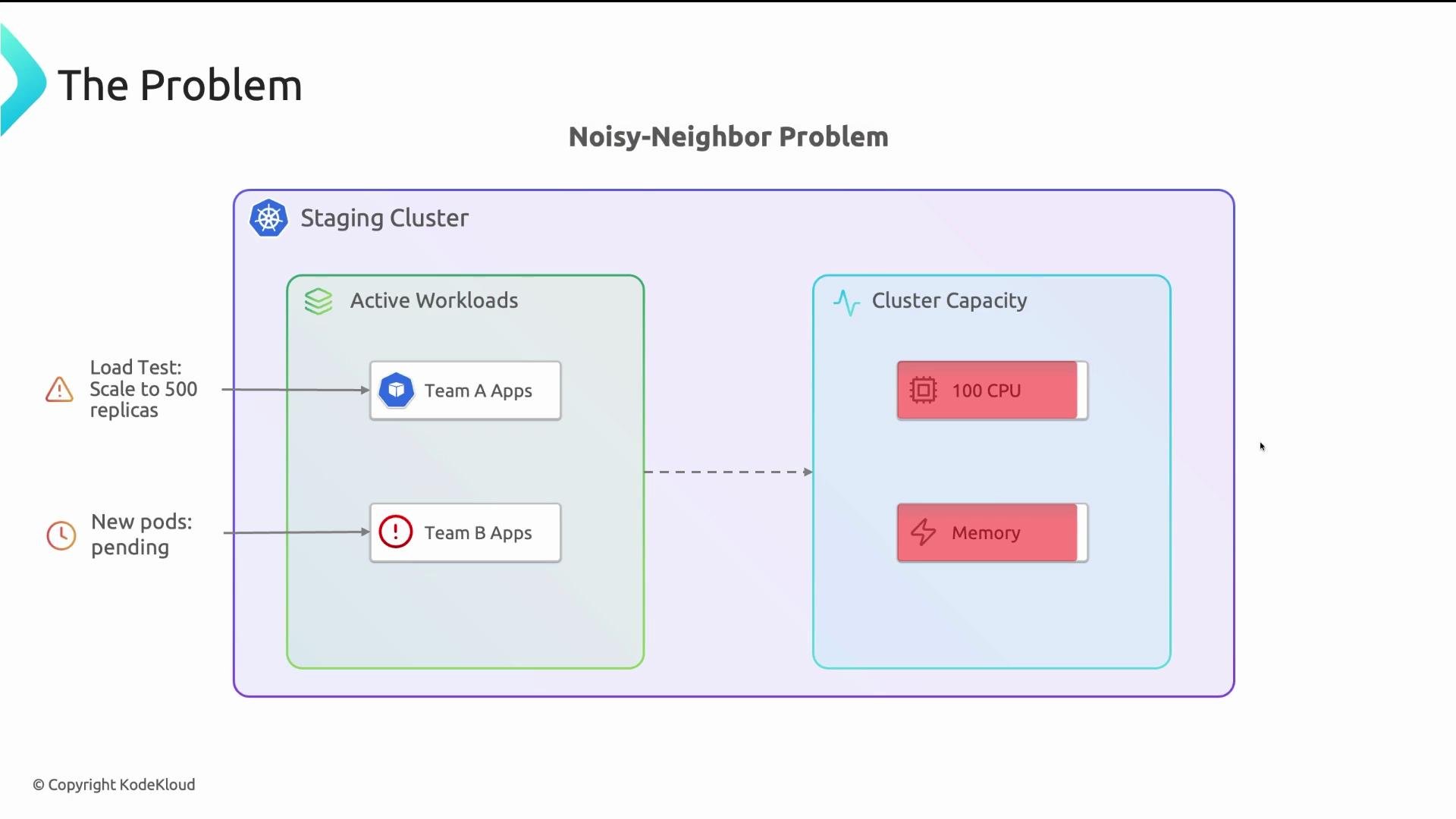
Without guardrails, a shared staging cluster can quickly become unusable. For example: a developer runs a load test and scales an application to 500 replicas on a cluster with only 100 CPUs. Those replicas consume CPU and memory, leaving other teams’ pods Pending or evicted—this is the noisy neighbor problem.
Why governance matters
Without guardrails, a shared staging cluster can quickly become unusable. For example: a developer runs a load test and scales an application to 500 replicas on a cluster with only 100 CPUs. Those replicas consume CPU and memory, leaving other teams’ pods Pending or evicted—this is the noisy neighbor problem.
 Common causes:
* Accidental large replica counts.
* CI/CD pipelines that spawn many pods.
* Namespaces without limits or defaults.
Kubernetes by design will attempt to schedule everything it is asked to—there is no built-in fairness principle. ResourceQuota and LimitRange provide that fairness and predictability.
Common causes:
* Accidental large replica counts.
* CI/CD pipelines that spawn many pods.
* Namespaces without limits or defaults.
Kubernetes by design will attempt to schedule everything it is asked to—there is no built-in fairness principle. ResourceQuota and LimitRange provide that fairness and predictability.
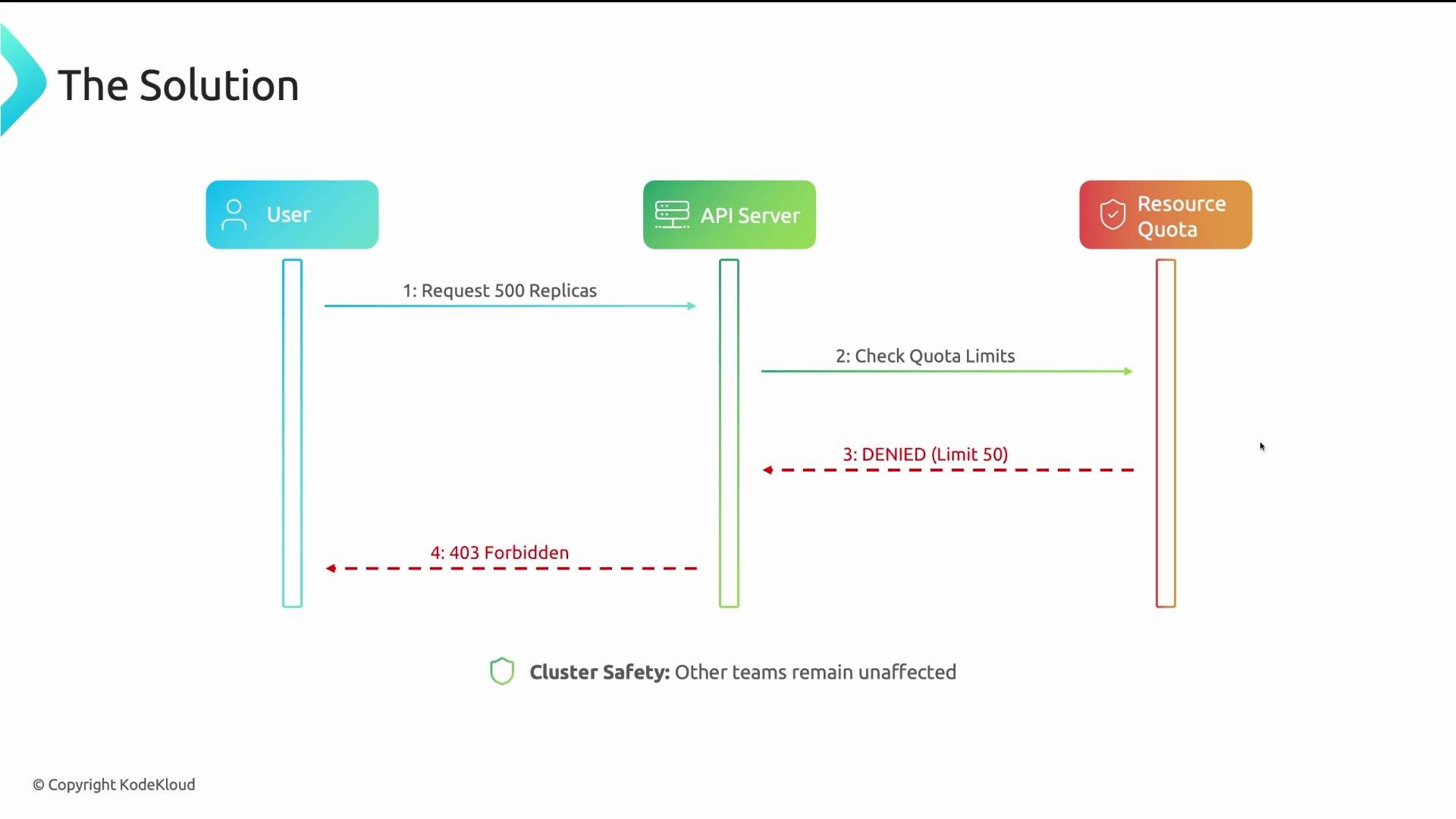
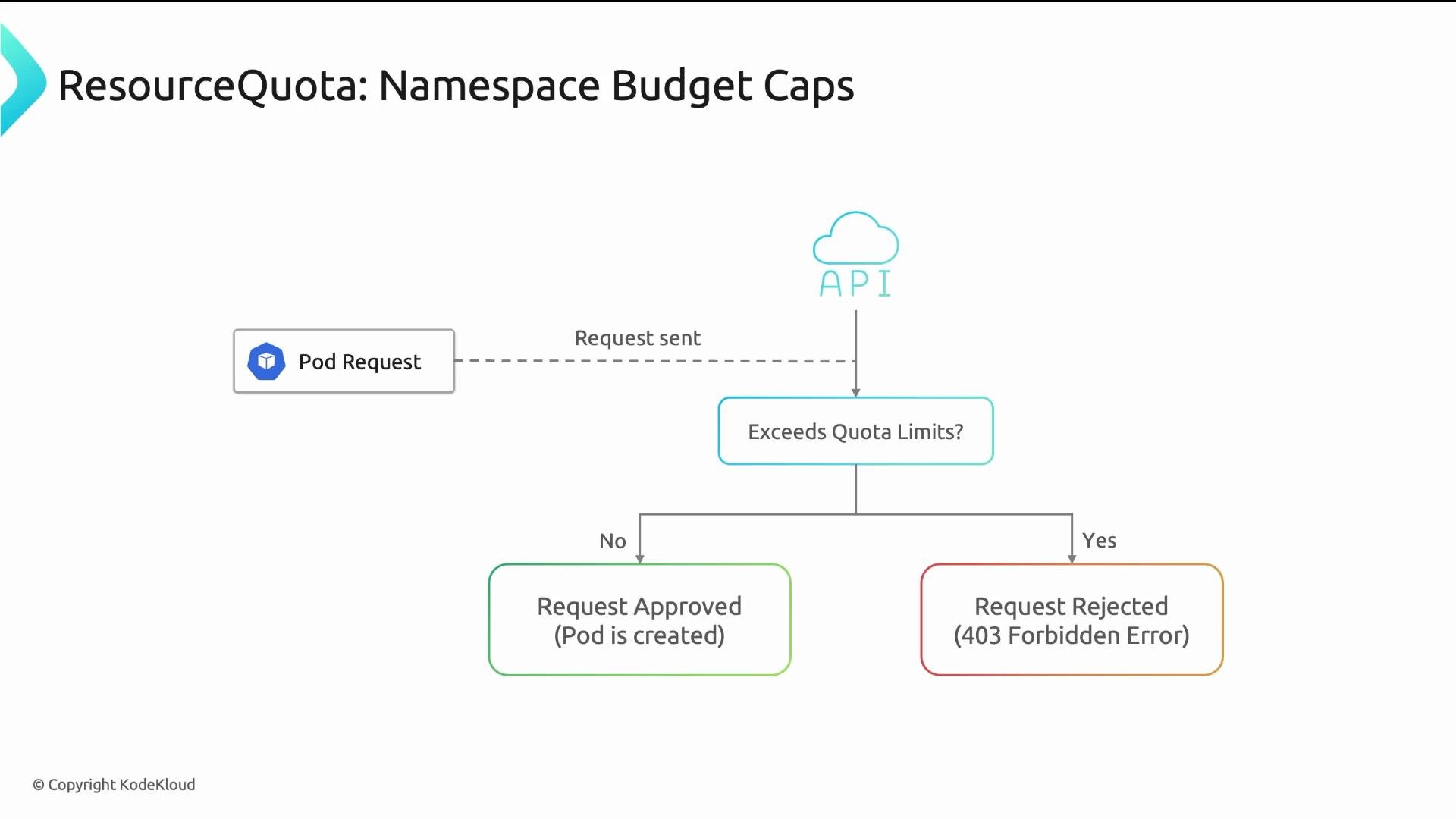
 If a request would exceed a quota, the API server rejects it at admission time with a 403 Forbidden response; the pod is never created.
 Default cluster behavior (no quotas, no defaults): CPU, memory, and pod counts are effectively unlimited. Whoever deploys first consumes available resources. That may work for single-team clusters, but it breaks down for shared environments.
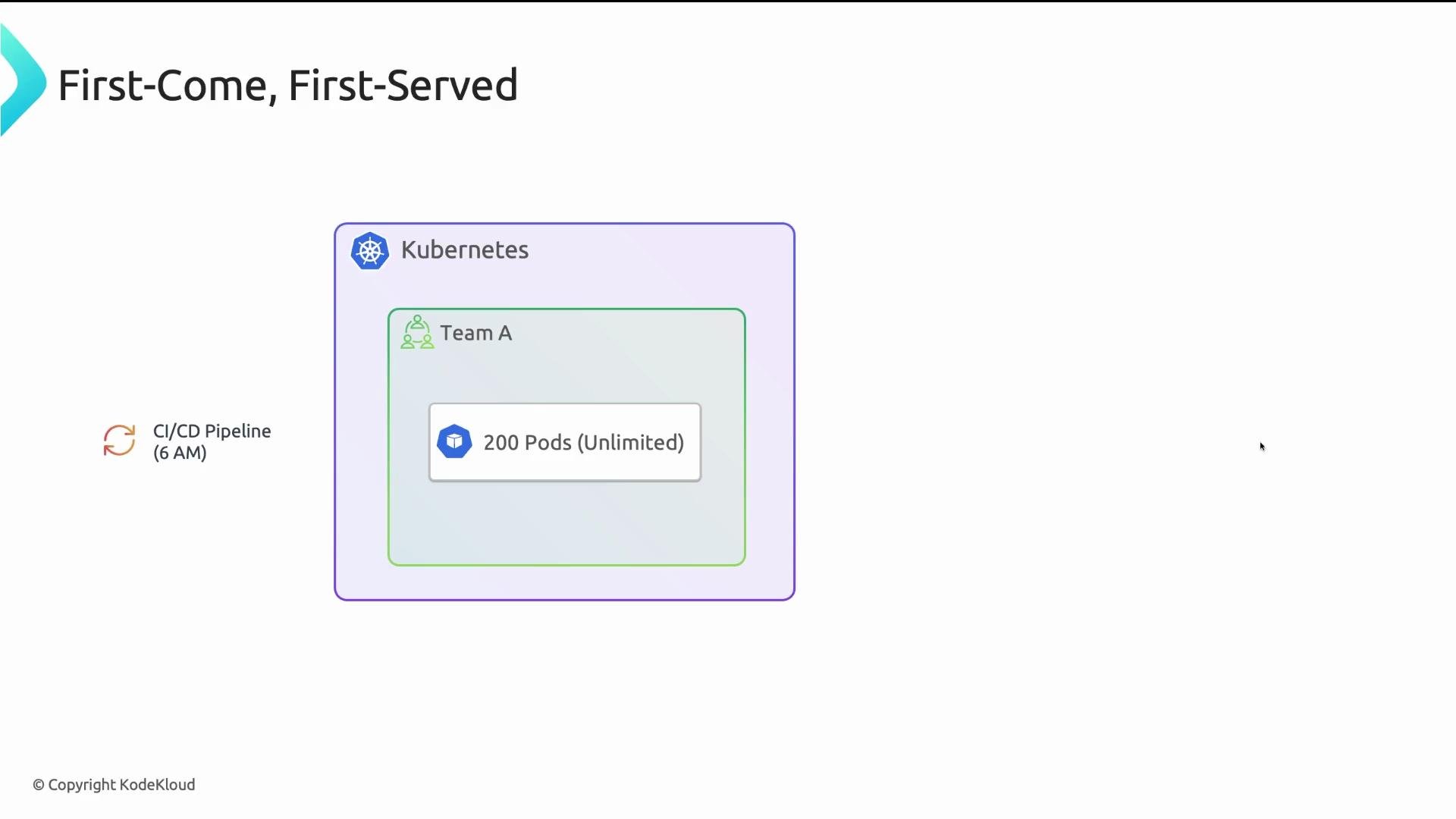 Often governance is only added after an incident. Using ResourceQuota and LimitRange proactively prevents such incidents.
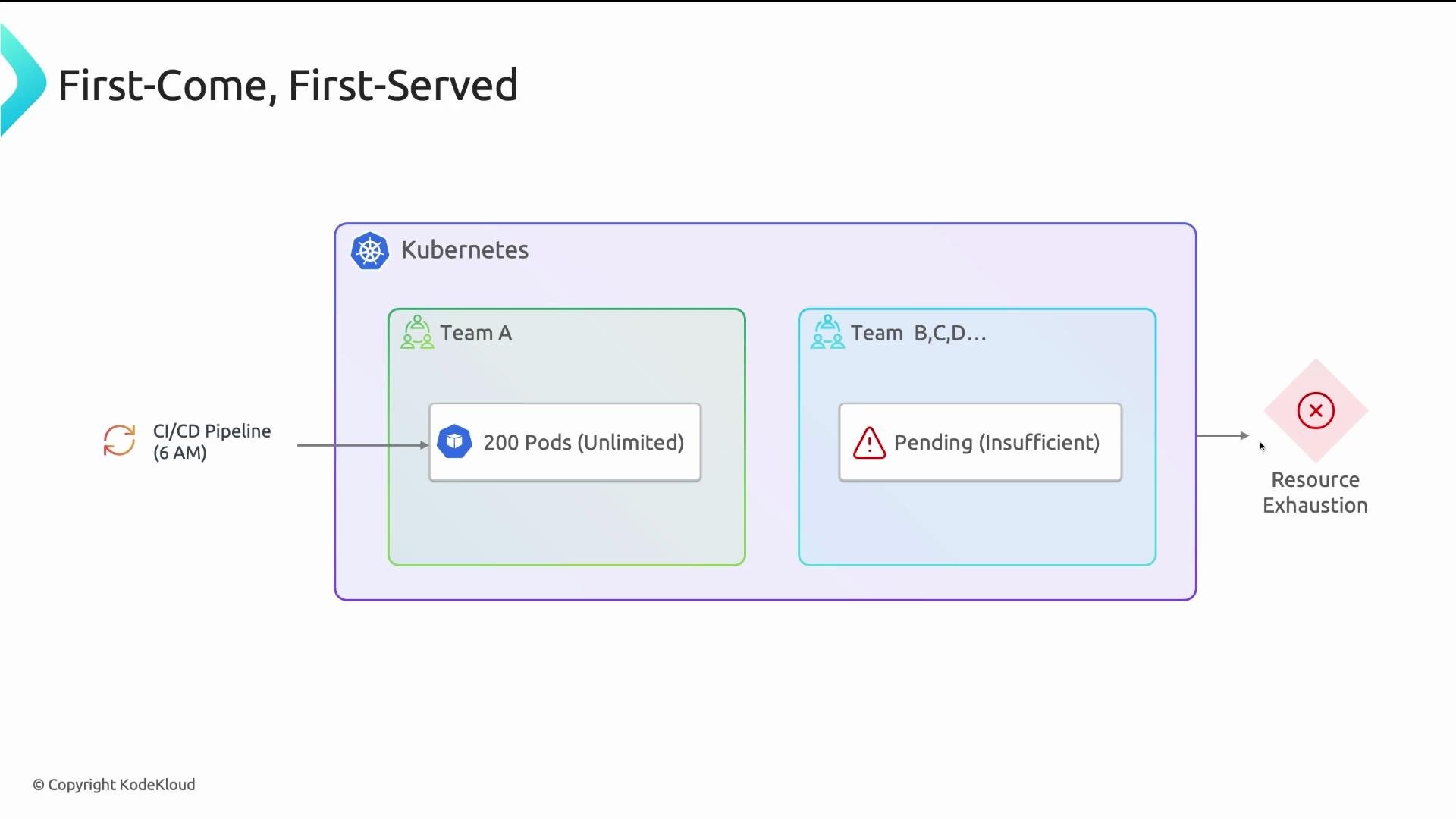 Summary: for multi-tenant environments, ResourceQuota + LimitRange = minimal, effective governance. Think of them as allocation rules for a shared office.
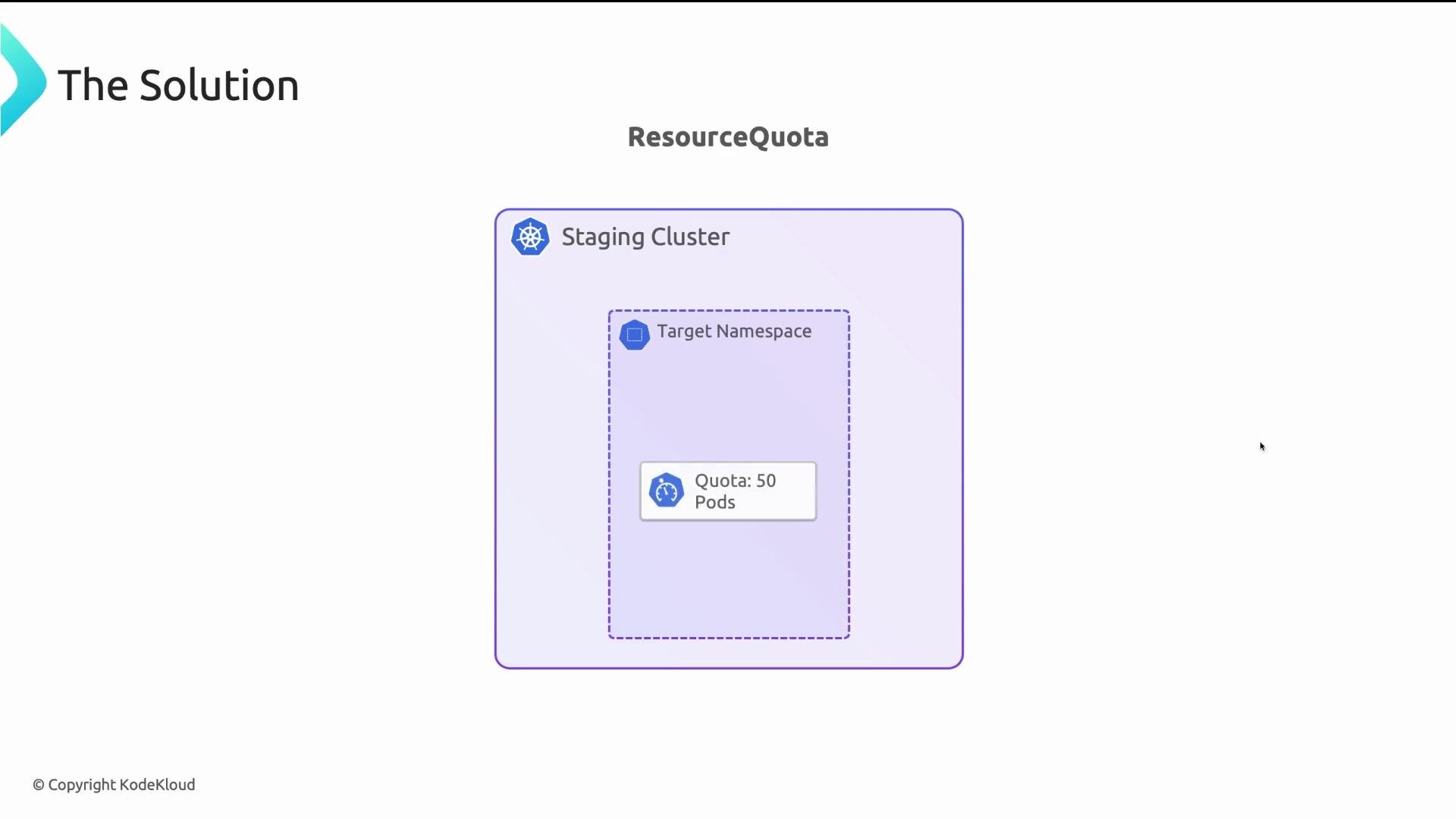
ResourceQuota — namespace budget caps
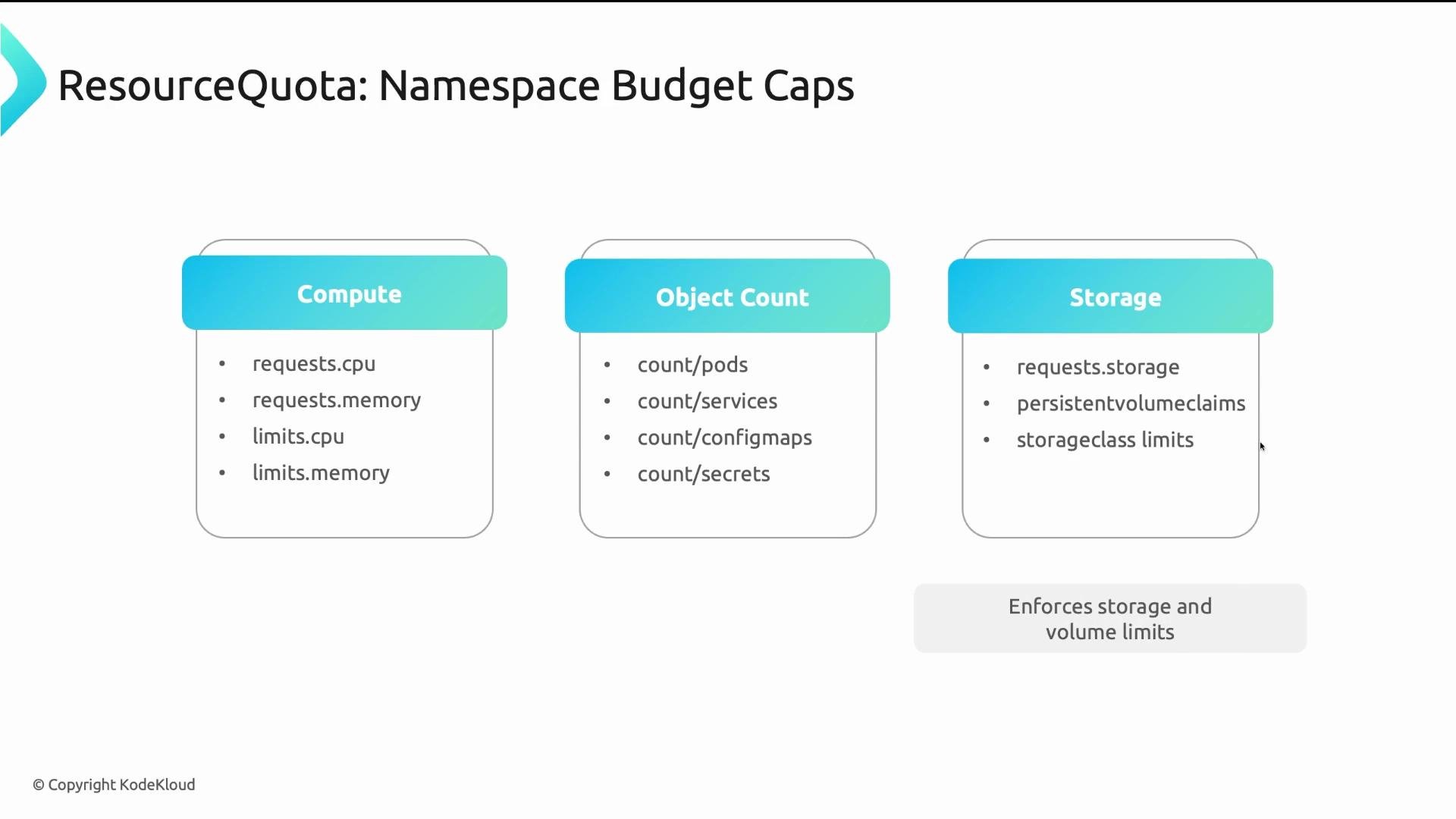
A ResourceQuota sets aggregate limits for a namespace. It caps total resources consumed across all objects in that namespace, including:
* Compute totals: `requests.cpu`, `limits.memory`, etc.
* Object counts: `pods`, `configmaps`, `services` to prevent sprawl.
* Storage: total storage requested and number of PersistentVolumeClaims.
Example: a ResourceQuota that caps CPU requests, memory requests, and total pods in a namespace:
```yaml theme={null}
apiVersion: v1
kind: ResourceQuota
metadata:
name: namespace-limits
spec:
hard:
requests.cpu: "4"
requests.memory: "8Gi"
pods: "10"
```
Summary: for multi-tenant environments, ResourceQuota + LimitRange = minimal, effective governance. Think of them as allocation rules for a shared office.
ResourceQuota — namespace budget caps
A ResourceQuota sets aggregate limits for a namespace. It caps total resources consumed across all objects in that namespace, including:
* Compute totals: `requests.cpu`, `limits.memory`, etc.
* Object counts: `pods`, `configmaps`, `services` to prevent sprawl.
* Storage: total storage requested and number of PersistentVolumeClaims.
Example: a ResourceQuota that caps CPU requests, memory requests, and total pods in a namespace:
```yaml theme={null}
apiVersion: v1
kind: ResourceQuota
metadata:
name: namespace-limits
spec:
hard:
requests.cpu: "4"
requests.memory: "8Gi"
pods: "10"
```
 Enforcement mechanism
ResourceQuota is enforced by the API server at admission time. The API server evaluates whether admitting a new object would push the namespace totals past the quota. If it would, the API server returns `403 Forbidden`. These checks occur before scheduling—pods violating quotas are rejected before reaching the scheduler.
Enforcement mechanism
ResourceQuota is enforced by the API server at admission time. The API server evaluates whether admitting a new object would push the namespace totals past the quota. If it would, the API server returns `403 Forbidden`. These checks occur before scheduling—pods violating quotas are rejected before reaching the scheduler.
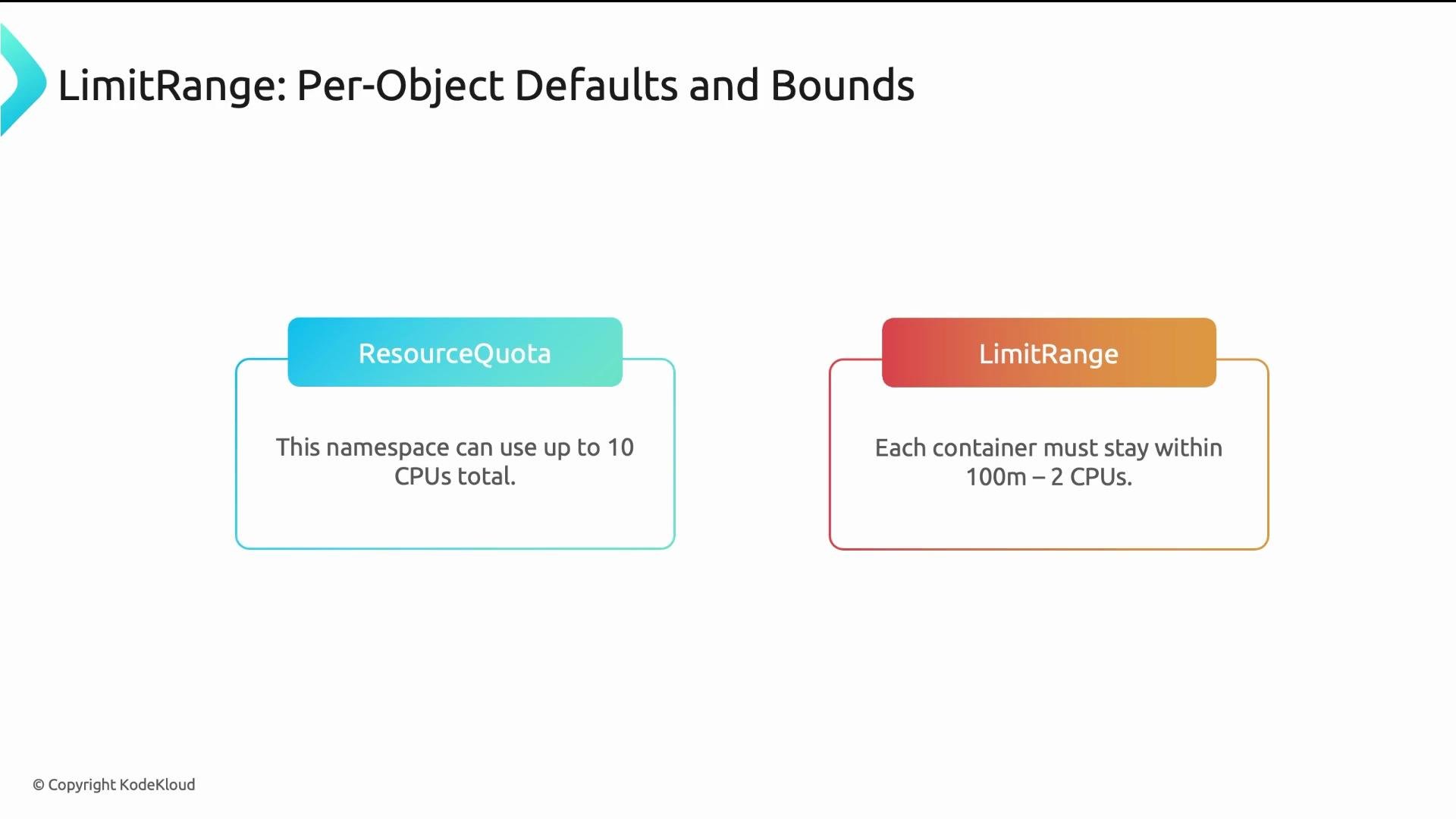
 LimitRange — per-object defaults and bounds
LimitRange ensures individual pods and containers have sane resource requests and limits. Its main uses:
* Inject defaults (`default` and `defaultRequest`) when containers omit requests/limits.
* Enforce minimum and maximum per-object values (`min`, `max`).
Common fields:
* `default`: default limit values applied when a container does not specify limits.
* `defaultRequest`: default request values used when a container leaves requests empty.
* `min` / `max`: hard per-container or per-pod bounds.
Applicable types: `Container`, `Pod`, `PersistentVolumeClaim`. The `Container` type is the most common.
Example LimitRange that sets per-container min/max and defaults:
```yaml theme={null}
apiVersion: v1
kind: LimitRange
metadata:
name: example-limitrange
spec:
limits:
- type: Container
min:
cpu: "50m"
memory: "64Mi"
max:
cpu: "1"
memory: "1Gi"
defaultRequest:
cpu: "100m"
memory: "128Mi"
default:
cpu: "500m"
memory: "256Mi"
```
LimitRange — per-object defaults and bounds
LimitRange ensures individual pods and containers have sane resource requests and limits. Its main uses:
* Inject defaults (`default` and `defaultRequest`) when containers omit requests/limits.
* Enforce minimum and maximum per-object values (`min`, `max`).
Common fields:
* `default`: default limit values applied when a container does not specify limits.
* `defaultRequest`: default request values used when a container leaves requests empty.
* `min` / `max`: hard per-container or per-pod bounds.
Applicable types: `Container`, `Pod`, `PersistentVolumeClaim`. The `Container` type is the most common.
Example LimitRange that sets per-container min/max and defaults:
```yaml theme={null}
apiVersion: v1
kind: LimitRange
metadata:
name: example-limitrange
spec:
limits:
- type: Container
min:
cpu: "50m"
memory: "64Mi"
max:
cpu: "1"
memory: "1Gi"
defaultRequest:
cpu: "100m"
memory: "128Mi"
default:
cpu: "500m"
memory: "256Mi"
```
 How ResourceQuota and LimitRange work together
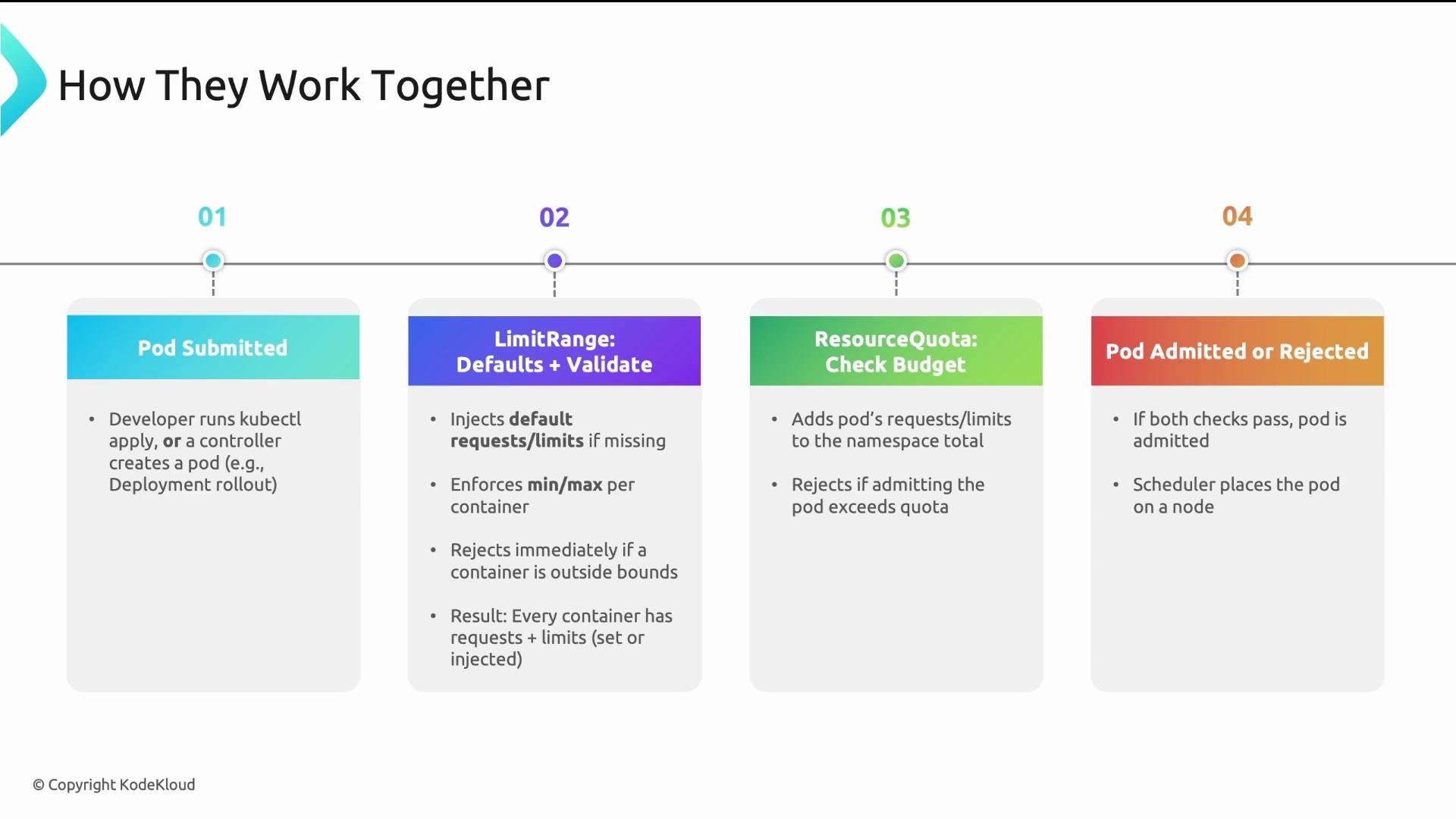
Admission pipeline flow when creating a pod:
1. The pod spec is submitted to the API server (e.g., `kubectl apply`, controllers).
2. LimitRanger (LimitRange admission controller) runs first:
* If containers omit requests/limits, LimitRange injects `defaultRequest`/`default`.
* If a request violates `min`/`max`, the request is rejected.
3. ResourceQuota admission controller runs next:
* It checks whether admitting the pod (including injected defaults) would exceed the namespace quotas.
* If it would exceed quotas, the request is rejected with `403 Forbidden`.
4. If both checks pass, the pod is admitted and sent to the scheduler.
How ResourceQuota and LimitRange work together
Admission pipeline flow when creating a pod:
1. The pod spec is submitted to the API server (e.g., `kubectl apply`, controllers).
2. LimitRanger (LimitRange admission controller) runs first:
* If containers omit requests/limits, LimitRange injects `defaultRequest`/`default`.
* If a request violates `min`/`max`, the request is rejected.
3. ResourceQuota admission controller runs next:
* It checks whether admitting the pod (including injected defaults) would exceed the namespace quotas.
* If it would exceed quotas, the request is rejected with `403 Forbidden`.
4. If both checks pass, the pod is admitted and sent to the scheduler.
 Practical examples
* Limit pod count in development namespaces:
* Prevents a developer from scaling a `Deployment` to hundreds of replicas in a single namespace.
```yaml theme={null}
apiVersion: v1
kind: ResourceQuota
metadata:
name: limit-pod-count
spec:
hard:
pods: "10"
```
* Team budget in production multi-tenant clusters:
* Caps requests and limits so teams get fair allocation across compute and memory.
```yaml theme={null}
apiVersion: v1
kind: ResourceQuota
metadata:
name: team-budget
spec:
hard:
requests.cpu: "8"
requests.memory: "16Gi"
limits.cpu: "10"
limits.memory: "20Gi"
```
* Container defaults to ensure QoS and measurable quotas:
* Apply a LimitRange in every namespace so pods never default to `BestEffort` QoS and ResourceQuota can compute totals accurately.
```yaml theme={null}
apiVersion: v1
kind: LimitRange
metadata:
name: container-defaults
spec:
limits:
- type: Container
min:
cpu: "50m"
memory: "64Mi"
defaultRequest:
cpu: "100m"
memory: "128Mi"
default:
cpu: "500m"
memory: "256Mi"
```
Combine a LimitRange that injects sensible defaults with a ResourceQuota that caps totals to provide comprehensive governance: LimitRange ensures per-container constraints and ResourceQuota enforces namespace-wide budgets.
LimitRange runs before ResourceQuota in the admission pipeline. This lets LimitRange inject defaults so the ResourceQuota sees complete resource requests and can correctly enforce namespace totals.
Common pitfalls and tips
If you set ResourceQuota but do not apply LimitRange defaults, pods without requests may end up in `BestEffort` QoS and ResourceQuota cannot reliably account for them. Always apply LimitRange defaults in namespaces where you use ResourceQuota.
Quick comparison
| Feature | ResourceQuota | LimitRange |
| --------------- | --------------------------------------------------- | ------------------------------------------------------------ |
| Scope | Namespace aggregate (totals across all objects) | Per-object (container/pod/PVC) defaults and bounds |
| Purpose | Enforce team budgets, limit object counts & storage | Inject defaults, enforce min/max for requests and limits |
| Admission order | Runs after LimitRange | Runs before ResourceQuota |
| Typical use | Cap total CPU/memory/pods/storage per namespace | Ensure containers have requests/limits and reasonable bounds |
Four takeaways
* ResourceQuota caps total namespace consumption (compute, object counts, storage).
* LimitRange sets per-container/pod defaults and enforces min/max bounds.
* Use LimitRange and ResourceQuota together to provide reliable multi-tenant governance.
* Apply sensible defaults (LimitRange) in every namespace and set ResourceQuota values appropriate to your environment (e.g., dev vs prod).
Further reading
* Kubernetes ResourceQuota docs: [https://kubernetes.io/docs/concepts/policy/resource-quotas/](https://kubernetes.io/docs/concepts/policy/resource-quotas/)
* Kubernetes LimitRange docs: [https://kubernetes.io/docs/concepts/policy/limit-range/](https://kubernetes.io/docs/concepts/policy/limit-range/)
Practical examples
* Limit pod count in development namespaces:
* Prevents a developer from scaling a `Deployment` to hundreds of replicas in a single namespace.
```yaml theme={null}
apiVersion: v1
kind: ResourceQuota
metadata:
name: limit-pod-count
spec:
hard:
pods: "10"
```
* Team budget in production multi-tenant clusters:
* Caps requests and limits so teams get fair allocation across compute and memory.
```yaml theme={null}
apiVersion: v1
kind: ResourceQuota
metadata:
name: team-budget
spec:
hard:
requests.cpu: "8"
requests.memory: "16Gi"
limits.cpu: "10"
limits.memory: "20Gi"
```
* Container defaults to ensure QoS and measurable quotas:
* Apply a LimitRange in every namespace so pods never default to `BestEffort` QoS and ResourceQuota can compute totals accurately.
```yaml theme={null}
apiVersion: v1
kind: LimitRange
metadata:
name: container-defaults
spec:
limits:
- type: Container
min:
cpu: "50m"
memory: "64Mi"
defaultRequest:
cpu: "100m"
memory: "128Mi"
default:
cpu: "500m"
memory: "256Mi"
```
Combine a LimitRange that injects sensible defaults with a ResourceQuota that caps totals to provide comprehensive governance: LimitRange ensures per-container constraints and ResourceQuota enforces namespace-wide budgets.
LimitRange runs before ResourceQuota in the admission pipeline. This lets LimitRange inject defaults so the ResourceQuota sees complete resource requests and can correctly enforce namespace totals.
Common pitfalls and tips
If you set ResourceQuota but do not apply LimitRange defaults, pods without requests may end up in `BestEffort` QoS and ResourceQuota cannot reliably account for them. Always apply LimitRange defaults in namespaces where you use ResourceQuota.
Quick comparison
| Feature | ResourceQuota | LimitRange |
| --------------- | --------------------------------------------------- | ------------------------------------------------------------ |
| Scope | Namespace aggregate (totals across all objects) | Per-object (container/pod/PVC) defaults and bounds |
| Purpose | Enforce team budgets, limit object counts & storage | Inject defaults, enforce min/max for requests and limits |
| Admission order | Runs after LimitRange | Runs before ResourceQuota |
| Typical use | Cap total CPU/memory/pods/storage per namespace | Ensure containers have requests/limits and reasonable bounds |
Four takeaways
* ResourceQuota caps total namespace consumption (compute, object counts, storage).
* LimitRange sets per-container/pod defaults and enforces min/max bounds.
* Use LimitRange and ResourceQuota together to provide reliable multi-tenant governance.
* Apply sensible defaults (LimitRange) in every namespace and set ResourceQuota values appropriate to your environment (e.g., dev vs prod).
Further reading
* Kubernetes ResourceQuota docs: [https://kubernetes.io/docs/concepts/policy/resource-quotas/](https://kubernetes.io/docs/concepts/policy/resource-quotas/)
* Kubernetes LimitRange docs: [https://kubernetes.io/docs/concepts/policy/limit-range/](https://kubernetes.io/docs/concepts/policy/limit-range/)