> ## Documentation Index
> Fetch the complete documentation index at: https://notes.kodekloud.com/llms.txt
> Use this file to discover all available pages before exploring further.
# Admission Control Policies That Prevent Bad Deployments
> Explains Kubernetes admission control, differences from RBAC, common policies and tools like Kyverno and Gatekeeper to enforce safe Pod and Deployment configurations
RBAC answers the question: who can do what? But it has a key limitation: RBAC controls access to resource *types*, not resource *configurations*. For example, RBAC can allow Alice to create Deployments, but it cannot require that her Deployments include resource limits or disallow `privileged: true`. Admission control fills that gap by inspecting and potentially mutating or rejecting API objects before they are stored.
 Why admission control matters — a real-world example
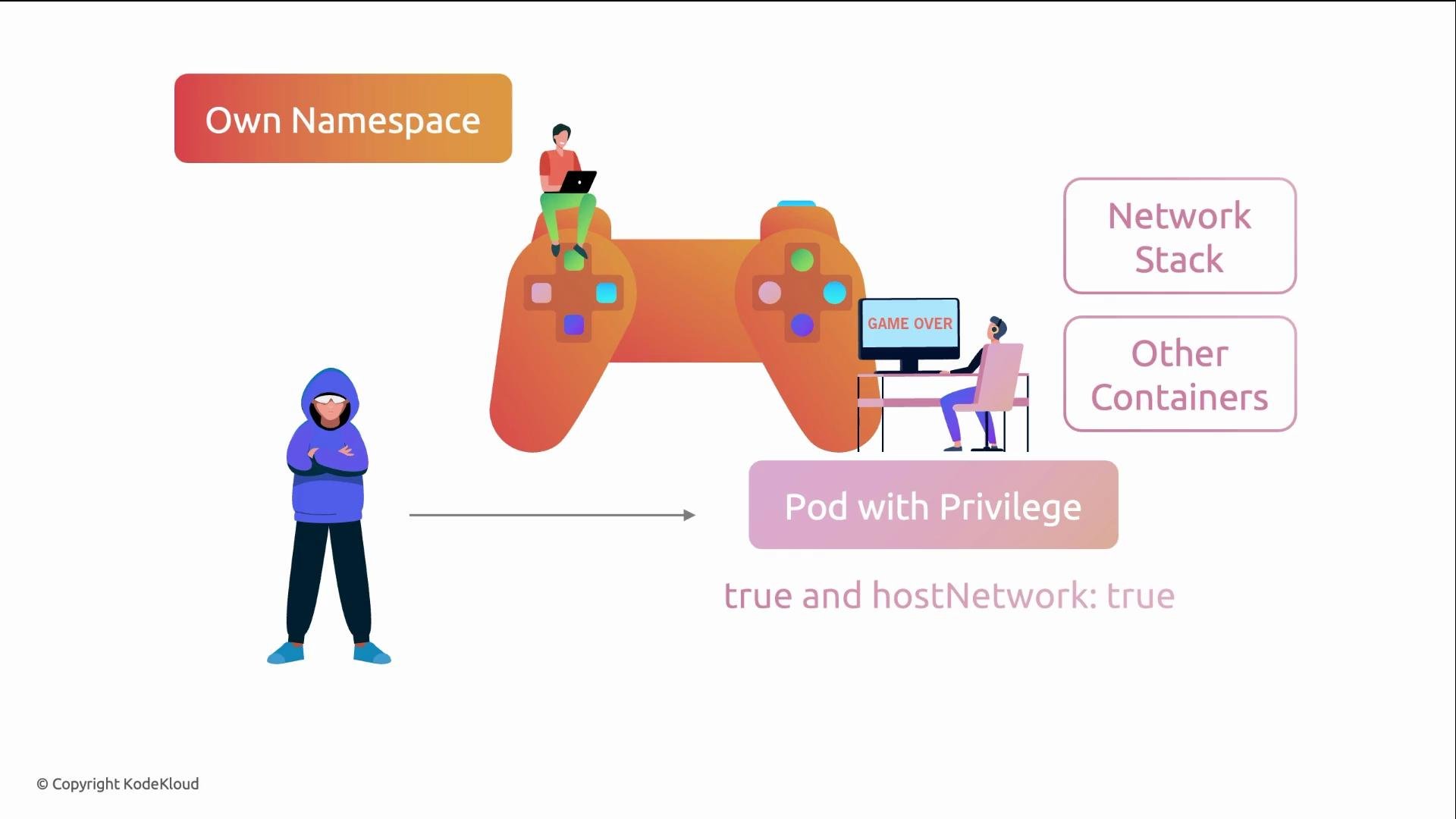
A gaming company enforced RBAC so developers could create resources only in their namespace. However, a developer deployed a Pod with `privileged: true` and `hostNetwork: true` to debug networking. That Pod had access to the host network stack and the potential to interact with other containers on the node. An attacker exploited a container vulnerability and escaped to the host.
RBAC could not prevent this because it does not inspect Pod specs; admission control can.
Why admission control matters — a real-world example
A gaming company enforced RBAC so developers could create resources only in their namespace. However, a developer deployed a Pod with `privileged: true` and `hostNetwork: true` to debug networking. That Pod had access to the host network stack and the potential to interact with other containers on the node. An attacker exploited a container vulnerability and escaped to the host.
RBAC could not prevent this because it does not inspect Pod specs; admission control can.
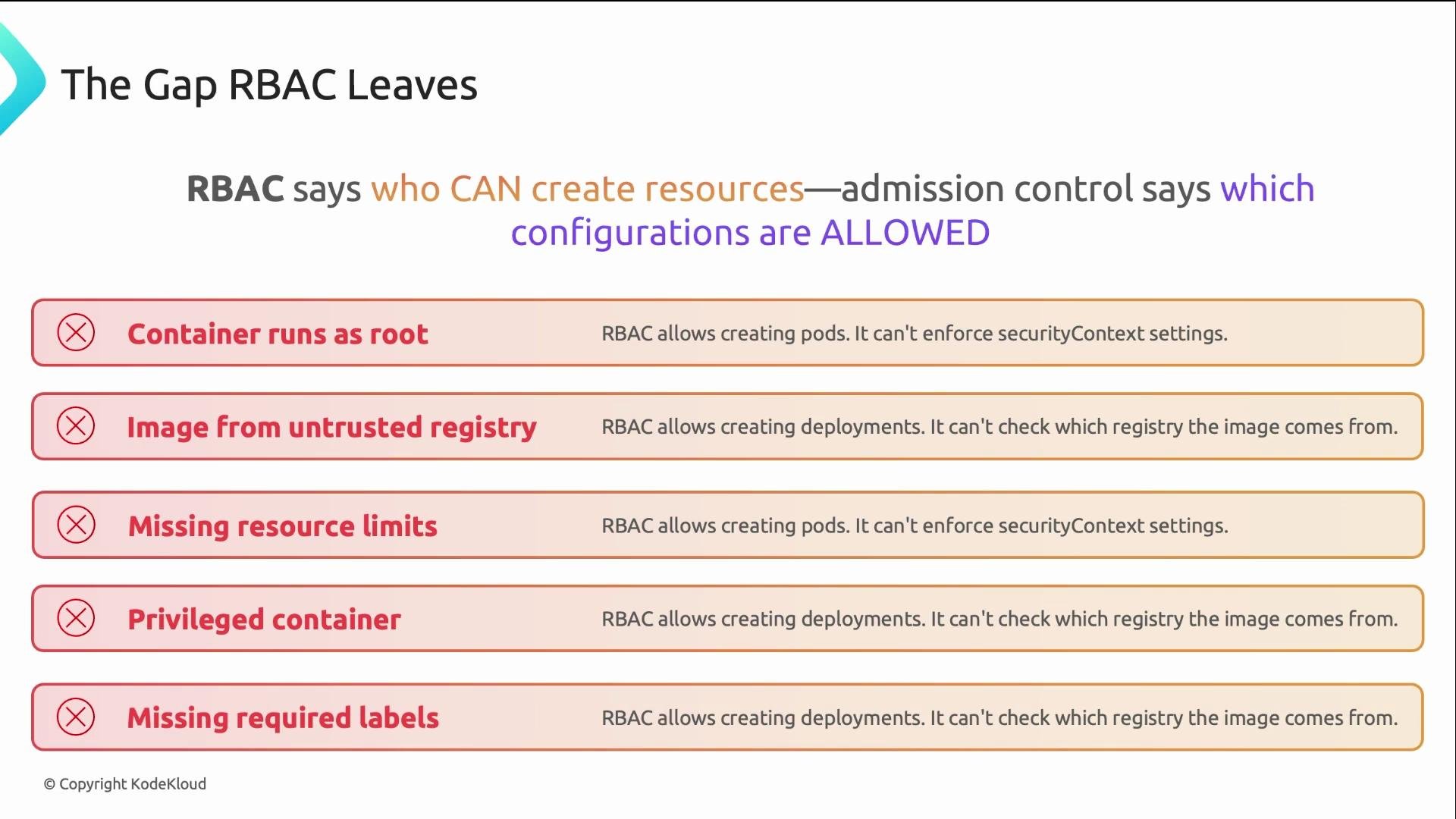
 A few examples of configuration risks that RBAC does not detect:
* Containers running as root or with `runAsUser: 0`.
* Images pulled from untrusted registries.
* Missing CPU/memory resource `requests` and `limits`.
* Missing or incorrect mandatory labels (e.g., `team`, `cost-center`).
* Pods with `privileged: true` or `hostNetwork: true`.
Admission controllers examine the incoming object and can mutate or reject it based on policy.
A few examples of configuration risks that RBAC does not detect:
* Containers running as root or with `runAsUser: 0`.
* Images pulled from untrusted registries.
* Missing CPU/memory resource `requests` and `limits`.
* Missing or incorrect mandatory labels (e.g., `team`, `cost-center`).
* Pods with `privileged: true` or `hostNetwork: true`.
Admission controllers examine the incoming object and can mutate or reject it based on policy.
 RBAC and admission control are complementary: RBAC gates who can call the API and which resource types they can act on; admission control inspects the resource content and enforces configuration policies.
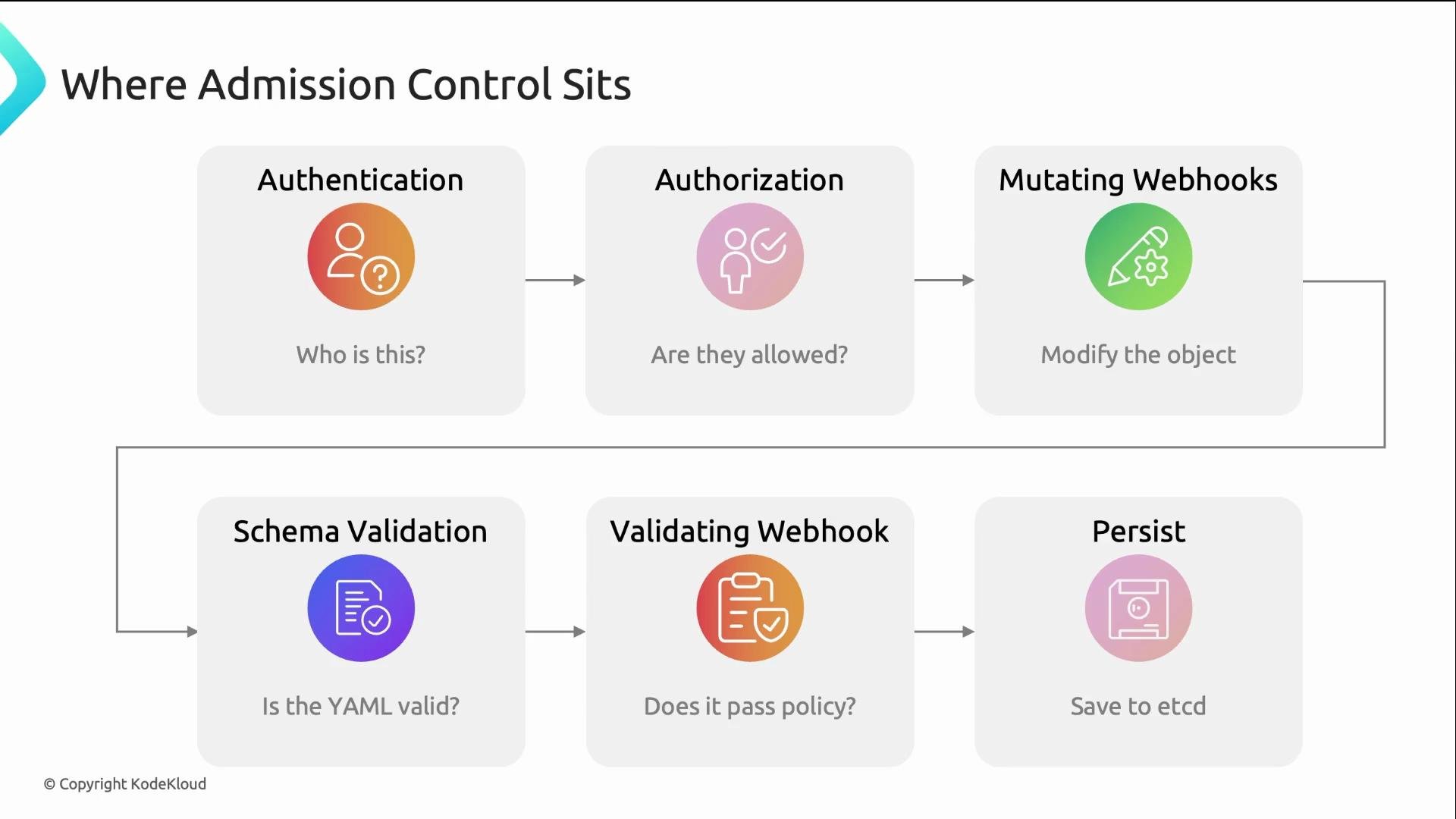
Where admission control sits in the Kubernetes API request flow
1. Authentication — verifies who you are.
2. Authorization (RBAC) — verifies whether you are allowed to perform the action on the resource type.
3. Mutating admission webhooks — may modify the incoming object (run before validation).
4. Validating admission webhooks — accept or reject the (possibly mutated) object.
5. Persistence — if all checks pass, the object is stored in etcd.
Ordering matters: mutating webhooks must run before validating webhooks because mutation can change the object that validation evaluates.
RBAC and admission control are complementary: RBAC gates who can call the API and which resource types they can act on; admission control inspects the resource content and enforces configuration policies.
Where admission control sits in the Kubernetes API request flow
1. Authentication — verifies who you are.
2. Authorization (RBAC) — verifies whether you are allowed to perform the action on the resource type.
3. Mutating admission webhooks — may modify the incoming object (run before validation).
4. Validating admission webhooks — accept or reject the (possibly mutated) object.
5. Persistence — if all checks pass, the object is stored in etcd.
Ordering matters: mutating webhooks must run before validating webhooks because mutation can change the object that validation evaluates.
 Mutating webhooks can change objects (for example, inject defaults or sidecars). Validating webhooks only accept or reject. Because mutating webhooks can affect the final object, they must run before validating webhooks.
Types of admission webhooks
* Mutating webhooks
* Modify the incoming object.
* Common uses: inject sidecars (logging, service mesh), add default labels/annotations, populate missing resource `requests`/`limits`.
* Validating webhooks
* Only accept or reject the object.
* Common uses: block `privileged: true`, enforce image registry whitelists, require specific labels, enforce resource limits.
Kyverno supports mutation, validation, and generation of resources. Gatekeeper (OPA Gatekeeper) is primarily validation-focused and uses Rego for policy logic. Many teams run both tools depending on which capability they need.
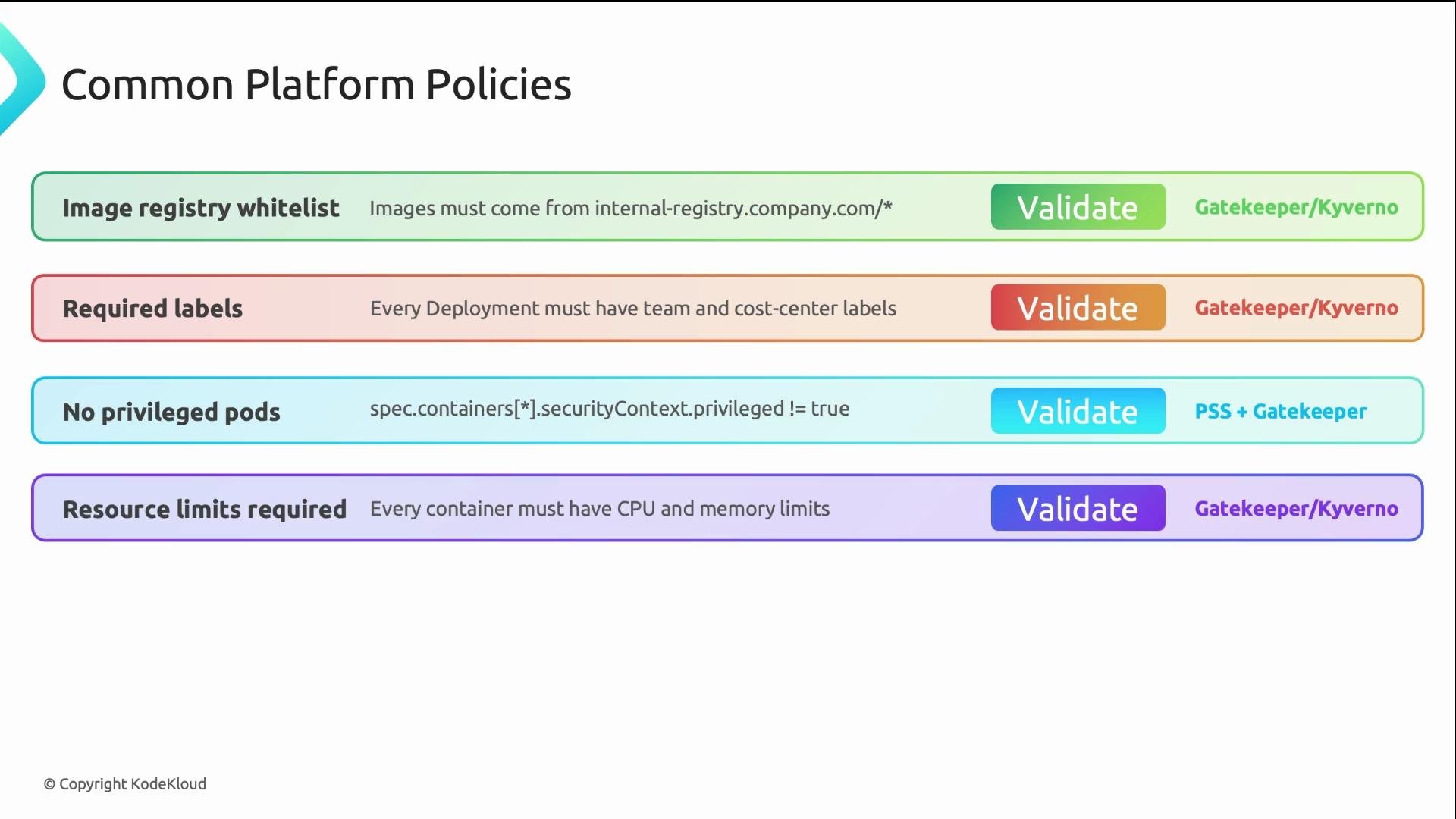
Common admission policies (high impact for platform teams)
| Policy | Type | Purpose | Typical tool(s) |
| -------------------------- | ---------- | ----------------------------------------------------------- | -------------------------------- |
| Image registry whitelist | Validating | Allow images only from trusted registry domains | Gatekeeper, Kyverno |
| Required labels | Validating | Enforce labels like `team` and `cost-center` on Deployments | Gatekeeper, Kyverno |
| No privileged Pods | Validating | Disallow `privileged: true` and `hostNetwork: true` | Gatekeeper, Kyverno, PodSecurity |
| Resource limits required | Validating | Require CPU/memory `requests` and `limits` | Gatekeeper, Kyverno, LimitRanger |
| Default labels/annotations | Mutating | Inject defaults for missing labels/annotations | Kyverno |
| Sidecar injection | Mutating | Auto-inject logging or service-mesh proxies | Kyverno, mutating webhooks |
These six policy types cover the majority of platform enforcement needs and are a good starting point for a policy catalog.
Mutating webhooks can change objects (for example, inject defaults or sidecars). Validating webhooks only accept or reject. Because mutating webhooks can affect the final object, they must run before validating webhooks.
Types of admission webhooks
* Mutating webhooks
* Modify the incoming object.
* Common uses: inject sidecars (logging, service mesh), add default labels/annotations, populate missing resource `requests`/`limits`.
* Validating webhooks
* Only accept or reject the object.
* Common uses: block `privileged: true`, enforce image registry whitelists, require specific labels, enforce resource limits.
Kyverno supports mutation, validation, and generation of resources. Gatekeeper (OPA Gatekeeper) is primarily validation-focused and uses Rego for policy logic. Many teams run both tools depending on which capability they need.
Common admission policies (high impact for platform teams)
| Policy | Type | Purpose | Typical tool(s) |
| -------------------------- | ---------- | ----------------------------------------------------------- | -------------------------------- |
| Image registry whitelist | Validating | Allow images only from trusted registry domains | Gatekeeper, Kyverno |
| Required labels | Validating | Enforce labels like `team` and `cost-center` on Deployments | Gatekeeper, Kyverno |
| No privileged Pods | Validating | Disallow `privileged: true` and `hostNetwork: true` | Gatekeeper, Kyverno, PodSecurity |
| Resource limits required | Validating | Require CPU/memory `requests` and `limits` | Gatekeeper, Kyverno, LimitRanger |
| Default labels/annotations | Mutating | Inject defaults for missing labels/annotations | Kyverno |
| Sidecar injection | Mutating | Auto-inject logging or service-mesh proxies | Kyverno, mutating webhooks |
These six policy types cover the majority of platform enforcement needs and are a good starting point for a policy catalog.
 Gatekeeper vs Kyverno — key differences and when to choose each
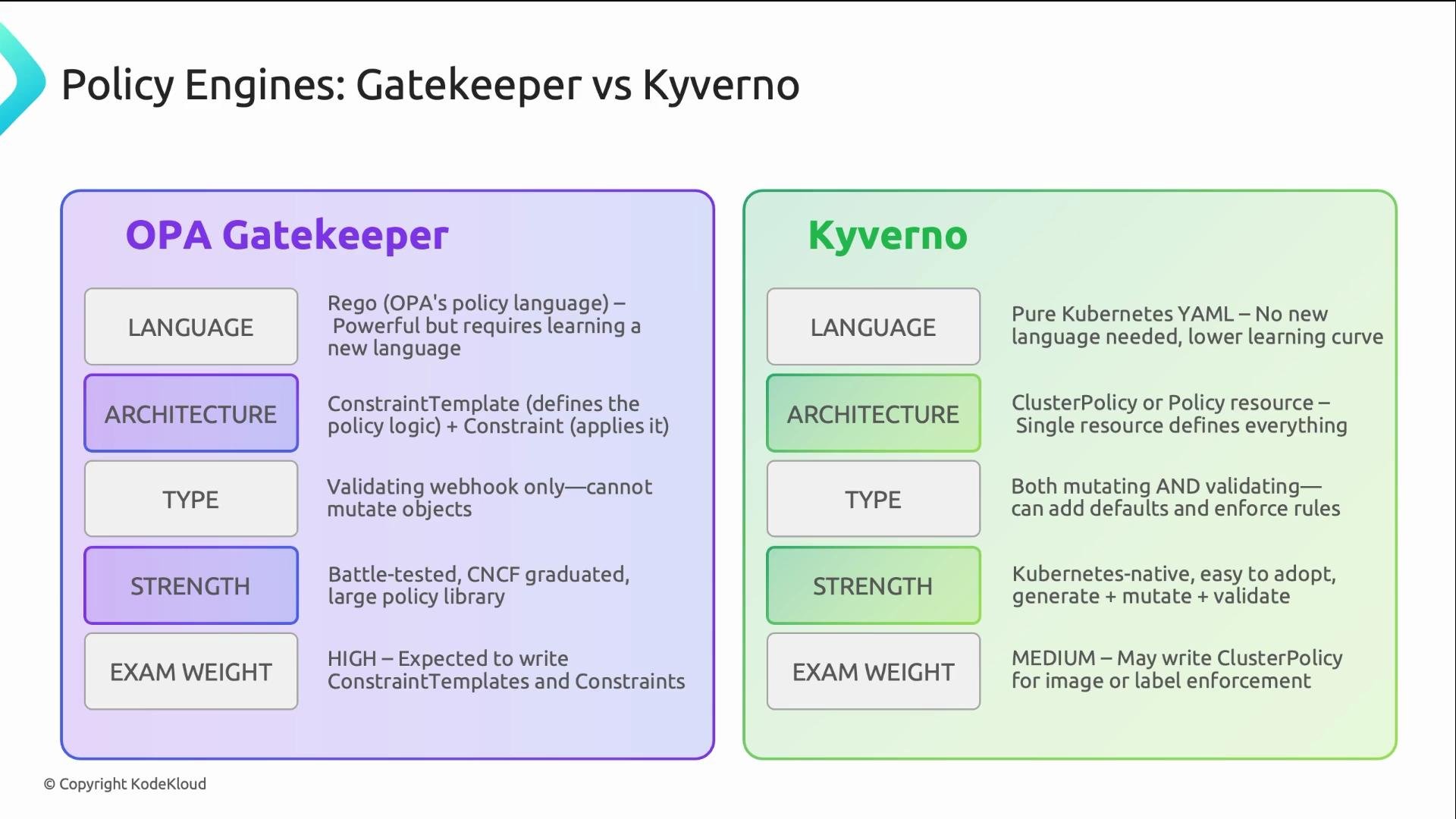
| Aspect | Gatekeeper (OPA Gatekeeper) | Kyverno |
| ------------------ | ----------------------------------------------------------------- | --------------------------------------------------------------------- |
| Policy language | Rego (Open Policy Agent) — expressive but has a learning curve | Kubernetes-native YAML — familiar to K8s users |
| Resource model | Two-resource model: `ConstraintTemplate` + `Constraint` | Single-resource model: `Policy` / `ClusterPolicy` |
| Primary capability | Validation (accept/reject); Rego can express complex logic | Validate, Mutate, Generate (patching & resource generation) |
| Ease of adoption | Powerful for complex policies; requires learning Rego | Easier onboarding for teams comfortable with YAML |
| Best use cases | Complex cross-resource constraints, advanced data-driven policies | Day-one platform policies, auto-injection, defaulting, and generation |
Many organizations use both: Gatekeeper for sophisticated validation rules and Kyverno for YAML-native mutation/validation and resource generation.
Gatekeeper vs Kyverno — key differences and when to choose each
| Aspect | Gatekeeper (OPA Gatekeeper) | Kyverno |
| ------------------ | ----------------------------------------------------------------- | --------------------------------------------------------------------- |
| Policy language | Rego (Open Policy Agent) — expressive but has a learning curve | Kubernetes-native YAML — familiar to K8s users |
| Resource model | Two-resource model: `ConstraintTemplate` + `Constraint` | Single-resource model: `Policy` / `ClusterPolicy` |
| Primary capability | Validation (accept/reject); Rego can express complex logic | Validate, Mutate, Generate (patching & resource generation) |
| Ease of adoption | Powerful for complex policies; requires learning Rego | Easier onboarding for teams comfortable with YAML |
| Best use cases | Complex cross-resource constraints, advanced data-driven policies | Day-one platform policies, auto-injection, defaulting, and generation |
Many organizations use both: Gatekeeper for sophisticated validation rules and Kyverno for YAML-native mutation/validation and resource generation.
 Built-in Kubernetes admission controllers
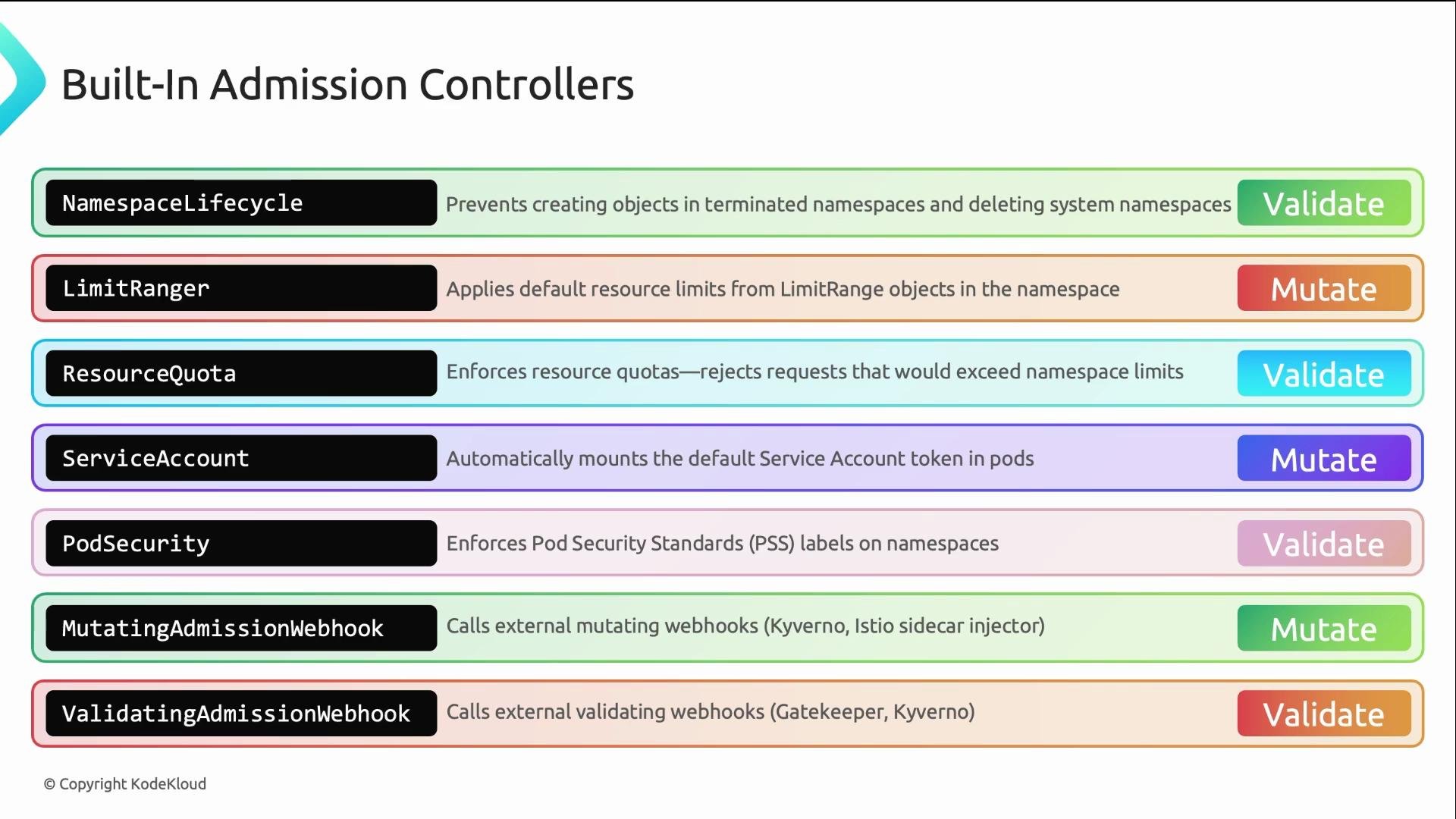
Kubernetes ships several admission controllers compiled into the API server. These run without external webhooks and handle common cluster policy concerns:
* NamespaceLifecycle — prevents creating objects in namespaces that are terminating.
* LimitRanger / ResourceQuota — enforce defaults and resource usage quotas.
* ServiceAccount / TokenVolumeProjection — handle service account tokens in Pods.
* PodSecurity — enforce Pod Security Standards (PSS).
* MutatingAdmissionWebhook / ValidatingAdmissionWebhook — the API hooks that call external webhook servers.
Gatekeeper and Kyverno operate on top of this admission framework to deliver custom, cluster-specific enforcement.
Built-in Kubernetes admission controllers
Kubernetes ships several admission controllers compiled into the API server. These run without external webhooks and handle common cluster policy concerns:
* NamespaceLifecycle — prevents creating objects in namespaces that are terminating.
* LimitRanger / ResourceQuota — enforce defaults and resource usage quotas.
* ServiceAccount / TokenVolumeProjection — handle service account tokens in Pods.
* PodSecurity — enforce Pod Security Standards (PSS).
* MutatingAdmissionWebhook / ValidatingAdmissionWebhook — the API hooks that call external webhook servers.
Gatekeeper and Kyverno operate on top of this admission framework to deliver custom, cluster-specific enforcement.
 Summary and next steps
* RBAC controls who may call the API; admission control inspects the payload and enforces configuration rules.
* Mutating webhooks run first to modify objects; validating webhooks run afterward to accept or reject the final object.
* Start with a small policy set: image registry whitelist, required labels, block privileged pods, require resource limits, inject defaults, and sidecar injection.
* Gatekeeper (Rego) is powerful for complex validation; Kyverno (YAML) is easier to adopt and supports mutation and generation.
* Use built-in admission controllers (LimitRanger, ResourceQuota, PodSecurity) alongside external engines for full coverage.
Links and references
* Kubernetes Admission Controllers: [https://kubernetes.io/docs/reference/access-authn-authz/admission-controllers/](https://kubernetes.io/docs/reference/access-authn-authz/admission-controllers/)
* Pod Security Standards (PSS): [https://kubernetes.io/docs/concepts/security/pod-security-standards/](https://kubernetes.io/docs/concepts/security/pod-security-standards/)
* OPA Gatekeeper: [https://github.com/open-policy-agent/gatekeeper](https://github.com/open-policy-agent/gatekeeper)
* Kyverno: [https://kyverno.io/](https://kyverno.io/)
When implementing admission policies, start with non-blocking enforcement (audit mode) where possible, validate policy behavior on a staging cluster, and progressively enforce to avoid unexpected production disruptions.
Summary and next steps
* RBAC controls who may call the API; admission control inspects the payload and enforces configuration rules.
* Mutating webhooks run first to modify objects; validating webhooks run afterward to accept or reject the final object.
* Start with a small policy set: image registry whitelist, required labels, block privileged pods, require resource limits, inject defaults, and sidecar injection.
* Gatekeeper (Rego) is powerful for complex validation; Kyverno (YAML) is easier to adopt and supports mutation and generation.
* Use built-in admission controllers (LimitRanger, ResourceQuota, PodSecurity) alongside external engines for full coverage.
Links and references
* Kubernetes Admission Controllers: [https://kubernetes.io/docs/reference/access-authn-authz/admission-controllers/](https://kubernetes.io/docs/reference/access-authn-authz/admission-controllers/)
* Pod Security Standards (PSS): [https://kubernetes.io/docs/concepts/security/pod-security-standards/](https://kubernetes.io/docs/concepts/security/pod-security-standards/)
* OPA Gatekeeper: [https://github.com/open-policy-agent/gatekeeper](https://github.com/open-policy-agent/gatekeeper)
* Kyverno: [https://kyverno.io/](https://kyverno.io/)
When implementing admission policies, start with non-blocking enforcement (audit mode) where possible, validate policy behavior on a staging cluster, and progressively enforce to avoid unexpected production disruptions.