> ## Documentation Index
> Fetch the complete documentation index at: https://notes.kodekloud.com/llms.txt
> Use this file to discover all available pages before exploring further.
# Demo Applying Pod Security Standards
> Explains using Kubernetes Pod Security Standards to enforce baseline restricted and privileged profiles via namespace labels and modes warn audit enforce, with examples and remediation steps.
[Gatekeeper](https://open-policy-agent.github.io/gatekeeper/) and [Kyverno](https://kyverno.io/) are powerful admission controllers, but both require installing extra tooling. Pod Security Standards (PSS) are built into Kubernetes and let cluster administrators enforce security baselines at the namespace level without deploying operators or CRDs.
PSS provides three predefined profiles and three enforcement modes. Use PSS when you want a simple, auditable, label-driven way to validate or block Pod specs at admission time.
## Pod Security profiles and modes
| Profile | Purpose | Typical use |
| ---------- | -------------------------------------------------------------------------------------: | ---------------------------------------------------- |
| privileged | Essentially "anything goes" — minimal restrictions. | System and infra workloads that require host access. |
| baseline | Blocks the most dangerous privilege escalations while minimizing application breakage. | General-purpose application workloads. |
| restricted | Hardened, follows security best practices. | Sensitive workloads, strict compliance environments. |
| Mode | Behavior |
| --------- | ----------------------------------------------------- |
| `enforce` | Blocks creations/updates that violate the profile. |
| `audit` | Records violations to audit logs (doesn't block). |
| `warn` | Prints admission-time warnings but allows the object. |
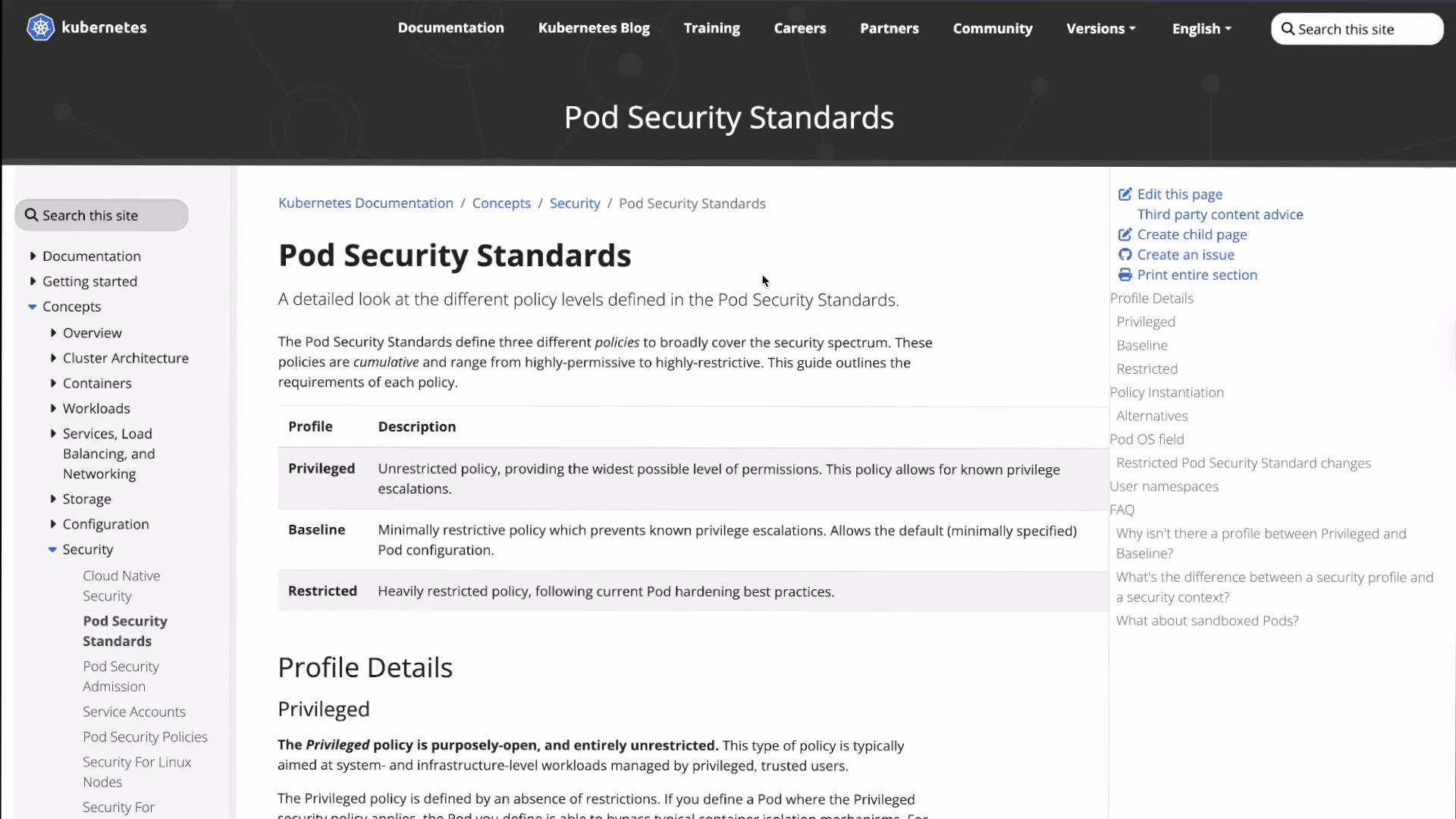 You can review the exact checks and rationale for each profile in the [Kubernetes Pod Security Standards documentation](https://kubernetes.io/docs/concepts/security/pod-security-standards/).
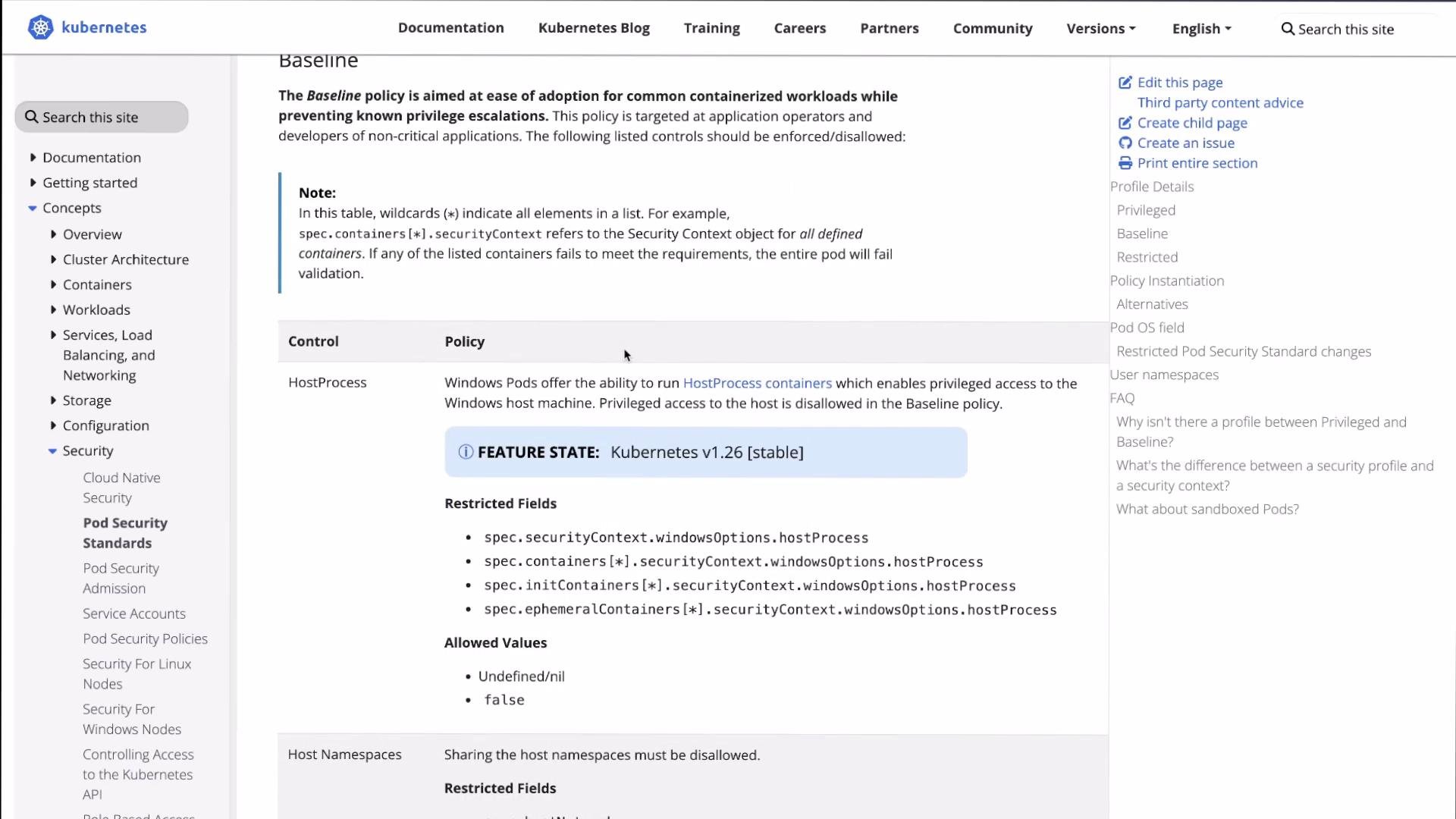 Pod Security Standards are label-driven: a namespace's enforcement behavior is determined solely by labels on that namespace (for example `pod-security.kubernetes.io/enforce=baseline`). Labels make policy auditable and easily reversible.
Applying or changing PSS labels requires permission to modify namespaces (typically cluster-admin). Test changes in a non-production cluster or dedicated namespaces before rolling higher-level enforcement.
## Typical workflow
The common progression is:
* Inspect namespaces and labels.
* Label a namespace with PSS modes (`warn`/`audit` first to surface issues).
* Attempt non-compliant workloads to capture warnings/audit entries.
* Fix workloads to meet the profile.
* Switch to `enforce` when ready to block non-compliant Pods.
Follow the steps below.
1. Check current namespaces and labels
```bash theme={null}
kubectl get namespaces --show-labels
```
Example output (trimmed):
```bash theme={null}
NAME STATUS AGE LABELS
default Active 137m kubernetes.io/metadata.name=default
kube-flannel Active 137m k8s-app=flannel,kubernetes.io/metadata.name=kube-flannel,pod-security.kubernetes.io/enforce=privileged
pss-baseline Active 9m kubernetes.io/metadata.name=pss-baseline
pss-privileged Active 9m kubernetes.io/metadata.name=pss-privileged
pss-restricted Active 9m kubernetes.io/metadata.name=pss-restricted
```
2. Label a namespace to enforce the `baseline` profile but also `audit`/`warn` the `restricted` profile so you can see what would fail under stricter rules:
```bash theme={null}
kubectl label namespace pss-baseline \
pod-security.kubernetes.io/enforce=baseline \
pod-security.kubernetes.io/audit=restricted \
pod-security.kubernetes.io/warn=restricted
# Output:
# namespace/pss-baseline labeled
```
3. Create a Pod that violates baseline to see the enforcement behavior
Save this as `privileged-pod.yaml`:
```yaml theme={null}
apiVersion: v1
kind: Pod
metadata:
name: privileged-app
spec:
hostNetwork: true
containers:
- name: app
image: nginx:alpine
securityContext:
privileged: true
```
Apply it into `pss-baseline`:
```bash theme={null}
kubectl apply -f privileged-pod.yaml -n pss-baseline
```
You will see an error because baseline forbids host namespaces and privileged containers:
```bash theme={null}
Error from server (Forbidden): error when creating "privileged-pod.yaml": pods "privileged-app" is forbidden: violates PodSecurity "baseline:latest": host namespaces (hostNetwork=true) are prohibited, privileged (container "app" must not set securityContext.privileged=true)
```
4. Try a standard nginx Pod that baseline will admit but restricted will warn on
Use `kubectl run` for a quick test:
```bash theme={null}
kubectl run baseline-test --image=nginx:alpine -n pss-baseline
```
Admission will allow the Pod but print warnings (because `pss-baseline` has `warn`/`audit` for `restricted`):
```bash theme={null}
Warning: would violate PodSecurity "restricted:latest":
- allowPrivilegeEscalation != false (container "baseline-test" must set securityContext.allowPrivilegeEscalation=false)
- capabilities not dropped (container "baseline-test" must set securityContext.capabilities.drop=["ALL"])
- runAsNonRoot != true (pod or container "baseline-test" must set securityContext.runAsNonRoot=true)
- seccompProfile not set (pod or container "baseline-test" must set securityContext.seccompProfile.type to "RuntimeDefault" or "Localhost")
pod/baseline-test created
```
These warnings let you discover which fields to add to meet the stricter profile without blocking workloads.
5. Enforce the `restricted` profile on another namespace and observe rejections
Label `pss-restricted` to enforce:
```bash theme={null}
kubectl label namespace pss-restricted pod-security.kubernetes.io/enforce=restricted
# Output:
# namespace/pss-restricted labeled
```
Try to run the same nginx image there:
```bash theme={null}
kubectl run restricted-test --image=nginx:alpine -n pss-restricted
```
Since `restricted` is in `enforce` mode, creation is blocked and the required corrections are listed:
```bash theme={null}
Error from server (Forbidden): pods "restricted-test" is forbidden: violates PodSecurity "restricted:latest":
- allowPrivilegeEscalation != false (container "restricted-test" must set securityContext.allowPrivilegeEscalation=false)
- capabilities not dropped (container "restricted-test" must set securityContext.capabilities.drop=["ALL"])
- runAsNonRoot != true (pod or container "restricted-test" must set securityContext.runAsNonRoot=true)
- seccompProfile not set (pod or container "restricted-test" must set securityContext.seccompProfile.type to "RuntimeDefault" or "Localhost")
```
6. Example Pod that complies with `restricted`
Save this as `restricted-pod.yaml`:
```yaml theme={null}
apiVersion: v1
kind: Pod
metadata:
name: restricted-app
spec:
containers:
- name: app
image: nginx/nginx-unprivileged:alpine
securityContext:
runAsNonRoot: true
allowPrivilegeEscalation: false
capabilities:
drop:
- ALL
seccompProfile:
type: RuntimeDefault
```
Apply it into the restricted namespace:
```bash theme={null}
kubectl apply -f restricted-pod.yaml -n pss-restricted
# Output:
# pod/restricted-app created
```
The image `nginx/nginx-unprivileged:alpine` runs as a non-root user and the `securityContext` fields satisfy the `restricted` checks.
7. Use `warn` mode to discover non-compliant workloads (audit flow)
Create an audit namespace and start in `warn` mode:
```bash theme={null}
kubectl create namespace workload-audit
kubectl label namespace workload-audit pod-security.kubernetes.io/warn=baseline
```
Run a test Pod (baseline is permissive):
```bash theme={null}
kubectl run audit-test --image=nginx:alpine -n workload-audit
kubectl get events -n workload-audit
```
If you then change the warn label to `restricted` and create another Pod, admission prints warnings for restricted violations:
```bash theme={null}
kubectl label namespace workload-audit pod-security.kubernetes.io/warn=restricted --overwrite
kubectl run audit-test-2 --image=nginx:alpine -n workload-audit
```
Admission-time output:
```bash theme={null}
Warning: would violate PodSecurity "restricted:latest":
- allowPrivilegeEscalation != false (container "audit-test-2" must set securityContext.allowPrivilegeEscalation=false)
- capabilities not dropped (container "audit-test-2" must set securityContext.capabilities.drop=["ALL"])
- runAsNonRoot != true (pod or container "audit-test-2" must set securityContext.runAsNonRoot=true)
- seccompProfile not set (pod or container "audit-test-2" must set securityContext.seccompProfile.type to "RuntimeDefault" or "Localhost")
pod/audit-test-2 created
```
You can inspect events to correlate lifecycle events with admission-time messages:
```bash theme={null}
kubectl get events -n workload-audit
```
## Recommended minimal `securityContext` fields for `restricted`
| Field | Example value | Purpose |
| -------------------------- | ---------------: | ----------------------------------------------- |
| `runAsNonRoot` | `true` | Ensure containers don't run as UID 0. |
| `allowPrivilegeEscalation` | `false` | Prevent setuid binaries / privilege escalation. |
| `capabilities.drop` | `["ALL"]` | Remove Linux capabilities. |
| `seccompProfile.type` | `RuntimeDefault` | Apply a seccomp profile at runtime. |
Putting these into pod/container specs is the most common way to resolve `restricted` violations.
## Summary
* Start with `warn` and `audit` modes to safely discover issues.
* Fix Pod specs (set `runAsNonRoot`, `allowPrivilegeEscalation=false`, drop capabilities, set `seccompProfile`, avoid host namespaces, etc.) until warnings disappear.
* Switch to `enforce` for the target profile to block non-compliant workloads.
* PSS offers a simple, label-driven approach that is easy to audit and reverse without extra operators.
Further reading:
* [Kubernetes Pod Security Standards](https://kubernetes.io/docs/concepts/security/pod-security-standards/)
* [Kubernetes Pod Security Admission](https://kubernetes.io/docs/reference/access-authn-authz/admission-controllers/#podsecurity)
Pod Security Standards are label-driven: a namespace's enforcement behavior is determined solely by labels on that namespace (for example `pod-security.kubernetes.io/enforce=baseline`). Labels make policy auditable and easily reversible.
Applying or changing PSS labels requires permission to modify namespaces (typically cluster-admin). Test changes in a non-production cluster or dedicated namespaces before rolling higher-level enforcement.
## Typical workflow
The common progression is:
* Inspect namespaces and labels.
* Label a namespace with PSS modes (`warn`/`audit` first to surface issues).
* Attempt non-compliant workloads to capture warnings/audit entries.
* Fix workloads to meet the profile.
* Switch to `enforce` when ready to block non-compliant Pods.
Follow the steps below.
1. Check current namespaces and labels
```bash theme={null}
kubectl get namespaces --show-labels
```
Example output (trimmed):
```bash theme={null}
NAME STATUS AGE LABELS
default Active 137m kubernetes.io/metadata.name=default
kube-flannel Active 137m k8s-app=flannel,kubernetes.io/metadata.name=kube-flannel,pod-security.kubernetes.io/enforce=privileged
pss-baseline Active 9m kubernetes.io/metadata.name=pss-baseline
pss-privileged Active 9m kubernetes.io/metadata.name=pss-privileged
pss-restricted Active 9m kubernetes.io/metadata.name=pss-restricted
```
2. Label a namespace to enforce the `baseline` profile but also `audit`/`warn` the `restricted` profile so you can see what would fail under stricter rules:
```bash theme={null}
kubectl label namespace pss-baseline \
pod-security.kubernetes.io/enforce=baseline \
pod-security.kubernetes.io/audit=restricted \
pod-security.kubernetes.io/warn=restricted
# Output:
# namespace/pss-baseline labeled
```
3. Create a Pod that violates baseline to see the enforcement behavior
Save this as `privileged-pod.yaml`:
```yaml theme={null}
apiVersion: v1
kind: Pod
metadata:
name: privileged-app
spec:
hostNetwork: true
containers:
- name: app
image: nginx:alpine
securityContext:
privileged: true
```
Apply it into `pss-baseline`:
```bash theme={null}
kubectl apply -f privileged-pod.yaml -n pss-baseline
```
You will see an error because baseline forbids host namespaces and privileged containers:
```bash theme={null}
Error from server (Forbidden): error when creating "privileged-pod.yaml": pods "privileged-app" is forbidden: violates PodSecurity "baseline:latest": host namespaces (hostNetwork=true) are prohibited, privileged (container "app" must not set securityContext.privileged=true)
```
4. Try a standard nginx Pod that baseline will admit but restricted will warn on
Use `kubectl run` for a quick test:
```bash theme={null}
kubectl run baseline-test --image=nginx:alpine -n pss-baseline
```
Admission will allow the Pod but print warnings (because `pss-baseline` has `warn`/`audit` for `restricted`):
```bash theme={null}
Warning: would violate PodSecurity "restricted:latest":
- allowPrivilegeEscalation != false (container "baseline-test" must set securityContext.allowPrivilegeEscalation=false)
- capabilities not dropped (container "baseline-test" must set securityContext.capabilities.drop=["ALL"])
- runAsNonRoot != true (pod or container "baseline-test" must set securityContext.runAsNonRoot=true)
- seccompProfile not set (pod or container "baseline-test" must set securityContext.seccompProfile.type to "RuntimeDefault" or "Localhost")
pod/baseline-test created
```
These warnings let you discover which fields to add to meet the stricter profile without blocking workloads.
5. Enforce the `restricted` profile on another namespace and observe rejections
Label `pss-restricted` to enforce:
```bash theme={null}
kubectl label namespace pss-restricted pod-security.kubernetes.io/enforce=restricted
# Output:
# namespace/pss-restricted labeled
```
Try to run the same nginx image there:
```bash theme={null}
kubectl run restricted-test --image=nginx:alpine -n pss-restricted
```
Since `restricted` is in `enforce` mode, creation is blocked and the required corrections are listed:
```bash theme={null}
Error from server (Forbidden): pods "restricted-test" is forbidden: violates PodSecurity "restricted:latest":
- allowPrivilegeEscalation != false (container "restricted-test" must set securityContext.allowPrivilegeEscalation=false)
- capabilities not dropped (container "restricted-test" must set securityContext.capabilities.drop=["ALL"])
- runAsNonRoot != true (pod or container "restricted-test" must set securityContext.runAsNonRoot=true)
- seccompProfile not set (pod or container "restricted-test" must set securityContext.seccompProfile.type to "RuntimeDefault" or "Localhost")
```
6. Example Pod that complies with `restricted`
Save this as `restricted-pod.yaml`:
```yaml theme={null}
apiVersion: v1
kind: Pod
metadata:
name: restricted-app
spec:
containers:
- name: app
image: nginx/nginx-unprivileged:alpine
securityContext:
runAsNonRoot: true
allowPrivilegeEscalation: false
capabilities:
drop:
- ALL
seccompProfile:
type: RuntimeDefault
```
Apply it into the restricted namespace:
```bash theme={null}
kubectl apply -f restricted-pod.yaml -n pss-restricted
# Output:
# pod/restricted-app created
```
The image `nginx/nginx-unprivileged:alpine` runs as a non-root user and the `securityContext` fields satisfy the `restricted` checks.
7. Use `warn` mode to discover non-compliant workloads (audit flow)
Create an audit namespace and start in `warn` mode:
```bash theme={null}
kubectl create namespace workload-audit
kubectl label namespace workload-audit pod-security.kubernetes.io/warn=baseline
```
Run a test Pod (baseline is permissive):
```bash theme={null}
kubectl run audit-test --image=nginx:alpine -n workload-audit
kubectl get events -n workload-audit
```
If you then change the warn label to `restricted` and create another Pod, admission prints warnings for restricted violations:
```bash theme={null}
kubectl label namespace workload-audit pod-security.kubernetes.io/warn=restricted --overwrite
kubectl run audit-test-2 --image=nginx:alpine -n workload-audit
```
Admission-time output:
```bash theme={null}
Warning: would violate PodSecurity "restricted:latest":
- allowPrivilegeEscalation != false (container "audit-test-2" must set securityContext.allowPrivilegeEscalation=false)
- capabilities not dropped (container "audit-test-2" must set securityContext.capabilities.drop=["ALL"])
- runAsNonRoot != true (pod or container "audit-test-2" must set securityContext.runAsNonRoot=true)
- seccompProfile not set (pod or container "audit-test-2" must set securityContext.seccompProfile.type to "RuntimeDefault" or "Localhost")
pod/audit-test-2 created
```
You can inspect events to correlate lifecycle events with admission-time messages:
```bash theme={null}
kubectl get events -n workload-audit
```
## Recommended minimal `securityContext` fields for `restricted`
| Field | Example value | Purpose |
| -------------------------- | ---------------: | ----------------------------------------------- |
| `runAsNonRoot` | `true` | Ensure containers don't run as UID 0. |
| `allowPrivilegeEscalation` | `false` | Prevent setuid binaries / privilege escalation. |
| `capabilities.drop` | `["ALL"]` | Remove Linux capabilities. |
| `seccompProfile.type` | `RuntimeDefault` | Apply a seccomp profile at runtime. |
Putting these into pod/container specs is the most common way to resolve `restricted` violations.
## Summary
* Start with `warn` and `audit` modes to safely discover issues.
* Fix Pod specs (set `runAsNonRoot`, `allowPrivilegeEscalation=false`, drop capabilities, set `seccompProfile`, avoid host namespaces, etc.) until warnings disappear.
* Switch to `enforce` for the target profile to block non-compliant workloads.
* PSS offers a simple, label-driven approach that is easy to audit and reverse without extra operators.
Further reading:
* [Kubernetes Pod Security Standards](https://kubernetes.io/docs/concepts/security/pod-security-standards/)
* [Kubernetes Pod Security Admission](https://kubernetes.io/docs/reference/access-authn-authz/admission-controllers/#podsecurity)