> ## Documentation Index
> Fetch the complete documentation index at: https://notes.kodekloud.com/llms.txt
> Use this file to discover all available pages before exploring further.
# OPA Gatekeeper Constraint Based Policy Enforcement
> Explains using OPA Gatekeeper ConstraintTemplates and Constraints to enforce Kubernetes admission policies with Rego examples, rollout best practices, and debugging tips.
Now let's build our first policy engine.
[Gatekeeper](https://open-policy-agent.github.io/gatekeeper/) is a Kubernetes-native policy engine built on top of Open Policy Agent. Gatekeeper uses a two-resource model—ConstraintTemplates and Constraints—to define and apply policies at the Kubernetes API server admission stage. This guide walks through the concepts, a practical Rego example, safe rollout practices, and debugging tips so you can write, test, and enforce policies reliably.
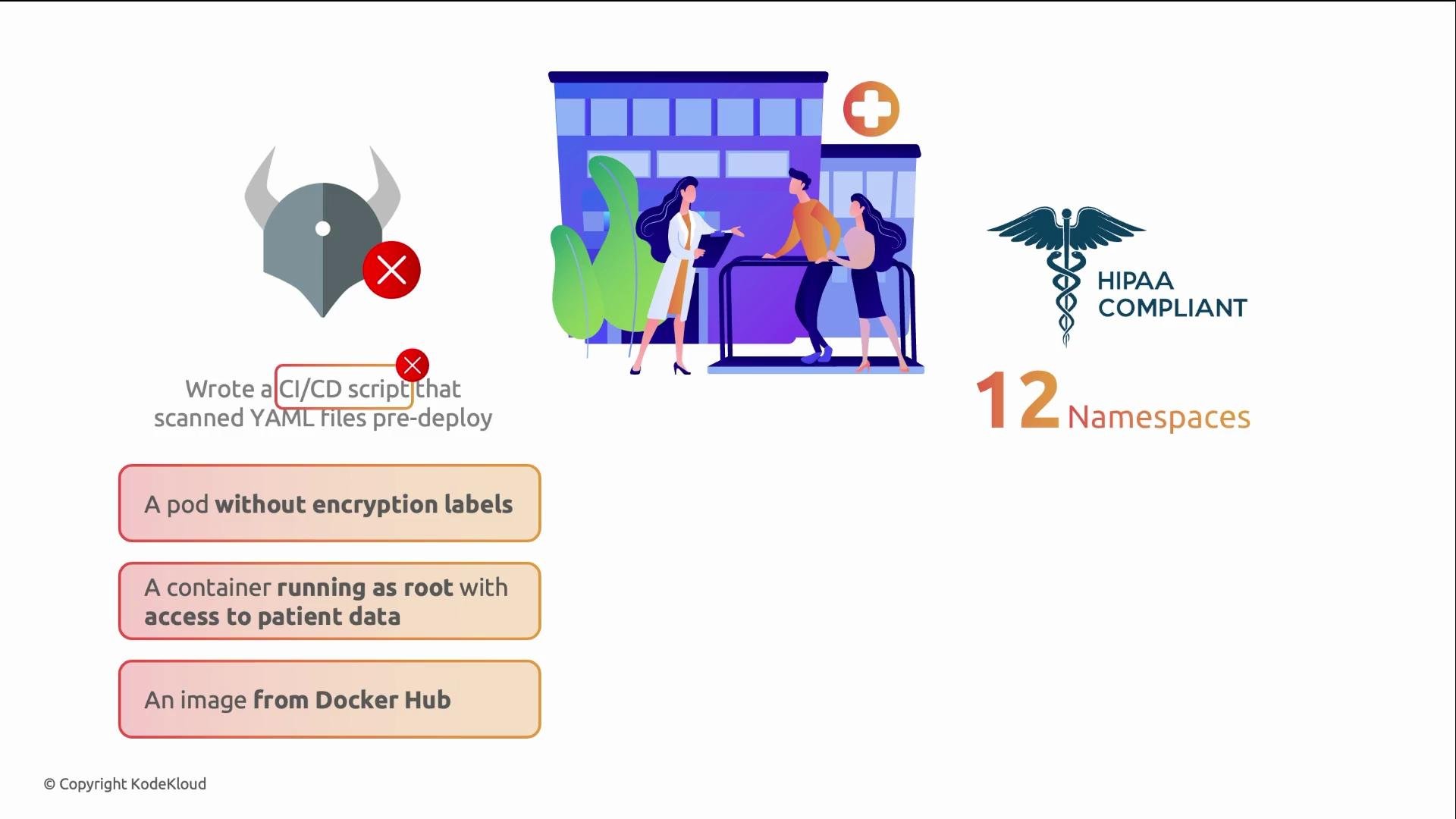
A real-world motivation: a healthcare company required HIPAA-compliant configurations across twelve namespaces. Their CI/CD pipeline scanned YAMLs, but developers could still run `kubectl apply` directly and bypass checks. In two months they logged three incidents: a pod missing encryption labels, a container running as root with direct patient-data access, and an unscanned image pulled from Docker Hub. Gatekeeper would have enforced these checks at the API server, preventing such resources regardless of how they were created.
 ## How Gatekeeper’s two-resource model works
Gatekeeper separates policy logic from policy instances:
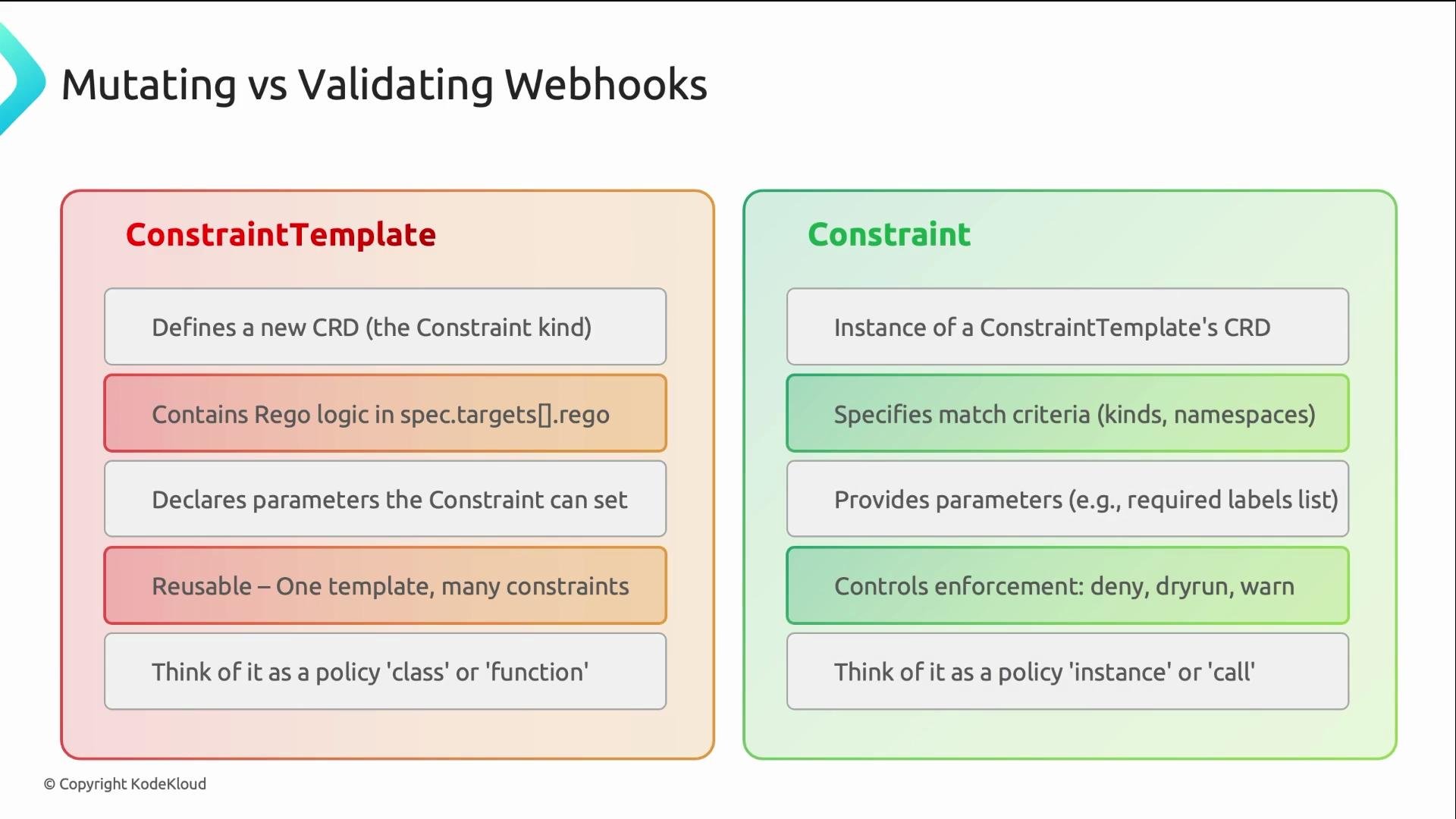
* ConstraintTemplate: authored by the platform or security team. Contains the Rego policy logic and registers a new CRD (CustomResourceDefinition) when applied.
* Constraint: an instance of that CRD that specifies where the policy should be applied and supplies parameters.
Write the logic once in a ConstraintTemplate and create multiple Constraints with different parameters to apply the same policy across multiple scopes.
## How Gatekeeper’s two-resource model works
Gatekeeper separates policy logic from policy instances:
* ConstraintTemplate: authored by the platform or security team. Contains the Rego policy logic and registers a new CRD (CustomResourceDefinition) when applied.
* Constraint: an instance of that CRD that specifies where the policy should be applied and supplies parameters.
Write the logic once in a ConstraintTemplate and create multiple Constraints with different parameters to apply the same policy across multiple scopes.
 ## Example: Required labels policy (ConstraintTemplate + Constraint)
The following example shows a ConstraintTemplate that enforces required labels on a resource. Key points:
* `spec.crd` creates a new kind: `K8sRequiredLabels`.
* `spec.targets.rego` contains the Rego logic.
* Rego inputs to know:
* `input.review` — the admissionReview object; the resource under validation/ mutation is `input.review.object`.
* `input.parameters` — parameters provided by the Constraint.
ConstraintTemplate:
```yaml theme={null}
apiVersion: templates.gatekeeper.sh/v1
kind: ConstraintTemplate
metadata:
name: k8srequiredlabels
spec:
crd:
spec:
names:
kind: K8sRequiredLabels
validation:
openAPIV3Schema:
properties:
labels:
type: array
items:
type: string
targets:
- target: admission.k8s.gatekeeper.sh
rego: |
package k8srequiredlabels
violation[{"msg": msg}] {
provided := input.review.object
required := input.parameters.labels
label := required[_]
not provided.metadata.labels[label]
msg := sprintf("missing: %v", [label])
}
```
Explanation:
* The `violation` rule iterates the `labels` parameter and checks whether each required label exists on the requested resource (`input.review.object.metadata.labels`).
* When a label is missing, the rule emits a violation message, and Gatekeeper will act according to the Constraint's `enforcementAction` (e.g., `deny`, `warn`, `dryrun`).
Now create a Constraint that uses the template. The `kind` must match the `K8sRequiredLabels` CRD registered by the template. The `enforcementAction` controls behavior:
* `dryrun`: record violations but allow the request.
* `warn`: allow the request, but return a warning to the caller.
* `deny`: reject the request.
Constraint:
```yaml theme={null}
apiVersion: constraints.gatekeeper.sh/v1beta1
kind: K8sRequiredLabels
metadata:
name: require-team-label
spec:
enforcementAction: deny
match:
kinds:
- apiGroups: [""]
kinds: ["Namespace"]
parameters:
labels: ["team"]
```
With the constraint above, attempts to create a Namespace without the `team` label will be rejected with a helpful message:
```bash theme={null}
$ kubectl create ns test-ns
Error from server: admission webhook "constraint.gatekeeper.sh" denied the request: missing: "team"
```
## Recommended rollout strategy
A staged rollout prevents sudden breakage across clusters and teams:
1. Start with `enforcementAction: dryrun` — captures violations without blocking resources.
2. Move to `warn` — surfaces issues to users while still allowing requests.
3. Finally switch to `deny` — fully enforce the policy once remediation is complete.
Rollout checklist: apply the ConstraintTemplate, create Constraints in `dryrun` mode, monitor recorded violations and fix offending resources, switch to `warn` for visibility, then set `enforcementAction: deny` when remediation is complete.
Important: Applying `deny` without a phased rollout can cause outages. Always run `dryrun` first and ensure teams have time to remediate violations before enforcing.
## Debugging Gatekeeper
* If a ConstraintTemplate fails to register, inspect its `status` for Rego syntax or schema errors.
* Use `kubectl get` and `kubectl describe` to inspect ConstraintTemplates, Constraints, and recorded violations.
* Gatekeeper records violations even when rejecting requests — violations appear in the Constraint status.
* Check the Gatekeeper controller logs for runtime errors, webhook connectivity issues, or other controller-side problems.
Common troubleshooting steps:
* Verify the ConstraintTemplate is Ready and has no Rego compile errors.
* Confirm the constraint `kind` exactly matches the CRD name created by the template.
* Ensure the Gatekeeper controller pods and webhook services are healthy and reachable by the API server.
## Useful commands and examples
| Operation | Command | Notes / Example Output |
| ----------------------------------- | ------------------------------------------------------------------------------------------------ | --------------------------------------------------- |
| List ConstraintTemplates | `kubectl get constrainttemplate` | Example output: `k8srequiredlabels True` |
| List Constraints of a type | `kubectl get k8srequiredlabels` | Example output: `require-team-label deny 12` |
| Inspect violations for a constraint | `kubectl get k8srequiredlabels require-team-label -o jsonpath='{.status.violations[*].message}'` | Shows violation messages recorded on the constraint |
| Check Gatekeeper controller logs | `kubectl logs -n gatekeeper-system deployment/gatekeeper-controller-manager` | Use to debug controller-side errors |
## Common issues
* Rego syntax errors or invalid schema in the ConstraintTemplate (check `kubectl describe constrainttemplate ` and `.status`).
* Misconfigured webhook or API server connectivity problems.
* Gatekeeper controller pods not running or crashing — check pod status and logs.
## Summary
Gatekeeper enforces policies using a clear two-resource model:
* ConstraintTemplates define Rego logic once and register a CRD.
* Constraints instantiate that CRD to define where and how to apply the logic using parameters.
Key Rego inputs for admission policies:
* `input.review` — the admissionReview object; `input.review.object` is the resource.
* `input.parameters` — values supplied by the Constraint.
Always follow a phased rollout: `dryrun` → `warn` → `deny`. Practice authoring ConstraintTemplates and Constraints, test them in `dryrun`, and monitor violations before enforcing to prevent surprises.
## Links and reference
* [Gatekeeper documentation](https://open-policy-agent.github.io/gatekeeper/)
* [Open Policy Agent (OPA) — Rego language docs](https://www.openpolicyagent.org/docs/latest/policy-language/)
* [Docker Hub](https://hub.docker.com/)
## Example: Required labels policy (ConstraintTemplate + Constraint)
The following example shows a ConstraintTemplate that enforces required labels on a resource. Key points:
* `spec.crd` creates a new kind: `K8sRequiredLabels`.
* `spec.targets.rego` contains the Rego logic.
* Rego inputs to know:
* `input.review` — the admissionReview object; the resource under validation/ mutation is `input.review.object`.
* `input.parameters` — parameters provided by the Constraint.
ConstraintTemplate:
```yaml theme={null}
apiVersion: templates.gatekeeper.sh/v1
kind: ConstraintTemplate
metadata:
name: k8srequiredlabels
spec:
crd:
spec:
names:
kind: K8sRequiredLabels
validation:
openAPIV3Schema:
properties:
labels:
type: array
items:
type: string
targets:
- target: admission.k8s.gatekeeper.sh
rego: |
package k8srequiredlabels
violation[{"msg": msg}] {
provided := input.review.object
required := input.parameters.labels
label := required[_]
not provided.metadata.labels[label]
msg := sprintf("missing: %v", [label])
}
```
Explanation:
* The `violation` rule iterates the `labels` parameter and checks whether each required label exists on the requested resource (`input.review.object.metadata.labels`).
* When a label is missing, the rule emits a violation message, and Gatekeeper will act according to the Constraint's `enforcementAction` (e.g., `deny`, `warn`, `dryrun`).
Now create a Constraint that uses the template. The `kind` must match the `K8sRequiredLabels` CRD registered by the template. The `enforcementAction` controls behavior:
* `dryrun`: record violations but allow the request.
* `warn`: allow the request, but return a warning to the caller.
* `deny`: reject the request.
Constraint:
```yaml theme={null}
apiVersion: constraints.gatekeeper.sh/v1beta1
kind: K8sRequiredLabels
metadata:
name: require-team-label
spec:
enforcementAction: deny
match:
kinds:
- apiGroups: [""]
kinds: ["Namespace"]
parameters:
labels: ["team"]
```
With the constraint above, attempts to create a Namespace without the `team` label will be rejected with a helpful message:
```bash theme={null}
$ kubectl create ns test-ns
Error from server: admission webhook "constraint.gatekeeper.sh" denied the request: missing: "team"
```
## Recommended rollout strategy
A staged rollout prevents sudden breakage across clusters and teams:
1. Start with `enforcementAction: dryrun` — captures violations without blocking resources.
2. Move to `warn` — surfaces issues to users while still allowing requests.
3. Finally switch to `deny` — fully enforce the policy once remediation is complete.
Rollout checklist: apply the ConstraintTemplate, create Constraints in `dryrun` mode, monitor recorded violations and fix offending resources, switch to `warn` for visibility, then set `enforcementAction: deny` when remediation is complete.
Important: Applying `deny` without a phased rollout can cause outages. Always run `dryrun` first and ensure teams have time to remediate violations before enforcing.
## Debugging Gatekeeper
* If a ConstraintTemplate fails to register, inspect its `status` for Rego syntax or schema errors.
* Use `kubectl get` and `kubectl describe` to inspect ConstraintTemplates, Constraints, and recorded violations.
* Gatekeeper records violations even when rejecting requests — violations appear in the Constraint status.
* Check the Gatekeeper controller logs for runtime errors, webhook connectivity issues, or other controller-side problems.
Common troubleshooting steps:
* Verify the ConstraintTemplate is Ready and has no Rego compile errors.
* Confirm the constraint `kind` exactly matches the CRD name created by the template.
* Ensure the Gatekeeper controller pods and webhook services are healthy and reachable by the API server.
## Useful commands and examples
| Operation | Command | Notes / Example Output |
| ----------------------------------- | ------------------------------------------------------------------------------------------------ | --------------------------------------------------- |
| List ConstraintTemplates | `kubectl get constrainttemplate` | Example output: `k8srequiredlabels True` |
| List Constraints of a type | `kubectl get k8srequiredlabels` | Example output: `require-team-label deny 12` |
| Inspect violations for a constraint | `kubectl get k8srequiredlabels require-team-label -o jsonpath='{.status.violations[*].message}'` | Shows violation messages recorded on the constraint |
| Check Gatekeeper controller logs | `kubectl logs -n gatekeeper-system deployment/gatekeeper-controller-manager` | Use to debug controller-side errors |
## Common issues
* Rego syntax errors or invalid schema in the ConstraintTemplate (check `kubectl describe constrainttemplate ` and `.status`).
* Misconfigured webhook or API server connectivity problems.
* Gatekeeper controller pods not running or crashing — check pod status and logs.
## Summary
Gatekeeper enforces policies using a clear two-resource model:
* ConstraintTemplates define Rego logic once and register a CRD.
* Constraints instantiate that CRD to define where and how to apply the logic using parameters.
Key Rego inputs for admission policies:
* `input.review` — the admissionReview object; `input.review.object` is the resource.
* `input.parameters` — values supplied by the Constraint.
Always follow a phased rollout: `dryrun` → `warn` → `deny`. Practice authoring ConstraintTemplates and Constraints, test them in `dryrun`, and monitor violations before enforcing to prevent surprises.
## Links and reference
* [Gatekeeper documentation](https://open-policy-agent.github.io/gatekeeper/)
* [Open Policy Agent (OPA) — Rego language docs](https://www.openpolicyagent.org/docs/latest/policy-language/)
* [Docker Hub](https://hub.docker.com/)