> ## Documentation Index
> Fetch the complete documentation index at: https://notes.kodekloud.com/llms.txt
> Use this file to discover all available pages before exploring further.
# L2 Announcement
> Explains Cilium L2 announcement allowing cluster nodes to reply to ARP for service IPs on a flat Layer 2 network so external hosts reach services with per-service failover.
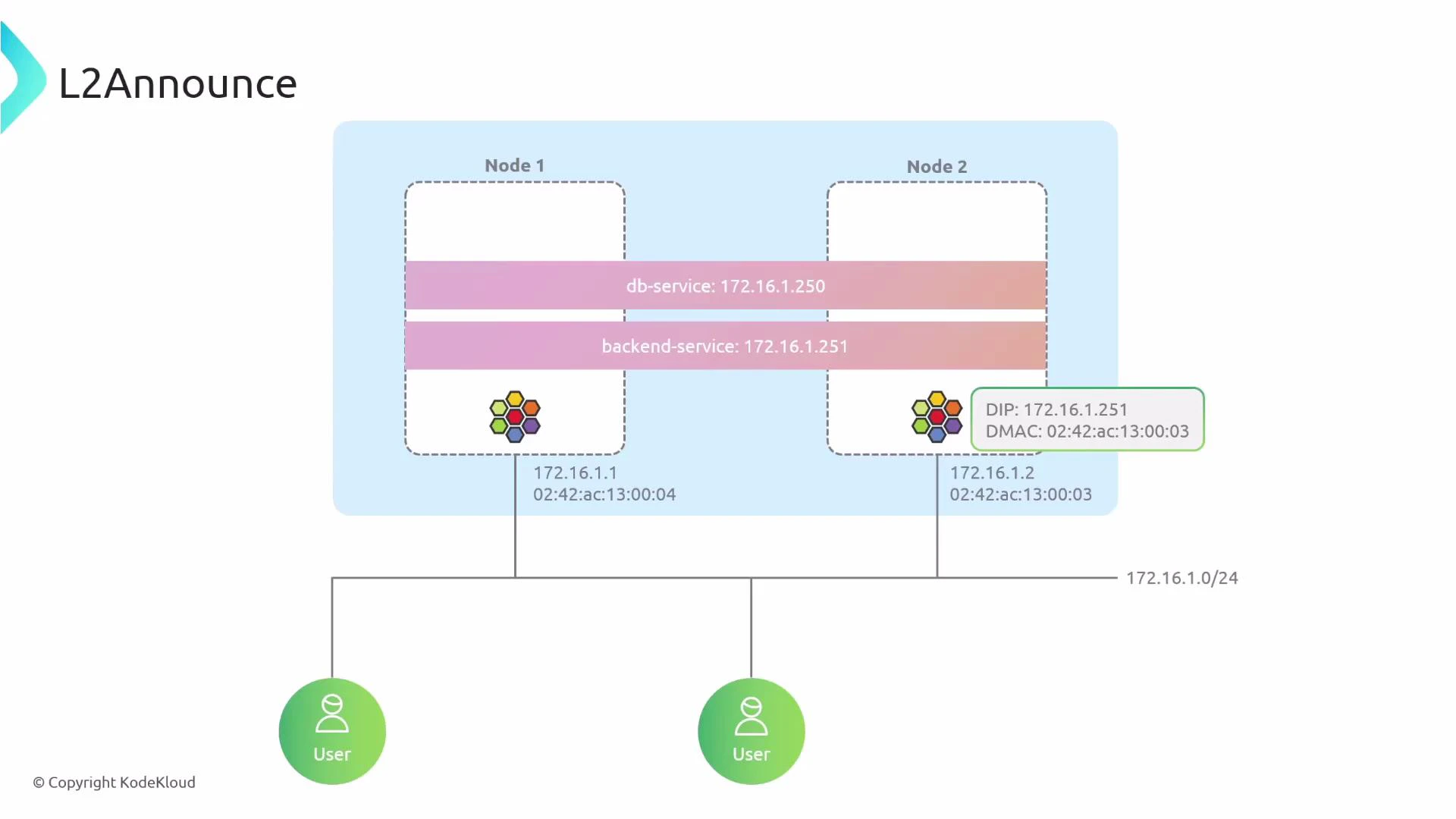
This lesson explains Cilium's L2 announcement feature: how it lets cluster nodes respond to ARP for service IPs on a flat Layer‑2 network so external hosts on the same broadcast domain can reach cluster services without BGP.
How it works at a glance:
* When a Service is assigned an IP on the local L2 subnet (for example, 172.16.1.250), hosts on that subnet may ARP for that IP.
* With L2 announce enabled, Cilium elects a node to claim the service IP via an ARP reply using the node’s MAC.
* The external sender directs traffic to the node’s MAC; that node forwards traffic into the cluster to the service endpoints.
* Different services can be announced by different nodes, enabling per‑service placement and failover without running BGP.
 When to use L2 announce
* Use L2 announce when cluster nodes and external clients share the same L2 broadcast domain (same VLAN/subnet).
* Do not use L2 announce to advertise services across routed networks or different subnets — use BGP-based advertisement for routed domains.
Enable L2 announce only when your nodes and external clients are on the same broadcast domain. If your network is routed across subnets, use BGP-based advertisement instead.
## Benefits and tradeoffs
* Benefits: Simple to configure for flat networks, no router adjacency or BGP required, per-service assignment and automatic failover via leases.
* Tradeoffs: Works only within the same L2 domain; not suitable for multi‑subnet/routed environments.
## Enabling L2 announce
Prerequisite: kube-proxy replacement must be enabled in Cilium (required for L2 announcement).
Example Cilium Helm values (or equivalent installation manifest changes):
```yaml theme={null}
# Cilium Helm values (example)
kubeProxyReplacement: "strict"
l2announcements:
enabled: true
```
After updating your Cilium configuration, restart the operator and daemonset so the new settings are applied:
```bash theme={null}
kubectl -n kube-system rollout restart deployment/cilium-operator
kubectl -n kube-system rollout restart ds/cilium
```
## Cilium L2 Announcement Policy (CiliumL2AnnouncementPolicy)
L2 announcements are controlled per service using the CiliumL2AnnouncementPolicy CRD. A policy selects which services should be announced, which nodes are eligible to respond to ARP, which network interfaces to use, and which IP types to advertise (ExternalIPs, LoadBalancer IPs, etc).
Example policy:
```yaml theme={null}
apiVersion: "cilium.io/v2alpha1"
kind: CiliumL2AnnouncementPolicy
metadata:
name: l2announcement-policy
spec:
serviceSelector:
matchLabels:
app: myapp
nodeSelector:
matchExpressions:
- key: node-role.kubernetes.io/control-plane
operator: DoesNotExist
interfaces:
- "^eth[0-9]+"
externalIPs: true
loadBalancerIPs: true
```
Key fields explained:
| Field | Purpose | Example |
| --------------- | ---------------------------------------------------------------- | -------------------------------------------- |
| serviceSelector | Selects Services by label to announce their service IPs | `app: myapp` |
| nodeSelector | Selects the set of nodes allowed to hold leases / respond to ARP | Exclude control-plane nodes via DoesNotExist |
| interfaces | Regex list of network interface names on which to respond to ARP | `^eth[0-9]+` matches eth0, eth1, ... |
| externalIPs | When true, advertise Service ExternalIPs | `true` |
| loadBalancerIPs | When true, advertise LoadBalancer service IPs | `true` |
Notes:
* The interfaces list accepts regular expressions applied to node interface names, giving fine control over which NICs will answer ARP.
* nodeSelector controls which nodes can acquire a lease for a given service IP; only eligible nodes will be chosen.
## Verifying configuration and runtime state
Describe the policy to inspect spec and status:
```bash theme={null}
kubectl describe ciliuml2announcementpolicy l2announcement-policy
```
Truncated sample output:
```text theme={null}
Name: l2announcement-policy
Namespace:
Labels:
Annotations:
API Version: cilium.io/v2alpha1
Kind: CiliumL2AnnouncementPolicy
Metadata:
Creation Timestamp: 2025-06-03T12:57:06Z
Generation: 1
Resource Version: 1193
UID:
Spec:
Service Selector: app=myapp
Node Selector: (matchExpressions: key=node-role.kubernetes.io/control-plane, operator=DoesNotExist)
Interfaces: ["^eth[0-9]+"]
External IPs: true
Load Balancer IPs: true
Status:
```
Cilium uses Kubernetes Lease objects to assign which node will answer ARP for each service IP. To list leases managed by Cilium:
```bash theme={null}
kubectl -n kube-system get lease
```
Sample lease output:
```text theme={null}
NAME HOLDER AGE
cilium-l2announce-default-app1-service my-cluster-worker2 35m
cilium-l2announce-default-app2-service my-cluster-worker 35m
```
Interpretation:
* HOLDER shows the node currently answering ARP for the service IP.
* If the holder node fails or loses eligibility, the lease will be acquired by another eligible node, which then begins responding — providing automatic failover.
## Troubleshooting tips
* Confirm nodes and external clients are on the same L2 subnet/VLAN.
* Verify the interface regex matches the actual interface name (check with ip link show).
* Ensure kube-proxy replacement is enabled (kubeProxyReplacement: "strict") before enabling l2announcements.
* Inspect Cilium logs on nodes and the cilium-operator for errors about leases or ARP handling:
* kubectl -n kube-system logs ds/cilium
* kubectl -n kube-system logs deployment/cilium-operator
## References
* [Cilium Documentation — L2 announcements](https://docs.cilium.io/en/stable/)
* [Kubernetes Concepts — Services](https://kubernetes.io/docs/concepts/services-networking/service/)
* [Kubernetes Leases API](https://kubernetes.io/docs/reference/generated/kubernetes-api/v1.27/#lease-v1-coordination-k8s-io)
That covers the fundamentals: how Cilium L2 announcement operates on flat L2 networks, how to enable it, how to write per‑service policies, and how to verify which nodes are announcing which service IPs.
When to use L2 announce
* Use L2 announce when cluster nodes and external clients share the same L2 broadcast domain (same VLAN/subnet).
* Do not use L2 announce to advertise services across routed networks or different subnets — use BGP-based advertisement for routed domains.
Enable L2 announce only when your nodes and external clients are on the same broadcast domain. If your network is routed across subnets, use BGP-based advertisement instead.
## Benefits and tradeoffs
* Benefits: Simple to configure for flat networks, no router adjacency or BGP required, per-service assignment and automatic failover via leases.
* Tradeoffs: Works only within the same L2 domain; not suitable for multi‑subnet/routed environments.
## Enabling L2 announce
Prerequisite: kube-proxy replacement must be enabled in Cilium (required for L2 announcement).
Example Cilium Helm values (or equivalent installation manifest changes):
```yaml theme={null}
# Cilium Helm values (example)
kubeProxyReplacement: "strict"
l2announcements:
enabled: true
```
After updating your Cilium configuration, restart the operator and daemonset so the new settings are applied:
```bash theme={null}
kubectl -n kube-system rollout restart deployment/cilium-operator
kubectl -n kube-system rollout restart ds/cilium
```
## Cilium L2 Announcement Policy (CiliumL2AnnouncementPolicy)
L2 announcements are controlled per service using the CiliumL2AnnouncementPolicy CRD. A policy selects which services should be announced, which nodes are eligible to respond to ARP, which network interfaces to use, and which IP types to advertise (ExternalIPs, LoadBalancer IPs, etc).
Example policy:
```yaml theme={null}
apiVersion: "cilium.io/v2alpha1"
kind: CiliumL2AnnouncementPolicy
metadata:
name: l2announcement-policy
spec:
serviceSelector:
matchLabels:
app: myapp
nodeSelector:
matchExpressions:
- key: node-role.kubernetes.io/control-plane
operator: DoesNotExist
interfaces:
- "^eth[0-9]+"
externalIPs: true
loadBalancerIPs: true
```
Key fields explained:
| Field | Purpose | Example |
| --------------- | ---------------------------------------------------------------- | -------------------------------------------- |
| serviceSelector | Selects Services by label to announce their service IPs | `app: myapp` |
| nodeSelector | Selects the set of nodes allowed to hold leases / respond to ARP | Exclude control-plane nodes via DoesNotExist |
| interfaces | Regex list of network interface names on which to respond to ARP | `^eth[0-9]+` matches eth0, eth1, ... |
| externalIPs | When true, advertise Service ExternalIPs | `true` |
| loadBalancerIPs | When true, advertise LoadBalancer service IPs | `true` |
Notes:
* The interfaces list accepts regular expressions applied to node interface names, giving fine control over which NICs will answer ARP.
* nodeSelector controls which nodes can acquire a lease for a given service IP; only eligible nodes will be chosen.
## Verifying configuration and runtime state
Describe the policy to inspect spec and status:
```bash theme={null}
kubectl describe ciliuml2announcementpolicy l2announcement-policy
```
Truncated sample output:
```text theme={null}
Name: l2announcement-policy
Namespace:
Labels:
Annotations:
API Version: cilium.io/v2alpha1
Kind: CiliumL2AnnouncementPolicy
Metadata:
Creation Timestamp: 2025-06-03T12:57:06Z
Generation: 1
Resource Version: 1193
UID:
Spec:
Service Selector: app=myapp
Node Selector: (matchExpressions: key=node-role.kubernetes.io/control-plane, operator=DoesNotExist)
Interfaces: ["^eth[0-9]+"]
External IPs: true
Load Balancer IPs: true
Status:
```
Cilium uses Kubernetes Lease objects to assign which node will answer ARP for each service IP. To list leases managed by Cilium:
```bash theme={null}
kubectl -n kube-system get lease
```
Sample lease output:
```text theme={null}
NAME HOLDER AGE
cilium-l2announce-default-app1-service my-cluster-worker2 35m
cilium-l2announce-default-app2-service my-cluster-worker 35m
```
Interpretation:
* HOLDER shows the node currently answering ARP for the service IP.
* If the holder node fails or loses eligibility, the lease will be acquired by another eligible node, which then begins responding — providing automatic failover.
## Troubleshooting tips
* Confirm nodes and external clients are on the same L2 subnet/VLAN.
* Verify the interface regex matches the actual interface name (check with ip link show).
* Ensure kube-proxy replacement is enabled (kubeProxyReplacement: "strict") before enabling l2announcements.
* Inspect Cilium logs on nodes and the cilium-operator for errors about leases or ARP handling:
* kubectl -n kube-system logs ds/cilium
* kubectl -n kube-system logs deployment/cilium-operator
## References
* [Cilium Documentation — L2 announcements](https://docs.cilium.io/en/stable/)
* [Kubernetes Concepts — Services](https://kubernetes.io/docs/concepts/services-networking/service/)
* [Kubernetes Leases API](https://kubernetes.io/docs/reference/generated/kubernetes-api/v1.27/#lease-v1-coordination-k8s-io)
That covers the fundamentals: how Cilium L2 announcement operates on flat L2 networks, how to enable it, how to write per‑service policies, and how to verify which nodes are announcing which service IPs.