> ## Documentation Index
> Fetch the complete documentation index at: https://notes.kodekloud.com/llms.txt
> Use this file to discover all available pages before exploring further.
# Demo Routing Modes
> Demonstrates Cilium tunnel versus native routing modes, inspects packet flows, and shows required physical network changes to enable native pod subnet routing with static routes or BGP.
This lesson demonstrates Cilium's two routing modes — tunnel (encapsulation) and native routing — by inspecting packet flows for each mode and showing what changes are required on your physical network to enable native routing.
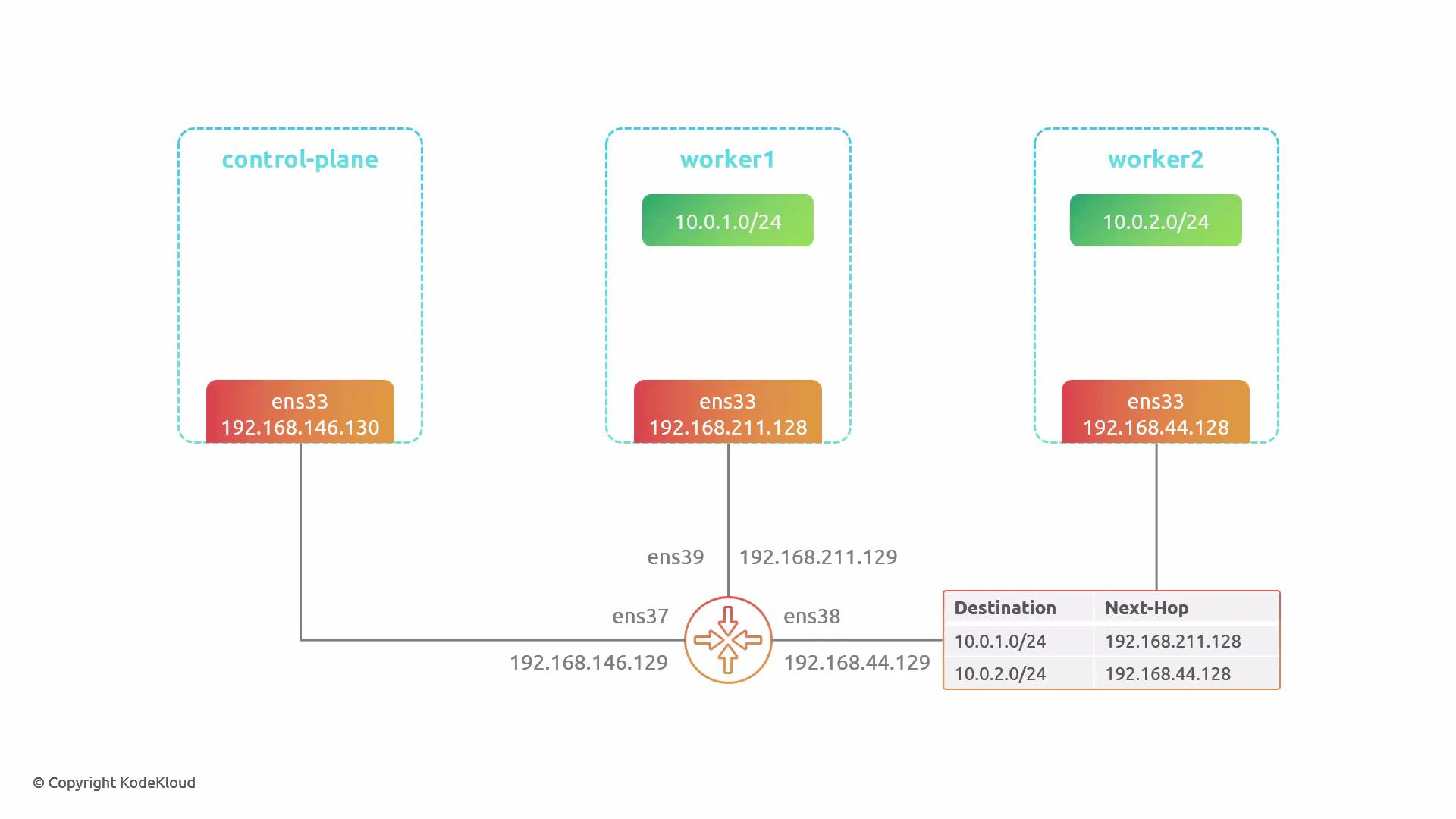
We use a small 3-node cluster (1 control-plane, 2 workers) where each node sits on a different physical network and all networks connect via a central router. The pod CIDRs are allocated by Cilium/Cluster IPAM from 10.0.0.0/8 and are split per node (for example, 10.0.1.0/24 for worker1 and 10.0.2.0/24 for worker2).
We will observe traffic from a pod on worker1 to a pod on worker2 using four terminals: control-plane, worker1, worker2, and router.
By default Cilium uses tunnel mode (VXLAN) to encapsulate pod traffic between nodes, so no changes are required on the physical network for basic pod-to-pod connectivity.
***
## Environment details
* Cluster: 3 nodes — 1 control-plane, 2 workers
* Node physical network interfaces and IPs:
* control-plane: 192.168.146.130 (router .129)
* worker1: 192.168.211.128 (router .129)
* worker2: 192.168.44.128 (router .129)
* Pod CIDR ranges: 10.0.0.0/8 split per node (e.g., 10.0.1.0/24, 10.0.2.0/24)
* Tools used: kubectl, helm, tcpdump, Wireshark
***
## 1) Install Cilium (default: tunnel/encapsulation mode)
Install Cilium using the upstream Helm chart and a default values.yaml (no routing changes). The default uses VXLAN encapsulation.
Install:
```bash theme={null}
helm install cilium cilium/cilium -n kube-system -f values.yaml
```
Verify nodes:
```bash theme={null}
kubectl get node
# NAME STATUS ROLES AGE VERSION
# control-plane Ready control-plane 26d v1.32.3
# worker1 Ready 26d v1.32.3
# worker2 Ready 26d v1.32.3
```
Sample app pods (spread across worker1 and worker2):
```bash theme={null}
kubectl get pod -o wide
# NAME READY STATUS RESTARTS AGE IP NODE
# app1-75c78488c4-5kfpf 1/1 Running 0 58s 10.0.2.80 worker2
# app1-75c78488c4-62mkr 1/1 Running 0 58s 10.0.1.71 worker1
# ...
```
From a pod on worker1, verify connectivity to a pod on worker2:
```bash theme={null}
kubectl exec -it app1-75c78488c4-714pb -- bash
# Inside pod:
ping -c 4 10.0.2.80
# ... successful replies ...
exit
```
With tunnel mode enabled, pod-to-pod traffic works out of the box.
***
## 2) Inspect tunnel-mode traffic on the router
Capture the traffic that flows between nodes on the router (interface that sees inter-node traffic, e.g., `ens38`):
```bash theme={null}
sudo tcpdump -i ens38 -w tunnel-mode.pcap
# Ctrl-C after collecting packets
```
Open the resulting pcap in Wireshark and inspect a tunneled frame. Example (trimmed) of a VXLAN-tunneled frame:
```text theme={null}
Frame 12: 148 bytes on wire (1184 bits), 148 bytes captured (1184 bits)
Ethernet II, Src: VMware_c4:17:04 (00:0c:29:c4:17:04), Dst: VMware_ab:13:e1 (00:0c:29:ab:13:e1)
Internet Protocol Version 4, Src: 192.168.211.128, Dst: 192.168.44.128
User Datagram Protocol, Src Port: 43347, Dst Port: 8472
Virtual eXtensible Local Area Network
Ethernet II, Src: 42:f6:eb:05:a3:55, Dst: c2:06:07:cf:97:e4
Internet Protocol Version 4, Src: 10.0.1.207, Dst: 10.0.2.80
Internet Control Message Protocol (ICMP)
```
Key points for tunnel (VXLAN) mode:
* Outer IP header uses node IPs (e.g., 192.168.x.x).
* Encapsulation uses UDP destination port 8472 (VXLAN).
* Original pod-to-pod Ethernet/IP/ICMP is encapsulated inside VXLAN.
* Physical network only needs to route between node IPs — pod IPs are hidden inside VXLAN.
***
## 3) Switch to native routing (disable encapsulation)
To enable native routing, update your Cilium values.yaml to set routingMode to "native", disable the tunnel (tunnelPort: 0), and configure ipv4NativeRoutingCIDR so Cilium knows which pod CIDRs should be advertised/routed natively.
Example values to change:
```yaml theme={null}
# Enable native routing
routingMode: "native"
# Disable VXLAN/Geneve tunnel (0 disables)
tunnelPort: 0
tunnelSourcePortRange: 0-0
# CIDR(s) to route natively on the wire
ipv4NativeRoutingCIDR: "10.0.0.0/8"
```
Apply the change and restart the operator and agents:
```bash theme={null}
helm upgrade cilium cilium/cilium -n kube-system -f values.yaml
kubectl -n kube-system rollout restart deployment/cilium-operator
kubectl -n kube-system rollout restart daemonset cilium
```
After the agents restart, pods may receive new IP addresses (the same CIDRs may be used, but packets will now be sent natively on the wire).
Notes:
* ipv4NativeRoutingCIDR tells Cilium which pod ranges to put onto the physical network (no encapsulation).
* You can pick a subset of CIDRs to mix tunnel and native behavior if desired.
***
## 4) Native routing: expected connectivity failure until physical routes exist
Once native routing is enabled, pod traffic is sent on the physical network using pod source/destination IPs. If the router does not have routes for the pod CIDRs, packets will be dropped.
Example: Pods after native mode is enabled:
```bash theme={null}
kubectl get pod -o wide
# NAME READY STATUS RESTARTS AGE IP NODE
# app1-75c78488c4-lq842 1/1 Running 0 59s 10.0.1.39 worker1
# app1-75c78488c4-tdpqj 1/1 Running 0 59s 10.0.2.137 worker2
```
Attempting to ping from worker1 to worker2 likely fails initially:
```bash theme={null}
kubectl exec -it app1-75c78488c4-s79d2 -- bash
# inside pod:
ping -c 3 10.0.2.137
# No responses — expected until the router knows how to reach the pod CIDRs
```
When using native routing, your physical network must route the pod CIDR(s). Provide routes via static entries, a dynamic routing protocol (for example, BGP), or another mechanism so other network segments can reach pod subnets.
***
## 5) Capture native-mode traffic on the router (no encapsulation)
Capture packets on the router interface that sees pod traffic (e.g., `ens39`):
```bash theme={null}
sudo tcpdump -i ens39 -w native-mode.pcap
# Ctrl-C after collecting packets
```
Inspect a native-mode packet (ICMP echo request) in Wireshark:
```text theme={null}
Frame 11: 98 bytes on wire (784 bits), 98 bytes captured (784 bits)
Ethernet II, Src: VMware_aa:4a:15, Dst: VMware_c4:17:0e
Internet Protocol Version 4, Src: 10.0.1.111, Dst: 10.0.2.137
Internet Control Message Protocol (ICMP)
Type: 8 (Echo (ping) request)
Code: 0
Checksum: 0x2357 [correct]
```
Key observations for native mode:
* The single IP header uses pod source/destination IPs (10.0.x.x).
* No VXLAN/outer IP header is present.
* Router/physical network must be able to forward pod CIDRs.
***
## 6) Determine per-node pod CIDRs (what to route)
Each node receives a dedicated IPAM range from Cilium. Use the agent debug info to find per-node IPAM allocations.
Find the cilium agent pods and node IPs:
```bash theme={null}
kubectl get pod -n kube-system -o wide | grep -i cilium
# cilium-mvtzv 1/1 Running 0 19m 192.168.211.128 worker1
# cilium-xs6fx 1/1 Running 0 19m 192.168.44.128 worker2
```
Check IPAM allocation per agent:
```bash theme={null}
kubectl exec cilium-mvtzv -n kube-system -- cilium debuginfo | grep IPAM
# IPAM:
kubectl exec cilium-xs6fx -n kube-system -- cilium debuginfo | grep IPAM
# IPAM:
# IPv4: 5/254 allocated from 10.0.2.0/24
```
Thus:
* worker1: 10.0.1.0/24
* worker2: 10.0.2.0/24
These are the CIDRs your router must be made aware of for native routing to work.
***
## 7) Add static routes on the router (quick demo)
Add static routes on the router that map the pod CIDRs to each node's physical IP:
Check current routes:
```bash theme={null}
ip route
# e.g. shows existing connected networks and default route
```
Add routes pointing pod CIDRs to node IPs:
```bash theme={null}
sudo ip route add 10.0.2.0/24 via 192.168.44.128
sudo ip route add 10.0.1.0/24 via 192.168.211.128
```
Verify routes:
```bash theme={null}
ip route
# now shows:
# 10.0.2.0/24 via 192.168.44.128 dev ens38
# 10.0.1.0/24 via 192.168.211.128 dev ens39
```
The router will now forward packets destined for 10.0.2.0/24 to worker2 and 10.0.1.0/24 to worker1.
Note: In production, dynamic routing (BGP) is preferable to manual static routes for maintainability and scaling.
***
## 8) Verify connectivity after adding routes
From the pod on worker1, ping the pod on worker2 again:
```bash theme={null}
kubectl exec -it app1-75c78488c4-s79d2 -- bash
# inside pod:
ping -c 6 10.0.2.137
# Expect successful replies with low latency
```
Once the router knows the pod CIDRs, native-mode pod-to-pod connectivity functions correctly.
***
## Side-by-side comparison (summary)
| Feature | Tunnel Mode (default) | Native Routing |
| --------------------------------------- | ----------------------------------------------------------------- | ---------------------------------------------------------------------------- |
| Packet on wire | Outer IPs = node IPs; inner = pod IPs inside VXLAN | Only pod source/destination IPs on the wire |
| Requires physical routing of pod CIDRs? | No — physical network only needs node IPs | Yes — router must know pod CIDRs (static routes or dynamic routing like BGP) |
| Overhead | Encapsulation (VXLAN/Geneve) — extra bytes + CPU for encaps/decap | Lower overhead — no encapsulation |
| Operational complexity | Lower (works out-of-the-box) | Higher (requires network config) |
| Use case | Simple deployments, heterogeneous networks | Optimized for performance where network can advertise pod subnets |
***
## Final notes and recommendations
* Tunnel mode is convenient for quick deployments or when you cannot change the underlay network. It hides pod IPs from the physical network but adds encapsulation overhead.
* Native routing removes encapsulation overhead and can reduce latency but requires that your physical network be aware of the pod CIDRs. This can be done via static routes for small deployments or dynamic routing (BGP) for production-scale environments.
* For production clusters with many nodes and dynamic topology, prefer a routing protocol (BGP) over manual static routes.
Links and references:
* [Cilium Documentation — Routing Modes](https://docs.cilium.io/)
* [Wireshark](https://www.wireshark.org/)
* [BGP — Wikipedia](https://en.wikipedia.org/wiki/Border_Gateway_Protocol)