> ## Documentation Index
> Fetch the complete documentation index at: https://notes.kodekloud.com/llms.txt
> Use this file to discover all available pages before exploring further.
# IP Address Management IPAM
> Explains how Cilium manages pod IP addresses, comparing Kubernetes host-scope and Cilium cluster-scope IPAM, allocation of per-node CIDRs, operator roles, and configuration options
This article explains how Cilium manages pod IP addresses: how cluster CIDRs are divided into per-node CIDRs, which components allocate those ranges, and the configuration options available in Cilium. You'll learn the differences between Kubernetes host-scope IPAM and Cilium's default cluster-scope IPAM (cluster-pool), plus a quick summary of other supported modes.
When you create a Kubernetes cluster you typically define a cluster-wide Pod CIDR (for example, 10.244.0.0/16). That cluster CIDR defines the pool of addresses available to all pods (10.244.0.0 — 10.244.255.255). Kubernetes does not assign IPs sequentially across the cluster; the cluster CIDR is subdivided into per-node slices. Each node receives a node-specific CIDR (for example, a /24), and pods scheduled to that node receive addresses from that node's slice.
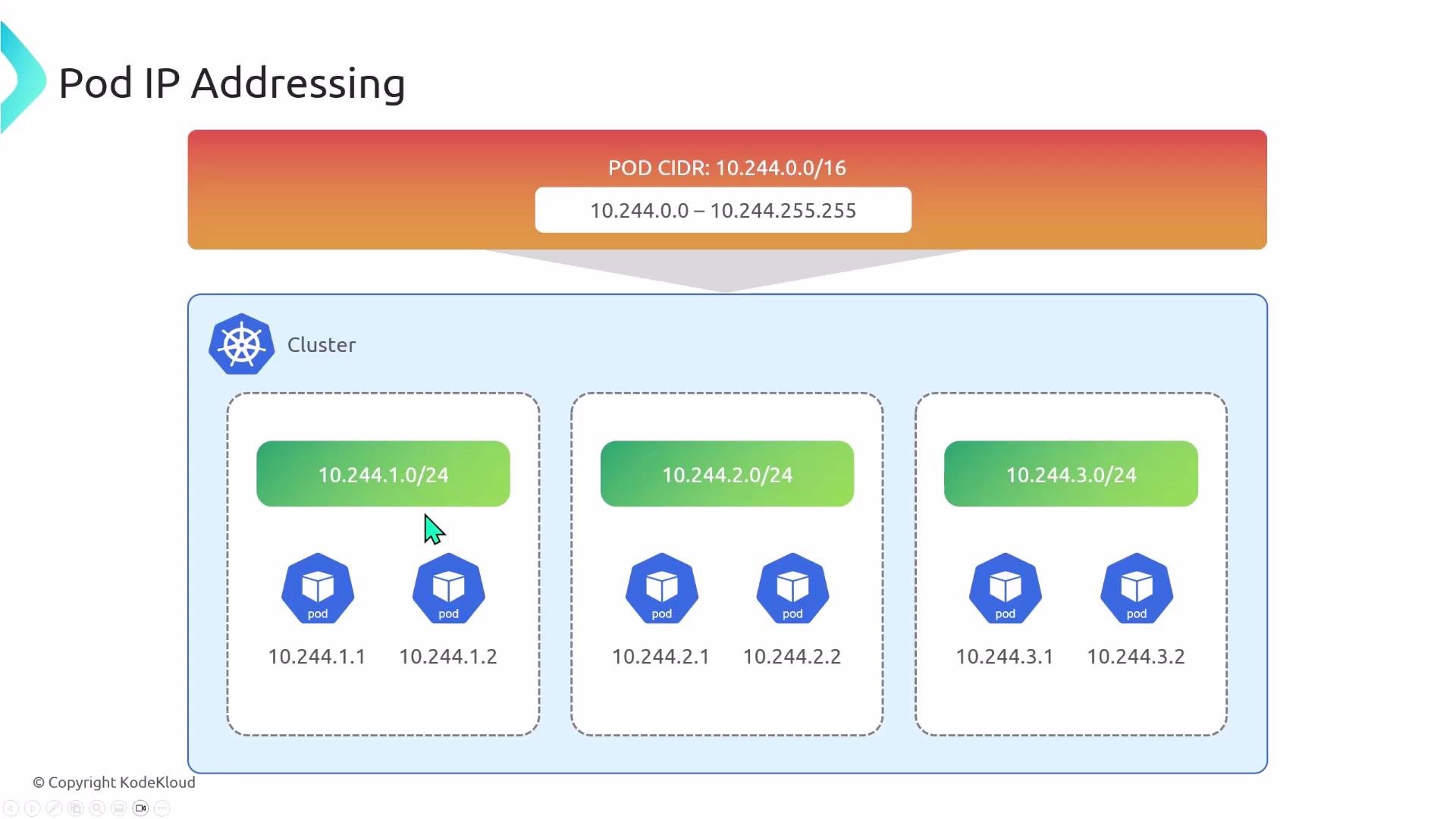 For example, with cluster CIDR 10.244.0.0/16 and per-node /24 allocations:
* Node 1 -> 10.244.1.0/24 -> pod IPs 10.244.1.1, 10.244.1.2, ...
* Node 2 -> 10.244.2.0/24 -> pod IPs 10.244.2.1, 10.244.2.2, ...
* Node 3 -> 10.244.3.0/24 -> pod IPs 10.244.3.1, 10.244.3.2, ...
A node can only assign pod IPs from the CIDR range it has been delegated.
If you need to verify which CIDR a node owns, check the Node resource (for Kubernetes host-scope) or the CiliumNode resource (for cluster-scope). The agent waits for these resources to be populated before assigning pod IPs.
***
## Kubernetes host-scope IPAM
Kubernetes host-scope (sometimes called "kubernetes") delegates per-node CIDR allocation to the Kubernetes control plane (kube-controller-manager). To enable this behavior, kube-controller-manager must be started with node CIDR allocation enabled and the cluster CIDR provided.
Example kube-controller-manager invocation (flags of interest):
```bash theme={null}
# kube-controller-manager example flags (truncated)
kube-controller-manager \
--allocate-node-cidrs=true \
--cluster-cidr=10.244.0.0/16,fd00:10:244::/56 \
--service-cluster-ip-range=10.96.0.0/16,fd00:10:96::/112 \
--kubeconfig=/etc/kubernetes/controller-manager.conf \
--authentication-kubeconfig=/etc/kubernetes/controller-manager.conf \
--authorization-kubeconfig=/etc/kubernetes/controller-manager.conf \
--bind-address=127.0.0.1 \
--client-ca-file=/etc/kubernetes/pki/ca.crt \
--cluster-name=my-cluster \
--cluster-signing-cert-file=/etc/kubernetes/pki/ca.crt \
--cluster-signing-key-file=/etc/kubernetes/pki/ca.key \
--controllers=*,bootstrapsigner,tokencleaner \
--requestheader-client-ca-file=/etc/kubernetes/pki/front-proxy-ca.crt \
--root-ca-file=/etc/kubernetes/pki/ca.crt \
--service-account-private-key-file=/etc/kubernetes/pki/sa.key
```
The controller-manager divides the cluster CIDR into node-sized slices (for example /24s) and records the assigned CIDR(s) on the Kubernetes Node resource. A Node will include the assigned podCIDR(s), for example:
```yaml theme={null}
apiVersion: v1
kind: Node
metadata:
labels:
kubernetes.io/hostname: my-cluster-worker
kubernetes.io/os: linux
name: my-cluster-worker
spec:
podCIDR: 10.244.2.0/24
podCIDRs:
- 10.244.2.0/24
- fd00:10:244:2::/64
```
When Cilium is configured to use Kubernetes host-scope IPAM, the Cilium agent reads the Node resource to learn the node’s podCIDR(s). Configure Cilium to wait for the Node-provided CIDR(s) and set IPAM mode to "kubernetes":
```yaml theme={null}
ipam:
# Configure IP Address Management mode.
# ref: https://docs.cilium.io/en/stable/network/concepts/ipam/
mode: "kubernetes"
k8s:
# Wait for Kubernetes to provide the PodCIDR via the Node resource
requireIPv4PodCIDR: true
requireIPv6PodCIDR: true
```
With these settings, the Cilium agent will not allocate pod IPs until the Node resource contains the podCIDR(s).
***
## Cluster-scope IPAM (Cilium operator) — default
Cilium’s default IPAM mode is cluster-scope, also referred to as "cluster-pool". In this model the Cilium operator manages a cluster-wide pool of CIDRs and delegates per-node subnets directly (rather than relying on kube-controller-manager).
To enable operator-managed allocation set mode to "cluster-pool" and provide the cluster-wide CIDR lists and per-node mask sizes:
```yaml theme={null}
ipam:
mode: "cluster-pool"
operator:
# IPv4 CIDR list to delegate to nodes for IPAM
clusterPoolIPv4PodCIDRList: ["10.0.0.0/8"]
# IPv4 per-node mask size (e.g., 24 -> /24 per node)
clusterPoolIPv4MaskSize: 24
# IPv6 CIDR list and per-node mask size (if using IPv6)
clusterPoolIPv6PodCIDRList: ["fd00::/104"]
clusterPoolIPv6MaskSize: 120
```
In cluster-pool mode the operator creates or updates a CiliumNode custom resource for each Kubernetes node. The Cilium agent watches its node's CiliumNode resource to learn the delegated podCIDR(s). Example CiliumNode:
```yaml theme={null}
apiVersion: cilium.io/v2
kind: CiliumNode
metadata:
generation: 4
labels:
kubernetes.io/hostname: my-cluster-worker2
name: my-cluster-worker2
resourceVersion: "2086"
uid: c1b72e20-f419-400b-a58e-a5d2dc7c7ee8
spec:
ipam:
podCIDRs:
- 10.0.2.0/24
- fd00::200/120
```
Once the CiliumNode resource contains podCIDRs, the agent on that node begins allocating addresses for local pods.
To inspect allocations and verify how many addresses are used on a node, run the Cilium status command in the agent pod on that node:
```bash theme={null}
kubectl exec -n kube-system cilium-cfkzf -- cilium-dbg status --all-addresses
```
Sample output showing the node’s IPAM allocation:
```console theme={null}
Kubernetes: Ok 1.32 (v1.32.2) [linux/amd64]
IPAM: IPv4: 5/254 allocated from 10.0.2.0/24
Allocated addresses:
10.0.2.163 (default/nginx)
10.0.2.236 (router)
10.0.2.244 (default/tshoot-66ddfc9f65-4qc7g)
10.0.2.48 (health)
10.0.2.74 (default/tshoot-66ddfc9f65-7572f)
```
For example, with cluster CIDR 10.244.0.0/16 and per-node /24 allocations:
* Node 1 -> 10.244.1.0/24 -> pod IPs 10.244.1.1, 10.244.1.2, ...
* Node 2 -> 10.244.2.0/24 -> pod IPs 10.244.2.1, 10.244.2.2, ...
* Node 3 -> 10.244.3.0/24 -> pod IPs 10.244.3.1, 10.244.3.2, ...
A node can only assign pod IPs from the CIDR range it has been delegated.
If you need to verify which CIDR a node owns, check the Node resource (for Kubernetes host-scope) or the CiliumNode resource (for cluster-scope). The agent waits for these resources to be populated before assigning pod IPs.
***
## Kubernetes host-scope IPAM
Kubernetes host-scope (sometimes called "kubernetes") delegates per-node CIDR allocation to the Kubernetes control plane (kube-controller-manager). To enable this behavior, kube-controller-manager must be started with node CIDR allocation enabled and the cluster CIDR provided.
Example kube-controller-manager invocation (flags of interest):
```bash theme={null}
# kube-controller-manager example flags (truncated)
kube-controller-manager \
--allocate-node-cidrs=true \
--cluster-cidr=10.244.0.0/16,fd00:10:244::/56 \
--service-cluster-ip-range=10.96.0.0/16,fd00:10:96::/112 \
--kubeconfig=/etc/kubernetes/controller-manager.conf \
--authentication-kubeconfig=/etc/kubernetes/controller-manager.conf \
--authorization-kubeconfig=/etc/kubernetes/controller-manager.conf \
--bind-address=127.0.0.1 \
--client-ca-file=/etc/kubernetes/pki/ca.crt \
--cluster-name=my-cluster \
--cluster-signing-cert-file=/etc/kubernetes/pki/ca.crt \
--cluster-signing-key-file=/etc/kubernetes/pki/ca.key \
--controllers=*,bootstrapsigner,tokencleaner \
--requestheader-client-ca-file=/etc/kubernetes/pki/front-proxy-ca.crt \
--root-ca-file=/etc/kubernetes/pki/ca.crt \
--service-account-private-key-file=/etc/kubernetes/pki/sa.key
```
The controller-manager divides the cluster CIDR into node-sized slices (for example /24s) and records the assigned CIDR(s) on the Kubernetes Node resource. A Node will include the assigned podCIDR(s), for example:
```yaml theme={null}
apiVersion: v1
kind: Node
metadata:
labels:
kubernetes.io/hostname: my-cluster-worker
kubernetes.io/os: linux
name: my-cluster-worker
spec:
podCIDR: 10.244.2.0/24
podCIDRs:
- 10.244.2.0/24
- fd00:10:244:2::/64
```
When Cilium is configured to use Kubernetes host-scope IPAM, the Cilium agent reads the Node resource to learn the node’s podCIDR(s). Configure Cilium to wait for the Node-provided CIDR(s) and set IPAM mode to "kubernetes":
```yaml theme={null}
ipam:
# Configure IP Address Management mode.
# ref: https://docs.cilium.io/en/stable/network/concepts/ipam/
mode: "kubernetes"
k8s:
# Wait for Kubernetes to provide the PodCIDR via the Node resource
requireIPv4PodCIDR: true
requireIPv6PodCIDR: true
```
With these settings, the Cilium agent will not allocate pod IPs until the Node resource contains the podCIDR(s).
***
## Cluster-scope IPAM (Cilium operator) — default
Cilium’s default IPAM mode is cluster-scope, also referred to as "cluster-pool". In this model the Cilium operator manages a cluster-wide pool of CIDRs and delegates per-node subnets directly (rather than relying on kube-controller-manager).
To enable operator-managed allocation set mode to "cluster-pool" and provide the cluster-wide CIDR lists and per-node mask sizes:
```yaml theme={null}
ipam:
mode: "cluster-pool"
operator:
# IPv4 CIDR list to delegate to nodes for IPAM
clusterPoolIPv4PodCIDRList: ["10.0.0.0/8"]
# IPv4 per-node mask size (e.g., 24 -> /24 per node)
clusterPoolIPv4MaskSize: 24
# IPv6 CIDR list and per-node mask size (if using IPv6)
clusterPoolIPv6PodCIDRList: ["fd00::/104"]
clusterPoolIPv6MaskSize: 120
```
In cluster-pool mode the operator creates or updates a CiliumNode custom resource for each Kubernetes node. The Cilium agent watches its node's CiliumNode resource to learn the delegated podCIDR(s). Example CiliumNode:
```yaml theme={null}
apiVersion: cilium.io/v2
kind: CiliumNode
metadata:
generation: 4
labels:
kubernetes.io/hostname: my-cluster-worker2
name: my-cluster-worker2
resourceVersion: "2086"
uid: c1b72e20-f419-400b-a58e-a5d2dc7c7ee8
spec:
ipam:
podCIDRs:
- 10.0.2.0/24
- fd00::200/120
```
Once the CiliumNode resource contains podCIDRs, the agent on that node begins allocating addresses for local pods.
To inspect allocations and verify how many addresses are used on a node, run the Cilium status command in the agent pod on that node:
```bash theme={null}
kubectl exec -n kube-system cilium-cfkzf -- cilium-dbg status --all-addresses
```
Sample output showing the node’s IPAM allocation:
```console theme={null}
Kubernetes: Ok 1.32 (v1.32.2) [linux/amd64]
IPAM: IPv4: 5/254 allocated from 10.0.2.0/24
Allocated addresses:
10.0.2.163 (default/nginx)
10.0.2.236 (router)
10.0.2.244 (default/tshoot-66ddfc9f65-4qc7g)
10.0.2.48 (health)
10.0.2.74 (default/tshoot-66ddfc9f65-7572f)
```
 ***
## Other IPAM modes (summary)
Cilium supports additional IPAM modes for advanced or platform-specific requirements. These modes can enable cloud-native integrations, multi-pool allocations, or external control via CRDs.
| IPAM Mode | Use Case | Notes |
| ----------------------- | ------------------------------------------------------------------------------ | ------------------------------------------------------------------------------------------------- |
| kubernetes (host-scope) | Let kube-controller-manager allocate per-node CIDRs | Simple for clusters that rely on Kubernetes control plane for networking decisions |
| cluster-pool (default) | Let Cilium operator manage a cluster CIDR and delegate per-node subnets | Offers Cilium-managed delegation and is the default for many installations |
| multi-pool | Allocate pod CIDRs from multiple pools and assign workloads to different pools | Useful for multi-tenant or performance-isolated workloads; requires additional annotations/config |
| crd-backed | External or custom IPAM controllers manage allocations via CRDs | Allows advanced customizations and operators to control IP allocations |
***
## Other IPAM modes (summary)
Cilium supports additional IPAM modes for advanced or platform-specific requirements. These modes can enable cloud-native integrations, multi-pool allocations, or external control via CRDs.
| IPAM Mode | Use Case | Notes |
| ----------------------- | ------------------------------------------------------------------------------ | ------------------------------------------------------------------------------------------------- |
| kubernetes (host-scope) | Let kube-controller-manager allocate per-node CIDRs | Simple for clusters that rely on Kubernetes control plane for networking decisions |
| cluster-pool (default) | Let Cilium operator manage a cluster CIDR and delegate per-node subnets | Offers Cilium-managed delegation and is the default for many installations |
| multi-pool | Allocate pod CIDRs from multiple pools and assign workloads to different pools | Useful for multi-tenant or performance-isolated workloads; requires additional annotations/config |
| crd-backed | External or custom IPAM controllers manage allocations via CRDs | Allows advanced customizations and operators to control IP allocations |
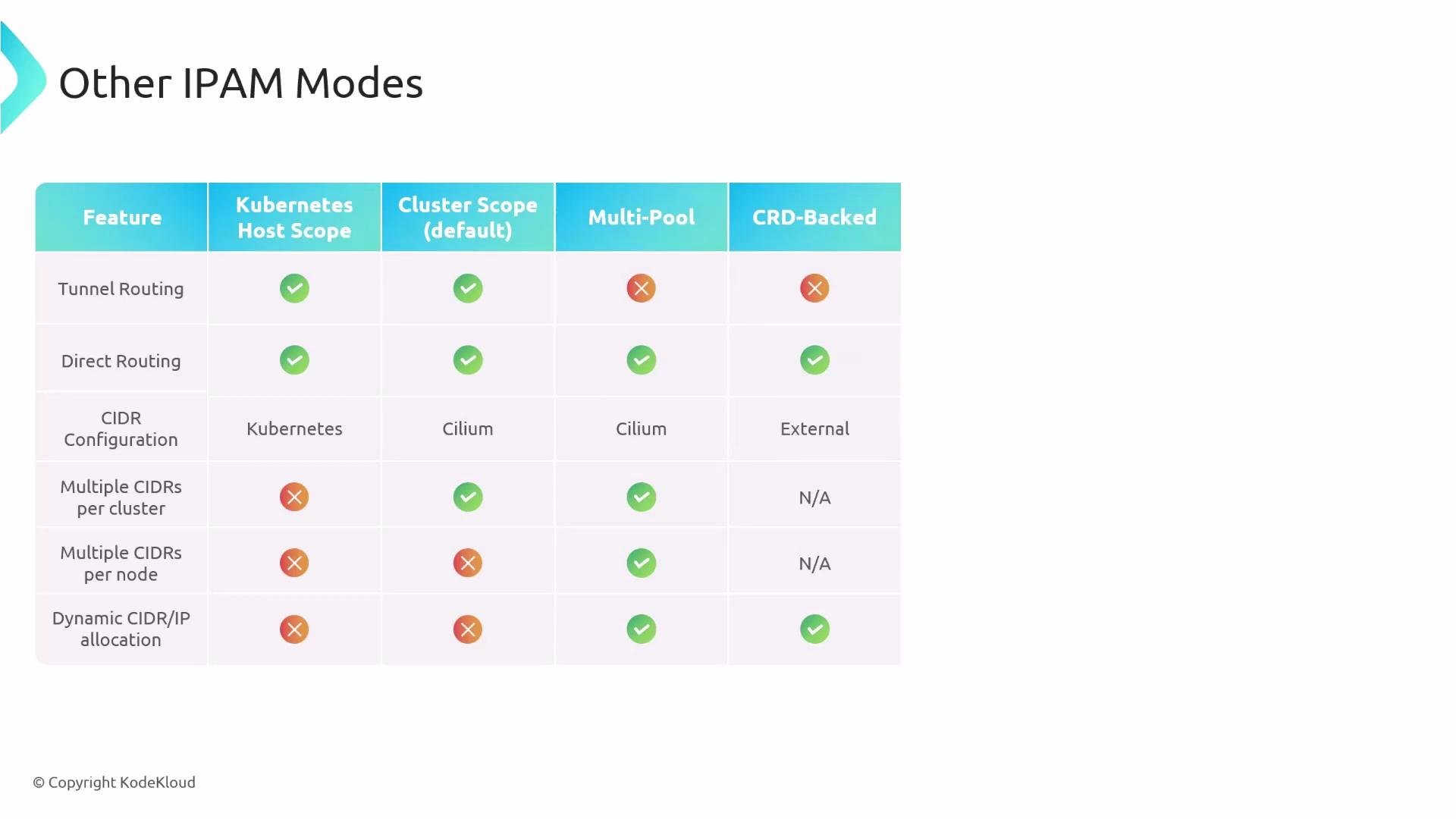 When selecting an IPAM mode, consult the Cilium IPAM documentation to confirm which network features are supported in that mode (not every feature is available for all modes): [https://docs.cilium.io/en/stable/network/concepts/ipam/](https://docs.cilium.io/en/stable/network/concepts/ipam/)
Do not change the IPAM mode of an existing, running cluster. Switching IPAM mode on a live cluster can disrupt networking and cause persistent connectivity issues for running workloads. To change modes safely, deploy a new cluster with the desired IPAM configuration and migrate workloads.
When selecting an IPAM mode, consult the Cilium IPAM documentation to confirm which network features are supported in that mode (not every feature is available for all modes): [https://docs.cilium.io/en/stable/network/concepts/ipam/](https://docs.cilium.io/en/stable/network/concepts/ipam/)
Do not change the IPAM mode of an existing, running cluster. Switching IPAM mode on a live cluster can disrupt networking and cause persistent connectivity issues for running workloads. To change modes safely, deploy a new cluster with the desired IPAM configuration and migrate workloads.