> ## Documentation Index
> Fetch the complete documentation index at: https://notes.kodekloud.com/llms.txt
> Use this file to discover all available pages before exploring further.
# Packet Walk
> Explains high level packet traversal in a Cilium Kubernetes cluster showing eBPF attachments, service DNAT, conntrack, BPF maps and VXLAN encapsulation for pod to pod traffic.
In this lesson we step through the network interfaces created by Cilium and then perform a packet walk: as packets traverse a node and the cluster network, we explain the routing decisions and where eBPF is involved. This is a high-level conceptual overview to show the big picture — it does not dive into eBPF implementation details.
This article simplifies many details for clarity. The exact behaviour may vary with Cilium versions and configuration (for example: kube-proxy replacement, encapsulation mode, or network policy settings).
## Node interfaces and pod addressing
Assume a two-node Kubernetes cluster with Cilium installed. On a node (Node1) the relevant host interfaces might look like:
```bash theme={null}
# On Kubernetes Node1
› ip add
9: eth0@if10: mtu 1500 qdisc noqueue
link/ether 02:42:ac:13:00:03 brd ff:ff:ff:ff:ff:ff link-netnsid 0
inet 172.19.0.3/16 brd 172.19.255.255 scope global eth0
valid_lft forever preferred_lft forever
3: cilium_host@cilium_net: mtu 1500
link/ether 1e:cc:8e:cf:40:b6 brd ff:ff:ff:ff:ff:ff
inet 10.0.2.241/32 scope global cilium_host
valid_lft forever preferred_lft forever
4: cilium_vxlan: mtu 1500 qdisc noqueue
link/ether aa:6f:d9:14:65:3b brd ff:ff:ff:ff:ff:ff
15: lxc0ce577f8ba27@if14: mtu 1500 qdisc noqueue
link/ether d6:8c:de:15:e1:7a brd ff:ff:ff:ff:ff:ff
```
Table: common interfaces and their roles
| Interface | Role / Purpose | Example IP |
| ----------------------- | ----------------------------------------------- | ------------- |
| eth0 | Physical host interface (cluster node network) | 172.19.0.3 |
| cilium\_host | Per-node Cilium host gateway (node CIDR IP) | 10.0.2.241/32 |
| cilium\_vxlan | VXLAN device used for overlay (when tunnelling) | n/a |
| lxc... (veth host-side) | Host-side veth that pairs with pod eth0 | n/a |
To confirm the node CIDR/allocated pool used by Cilium, inspect the agent debug output:
```bash theme={null}
# On Node1 (exec into the cilium agent pod)
› kubectl exec cilium-v5flq -n kube-system -- cilium debuginfo | grep IPAM
IPAM: IPv4: 6/254 allocated from 10.0.2.0/24
```
Node2 in this example has a different allocation:
```bash theme={null}
# On Node2
› kubectl exec cilium-65r9f -n kube-system -- cilium debuginfo | grep IPAM
IPAM: IPv4: 6/254 allocated from 10.0.1.0/24
```
When a pod is scheduled on Node1 (for example, a frontend pod), it receives an isolated network namespace with an eth0 and an IP from the node's pool:
```bash theme={null}
# On the frontend pod
› kubectl exec frontend-5f44ddcfd6-dxmsc -- ip add
1: lo: mtu 65536 qdisc noqueue state UNKNOWN group default qlen 1000
inet 127.0.0.1/8 scope host lo
14: eth0@if15: mtu 1500 qdisc noqueue state UP group default qlen 1000
link/ether 2e:91:24:0d:66:2b brd ff:ff:ff:ff:ff:ff link-netnsid 0
inet 10.0.2.172/32 scope global eth0
```
On the host you’ll see the matching veth peer:
```bash theme={null}
# On Kubernetes Node1
› ip add
15: lxc0ce577f8ba27@if14: mtu 1500 qdisc noqueue state UP group default qlen 1000
link/ether d6:8c:de:15:e1:7a brd ff:ff:ff:ff:ff:ff link-netns cni-23fe68b7-891f-c523-5bcd-69d915414682
```
The pod’s default route points to the local cilium\_host IP (the per-node gateway):
```bash theme={null}
# On the frontend pod
› kubectl exec frontend-5f44ddcfd6-dxmsc -- ip route
default via 10.0.2.241 dev eth0 mtu 1450
10.0.2.241 dev eth0 scope link
```
Pod ARP entry confirms the host-side veth MAC:
```bash theme={null}
› kubectl exec frontend-5f44ddcfd6-dxmsc -- arp -a
? (10.0.2.241) at d6:8c:de:15:e1:7a [ether] on eth0
```
Other pods on the same node follow the same pattern (default route via cilium\_host, host-side veth entries with unique MACs). Node2 shows the same set of interfaces but with a different cilium\_host IP (10.0.1.48 in the example):
```bash theme={null}
# On Kubernetes Node2
› ip add
3: cilium_host@cilium_net: mtu 1500
link/ether ca:8c:0a:ae:98:9a brd ff:ff:ff:ff:ff:ff
inet 10.0.1.48/32 scope global cilium_host
4: cilium_vxlan: mtu 1500 qdisc noqueue
7: eth0@if8: mtu 1500
link/ether 02:42:ac:13:00:02 brd ff:ff:ff:ff:ff:ff
inet 172.19.0.2/16 scope global eth0
```
Example backend pods on Node2 and their host-side veths:
```bash theme={null}
# Pod interfaces on Node2
› kubectl exec backend-7d965dd744-mvcfl -- ip add
10: eth0@if11: ... inet 10.0.1.105/32 scope global eth0
› kubectl exec backend-7d965dd744-zhlld -- ip add
12: eth0@if13: ... inet 10.0.1.128/32 scope global eth0
# Host-side veth entries on Node2
› ip add
11: lxce2a18cced893@if10: ... link/ether d2:10:a4:a5:82:9e
13: lxc6fcb99267c0e@if12: ... link/ether 92:67:3b:3a:79:b7
```
## Services and backends
Create a ClusterIP Service that selects backend pods:
```yaml theme={null}
apiVersion: v1
kind: Service
metadata:
name: backend-service
spec:
selector:
app: backend
ports:
- protocol: TCP
port: 80
targetPort: 80
```
Check the Service in Kubernetes:
```bash theme={null}
> kubectl get service
NAME TYPE CLUSTER-IP EXTERNAL-IP PORT(S) AGE
backend-service ClusterIP 10.96.71.79 80/TCP 18h
```
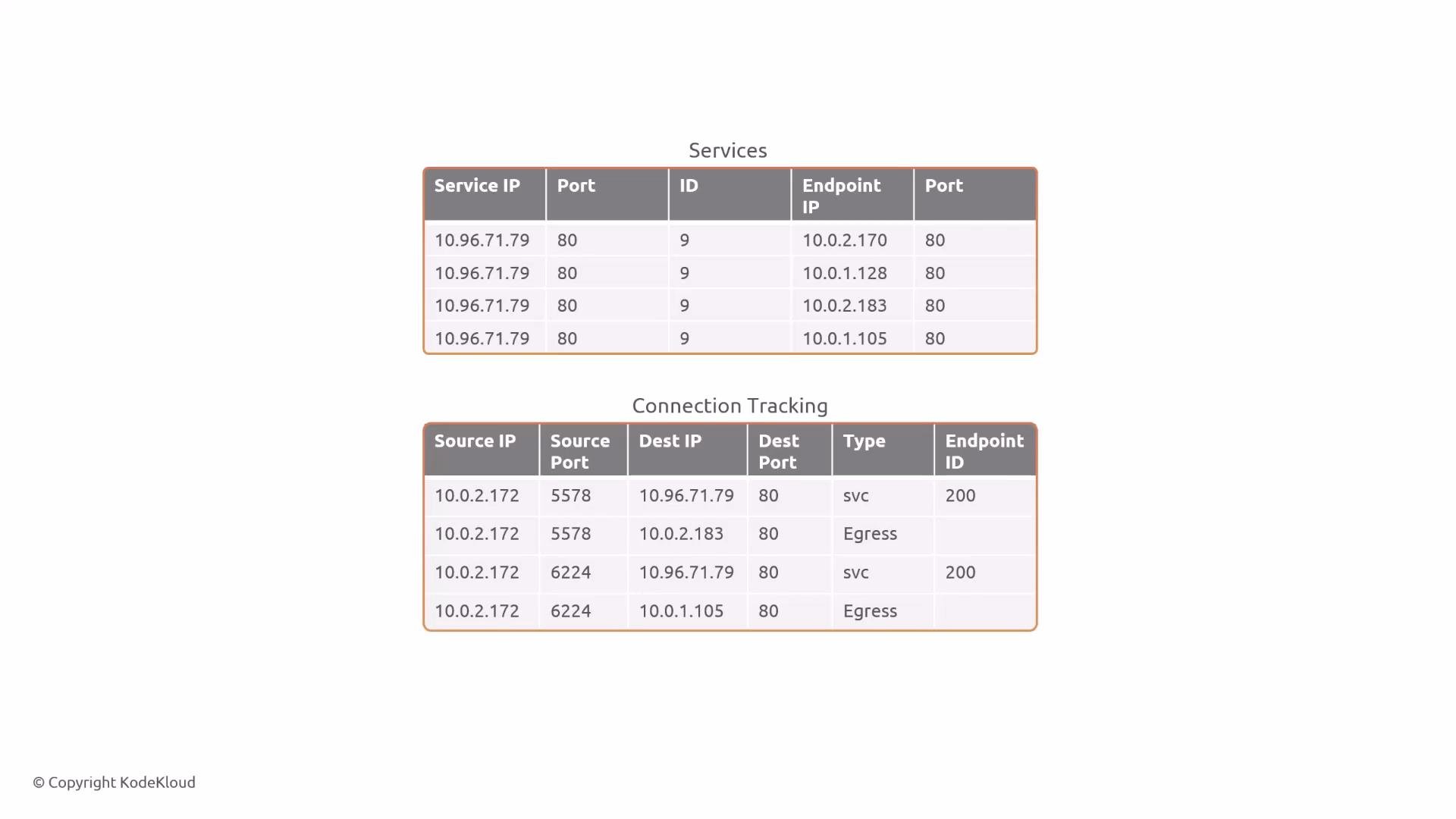
Cilium tracks services and maps them to endpoints. Example from the Cilium agent shows the service IP and active backends:
```bash theme={null}
> kubectl exec cilium-v5flq -n kube-system -- cilium-dbg service list
9 10.96.71.79:80/TCP ClusterIP 1 => 10.0.2.170:80/TCP (active)
2 => 10.0.1.128:80/TCP (active)
3 => 10.0.2.183:80/TCP (active)
4 => 10.0.1.105:80/TCP (active)
```
Table: Service mapping (example)
| Service IP:Port | Endpoint examples |
| --------------- | ---------------------------------------------- |
| 10.96.71.79:80 | 10.0.2.170, 10.0.1.128, 10.0.2.183, 10.0.1.105 |
## High-level eBPF attachments
Cilium attaches eBPF programs to multiple interfaces (per-pod veths, host interfaces, VXLAN device, etc.). Inspect currently attached programs with bpftool from within the Cilium agent:
```bash theme={null}
› kubectl exec cilium-v5flq -n kube-system -- bpftool net show
tc:
cilium_net(2) tcx/ingress cil_to_host prog_id 2382 link_id 58
cilium_host(3) tcx/ingress cil_to_host prog_id 2310 link_id 56
cilium_host(3) tcx/egress cil_from_host prog_id 2347 link_id 57
cilium_vxlan(4) tcx/ingress cil_from_overlay prog_id 2193 link_id 54
cilium_vxlan(4) tcx/egress cil_to_overlay prog_id 2181 link_id 55
lxc_health(6) tcx/ingress cil_from_container prog_id 2427 link_id 61
eth0(9) tcx/ingress cil_from_netdev prog_id 2408 link_id 59
eth0(9) tcx/egress cil_to_netdev prog_id 2397 link_id 60
lxc40936866317e(11) tcx/ingress cil_from_container prog_id 2503 link_id 63
lxc11edf8df708c(13) tcx/ingress cil_from_container prog_id 2515 link_id 65
lxc0ce577f8ba27(15) tcx/ingress cil_from_container prog_id 2507 link_id 64
lxc056a2ce77306(17) tcx/ingress cil_from_container prog_id 2591 link_id 66
flow_dissector:
netfilter:
```
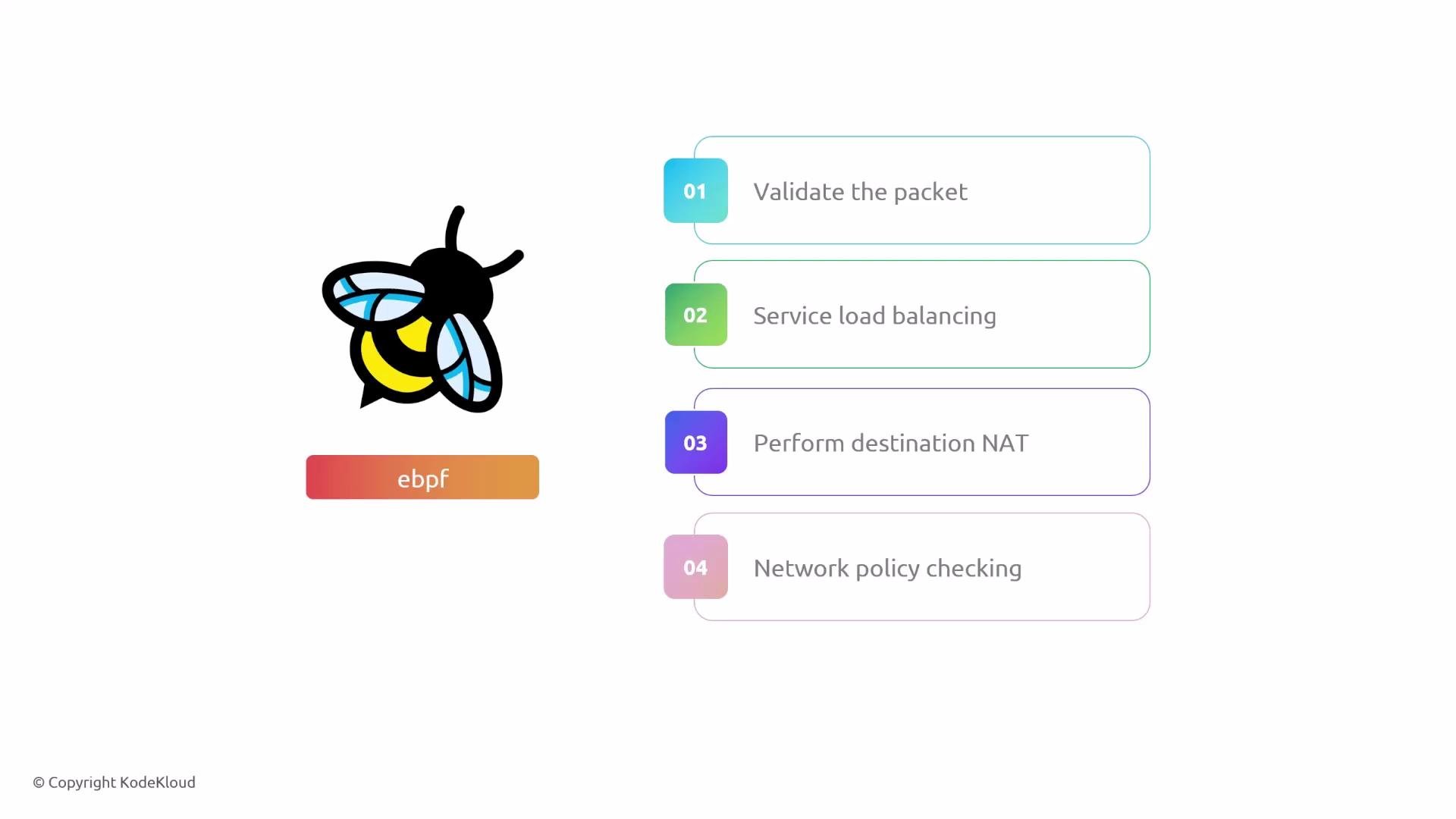
Common responsibilities of these eBPF programs when a packet is seen on an attached interface:
1. Validate and classify the packet
2. Perform service load balancing
3. Apply destination NAT (service translation)
4. Enforce network policy (accept or drop)
 ## Packet walk: pod-to-pod (same node)
Scenario: frontend pod (10.0.2.172) on Node1 sends to backend service (10.96.71.79:80). Example flow tuple:
* sourceIP: 10.0.2.172
* destIP: 10.96.71.79
* sourcePort: ephemeral (e.g., 5578)
* destPort: 80
Flow steps (same-node backend selected):
1. The frontend routes via the node gateway (cilium\_host 10.0.2.241) — the packet travels over the pod-host veth.
2. The eBPF program attached to the pod veth (cil\_from\_container) runs. It looks up the service and selects a backend endpoint.
3. Cilium performs DNAT to the chosen backend pod IP (for example, 10.0.2.183) and creates connection-tracking entries for both directions so that return traffic is correctly translated.
4. The eBPF program looks up the destination in the cilium\_lxc map to obtain destination MAC and host veth info, then forwards the packet out the matching host veth toward the destination pod.
You can inspect BPF maps to debug how Cilium maps pod IPs to host egress interfaces and endpoint IDs. Example lookup (hex key shown) for destination 10.0.2.183 in the cilium\_lxc map:
```bash theme={null}
# Example: lookup cilium_lxc map for destination 10.0.2.183 (hex key shown)
› kubectl exec cilium-v5flq -n kube-system -- bpftool map lookup pinned /sys/fs/bpf/tc/globals/cilium_lxc key hex 0A 00 02 B7 00 00 00 00 00 00 00 00 00 00 00 00 01 00 00 00
key:
0a 00 02 b7 00 00 00 00 00 00 00 00 00 00 00 00
01 00 00 00
value:
11 00 00 00 00 00 52 02 00 00 00 00 00 00 00 00
b6 78 bb f4 81 cc 00 00 92 f5 87 72 a2 1a 00 00
97 7a 00 00 00 00 00 00 00 00 00 00 00 00 00 00
```
Within that value, part encodes the destination MAC and the endpoint ID (for example 0x0252 -> decimal 594). Confirm the endpoint mapping:
```bash theme={null}
› kubectl exec cilium-v5flq -n kube-system -- cilium endpoint get 594
[
{
"id": 594,
"status": {
"external-identifiers": {
"k8s-namespace": "default",
"k8s-pod-name": "backend-7d965dd744-9t9gx"
},
"networking": {
"addressing": [
{
"ipv4": "10.0.2.183"
}
]
}
}
}
]
```
Return traffic for the connection is handled by conntrack and the reverse NAT is applied as responses traverse back through the agent.
## Packet walk: pod-to-pod (reverse direction)
When the backend (10.0.2.183) responds, tuple values flip:
* sourceIP: 10.0.2.183
* destIP: 10.0.2.172
* sourcePort: 80
* destPort: ephemeral (e.g., 5578)
Process:
1. The backend’s default route sends traffic to its cilium\_host (10.0.2.241).
2. The pod’s host veth ingress trigger runs (cil\_from\_container), which checks conntrack for the original flow.
3. Conntrack state is used to rewrite addresses back to the service IP if required and to identify the frontend endpoint (for example endpoint ID 3959).
4. The eBPF program forwards the packet to the frontend pod’s veth.
Example debug lookups for the frontend endpoint:
```bash theme={null}
# Example debug lookup for frontend endpoint
› kubectl exec cilium-v5flq -n kube-system -- bpftool map lookup pinned /sys/fs/bpf/tc/globals/cilium_lxc key hex 0A 00 02 AC 00 00 00 00 00 00 00 00 00 00 01 00 00 00
value:
0f 00 00 00 00 00 77 0f ...
# Verify endpoint ID 3959:
› kubectl exec cilium-v5flq -n kube-system -- cilium endpoint get 3959
[
{
"id": 3959,
"status": {
"external-identifiers": {
"k8s-pod-name": "frontend-5f44ddcfd6-dxmsc",
"pod-name": "default/frontend-5f44ddcfd6-dxmsc"
},
"networking": {
"addressing": [
{
"ipv4": "10.0.2.172"
}
]
}
}
}
]
```
This confirms Cilium’s mapping and the MAC/interface used to forward the packet to the frontend pod.
## Packet walk: pod-to-pod (different nodes)
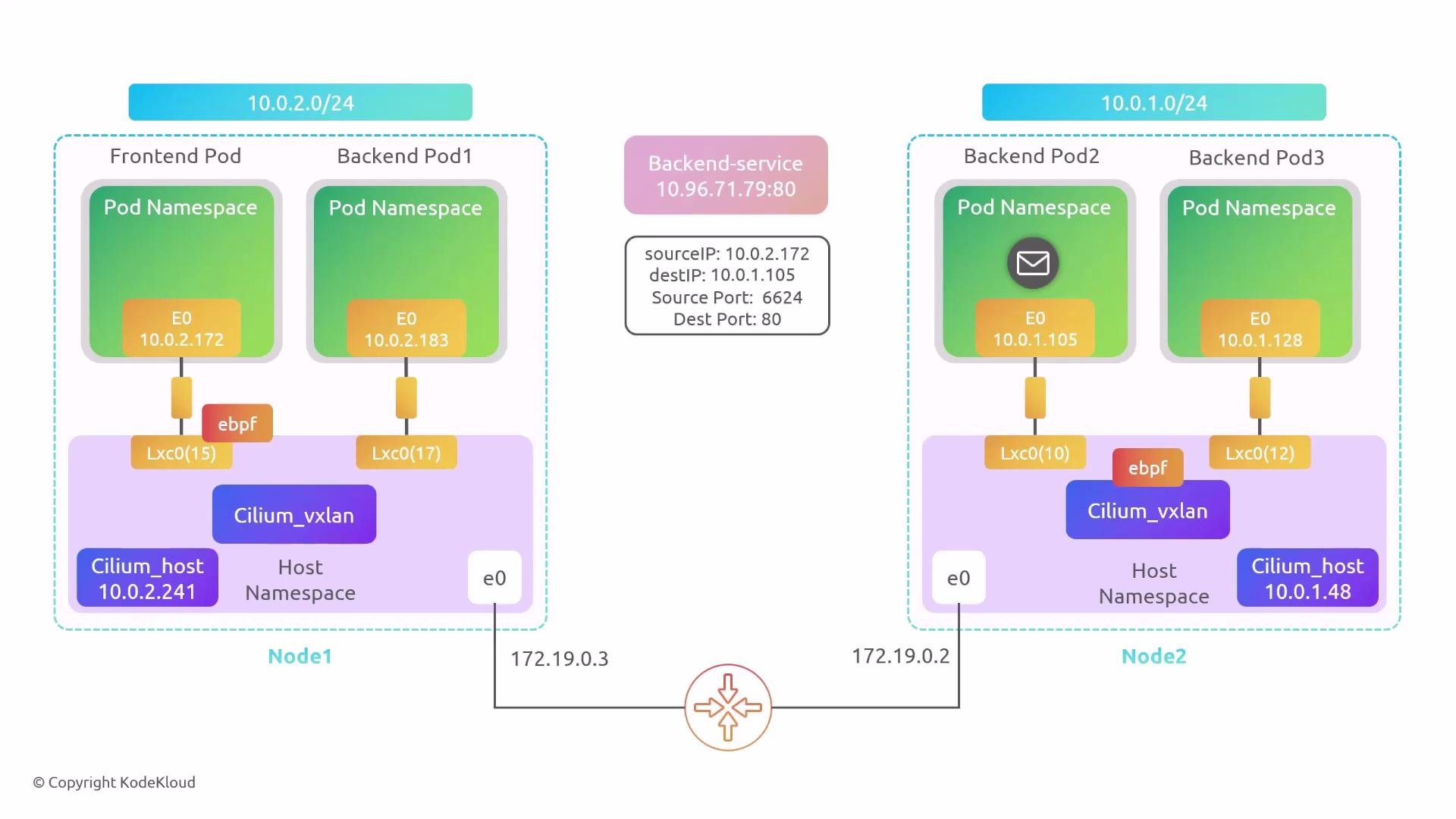
Now consider the frontend (Node1, 10.0.2.172) contacting the service but Cilium selects a backend on Node2 (10.0.1.105). Example initial tuple:
* sourceIP: 10.0.2.172
* destIP: 10.96.71.79
* sourcePort: ephemeral
* destPort: 80
Flow for remote backend:
1. The frontend sends the packet to local cilium\_host (10.0.2.241).
2. The local eBPF program resolves a backend endpoint (10.0.1.105) that belongs to Node2. Cilium looks up the ipcache (cilium\_ipcache) mapping for that pod to obtain the node-level host address (the node’s eth0 IP).
3. Example ipcache lookup shows the host IP for Node2 (172.19.0.2):
```bash theme={null}
# Look up ipcache for endpoint IP (example)
› kubectl exec cilium-v5flq -n kube-system -- bpftool map lookup pinned /sys/fs/bpf/tc/globals/cilium_ipcache key hex 40 00 00 00 00 00 00 01 0a 00 01 69 00 00 00 00 00 00 00 00 00 00
...
value:
97 7a 00 00 ac 13 00 02 00 00 00 00
# ac 13 00 02 -> 172.19.0.2 (host IP of Node2)
```
4. Because the backend is remote and the cluster is using VXLAN encapsulation, Cilium encapsulates the packet. The outer packet uses Node1 and Node2 host IPs as the VXLAN outer source/destination and egresses via cilium\_vxlan.
5. On Node2, the VXLAN decapsulated packet arrives on cilium\_vxlan. The eBPF program attached to that device (cil\_from\_overlay) decapsulates and then performs an inner-packet lookup in cilium\_lxc to find the destination MAC and host veth to forward to the pod.
Example lookup on Node2 for pod 10.0.1.105:
```bash theme={null}
# On Node2: lookup cilium_lxc for the remote-destination pod 10.0.1.105
› kubectl exec cilium-65r9f -n kube-system -- bpftool map lookup pinned /sys/fs/bpf/tc/globals/cilium_lxc key hex 0A 00 01 69 00 00 00 00 00 00 00 00 00 01 00 00 00
value:
0b 00 00 00 00 9e 04 00 00 00 ...
f2 68 f8 83 61 0e 00 00 d2 10 a4 a5 82 9e 00 00
# the value includes destination MAC f2:68:f8:83:61:0e and host-side veth info
```
Verify the backend pod interface and MAC:
```bash theme={null}
> kubectl exec backend-7d965dd744-mvcfl -- ip add
10: eth0@if11: ... inet 10.0.1.105/32 scope global eth0
link/ether f2:68:f8:83:61:0e
```
Decode the endpoint identity from the map value (e.g., 0x9e04 -> endpoint ID 1182) and confirm:
```bash theme={null}
> kubectl exec cilium-65r9f -n kube-system -- cilium endpoint get 1182
[
{
"id": 1182,
"status": {
"external-identifiers": {
"k8s-pod-name": "backend-7d965dd744-mvcfl",
"pod-name": "default/backend-7d965dd744-mvcfl"
},
"networking": {
"addressing": [
{
"ipv4": "10.0.1.105"
}
]
}
}
}
]
```
Node2 forwards the inner packet to the correct veth and the destination pod receives it. Return traffic reverses this process: pod -> host veth -> cilium\_host -> VXLAN encapsulate -> Node1 -> decapsulate -> forward to frontend pod. Conntrack ensures NAT and correct service semantics.
## Packet walk: pod-to-pod (same node)
Scenario: frontend pod (10.0.2.172) on Node1 sends to backend service (10.96.71.79:80). Example flow tuple:
* sourceIP: 10.0.2.172
* destIP: 10.96.71.79
* sourcePort: ephemeral (e.g., 5578)
* destPort: 80
Flow steps (same-node backend selected):
1. The frontend routes via the node gateway (cilium\_host 10.0.2.241) — the packet travels over the pod-host veth.
2. The eBPF program attached to the pod veth (cil\_from\_container) runs. It looks up the service and selects a backend endpoint.
3. Cilium performs DNAT to the chosen backend pod IP (for example, 10.0.2.183) and creates connection-tracking entries for both directions so that return traffic is correctly translated.
4. The eBPF program looks up the destination in the cilium\_lxc map to obtain destination MAC and host veth info, then forwards the packet out the matching host veth toward the destination pod.
You can inspect BPF maps to debug how Cilium maps pod IPs to host egress interfaces and endpoint IDs. Example lookup (hex key shown) for destination 10.0.2.183 in the cilium\_lxc map:
```bash theme={null}
# Example: lookup cilium_lxc map for destination 10.0.2.183 (hex key shown)
› kubectl exec cilium-v5flq -n kube-system -- bpftool map lookup pinned /sys/fs/bpf/tc/globals/cilium_lxc key hex 0A 00 02 B7 00 00 00 00 00 00 00 00 00 00 00 00 01 00 00 00
key:
0a 00 02 b7 00 00 00 00 00 00 00 00 00 00 00 00
01 00 00 00
value:
11 00 00 00 00 00 52 02 00 00 00 00 00 00 00 00
b6 78 bb f4 81 cc 00 00 92 f5 87 72 a2 1a 00 00
97 7a 00 00 00 00 00 00 00 00 00 00 00 00 00 00
```
Within that value, part encodes the destination MAC and the endpoint ID (for example 0x0252 -> decimal 594). Confirm the endpoint mapping:
```bash theme={null}
› kubectl exec cilium-v5flq -n kube-system -- cilium endpoint get 594
[
{
"id": 594,
"status": {
"external-identifiers": {
"k8s-namespace": "default",
"k8s-pod-name": "backend-7d965dd744-9t9gx"
},
"networking": {
"addressing": [
{
"ipv4": "10.0.2.183"
}
]
}
}
}
]
```
Return traffic for the connection is handled by conntrack and the reverse NAT is applied as responses traverse back through the agent.
## Packet walk: pod-to-pod (reverse direction)
When the backend (10.0.2.183) responds, tuple values flip:
* sourceIP: 10.0.2.183
* destIP: 10.0.2.172
* sourcePort: 80
* destPort: ephemeral (e.g., 5578)
Process:
1. The backend’s default route sends traffic to its cilium\_host (10.0.2.241).
2. The pod’s host veth ingress trigger runs (cil\_from\_container), which checks conntrack for the original flow.
3. Conntrack state is used to rewrite addresses back to the service IP if required and to identify the frontend endpoint (for example endpoint ID 3959).
4. The eBPF program forwards the packet to the frontend pod’s veth.
Example debug lookups for the frontend endpoint:
```bash theme={null}
# Example debug lookup for frontend endpoint
› kubectl exec cilium-v5flq -n kube-system -- bpftool map lookup pinned /sys/fs/bpf/tc/globals/cilium_lxc key hex 0A 00 02 AC 00 00 00 00 00 00 00 00 00 00 01 00 00 00
value:
0f 00 00 00 00 00 77 0f ...
# Verify endpoint ID 3959:
› kubectl exec cilium-v5flq -n kube-system -- cilium endpoint get 3959
[
{
"id": 3959,
"status": {
"external-identifiers": {
"k8s-pod-name": "frontend-5f44ddcfd6-dxmsc",
"pod-name": "default/frontend-5f44ddcfd6-dxmsc"
},
"networking": {
"addressing": [
{
"ipv4": "10.0.2.172"
}
]
}
}
}
]
```
This confirms Cilium’s mapping and the MAC/interface used to forward the packet to the frontend pod.
## Packet walk: pod-to-pod (different nodes)
Now consider the frontend (Node1, 10.0.2.172) contacting the service but Cilium selects a backend on Node2 (10.0.1.105). Example initial tuple:
* sourceIP: 10.0.2.172
* destIP: 10.96.71.79
* sourcePort: ephemeral
* destPort: 80
Flow for remote backend:
1. The frontend sends the packet to local cilium\_host (10.0.2.241).
2. The local eBPF program resolves a backend endpoint (10.0.1.105) that belongs to Node2. Cilium looks up the ipcache (cilium\_ipcache) mapping for that pod to obtain the node-level host address (the node’s eth0 IP).
3. Example ipcache lookup shows the host IP for Node2 (172.19.0.2):
```bash theme={null}
# Look up ipcache for endpoint IP (example)
› kubectl exec cilium-v5flq -n kube-system -- bpftool map lookup pinned /sys/fs/bpf/tc/globals/cilium_ipcache key hex 40 00 00 00 00 00 00 01 0a 00 01 69 00 00 00 00 00 00 00 00 00 00
...
value:
97 7a 00 00 ac 13 00 02 00 00 00 00
# ac 13 00 02 -> 172.19.0.2 (host IP of Node2)
```
4. Because the backend is remote and the cluster is using VXLAN encapsulation, Cilium encapsulates the packet. The outer packet uses Node1 and Node2 host IPs as the VXLAN outer source/destination and egresses via cilium\_vxlan.
5. On Node2, the VXLAN decapsulated packet arrives on cilium\_vxlan. The eBPF program attached to that device (cil\_from\_overlay) decapsulates and then performs an inner-packet lookup in cilium\_lxc to find the destination MAC and host veth to forward to the pod.
Example lookup on Node2 for pod 10.0.1.105:
```bash theme={null}
# On Node2: lookup cilium_lxc for the remote-destination pod 10.0.1.105
› kubectl exec cilium-65r9f -n kube-system -- bpftool map lookup pinned /sys/fs/bpf/tc/globals/cilium_lxc key hex 0A 00 01 69 00 00 00 00 00 00 00 00 00 01 00 00 00
value:
0b 00 00 00 00 9e 04 00 00 00 ...
f2 68 f8 83 61 0e 00 00 d2 10 a4 a5 82 9e 00 00
# the value includes destination MAC f2:68:f8:83:61:0e and host-side veth info
```
Verify the backend pod interface and MAC:
```bash theme={null}
> kubectl exec backend-7d965dd744-mvcfl -- ip add
10: eth0@if11: ... inet 10.0.1.105/32 scope global eth0
link/ether f2:68:f8:83:61:0e
```
Decode the endpoint identity from the map value (e.g., 0x9e04 -> endpoint ID 1182) and confirm:
```bash theme={null}
> kubectl exec cilium-65r9f -n kube-system -- cilium endpoint get 1182
[
{
"id": 1182,
"status": {
"external-identifiers": {
"k8s-pod-name": "backend-7d965dd744-mvcfl",
"pod-name": "default/backend-7d965dd744-mvcfl"
},
"networking": {
"addressing": [
{
"ipv4": "10.0.1.105"
}
]
}
}
}
]
```
Node2 forwards the inner packet to the correct veth and the destination pod receives it. Return traffic reverses this process: pod -> host veth -> cilium\_host -> VXLAN encapsulate -> Node1 -> decapsulate -> forward to frontend pod. Conntrack ensures NAT and correct service semantics.
 ## Wrapping up
This lesson summarized the higher-level packet flow when using Cilium with eBPF:
* Pods connect to the host via per-pod veth pairs; the per-node cilium\_host acts as the pod gateway.
* eBPF programs are attached to many interfaces (pod veths, host, vxlan) and perform packet validation, load balancing, DNAT, and policy enforcement.
* Cilium uses BPF maps (for example cilium\_lxc and cilium\_ipcache) for fast lookups of MACs, endpoint IDs and node mappings.
* For remote endpoints Cilium encapsulates traffic (VXLAN in this example) using node IPs as outer addresses, decapsulates on the destination node and forwards to the pod.
* Connection tracking carries state for DNAT and reverse translation so services behave as expected.
## Wrapping up
This lesson summarized the higher-level packet flow when using Cilium with eBPF:
* Pods connect to the host via per-pod veth pairs; the per-node cilium\_host acts as the pod gateway.
* eBPF programs are attached to many interfaces (pod veths, host, vxlan) and perform packet validation, load balancing, DNAT, and policy enforcement.
* Cilium uses BPF maps (for example cilium\_lxc and cilium\_ipcache) for fast lookups of MACs, endpoint IDs and node mappings.
* For remote endpoints Cilium encapsulates traffic (VXLAN in this example) using node IPs as outer addresses, decapsulates on the destination node and forwards to the pod.
* Connection tracking carries state for DNAT and reverse translation so services behave as expected.
 Conceptual reminder: the ordering of eBPF hooks and specific packet transformations can vary with Cilium configuration (encapsulation vs. direct routing, kube-proxy replacement, etc.), kernel versions and user-space tooling. Use the Cilium debugging tools and bpftool to inspect live behaviour in your environment.
## Links and references
* Cilium documentation: [https://cilium.io/docs/](https://cilium.io/docs/)
* Kubernetes concepts: [https://kubernetes.io/docs/concepts/overview/what-is-kubernetes/](https://kubernetes.io/docs/concepts/overview/what-is-kubernetes/)
* bpftool reference: [https://man7.org/linux/man-pages/man8/bpftool.8.html](https://man7.org/linux/man-pages/man8/bpftool.8.html)
Conceptual reminder: the ordering of eBPF hooks and specific packet transformations can vary with Cilium configuration (encapsulation vs. direct routing, kube-proxy replacement, etc.), kernel versions and user-space tooling. Use the Cilium debugging tools and bpftool to inspect live behaviour in your environment.
## Links and references
* Cilium documentation: [https://cilium.io/docs/](https://cilium.io/docs/)
* Kubernetes concepts: [https://kubernetes.io/docs/concepts/overview/what-is-kubernetes/](https://kubernetes.io/docs/concepts/overview/what-is-kubernetes/)
* bpftool reference: [https://man7.org/linux/man-pages/man8/bpftool.8.html](https://man7.org/linux/man-pages/man8/bpftool.8.html)