> ## Documentation Index
> Fetch the complete documentation index at: https://notes.kodekloud.com/llms.txt
> Use this file to discover all available pages before exploring further.
# Policy Audit Mode
> Explains Cilium's policy audit mode for observing would-be allows or denies, how to enable globally or per-endpoint, and how to inspect audited flows with Hubble
In this lesson you'll learn how Cilium's policy audit mode works and how to enable it. Policy audit mode lets you observe what a CiliumNetworkPolicy would do (allow or deny) without actually dropping traffic. This is useful for validating policies safely before enforcing them in production.
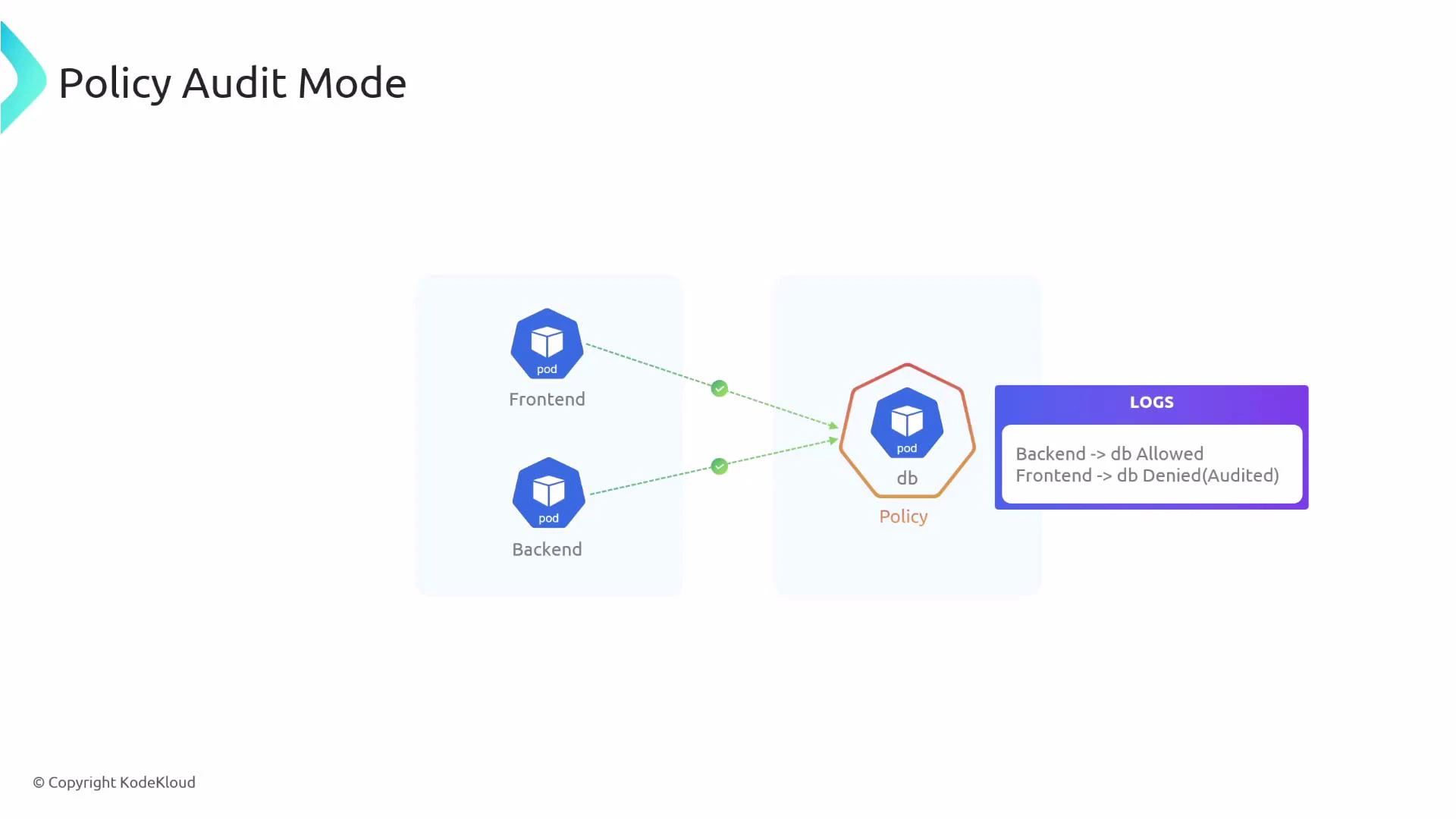
What does audit mode look like in practice? Consider three pods: frontend, backend, and db. You apply a policy that selects the db pod and allows ingress only from backend:
```yaml theme={null}
apiVersion: "cilium.io/v2"
kind: CiliumNetworkPolicy
metadata:
name: "audit-example"
spec:
endpointSelector:
matchLabels:
app: db
ingress:
- fromEndpoints:
- matchLabels:
app: backend
```
With audit mode enabled, traffic that would normally be denied (for example, frontend -> db) is still allowed, but Cilium logs that the flow would have been denied. This enables safe, observable policy rollouts without blackholing traffic.
 Why use policy audit mode?
* Validate policies by observing “would-be” denies without impacting live traffic.
* Identify false positives or unintended blocks before switching to enforcement.
* Roll out complex network policies gradually and safely.
Verdicts and their meanings (quick reference):
| Policy Verdict | Meaning |
| ------------------------- | ---------------------------------------------------------------------------------------------------- |
| none (INGRESS AUDITED) | Traffic would be denied by policy, but audit mode allowed the flow and recorded the audited verdict. |
| L3-Only (INGRESS ALLOWED) | Traffic is allowed by the policy (L3 match) and is permitted. |
| other verdicts | May indicate more specific L4/L7 evaluation — inspect Hubble logs for details. |
How to enable audit mode
There are two ways to enable policy audit mode:
1. Globally (all endpoints) via Helm — requires restarting Cilium components.
2. Per-endpoint (specific endpoints) using cilium-dbg — no cluster-wide restart required.
Enable audit mode globally
* Edit your Cilium Helm chart values to turn on audit mode:
```yaml theme={null}
policyAuditMode: true
```
* After updating Helm values, restart the Cilium operator and agent so the change takes effect:
```bash theme={null}
kubectl -n kube-system rollout restart deployment/cilium-operator
kubectl -n kube-system rollout restart daemonset/cilium
```
Enable audit mode for a specific endpoint
* Use cilium-dbg inside a cilium-agent pod to change a single endpoint's configuration. Replace variables with your values:
```bash theme={null}
# Set these variables appropriately
CILIUM_NAMESPACE=kube-system
CILIUM_POD=
ENDPOINT=
kubectl -n "$CILIUM_NAMESPACE" exec "$CILIUM_POD" -c cilium-agent -- \
cilium-dbg endpoint config "$ENDPOINT" PolicyAuditMode=Enabled
```
Inspecting audited flows with Hubble
After enabling audit mode (globally or per-endpoint), use Hubble to observe flows and policy verdicts. Audited (would-be denied) traffic is labeled with a policy verdict of "none" and the text "INGRESS AUDITED". Allowed traffic will show the appropriate allowed verdict and "INGRESS ALLOWED".
Example: frontend -> db (audited, would be denied)
```bash theme={null}
kubectl -n kube-system exec cilium-pvq7s -- hubble observe flows -t policy-verdict --last 1
# Jun 3 06:57:16.456: default/frontend-5f44ddcfd6-lbvlz:35256 (ID:6443) -> default/db-584f4c666-wjfkq:80 (ID:6942) policy-verdict:none INGRESS AUDITED (TCP Flags: SYN)
```
Example: backend -> db (allowed by policy)
```bash theme={null}
kubectl -n kube-system exec cilium-pvq7s -- hubble observe flows -t policy-verdict --last 1
# Jun 3 07:00:52.959: default/backend-7d965dd744-gvpmt:53198 (ID:7661) -> default/db-584f4c666-wjfkq:80 (ID:6942) policy-verdict:L3-Only INGRESS ALLOWED (TCP Flags: SYN)
```
Policy audit mode is ideal for testing and validating network policies safely. Use it to identify unexpected denies and tune your rules before switching to enforcement.
Audit mode does not provide network isolation or enforce security controls. Do not rely on audit mode for protection — enable policy enforcement only after you have validated the behavior.
Links and references
* Cilium Helm chart values: [https://docs.cilium.io/en/stable/gettingstarted/helm/](https://docs.cilium.io/en/stable/gettingstarted/helm/)
* cilium-dbg tool: [https://docs.cilium.io/en/stable/tools/cilium-dbg/](https://docs.cilium.io/en/stable/tools/cilium-dbg/)
* Hubble (observability): [https://docs.cilium.io/en/stable/gettingstarted/hubble/](https://docs.cilium.io/en/stable/gettingstarted/hubble/)
* Cilium documentation: [https://docs.cilium.io/](https://docs.cilium.io/)
Why use policy audit mode?
* Validate policies by observing “would-be” denies without impacting live traffic.
* Identify false positives or unintended blocks before switching to enforcement.
* Roll out complex network policies gradually and safely.
Verdicts and their meanings (quick reference):
| Policy Verdict | Meaning |
| ------------------------- | ---------------------------------------------------------------------------------------------------- |
| none (INGRESS AUDITED) | Traffic would be denied by policy, but audit mode allowed the flow and recorded the audited verdict. |
| L3-Only (INGRESS ALLOWED) | Traffic is allowed by the policy (L3 match) and is permitted. |
| other verdicts | May indicate more specific L4/L7 evaluation — inspect Hubble logs for details. |
How to enable audit mode
There are two ways to enable policy audit mode:
1. Globally (all endpoints) via Helm — requires restarting Cilium components.
2. Per-endpoint (specific endpoints) using cilium-dbg — no cluster-wide restart required.
Enable audit mode globally
* Edit your Cilium Helm chart values to turn on audit mode:
```yaml theme={null}
policyAuditMode: true
```
* After updating Helm values, restart the Cilium operator and agent so the change takes effect:
```bash theme={null}
kubectl -n kube-system rollout restart deployment/cilium-operator
kubectl -n kube-system rollout restart daemonset/cilium
```
Enable audit mode for a specific endpoint
* Use cilium-dbg inside a cilium-agent pod to change a single endpoint's configuration. Replace variables with your values:
```bash theme={null}
# Set these variables appropriately
CILIUM_NAMESPACE=kube-system
CILIUM_POD=
ENDPOINT=
kubectl -n "$CILIUM_NAMESPACE" exec "$CILIUM_POD" -c cilium-agent -- \
cilium-dbg endpoint config "$ENDPOINT" PolicyAuditMode=Enabled
```
Inspecting audited flows with Hubble
After enabling audit mode (globally or per-endpoint), use Hubble to observe flows and policy verdicts. Audited (would-be denied) traffic is labeled with a policy verdict of "none" and the text "INGRESS AUDITED". Allowed traffic will show the appropriate allowed verdict and "INGRESS ALLOWED".
Example: frontend -> db (audited, would be denied)
```bash theme={null}
kubectl -n kube-system exec cilium-pvq7s -- hubble observe flows -t policy-verdict --last 1
# Jun 3 06:57:16.456: default/frontend-5f44ddcfd6-lbvlz:35256 (ID:6443) -> default/db-584f4c666-wjfkq:80 (ID:6942) policy-verdict:none INGRESS AUDITED (TCP Flags: SYN)
```
Example: backend -> db (allowed by policy)
```bash theme={null}
kubectl -n kube-system exec cilium-pvq7s -- hubble observe flows -t policy-verdict --last 1
# Jun 3 07:00:52.959: default/backend-7d965dd744-gvpmt:53198 (ID:7661) -> default/db-584f4c666-wjfkq:80 (ID:6942) policy-verdict:L3-Only INGRESS ALLOWED (TCP Flags: SYN)
```
Policy audit mode is ideal for testing and validating network policies safely. Use it to identify unexpected denies and tune your rules before switching to enforcement.
Audit mode does not provide network isolation or enforce security controls. Do not rely on audit mode for protection — enable policy enforcement only after you have validated the behavior.
Links and references
* Cilium Helm chart values: [https://docs.cilium.io/en/stable/gettingstarted/helm/](https://docs.cilium.io/en/stable/gettingstarted/helm/)
* cilium-dbg tool: [https://docs.cilium.io/en/stable/tools/cilium-dbg/](https://docs.cilium.io/en/stable/tools/cilium-dbg/)
* Hubble (observability): [https://docs.cilium.io/en/stable/gettingstarted/hubble/](https://docs.cilium.io/en/stable/gettingstarted/hubble/)
* Cilium documentation: [https://docs.cilium.io/](https://docs.cilium.io/)