> ## Documentation Index
> Fetch the complete documentation index at: https://notes.kodekloud.com/llms.txt
> Use this file to discover all available pages before exploring further.
# Demo Cilium Gateway API
> Guide to enable and configure Cilium Gateway API, install Gateway API CRDs, create Gateway and HTTPRoute resources, deploy demo services, and test routing for multiple host and path backends
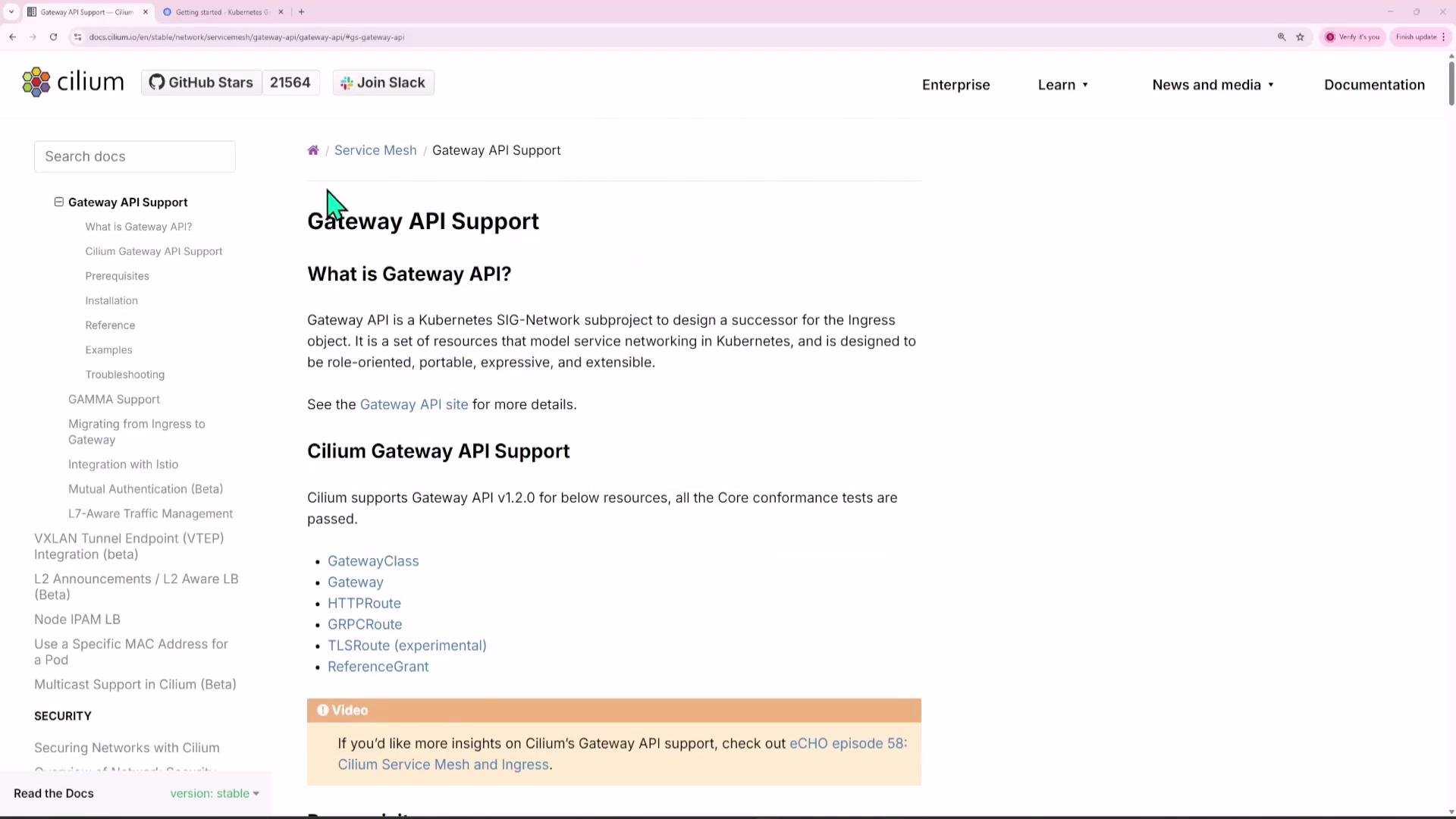
This guide shows how to enable Gateway API support in Cilium, install the required Gateway API CRDs, enable the feature in the Cilium Helm chart, and configure a Gateway + HTTPRoute to expose multiple apps (shopping.com and blogger.com) plus a default backend.
 ## Overview
High-level steps covered:
* Install Gateway API CRDs (use experimental CRDs for full TCP/TLS/UDP support).
* Enable Gateway API in the Cilium Helm values and restart Cilium pods.
* Deploy demo applications and ClusterIP services.
* Create a Gateway resource (Cilium-provided GatewayClass) and a LoadBalancer service for external access.
* Create HTTPRoute resources to route host/path combinations to different backends.
* Test with curl or browser (use /etc/hosts for testing DNS to the gateway IP).
## Prerequisites
Follow the Cilium Gateway API docs for full details: [Cilium Gateway API docs](https://docs.cilium.io/en/stable/gateway-api/).
## Overview
High-level steps covered:
* Install Gateway API CRDs (use experimental CRDs for full TCP/TLS/UDP support).
* Enable Gateway API in the Cilium Helm values and restart Cilium pods.
* Deploy demo applications and ClusterIP services.
* Create a Gateway resource (Cilium-provided GatewayClass) and a LoadBalancer service for external access.
* Create HTTPRoute resources to route host/path combinations to different backends.
* Test with curl or browser (use /etc/hosts for testing DNS to the gateway IP).
## Prerequisites
Follow the Cilium Gateway API docs for full details: [Cilium Gateway API docs](https://docs.cilium.io/en/stable/gateway-api/).
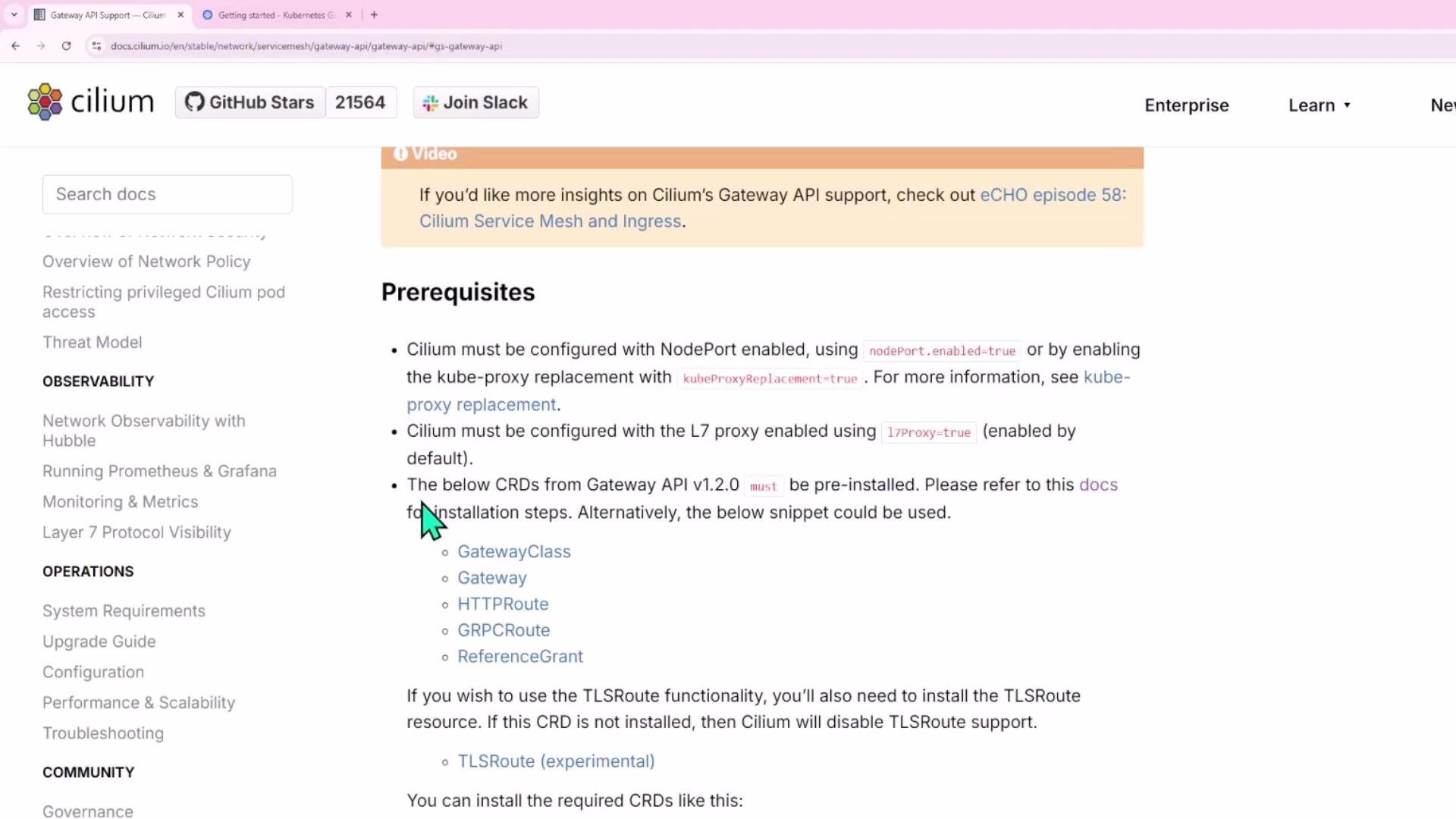 Cilium expects the experimental Gateway API CRDs in many environments because they include TCPRoute/TLSRoute/UDPRoute support. Install the experimental release to avoid missing-CRD errors.
Install the experimental Gateway API CRDs (example):
```bash theme={null}
# Install experimental Gateway API CRDs (includes TCP/TLS/UDP routes)
kubectl apply -f https://github.com/kubernetes-sigs/gateway-api/releases/download/v1.3.0/experimental-install.yaml
```
You should see CRDs created; trimmed expected output:
```text theme={null}
customresourcedefinition.apiextensions.k8s.io/backendtlspolicies.gateway.networking.k8s.io created
customresourcedefinition.apiextensions.k8s.io/gatewayclasses.gateway.networking.k8s.io created
customresourcedefinition.apiextensions.k8s.io/gateways.gateway.networking.k8s.io created
customresourcedefinition.apiextensions.k8s.io/grpcroutes.gateway.networking.k8s.io created
customresourcedefinition.apiextensions.k8s.io/httproutes.gateway.networking.k8s.io created
customresourcedefinition.apiextensions.k8s.io/tcproutes.gateway.networking.k8s.io created
customresourcedefinition.apiextensions.k8s.io/tlsroutes.gateway.networking.k8s.io created
customresourcedefinition.apiextensions.k8s.io/udproutes.gateway.networking.k8s.io created
customresourcedefinition.apiextensions.k8s.io/xbackendtrafficpolicies.gateway.networking.x-k8s.io created
customresourcedefinition.apiextensions.k8s.io/xlistenersets.gateway.networking.x-k8s.io created
```
Verify CRDs are present:
```bash theme={null}
kubectl get crd | grep gateway
```
Cilium requires either nodePort.enabled=true (Cilium NodePort implementation) or kubeProxyReplacement=true. This prerequisite is also required when enabling ingress support in Cilium. Pick one of these two options in your Helm values.
## Enable Gateway API support in Cilium (Helm)
Update Cilium Helm values to enable Gateway API support. Example snippet from values.yaml:
```yaml theme={null}
# enable Channel: either enable NodePort or kube-proxy replacement
nodePort:
enabled: true
# or
gatewayAPI:
# Enable support for Gateway API in cilium
enabled: false
enableProxyProtocol: false
enableAppProtocol: false
# ... other gatewayAPI options ...
```
To enable Gateway API (and optionally enable kube-proxy replacement), run:
```bash theme={null}
helm upgrade cilium cilium/cilium --version 1.17.3 \
--namespace kube-system \
--reuse-values \
--set kubeProxyReplacement=true \
--set gatewayAPI.enabled=true
```
Restart the operator and agents so they pick up the new configuration:
```bash theme={null}
kubectl -n kube-system rollout restart deployment/cilium-operator
kubectl -n kube-system rollout restart ds/cilium
```
Check Cilium status:
```bash theme={null}
cilium status
```
After rollout, the Cilium controller will create a GatewayClass for you. Confirm with:
```bash theme={null}
kubectl get gatewayclass
```
Expected:
```text theme={null}
NAME CONTROLLER ACCEPTED AGE
cilium io.cilium/gateway-controller True 2m
```
## Demo applications and services (what to expose)
This demo deploys three apps and a default catch-all backend:
| App / Host | Routes | Service name | Service port |
| ------------ | -------------------------------- | ----------------------- | ------------ |
| shopping.com | /products -> ecom-products | ecom-products-service | 3000 |
| shopping.com | /cart -> ecom-carts | ecom-carts-service | 3000 |
| blogger.com | / -> blog | blog-service | 3000 |
| catch-all | all unmatched -> default-backend | default-backend-service | 80 |
Apply the following YAML manifests in your cluster (examples below). Each block contains a Deployment + ClusterIP Service.
ecom-products deployment + service:
```yaml theme={null}
# ecom-products deployment + service
apiVersion: apps/v1
kind: Deployment
metadata:
name: ecom-products
spec:
selector:
matchLabels:
app: ecom-products
template:
metadata:
labels:
app: ecom-products
spec:
containers:
- name: ecom-products
image: sanjeevkt720/350-ecom-products
ports:
- containerPort: 3000
---
apiVersion: v1
kind: Service
metadata:
name: ecom-products-service
spec:
type: ClusterIP
selector:
app: ecom-products
ports:
- port: 3000
targetPort: 3000
```
ecom-carts deployment + service:
```yaml theme={null}
# ecom-carts deployment + service
apiVersion: apps/v1
kind: Deployment
metadata:
name: ecom-carts
spec:
selector:
matchLabels:
app: ecom-carts
template:
metadata:
labels:
app: ecom-carts
spec:
containers:
- name: ecom-carts
image: sanjeevkt720/350-ecom-cart:v3
ports:
- containerPort: 3000
---
apiVersion: v1
kind: Service
metadata:
name: ecom-carts-service
spec:
type: ClusterIP
selector:
app: ecom-carts
ports:
- port: 3000
targetPort: 3000
```
blog deployment + service:
```yaml theme={null}
# blog deployment + service
apiVersion: apps/v1
kind: Deployment
metadata:
name: blog
spec:
selector:
matchLabels:
app: blog
template:
metadata:
labels:
app: blog
spec:
containers:
- name: blog
image: sanjeevkt720/350-blog
ports:
- containerPort: 3000
---
apiVersion: v1
kind: Service
metadata:
name: blog-service
spec:
type: ClusterIP
selector:
app: blog
ports:
- port: 3000
targetPort: 3000
```
default backend (nginx) deployment + service:
```yaml theme={null}
# default backend deployment + service
apiVersion: apps/v1
kind: Deployment
metadata:
name: default-backend
spec:
selector:
matchLabels:
app: default-backend
template:
metadata:
labels:
app: default-backend
spec:
containers:
- name: nginx
image: nginx
ports:
- containerPort: 80
---
apiVersion: v1
kind: Service
metadata:
name: default-backend-service
spec:
type: ClusterIP
selector:
app: default-backend
ports:
- port: 80
targetPort: 80
```
Verify deployments and services:
```bash theme={null}
kubectl get deploy
kubectl get svc
```
You should see the ClusterIP services for each demo app.
## Create the Gateway
Create a Gateway that uses the Cilium GatewayClass and listens on HTTP port 80. Save as `gateway.yaml`:
```yaml theme={null}
apiVersion: gateway.networking.k8s.io/v1beta1
kind: Gateway
metadata:
name: my-gateway
spec:
gatewayClassName: cilium
listeners:
- protocol: HTTP
port: 80
name: web-gw
```
Apply:
```bash theme={null}
kubectl apply -f gateway.yaml
```
Check gateway status:
```bash theme={null}
kubectl get gateway
```
Example output:
```text theme={null}
NAME CLASS ADDRESS PROGRAMMED AGE
my-gateway cilium 172.19.255.92 True 10s
```
When the Gateway is created, Cilium automatically creates a LoadBalancer-type Service named `cilium-gateway-`. That Service exposes an EXTERNAL-IP you can point DNS at:
```bash theme={null}
kubectl get svc
```
Example snippet:
```text theme={null}
NAME TYPE CLUSTER-IP EXTERNAL-IP PORT(S)
cilium-gateway-my-gateway LoadBalancer 10.96.161.102 172.19.255.92 80:30269/TCP
```
Use that EXTERNAL-IP (172.19.255.92 in the example) for DNS records or /etc/hosts entries when testing.
## Create HTTPRoute resources
Create an HTTPRoute that attaches to the Gateway and maps host/path combinations to backend services. Save as `httproute.yaml`:
```yaml theme={null}
apiVersion: gateway.networking.k8s.io/v1beta1
kind: HTTPRoute
metadata:
name: my-routes
spec:
parentRefs:
- name: my-gateway
namespace: default
rules:
# shopping.com -> /products -> ecom-products-service:3000
- matches:
- path:
type: PathPrefix
value: /products
headers:
- name: Host
value: shopping.com
backendRefs:
- name: ecom-products-service
port: 3000
# shopping.com -> /cart -> ecom-carts-service:3000
- matches:
- path:
type: PathPrefix
value: /cart
headers:
- name: Host
value: shopping.com
backendRefs:
- name: ecom-carts-service
port: 3000
# blogger.com -> / -> blog-service:3000
- matches:
- path:
type: PathPrefix
value: /
headers:
- name: Host
value: blogger.com
backendRefs:
- name: blog-service
port: 3000
# catch-all -> default-backend-service:80
- backendRefs:
- name: default-backend-service
port: 80
```
Apply the HTTPRoute:
```bash theme={null}
kubectl apply -f httproute.yaml
```
Verify the HTTPRoute and inspect details:
```bash theme={null}
kubectl get httproute
kubectl describe httproute my-routes
```
## Test routes (DNS / hosts + curl)
For local testing, add /etc/hosts entries that map the demo hostnames to the gateway EXTERNAL-IP:
```text theme={null}
172.19.255.92 shopping.com
172.19.255.92 blogger.com
172.19.255.92 testing123.com
```
Then test with curl:
```bash theme={null}
# shopping.com /products
curl -s shopping.com/products
# shopping.com /cart
curl -s shopping.com/cart
# blogger.com /
curl -s blogger.com/
# an unmatched host -> default backend (nginx HTML)
curl -s testing123.com/
# => ... Welcome to nginx! ...
```
Example snippet from the default nginx page (trimmed):
```html theme={null}
Welcome to nginx!
Cilium expects the experimental Gateway API CRDs in many environments because they include TCPRoute/TLSRoute/UDPRoute support. Install the experimental release to avoid missing-CRD errors.
Install the experimental Gateway API CRDs (example):
```bash theme={null}
# Install experimental Gateway API CRDs (includes TCP/TLS/UDP routes)
kubectl apply -f https://github.com/kubernetes-sigs/gateway-api/releases/download/v1.3.0/experimental-install.yaml
```
You should see CRDs created; trimmed expected output:
```text theme={null}
customresourcedefinition.apiextensions.k8s.io/backendtlspolicies.gateway.networking.k8s.io created
customresourcedefinition.apiextensions.k8s.io/gatewayclasses.gateway.networking.k8s.io created
customresourcedefinition.apiextensions.k8s.io/gateways.gateway.networking.k8s.io created
customresourcedefinition.apiextensions.k8s.io/grpcroutes.gateway.networking.k8s.io created
customresourcedefinition.apiextensions.k8s.io/httproutes.gateway.networking.k8s.io created
customresourcedefinition.apiextensions.k8s.io/tcproutes.gateway.networking.k8s.io created
customresourcedefinition.apiextensions.k8s.io/tlsroutes.gateway.networking.k8s.io created
customresourcedefinition.apiextensions.k8s.io/udproutes.gateway.networking.k8s.io created
customresourcedefinition.apiextensions.k8s.io/xbackendtrafficpolicies.gateway.networking.x-k8s.io created
customresourcedefinition.apiextensions.k8s.io/xlistenersets.gateway.networking.x-k8s.io created
```
Verify CRDs are present:
```bash theme={null}
kubectl get crd | grep gateway
```
Cilium requires either nodePort.enabled=true (Cilium NodePort implementation) or kubeProxyReplacement=true. This prerequisite is also required when enabling ingress support in Cilium. Pick one of these two options in your Helm values.
## Enable Gateway API support in Cilium (Helm)
Update Cilium Helm values to enable Gateway API support. Example snippet from values.yaml:
```yaml theme={null}
# enable Channel: either enable NodePort or kube-proxy replacement
nodePort:
enabled: true
# or
gatewayAPI:
# Enable support for Gateway API in cilium
enabled: false
enableProxyProtocol: false
enableAppProtocol: false
# ... other gatewayAPI options ...
```
To enable Gateway API (and optionally enable kube-proxy replacement), run:
```bash theme={null}
helm upgrade cilium cilium/cilium --version 1.17.3 \
--namespace kube-system \
--reuse-values \
--set kubeProxyReplacement=true \
--set gatewayAPI.enabled=true
```
Restart the operator and agents so they pick up the new configuration:
```bash theme={null}
kubectl -n kube-system rollout restart deployment/cilium-operator
kubectl -n kube-system rollout restart ds/cilium
```
Check Cilium status:
```bash theme={null}
cilium status
```
After rollout, the Cilium controller will create a GatewayClass for you. Confirm with:
```bash theme={null}
kubectl get gatewayclass
```
Expected:
```text theme={null}
NAME CONTROLLER ACCEPTED AGE
cilium io.cilium/gateway-controller True 2m
```
## Demo applications and services (what to expose)
This demo deploys three apps and a default catch-all backend:
| App / Host | Routes | Service name | Service port |
| ------------ | -------------------------------- | ----------------------- | ------------ |
| shopping.com | /products -> ecom-products | ecom-products-service | 3000 |
| shopping.com | /cart -> ecom-carts | ecom-carts-service | 3000 |
| blogger.com | / -> blog | blog-service | 3000 |
| catch-all | all unmatched -> default-backend | default-backend-service | 80 |
Apply the following YAML manifests in your cluster (examples below). Each block contains a Deployment + ClusterIP Service.
ecom-products deployment + service:
```yaml theme={null}
# ecom-products deployment + service
apiVersion: apps/v1
kind: Deployment
metadata:
name: ecom-products
spec:
selector:
matchLabels:
app: ecom-products
template:
metadata:
labels:
app: ecom-products
spec:
containers:
- name: ecom-products
image: sanjeevkt720/350-ecom-products
ports:
- containerPort: 3000
---
apiVersion: v1
kind: Service
metadata:
name: ecom-products-service
spec:
type: ClusterIP
selector:
app: ecom-products
ports:
- port: 3000
targetPort: 3000
```
ecom-carts deployment + service:
```yaml theme={null}
# ecom-carts deployment + service
apiVersion: apps/v1
kind: Deployment
metadata:
name: ecom-carts
spec:
selector:
matchLabels:
app: ecom-carts
template:
metadata:
labels:
app: ecom-carts
spec:
containers:
- name: ecom-carts
image: sanjeevkt720/350-ecom-cart:v3
ports:
- containerPort: 3000
---
apiVersion: v1
kind: Service
metadata:
name: ecom-carts-service
spec:
type: ClusterIP
selector:
app: ecom-carts
ports:
- port: 3000
targetPort: 3000
```
blog deployment + service:
```yaml theme={null}
# blog deployment + service
apiVersion: apps/v1
kind: Deployment
metadata:
name: blog
spec:
selector:
matchLabels:
app: blog
template:
metadata:
labels:
app: blog
spec:
containers:
- name: blog
image: sanjeevkt720/350-blog
ports:
- containerPort: 3000
---
apiVersion: v1
kind: Service
metadata:
name: blog-service
spec:
type: ClusterIP
selector:
app: blog
ports:
- port: 3000
targetPort: 3000
```
default backend (nginx) deployment + service:
```yaml theme={null}
# default backend deployment + service
apiVersion: apps/v1
kind: Deployment
metadata:
name: default-backend
spec:
selector:
matchLabels:
app: default-backend
template:
metadata:
labels:
app: default-backend
spec:
containers:
- name: nginx
image: nginx
ports:
- containerPort: 80
---
apiVersion: v1
kind: Service
metadata:
name: default-backend-service
spec:
type: ClusterIP
selector:
app: default-backend
ports:
- port: 80
targetPort: 80
```
Verify deployments and services:
```bash theme={null}
kubectl get deploy
kubectl get svc
```
You should see the ClusterIP services for each demo app.
## Create the Gateway
Create a Gateway that uses the Cilium GatewayClass and listens on HTTP port 80. Save as `gateway.yaml`:
```yaml theme={null}
apiVersion: gateway.networking.k8s.io/v1beta1
kind: Gateway
metadata:
name: my-gateway
spec:
gatewayClassName: cilium
listeners:
- protocol: HTTP
port: 80
name: web-gw
```
Apply:
```bash theme={null}
kubectl apply -f gateway.yaml
```
Check gateway status:
```bash theme={null}
kubectl get gateway
```
Example output:
```text theme={null}
NAME CLASS ADDRESS PROGRAMMED AGE
my-gateway cilium 172.19.255.92 True 10s
```
When the Gateway is created, Cilium automatically creates a LoadBalancer-type Service named `cilium-gateway-`. That Service exposes an EXTERNAL-IP you can point DNS at:
```bash theme={null}
kubectl get svc
```
Example snippet:
```text theme={null}
NAME TYPE CLUSTER-IP EXTERNAL-IP PORT(S)
cilium-gateway-my-gateway LoadBalancer 10.96.161.102 172.19.255.92 80:30269/TCP
```
Use that EXTERNAL-IP (172.19.255.92 in the example) for DNS records or /etc/hosts entries when testing.
## Create HTTPRoute resources
Create an HTTPRoute that attaches to the Gateway and maps host/path combinations to backend services. Save as `httproute.yaml`:
```yaml theme={null}
apiVersion: gateway.networking.k8s.io/v1beta1
kind: HTTPRoute
metadata:
name: my-routes
spec:
parentRefs:
- name: my-gateway
namespace: default
rules:
# shopping.com -> /products -> ecom-products-service:3000
- matches:
- path:
type: PathPrefix
value: /products
headers:
- name: Host
value: shopping.com
backendRefs:
- name: ecom-products-service
port: 3000
# shopping.com -> /cart -> ecom-carts-service:3000
- matches:
- path:
type: PathPrefix
value: /cart
headers:
- name: Host
value: shopping.com
backendRefs:
- name: ecom-carts-service
port: 3000
# blogger.com -> / -> blog-service:3000
- matches:
- path:
type: PathPrefix
value: /
headers:
- name: Host
value: blogger.com
backendRefs:
- name: blog-service
port: 3000
# catch-all -> default-backend-service:80
- backendRefs:
- name: default-backend-service
port: 80
```
Apply the HTTPRoute:
```bash theme={null}
kubectl apply -f httproute.yaml
```
Verify the HTTPRoute and inspect details:
```bash theme={null}
kubectl get httproute
kubectl describe httproute my-routes
```
## Test routes (DNS / hosts + curl)
For local testing, add /etc/hosts entries that map the demo hostnames to the gateway EXTERNAL-IP:
```text theme={null}
172.19.255.92 shopping.com
172.19.255.92 blogger.com
172.19.255.92 testing123.com
```
Then test with curl:
```bash theme={null}
# shopping.com /products
curl -s shopping.com/products
# shopping.com /cart
curl -s shopping.com/cart
# blogger.com /
curl -s blogger.com/
# an unmatched host -> default backend (nginx HTML)
curl -s testing123.com/
# => ... Welcome to nginx! ...
```
Example snippet from the default nginx page (trimmed):
```html theme={null}
Welcome to nginx!
For online documentation and support please refer to nginx.org.
Thank you for using nginx.
```
Seeing the correct JSON responses and the nginx default page confirms that the Gateway + HTTPRoute configuration is forwarding traffic as expected.
## Troubleshooting tips
* Ensure Gateway API CRDs were installed (use the experimental manifest if you need TCP/TLS/UDP routes).
* Verify Cilium has gatewayAPI.enabled=true in its Helm values and that you restarted the operator/agents after upgrading.
* Confirm the gateway service (`cilium-gateway-`) has an EXTERNAL-IP and that DNS or /etc/hosts points to that IP.
* Inspect Gateway and HTTPRoute resources for events and status:
* kubectl describe gateway my-gateway
* kubectl describe httproute my-routes
* Check Cilium logs and controller events if the GatewayClass or Gateway is not being programmed.
## Links and references
* [Cilium Gateway API docs](https://docs.cilium.io/en/stable/gateway-api/)
* [Gateway API releases (experimental-install.yaml)](https://github.com/kubernetes-sigs/gateway-api/releases)
* [Kubernetes Gateway API specification](https://gateway-api.sigs.k8s.io/)