> ## Documentation Index
> Fetch the complete documentation index at: https://notes.kodekloud.com/llms.txt
> Use this file to discover all available pages before exploring further.
# Demo Argo Rollout Canary
> Guide demonstrating Argo Rollouts canary deployments for gradual traffic shifting, including Rollout manifests, setWeight steps, pauses, promotion, inspection, and rollback commands.
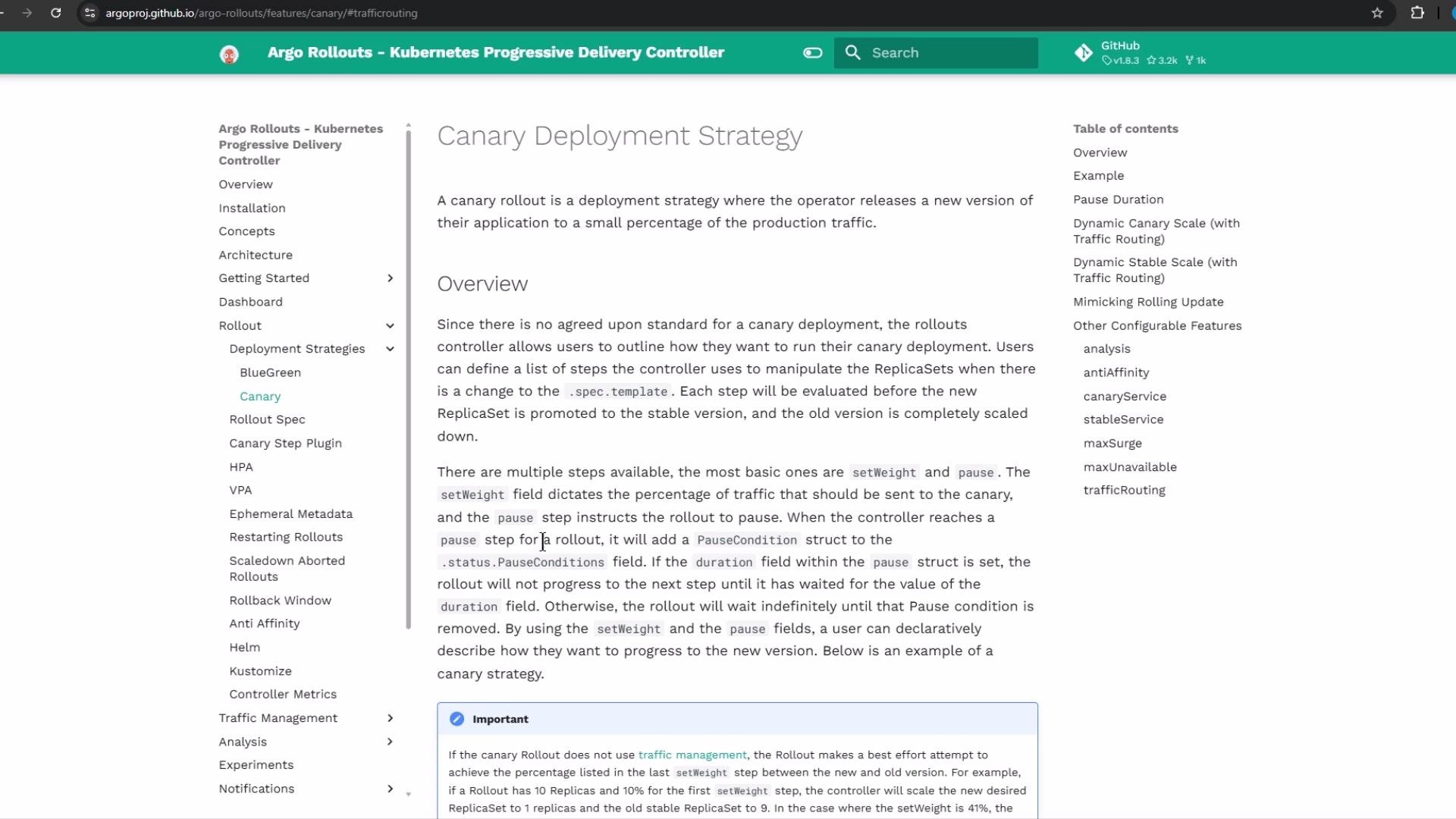
In this lesson we demonstrate how to perform a gradual release using the canary deployment model provided by Argo Rollouts. Argo Rollouts extends Kubernetes Deployments with more control over update behavior — enabling canary, blue-green, and progressive delivery strategies. The canary strategy routes a percentage of traffic to a new revision and increases that percentage in controlled steps with optional pauses for validation.
 ## Rollout manifest (canary strategy) — overview
A Rollout manifest (kind: `Rollout`) looks like a Deployment but gives you fine-grained control of updates. Instead of replacing all pods at once, the canary strategy lets you increment traffic using `setWeight` steps and `pause` actions (timed or indefinite).
Example Rollout (illustrative):
```yaml theme={null}
apiVersion: argoproj.io/v1alpha1
kind: Rollout
metadata:
name: example-rollout
spec:
replicas: 10
selector:
matchLabels:
app: nginx
template:
metadata:
labels:
app: nginx
spec:
containers:
- name: nginx
image: nginx:1.15.4
ports:
- containerPort: 80
minReadySeconds: 30
revisionHistoryLimit: 3
strategy:
canary:
maxSurge: 25%
maxUnavailable: 0
steps:
- setWeight: 10
pause:
duration: 1h
- setWeight: 20
pause: {} # pause indefinitely until manual promotion
```
Pause duration formats supported: seconds (`10s`), minutes (`10m`), hours (`1h`), or an empty object (`{}`) for an indefinite (manual) pause:
```yaml theme={null}
spec:
strategy:
canary:
steps:
- pause: { duration: 10s } # 10 seconds
- pause: { duration: 10m } # 10 minutes
- pause: { duration: 1h } # 1 hour
- pause: {} # pause indefinitely (manual promotion)
```
A `pause: {}` is an indefinite pause — the rollout will wait until you manually promote the next step (UI or `kubectl argo rollouts promote`). Plan for manual verification before continuing.
### Blue-green (reference snippet)
For comparison, here is a sample blue-green configuration (used for preview/promotion workflows):
```yaml theme={null}
revisions: 3
strategy:
blueGreen:
activeService: active-service
previewService: preview-service
previewReplicaCount: 1
autoPromotionEnabled: false
prePromotionAnalysis:
templates:
- templateName: success-rate
args:
- name: service-name
value: guestbook-svc.default.svc.cluster.local
postPromotionAnalysis:
templates:
- templateName: success-rate
args:
- name: service-name
value: guestbook-svc.default.svc.cluster.local
```
## Applying the canary example from the repository
This repository contains a `patterns/canary/` folder with `rollout.yml` and `service.yml`. Below are the manifests used in the demo.
Initial `rollout.yml` (canary steps):
```yaml theme={null}
apiVersion: argoproj.io/v1alpha1
kind: Rollout
metadata:
name: app-rollout
namespace: canary
spec:
replicas: 10
selector:
matchLabels:
app: app-rollout
template:
metadata:
labels:
app: app-rollout
spec:
containers:
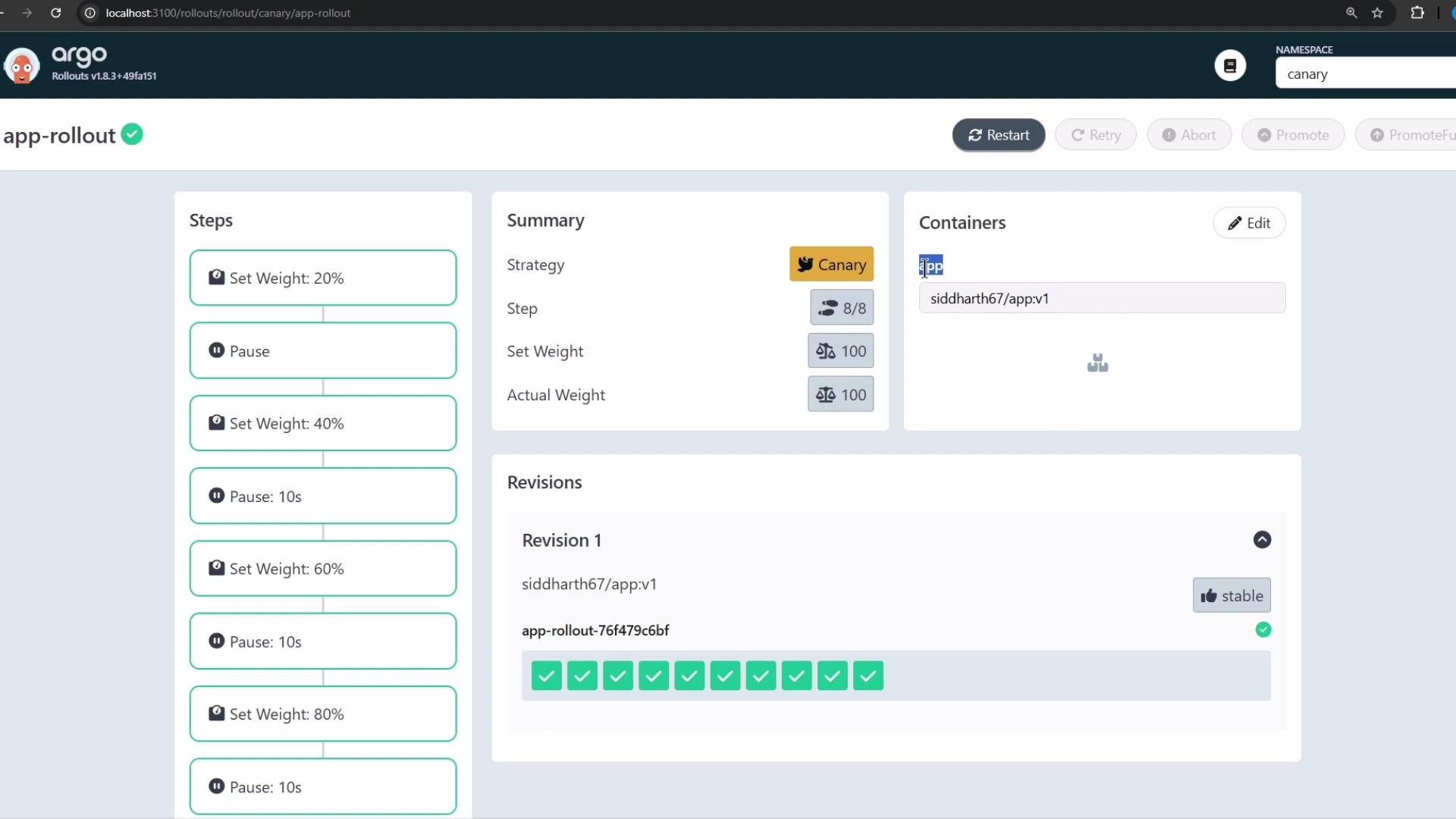
- name: app
image: siddharth67/app:v1
strategy:
canary:
steps:
- setWeight: 20
pause: {}
- setWeight: 40
pause:
duration: 1m
- setWeight: 60
pause:
duration: 1m
- setWeight: 80
pause:
duration: 1m
```
For demo speed we adjusted timed pauses to `10s` so the rollout completes faster:
```yaml theme={null}
apiVersion: argoproj.io/v1alpha1
kind: Rollout
metadata:
name: app-rollout
namespace: canary
spec:
replicas: 10
selector:
matchLabels:
app: app-rollout
template:
metadata:
labels:
app: app-rollout
spec:
containers:
- name: app
image: siddharth67/app:v1
strategy:
canary:
steps:
- setWeight: 20
- pause: {}
- setWeight: 40
- pause:
duration: 10s
- setWeight: 60
- pause:
duration: 10s
- setWeight: 80
- pause:
duration: 10s
```
Commands to create the namespace and apply the manifests:
```bash theme={null}
# create the canary namespace
kubectl create ns canary
# apply the rollout and service manifests
kubectl -n canary apply -f cgoa-demos/patterns/canary/
# confirm resources
kubectl -n canary get all
```
Expected simplified output after apply:
```bash theme={null}
namespace/canary created
rollout.argoproj.io/app-rollout created
service/app-rollout-service created
# kubectl -n canary get all
NAME READY STATUS RESTARTS AGE
pod/app-rollout-76f479c6bf-251rz 1/1 Running 0 8s
... (other app-rollout pods)
NAME TYPE CLUSTER-IP PORT(S)
service/app-rollout-service NodePort 10.109.7.217 80:30797/TCP
NAME DESIRED CURRENT READY
replicaset.apps/app-rollout-76f479c6bf 10 10 10
```
Argo Rollouts manages ReplicaSets and pods for `Rollout` resources. You will not see a Kubernetes `Deployment` for this workload — instead look for `rollout.argoproj.io` and ReplicaSets.
## Inspecting Rollouts
List rollouts in the cluster or a specific namespace:
```bash theme={null}
# list rollouts in the current namespace
kubectl get rollouts
# list rollouts in the canary namespace
kubectl get rollouts -n canary
```
Example output:
```bash theme={null}
# kubectl get rollouts -n canary
NAME DESIRED CURRENT UP-TO-DATE AVAILABLE AGE
app-rollout 10 10 10 10 37s
```
## Accessing the application and observing canary traffic
The `Service` exposes the app on a NodePort (e.g., `30797`). In the demo we continuously polled the `/app` endpoint and printed the reported application version. Use this local script (adjust the port as necessary):
```bash theme={null}
while true; do
echo -n "$(date '+%H:%M:%S') - ";
curl -s --max-time 1 http://localhost:30797/app 2>/dev/null |
awk '{
if ($0 ~ /Application Version:/) {
if ($0 ~ /v1/) print "\033[34m" $0 "\033[0m";
else if ($0 ~ /v2/) print "\033[33m" $0 "\033[0m";
else print $0;
} else print $0;
}';
sleep 1;
done
```
This output will show mostly `v1` at first, then occasional `v2` responses as the canary begins, then a growing mix of `v2` as the setWeight increases, and finally all `v2` once the rollout completes.
## Promoting a new version (UI or CLI)
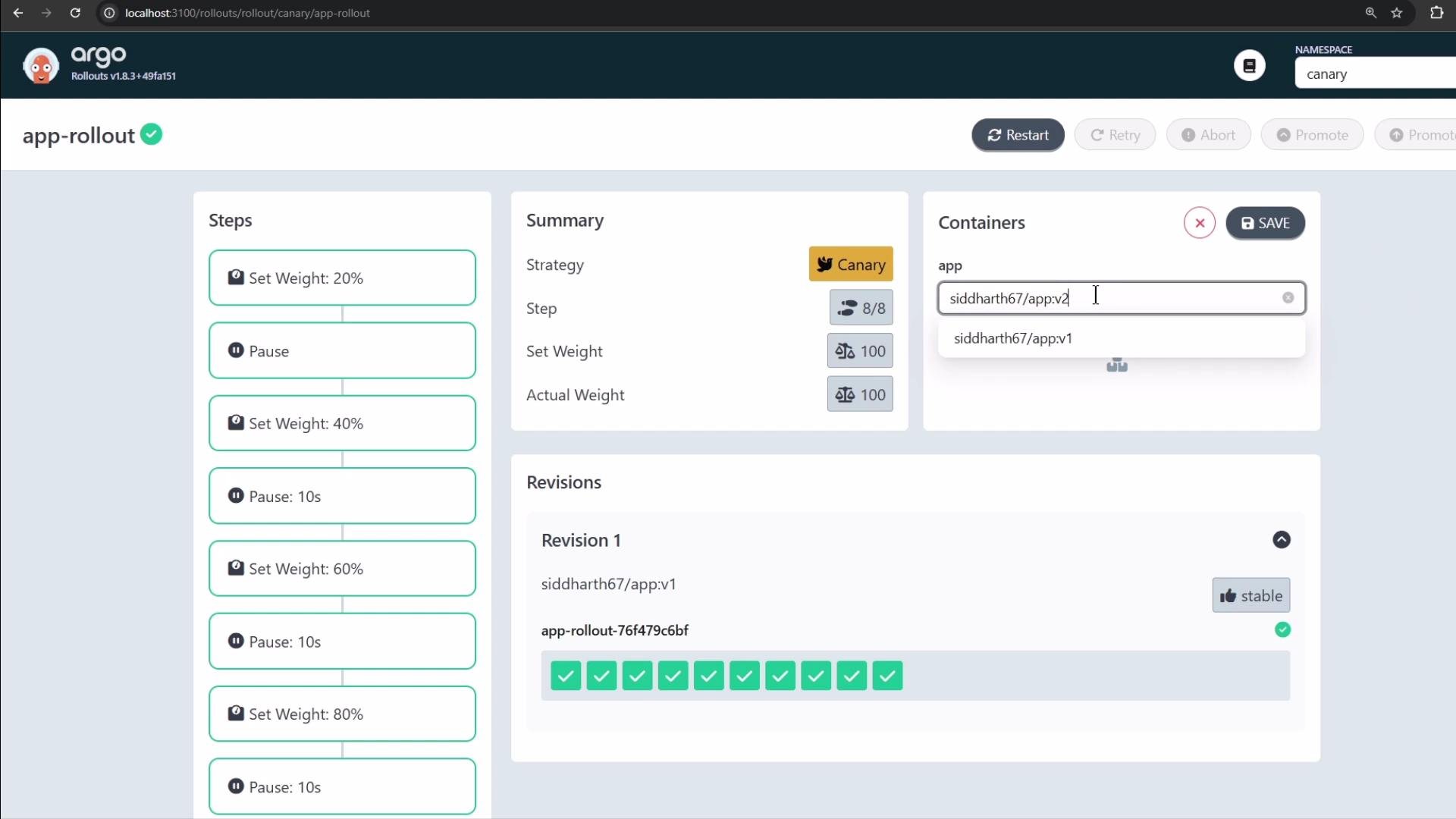
To promote a new revision, update the container image to `v2` in the manifest and apply it (or use the UI). The Rollout will create a new revision and follow the configured canary steps:
* A `setWeight: 20` step means 2 of 10 pods will run `v2` while 8 run `v1`.
* If the first step contains `pause: {}`, the rollout will stop for manual promotion.
* On manual promotion, the rollout proceeds to 40%, 60%, 80%, and finally 100% (with configured pauses).
Promote with the kubectl plugin:
```bash theme={null}
# promote to the next step
kubectl argo rollouts promote
# promote fully (skip intermediate steps)
kubectl argo rollouts promote --full
```
Make sure the `kubectl-argo-rollouts` plugin is installed if you plan to promote from the CLI. Alternatively, use the Argo Rollouts UI.
## Rollout manifest (canary strategy) — overview
A Rollout manifest (kind: `Rollout`) looks like a Deployment but gives you fine-grained control of updates. Instead of replacing all pods at once, the canary strategy lets you increment traffic using `setWeight` steps and `pause` actions (timed or indefinite).
Example Rollout (illustrative):
```yaml theme={null}
apiVersion: argoproj.io/v1alpha1
kind: Rollout
metadata:
name: example-rollout
spec:
replicas: 10
selector:
matchLabels:
app: nginx
template:
metadata:
labels:
app: nginx
spec:
containers:
- name: nginx
image: nginx:1.15.4
ports:
- containerPort: 80
minReadySeconds: 30
revisionHistoryLimit: 3
strategy:
canary:
maxSurge: 25%
maxUnavailable: 0
steps:
- setWeight: 10
pause:
duration: 1h
- setWeight: 20
pause: {} # pause indefinitely until manual promotion
```
Pause duration formats supported: seconds (`10s`), minutes (`10m`), hours (`1h`), or an empty object (`{}`) for an indefinite (manual) pause:
```yaml theme={null}
spec:
strategy:
canary:
steps:
- pause: { duration: 10s } # 10 seconds
- pause: { duration: 10m } # 10 minutes
- pause: { duration: 1h } # 1 hour
- pause: {} # pause indefinitely (manual promotion)
```
A `pause: {}` is an indefinite pause — the rollout will wait until you manually promote the next step (UI or `kubectl argo rollouts promote`). Plan for manual verification before continuing.
### Blue-green (reference snippet)
For comparison, here is a sample blue-green configuration (used for preview/promotion workflows):
```yaml theme={null}
revisions: 3
strategy:
blueGreen:
activeService: active-service
previewService: preview-service
previewReplicaCount: 1
autoPromotionEnabled: false
prePromotionAnalysis:
templates:
- templateName: success-rate
args:
- name: service-name
value: guestbook-svc.default.svc.cluster.local
postPromotionAnalysis:
templates:
- templateName: success-rate
args:
- name: service-name
value: guestbook-svc.default.svc.cluster.local
```
## Applying the canary example from the repository
This repository contains a `patterns/canary/` folder with `rollout.yml` and `service.yml`. Below are the manifests used in the demo.
Initial `rollout.yml` (canary steps):
```yaml theme={null}
apiVersion: argoproj.io/v1alpha1
kind: Rollout
metadata:
name: app-rollout
namespace: canary
spec:
replicas: 10
selector:
matchLabels:
app: app-rollout
template:
metadata:
labels:
app: app-rollout
spec:
containers:
- name: app
image: siddharth67/app:v1
strategy:
canary:
steps:
- setWeight: 20
pause: {}
- setWeight: 40
pause:
duration: 1m
- setWeight: 60
pause:
duration: 1m
- setWeight: 80
pause:
duration: 1m
```
For demo speed we adjusted timed pauses to `10s` so the rollout completes faster:
```yaml theme={null}
apiVersion: argoproj.io/v1alpha1
kind: Rollout
metadata:
name: app-rollout
namespace: canary
spec:
replicas: 10
selector:
matchLabels:
app: app-rollout
template:
metadata:
labels:
app: app-rollout
spec:
containers:
- name: app
image: siddharth67/app:v1
strategy:
canary:
steps:
- setWeight: 20
- pause: {}
- setWeight: 40
- pause:
duration: 10s
- setWeight: 60
- pause:
duration: 10s
- setWeight: 80
- pause:
duration: 10s
```
Commands to create the namespace and apply the manifests:
```bash theme={null}
# create the canary namespace
kubectl create ns canary
# apply the rollout and service manifests
kubectl -n canary apply -f cgoa-demos/patterns/canary/
# confirm resources
kubectl -n canary get all
```
Expected simplified output after apply:
```bash theme={null}
namespace/canary created
rollout.argoproj.io/app-rollout created
service/app-rollout-service created
# kubectl -n canary get all
NAME READY STATUS RESTARTS AGE
pod/app-rollout-76f479c6bf-251rz 1/1 Running 0 8s
... (other app-rollout pods)
NAME TYPE CLUSTER-IP PORT(S)
service/app-rollout-service NodePort 10.109.7.217 80:30797/TCP
NAME DESIRED CURRENT READY
replicaset.apps/app-rollout-76f479c6bf 10 10 10
```
Argo Rollouts manages ReplicaSets and pods for `Rollout` resources. You will not see a Kubernetes `Deployment` for this workload — instead look for `rollout.argoproj.io` and ReplicaSets.
## Inspecting Rollouts
List rollouts in the cluster or a specific namespace:
```bash theme={null}
# list rollouts in the current namespace
kubectl get rollouts
# list rollouts in the canary namespace
kubectl get rollouts -n canary
```
Example output:
```bash theme={null}
# kubectl get rollouts -n canary
NAME DESIRED CURRENT UP-TO-DATE AVAILABLE AGE
app-rollout 10 10 10 10 37s
```
## Accessing the application and observing canary traffic
The `Service` exposes the app on a NodePort (e.g., `30797`). In the demo we continuously polled the `/app` endpoint and printed the reported application version. Use this local script (adjust the port as necessary):
```bash theme={null}
while true; do
echo -n "$(date '+%H:%M:%S') - ";
curl -s --max-time 1 http://localhost:30797/app 2>/dev/null |
awk '{
if ($0 ~ /Application Version:/) {
if ($0 ~ /v1/) print "\033[34m" $0 "\033[0m";
else if ($0 ~ /v2/) print "\033[33m" $0 "\033[0m";
else print $0;
} else print $0;
}';
sleep 1;
done
```
This output will show mostly `v1` at first, then occasional `v2` responses as the canary begins, then a growing mix of `v2` as the setWeight increases, and finally all `v2` once the rollout completes.
## Promoting a new version (UI or CLI)
To promote a new revision, update the container image to `v2` in the manifest and apply it (or use the UI). The Rollout will create a new revision and follow the configured canary steps:
* A `setWeight: 20` step means 2 of 10 pods will run `v2` while 8 run `v1`.
* If the first step contains `pause: {}`, the rollout will stop for manual promotion.
* On manual promotion, the rollout proceeds to 40%, 60%, 80%, and finally 100% (with configured pauses).
Promote with the kubectl plugin:
```bash theme={null}
# promote to the next step
kubectl argo rollouts promote
# promote fully (skip intermediate steps)
kubectl argo rollouts promote --full
```
Make sure the `kubectl-argo-rollouts` plugin is installed if you plan to promote from the CLI. Alternatively, use the Argo Rollouts UI.
 Example progression (polling output):
```text theme={null}
11:17:45 - Application Version: v1
11:17:48 - Application Version: v2
11:17:51 - Application Version: v2
11:18:04 - Application Version: v1
11:18:14 - Application Version: v2
...
11:19:14 - Application Version: v2
11:19:29 - Application Version: v2
```
As you promote through higher `setWeight` steps, the frequency of `v2` responses increases until all pods serve `v2`.
Example progression (polling output):
```text theme={null}
11:17:45 - Application Version: v1
11:17:48 - Application Version: v2
11:17:51 - Application Version: v2
11:18:04 - Application Version: v1
11:18:14 - Application Version: v2
...
11:19:14 - Application Version: v2
11:19:29 - Application Version: v2
```
As you promote through higher `setWeight` steps, the frequency of `v2` responses increases until all pods serve `v2`.
 ## Rollbacks and stability
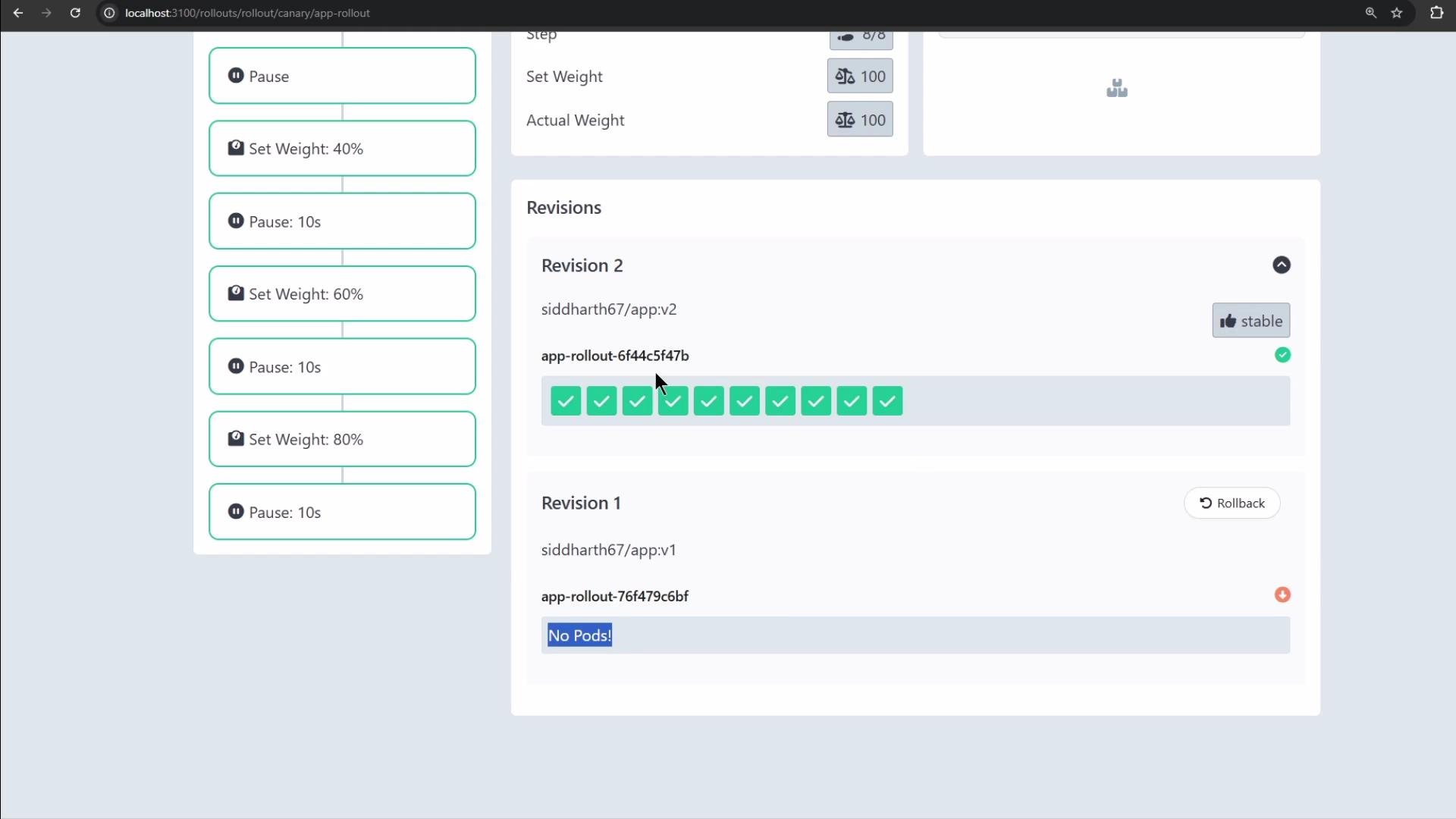
Argo Rollouts keeps a revision history and supports rollback to a previous revision if issues are detected during promotion. You can revert using the UI or the CLI to restore a stable revision. The UI highlights stable revisions and current status for easy rollback.
## Rollbacks and stability
Argo Rollouts keeps a revision history and supports rollback to a previous revision if issues are detected during promotion. You can revert using the UI or the CLI to restore a stable revision. The UI highlights stable revisions and current status for easy rollback.
 ## Quick reference
Table: common pause durations and promotion commands
| Topic | Example |
| -------------------- | ---------------------------------------------------------- |
| Pause formats | `yaml
## Quick reference
Table: common pause durations and promotion commands
| Topic | Example |
| -------------------- | ---------------------------------------------------------- |
| Pause formats | `yaml
pause: { duration: 10s }` or `yaml
pause: {} ` |
| Promote to next step | `kubectl argo rollouts promote ` |
| Promote fully | `kubectl argo rollouts promote --full ` |
Summary of best practices
* Use `setWeight` steps to route a specific percentage of traffic to a new revision.
* Combine timed pauses (e.g., `10s`, `1m`) with indefinite pauses (`{}`) for manual verification.
* Observe application metrics and logs during each pause before promoting.
* Use the Argo Rollouts UI or `kubectl-argo-rollouts` plugin to promote, inspect, and roll back as needed.
Ensure Argo Rollouts CRDs and controller are installed in your cluster and install the `kubectl-argo-rollouts` plugin if you intend to promote or inspect rollouts from the CLI. See the Argo Rollouts installation guide for details.
## Links and references
* Argo Rollouts documentation: [https://argoproj.github.io/argo-rollouts/](https://argoproj.github.io/argo-rollouts/)
* kubectl-argo-rollouts plugin installation: [https://argoproj.github.io/argo-rollouts/installation/#kubectl-plugin](https://argoproj.github.io/argo-rollouts/installation/#kubectl-plugin)
* Kubernetes documentation: [https://kubernetes.io/docs/](https://kubernetes.io/docs/)
That's all for now.