> ## Documentation Index
> Fetch the complete documentation index at: https://notes.kodekloud.com/llms.txt
> Use this file to discover all available pages before exploring further.
# Demo ArgoCD Pull Based Reconciler ConfigMap
> How to speed up ArgoCD Git polling by setting timeout.reconciliation in argocd-cm ConfigMap, restarting the application controller, and verifying faster reconciliation
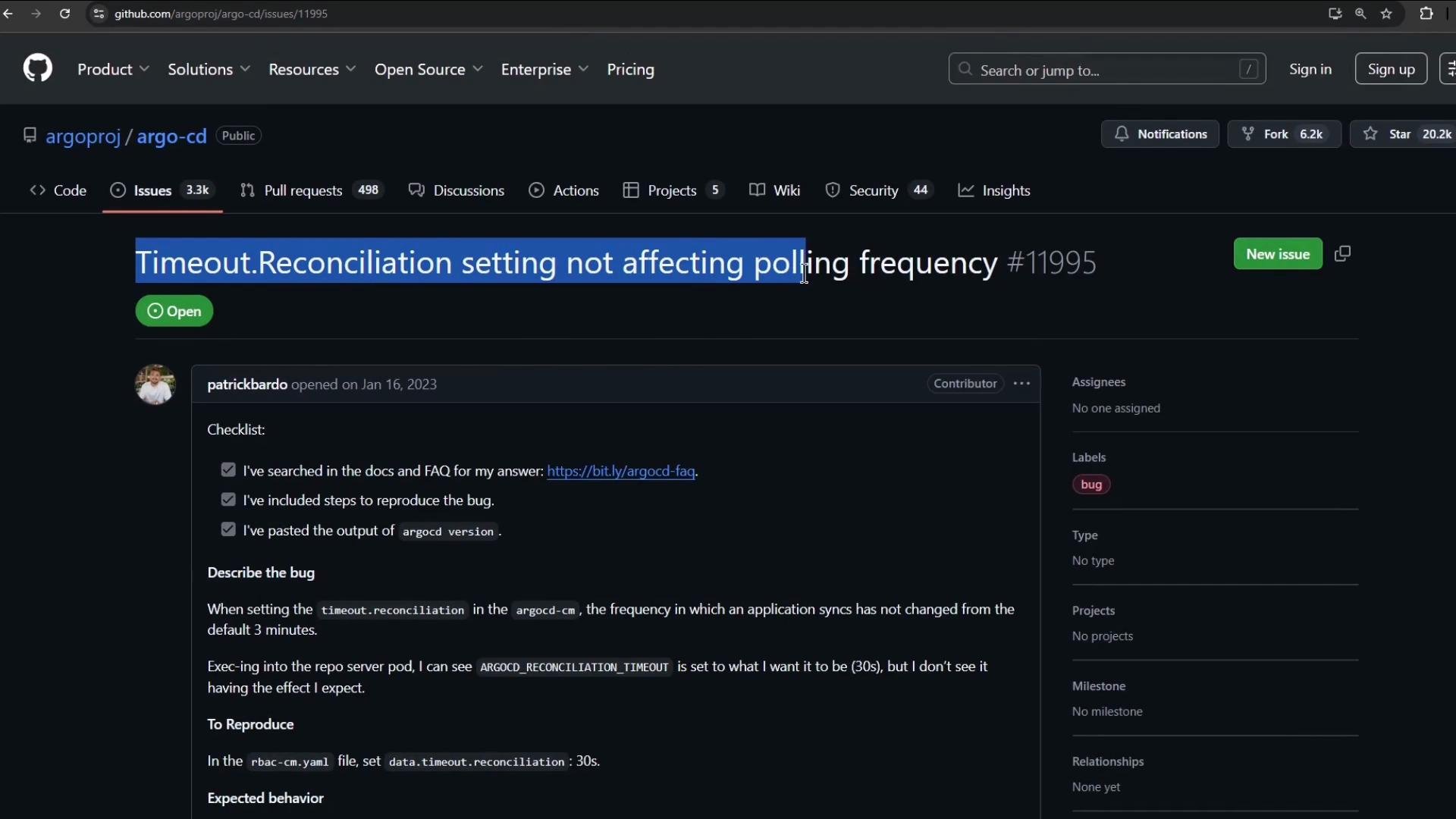
ArgoCD performs reconciliation by polling Git and comparing the desired state to cluster state. By default ArgoCD polls at a relatively low frequency (often on the order of minutes). This guide shows how to tune ArgoCD's pull-based reconciler to poll Git more frequently (for example, every 10s) by updating the `argocd-cm` ConfigMap and restarting the application controller so the new setting takes effect.
Key steps
* Edit the `argocd-cm` ConfigMap in the `argocd` namespace and set `timeout.reconciliation` to a duration string (for example, `"10s"`).
* Restart the ArgoCD application controller (Deployment or StatefulSet) so it loads the updated configuration.
* Verify the new behavior by changing an ArgoCD-managed manifest in Git and observing faster reconciliation.
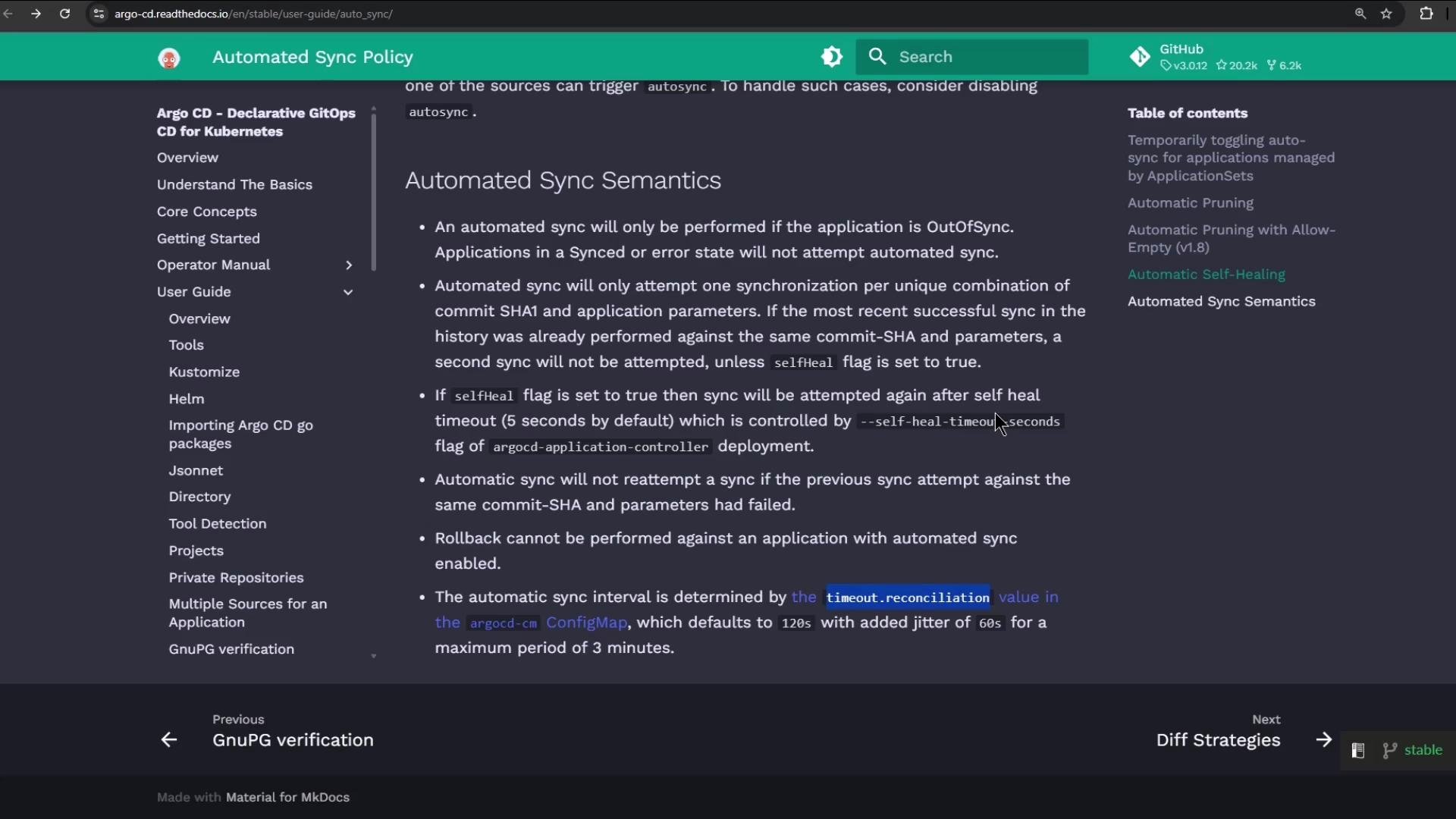 ## 1. Edit the ConfigMap (set poll/reconciliation interval)
Open the `argocd-cm` ConfigMap in the `argocd` namespace and edit it:
```bash theme={null}
kubectl -n argocd edit cm argocd-cm
```
Under the ConfigMap `data:` section add or update `timeout.reconciliation` with a duration string (examples: `"10s"`, `"60s"`, `"1m"`). The value must be a string.
Minimal example to add:
```yaml theme={null}
apiVersion: v1
data:
# Poll/reconciliation interval. This must be a string duration.
timeout.reconciliation: "10s"
```
If your ConfigMap already contains `resource.customizations` (for ignoring noisy fields or other behaviors), keep those entries. A common pattern includes `resource.customizations.ignoreResourceUpdates.*` to avoid unnecessary drift detection noise. Example entries you can keep or adapt:
```yaml theme={null}
data:
resource.customizations.ignoreResourceUpdates.ConfigMap: |
jqPathExpressions:
# Ignore cluster-autoscaler last-updated annotation
- '.metadata.annotations["cluster-autoscaler.kubernetes.io/last-updated"] = ""'
# Ignore legacy leader election annotation
- '.metadata.annotations["control-plane.alpha.kubernetes.io/leader"] = ""'
resource.customizations.ignoreResourceUpdates.Endpoints: |
jsonPointers:
- /metadata
- /subsets
resource.customizations.ignoreResourceUpdates.all: |
jsonPointers:
- /status
```
Note: The exact customization keys and formats depend on your ArgoCD version and needs. The important setting for poll frequency is `timeout.reconciliation`.
After you save the edited ConfigMap, you must restart the ArgoCD application controller (Deployment or StatefulSet) so the controller picks up the new `timeout.reconciliation` value.
## 2. Restart the application controller
The application controller must be restarted to load the new ConfigMap value. Most ArgoCD installations use a Deployment named `argocd-application-controller`, but some use a StatefulSet.
For a Deployment:
```bash theme={null}
kubectl -n argocd rollout restart deployment argocd-application-controller
```
For a StatefulSet:
```bash theme={null}
kubectl -n argocd rollout restart sts argocd-application-controller
```
Confirm the rollout status:
```bash theme={null}
kubectl -n argocd get deployment argocd-application-controller
# Example output:
# NAME READY UP-TO-DATE AVAILABLE AGE
# argocd-application-controller 0/1 0 0 45m
# (after a short while)
# argocd-application-controller 1/1 1 1 46m
```
Verify the ConfigMap contains the new timeout:
```bash theme={null}
kubectl -n argocd get cm argocd-cm -o yaml | grep -i timeout
# Expected output:
# timeout.reconciliation: 10s
```
## 1. Edit the ConfigMap (set poll/reconciliation interval)
Open the `argocd-cm` ConfigMap in the `argocd` namespace and edit it:
```bash theme={null}
kubectl -n argocd edit cm argocd-cm
```
Under the ConfigMap `data:` section add or update `timeout.reconciliation` with a duration string (examples: `"10s"`, `"60s"`, `"1m"`). The value must be a string.
Minimal example to add:
```yaml theme={null}
apiVersion: v1
data:
# Poll/reconciliation interval. This must be a string duration.
timeout.reconciliation: "10s"
```
If your ConfigMap already contains `resource.customizations` (for ignoring noisy fields or other behaviors), keep those entries. A common pattern includes `resource.customizations.ignoreResourceUpdates.*` to avoid unnecessary drift detection noise. Example entries you can keep or adapt:
```yaml theme={null}
data:
resource.customizations.ignoreResourceUpdates.ConfigMap: |
jqPathExpressions:
# Ignore cluster-autoscaler last-updated annotation
- '.metadata.annotations["cluster-autoscaler.kubernetes.io/last-updated"] = ""'
# Ignore legacy leader election annotation
- '.metadata.annotations["control-plane.alpha.kubernetes.io/leader"] = ""'
resource.customizations.ignoreResourceUpdates.Endpoints: |
jsonPointers:
- /metadata
- /subsets
resource.customizations.ignoreResourceUpdates.all: |
jsonPointers:
- /status
```
Note: The exact customization keys and formats depend on your ArgoCD version and needs. The important setting for poll frequency is `timeout.reconciliation`.
After you save the edited ConfigMap, you must restart the ArgoCD application controller (Deployment or StatefulSet) so the controller picks up the new `timeout.reconciliation` value.
## 2. Restart the application controller
The application controller must be restarted to load the new ConfigMap value. Most ArgoCD installations use a Deployment named `argocd-application-controller`, but some use a StatefulSet.
For a Deployment:
```bash theme={null}
kubectl -n argocd rollout restart deployment argocd-application-controller
```
For a StatefulSet:
```bash theme={null}
kubectl -n argocd rollout restart sts argocd-application-controller
```
Confirm the rollout status:
```bash theme={null}
kubectl -n argocd get deployment argocd-application-controller
# Example output:
# NAME READY UP-TO-DATE AVAILABLE AGE
# argocd-application-controller 0/1 0 0 45m
# (after a short while)
# argocd-application-controller 1/1 1 1 46m
```
Verify the ConfigMap contains the new timeout:
```bash theme={null}
kubectl -n argocd get cm argocd-cm -o yaml | grep -i timeout
# Expected output:
# timeout.reconciliation: 10s
```
 ## 3. Verify with a deployment change (test reconciliation frequency)
Make a small change in the Git repo for an ArgoCD-managed app to confirm faster polling. In this demo we change the replica count of a Deployment. This is the manifest as stored in Git before the change:
```yaml theme={null}
apiVersion: apps/v1
kind: Deployment
metadata:
name: highway-animation
namespace: highway-animation
spec:
replicas: 10
selector:
matchLabels:
app: highway-animation
template:
metadata:
labels:
app: highway-animation
spec:
containers:
- name: highway-animation
image: siddharth67/highway-animation:blue
ports:
- containerPort: 3000
env:
- name: POD_COUNT
value: "10"
```
Change `replicas` to a new value (for example `7`), commit and push. Example updated manifest:
```yaml theme={null}
apiVersion: apps/v1
kind: Deployment
metadata:
name: highway-animation
namespace: highway-animation
spec:
replicas: 7
selector:
matchLabels:
app: highway-animation
template:
metadata:
labels:
app: highway-animation
spec:
containers:
- name: highway-animation
image: siddharth67/highway-animation:blue
ports:
- containerPort: 3000
env:
- name: POD_COUNT
value: "7"
```
After pushing the change, ArgoCD will poll the Git repository according to the configured `timeout.reconciliation` (plus any processing time). Check the target namespace to observe pod scaling and reconciliation:
```bash theme={null}
kubectl -n highway-animation get po
# Example output shows new pods being created and old pods terminating as the Deployment scales:
# NAME READY STATUS RESTARTS AGE
# highway-animation-97b59688-rrnh2 1/1 Running 0 14s
# highway-animation-c88486bd5-kfkqp 0/1 Pending 0 0s
# ...
```
Timing may vary slightly due to controller scheduling and cluster load. If `timeout.reconciliation: "10s"` is set and the application controller was restarted, you should observe reconciliation occurring more frequently than the default (often within the configured interval plus controller processing time).
## Quick reference — common commands
| Task | Command / Notes | |
| --------------------------------- | -------------------------------------------------------------------------------- | ----------------- |
| Edit ConfigMap | `kubectl -n argocd edit cm argocd-cm` | |
| Set poll interval | Add `timeout.reconciliation: "10s"` under `data:` in the ConfigMap | |
| Restart controller (Deployment) | `kubectl -n argocd rollout restart deployment argocd-application-controller` | |
| Restart controller (StatefulSet) | `kubectl -n argocd rollout restart sts argocd-application-controller` | |
| Verify ConfigMap contains timeout | \`kubectl -n argocd get cm argocd-cm -o yaml | grep -i timeout\` |
| Check controller logs | `kubectl -n argocd logs -l app.kubernetes.io/name=argocd-application-controller` | |
| Inspect target namespace pods | `kubectl -n get po` | |
## Troubleshooting tips
* Ensure `timeout.reconciliation` is a quoted string value (for example `"10s"`) under the ConfigMap `data:`; unquoted values may be rejected or parsed incorrectly.
* Always restart the `argocd-application-controller` after editing `argocd-cm`; the controller reads this ConfigMap at startup.
* If reconcilation is still slow:
* Confirm the controller restart succeeded (`kubectl -n argocd get deployment argocd-application-controller`).
* Inspect controller logs for errors or warnings:
```bash theme={null}
kubectl -n argocd logs -l app.kubernetes.io/name=argocd-application-controller
```
* Check for any cluster-level rate limiting or heavy controller load that could delay reconciliation.
* For ArgoCD version-specific behavior or additional tuning options, refer to the official docs: [Argo CD documentation - Configuration](https://argo-cd.readthedocs.io/) and [Argo CD troubleshooting](https://argo-cd.readthedocs.io/en/stable/troubleshooting/).
This walkthrough demonstrates how to tune ArgoCD's pull/poll frequency by updating `timeout.reconciliation` in the `argocd-cm` ConfigMap and ensuring the application controller loads the new configuration.
## 3. Verify with a deployment change (test reconciliation frequency)
Make a small change in the Git repo for an ArgoCD-managed app to confirm faster polling. In this demo we change the replica count of a Deployment. This is the manifest as stored in Git before the change:
```yaml theme={null}
apiVersion: apps/v1
kind: Deployment
metadata:
name: highway-animation
namespace: highway-animation
spec:
replicas: 10
selector:
matchLabels:
app: highway-animation
template:
metadata:
labels:
app: highway-animation
spec:
containers:
- name: highway-animation
image: siddharth67/highway-animation:blue
ports:
- containerPort: 3000
env:
- name: POD_COUNT
value: "10"
```
Change `replicas` to a new value (for example `7`), commit and push. Example updated manifest:
```yaml theme={null}
apiVersion: apps/v1
kind: Deployment
metadata:
name: highway-animation
namespace: highway-animation
spec:
replicas: 7
selector:
matchLabels:
app: highway-animation
template:
metadata:
labels:
app: highway-animation
spec:
containers:
- name: highway-animation
image: siddharth67/highway-animation:blue
ports:
- containerPort: 3000
env:
- name: POD_COUNT
value: "7"
```
After pushing the change, ArgoCD will poll the Git repository according to the configured `timeout.reconciliation` (plus any processing time). Check the target namespace to observe pod scaling and reconciliation:
```bash theme={null}
kubectl -n highway-animation get po
# Example output shows new pods being created and old pods terminating as the Deployment scales:
# NAME READY STATUS RESTARTS AGE
# highway-animation-97b59688-rrnh2 1/1 Running 0 14s
# highway-animation-c88486bd5-kfkqp 0/1 Pending 0 0s
# ...
```
Timing may vary slightly due to controller scheduling and cluster load. If `timeout.reconciliation: "10s"` is set and the application controller was restarted, you should observe reconciliation occurring more frequently than the default (often within the configured interval plus controller processing time).
## Quick reference — common commands
| Task | Command / Notes | |
| --------------------------------- | -------------------------------------------------------------------------------- | ----------------- |
| Edit ConfigMap | `kubectl -n argocd edit cm argocd-cm` | |
| Set poll interval | Add `timeout.reconciliation: "10s"` under `data:` in the ConfigMap | |
| Restart controller (Deployment) | `kubectl -n argocd rollout restart deployment argocd-application-controller` | |
| Restart controller (StatefulSet) | `kubectl -n argocd rollout restart sts argocd-application-controller` | |
| Verify ConfigMap contains timeout | \`kubectl -n argocd get cm argocd-cm -o yaml | grep -i timeout\` |
| Check controller logs | `kubectl -n argocd logs -l app.kubernetes.io/name=argocd-application-controller` | |
| Inspect target namespace pods | `kubectl -n get po` | |
## Troubleshooting tips
* Ensure `timeout.reconciliation` is a quoted string value (for example `"10s"`) under the ConfigMap `data:`; unquoted values may be rejected or parsed incorrectly.
* Always restart the `argocd-application-controller` after editing `argocd-cm`; the controller reads this ConfigMap at startup.
* If reconcilation is still slow:
* Confirm the controller restart succeeded (`kubectl -n argocd get deployment argocd-application-controller`).
* Inspect controller logs for errors or warnings:
```bash theme={null}
kubectl -n argocd logs -l app.kubernetes.io/name=argocd-application-controller
```
* Check for any cluster-level rate limiting or heavy controller load that could delay reconciliation.
* For ArgoCD version-specific behavior or additional tuning options, refer to the official docs: [Argo CD documentation - Configuration](https://argo-cd.readthedocs.io/) and [Argo CD troubleshooting](https://argo-cd.readthedocs.io/en/stable/troubleshooting/).
This walkthrough demonstrates how to tune ArgoCD's pull/poll frequency by updating `timeout.reconciliation` in the `argocd-cm` ConfigMap and ensuring the application controller loads the new configuration.