> ## Documentation Index
> Fetch the complete documentation index at: https://notes.kodekloud.com/llms.txt
> Use this file to discover all available pages before exploring further.
# Course Overview
> Describes GitOps using Git as single source of truth and pull based controllers to prevent drift, improve auditability, reduce credential exposure, and simplify disaster recovery.
This lesson introduces common DevOps challenges and shows how GitOps addresses them by making Git the single source of truth and using automated, pull-based controllers to reconcile cluster state.
## Scenario
Dash0, a software vendor, is moving to a multi-cloud, containerized platform managed by a central Platform DevOps team. They adopted an Infrastructure-as-Code approach using tools such as [Kustomize](https://learn.kodekloud.com/user/courses/kustomize), [Terraform](https://learn.kodekloud.com/user/courses/terraform-basics-training-course), and [Ansible](https://learn.kodekloud.com/user/courses/learn-ansible-basics-beginners-course) to define infrastructure and application deployments in code. However, their initial processes contained several operational flaws.
At first, team members manually applied Kubernetes manifests from a single Git branch without versioning, peer reviews, or automation. Changes were applied directly to the cluster, which made it impossible to audit reliably or trace who made what change and when.
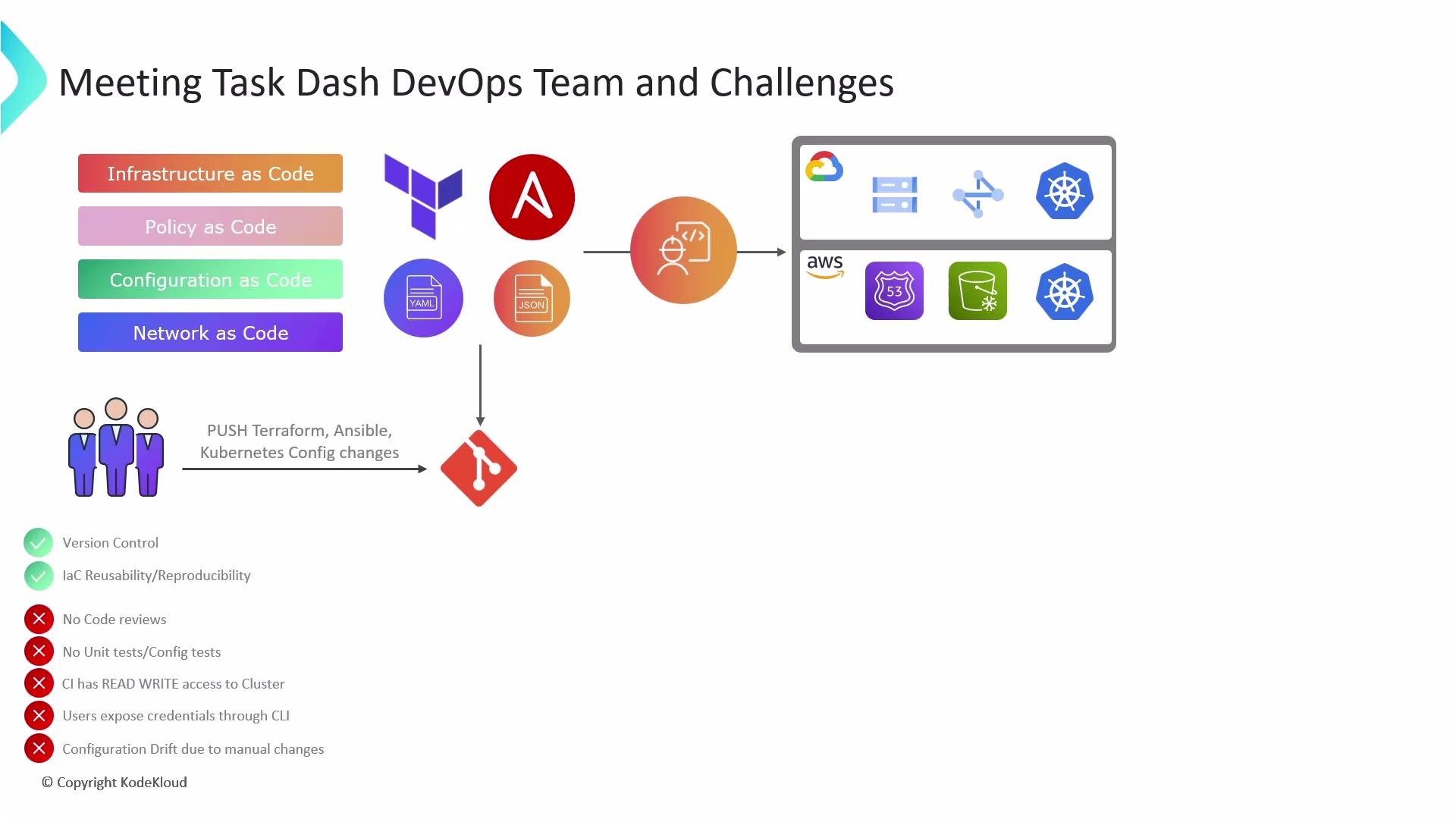 To speed up delivery, the team introduced a CI/CD pipeline that used a push-based model. In practice this created a dual workflow: the pipeline could push changes, and operators could still make manual, direct edits to the live cluster using kubectl. For example, operators applied different manifest versions directly:
```bash theme={null}
kubectl apply -f app-v2.8.4.yaml
kubectl apply -f app-v2.9.5.yaml
kubectl apply -f app-v3.0.1.yaml
```
This push-plus-manual approach produced three primary issues:
| Problem | Explanation | Impact |
| ---------------------------- | ---------------------------------------------------------------------------------------------------------------------------------- | ----------------------------------------------------------------------------------------------------- |
| Security risk | The pipeline and manual CLI access required exposing credentials (service account tokens, static kubeconfigs) outside the cluster. | Increased attack surface and higher risk of leaked or misused credentials. |
| Configuration drift | Manual, undocumented changes on the cluster meant the Git repository no longer reflected the live state. | Harder to debug, audit, and reason about production state. |
| Unreliable disaster recovery | Disaster recovery plans assumed Git contained the complete, correct state. Undocumented cluster changes broke that assumption. | Restores required manual discovery and reapplication of changes, increasing downtime and human error. |
## What is GitOps?
GitOps is a methodology that treats Git as the single source of truth for the desired system state and uses automated, auditable mechanisms to reconcile the live cluster state with Git. Instead of pushing changes into the cluster from outside, GitOps relies on pull-based agents (controllers) running inside the cluster to continuously compare and apply the declared state from Git.
GitOps: Store the desired state in Git, and use automated controllers (pull-based agents) inside the cluster to continuously reconcile the live state with Git. This improves auditability, reduces credential exposure, prevents configuration drift, and simplifies disaster recovery.
## Key benefits of GitOps
* Auditability: Every change is a Git commit, enabling complete history, code review, and traceability.
* Reduced credential exposure: Controllers running inside the cluster fetch manifests; external systems do not need persistent cluster credentials.
* Declarative convergence: Continuous reconciliation brings the cluster to the declared state, preventing drift.
* Faster, reliable rollbacks: Revert a commit in Git to roll back the desired state, and the controller will converge the cluster accordingly.
* Improved DR posture: The Git repo contains the canonical desired state, so restores are more predictable.
## How GitOps works (high level)
1. Developers or operators create commits (changes) in Git to update infrastructure or application manifests.
2. A GitOps controller inside the cluster watches the Git repository for changes.
3. When a change is detected, the controller pulls the desired state and reconciles the live cluster to match it.
4. Any drift is reported or automatically corrected according to policy.
## Links and references
* [Kubernetes Basics](https://kubernetes.io/docs/concepts/overview/what-is-kubernetes/)
* GitOps principles and best practices — see documentation from major GitOps projects (Argo CD, Flux) for implementation details.
* [Kustomize tooling guide](https://learn.kodekloud.com/user/courses/kustomize)
* [Terraform basics training](https://learn.kodekloud.com/user/courses/terraform-basics-training-course)
* [Ansible for automation](https://learn.kodekloud.com/user/courses/learn-ansible-basics-beginners-course)
To speed up delivery, the team introduced a CI/CD pipeline that used a push-based model. In practice this created a dual workflow: the pipeline could push changes, and operators could still make manual, direct edits to the live cluster using kubectl. For example, operators applied different manifest versions directly:
```bash theme={null}
kubectl apply -f app-v2.8.4.yaml
kubectl apply -f app-v2.9.5.yaml
kubectl apply -f app-v3.0.1.yaml
```
This push-plus-manual approach produced three primary issues:
| Problem | Explanation | Impact |
| ---------------------------- | ---------------------------------------------------------------------------------------------------------------------------------- | ----------------------------------------------------------------------------------------------------- |
| Security risk | The pipeline and manual CLI access required exposing credentials (service account tokens, static kubeconfigs) outside the cluster. | Increased attack surface and higher risk of leaked or misused credentials. |
| Configuration drift | Manual, undocumented changes on the cluster meant the Git repository no longer reflected the live state. | Harder to debug, audit, and reason about production state. |
| Unreliable disaster recovery | Disaster recovery plans assumed Git contained the complete, correct state. Undocumented cluster changes broke that assumption. | Restores required manual discovery and reapplication of changes, increasing downtime and human error. |
## What is GitOps?
GitOps is a methodology that treats Git as the single source of truth for the desired system state and uses automated, auditable mechanisms to reconcile the live cluster state with Git. Instead of pushing changes into the cluster from outside, GitOps relies on pull-based agents (controllers) running inside the cluster to continuously compare and apply the declared state from Git.
GitOps: Store the desired state in Git, and use automated controllers (pull-based agents) inside the cluster to continuously reconcile the live state with Git. This improves auditability, reduces credential exposure, prevents configuration drift, and simplifies disaster recovery.
## Key benefits of GitOps
* Auditability: Every change is a Git commit, enabling complete history, code review, and traceability.
* Reduced credential exposure: Controllers running inside the cluster fetch manifests; external systems do not need persistent cluster credentials.
* Declarative convergence: Continuous reconciliation brings the cluster to the declared state, preventing drift.
* Faster, reliable rollbacks: Revert a commit in Git to roll back the desired state, and the controller will converge the cluster accordingly.
* Improved DR posture: The Git repo contains the canonical desired state, so restores are more predictable.
## How GitOps works (high level)
1. Developers or operators create commits (changes) in Git to update infrastructure or application manifests.
2. A GitOps controller inside the cluster watches the Git repository for changes.
3. When a change is detected, the controller pulls the desired state and reconciles the live cluster to match it.
4. Any drift is reported or automatically corrected according to policy.
## Links and references
* [Kubernetes Basics](https://kubernetes.io/docs/concepts/overview/what-is-kubernetes/)
* GitOps principles and best practices — see documentation from major GitOps projects (Argo CD, Flux) for implementation details.
* [Kustomize tooling guide](https://learn.kodekloud.com/user/courses/kustomize)
* [Terraform basics training](https://learn.kodekloud.com/user/courses/terraform-basics-training-course)
* [Ansible for automation](https://learn.kodekloud.com/user/courses/learn-ansible-basics-beginners-course)