> ## Documentation Index
> Fetch the complete documentation index at: https://notes.kodekloud.com/llms.txt
> Use this file to discover all available pages before exploring further.
# CI and CD
> Explains CI and CD, PR based pipelines, automated testing and deployment strategies that enable faster, safer, and more reliable software delivery.
This guide explains why Continuous Integration (CI) and Continuous Delivery/Deployment (CD) are essential for modern software development. It covers typical workflows, common pitfalls when CI is absent, and how CI/CD pipelines validate and promote changes from feature branches to production.
What you'll learn:
* What CI and CD mean and how they differ
* A typical pull request (PR) based CI workflow
* How pipelines validate integrated code and prevent regressions
* Deployment strategies for staging and production
Why CI/CD matters
* CI/CD automates verification and delivery of code changes, reducing human error and accelerating feedback.
* Using a Git hosting platform (for example, Gitea, GitHub, GitLab, Bitbucket) lets teams trigger automated pipelines on pull requests and merges.
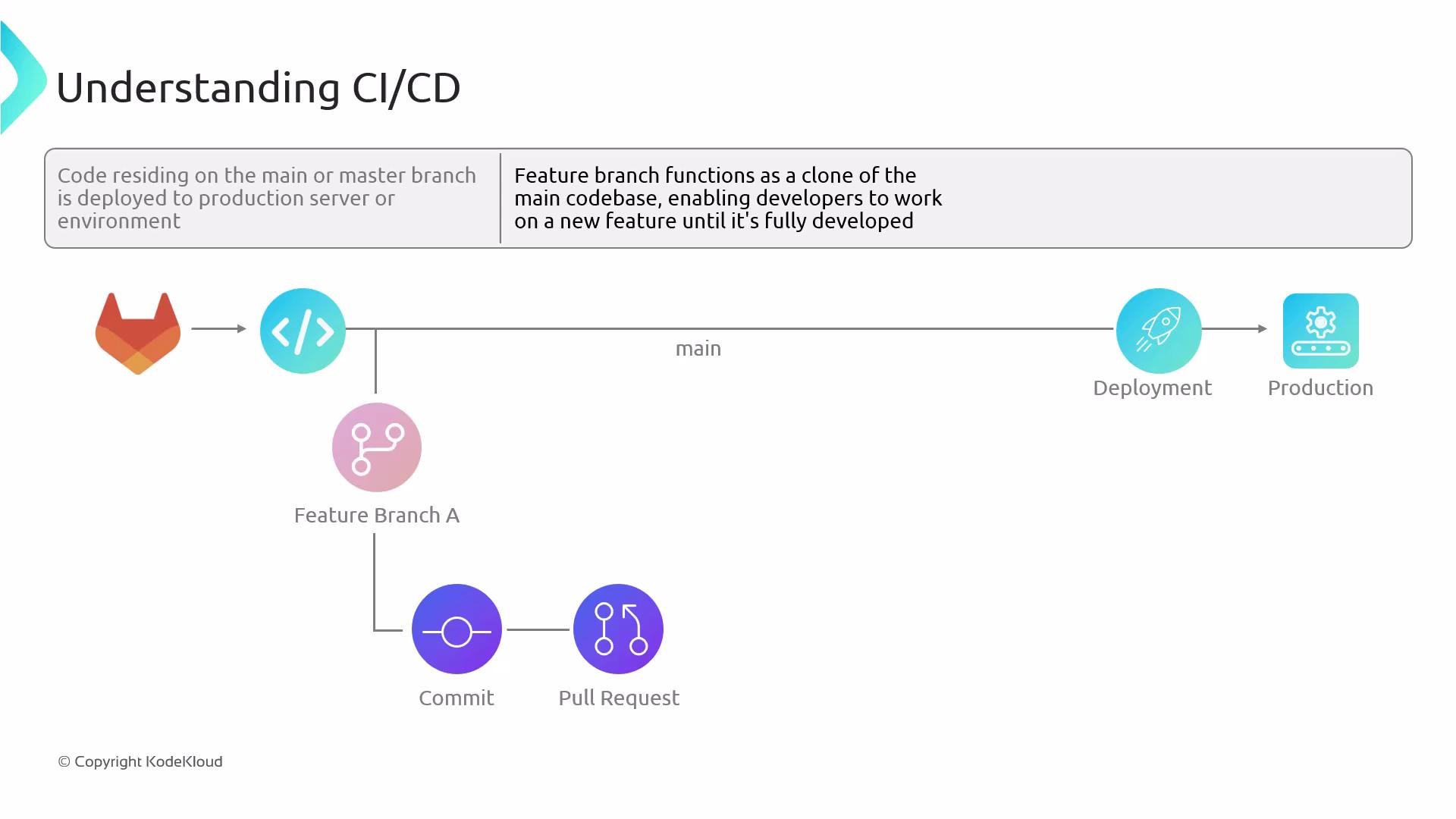
* Primary branches (commonly `main` or `master`) are usually the source of truth for production deployments; feature branches let developers iterate without disrupting production.
In a typical project, developers create feature branches to work independently and open a pull request (or merge request) when ready. The PR triggers automated checks—unit tests, static analysis, license scanning, vulnerability scans, and artifact builds—before reviewers merge the change.
 Common risks when CI is missing
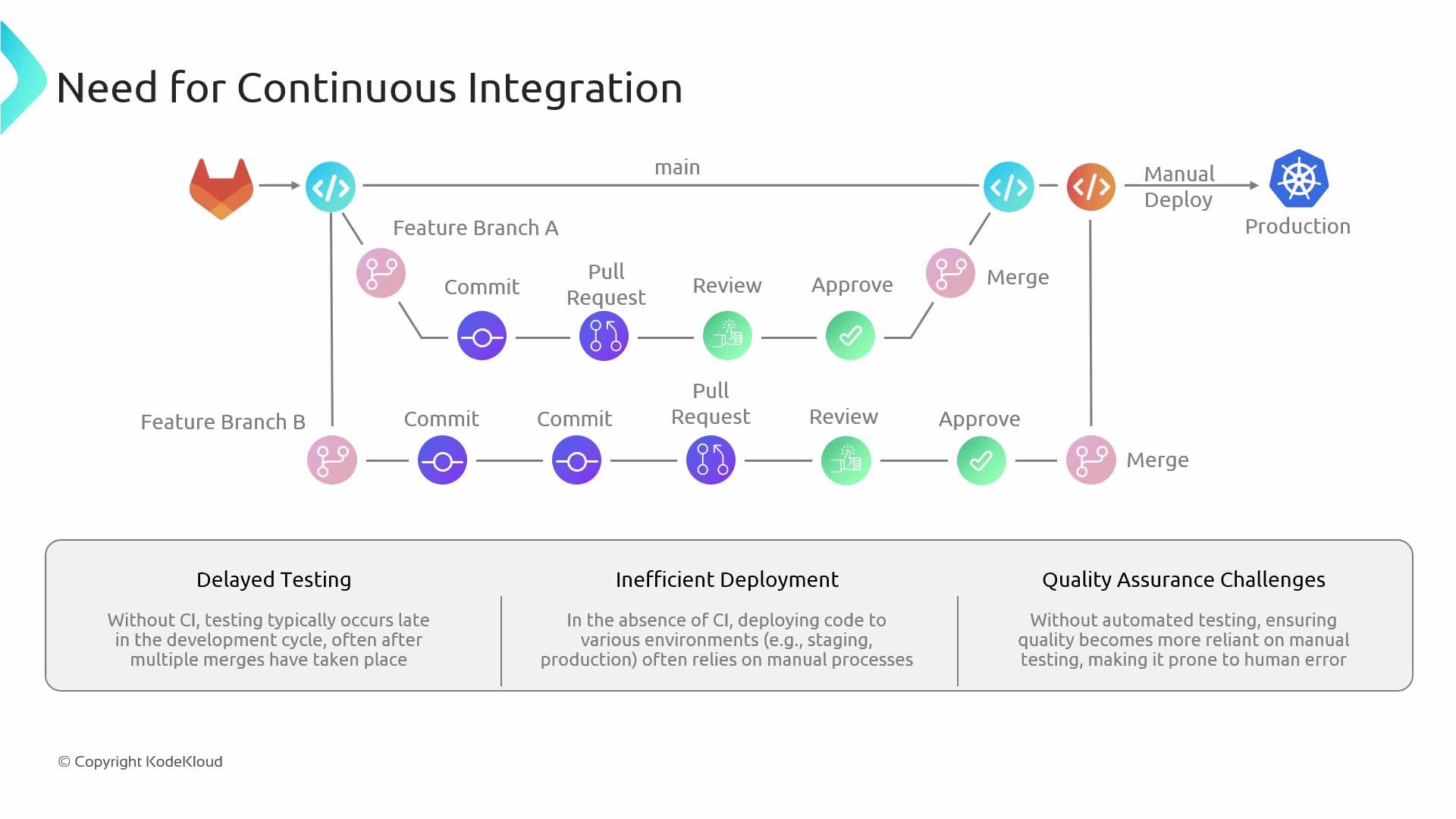
* Delayed testing: Tests run late and integration issues surface only after multiple merges.
* Inefficient deployments: Manual steps increase the chance of inconsistent environment states.
* Reduced quality assurance: Heavy reliance on manual testing introduces human error and bottlenecks.
Deploying untested code directly to production is risky. Automated CI and testing reduce the likelihood of regressions and outages.
Common risks when CI is missing
* Delayed testing: Tests run late and integration issues surface only after multiple merges.
* Inefficient deployments: Manual steps increase the chance of inconsistent environment states.
* Reduced quality assurance: Heavy reliance on manual testing introduces human error and bottlenecks.
Deploying untested code directly to production is risky. Automated CI and testing reduce the likelihood of regressions and outages.
 Typical PR-driven CI workflow (step-by-step)
1. Developer A creates a feature branch `feature/A`, implements changes, and opens a pull request against `main`.
2. The CI pipeline runs on the PR. Typical stages:
* Checkout and prepare environment
* Run unit tests
* Static code analysis and linting
* Dependency and license scanning
* Build artifacts (binaries, Docker images)
* Vulnerability scanning and security tests
3. If any check fails, the contributor updates the branch and pushes a new commit—this re-triggers the CI pipeline.
4. When checks pass and reviewers approve, merge the PR into `main`.
5. Developer B independently follows the same process with `feature/B`.
Why run CI on both PRs and `main`?
* Fast feedback: CI on the PR validates the change in isolation (often merged with the latest `main` locally) and gives quick feedback to the author and reviewers.
* Integration safety: CI on `main` after merge validates the combined state, catching race conditions or interactions with other recently merged changes.
This practice—frequent automated verification so many developers can integrate changes safely—is continuous integration.
Continuous Delivery vs Continuous Deployment
* Continuous Delivery: Every change is built, tested, and ready to deploy; a manual approval or release step promotes the change to production.
* Continuous Deployment: Every passing change is automatically deployed to production with no manual gate.
Comparison table
| Pattern | Production Deployment | Typical Use Case |
| --------------------: | :----------------------------------------: | -------------------------------------------------------------------- |
| Continuous Delivery | Manual approval required before production | Organizations needing human oversight for compliance or coordination |
| Continuous Deployment | Automatic deployment on successful CI | High-velocity teams confident in automated tests and monitoring |
Deployment and validation after CI
* After `main` passes CI, deploy to a non-production environment that mirrors production (for example, staging) for live validation.
* Pipelines can also deploy feature branches to ephemeral environments for testing.
* Post-deploy tests: integration tests, end-to-end (E2E) tests, performance and load testing.
* Promotion: Once staging checks pass, either merge/tags are created to mark release artifacts, and a pipeline promotes those artifacts to production.
Recommended pipeline stages
| Stage | Purpose |
| ----------------------------- | ---------------------------------------------------------------------------------------------- |
| Build | Compile code and produce artifacts (e.g., Docker images) |
| Test | Unit tests, integration tests, and E2E tests |
| Scan | Security, dependency, and license scans |
| Deploy (staging) | Validate artifacts in an environment similar to production |
| Promote / Deploy (production) | Release artifacts to customers (manual checkpoint for CD, automatic for Continuous Deployment) |
Typical PR-driven CI workflow (step-by-step)
1. Developer A creates a feature branch `feature/A`, implements changes, and opens a pull request against `main`.
2. The CI pipeline runs on the PR. Typical stages:
* Checkout and prepare environment
* Run unit tests
* Static code analysis and linting
* Dependency and license scanning
* Build artifacts (binaries, Docker images)
* Vulnerability scanning and security tests
3. If any check fails, the contributor updates the branch and pushes a new commit—this re-triggers the CI pipeline.
4. When checks pass and reviewers approve, merge the PR into `main`.
5. Developer B independently follows the same process with `feature/B`.
Why run CI on both PRs and `main`?
* Fast feedback: CI on the PR validates the change in isolation (often merged with the latest `main` locally) and gives quick feedback to the author and reviewers.
* Integration safety: CI on `main` after merge validates the combined state, catching race conditions or interactions with other recently merged changes.
This practice—frequent automated verification so many developers can integrate changes safely—is continuous integration.
Continuous Delivery vs Continuous Deployment
* Continuous Delivery: Every change is built, tested, and ready to deploy; a manual approval or release step promotes the change to production.
* Continuous Deployment: Every passing change is automatically deployed to production with no manual gate.
Comparison table
| Pattern | Production Deployment | Typical Use Case |
| --------------------: | :----------------------------------------: | -------------------------------------------------------------------- |
| Continuous Delivery | Manual approval required before production | Organizations needing human oversight for compliance or coordination |
| Continuous Deployment | Automatic deployment on successful CI | High-velocity teams confident in automated tests and monitoring |
Deployment and validation after CI
* After `main` passes CI, deploy to a non-production environment that mirrors production (for example, staging) for live validation.
* Pipelines can also deploy feature branches to ephemeral environments for testing.
* Post-deploy tests: integration tests, end-to-end (E2E) tests, performance and load testing.
* Promotion: Once staging checks pass, either merge/tags are created to mark release artifacts, and a pipeline promotes those artifacts to production.
Recommended pipeline stages
| Stage | Purpose |
| ----------------------------- | ---------------------------------------------------------------------------------------------- |
| Build | Compile code and produce artifacts (e.g., Docker images) |
| Test | Unit tests, integration tests, and E2E tests |
| Scan | Security, dependency, and license scans |
| Deploy (staging) | Validate artifacts in an environment similar to production |
| Promote / Deploy (production) | Release artifacts to customers (manual checkpoint for CD, automatic for Continuous Deployment) |
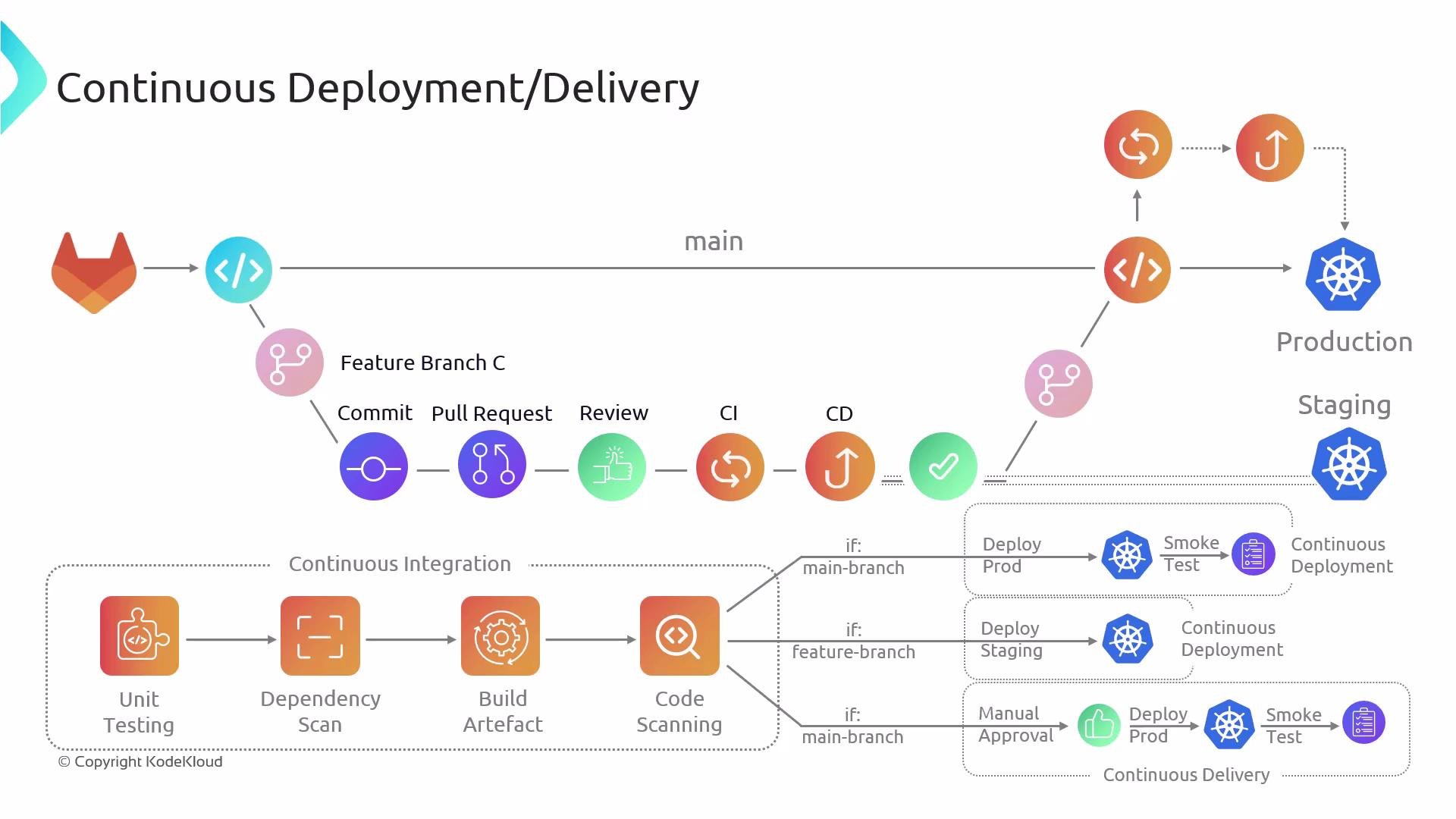 Continuous Delivery keeps your codebase always in a deployable state but uses a manual approval before production. Continuous Deployment automates the last step: code moves to production automatically when all checks succeed.
Further reading and references
* [Gitea](https://gitea.io) — lightweight Git hosting
* [GitHub](https://github.com), [GitLab](https://gitlab.com), [Bitbucket](https://bitbucket.org) — popular Git hosting and CI/CD platforms
* CI/CD best practices and pipeline examples:
* Branch-per-feature workflows and PR validation
* Use of ephemeral environments for feature testing
* Automate as many checks as practical to reduce manual testing burden
Adopting CI/CD transforms code delivery from a risky manual process into a reliable, repeatable pipeline—improving quality, accelerating releases, and increasing team confidence.
Continuous Delivery keeps your codebase always in a deployable state but uses a manual approval before production. Continuous Deployment automates the last step: code moves to production automatically when all checks succeed.
Further reading and references
* [Gitea](https://gitea.io) — lightweight Git hosting
* [GitHub](https://github.com), [GitLab](https://gitlab.com), [Bitbucket](https://bitbucket.org) — popular Git hosting and CI/CD platforms
* CI/CD best practices and pipeline examples:
* Branch-per-feature workflows and PR validation
* Use of ephemeral environments for feature testing
* Automate as many checks as practical to reduce manual testing burden
Adopting CI/CD transforms code delivery from a risky manual process into a reliable, repeatable pipeline—improving quality, accelerating releases, and increasing team confidence.