> ## Documentation Index
> Fetch the complete documentation index at: https://notes.kodekloud.com/llms.txt
> Use this file to discover all available pages before exploring further.
# Demo CICD vs GitOps Part 1
> Demonstrates a GitOps CI CD workflow where Jenkins builds and publishes container images, updates Kubernetes manifests in Git, and Argo CD applies those changes to the cluster.
This lesson demonstrates a GitOps-style CI/CD flow: a Jenkins pipeline builds and publishes a container image, updates Kubernetes manifests stored in Git, and Argo CD applies those changes to the cluster. The example uses a simple Node.js app (highway-animation), a manifest repository tracked by Argo CD, and a self-hosted Gitea instance for repository hosting and PR automation.
## Manifest: Deployment example
Below is the Deployment manifest used in this demo. It deploys 10 replicas of the `highway-animation` app and exposes the app container on port 3000. Argo CD will track this manifest in the manifest repository.
```yaml theme={null}
apiVersion: apps/v1
kind: Deployment
metadata:
name: highway-animation
namespace: jenkins-demo
spec:
replicas: 10
selector:
matchLabels:
app: highway-animation
template:
metadata:
labels:
app: highway-animation
spec:
containers:
- name: highway-animation
image: siddharth67/highway-animation:blue
ports:
- containerPort: 3000
env:
- name: POD_COUNT
value: "10"
```
## Create an Argo CD Application
Create an Argo CD Application that points to the manifest repository for the Jenkins demo. In the UI choose a name such as `jenkins-demo`, set the sync policy to manual initially (so you can control when changes are applied), and enable auto-creation of the target namespace.
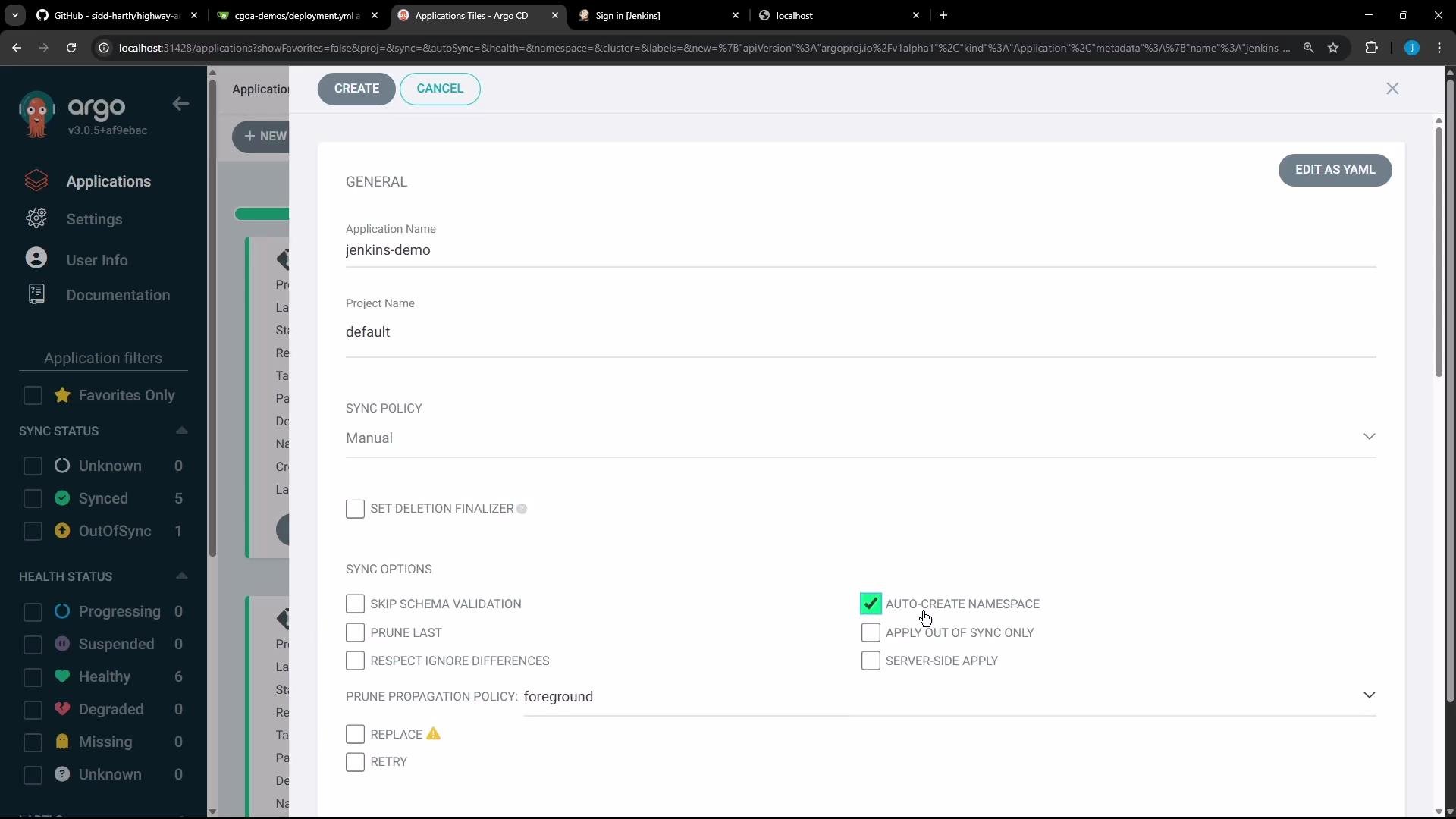 After creating the application the status will show as OutOfSync until you manually sync. Once you sync, Argo CD creates the `jenkins-demo` namespace and deploys the resources. In this demo the Deployment creates 10 Pods.
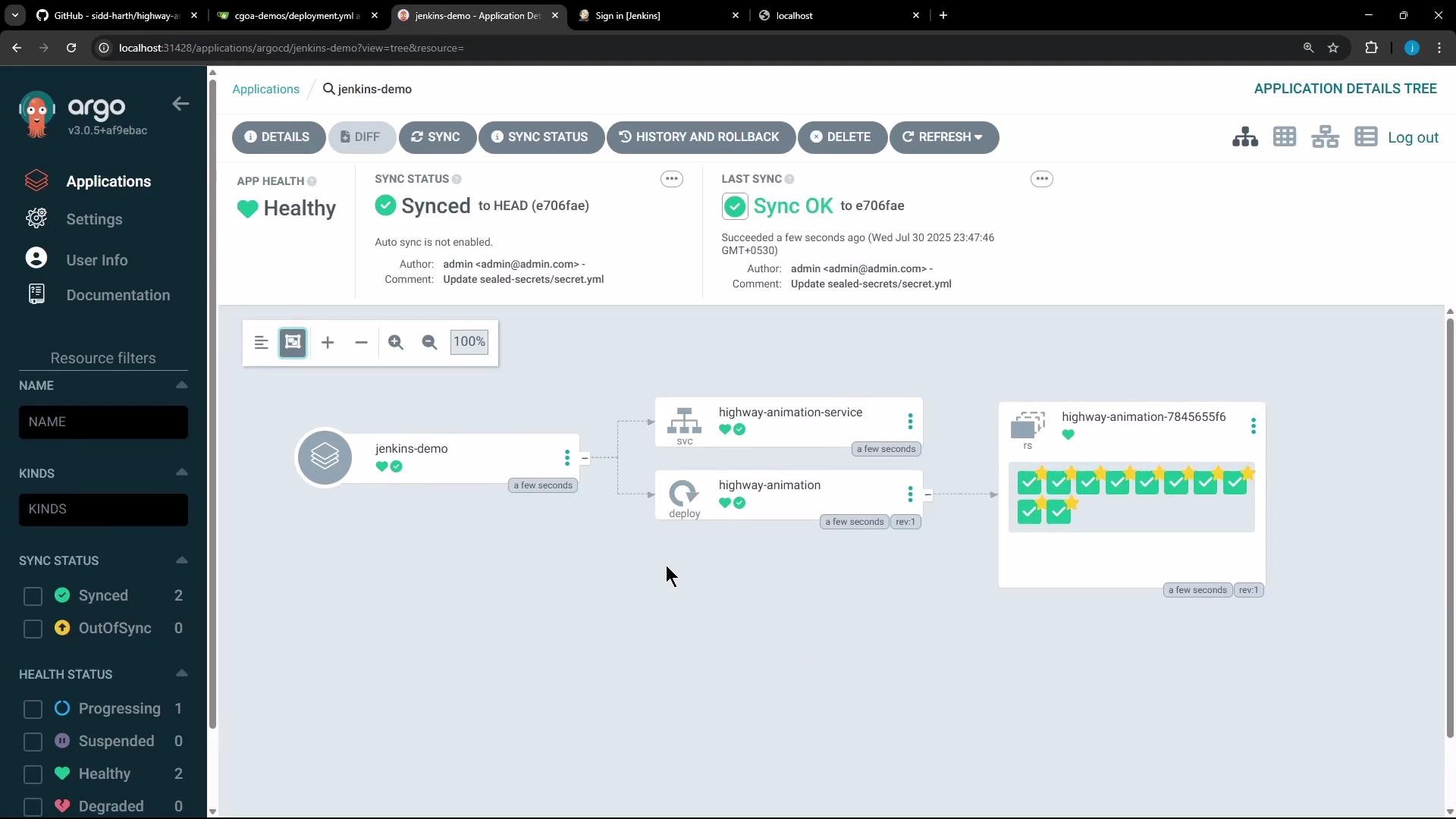 Once deployed you can access the app (in the demo it was exposed on a NodePort) and confirm the UI shows 10 blue vehicles.
## Developer workflow with GitOps
With GitOps the developer makes changes to application source, builds a new image, pushes it to a registry, and updates the image tag in the manifest repository. Argo CD monitors the manifest repo and applies changes once they land on the tracked branch (e.g., `main`).
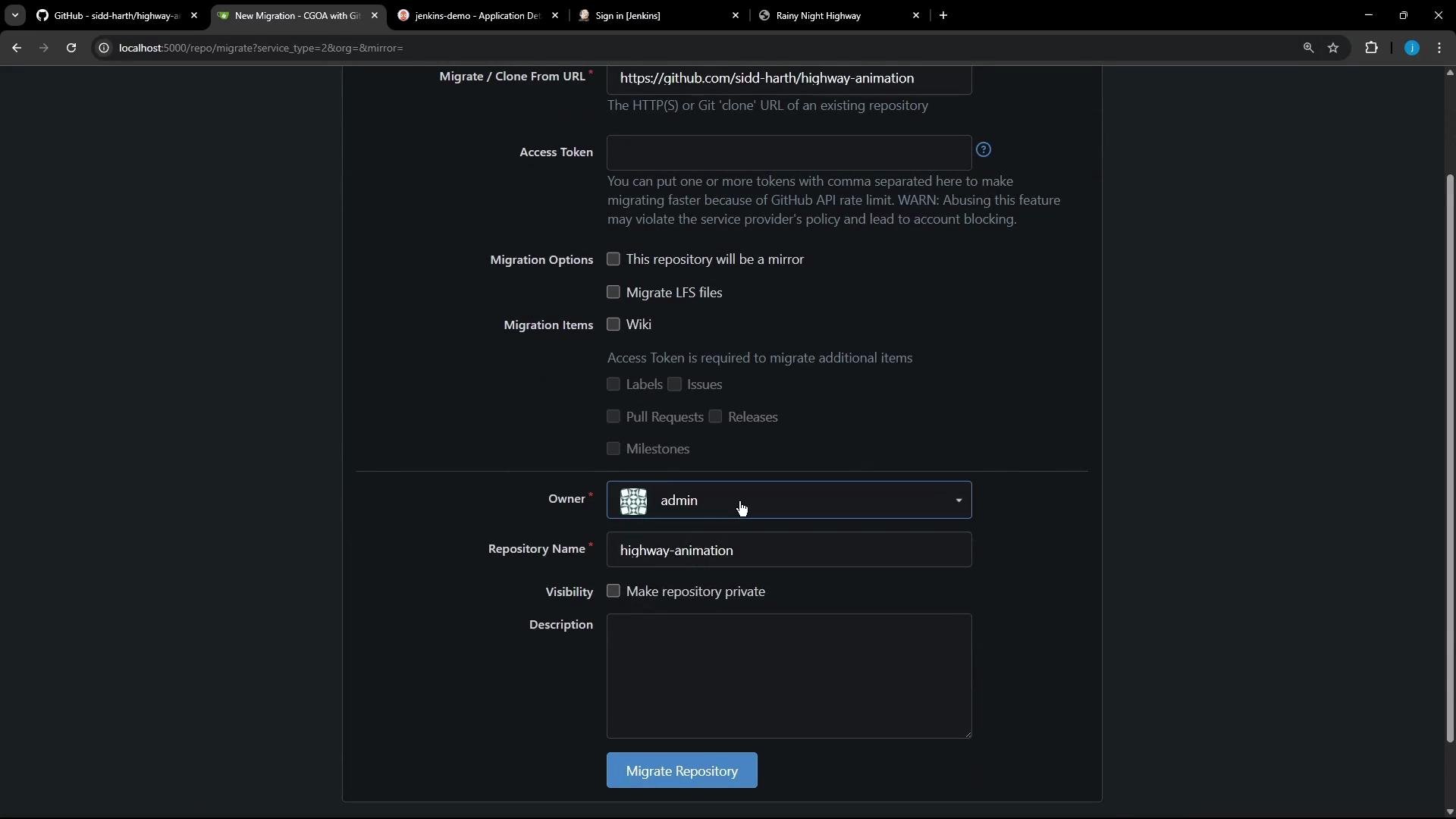
For this demo we migrated the app source from GitHub to a self-hosted Gitea instance and made small UI/server fixes. The migration UI looks like this:
Once deployed you can access the app (in the demo it was exposed on a NodePort) and confirm the UI shows 10 blue vehicles.
## Developer workflow with GitOps
With GitOps the developer makes changes to application source, builds a new image, pushes it to a registry, and updates the image tag in the manifest repository. Argo CD monitors the manifest repo and applies changes once they land on the tracked branch (e.g., `main`).
For this demo we migrated the app source from GitHub to a self-hosted Gitea instance and made small UI/server fixes. The migration UI looks like this:
 The `highway-animation` repository contains:
* `public/index.html` (UI)
* frontend JS files (`ui.js`, `app.js`)
* `package.json`
* `Dockerfile`
* `Jenkinsfile` (CI/CD)
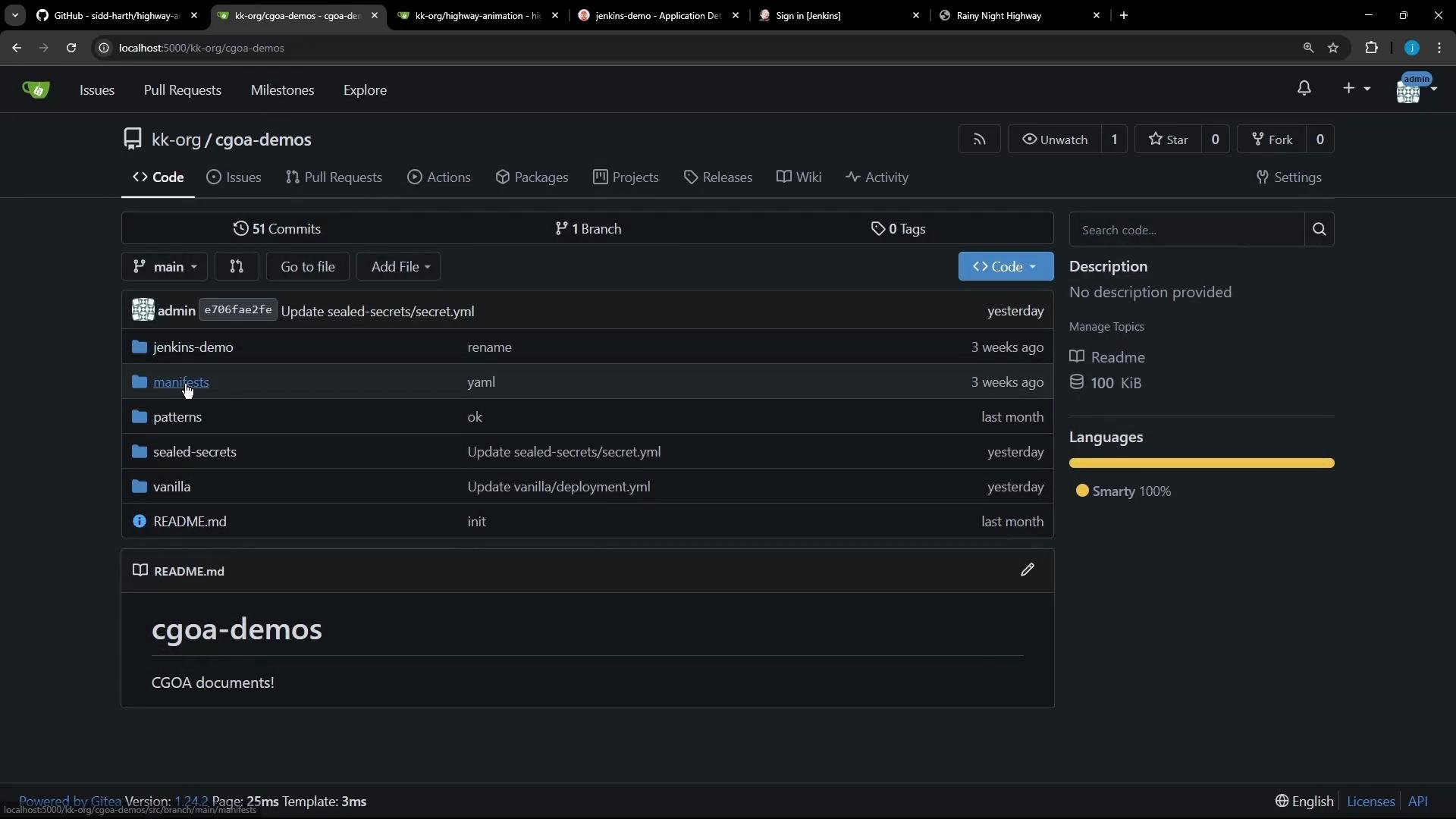
When browsing the manifest repository to update `deployment.yaml` you will see a structure similar to the image below:
The `highway-animation` repository contains:
* `public/index.html` (UI)
* frontend JS files (`ui.js`, `app.js`)
* `package.json`
* `Dockerfile`
* `Jenkinsfile` (CI/CD)
When browsing the manifest repository to update `deployment.yaml` you will see a structure similar to the image below:
 ## Application fixes and snippets
Representative fixes made while preparing the demo:
* Ensure server listens on port 3000 (was 3001).
* Serve static assets from `public/`.
* Add a `/health` endpoint and a `/api/pod-info` endpoint that reads `POD_COUNT` from environment variables.
server.js (corrected):
```javascript theme={null}
const express = require('express');
const path = require('path');
const app = express();
const PORT = process.env.PORT || 3000;
// Serve static files from public directory
app.use(express.static('public'));
// Main route
app.get('/', (req, res) => {
res.sendFile(path.join(__dirname, 'public', 'index.html'));
});
// Health check route
app.get('/health', (req, res) => {
res.json({ status: 'OK', message: 'Highway Animation Server is running' });
});
app.get('/api/pod-info', (req, res) => {
const podCount = parseInt(process.env.POD_COUNT, 10) || 1;
res.json({ podCount });
});
app.listen(PORT, () => {
console.log(`Server listening on port ${PORT}`);
});
```
index.html (style snippet):
```html theme={null}
Rainy Night Highway
```
ui.js — example snippets
* Adjust vehicle color selection to use a red palette:
```javascript theme={null}
const redVariations = [
'#DC143C', '#B22222', '#8B0000', '#FF6347',
'#CD5C5C', '#FF0000', '#FA8072'
];
const vehicleTypes = ['sedan','bus','truck','suv','hatchback','sports','doubleDecker'];
for (let i = 0; i < vehicleTypes.length; i++) {
const type = vehicleTypes[i];
const color = redVariations[i % redVariations.length];
const accent = this.darkenColor ? this.darkenColor(color, 20) : '#000';
// Create a sprite canvas for each vehicle type...
// (rest of sprite creation code)
}
```
* Example daytime sun drawing in the background:
```javascript theme={null}
class HighwayAnimation {
drawBackground() {
// Daytime sun
const sunX = this.canvas.width * 0.8;
const sunY = this.canvas.height * 0.2;
const sunGlow = this.ctx.createRadialGradient(sunX, sunY, 20, sunX, sunY, 80);
sunGlow.addColorStop(0, 'rgba(255, 255, 100, 0.6)');
sunGlow.addColorStop(0.5, 'rgba(255, 200, 50, 0.3)');
sunGlow.addColorStop(1, 'transparent');
this.ctx.fillStyle = sunGlow;
this.ctx.fillRect(sunX - 80, sunY - 160, 160, 160);
// Sun rays
this.ctx.strokeStyle = 'rgba(255, 255, 100, 0.4)';
this.ctx.lineWidth = 2;
for (let i = 0; i < 8; i++) {
const angle = (i * Math.PI * 2) / 8;
const x1 = sunX - Math.sin(angle) * 35;
const y1 = sunY - Math.cos(angle) * 35;
const x2 = sunX + Math.sin(angle) * 55;
const y2 = sunY + Math.cos(angle) * 55;
this.ctx.beginPath();
this.ctx.moveTo(x1, y1);
this.ctx.lineTo(x2, y2);
this.ctx.stroke();
}
// Sun center
this.ctx.fillStyle = 'rgba(255, 240, 120, 0.9)';
this.ctx.beginPath();
this.ctx.arc(sunX, sunY, 20, 0, Math.PI * 2);
this.ctx.fill();
}
}
```
## Jenkins pipeline (full CI/CD automation)
After making source changes you build a new Docker image and push it to a registry. The Jenkins pipeline automates:
* Build and tag the image (using BUILD\_ID and Git commit).
* Push the image to the registry using stored credentials.
* Clone or pull the manifest repository.
* Update the `deployment.yaml` with the new image tag (using `sed`).
* Commit and push a feature branch and open a PR via the Gitea API.
Below is a cleaned-up, corrected Jenkins declarative pipeline that demonstrates the full flow.
```groovy theme={null}
pipeline {
agent any
environment {
NAME = "highway-animation"
// VERSION includes BUILD_ID and the commit hash
VERSION = "${env.BUILD_ID}-${env.GIT_COMMIT}"
IMAGE_REPO = "siddharth67"
// GITEA_TOKEN should be added to Jenkins Credentials (type: Secret text)
GITEA_TOKEN = credentials('gitea-token')
// DockerHub credentials ID stored in Jenkins credentials
DOCKER_CREDENTIALS_ID = 'docker-hub-credentials'
MANIFEST_REPO_URL = "http://localhost:5000/kk-org/cgoa-demos.git"
MANIFEST_DIR = "cgoa-demos"
FEATURE_BRANCH = "feature-gitea"
}
stages {
stage('Unit Tests') {
steps {
echo 'Run unit tests here (placeholder)'
}
}
stage('Build Image') {
steps {
sh "docker build -t ${NAME}:${VERSION} ."
sh "docker tag ${NAME}:${VERSION} ${IMAGE_REPO}/${NAME}:${VERSION}"
}
}
stage('Push Image') {
steps {
withDockerRegistry([credentialsId: DOCKER_CREDENTIALS_ID, url: ""]) {
sh "docker push ${IMAGE_REPO}/${NAME}:${VERSION}"
}
}
}
stage('Clone or Pull Manifest Repo') {
steps {
script {
if (fileExists("${MANIFEST_DIR}")) {
echo 'Manifest repo exists. Pulling latest changes...'
dir("${MANIFEST_DIR}") {
sh 'git checkout main || true'
sh 'git pull origin main'
}
} else {
echo 'Cloning manifest repo...'
sh "git clone -b main ${MANIFEST_REPO_URL} ${MANIFEST_DIR}"
}
}
}
}
stage('Update Manifest') {
steps {
dir("${MANIFEST_DIR}/jenkins-demo") {
// Replace the image line with the new image and tag.
// This sed targets a line starting with "image:" and replaces the value.
sh "sed -i 's|^\\s*image:\\s.*|image: ${IMAGE_REPO}/${NAME}:${VERSION}|' deployment.yaml"
sh 'cat deployment.yaml'
}
}
}
stage('Commit & Push Manifest Branch') {
steps {
dir("${MANIFEST_DIR}") {
sh "git config user.email 'jenkins@ci.local'"
sh "git config user.name 'jenkins'"
// Create or checkout the feature branch
sh "git checkout -B ${FEATURE_BRANCH}"
sh 'git add -A'
sh "git commit -m 'Updated image to ${IMAGE_REPO}/${NAME}:${VERSION}' || echo 'No changes to commit'"
// Use the Gitea token in the remote URL for authentication
sh "git remote set-url origin https://${GITEA_TOKEN}@${env.MANIFEST_REPO_URL.replace('http://', '').replace('.git','')}.git || true"
sh "git push -u origin ${FEATURE_BRANCH} --force"
}
}
}
stage('Create Pull Request in Gitea') {
steps {
dir("${MANIFEST_DIR}") {
// The gitea token is available in environment variable GITEA_TOKEN
sh """
cat < /tmp/pr-body.json
{
"assignee": "admin",
"assignees": ["admin"],
"base": "main",
"head": "${FEATURE_BRANCH}",
"title": "Update image: ${NAME}:${VERSION}",
"body": "Automated update of Deployment to image ${IMAGE_REPO}/${NAME}:${VERSION}"
}
JSON
"""
sh "curl -s -X POST 'http://localhost:5000/api/v1/repos/kk-org/cgoa-demos/pulls' -H 'Content-Type: application/json' -H \"Authorization: token ${GITEA_TOKEN}\" -d @/tmp/pr-body.json || true"
}
}
}
}
}
```
Never hard-code tokens or registry credentials in pipelines or repository files. Use Jenkins Credentials (or a secret manager) and reference them via `credentials()` in the pipeline.
Store tokens and registry credentials in Jenkins Credentials (or another secret manager) and reference them via `credentials()` in the pipeline. Avoid hard-coding secrets in scripts or repository files.
## Gitea: creating tokens and using the API
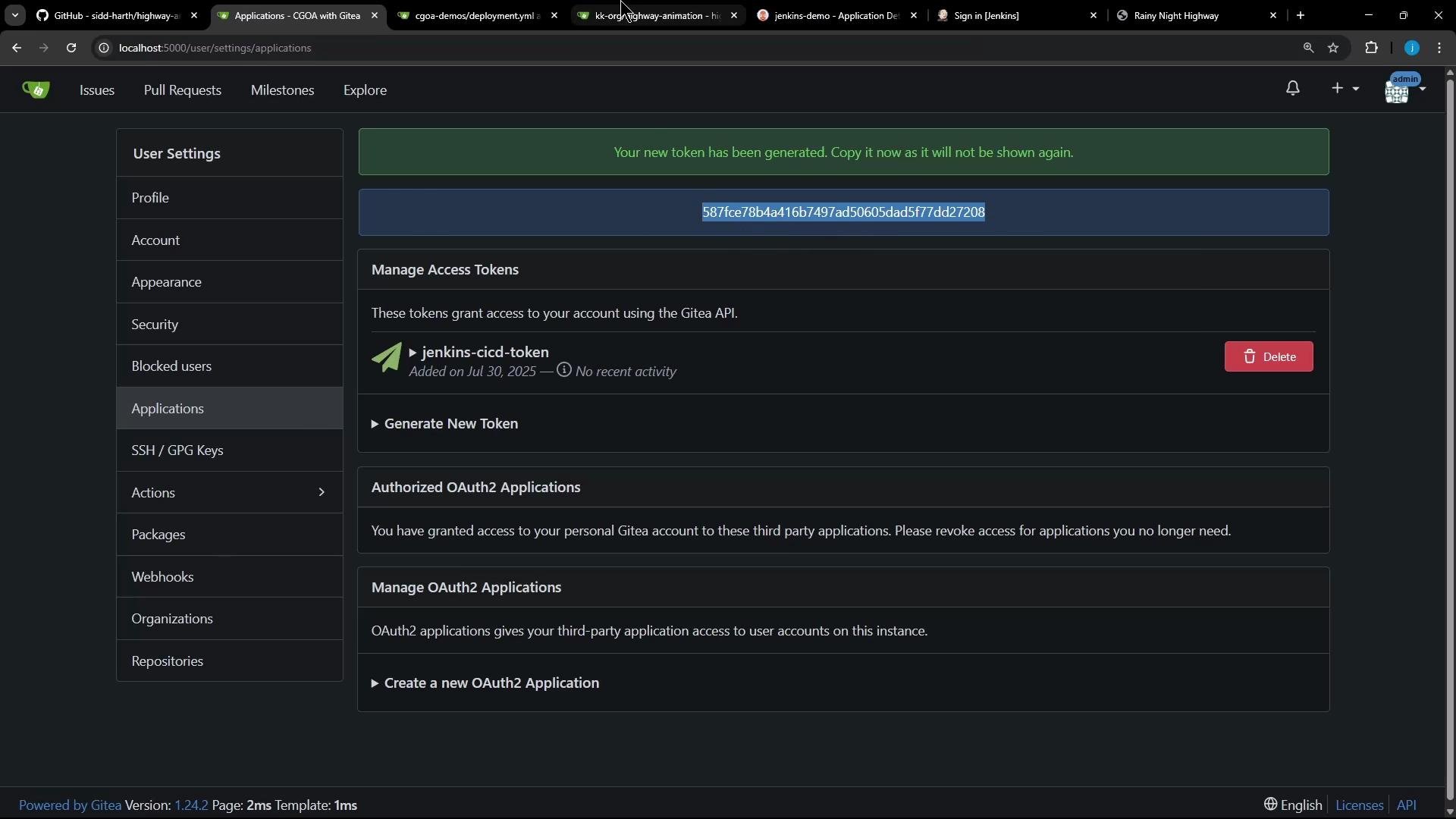
If you need to create a personal access token in Gitea (so Jenkins can push/raise PRs), go to your Gitea user settings → Applications and generate a token with repository write permissions. The token is shown only once — copy it to a secure secret store.
## Application fixes and snippets
Representative fixes made while preparing the demo:
* Ensure server listens on port 3000 (was 3001).
* Serve static assets from `public/`.
* Add a `/health` endpoint and a `/api/pod-info` endpoint that reads `POD_COUNT` from environment variables.
server.js (corrected):
```javascript theme={null}
const express = require('express');
const path = require('path');
const app = express();
const PORT = process.env.PORT || 3000;
// Serve static files from public directory
app.use(express.static('public'));
// Main route
app.get('/', (req, res) => {
res.sendFile(path.join(__dirname, 'public', 'index.html'));
});
// Health check route
app.get('/health', (req, res) => {
res.json({ status: 'OK', message: 'Highway Animation Server is running' });
});
app.get('/api/pod-info', (req, res) => {
const podCount = parseInt(process.env.POD_COUNT, 10) || 1;
res.json({ podCount });
});
app.listen(PORT, () => {
console.log(`Server listening on port ${PORT}`);
});
```
index.html (style snippet):
```html theme={null}
Rainy Night Highway
```
ui.js — example snippets
* Adjust vehicle color selection to use a red palette:
```javascript theme={null}
const redVariations = [
'#DC143C', '#B22222', '#8B0000', '#FF6347',
'#CD5C5C', '#FF0000', '#FA8072'
];
const vehicleTypes = ['sedan','bus','truck','suv','hatchback','sports','doubleDecker'];
for (let i = 0; i < vehicleTypes.length; i++) {
const type = vehicleTypes[i];
const color = redVariations[i % redVariations.length];
const accent = this.darkenColor ? this.darkenColor(color, 20) : '#000';
// Create a sprite canvas for each vehicle type...
// (rest of sprite creation code)
}
```
* Example daytime sun drawing in the background:
```javascript theme={null}
class HighwayAnimation {
drawBackground() {
// Daytime sun
const sunX = this.canvas.width * 0.8;
const sunY = this.canvas.height * 0.2;
const sunGlow = this.ctx.createRadialGradient(sunX, sunY, 20, sunX, sunY, 80);
sunGlow.addColorStop(0, 'rgba(255, 255, 100, 0.6)');
sunGlow.addColorStop(0.5, 'rgba(255, 200, 50, 0.3)');
sunGlow.addColorStop(1, 'transparent');
this.ctx.fillStyle = sunGlow;
this.ctx.fillRect(sunX - 80, sunY - 160, 160, 160);
// Sun rays
this.ctx.strokeStyle = 'rgba(255, 255, 100, 0.4)';
this.ctx.lineWidth = 2;
for (let i = 0; i < 8; i++) {
const angle = (i * Math.PI * 2) / 8;
const x1 = sunX - Math.sin(angle) * 35;
const y1 = sunY - Math.cos(angle) * 35;
const x2 = sunX + Math.sin(angle) * 55;
const y2 = sunY + Math.cos(angle) * 55;
this.ctx.beginPath();
this.ctx.moveTo(x1, y1);
this.ctx.lineTo(x2, y2);
this.ctx.stroke();
}
// Sun center
this.ctx.fillStyle = 'rgba(255, 240, 120, 0.9)';
this.ctx.beginPath();
this.ctx.arc(sunX, sunY, 20, 0, Math.PI * 2);
this.ctx.fill();
}
}
```
## Jenkins pipeline (full CI/CD automation)
After making source changes you build a new Docker image and push it to a registry. The Jenkins pipeline automates:
* Build and tag the image (using BUILD\_ID and Git commit).
* Push the image to the registry using stored credentials.
* Clone or pull the manifest repository.
* Update the `deployment.yaml` with the new image tag (using `sed`).
* Commit and push a feature branch and open a PR via the Gitea API.
Below is a cleaned-up, corrected Jenkins declarative pipeline that demonstrates the full flow.
```groovy theme={null}
pipeline {
agent any
environment {
NAME = "highway-animation"
// VERSION includes BUILD_ID and the commit hash
VERSION = "${env.BUILD_ID}-${env.GIT_COMMIT}"
IMAGE_REPO = "siddharth67"
// GITEA_TOKEN should be added to Jenkins Credentials (type: Secret text)
GITEA_TOKEN = credentials('gitea-token')
// DockerHub credentials ID stored in Jenkins credentials
DOCKER_CREDENTIALS_ID = 'docker-hub-credentials'
MANIFEST_REPO_URL = "http://localhost:5000/kk-org/cgoa-demos.git"
MANIFEST_DIR = "cgoa-demos"
FEATURE_BRANCH = "feature-gitea"
}
stages {
stage('Unit Tests') {
steps {
echo 'Run unit tests here (placeholder)'
}
}
stage('Build Image') {
steps {
sh "docker build -t ${NAME}:${VERSION} ."
sh "docker tag ${NAME}:${VERSION} ${IMAGE_REPO}/${NAME}:${VERSION}"
}
}
stage('Push Image') {
steps {
withDockerRegistry([credentialsId: DOCKER_CREDENTIALS_ID, url: ""]) {
sh "docker push ${IMAGE_REPO}/${NAME}:${VERSION}"
}
}
}
stage('Clone or Pull Manifest Repo') {
steps {
script {
if (fileExists("${MANIFEST_DIR}")) {
echo 'Manifest repo exists. Pulling latest changes...'
dir("${MANIFEST_DIR}") {
sh 'git checkout main || true'
sh 'git pull origin main'
}
} else {
echo 'Cloning manifest repo...'
sh "git clone -b main ${MANIFEST_REPO_URL} ${MANIFEST_DIR}"
}
}
}
}
stage('Update Manifest') {
steps {
dir("${MANIFEST_DIR}/jenkins-demo") {
// Replace the image line with the new image and tag.
// This sed targets a line starting with "image:" and replaces the value.
sh "sed -i 's|^\\s*image:\\s.*|image: ${IMAGE_REPO}/${NAME}:${VERSION}|' deployment.yaml"
sh 'cat deployment.yaml'
}
}
}
stage('Commit & Push Manifest Branch') {
steps {
dir("${MANIFEST_DIR}") {
sh "git config user.email 'jenkins@ci.local'"
sh "git config user.name 'jenkins'"
// Create or checkout the feature branch
sh "git checkout -B ${FEATURE_BRANCH}"
sh 'git add -A'
sh "git commit -m 'Updated image to ${IMAGE_REPO}/${NAME}:${VERSION}' || echo 'No changes to commit'"
// Use the Gitea token in the remote URL for authentication
sh "git remote set-url origin https://${GITEA_TOKEN}@${env.MANIFEST_REPO_URL.replace('http://', '').replace('.git','')}.git || true"
sh "git push -u origin ${FEATURE_BRANCH} --force"
}
}
}
stage('Create Pull Request in Gitea') {
steps {
dir("${MANIFEST_DIR}") {
// The gitea token is available in environment variable GITEA_TOKEN
sh """
cat < /tmp/pr-body.json
{
"assignee": "admin",
"assignees": ["admin"],
"base": "main",
"head": "${FEATURE_BRANCH}",
"title": "Update image: ${NAME}:${VERSION}",
"body": "Automated update of Deployment to image ${IMAGE_REPO}/${NAME}:${VERSION}"
}
JSON
"""
sh "curl -s -X POST 'http://localhost:5000/api/v1/repos/kk-org/cgoa-demos/pulls' -H 'Content-Type: application/json' -H \"Authorization: token ${GITEA_TOKEN}\" -d @/tmp/pr-body.json || true"
}
}
}
}
}
```
Never hard-code tokens or registry credentials in pipelines or repository files. Use Jenkins Credentials (or a secret manager) and reference them via `credentials()` in the pipeline.
Store tokens and registry credentials in Jenkins Credentials (or another secret manager) and reference them via `credentials()` in the pipeline. Avoid hard-coding secrets in scripts or repository files.
## Gitea: creating tokens and using the API
If you need to create a personal access token in Gitea (so Jenkins can push/raise PRs), go to your Gitea user settings → Applications and generate a token with repository write permissions. The token is shown only once — copy it to a secure secret store.
 Gitea exposes a REST API (Swagger) that documents payloads for operations such as creating pull requests. You can review the API and try sample requests: [https://docs.gitea.io/en-us/swagger/](https://docs.gitea.io/en-us/swagger/)
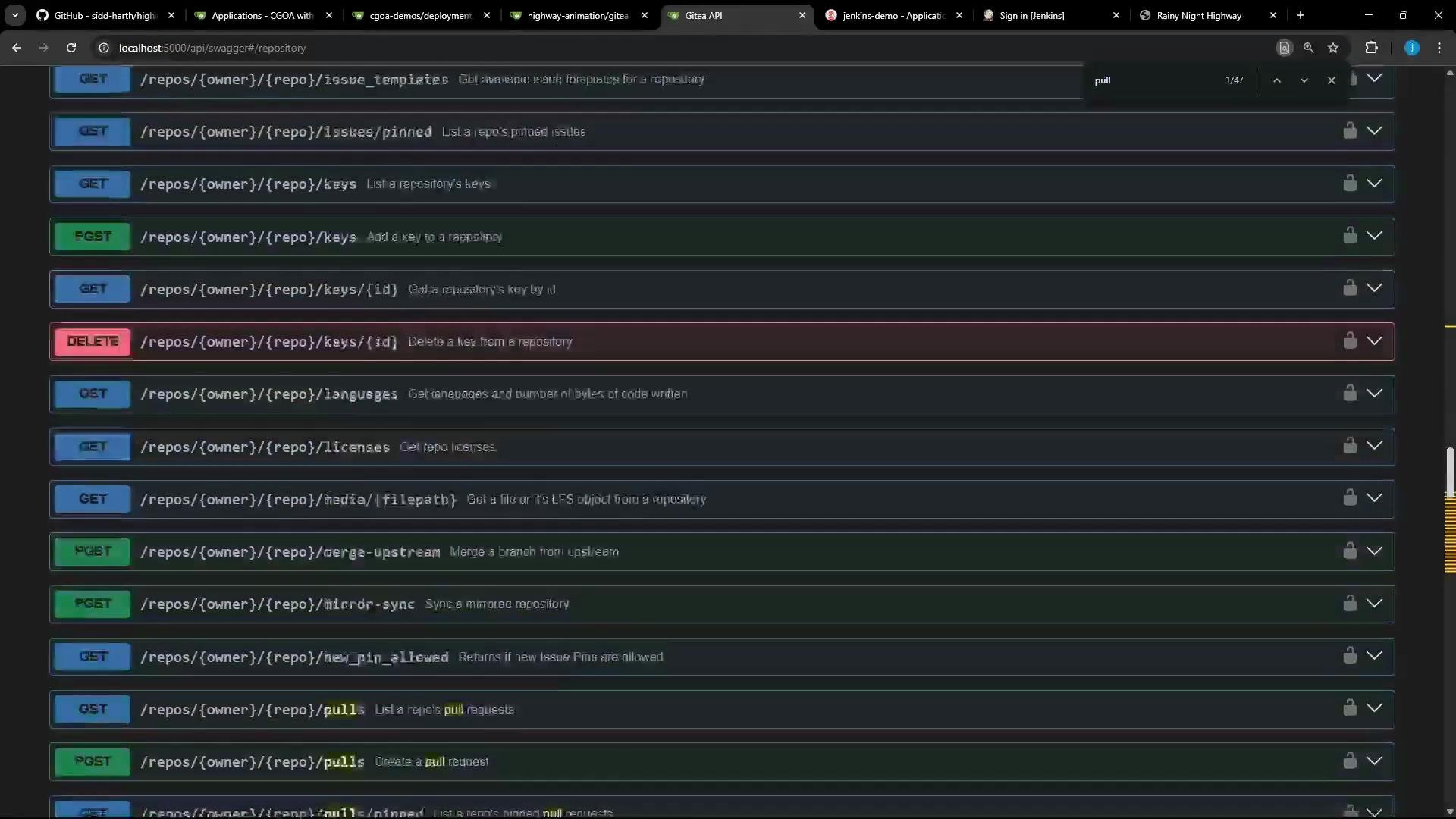 Example shell script to create a PR (invoked by the Jenkins pipeline). This script relies on the `GITEA_TOKEN` environment variable and assumes the repo owner/name and branch names are set appropriately:
gitea-pr.sh (example):
```bash theme={null}
#!/usr/bin/env bash
set -euo pipefail
API_URL="http://localhost:5000/api/v1"
REPO_OWNER="kk-org"
REPO_NAME="cgoa-demos"
HEAD_BRANCH="feature-gitea"
BASE_BRANCH="main"
echo "Opening a Pull Request for ${REPO_OWNER}/${REPO_NAME}: ${HEAD_BRANCH} -> ${BASE_BRANCH}"
curl -s -X POST "${API_URL}/repos/${REPO_OWNER}/${REPO_NAME}/pulls" \
-H 'Accept: application/json' \
-H "Authorization: token ${GITEA_TOKEN}" \
-H 'Content-Type: application/json' \
-d "{
\"assignee\": \"admin\",
\"assignees\": [\"admin\"],
\"base\": \"${BASE_BRANCH}\",
\"head\": \"${HEAD_BRANCH}\",
\"title\": \"Updated deployment image\",
\"body\": \"Automated update of deployment image by CI pipeline.\"
}"
echo "Pull request API call complete."
```
## Pipeline stages at a glance
| Stage | Purpose | Example action |
| --------------- | ---------------------------------- | ------------------------------------------ |
| Unit Tests | Verify application logic | Run `npm test` or equivalent |
| Build Image | Build and tag container | `docker build -t highway-animation:...` |
| Push Image | Push image to registry | `docker push /highway-animation:...` |
| Update Manifest | Update deployment image in Git | `sed` replace in `deployment.yaml` |
| Commit & PR | Push branch and open PR for review | Use Gitea API to create PR |
| Argo CD sync | Apply manifest changes to cluster | Argo CD observes `main` and applies |
## End-to-end flow (summary)
1. Developer updates application source (UI or server).
2. Jenkins builds, tags, and pushes a new image to the registry.
3. Jenkins clones/pulls the manifest repo, updates `deployment.yaml` with the new image tag, commits, and pushes a feature branch.
4. Jenkins opens a PR in Gitea for the manifest change.
5. A reviewer inspects and merges the PR; once merged, Argo CD detects the change on `main` and applies it to the cluster (or Argo CD can be configured for automated sync).
For more background reading:
* Argo CD docs: [https://argo-cd.readthedocs.io/](https://argo-cd.readthedocs.io/)
* Jenkins pipeline docs: [https://www.jenkins.io/doc/](https://www.jenkins.io/doc/)
* Gitea API docs (Swagger): [https://docs.gitea.io/en-us/swagger/](https://docs.gitea.io/en-us/swagger/)
Later we will create the Jenkins job, run the pipeline, and observe the full flow end-to-end — from source change to Argo CD applying the updated manifest.
Example shell script to create a PR (invoked by the Jenkins pipeline). This script relies on the `GITEA_TOKEN` environment variable and assumes the repo owner/name and branch names are set appropriately:
gitea-pr.sh (example):
```bash theme={null}
#!/usr/bin/env bash
set -euo pipefail
API_URL="http://localhost:5000/api/v1"
REPO_OWNER="kk-org"
REPO_NAME="cgoa-demos"
HEAD_BRANCH="feature-gitea"
BASE_BRANCH="main"
echo "Opening a Pull Request for ${REPO_OWNER}/${REPO_NAME}: ${HEAD_BRANCH} -> ${BASE_BRANCH}"
curl -s -X POST "${API_URL}/repos/${REPO_OWNER}/${REPO_NAME}/pulls" \
-H 'Accept: application/json' \
-H "Authorization: token ${GITEA_TOKEN}" \
-H 'Content-Type: application/json' \
-d "{
\"assignee\": \"admin\",
\"assignees\": [\"admin\"],
\"base\": \"${BASE_BRANCH}\",
\"head\": \"${HEAD_BRANCH}\",
\"title\": \"Updated deployment image\",
\"body\": \"Automated update of deployment image by CI pipeline.\"
}"
echo "Pull request API call complete."
```
## Pipeline stages at a glance
| Stage | Purpose | Example action |
| --------------- | ---------------------------------- | ------------------------------------------ |
| Unit Tests | Verify application logic | Run `npm test` or equivalent |
| Build Image | Build and tag container | `docker build -t highway-animation:...` |
| Push Image | Push image to registry | `docker push /highway-animation:...` |
| Update Manifest | Update deployment image in Git | `sed` replace in `deployment.yaml` |
| Commit & PR | Push branch and open PR for review | Use Gitea API to create PR |
| Argo CD sync | Apply manifest changes to cluster | Argo CD observes `main` and applies |
## End-to-end flow (summary)
1. Developer updates application source (UI or server).
2. Jenkins builds, tags, and pushes a new image to the registry.
3. Jenkins clones/pulls the manifest repo, updates `deployment.yaml` with the new image tag, commits, and pushes a feature branch.
4. Jenkins opens a PR in Gitea for the manifest change.
5. A reviewer inspects and merges the PR; once merged, Argo CD detects the change on `main` and applies it to the cluster (or Argo CD can be configured for automated sync).
For more background reading:
* Argo CD docs: [https://argo-cd.readthedocs.io/](https://argo-cd.readthedocs.io/)
* Jenkins pipeline docs: [https://www.jenkins.io/doc/](https://www.jenkins.io/doc/)
* Gitea API docs (Swagger): [https://docs.gitea.io/en-us/swagger/](https://docs.gitea.io/en-us/swagger/)
Later we will create the Jenkins job, run the pipeline, and observe the full flow end-to-end — from source change to Argo CD applying the updated manifest.