> ## Documentation Index
> Fetch the complete documentation index at: https://notes.kodekloud.com/llms.txt
> Use this file to discover all available pages before exploring further.
# Demo CICD vs GitOps Part 2
> Shows a Jenkins CI pipeline building and pushing Docker images and updating Git manifests for Argo CD GitOps deployments
This lesson continues the CI/CD with [GitOps with ArgoCD](https://learn.kodekloud.com/user/courses/gitops-with-argocd) walkthrough and finalizes a [Jenkins](https://learn.kodekloud.com/user/courses/jenkins) pipeline that:
* Builds a Docker image,
* Pushes it to Docker Hub,
* Updates the Kubernetes manifest in a Git repository,
* Raises a pull request so a GitOps operator (Argo CD) can reconcile the change.
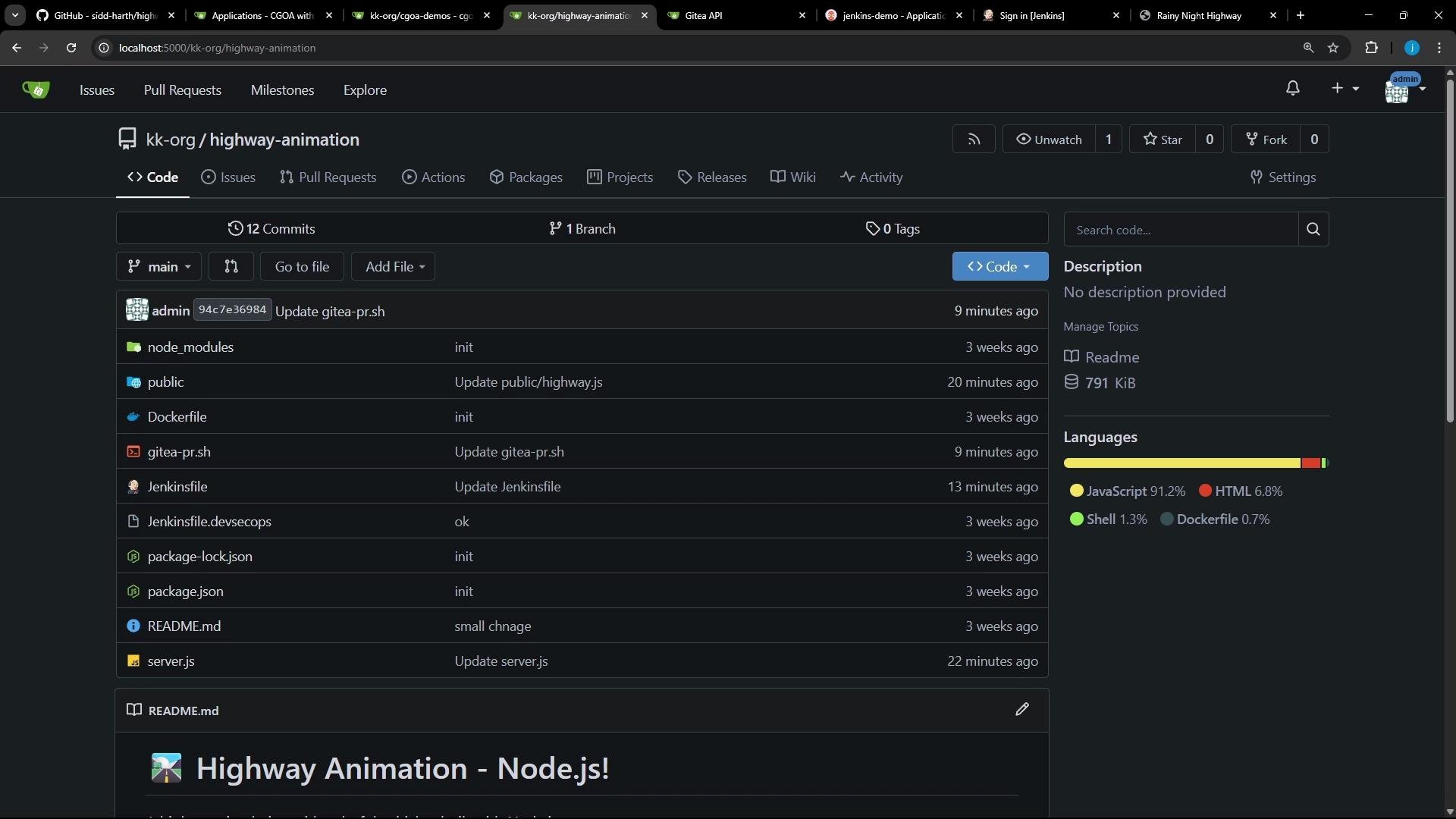
The `highway-animation` repository was imported into Gitea and the Jenkinsfile was modified for this flow.
 Pipeline filename mismatch issue
* The pipeline previously failed because some stages referenced `deployment.yaml` while the repository file is named `deployment.yml`. That made the `sed` / `cat` commands error out.
* Always verify file names and paths in the workspace before running commands that assume a file exists.
Always validate filenames and paths in the pipeline workspace (for example `deployment.yml` vs `deployment.yaml`) before using `sed` or `cat` to avoid stage failures.
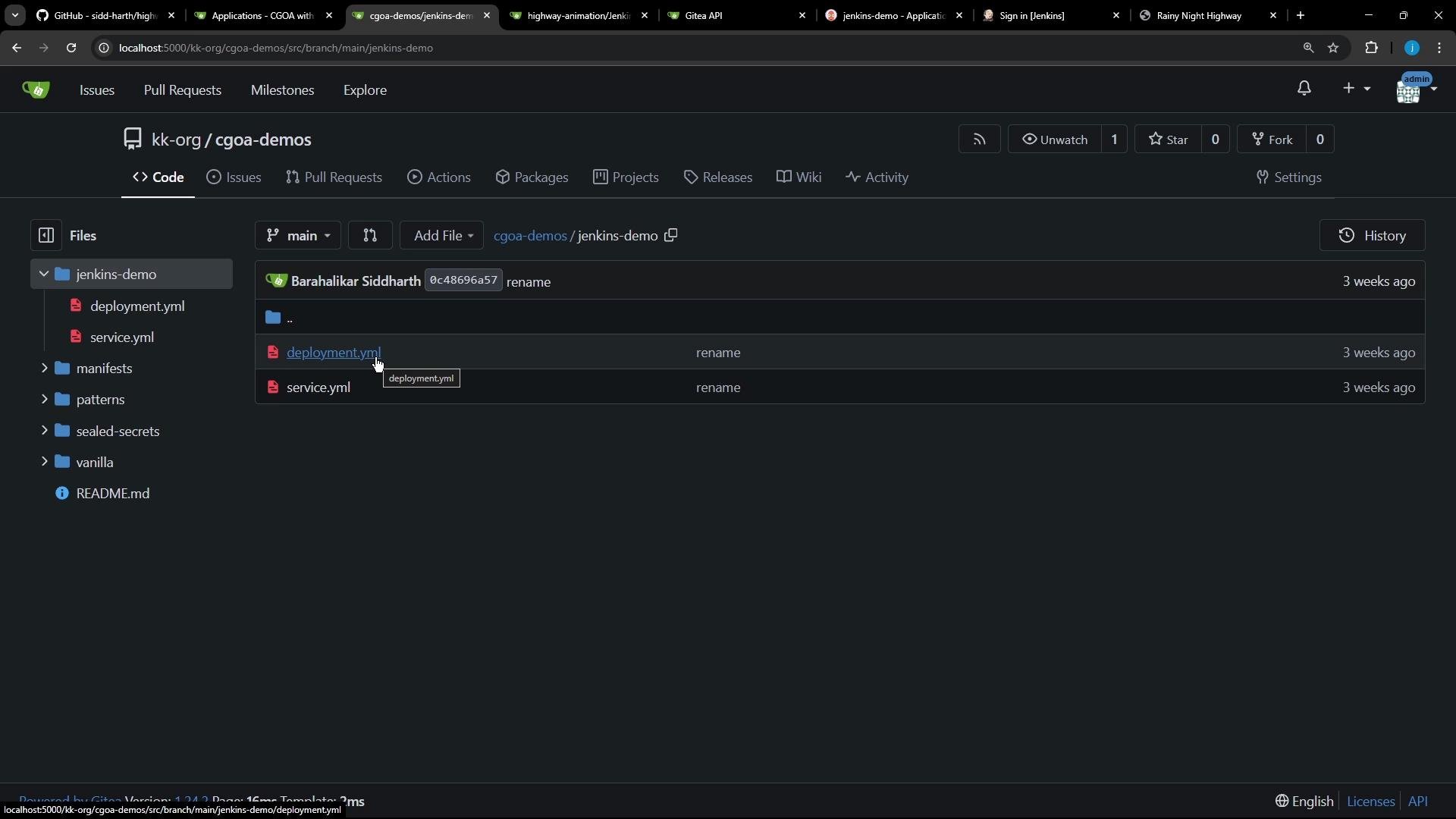
Repository layout reminder — in this demo the Kubernetes manifests live under `cgoa-demos/jenkins-demo` and the manifest file is `deployment.yml` (note the single-letter extension):
Pipeline filename mismatch issue
* The pipeline previously failed because some stages referenced `deployment.yaml` while the repository file is named `deployment.yml`. That made the `sed` / `cat` commands error out.
* Always verify file names and paths in the workspace before running commands that assume a file exists.
Always validate filenames and paths in the pipeline workspace (for example `deployment.yml` vs `deployment.yaml`) before using `sed` or `cat` to avoid stage failures.
Repository layout reminder — in this demo the Kubernetes manifests live under `cgoa-demos/jenkins-demo` and the manifest file is `deployment.yml` (note the single-letter extension):
 Corrected declarative Jenkinsfile
Below is a consolidated and corrected declarative Jenkinsfile for this CI flow. It:
* Builds and tags the Docker image using a deterministic `VERSION` (combining `BUILD_ID` and `GIT_COMMIT`),
* Pushes the image to Docker Hub using stored credentials,
* Clones or pulls the `cgoa-demos` repo, updates `deployment.yml` to the new image tag, commits, pushes and creates a PR.
```groovy theme={null}
pipeline {
agent any
environment {
NAME = "highway-animation-jenkins"
VERSION = "${env.BUILD_ID}-${env.GIT_COMMIT}"
IMAGE_REPO = 'siddharth67'
GITEA_TOKEN = credentials('gitea-token') // secret/token stored in Jenkins
}
stages {
stage('Unit Tests') {
steps {
echo 'Implement unit tests if applicable.'
}
}
stage('Build Image') {
steps {
sh "docker build -t ${NAME}:latest ."
sh "docker tag ${NAME}:latest ${IMAGE_REPO}/${NAME}:${VERSION}"
}
}
stage('Push Image') {
steps {
// Uses Docker Pipeline plugin credentials to authenticate to Docker Hub
withDockerRegistry([credentialsId: 'docker-hub-credentials', url: ""]) {
sh "docker push ${IMAGE_REPO}/${NAME}:${VERSION}"
}
}
}
stage('Clone/Pull Repo') {
steps {
script {
if (fileExists('cgoa-demos')) {
echo 'Cloned repo already exists - Pulling latest changes'
dir('cgoa-demos') {
sh 'git pull'
}
} else {
echo 'Repo does not exist - Cloning the repo'
sh 'git clone -b feature-gitea http://localhost:5000/kk-org/cgoa-demos'
}
}
}
}
stage('Update Manifest') {
steps {
dir('cgoa-demos/jenkins-demo') {
// Replace the image line in deployment.yml with the new image:tag
sh "sed -i \"s#image:.*#image: ${IMAGE_REPO}/${NAME}:${VERSION}#g\" deployment.yml"
sh "cat deployment.yml"
}
}
}
stage('Commit & Push') {
steps {
dir('cgoa-demos/jenkins-demo') {
// Configure git user and push back to feature branch using a token in the remote URL
sh "git config --global user.email 'jenkins@ci.com'"
sh "git remote set-url origin http://${GITEA_TOKEN}@localhost:5000/kk-org/cgoa-demos"
sh "git checkout feature-gitea"
sh "git add -A"
// commit may return non-zero if there are no changes; allow that without failing the build
sh "git commit -m \"Updated image version for Build - ${VERSION}\" || true"
sh "git push origin feature-gitea"
}
}
}
stage('Create PR') {
steps {
dir('cgoa-demos/jenkins-demo') {
// Example script to create a PR using Gitea REST API (gitea-pr.sh should exist and be executable)
sh "./gitea-pr.sh || true"
}
}
}
}
}
```
Create the Jenkins pipeline job
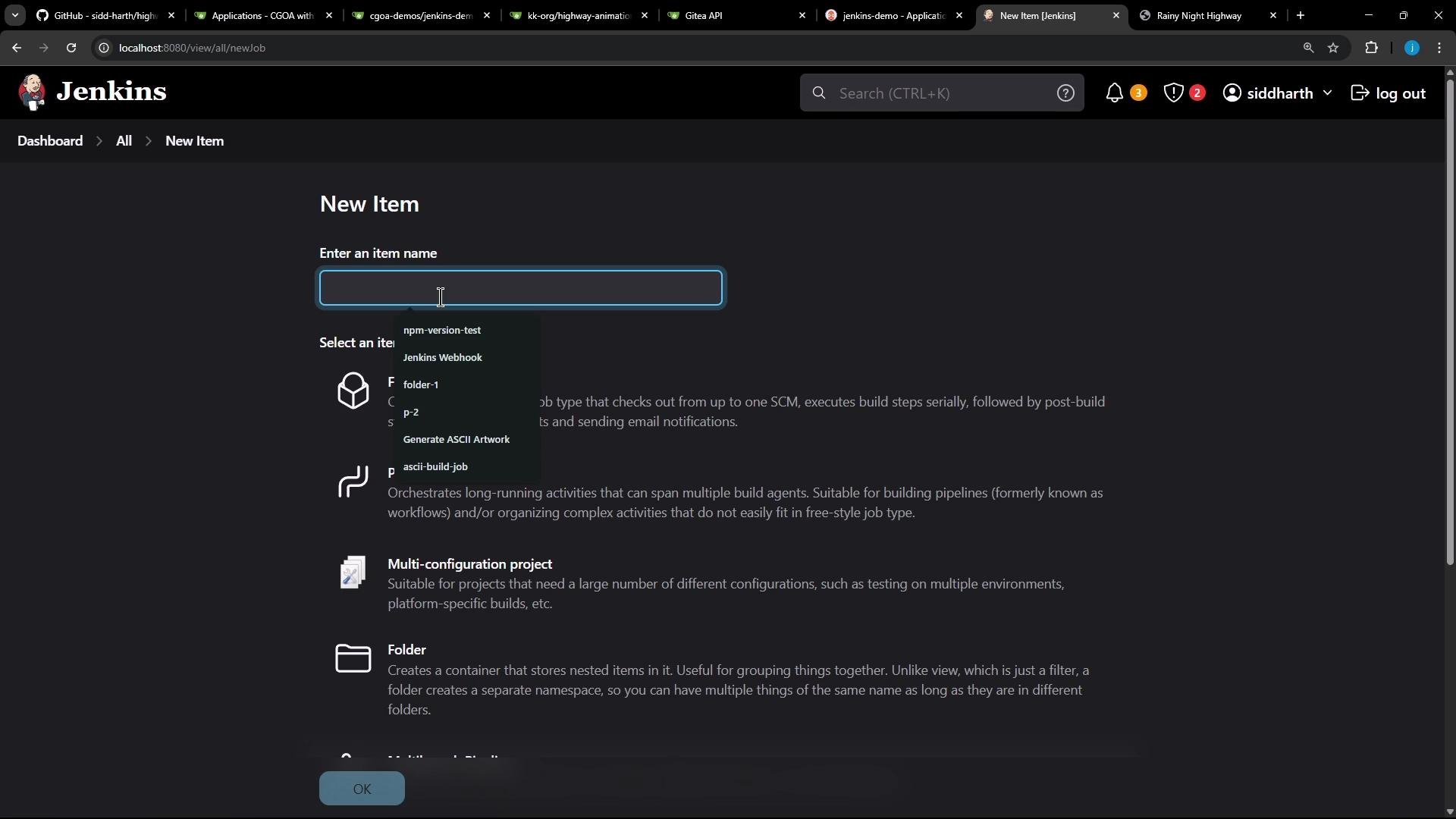
* Create a new Jenkins job of type "Pipeline" that points to this Jenkinsfile in your source repository and run it.
Corrected declarative Jenkinsfile
Below is a consolidated and corrected declarative Jenkinsfile for this CI flow. It:
* Builds and tags the Docker image using a deterministic `VERSION` (combining `BUILD_ID` and `GIT_COMMIT`),
* Pushes the image to Docker Hub using stored credentials,
* Clones or pulls the `cgoa-demos` repo, updates `deployment.yml` to the new image tag, commits, pushes and creates a PR.
```groovy theme={null}
pipeline {
agent any
environment {
NAME = "highway-animation-jenkins"
VERSION = "${env.BUILD_ID}-${env.GIT_COMMIT}"
IMAGE_REPO = 'siddharth67'
GITEA_TOKEN = credentials('gitea-token') // secret/token stored in Jenkins
}
stages {
stage('Unit Tests') {
steps {
echo 'Implement unit tests if applicable.'
}
}
stage('Build Image') {
steps {
sh "docker build -t ${NAME}:latest ."
sh "docker tag ${NAME}:latest ${IMAGE_REPO}/${NAME}:${VERSION}"
}
}
stage('Push Image') {
steps {
// Uses Docker Pipeline plugin credentials to authenticate to Docker Hub
withDockerRegistry([credentialsId: 'docker-hub-credentials', url: ""]) {
sh "docker push ${IMAGE_REPO}/${NAME}:${VERSION}"
}
}
}
stage('Clone/Pull Repo') {
steps {
script {
if (fileExists('cgoa-demos')) {
echo 'Cloned repo already exists - Pulling latest changes'
dir('cgoa-demos') {
sh 'git pull'
}
} else {
echo 'Repo does not exist - Cloning the repo'
sh 'git clone -b feature-gitea http://localhost:5000/kk-org/cgoa-demos'
}
}
}
}
stage('Update Manifest') {
steps {
dir('cgoa-demos/jenkins-demo') {
// Replace the image line in deployment.yml with the new image:tag
sh "sed -i \"s#image:.*#image: ${IMAGE_REPO}/${NAME}:${VERSION}#g\" deployment.yml"
sh "cat deployment.yml"
}
}
}
stage('Commit & Push') {
steps {
dir('cgoa-demos/jenkins-demo') {
// Configure git user and push back to feature branch using a token in the remote URL
sh "git config --global user.email 'jenkins@ci.com'"
sh "git remote set-url origin http://${GITEA_TOKEN}@localhost:5000/kk-org/cgoa-demos"
sh "git checkout feature-gitea"
sh "git add -A"
// commit may return non-zero if there are no changes; allow that without failing the build
sh "git commit -m \"Updated image version for Build - ${VERSION}\" || true"
sh "git push origin feature-gitea"
}
}
}
stage('Create PR') {
steps {
dir('cgoa-demos/jenkins-demo') {
// Example script to create a PR using Gitea REST API (gitea-pr.sh should exist and be executable)
sh "./gitea-pr.sh || true"
}
}
}
}
}
```
Create the Jenkins pipeline job
* Create a new Jenkins job of type "Pipeline" that points to this Jenkinsfile in your source repository and run it.
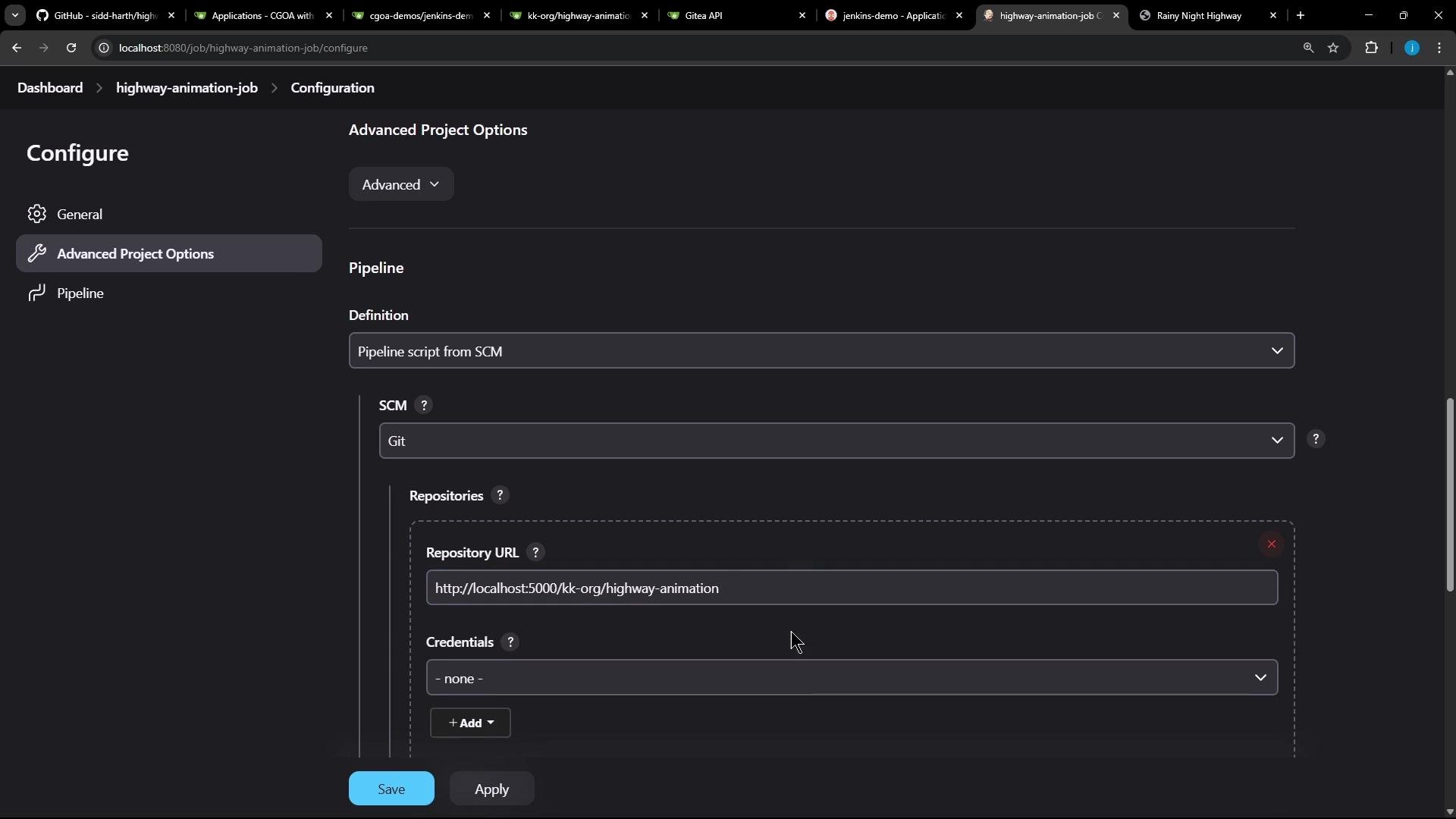
 In the job configuration select "Pipeline script from SCM", provide the Git repository URL and branch (for example `main`), then save:
 Example build steps observed during execution
* The pipeline will run stages for build, tag and push. Example shell output from the Build / Push stages:
```shell theme={null}
docker build -t highway-animation-jenkins:latest .
docker tag highway-animation-jenkins:latest siddharth67/highway-animation-jenkins:2-508f3ed33b6b6876749a0f1140204afa72766719
docker push siddharth67/highway-animation-jenkins:2-508f3ed33b6b6876749a0f1140204afa72766719
```
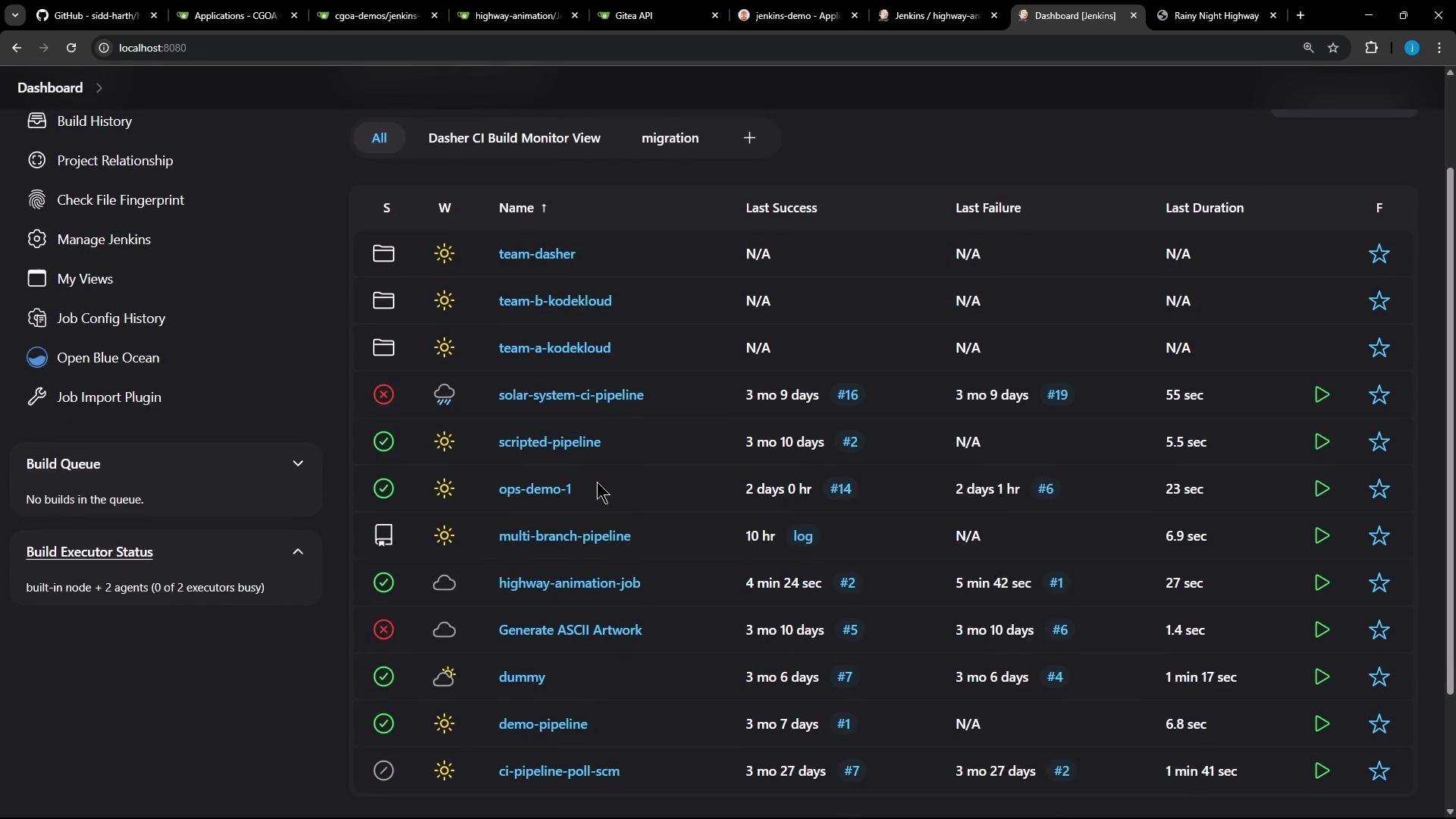
A successful pipeline run appears like other Jenkins jobs in the dashboard:
Example build steps observed during execution
* The pipeline will run stages for build, tag and push. Example shell output from the Build / Push stages:
```shell theme={null}
docker build -t highway-animation-jenkins:latest .
docker tag highway-animation-jenkins:latest siddharth67/highway-animation-jenkins:2-508f3ed33b6b6876749a0f1140204afa72766719
docker push siddharth67/highway-animation-jenkins:2-508f3ed33b6b6876749a0f1140204afa72766719
```
A successful pipeline run appears like other Jenkins jobs in the dashboard:
 Credentials and secure tokens
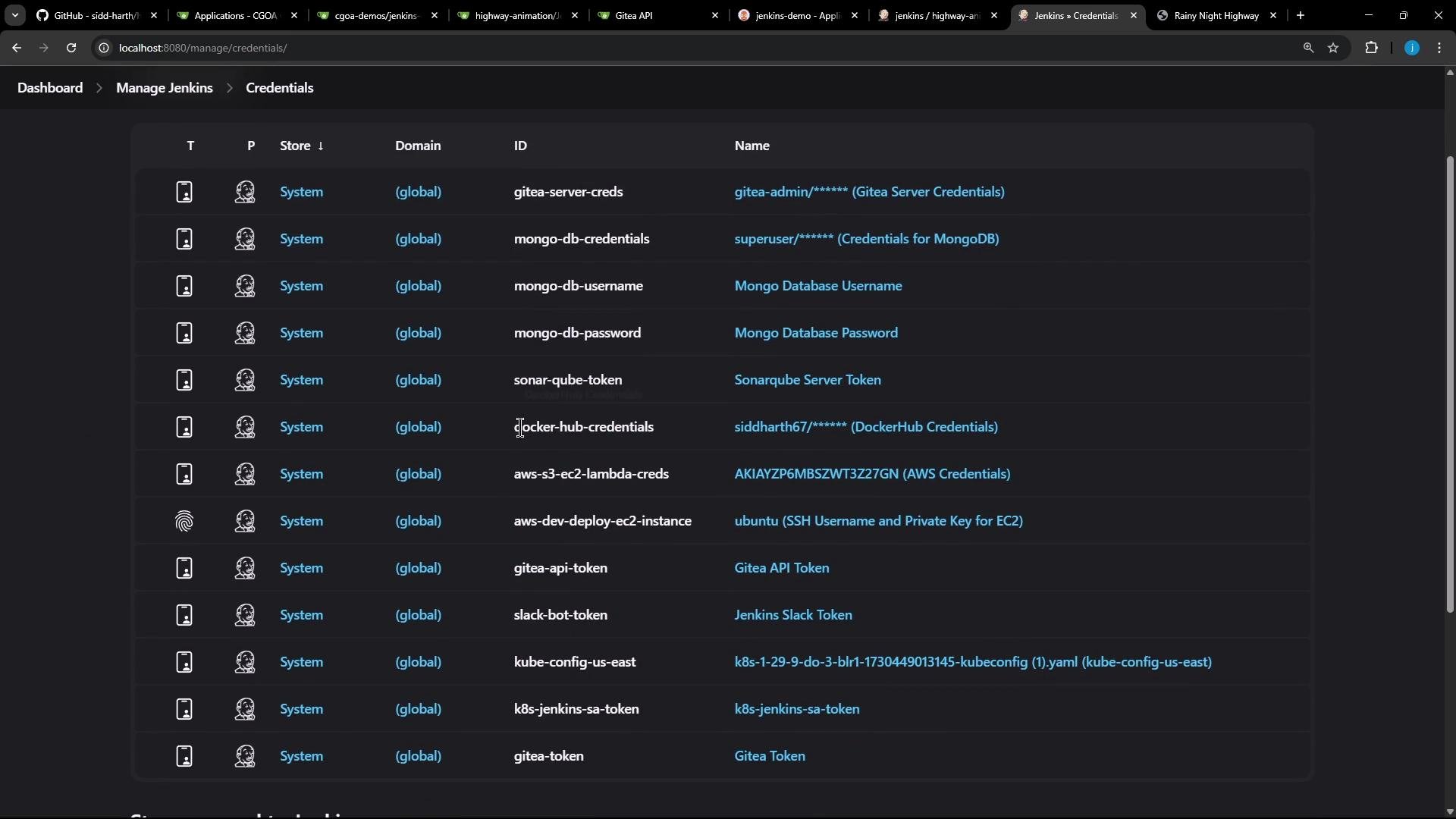
* Ensure Jenkins has Docker Hub credentials configured in "Manage Jenkins" → "Credentials" and referenced by the pipeline (this example uses `docker-hub-credentials`).
* Also store the Gitea token as a Jenkins credential (here referenced as `gitea-token`) so scripts can push and create PRs securely.
Store registry credentials and Git/Gitea tokens in Jenkins credentials (not inline in the pipeline). Avoid exposing tokens in console output and remote URLs without proper masking.
Credentials and secure tokens
* Ensure Jenkins has Docker Hub credentials configured in "Manage Jenkins" → "Credentials" and referenced by the pipeline (this example uses `docker-hub-credentials`).
* Also store the Gitea token as a Jenkins credential (here referenced as `gitea-token`) so scripts can push and create PRs securely.
Store registry credentials and Git/Gitea tokens in Jenkins credentials (not inline in the pipeline). Avoid exposing tokens in console output and remote URLs without proper masking.
 Pull request creation
* After pushing the commit, the pipeline runs a helper script (for example `gitea-pr.sh`) that calls the Gitea REST API to create a PR. Example response printed by such a script:
```json theme={null}
{"id":1,"login":"admin","login_name":"source","full_name":"","email":"admin@admin.com","avatar_url":"http://localhost:5000/avatars/...","html_url":"http://localhost:5000/kk-org/cgoa-demos/pulls/1", ...}
```
```text theme={null}
Success
```
Updated manifest in Git
* Once the PR is merged to `main`, Argo CD will observe the updated `deployment.yml` with the new image tag — for example:
```yaml theme={null}
apiVersion: apps/v1
kind: Deployment
metadata:
name: highway-animation
namespace: jenkins-demo
spec:
replicas: 10
selector:
matchLabels:
app: highway-animation
template:
metadata:
labels:
app: highway-animation
spec:
containers:
- name: highway-animation
image: siddharth67/highway-animation-jenkins:2-508f3ed33b6b6876749a0f1140204afa72766719
ports:
- containerPort: 3000
env:
- name: POD_COUNT
value: "10"
```
Argo CD reconciliation
* When Argo CD detects the desired state in Git differs from cluster state it marks the application OutOfSync. You can then click Sync to roll out the new image.
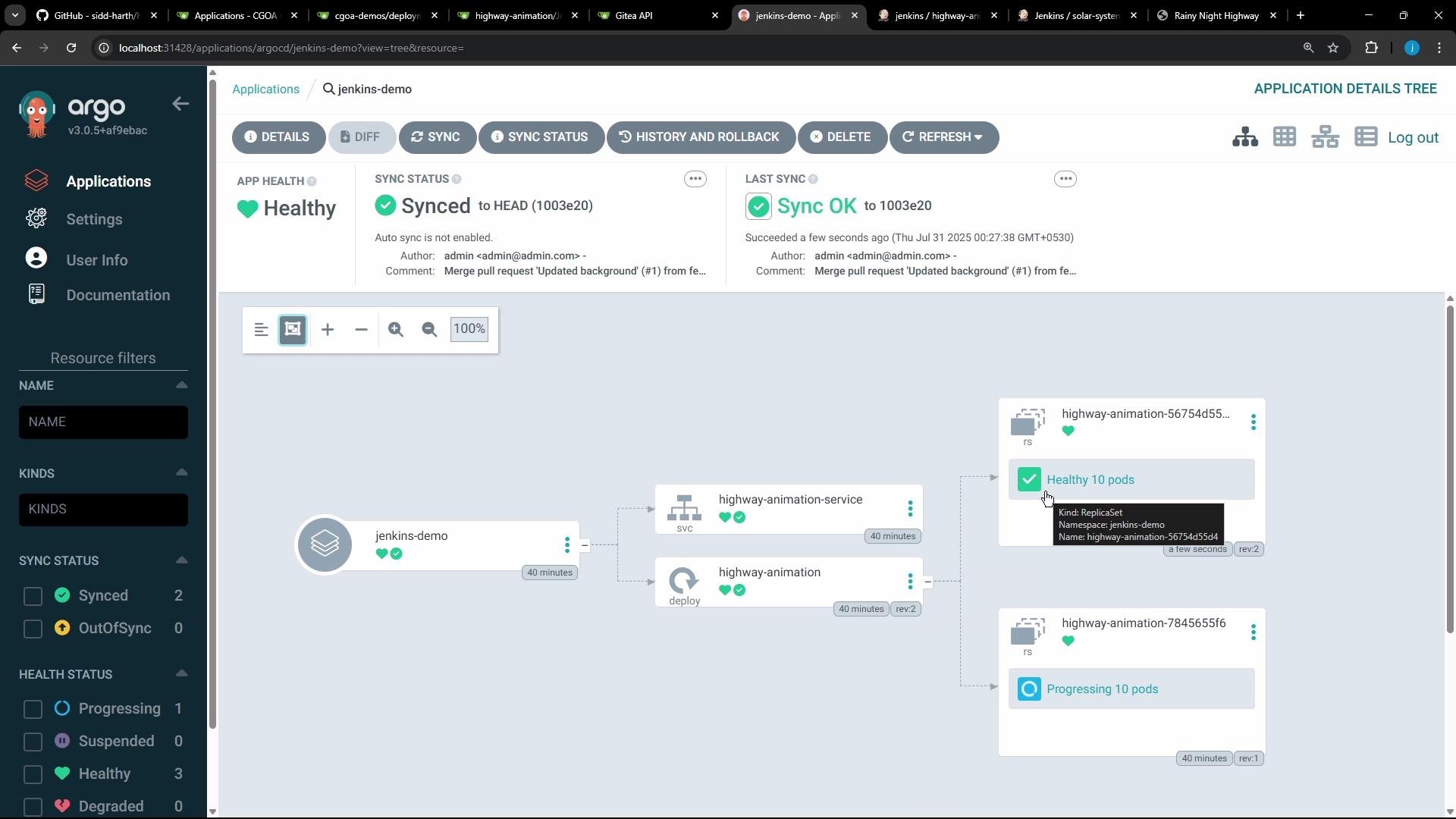
* The Argo CD UI reports application health and sync status:
Pull request creation
* After pushing the commit, the pipeline runs a helper script (for example `gitea-pr.sh`) that calls the Gitea REST API to create a PR. Example response printed by such a script:
```json theme={null}
{"id":1,"login":"admin","login_name":"source","full_name":"","email":"admin@admin.com","avatar_url":"http://localhost:5000/avatars/...","html_url":"http://localhost:5000/kk-org/cgoa-demos/pulls/1", ...}
```
```text theme={null}
Success
```
Updated manifest in Git
* Once the PR is merged to `main`, Argo CD will observe the updated `deployment.yml` with the new image tag — for example:
```yaml theme={null}
apiVersion: apps/v1
kind: Deployment
metadata:
name: highway-animation
namespace: jenkins-demo
spec:
replicas: 10
selector:
matchLabels:
app: highway-animation
template:
metadata:
labels:
app: highway-animation
spec:
containers:
- name: highway-animation
image: siddharth67/highway-animation-jenkins:2-508f3ed33b6b6876749a0f1140204afa72766719
ports:
- containerPort: 3000
env:
- name: POD_COUNT
value: "10"
```
Argo CD reconciliation
* When Argo CD detects the desired state in Git differs from cluster state it marks the application OutOfSync. You can then click Sync to roll out the new image.
* The Argo CD UI reports application health and sync status:
 Rollback and remediation
* If the release introduces a bug (for example UI regressions), Argo CD allows you to roll back to a previous revision in the cluster. Note: rollback reverts the live cluster state to a previous ReplicaSet but does not change the Git repository. After rollback you should:
1. Fix the root cause in source control,
2. Build and test a new image,
3. Update manifests, push and merge the PR,
4. Let Argo CD reconcile the corrected state.
Pipeline stage summary
| Stage | Purpose | Example action |
| --------------- | ------------------------------------- | ------------------------------------------------------------------------------ |
| Build Image | Build & tag the image | `docker build -t ${NAME}:latest .` |
| Push Image | Authenticate and push to registry | `docker push ${IMAGE_REPO}/${NAME}:${VERSION}` |
| Clone/Pull Repo | Ensure local copy of manifests | `git clone -b feature-gitea http://.../cgoa-demos` |
| Update Manifest | Replace image tag in `deployment.yml` | `sed -i "s#image:.*#image: ${IMAGE_REPO}/${NAME}:${VERSION}#g" deployment.yml` |
| Commit & Push | Push changes to feature branch | `git push origin feature-gitea` |
| Create PR | Create a pull request (Gitea API) | `./gitea-pr.sh` |
DevSecOps considerations
* Add dependency scanning (e.g., `npm audit`, Snyk) before building images.
* Scan images (e.g., `trivy image`) before pushing to the registry; fail builds on critical vulnerabilities.
* Perform static analysis (SonarQube) and dynamic testing as appropriate.
Example Trivy usage (after image build, before push):
```shell theme={null}
trivy image siddharth67/highway-animation-jenkins:${GIT_COMMIT} --severity HIGH,CRITICAL --exit-code 1 --quiet --format json -o trivy-image-results.json
trivy convert --format template --template "@/usr/local/share/trivy/templates/html.tpl" --output trivy-image-results.html trivy-image-results.json
```
Wrap-up
This lesson demonstrated a common CI pipeline pattern that:
* Builds and tags an image,
* Pushes it to Docker Hub,
* Updates Kubernetes manifests in Git,
* Opens a PR so a GitOps operator (Argo CD) can pick up and deploy the change.
When the PR is merged Argo CD detects the change and applies the new manifest. If problems occur in production you can roll back via Argo CD and iterate fixes through the CI pipeline.
Further reading and references
* [GitOps with ArgoCD course](https://learn.kodekloud.com/user/courses/gitops-with-argocd)
* [Jenkins course](https://learn.kodekloud.com/user/courses/jenkins)
* Argo CD documentation: [https://argo-cd.readthedocs.io/](https://argo-cd.readthedocs.io/)
* Trivy: [https://github.com/aquasecurity/trivy](https://github.com/aquasecurity/trivy)
That's all for this lesson.
Rollback and remediation
* If the release introduces a bug (for example UI regressions), Argo CD allows you to roll back to a previous revision in the cluster. Note: rollback reverts the live cluster state to a previous ReplicaSet but does not change the Git repository. After rollback you should:
1. Fix the root cause in source control,
2. Build and test a new image,
3. Update manifests, push and merge the PR,
4. Let Argo CD reconcile the corrected state.
Pipeline stage summary
| Stage | Purpose | Example action |
| --------------- | ------------------------------------- | ------------------------------------------------------------------------------ |
| Build Image | Build & tag the image | `docker build -t ${NAME}:latest .` |
| Push Image | Authenticate and push to registry | `docker push ${IMAGE_REPO}/${NAME}:${VERSION}` |
| Clone/Pull Repo | Ensure local copy of manifests | `git clone -b feature-gitea http://.../cgoa-demos` |
| Update Manifest | Replace image tag in `deployment.yml` | `sed -i "s#image:.*#image: ${IMAGE_REPO}/${NAME}:${VERSION}#g" deployment.yml` |
| Commit & Push | Push changes to feature branch | `git push origin feature-gitea` |
| Create PR | Create a pull request (Gitea API) | `./gitea-pr.sh` |
DevSecOps considerations
* Add dependency scanning (e.g., `npm audit`, Snyk) before building images.
* Scan images (e.g., `trivy image`) before pushing to the registry; fail builds on critical vulnerabilities.
* Perform static analysis (SonarQube) and dynamic testing as appropriate.
Example Trivy usage (after image build, before push):
```shell theme={null}
trivy image siddharth67/highway-animation-jenkins:${GIT_COMMIT} --severity HIGH,CRITICAL --exit-code 1 --quiet --format json -o trivy-image-results.json
trivy convert --format template --template "@/usr/local/share/trivy/templates/html.tpl" --output trivy-image-results.html trivy-image-results.json
```
Wrap-up
This lesson demonstrated a common CI pipeline pattern that:
* Builds and tags an image,
* Pushes it to Docker Hub,
* Updates Kubernetes manifests in Git,
* Opens a PR so a GitOps operator (Argo CD) can pick up and deploy the change.
When the PR is merged Argo CD detects the change and applies the new manifest. If problems occur in production you can roll back via Argo CD and iterate fixes through the CI pipeline.
Further reading and references
* [GitOps with ArgoCD course](https://learn.kodekloud.com/user/courses/gitops-with-argocd)
* [Jenkins course](https://learn.kodekloud.com/user/courses/jenkins)
* Argo CD documentation: [https://argo-cd.readthedocs.io/](https://argo-cd.readthedocs.io/)
* Trivy: [https://github.com/aquasecurity/trivy](https://github.com/aquasecurity/trivy)
That's all for this lesson.