> ## Documentation Index
> Fetch the complete documentation index at: https://notes.kodekloud.com/llms.txt
> Use this file to discover all available pages before exploring further.
# DevOps and DevSecOps
> Explains DevOps versus DevSecOps and advocates shifting security left by embedding automated security checks into CI/CD pipelines to detect and prevent vulnerabilities early.
This lesson compares DevOps and DevSecOps and explains why integrating security earlier in the delivery process matters.
DevOps improves speed and collaboration between development and operations by automating build, test, and deployment workflows. Traditional DevOps often defers security checks until late in the pipeline, increasing the chance that vulnerabilities reach staging or production.
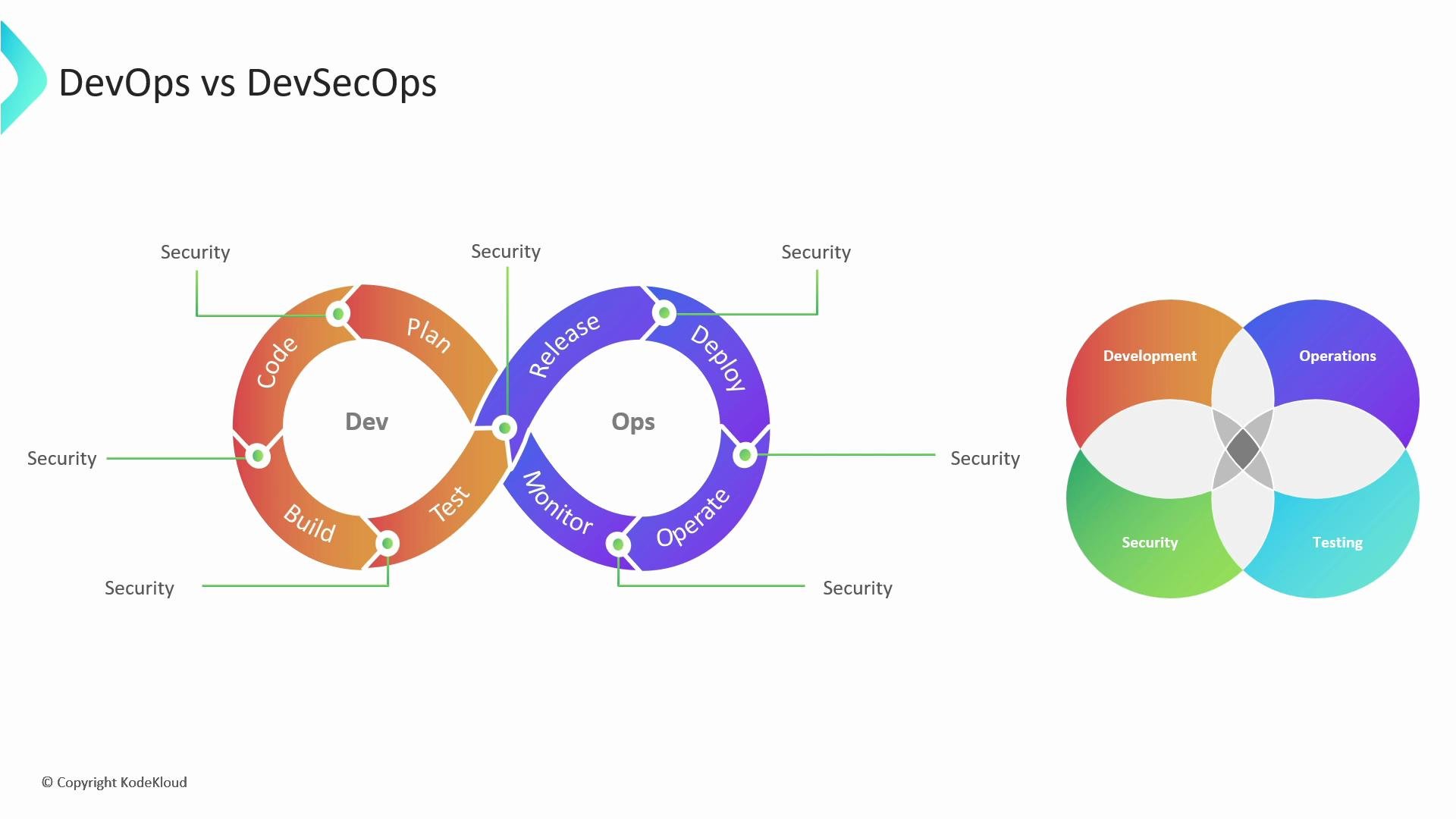
DevSecOps embeds security into the DevOps workflow, making security an integral, automated part of continuous delivery. In short: DevOps automates delivery and monitoring; DevSecOps extends that automation to include security tooling and policy enforcement across the pipeline.
 ## Typical DevOps pipeline (example flow)
A common continuous delivery flow looks like this:
* Developer commits code to a central Git repository (see [Git for Beginners](https://learn.kodekloud.com/user/courses/git-for-beginners)).
* A CI/CD server (for example, [Jenkins](https://learn.kodekloud.com/user/courses/jenkins), [GitHub Actions](https://learn.kodekloud.com/user/courses/github-actions), or [GitLab CI/CD](https://learn.kodekloud.com/user/courses/gitlab-ci-cd-architecting-deploying-and-optimizing-pipelines)) pulls the changes, runs unit tests and linters, and produces artifacts (binaries, container images).
* Artifacts are deployed to staging/QA for integration, acceptance, and dynamic testing.
* After verification, artifacts are deployed to production—commonly as containers (see [Docker Training Course for the Absolute Beginner](https://learn.kodekloud.com/user/courses/docker-training-course-for-the-absolute-beginner)) orchestrated by platforms like Kubernetes (see [Kubernetes for the Absolute Beginners - Hands-on Tutorial](https://learn.kodekloud.com/user/courses/kubernetes-for-the-absolute-beginners-hands-on-tutorial)).
* Monitoring and observability tools (for example, Prometheus + Grafana; see [AIOps Foundations - Intelligent Monitoring With Prometheus & Grafana](https://learn.kodekloud.com/user/courses/aiops-foundations-intelligent-monitoring-with-prometheus-grafana)) continuously track health and performance.
## Where security often appears in traditional DevOps
* Security checks are frequently scheduled late: end-of-pipeline vulnerability scans, penetration tests, or manual reviews.
* Because security is an end-stage activity, important issues may be discovered only after deployment to staging or production.
## Why late security is problematic
* High risk: Critical vulnerabilities (e.g., SQL injection) discovered in production may already be exploitable.
* Resource waste: Running and deploying vulnerable builds consumes compute, storage, and bandwidth unnecessarily.
* Higher cost: Fixes discovered late require rollbacks or hotfixes and re-running the entire pipeline—this is more expensive than early remediation.
* Delivery slowdowns: Reprocessing a pipeline for a single fix delays other feature deliveries and reduces throughput.
## A sequential (real-world) example
* Application is deployed to production.
* A late security test detects a high-severity vulnerability (for example, SQL injection).
* Remediation requires a code change, a new build, full pipeline execution (tests, staging, production), and additional verification—this reintroduces risk and delays releases.
## What DevSecOps brings: shift-left security
Shift-left security integrates security earlier in the development lifecycle by embedding automated security checks into CI/CD and developer workflows. This approach transforms security from an afterthought into a continuous, developer-visible activity.
Table: Common security controls and where they run
| Security control | Tooling examples | Typical execution point |
| ------------------------------------------- | ----------------------------------------------: | --------------------------------------------------- |
| Static Application Security Testing (SAST) | `Semgrep`, `ESLint` security rules, `Checkmarx` | Pre-commit, pull request CI |
| Dependency scanning / SCA | `OWASP Dependency-Check`, `Snyk`, `Dependabot` | During build or pre-merge |
| Infrastructure-as-Code scanning | `tflint`, `checkov` | Pre-merge or CI pipeline (Terraform/CloudFormation) |
| Container image scanning | `Trivy`, `Clair` | Image build step, before push to registry |
| Dynamic Application Security Testing (DAST) | `OWASP ZAP`, commercial DAST tools | Against staging environments |
| Runtime protection & monitoring | RASP, EDR, EKS/Amazon GuardDuty, Falco | Production runtime |
Benefits of embedding these checks into CI/CD:
* Faster feedback to developers (fail-fast on obvious issues).
* Prevent vulnerable artifacts from reaching production.
* Make security part of the developer workflow and culture.
## Benefits of shifting left with DevSecOps
| Benefit | Business impact |
| ---------------------------- | ---------------------------------------------------------------------------: |
| Reduced remediation cost | Fixing issues earlier is cheaper than post-deployment incident response |
| Faster, predictable delivery | Automated checks reduce last-minute surprises and rework |
| Lower operational risk | Frequent scans and gating reduce the chance of critical issues reaching prod |
| Continuous learning | Security findings feed back into code reviews and developer training |
Shift-left security isn't about blocking delivery; it's about automated, actionable feedback. Use strict fail conditions for high-severity issues and advisory checks for low-severity findings so teams can deliver features quickly while keeping risk low.
## Practical next steps to adopt DevSecOps
* Start by adding SAST and dependency scanning to pull-request CI jobs.
* Add IaC scanning to the pipeline before infrastructure provisioning (see [Terraform Basics Training Course](https://learn.kodekloud.com/user/courses/terraform-basics-training-course)).
* Run container image scans as part of your image build process and block pushes for critical findings.
* Schedule DAST against staging and use runtime defense tools in production.
* Integrate security results into issue trackers and developer workflows so remediation is tracked and measured.
## Links and references
* [Kubernetes Documentation](https://kubernetes.io/docs/)
* [Docker Hub](https://hub.docker.com/)
* [Terraform Registry](https://registry.terraform.io/)
By embedding security tooling and policies into CI/CD and the developer lifecycle, DevSecOps enables teams to deliver software faster, safer, and with measurable, predictable risk management.
That's all for now.
## Typical DevOps pipeline (example flow)
A common continuous delivery flow looks like this:
* Developer commits code to a central Git repository (see [Git for Beginners](https://learn.kodekloud.com/user/courses/git-for-beginners)).
* A CI/CD server (for example, [Jenkins](https://learn.kodekloud.com/user/courses/jenkins), [GitHub Actions](https://learn.kodekloud.com/user/courses/github-actions), or [GitLab CI/CD](https://learn.kodekloud.com/user/courses/gitlab-ci-cd-architecting-deploying-and-optimizing-pipelines)) pulls the changes, runs unit tests and linters, and produces artifacts (binaries, container images).
* Artifacts are deployed to staging/QA for integration, acceptance, and dynamic testing.
* After verification, artifacts are deployed to production—commonly as containers (see [Docker Training Course for the Absolute Beginner](https://learn.kodekloud.com/user/courses/docker-training-course-for-the-absolute-beginner)) orchestrated by platforms like Kubernetes (see [Kubernetes for the Absolute Beginners - Hands-on Tutorial](https://learn.kodekloud.com/user/courses/kubernetes-for-the-absolute-beginners-hands-on-tutorial)).
* Monitoring and observability tools (for example, Prometheus + Grafana; see [AIOps Foundations - Intelligent Monitoring With Prometheus & Grafana](https://learn.kodekloud.com/user/courses/aiops-foundations-intelligent-monitoring-with-prometheus-grafana)) continuously track health and performance.
## Where security often appears in traditional DevOps
* Security checks are frequently scheduled late: end-of-pipeline vulnerability scans, penetration tests, or manual reviews.
* Because security is an end-stage activity, important issues may be discovered only after deployment to staging or production.
## Why late security is problematic
* High risk: Critical vulnerabilities (e.g., SQL injection) discovered in production may already be exploitable.
* Resource waste: Running and deploying vulnerable builds consumes compute, storage, and bandwidth unnecessarily.
* Higher cost: Fixes discovered late require rollbacks or hotfixes and re-running the entire pipeline—this is more expensive than early remediation.
* Delivery slowdowns: Reprocessing a pipeline for a single fix delays other feature deliveries and reduces throughput.
## A sequential (real-world) example
* Application is deployed to production.
* A late security test detects a high-severity vulnerability (for example, SQL injection).
* Remediation requires a code change, a new build, full pipeline execution (tests, staging, production), and additional verification—this reintroduces risk and delays releases.
## What DevSecOps brings: shift-left security
Shift-left security integrates security earlier in the development lifecycle by embedding automated security checks into CI/CD and developer workflows. This approach transforms security from an afterthought into a continuous, developer-visible activity.
Table: Common security controls and where they run
| Security control | Tooling examples | Typical execution point |
| ------------------------------------------- | ----------------------------------------------: | --------------------------------------------------- |
| Static Application Security Testing (SAST) | `Semgrep`, `ESLint` security rules, `Checkmarx` | Pre-commit, pull request CI |
| Dependency scanning / SCA | `OWASP Dependency-Check`, `Snyk`, `Dependabot` | During build or pre-merge |
| Infrastructure-as-Code scanning | `tflint`, `checkov` | Pre-merge or CI pipeline (Terraform/CloudFormation) |
| Container image scanning | `Trivy`, `Clair` | Image build step, before push to registry |
| Dynamic Application Security Testing (DAST) | `OWASP ZAP`, commercial DAST tools | Against staging environments |
| Runtime protection & monitoring | RASP, EDR, EKS/Amazon GuardDuty, Falco | Production runtime |
Benefits of embedding these checks into CI/CD:
* Faster feedback to developers (fail-fast on obvious issues).
* Prevent vulnerable artifacts from reaching production.
* Make security part of the developer workflow and culture.
## Benefits of shifting left with DevSecOps
| Benefit | Business impact |
| ---------------------------- | ---------------------------------------------------------------------------: |
| Reduced remediation cost | Fixing issues earlier is cheaper than post-deployment incident response |
| Faster, predictable delivery | Automated checks reduce last-minute surprises and rework |
| Lower operational risk | Frequent scans and gating reduce the chance of critical issues reaching prod |
| Continuous learning | Security findings feed back into code reviews and developer training |
Shift-left security isn't about blocking delivery; it's about automated, actionable feedback. Use strict fail conditions for high-severity issues and advisory checks for low-severity findings so teams can deliver features quickly while keeping risk low.
## Practical next steps to adopt DevSecOps
* Start by adding SAST and dependency scanning to pull-request CI jobs.
* Add IaC scanning to the pipeline before infrastructure provisioning (see [Terraform Basics Training Course](https://learn.kodekloud.com/user/courses/terraform-basics-training-course)).
* Run container image scans as part of your image build process and block pushes for critical findings.
* Schedule DAST against staging and use runtime defense tools in production.
* Integrate security results into issue trackers and developer workflows so remediation is tracked and measured.
## Links and references
* [Kubernetes Documentation](https://kubernetes.io/docs/)
* [Docker Hub](https://hub.docker.com/)
* [Terraform Registry](https://registry.terraform.io/)
By embedding security tooling and policies into CI/CD and the developer lifecycle, DevSecOps enables teams to deliver software faster, safer, and with measurable, predictable risk management.
That's all for now.