> ## Documentation Index
> Fetch the complete documentation index at: https://notes.kodekloud.com/llms.txt
> Use this file to discover all available pages before exploring further.
# Demo Kustomize
> Guide to using Kustomize to manage Kubernetes manifests with environment overlays and deploying them via Argo CD in a GitOps workflow.
This guide demonstrates a template-free way to manage Kubernetes manifests using Kustomize, and how to deploy those manifests with Argo CD in a GitOps workflow. You'll learn how to structure a repository with a canonical base and environment-specific overlays, patch resources with strategic merges, and create Argo CD Applications that point to overlay paths to keep clusters in sync.
Repository layout
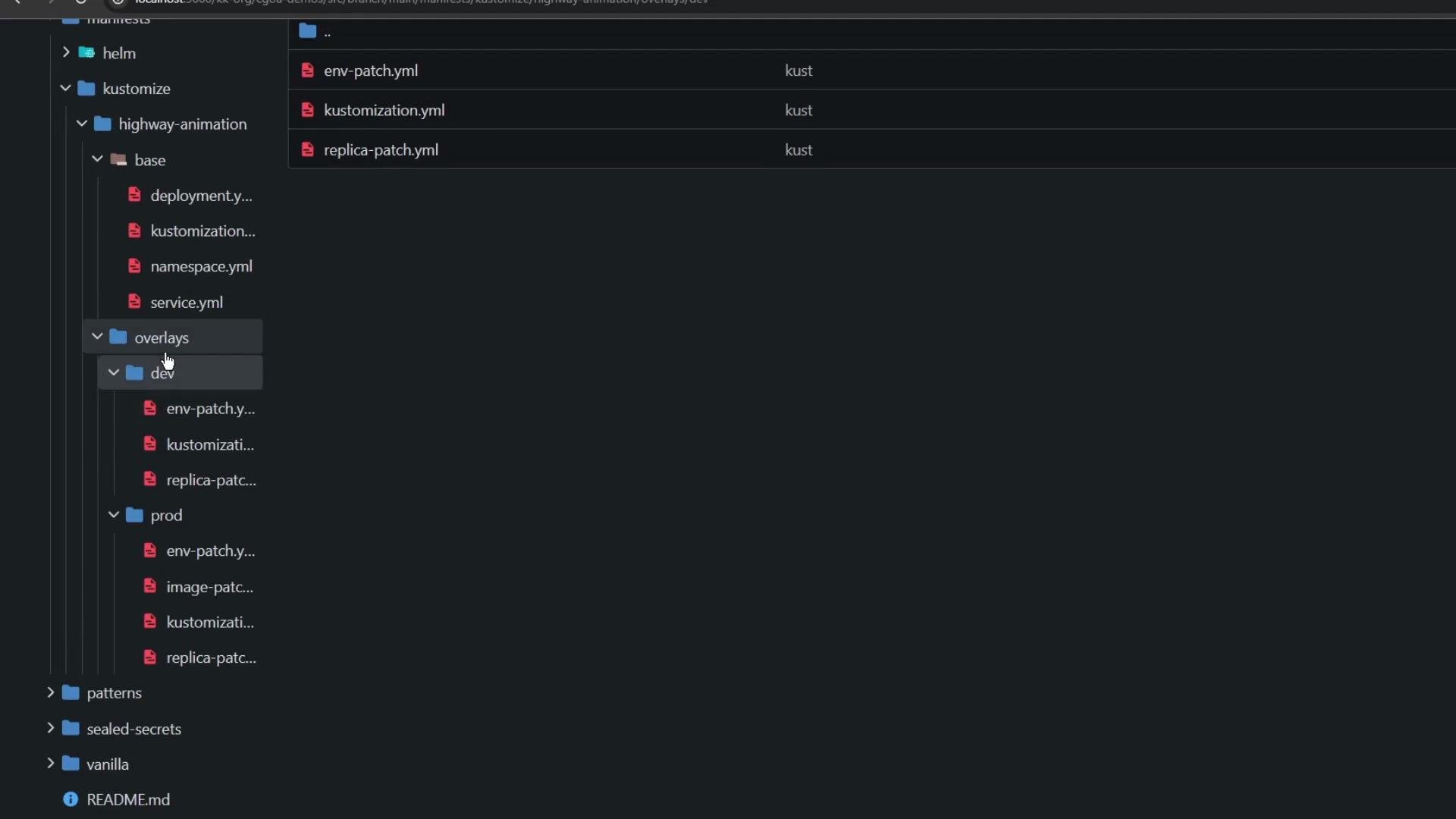
* The repo contains a `manifest` folder with two top-level directories: `helm` and `kustomize`.
* Inside `kustomize` there are `base` and `overlays` folders. `base` holds canonical manifests (Deployment, Service, Namespace) and a `kustomization.yml`. `overlays` include environment-specific patches (e.g., `dev`, `prod`) that Kustomize applies on top of the base.
 Base kustomization
* The `base/kustomization.yml` lists the core manifests to be managed as the canonical source:
```yaml theme={null}
apiVersion: kustomize.config.k8s.io/v1beta1
kind: Kustomization
resources:
- deployment.yml
- service.yml
- namespace.yml
```
Base Deployment (canonical)
* `base/deployment.yml` defines the default configuration: image tag `blue`, labels, and a single replica:
```yaml theme={null}
apiVersion: apps/v1
kind: Deployment
metadata:
name: highway-animation
spec:
replicas: 1
selector:
matchLabels:
app: highway-animation
template:
metadata:
labels:
app: highway-animation
spec:
containers:
- name: highway-animation
image: siddharth67/highway-animation:blue
ports:
- containerPort: 3000
env:
- name: POD_COUNT
value: "1"
```
Overlays concept
* Overlays reference the `base` and apply environment-specific changes using Kustomize patches and per-overlay kustomization files (for example, `overlays/dev/kustomization.yml` and `overlays/prod/kustomization.yml`).
* Typical overlay changes include replica counts, environment variables, image tags, and namespace assignments.
Dev overlay
* `overlays/dev/kustomization.yml` points to the base and applies two patches (replica and env), and forces resources into the `kustomize-dev` namespace:
```yaml theme={null}
apiVersion: kustomize.config.k8s.io/v1beta1
kind: Kustomization
resources:
- ../../base
namespace: kustomize-dev
patches:
- path: replica-patch.yml
target:
kind: Deployment
name: highway-animation
- path: env-patch.yml
target:
kind: Deployment
name: highway-animation
```
Dev patch: replicas
* `overlays/dev/replica-patch.yml` sets the dev replica count:
```yaml theme={null}
apiVersion: apps/v1
kind: Deployment
metadata:
name: highway-animation
spec:
replicas: 2
```
Dev patch: env
* `overlays/dev/env-patch.yml` updates the container environment variable. Note that the container `name` must match the base so Kustomize can perform a strategic merge correctly:
```yaml theme={null}
apiVersion: apps/v1
kind: Deployment
metadata:
name: highway-animation
spec:
template:
spec:
containers:
- name: highway-animation
env:
- name: POD_COUNT
value: "2"
```
Kustomize performs a strategic merge when applying patches. Always include the container `name` in your patch when modifying container-level fields (`env`, `image`, `ports`, etc.) so Kustomize can match and update the correct container.
Prod overlay
* `overlays/prod/kustomization.yml` references the same base, sets `kustomize-prod` as the namespace, and applies three patches (replicas, env, image):
```yaml theme={null}
apiVersion: kustomize.config.k8s.io/v1beta1
kind: Kustomization
resources:
- ../../base
namespace: kustomize-prod
patches:
- path: replica-patch.yml
target:
kind: Deployment
name: highway-animation
- path: env-patch.yml
target:
kind: Deployment
name: highway-animation
- path: image-patch.yml
target:
kind: Deployment
name: highway-animation
```
Prod patches (examples)
* Replica patch (`overlays/prod/replica-patch.yml`):
```yaml theme={null}
apiVersion: apps/v1
kind: Deployment
metadata:
name: highway-animation
spec:
replicas: 5
```
* Env patch (`overlays/prod/env-patch.yml`):
```yaml theme={null}
apiVersion: apps/v1
kind: Deployment
metadata:
name: highway-animation
spec:
template:
spec:
containers:
- name: highway-animation
env:
- name: POD_COUNT
value: "5"
```
* Image patch (`overlays/prod/image-patch.yml`):
```yaml theme={null}
apiVersion: apps/v1
kind: Deployment
metadata:
name: highway-animation
spec:
template:
spec:
containers:
- name: highway-animation
image: siddharth67/highway-animation:green
```
Deploying with Argo CD (GitOps)
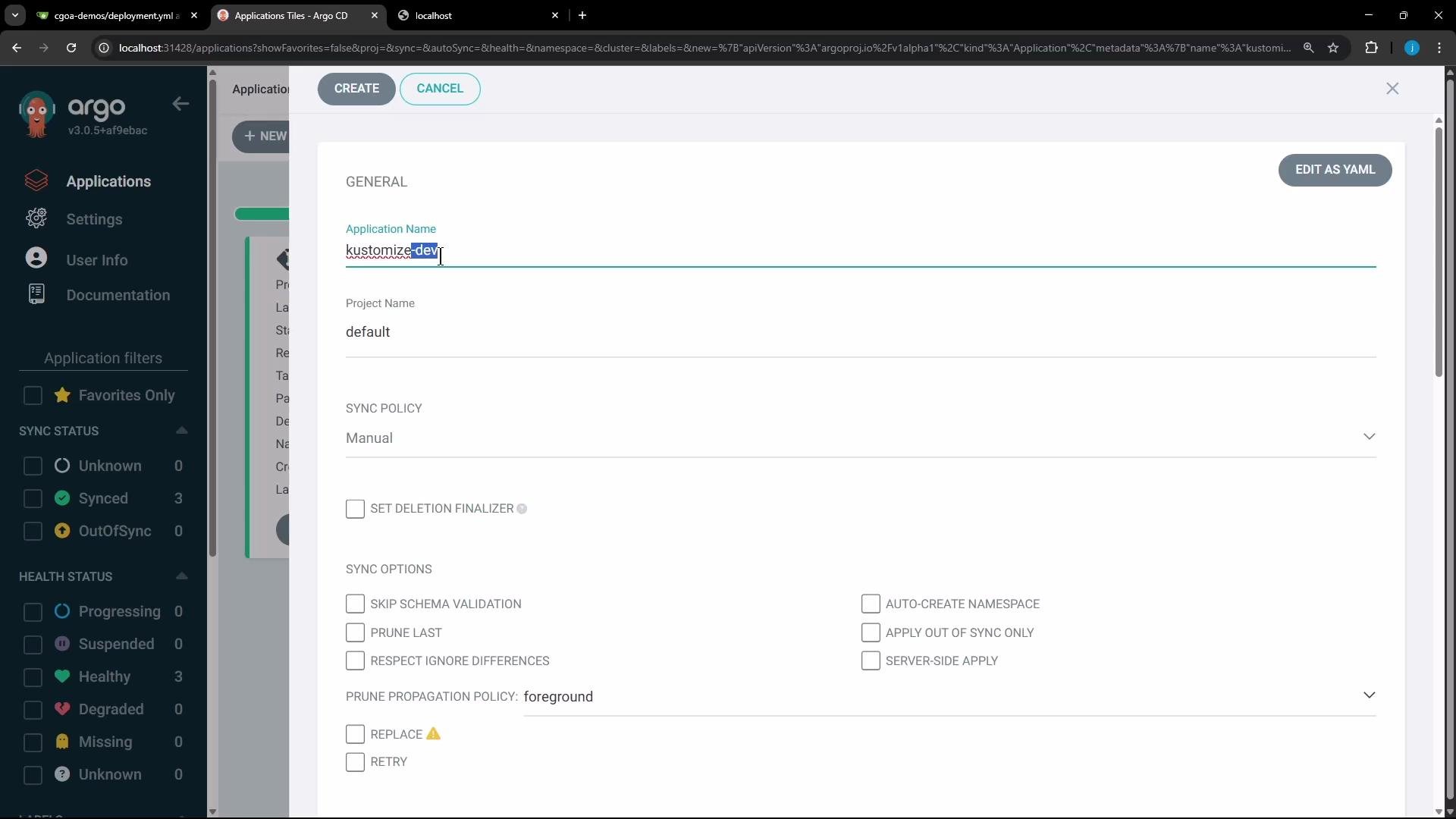
* With overlays in Git, create an Argo CD Application per environment that targets the overlay path (for example, `manifest/kustomize/overlays/dev` for dev).
* Recommended Argo CD settings:
* App name: `kustomize-dev` (or `kustomize-prod` for production)
* Repo path: `manifest/kustomize/overlays/dev` (or `.../overlays/prod`)
* Sync policy: automatic (if you want continuous reconciliation)
* Option: enable auto-create namespace (or let Kustomize create it via `namespace.yml` in `base`)
Argo CD will render the kustomization, apply the base plus selected overlays, and continuously reconcile the cluster to match Git state.
Base kustomization
* The `base/kustomization.yml` lists the core manifests to be managed as the canonical source:
```yaml theme={null}
apiVersion: kustomize.config.k8s.io/v1beta1
kind: Kustomization
resources:
- deployment.yml
- service.yml
- namespace.yml
```
Base Deployment (canonical)
* `base/deployment.yml` defines the default configuration: image tag `blue`, labels, and a single replica:
```yaml theme={null}
apiVersion: apps/v1
kind: Deployment
metadata:
name: highway-animation
spec:
replicas: 1
selector:
matchLabels:
app: highway-animation
template:
metadata:
labels:
app: highway-animation
spec:
containers:
- name: highway-animation
image: siddharth67/highway-animation:blue
ports:
- containerPort: 3000
env:
- name: POD_COUNT
value: "1"
```
Overlays concept
* Overlays reference the `base` and apply environment-specific changes using Kustomize patches and per-overlay kustomization files (for example, `overlays/dev/kustomization.yml` and `overlays/prod/kustomization.yml`).
* Typical overlay changes include replica counts, environment variables, image tags, and namespace assignments.
Dev overlay
* `overlays/dev/kustomization.yml` points to the base and applies two patches (replica and env), and forces resources into the `kustomize-dev` namespace:
```yaml theme={null}
apiVersion: kustomize.config.k8s.io/v1beta1
kind: Kustomization
resources:
- ../../base
namespace: kustomize-dev
patches:
- path: replica-patch.yml
target:
kind: Deployment
name: highway-animation
- path: env-patch.yml
target:
kind: Deployment
name: highway-animation
```
Dev patch: replicas
* `overlays/dev/replica-patch.yml` sets the dev replica count:
```yaml theme={null}
apiVersion: apps/v1
kind: Deployment
metadata:
name: highway-animation
spec:
replicas: 2
```
Dev patch: env
* `overlays/dev/env-patch.yml` updates the container environment variable. Note that the container `name` must match the base so Kustomize can perform a strategic merge correctly:
```yaml theme={null}
apiVersion: apps/v1
kind: Deployment
metadata:
name: highway-animation
spec:
template:
spec:
containers:
- name: highway-animation
env:
- name: POD_COUNT
value: "2"
```
Kustomize performs a strategic merge when applying patches. Always include the container `name` in your patch when modifying container-level fields (`env`, `image`, `ports`, etc.) so Kustomize can match and update the correct container.
Prod overlay
* `overlays/prod/kustomization.yml` references the same base, sets `kustomize-prod` as the namespace, and applies three patches (replicas, env, image):
```yaml theme={null}
apiVersion: kustomize.config.k8s.io/v1beta1
kind: Kustomization
resources:
- ../../base
namespace: kustomize-prod
patches:
- path: replica-patch.yml
target:
kind: Deployment
name: highway-animation
- path: env-patch.yml
target:
kind: Deployment
name: highway-animation
- path: image-patch.yml
target:
kind: Deployment
name: highway-animation
```
Prod patches (examples)
* Replica patch (`overlays/prod/replica-patch.yml`):
```yaml theme={null}
apiVersion: apps/v1
kind: Deployment
metadata:
name: highway-animation
spec:
replicas: 5
```
* Env patch (`overlays/prod/env-patch.yml`):
```yaml theme={null}
apiVersion: apps/v1
kind: Deployment
metadata:
name: highway-animation
spec:
template:
spec:
containers:
- name: highway-animation
env:
- name: POD_COUNT
value: "5"
```
* Image patch (`overlays/prod/image-patch.yml`):
```yaml theme={null}
apiVersion: apps/v1
kind: Deployment
metadata:
name: highway-animation
spec:
template:
spec:
containers:
- name: highway-animation
image: siddharth67/highway-animation:green
```
Deploying with Argo CD (GitOps)
* With overlays in Git, create an Argo CD Application per environment that targets the overlay path (for example, `manifest/kustomize/overlays/dev` for dev).
* Recommended Argo CD settings:
* App name: `kustomize-dev` (or `kustomize-prod` for production)
* Repo path: `manifest/kustomize/overlays/dev` (or `.../overlays/prod`)
* Sync policy: automatic (if you want continuous reconciliation)
* Option: enable auto-create namespace (or let Kustomize create it via `namespace.yml` in `base`)
Argo CD will render the kustomization, apply the base plus selected overlays, and continuously reconcile the cluster to match Git state.
 Dev application example (live)
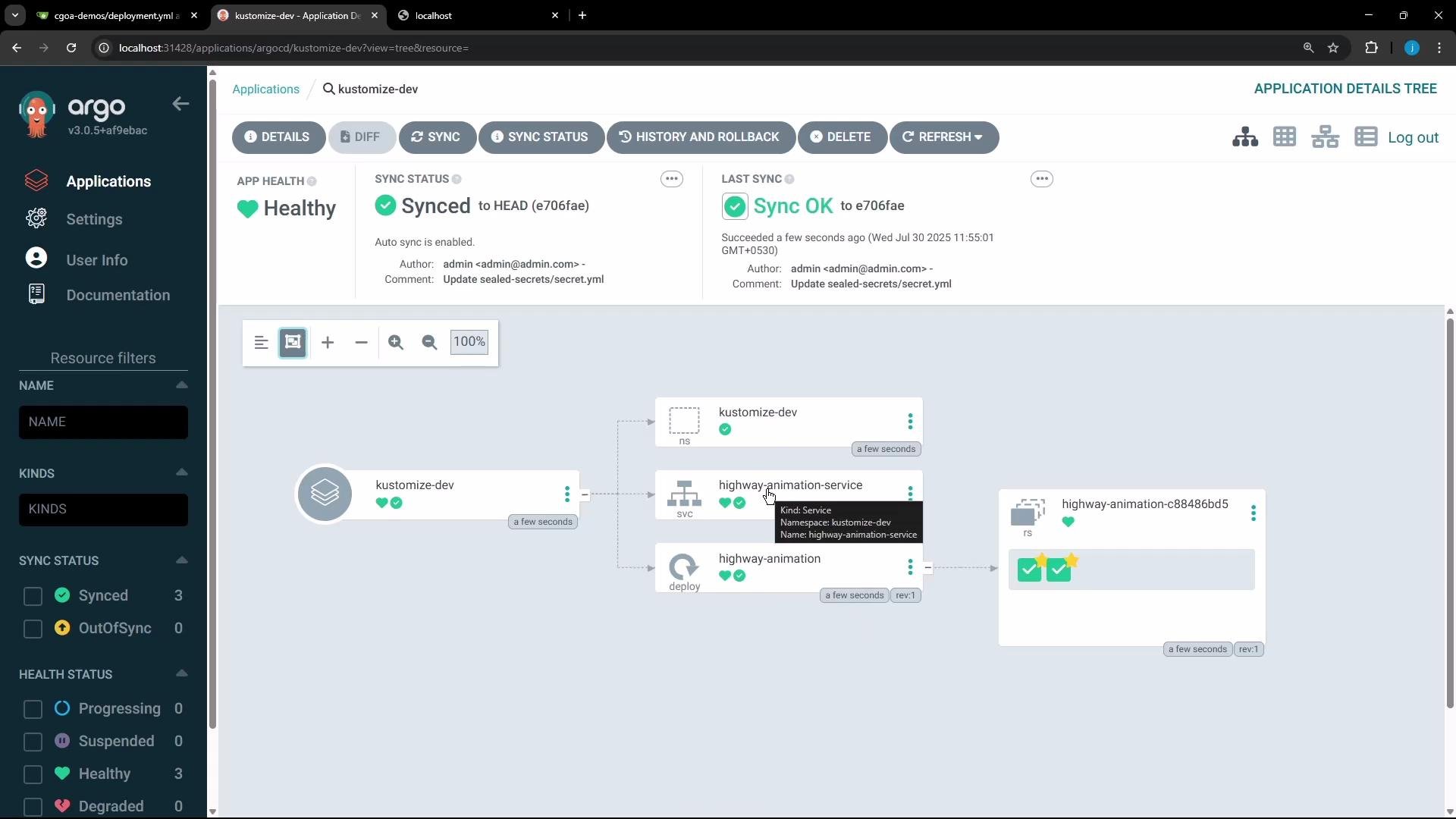
* Creating the Argo CD Application for `overlays/dev` results in Argo CD applying:
* The base resources
* The dev overlay patches (replicas and env)
* The `kustomize-dev` namespace (if configured)
* The Application should show as Synced and Healthy after the cluster converges.
Dev application example (live)
* Creating the Argo CD Application for `overlays/dev` results in Argo CD applying:
* The base resources
* The dev overlay patches (replicas and env)
* The `kustomize-dev` namespace (if configured)
* The Application should show as Synced and Healthy after the cluster converges.
 What you should observe
* The base Deployment had `replicas: 1` and `POD_COUNT: "1"`.
* The dev overlay patches change replicas to `2` and `POD_COUNT` to `"2"`.
* The prod overlay sets replicas to `5`, `POD_COUNT` to `"5"`, and updates the image to `green`.
Comparison at a glance
| Resource / Field | Base | Dev overlay result | Prod overlay result |
| -------------------------- | -----------------------------------: | -----------------------------------: | ------------------------------------: |
| Namespace | default (or none) | `kustomize-dev` | `kustomize-prod` |
| `replicas` | `1` | `2` | `5` |
| `POD_COUNT` env var | `"1"` | `"2"` | `"5"` |
| Image | `siddharth67/highway-animation:blue` | `siddharth67/highway-animation:blue` | `siddharth67/highway-animation:green` |
| Example NodePort (Service) | — | `30906` (example) | `30247` (example) |
Live Deployment excerpt (dev)
* The live Deployment in `kustomize-dev` will reflect the merged configuration:
```yaml theme={null}
spec:
replicas: 2
template:
spec:
containers:
- name: highway-animation
image: siddharth67/highway-animation:blue
env:
- name: POD_COUNT
value: '2'
status:
availableReplicas: 2
readyReplicas: 2
replicas: 2
updatedReplicas: 2
```
Accessing the application
* If the Service is exposed via NodePort, use the node IP and NodePort (for example, `http://:30906`) to reach the dev application.
* Dev pods will use the `blue` image; prod pods will use `green` if the prod image patch is applied.
Production deployment notes
* Create a separate Argo CD Application pointing at `manifest/kustomize/overlays/prod`. Argo CD will apply prod patches: `replicas: 5`, `POD_COUNT: "5"`, and `image: ...:green`. The live prod Deployment will reflect these changes and scale accordingly.
Summary and best practices
* Kustomize enables one canonical base with environment-specific overlays—no templating required.
* Use strategic merge patches in overlays to modify the base; include `containers[].name` when patching container fields to ensure accurate merges.
* Use Argo CD to point to overlay paths so each environment is an independent Argo CD Application that continuously reconciles Git → cluster (GitOps).
* Organize overlays clearly (e.g., `dev`, `staging`, `prod`) and keep patches small and focused (replicas, env, image).
When writing [Kustomize](https://learn.kodekloud.com/user/courses/kustomize) patches that modify container fields (env, image, etc.), include the container `name` in the patch so Kustomize can match and merge the correct container entry.
That's all for now.
What you should observe
* The base Deployment had `replicas: 1` and `POD_COUNT: "1"`.
* The dev overlay patches change replicas to `2` and `POD_COUNT` to `"2"`.
* The prod overlay sets replicas to `5`, `POD_COUNT` to `"5"`, and updates the image to `green`.
Comparison at a glance
| Resource / Field | Base | Dev overlay result | Prod overlay result |
| -------------------------- | -----------------------------------: | -----------------------------------: | ------------------------------------: |
| Namespace | default (or none) | `kustomize-dev` | `kustomize-prod` |
| `replicas` | `1` | `2` | `5` |
| `POD_COUNT` env var | `"1"` | `"2"` | `"5"` |
| Image | `siddharth67/highway-animation:blue` | `siddharth67/highway-animation:blue` | `siddharth67/highway-animation:green` |
| Example NodePort (Service) | — | `30906` (example) | `30247` (example) |
Live Deployment excerpt (dev)
* The live Deployment in `kustomize-dev` will reflect the merged configuration:
```yaml theme={null}
spec:
replicas: 2
template:
spec:
containers:
- name: highway-animation
image: siddharth67/highway-animation:blue
env:
- name: POD_COUNT
value: '2'
status:
availableReplicas: 2
readyReplicas: 2
replicas: 2
updatedReplicas: 2
```
Accessing the application
* If the Service is exposed via NodePort, use the node IP and NodePort (for example, `http://:30906`) to reach the dev application.
* Dev pods will use the `blue` image; prod pods will use `green` if the prod image patch is applied.
Production deployment notes
* Create a separate Argo CD Application pointing at `manifest/kustomize/overlays/prod`. Argo CD will apply prod patches: `replicas: 5`, `POD_COUNT: "5"`, and `image: ...:green`. The live prod Deployment will reflect these changes and scale accordingly.
Summary and best practices
* Kustomize enables one canonical base with environment-specific overlays—no templating required.
* Use strategic merge patches in overlays to modify the base; include `containers[].name` when patching container fields to ensure accurate merges.
* Use Argo CD to point to overlay paths so each environment is an independent Argo CD Application that continuously reconciles Git → cluster (GitOps).
* Organize overlays clearly (e.g., `dev`, `staging`, `prod`) and keep patches small and focused (replicas, env, image).
When writing [Kustomize](https://learn.kodekloud.com/user/courses/kustomize) patches that modify container fields (env, image, etc.), include the container `name` in the patch so Kustomize can match and merge the correct container entry.
That's all for now.