> ## Documentation Index
> Fetch the complete documentation index at: https://notes.kodekloud.com/llms.txt
> Use this file to discover all available pages before exploring further.
# Demo Sidecars
> Hands-on tutorial demonstrating Istio sidecar injection, mTLS enforcement, and Sidecar CRD egress controls using the Bookinfo sample.
This lesson demonstrates Istio Sidecars and how they affect traffic management. You’ll see how sidecar injection, PeerAuthentication (STRICT mTLS), and the Sidecar CRD interact to control connectivity between workloads.
What you'll learn:
* Verify namespace injection labels
* Deploy the Bookinfo sample
* Observe sidecar injection and pod initialization behavior
* Enforce mTLS with PeerAuthentication
* See how namespace labels change connectivity
* Restrict egress with a Sidecar resource and narrow scope with workloadSelector
***
## Prerequisites
* kubectl configured to a cluster with Istio installed
* Istio sidecar injector webhook running
* Basic familiarity with Kubernetes namespaces, pods, and services
Useful reference:
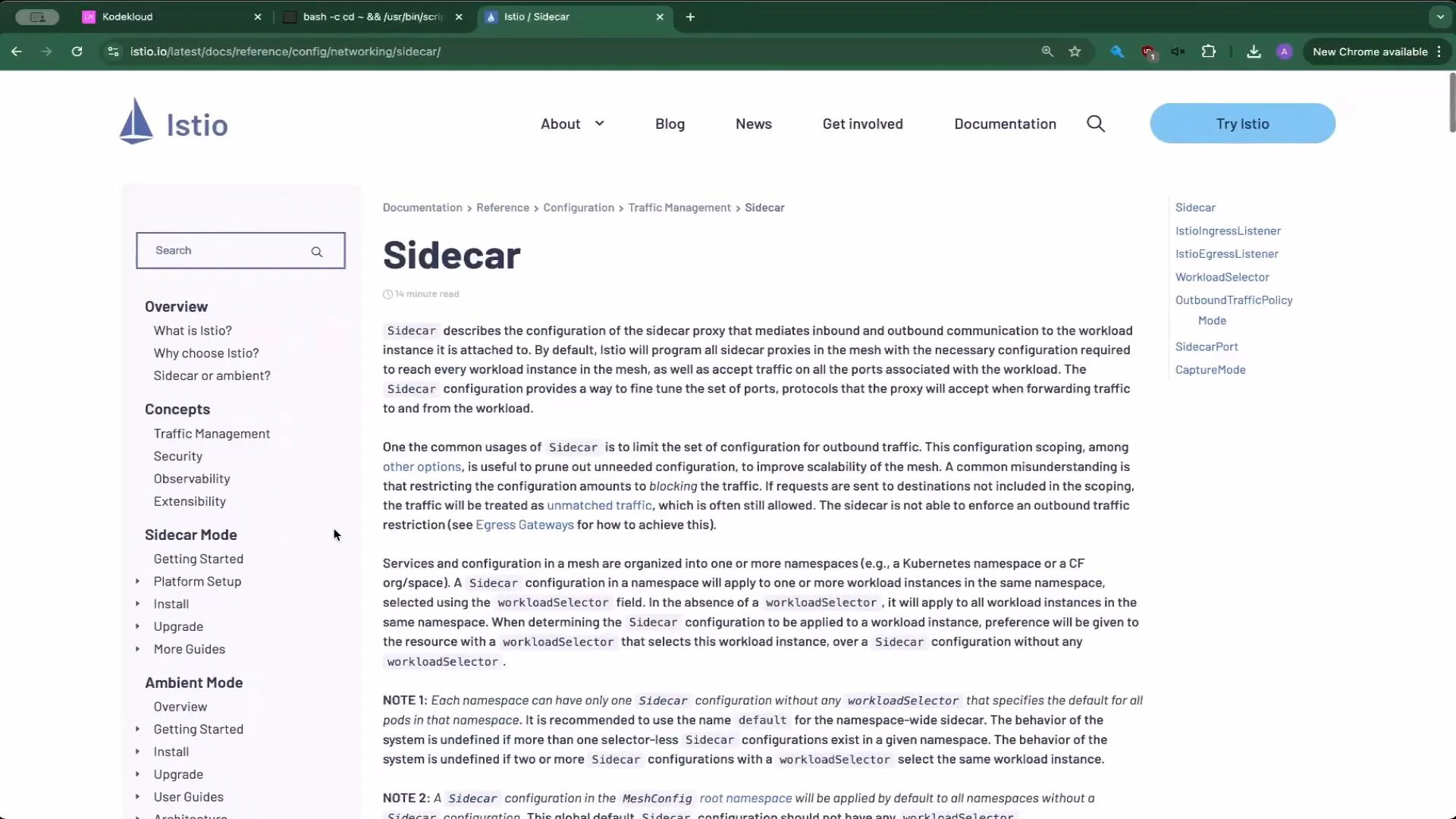
* [Istio Sidecar documentation](https://istio.io/latest/docs/reference/config/networking/sidecar/)
***
## 1) Verify namespace labels and deploy Bookinfo
Confirm the `default` namespace is labeled for Istio injection:
```bash theme={null}
kubectl get ns --show-labels
```
Example output:
```text theme={null}
NAME STATUS AGE LABELS
default Active 4m2s istio-injection=enabled,kubernetes.io/metadata.name=default
istio-system Active 91s kubernetes.io/metadata.name=istio-system
kube-node-lease Active 4m2s kubernetes.io/metadata.name=kube-node-lease
kube-public Active 4m2s kubernetes.io/metadata.name=kube-public
kube-system Active 4m2s kubernetes.io/metadata.name=kube-system
```
Deploy the Bookinfo sample into `default`:
```bash theme={null}
kubectl apply -f https://raw.githubusercontent.com/istio/istio/release-1.11/samples/bookinfo/platform/kube/bookinfo.yaml
```
You will see resources created (services, deployments, serviceaccounts). Watch pod initialization; `0/2` or `Init:0/1` typically means the Istio sidecar is being injected and is starting:
```bash theme={null}
kubectl get pods
```
Example during initialization:
```text theme={null}
NAME READY STATUS RESTARTS AGE
details-v1-65599dcf88-56xsj 0/2 PodInitializing 0 4s
productpage-v1-9487c9c5b-k9lsp 0/2 Init:0/1 0 3s
reviews-v1-5985998544-bv2f9 0/2 PodInitializing 0 4s
...
```
After sidecar initialization pods become `2/2 Running`.
***
## 2) Create a test namespace (no injection) and run a client pod
Create a namespace `test` that initially has no Istio injection:
```bash theme={null}
kubectl create ns test
kubectl get ns --show-labels
```
Example output (note `test` has no `istio-injection` label):
```text theme={null}
NAME STATUS AGE LABELS
default Active 5m11s istio-injection=enabled,kubernetes.io/metadata.name=default
istio-system Active 2m40s kubernetes.io/metadata.name=istio-system
test Active 8s kubernetes.io/metadata.name=test
```
Run an nginx pod in `test`:
```bash theme={null}
kubectl run test --image=nginx -n test
kubectl get pods -n test
```
Example:
```text theme={null}
NAME READY STATUS RESTARTS AGE
test 1/1 Running 0 12s
```
Get Bookinfo services in `default` and note `productpage` ClusterIP:
```bash theme={null}
kubectl get svc -n default
```
Example:
```text theme={null}
NAME TYPE CLUSTER-IP PORT(S) AGE
details ClusterIP 10.101.74.51 9080/TCP 114s
productpage ClusterIP 10.103.71.228 9080/TCP 114s
ratings ClusterIP 10.99.109.116 9080/TCP 114s
reviews ClusterIP 10.111.9.176 9080/TCP 114s
```
Exec into the `test` pod and curl the productpage. Because Istio defaults to permissive behavior (no mTLS enforced), this call should succeed even though the `test` pod has no sidecar:
```bash theme={null}
kubectl exec -ti -n test test -- /bin/sh
# inside pod:
curl --head http://productpage.default.svc.cluster.local:9080
```
Example response:
```text theme={null}
HTTP/1.1 200 OK
content-type: text/html; charset=utf-8
content-length: 1683
server: envoy
date: Wed, 09 Apr 2025 14:53:18 GMT
x-envoy-upstream-service-time: 27
x-envoy-decorator-operation: productpage.default.svc.cluster.local:9080/*
```
Takeaway: Istio ships permissive by default—services are reachable unless policies are added to restrict them.
***
## 3) Enforce mTLS in the default namespace (PeerAuthentication)
Warning: applying a PeerAuthentication mode STRICT will immediately require mTLS for all workloads in the namespace. Clients without an Istio sidecar will not be able to connect.
Applying PeerAuthentication with `mode: STRICT` will block non-mTLS traffic to workloads in the target namespace. Make sure you understand the impact before applying to production namespaces.
Create a PeerAuthentication named `default` in the `default` namespace to enforce mTLS:
peer\_auth.yaml
```yaml theme={null}
apiVersion: security.istio.io/v1beta1
kind: PeerAuthentication
metadata:
name: default
namespace: default
spec:
mtls:
mode: STRICT
```
Apply it:
```bash theme={null}
kubectl apply -f peer_auth.yaml
```
Retry curling `productpage` from the `test` pod (still without a sidecar). The call will fail because the `default` namespace now requires mTLS at the peer level, which is normally provided by the Istio sidecar proxy:
```bash theme={null}
kubectl exec -ti -n test test -- /bin/sh
# inside pod:
curl --head http://productpage.default.svc.cluster.local:9080
```
Result:
```text theme={null}
curl: (56) Recv failure: Connection reset by peer
```
PeerAuthentication in `STRICT` mode forces mTLS for peer connections in the targeted namespace. Clients without an Istio sidecar cannot establish mTLS and will be blocked.
***
## 4) Enable sidecar injection on the test namespace
Label the `test` namespace for automatic sidecar injection:
```bash theme={null}
kubectl label namespace test istio-injection=enabled
kubectl get ns --show-labels
```
Example output:
```text theme={null}
NAME STATUS AGE LABELS
default Active 9m58s istio-injection=enabled,kubernetes.io/metadata.name=default
test Active 4m55s istio-injection=enabled,kubernetes.io/metadata.name=test
istio-system Active 10m kubernetes.io/metadata.name=istio-system
```
Recreate the `test` pod so the injector adds the sidecar:
```bash theme={null}
kubectl delete pod -n test test
kubectl run test --image=nginx -n test
kubectl get pods -n test
```
You will observe the pod transition from `1/2` (sidecar injecting) to `2/2` (both containers ready):
```text theme={null}
NAME READY STATUS RESTARTS AGE
test 1/2 Running 0 2s
# then
test 2/2 Running 0 10s
```
Now retry the curl from the sidecar-injected `test` pod; the request should succeed because the sidecar negotiates mTLS:
```bash theme={null}
kubectl exec -ti -n test test -- /bin/sh
# inside pod:
curl --head http://productpage.default.svc:9080
```
Example success:
```text theme={null}
HTTP/1.1 200 OK
content-type: text/html; charset=utf-8
content-length: 1683
server: envoy
date: Wed, 09 Apr 2025 14:57:15 GMT
x-envoy-upstream-service-time: 21
```
***
## 5) Restrict egress with a Sidecar resource (namespace-wide)
By default, Istio sidecars allow egress to all services discovered in the mesh. A Sidecar CRD can restrict which hosts a workload’s sidecar may discover and talk to.
Create a Sidecar in the `test` namespace that restricts egress to only the local namespace and `istio-system`:
sidecar\_default\_namespace.yaml
```yaml theme={null}
apiVersion: networking.istio.io/v1
kind: Sidecar
metadata:
name: default
namespace: test
spec:
egress:
- hosts:
- "./*"
- "istio-system/*"
```
Apply it:
```bash theme={null}
kubectl apply -f sidecar_default_namespace.yaml
```
Now exec into the `test` pod and attempt to curl `productpage` in `default`:
```bash theme={null}
kubectl exec -ti -n test test -- /bin/sh
# inside pod:
curl --head http://productpage.default.svc:9080
```
Result:
```text theme={null}
curl: (52) Empty reply from server
```
Why this happens: the Sidecar replaced the default egress behavior for workloads in `test`, limiting allowed hosts to `./*` (the same namespace) and `istio-system/*`. Because `default/*` is not permitted, the local client-side Envoy proxy blocks the outbound request and returns an empty reply.
To restore access to `default` services, include `default/*` in `egress.hosts`:
sidecar\_default\_namespace.yaml
```yaml theme={null}
apiVersion: networking.istio.io/v1
kind: Sidecar
metadata:
name: default
namespace: test
spec:
egress:
- hosts:
- "./*"
- "default/*"
- "istio-system/*"
```
Apply the change:
```bash theme={null}
kubectl apply -f sidecar_default_namespace.yaml
```
Curl should now succeed:
```text theme={null}
HTTP/1.1 200 OK
content-type: text/html; charset=utf-8
content-length: 1683
server: envoy
date: Wed, 09 Apr 2025 15:01:13 GMT
x-envoy-upstream-service-time: 9
```
***
## 6) Narrow the Sidecar scope with workloadSelector
Use `workloadSelector` to target a Sidecar only to workloads with specific labels, enabling fine-grained control.
Example Sidecar that only affects workloads labeled `run=test`:
```yaml theme={null}
apiVersion: networking.istio.io/v1
kind: Sidecar
metadata:
name: default
namespace: test
spec:
workloadSelector:
labels:
run: test
egress:
- hosts:
- "./*"
- "istio-system/*"
```
Apply:
```bash theme={null}
kubectl apply -f sidecar_default_namespace.yaml
```
Behavior:
* Pods matching `run=test` (for example the `test` pod) will be limited to `./*` and `istio-system/*`. Attempts to reach `productpage.default.svc` will return an empty reply.
* Pods without `run=test` are unaffected and can still reach `default` services.
Verification steps:
1. Launch another pod without the target label:
```bash theme={null}
kubectl run nginx --image=nginx -n test
kubectl get pods -n test --show-labels
```
2. From the `nginx` pod (no `run=test`), curl the productpage — it should succeed:
```bash theme={null}
kubectl exec -ti -n test nginx -- /bin/sh
# inside pod:
curl --head http://productpage.default.svc:9080
```
3. From the `test` pod (label `run=test`), curl the productpage — it will fail:
```bash theme={null}
kubectl exec -ti -n test test -- /bin/sh
# inside pod:
curl --head http://productpage.default.svc:9080
```
Result:
```text theme={null}
curl: (52) Empty reply from server
```
This demonstrates how `workloadSelector` limits Sidecar effects to specific workloads, enabling multi-tenant or progressive rollout patterns.
***
## 7) Sidecar examples and quick references
Use these snippets as a starting point when authoring Sidecar resources.
* Restricting egress to production namespaces:
```yaml theme={null}
apiVersion: networking.istio.io/v1
kind: Sidecar
metadata:
name: default
namespace: prod-us1
spec:
egress:
- hosts:
- "prod-us1/*"
- "prod-apis/*"
- "istio-system/*"
```
* Advanced Sidecar with ingress, defaultEndpoint, and egress ports:
```yaml theme={null}
apiVersion: networking.istio.io/v1
kind: Sidecar
metadata:
name: ratings
namespace: prod-us1
spec:
workloadSelector:
labels:
app: ratings
ingress:
- port:
number: 9080
protocol: HTTP
name: somename
defaultEndpoint: unix:///var/run/someuds.sock
egress:
- port:
number: 9080
protocol: HTTP
name: egresshttp
```
Summary: Sidecar resources let you control service discovery and egress rules at the proxy level — ideal for large clusters, multi-tenant environments, or when reducing blast radius is a priority.
 ***
## Commands and expected effects (quick reference)
| Command | Purpose | Expected effect |
| ------------------------------------------------- | -------------------------------: | --------------------------------------------------------------------------- |
| `kubectl get ns --show-labels` | Check injection labels | See `istio-injection=enabled` if automatic injection is active |
| `kubectl apply -f ` | Deploy Bookinfo | Bookinfo services and deployments start with sidecars in labeled namespaces |
| `kubectl run test --image=nginx -n test` | Create test client pod | Creates a pod to validate connectivity |
| `kubectl apply -f peer_auth.yaml` | Enforce mTLS in a namespace | Non-sidecar clients are blocked (STRICT) |
| `kubectl label ns test istio-injection=enabled` | Enable injection for a namespace | New pods in namespace receive sidecars |
| `kubectl apply -f sidecar_default_namespace.yaml` | Limit egress hosts | Sidecar proxies restrict outbound discovery and traffic |
| `workloadSelector` in Sidecar | Target specific workloads | Only pods matching labels are affected |
***
## Links and references
* Istio Sidecar docs: [https://istio.io/latest/docs/reference/config/networking/sidecar/](https://istio.io/latest/docs/reference/config/networking/sidecar/)
* Istio PeerAuthentication: [https://istio.io/latest/docs/reference/config/security/peer\_authentication/](https://istio.io/latest/docs/reference/config/security/peer_authentication/)
* Kubernetes namespaces: [https://kubernetes.io/docs/concepts/overview/working-with-objects/namespaces/](https://kubernetes.io/docs/concepts/overview/working-with-objects/namespaces/)
***
That concludes this Sidecar lesson. Next: VirtualServices and more advanced traffic routing.
***
## Commands and expected effects (quick reference)
| Command | Purpose | Expected effect |
| ------------------------------------------------- | -------------------------------: | --------------------------------------------------------------------------- |
| `kubectl get ns --show-labels` | Check injection labels | See `istio-injection=enabled` if automatic injection is active |
| `kubectl apply -f ` | Deploy Bookinfo | Bookinfo services and deployments start with sidecars in labeled namespaces |
| `kubectl run test --image=nginx -n test` | Create test client pod | Creates a pod to validate connectivity |
| `kubectl apply -f peer_auth.yaml` | Enforce mTLS in a namespace | Non-sidecar clients are blocked (STRICT) |
| `kubectl label ns test istio-injection=enabled` | Enable injection for a namespace | New pods in namespace receive sidecars |
| `kubectl apply -f sidecar_default_namespace.yaml` | Limit egress hosts | Sidecar proxies restrict outbound discovery and traffic |
| `workloadSelector` in Sidecar | Target specific workloads | Only pods matching labels are affected |
***
## Links and references
* Istio Sidecar docs: [https://istio.io/latest/docs/reference/config/networking/sidecar/](https://istio.io/latest/docs/reference/config/networking/sidecar/)
* Istio PeerAuthentication: [https://istio.io/latest/docs/reference/config/security/peer\_authentication/](https://istio.io/latest/docs/reference/config/security/peer_authentication/)
* Kubernetes namespaces: [https://kubernetes.io/docs/concepts/overview/working-with-objects/namespaces/](https://kubernetes.io/docs/concepts/overview/working-with-objects/namespaces/)
***
That concludes this Sidecar lesson. Next: VirtualServices and more advanced traffic routing.