> ## Documentation Index
> Fetch the complete documentation index at: https://notes.kodekloud.com/llms.txt
> Use this file to discover all available pages before exploring further.
# Gateways
> Overview of Istio Gateways, explaining ingress and egress roles, TLS termination, routing with Gateways, VirtualService and DestinationRule, configuration examples, and traffic flow
A Gateway in Istio is the entry and exit point between the service mesh and the outside world. Gateways are optional — if your workloads only communicate inside the mesh, you may not need one. For internal routing, a VirtualService alone is often sufficient.
Gateways let you:
* Expose services to external clients (Ingress Gateway).
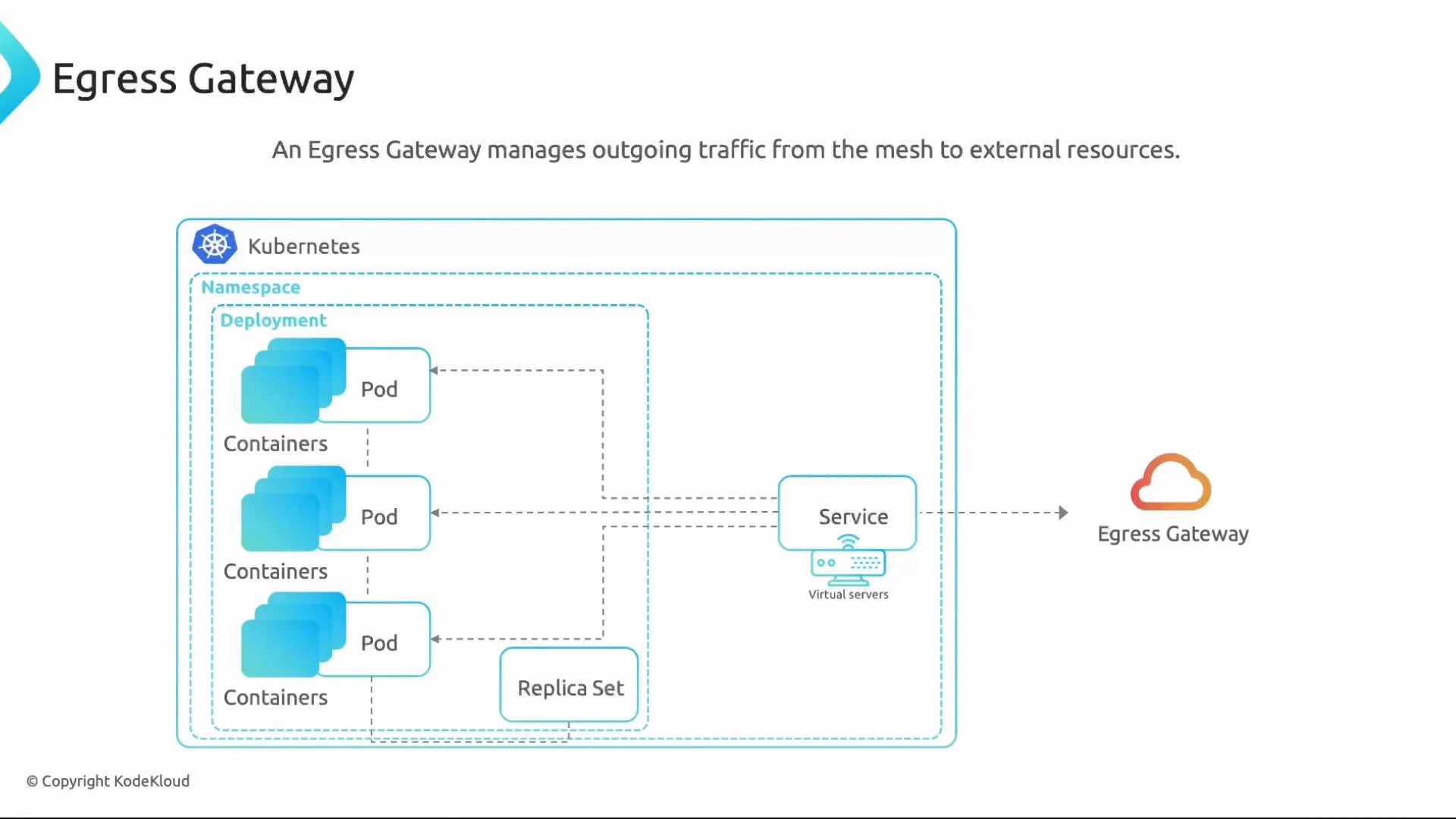
* Control and centralize outbound traffic from the mesh (Egress Gateway).
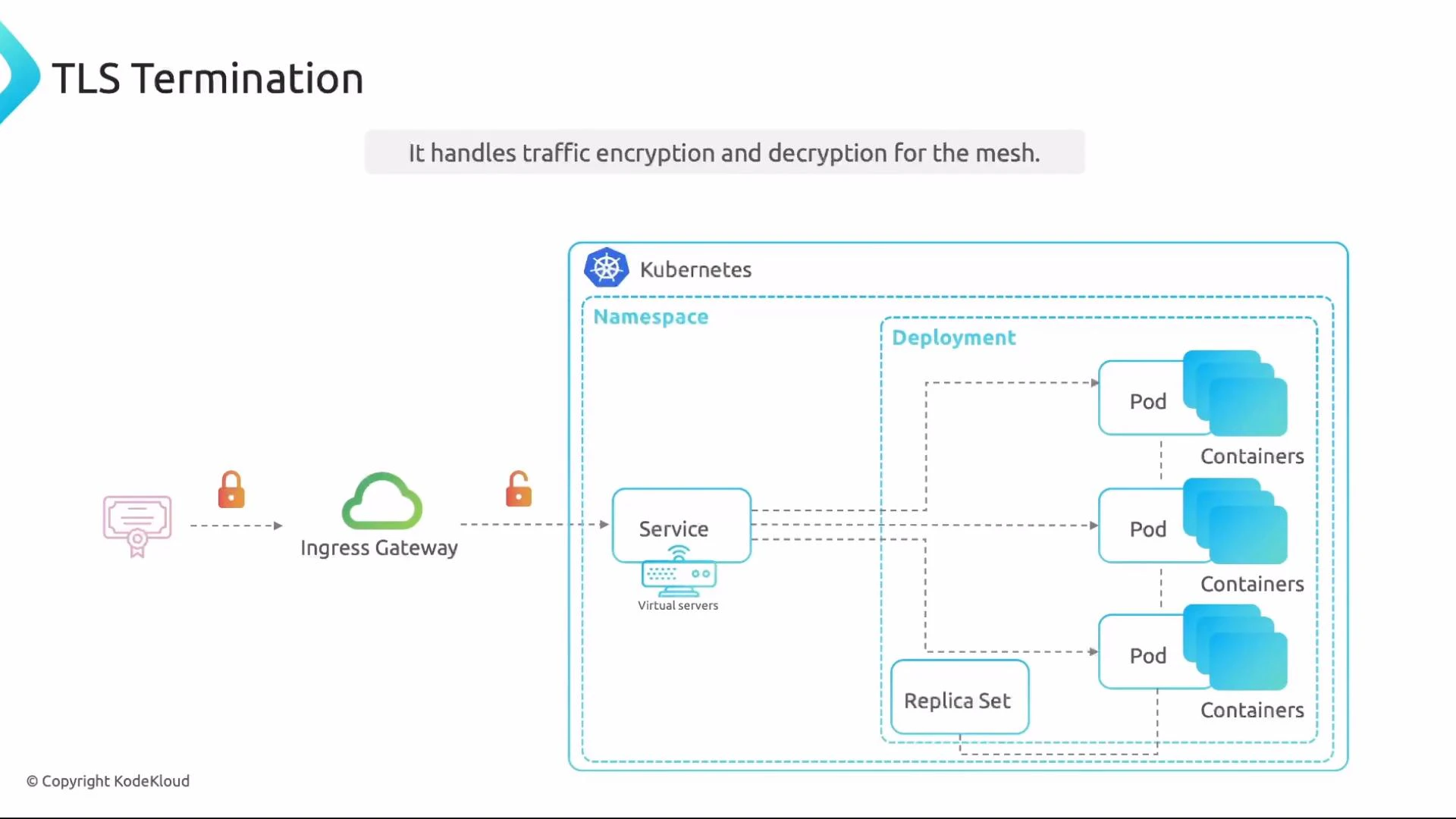
* Perform TLS termination, protocol handling, and host/port binding at the mesh boundary.
When to use a Gateway
* Use an Ingress Gateway to expose services to external users or APIs.
* Use an Egress Gateway to centralize outbound policies, logging, or TLS for traffic leaving the mesh.
* Skip Gateways if services are internal-only and no external exposure or control is required.
Types of Gateways
| Gateway Type | Purpose | Typical Use Case |
| --------------- | -------------------------------------- | ---------------------------------------------------- |
| Ingress Gateway | Manages incoming traffic to the mesh | Expose web services to the public (HTTP(S), gRPC) |
| Egress Gateway | Manages outgoing traffic from the mesh | Centralize outbound TLS, logging, or egress policies |
 Enabling Gateways via Istio Operator
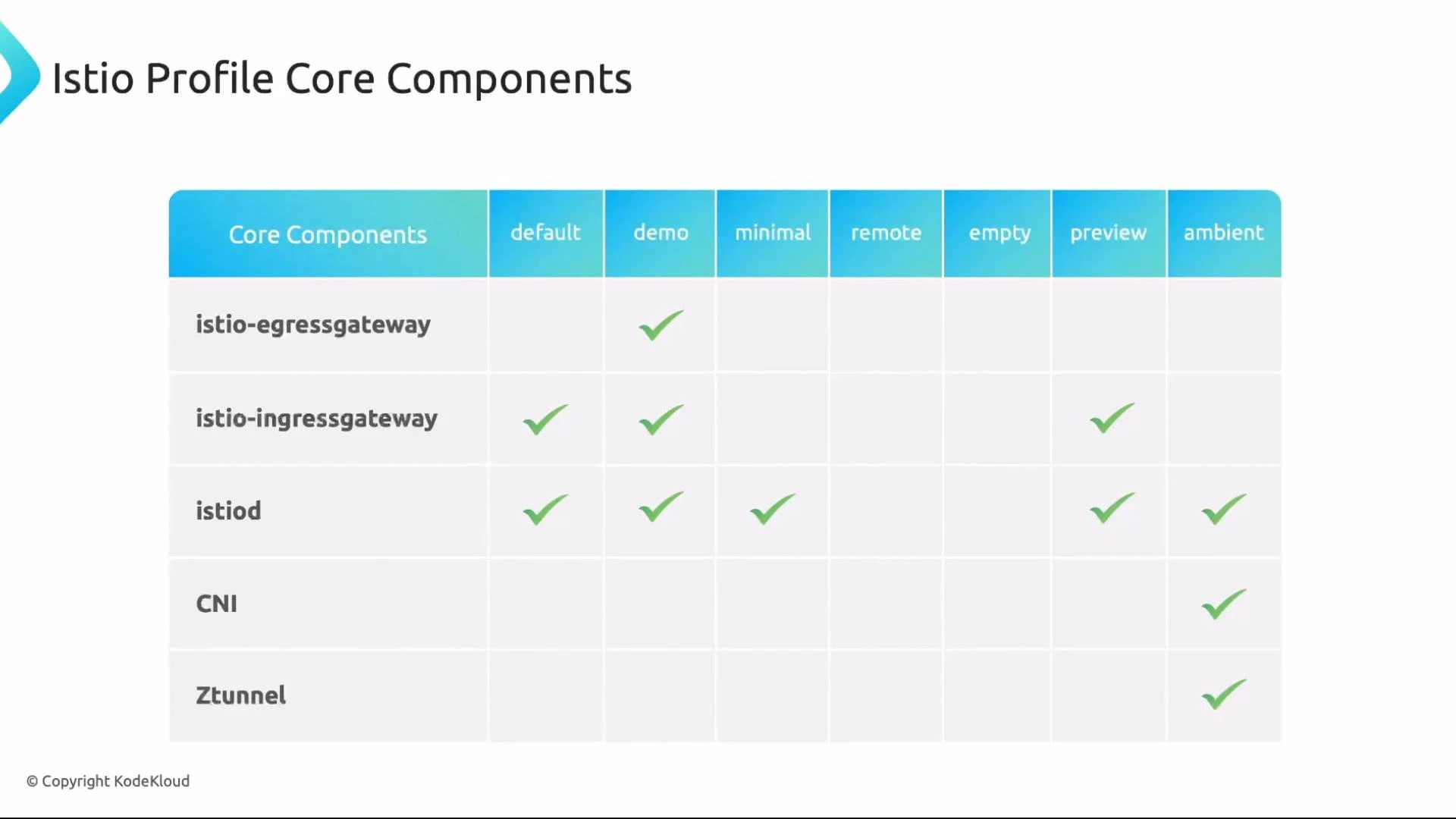
You choose which gateways to enable when installing Istio. Profiles (such as `default`, `demo`, `minimal`, `remote`, `empty`, `preview`, and `ambient`) include different core components. For example, the `demo` profile commonly includes both ingress and egress gateways, while `minimal` might include only ingress.
Enabling Gateways via Istio Operator
You choose which gateways to enable when installing Istio. Profiles (such as `default`, `demo`, `minimal`, `remote`, `empty`, `preview`, and `ambient`) include different core components. For example, the `demo` profile commonly includes both ingress and egress gateways, while `minimal` might include only ingress.
 After installation, verify gateway pods in the Istio system namespace with:
* kubectl get pods -n istio-system
You will see Envoy-based pods for ingress (and egress if enabled). Gateways are selected by label selectors configured in Gateway resources, so make sure selectors match the labels on those pods.
Ensure the Gateway selector matches the label on the gateway pods. Common labels are `istio=ingressgateway` or `istio=egressgateway` (labels vary by installation). If the selector is incorrect, the Gateway resource will not be bound to the gateway pods and external traffic will not be routed.
TLS termination, protocols, and routing
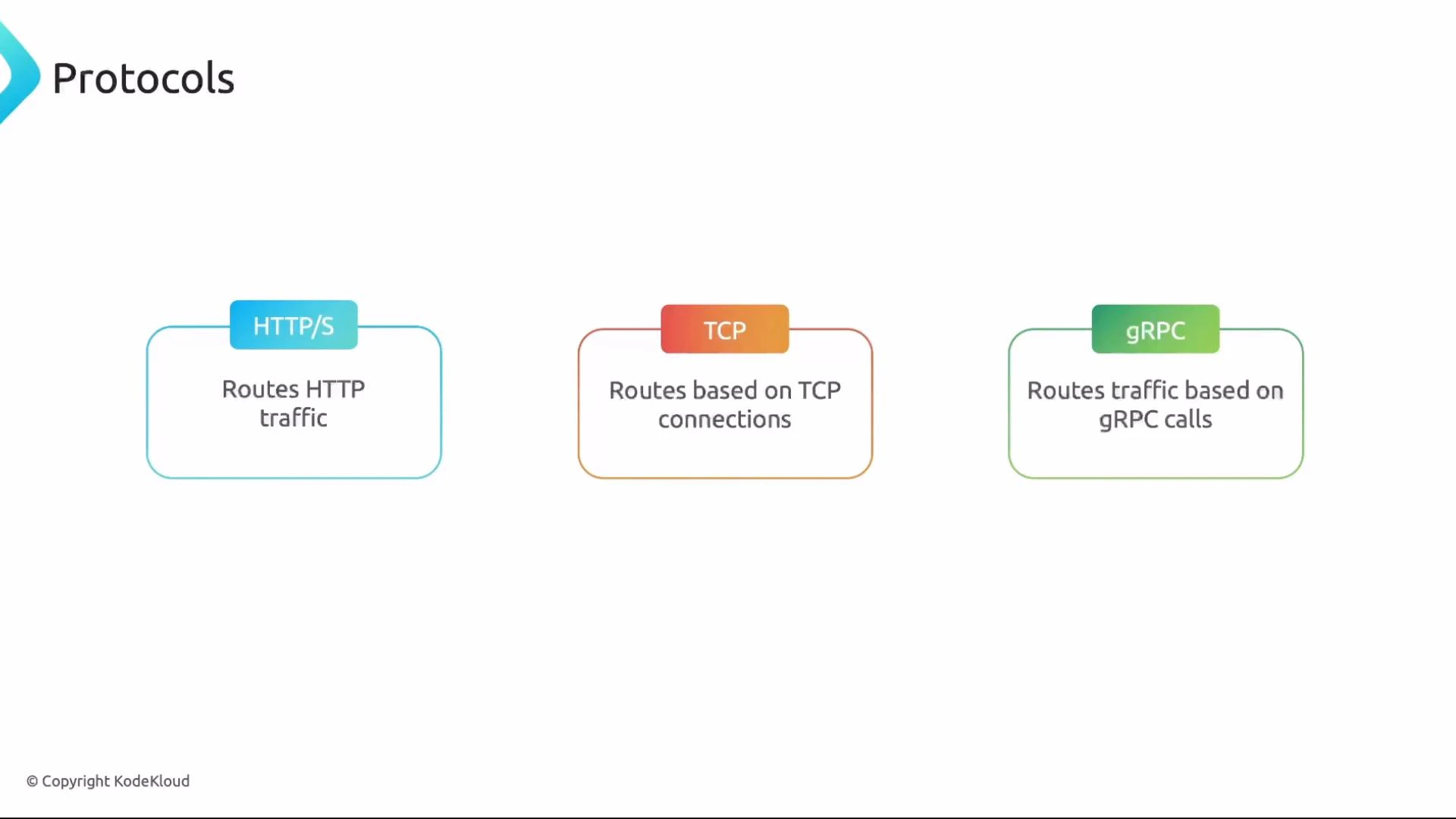
Gateways commonly perform TLS termination (managing encryption/decryption and certificates) and support multiple protocols: HTTP(S), TCP, and gRPC. Gateways can route traffic based on ports, headers, and URL paths, but most advanced routing rules are defined in VirtualService objects.
After installation, verify gateway pods in the Istio system namespace with:
* kubectl get pods -n istio-system
You will see Envoy-based pods for ingress (and egress if enabled). Gateways are selected by label selectors configured in Gateway resources, so make sure selectors match the labels on those pods.
Ensure the Gateway selector matches the label on the gateway pods. Common labels are `istio=ingressgateway` or `istio=egressgateway` (labels vary by installation). If the selector is incorrect, the Gateway resource will not be bound to the gateway pods and external traffic will not be routed.
TLS termination, protocols, and routing
Gateways commonly perform TLS termination (managing encryption/decryption and certificates) and support multiple protocols: HTTP(S), TCP, and gRPC. Gateways can route traffic based on ports, headers, and URL paths, but most advanced routing rules are defined in VirtualService objects.
 Key configuration objects
* Gateway — declares ports, protocols, hostnames to listen on and uses a selector to target gateway pods.
* VirtualService — defines routing rules (host, path, headers) and is how you bind Gateway traffic to services.
* DestinationRule — optional for basic routing but required for subsets, load balancing policies, connection pools, or TLS settings.
Comparison at a glance:
| Resource | Primary Responsibility | Required to expose service externally? |
| --------------- | ------------------------------------------------------------ | --------------------------------------------- |
| Gateway | Bind Envoy gateway pods to ports/protocols/hosts | Yes (for external traffic) |
| VirtualService | Route traffic to service destinations and define match rules | No (can work for internal-only) |
| DestinationRule | Configure subsets, LB, TLS for destinations | No (but needed for subsets/advanced features) |
Example: VirtualService + DestinationRule (internal routing and traffic-splitting)
```yaml theme={null}
apiVersion: networking.istio.io/v1alpha3
kind: VirtualService
metadata:
name: ingress-app-vs
namespace: frontend
spec:
hosts:
- app-svc
http:
- match:
- uri:
prefix: /
route:
- destination:
host: app-svc.frontend.svc.cluster.local
port:
number: 80
subset: v1
weight: 50
- destination:
host: app-svc.frontend.svc.cluster.local
port:
number: 80
subset: v2
weight: 50
---
apiVersion: networking.istio.io/v1alpha3
kind: DestinationRule
metadata:
name: app-ds
namespace: frontend
spec:
host: app-svc
subsets:
- name: v1
labels:
version: v1
- name: v2
labels:
version: v2
```
Expose the service externally: Gateway + VirtualService
A Gateway resource defines which ports, hosts, and protocols the gateway listens on and must target gateway pods via a selector. Example (Ingress Gateway):
```yaml theme={null}
apiVersion: networking.istio.io/v1alpha3
kind: Gateway
metadata:
name: ingress-app-gateway
namespace: istio-system
spec:
selector:
istio: ingressgateway
servers:
- port:
number: 80
name: http
protocol: HTTP
hosts:
- app.example.com
```
Notes:
* The `selector` above targets ingress gateway pods in the `istio-system` namespace. If your installation used a different label (for example `istio=ingress`), change the selector accordingly.
* For production, use port `443` and HTTPS with proper `tls` server settings.
Bind the Gateway to routes by referencing it from a VirtualService. Place the VirtualService in the same namespace as the Gateway to refer to it by name, or prefix with the namespace when in another namespace.
```yaml theme={null}
apiVersion: networking.istio.io/v1alpha3
kind: VirtualService
metadata:
name: ingress-app-vs
namespace: istio-system
spec:
hosts:
- app-svc
- "app.example.com"
gateways:
- ingress-app-gateway
http:
- match:
- uri:
prefix: /
route:
- destination:
host: app-svc.frontend.svc.cluster.local
port:
number: 80
subset: v1
weight: 50
- destination:
host: app-svc.frontend.svc.cluster.local
port:
number: 80
subset: v2
weight: 50
```
* `app-svc` allows internal service-to-service routing rules to match.
* `"app.example.com"` applies the same routing for external requests coming through the Gateway.
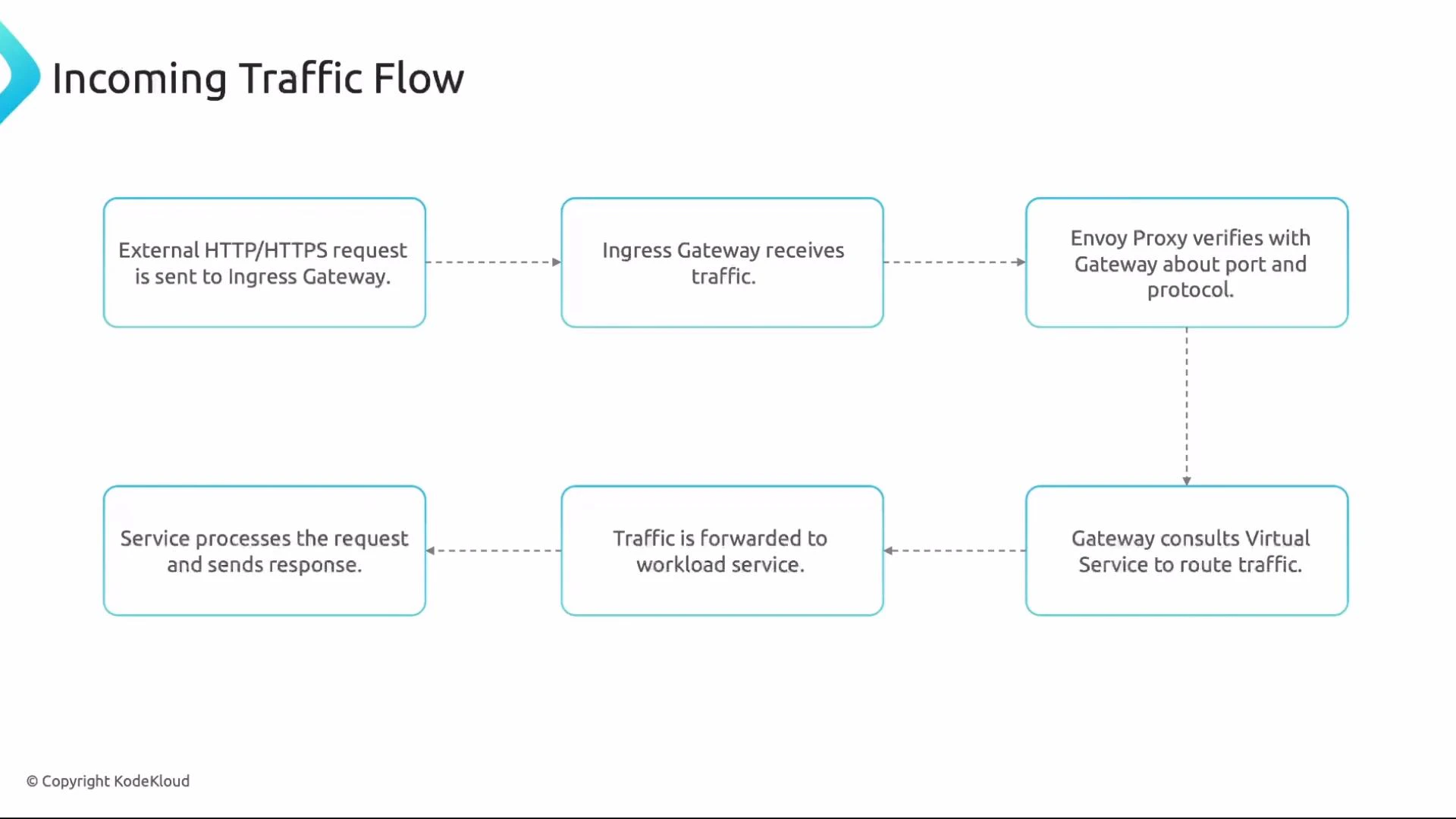
Incoming traffic flow (high level)
1. External client sends HTTP/HTTPS to the Ingress Gateway public IP (e.g., `app.example.com`).
2. The Ingress Gateway (Envoy) receives the request and optionally terminates TLS.
3. Envoy uses the Gateway configuration to determine port/protocol handling.
4. The request is matched by a VirtualService (host/path) to select routing.
5. Traffic is forwarded to the Kubernetes Service and then to the target pods.
6. The service responds and the response flows back to the client.
Key configuration objects
* Gateway — declares ports, protocols, hostnames to listen on and uses a selector to target gateway pods.
* VirtualService — defines routing rules (host, path, headers) and is how you bind Gateway traffic to services.
* DestinationRule — optional for basic routing but required for subsets, load balancing policies, connection pools, or TLS settings.
Comparison at a glance:
| Resource | Primary Responsibility | Required to expose service externally? |
| --------------- | ------------------------------------------------------------ | --------------------------------------------- |
| Gateway | Bind Envoy gateway pods to ports/protocols/hosts | Yes (for external traffic) |
| VirtualService | Route traffic to service destinations and define match rules | No (can work for internal-only) |
| DestinationRule | Configure subsets, LB, TLS for destinations | No (but needed for subsets/advanced features) |
Example: VirtualService + DestinationRule (internal routing and traffic-splitting)
```yaml theme={null}
apiVersion: networking.istio.io/v1alpha3
kind: VirtualService
metadata:
name: ingress-app-vs
namespace: frontend
spec:
hosts:
- app-svc
http:
- match:
- uri:
prefix: /
route:
- destination:
host: app-svc.frontend.svc.cluster.local
port:
number: 80
subset: v1
weight: 50
- destination:
host: app-svc.frontend.svc.cluster.local
port:
number: 80
subset: v2
weight: 50
---
apiVersion: networking.istio.io/v1alpha3
kind: DestinationRule
metadata:
name: app-ds
namespace: frontend
spec:
host: app-svc
subsets:
- name: v1
labels:
version: v1
- name: v2
labels:
version: v2
```
Expose the service externally: Gateway + VirtualService
A Gateway resource defines which ports, hosts, and protocols the gateway listens on and must target gateway pods via a selector. Example (Ingress Gateway):
```yaml theme={null}
apiVersion: networking.istio.io/v1alpha3
kind: Gateway
metadata:
name: ingress-app-gateway
namespace: istio-system
spec:
selector:
istio: ingressgateway
servers:
- port:
number: 80
name: http
protocol: HTTP
hosts:
- app.example.com
```
Notes:
* The `selector` above targets ingress gateway pods in the `istio-system` namespace. If your installation used a different label (for example `istio=ingress`), change the selector accordingly.
* For production, use port `443` and HTTPS with proper `tls` server settings.
Bind the Gateway to routes by referencing it from a VirtualService. Place the VirtualService in the same namespace as the Gateway to refer to it by name, or prefix with the namespace when in another namespace.
```yaml theme={null}
apiVersion: networking.istio.io/v1alpha3
kind: VirtualService
metadata:
name: ingress-app-vs
namespace: istio-system
spec:
hosts:
- app-svc
- "app.example.com"
gateways:
- ingress-app-gateway
http:
- match:
- uri:
prefix: /
route:
- destination:
host: app-svc.frontend.svc.cluster.local
port:
number: 80
subset: v1
weight: 50
- destination:
host: app-svc.frontend.svc.cluster.local
port:
number: 80
subset: v2
weight: 50
```
* `app-svc` allows internal service-to-service routing rules to match.
* `"app.example.com"` applies the same routing for external requests coming through the Gateway.
Incoming traffic flow (high level)
1. External client sends HTTP/HTTPS to the Ingress Gateway public IP (e.g., `app.example.com`).
2. The Ingress Gateway (Envoy) receives the request and optionally terminates TLS.
3. Envoy uses the Gateway configuration to determine port/protocol handling.
4. The request is matched by a VirtualService (host/path) to select routing.
5. Traffic is forwarded to the Kubernetes Service and then to the target pods.
6. The service responds and the response flows back to the client.
 Important relationships
* A Gateway needs a corresponding VirtualService to route traffic into the mesh.
* A VirtualService can operate without a Gateway for internal routing.
* DestinationRules are optional for simple routing but required when using subsets, load balancing, or connection pool/TLS settings.
Egress Gateway (outgoing traffic control)
An Egress Gateway centralizes outbound traffic control and is useful for logging, monitoring, policy enforcement, and centralized TLS. You can allow specific outbound hosts or use a wildcard to permit all.
Example Egress Gateway allowing HTTP and HTTPS:
```yaml theme={null}
apiVersion: networking.istio.io/v1alpha3
kind: Gateway
metadata:
name: egress-app-gateway
namespace: istio-system
spec:
selector:
istio: egressgateway
servers:
- port:
number: 80
name: http
protocol: HTTP
hosts:
- "*"
- port:
number: 443
name: https
protocol: HTTPS
hosts:
- "*"
```
Using `"*"` in `hosts` permits outbound connections to any host (subject to additional mesh policies). Restrict outbound traffic by listing specific hostnames instead of `"*"` when required.
To force traffic through the egress gateway:
* Create a ServiceEntry (if the external host is not part of the mesh DNS) to allow mesh resolution/reachability.
* Create a VirtualService that references the egress Gateway (use `namespace/gateway-name` if in different namespaces).
Example VirtualService that forces traffic to `api.example.com` through the egress gateway:
```yaml theme={null}
apiVersion: networking.istio.io/v1alpha3
kind: VirtualService
metadata:
name: egress-app-vs
namespace: frontend
spec:
hosts:
- api.example.com
gateways:
- istio-system/egress-app-gateway
http:
- match:
- uri:
prefix: /
route:
- destination:
host: api.example.com
port:
number: 443
```
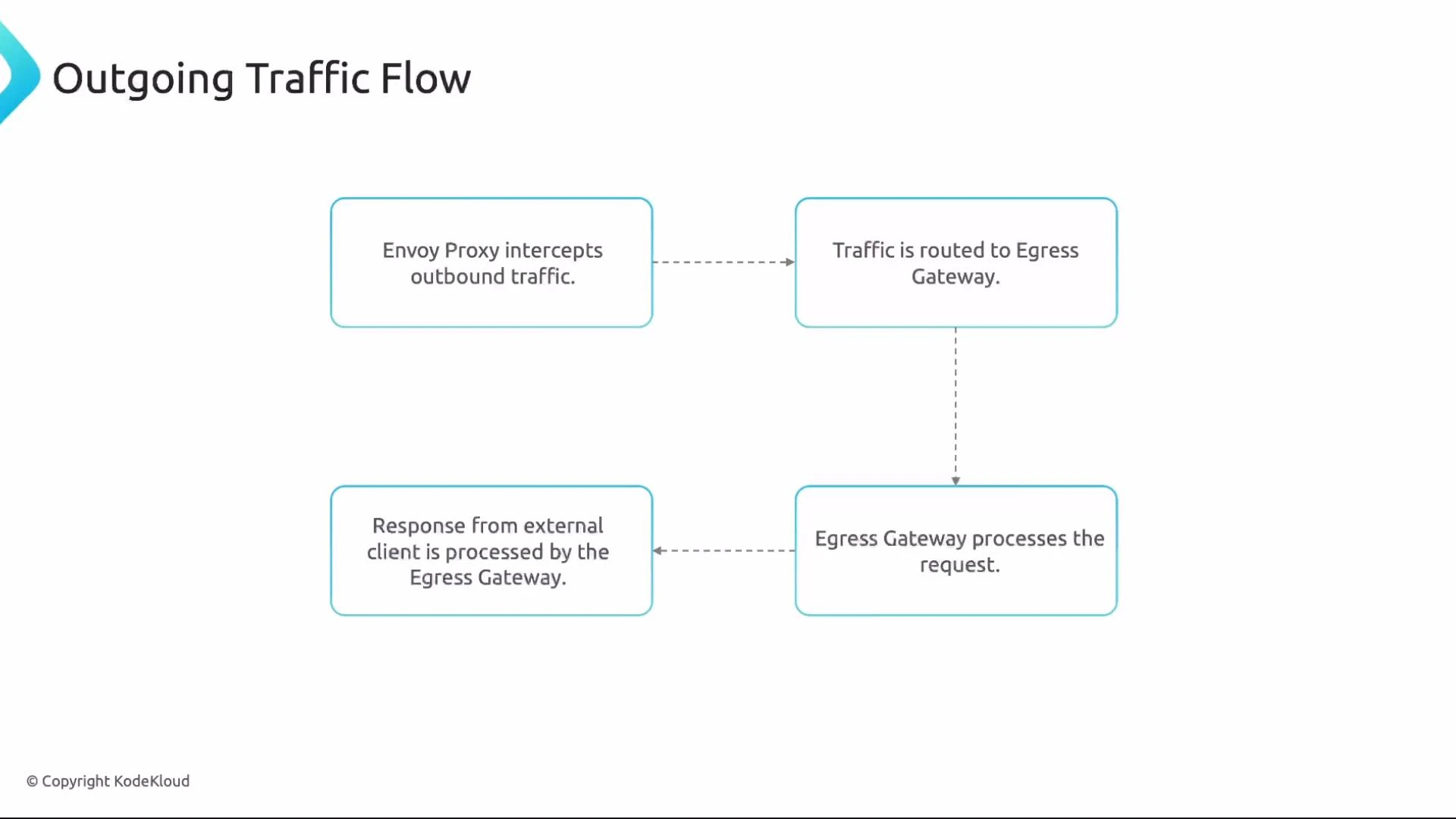
Outgoing traffic flow (high level)
1. A workload's sidecar Envoy intercepts outbound traffic.
2. The VirtualService routing rules send matching outbound requests to the Egress Gateway.
3. The Egress Gateway applies policies, logging, and TLS, then forwards the request to the external service.
4. Responses return via the Egress Gateway back to the originating workload.
Important relationships
* A Gateway needs a corresponding VirtualService to route traffic into the mesh.
* A VirtualService can operate without a Gateway for internal routing.
* DestinationRules are optional for simple routing but required when using subsets, load balancing, or connection pool/TLS settings.
Egress Gateway (outgoing traffic control)
An Egress Gateway centralizes outbound traffic control and is useful for logging, monitoring, policy enforcement, and centralized TLS. You can allow specific outbound hosts or use a wildcard to permit all.
Example Egress Gateway allowing HTTP and HTTPS:
```yaml theme={null}
apiVersion: networking.istio.io/v1alpha3
kind: Gateway
metadata:
name: egress-app-gateway
namespace: istio-system
spec:
selector:
istio: egressgateway
servers:
- port:
number: 80
name: http
protocol: HTTP
hosts:
- "*"
- port:
number: 443
name: https
protocol: HTTPS
hosts:
- "*"
```
Using `"*"` in `hosts` permits outbound connections to any host (subject to additional mesh policies). Restrict outbound traffic by listing specific hostnames instead of `"*"` when required.
To force traffic through the egress gateway:
* Create a ServiceEntry (if the external host is not part of the mesh DNS) to allow mesh resolution/reachability.
* Create a VirtualService that references the egress Gateway (use `namespace/gateway-name` if in different namespaces).
Example VirtualService that forces traffic to `api.example.com` through the egress gateway:
```yaml theme={null}
apiVersion: networking.istio.io/v1alpha3
kind: VirtualService
metadata:
name: egress-app-vs
namespace: frontend
spec:
hosts:
- api.example.com
gateways:
- istio-system/egress-app-gateway
http:
- match:
- uri:
prefix: /
route:
- destination:
host: api.example.com
port:
number: 443
```
Outgoing traffic flow (high level)
1. A workload's sidecar Envoy intercepts outbound traffic.
2. The VirtualService routing rules send matching outbound requests to the Egress Gateway.
3. The Egress Gateway applies policies, logging, and TLS, then forwards the request to the external service.
4. Responses return via the Egress Gateway back to the originating workload.
 Gateway configuration notes
There are fewer configuration options on Gateways than on VirtualServices or DestinationRules, but Gateways support:
* TLS modes and `serverTLSSettings`
* Port and protocol definitions
* Host binding and redirects
Consult the Istio Gateway reference for full options and examples.
Gateway configuration notes
There are fewer configuration options on Gateways than on VirtualServices or DestinationRules, but Gateways support:
* TLS modes and `serverTLSSettings`
* Port and protocol definitions
* Host binding and redirects
Consult the Istio Gateway reference for full options and examples.
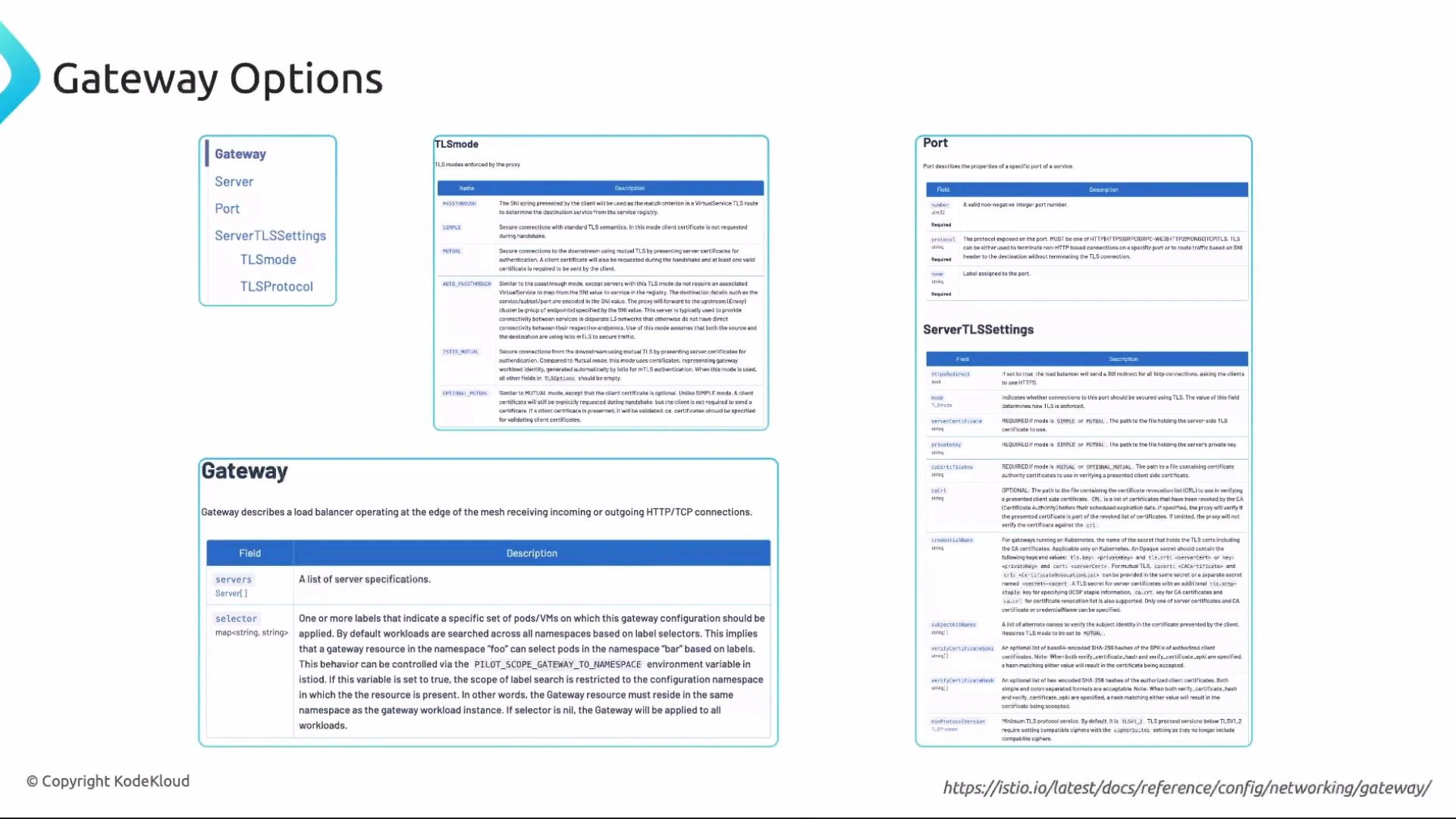 Tip: Review the "Reference: Networking — Gateway" section in the Istio docs for examples on `tls` settings, `serverTLSSettings`, and protocol handling: [https://istio.io/latest/docs/reference/config/networking/gateway/](https://istio.io/latest/docs/reference/config/networking/gateway/). Understanding Gateway selectors, servers, and how VirtualService integrates with Gateways is key for deployment and certification exams.
Summary
This article covered:
* What Istio Gateways are and when to use them.
* Differences between Ingress and Egress Gateways and how they integrate with VirtualService and DestinationRule.
* Example YAMLs for VirtualService, DestinationRule, Ingress Gateway, and Egress Gateway.
* High-level incoming and outgoing traffic flows and configuration considerations.
Next steps
* Practice configuring a Gateway + VirtualService end-to-end.
* Test TLS termination and host/path-based routing.
* Explore ServiceEntry + Egress Gateway patterns for controlled outbound access.
Tip: Review the "Reference: Networking — Gateway" section in the Istio docs for examples on `tls` settings, `serverTLSSettings`, and protocol handling: [https://istio.io/latest/docs/reference/config/networking/gateway/](https://istio.io/latest/docs/reference/config/networking/gateway/). Understanding Gateway selectors, servers, and how VirtualService integrates with Gateways is key for deployment and certification exams.
Summary
This article covered:
* What Istio Gateways are and when to use them.
* Differences between Ingress and Egress Gateways and how they integrate with VirtualService and DestinationRule.
* Example YAMLs for VirtualService, DestinationRule, Ingress Gateway, and Egress Gateway.
* High-level incoming and outgoing traffic flows and configuration considerations.
Next steps
* Practice configuring a Gateway + VirtualService end-to-end.
* Test TLS termination and host/path-based routing.
* Explore ServiceEntry + Egress Gateway patterns for controlled outbound access.