> ## Documentation Index
> Fetch the complete documentation index at: https://notes.kodekloud.com/llms.txt
> Use this file to discover all available pages before exploring further.
# Clone Source
> Using Kyverno clone generate rules to replicate a central image pull Secret from a golden namespace into new namespaces and keep clones synchronized while avoiding embedded secret data
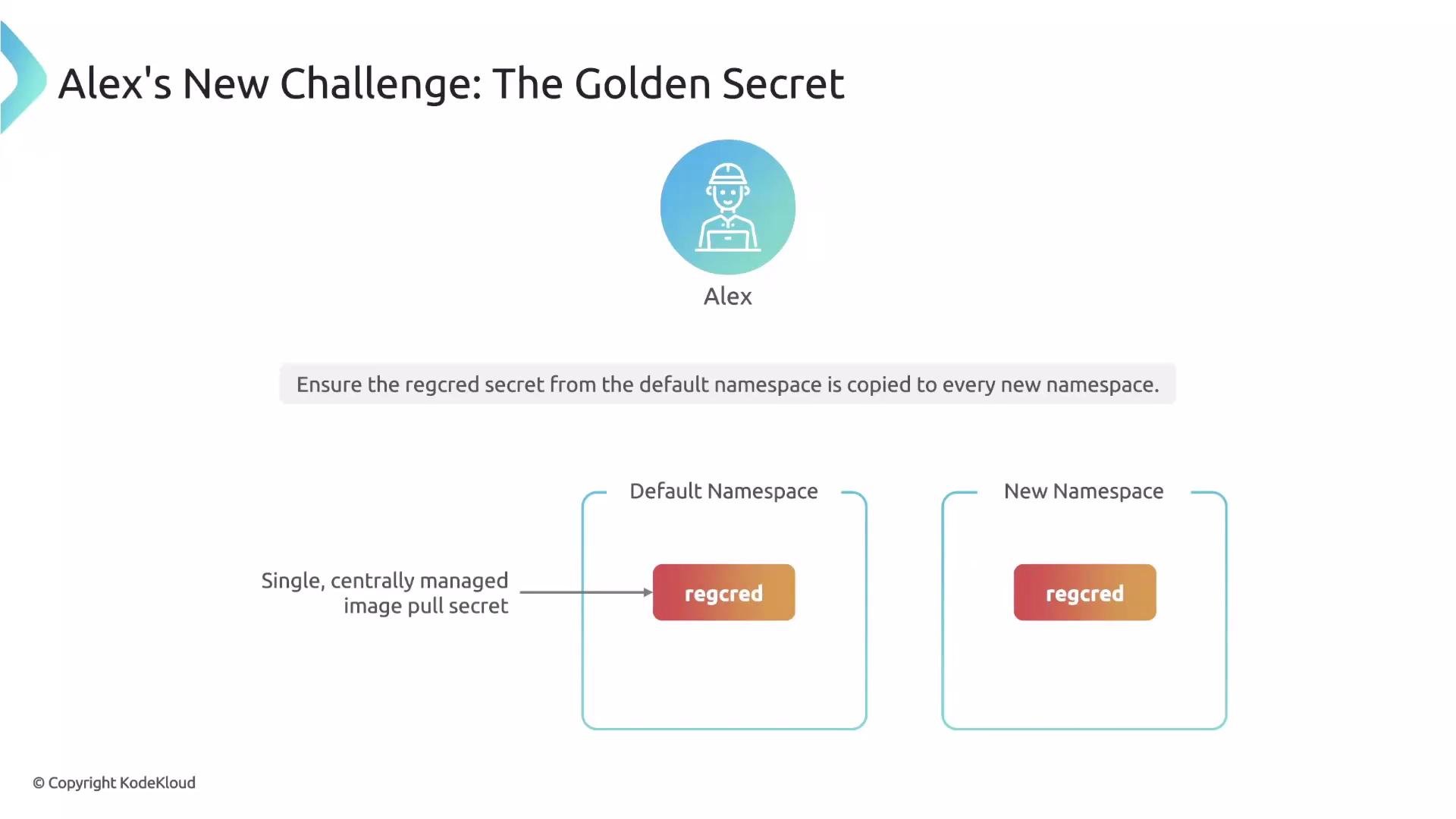
Alice wants Kyverno to distribute a single, centrally-managed image pull secret to every new Namespace in the cluster. Instead of embedding Base64-encoded secret data inside a policy (the data source), she points Kyverno at the existing secret and instructs it to copy that secret into each Namespace. This approach keeps the `default` namespace secret — the golden source of truth — as the single place to rotate credentials.
 Why not use the data source?
* Embedding secret data into the policy duplicates sensitive material across policy manifests.
* Every rotation would require updating the policy, increasing risk and administrative overhead.
* The data source is best when the policy itself should be the canonical resource definition.
When an existing in-cluster resource is the source of truth, use the clone source: the policy becomes a pointer that instructs Kyverno to copy the real resource into target namespaces.
Understanding generate content sources
A Kyverno generate rule can obtain content in two ways:
| Content source | What it means | When to use |
| -------------- | -----------------------------------------------------------------------------------------------------------------------------------------------------------: | ------------------------------------------------------------------------------------------- |
| Data source | You author the resource manifest inside the policy (under `generate.data` or inline manifest). Kyverno creates the downstream resource from that definition. | Use when the policy should be the canonical source of the resource configuration. |
| Clone source | The policy points to an existing, deployed resource using `generate.clone`. Kyverno replicates that resource as-is to target namespaces. | Use when an in-cluster resource is the golden source (e.g., centrally-managed credentials). |
For the data source you include a `data` (or inline manifest) under `generate`. For the clone source you declare a `clone` block that references the source `namespace` and `name`.
Example: clone a shared image pull secret to every new Namespace
This ClusterPolicy clones the `regcred` Secret from the `default` namespace into each new Namespace. The rule matches Namespace creation; `generate` declares the downstream Secret and `clone` points to the golden source. `synchronize: true` keeps downstream clones in sync with the source.
```yaml theme={null}
apiVersion: kyverno.io/v1
kind: ClusterPolicy
metadata:
name: clone-regcred-to-namespaces
spec:
rules:
- name: sync-image-pull-secret
match:
any:
- resources:
kinds:
- Namespace
generate:
apiVersion: v1
kind: Secret
name: regcred
namespace: "{{request.object.metadata.name}}"
clone:
namespace: default
name: regcred
synchronize: true
```
With `synchronize: true`, Kyverno detects updates to the golden secret in `default` and propagates them to every cloned Secret across the cluster. Alice manages only the master secret; Kyverno manages distributed copies.
Best practices and security
When cloning Secrets across namespaces, ensure proper RBAC and policy scoping so only authorized controllers and users can view or create clones. Consider encryption-at-rest, `imagePullSecrets` usage patterns, and tools like Sealed Secrets for additional protection. See the Kyverno documentation for generate/clone details: [https://kyverno.io/docs/writing-policies/generate/](https://kyverno.io/docs/writing-policies/generate/)
Synchronization: effects and behaviors
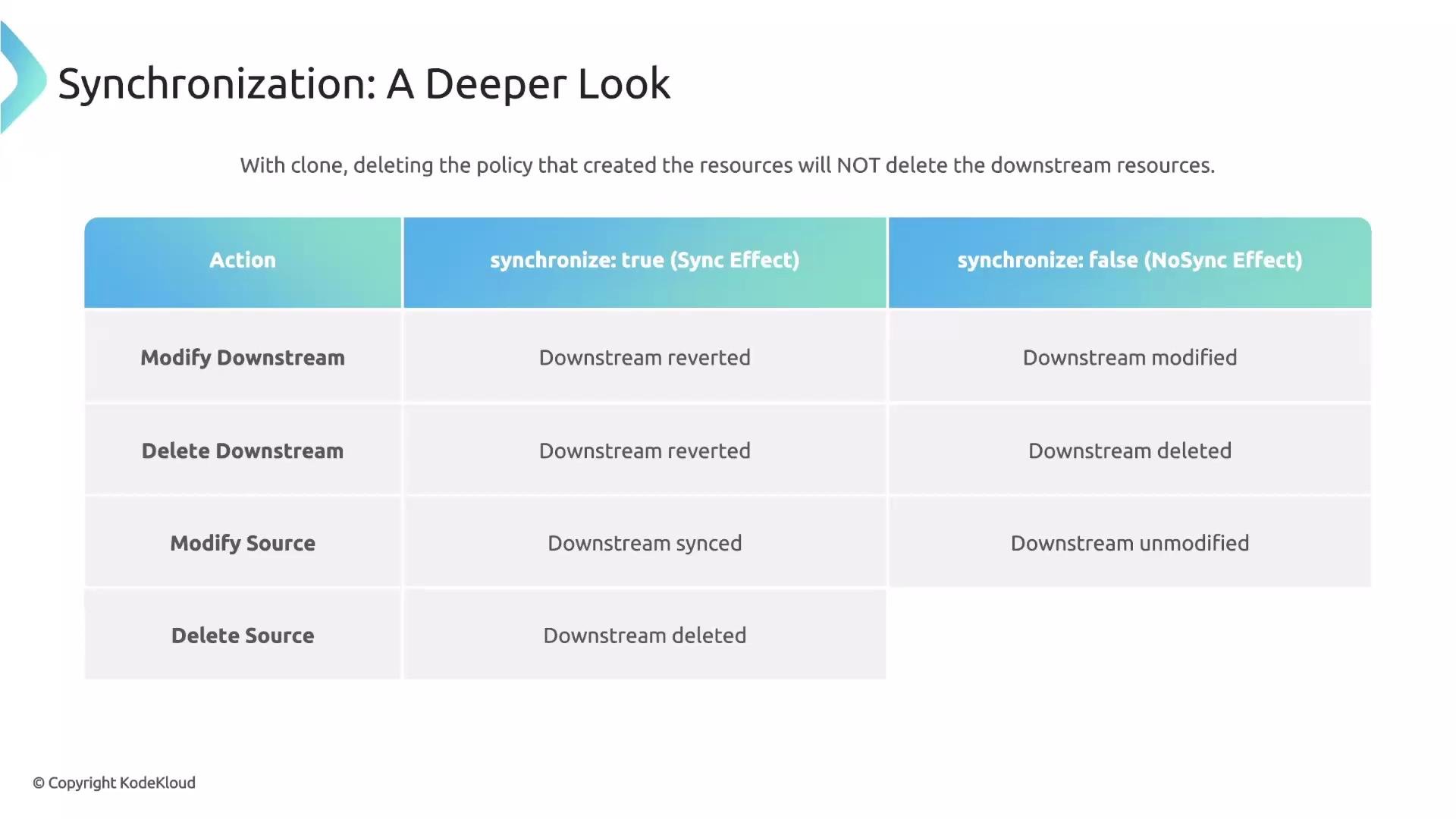
The `synchronize` flag controls how Kyverno reconciles differences between the source, downstream clones, and trigger resources. Below is a concise summary; refer to your cluster policy needs when choosing `true` or `false`.
| Event | `synchronize: true` | `synchronize: false` |
| ----------------------------------------------------------------- | ------------------------------------------------------------------------------: | -------------------------------------------------------- |
| Modify downstream clone | Kyverno detects drift and reverts the clone to match the source. | Downstream change persists. |
| Delete downstream clone | Kyverno recreates the clone from the source. | Clone remains deleted. |
| Modify source resource (rotate credentials) | Kyverno updates all downstream clones to match the new source. | Downstream clones remain stale. |
| Delete source resource | Kyverno deletes all downstream clones to avoid propagating invalid credentials. | Downstream clones remain (may hold invalid credentials). |
| Trigger resource no longer matches (e.g., Namespace label change) | Kyverno removes the downstream resource because the trigger no longer matches. | Downstream resource is orphaned. |
| Delete the trigger resource (e.g., Namespace deleted) | Kyverno deletes the downstream resource along with the trigger. | Downstream resource is orphaned. |
| Delete the Kyverno policy | Kyverno removes the downstream resources to avoid unmanaged clones. | Downstream resources remain. |
Why not use the data source?
* Embedding secret data into the policy duplicates sensitive material across policy manifests.
* Every rotation would require updating the policy, increasing risk and administrative overhead.
* The data source is best when the policy itself should be the canonical resource definition.
When an existing in-cluster resource is the source of truth, use the clone source: the policy becomes a pointer that instructs Kyverno to copy the real resource into target namespaces.
Understanding generate content sources
A Kyverno generate rule can obtain content in two ways:
| Content source | What it means | When to use |
| -------------- | -----------------------------------------------------------------------------------------------------------------------------------------------------------: | ------------------------------------------------------------------------------------------- |
| Data source | You author the resource manifest inside the policy (under `generate.data` or inline manifest). Kyverno creates the downstream resource from that definition. | Use when the policy should be the canonical source of the resource configuration. |
| Clone source | The policy points to an existing, deployed resource using `generate.clone`. Kyverno replicates that resource as-is to target namespaces. | Use when an in-cluster resource is the golden source (e.g., centrally-managed credentials). |
For the data source you include a `data` (or inline manifest) under `generate`. For the clone source you declare a `clone` block that references the source `namespace` and `name`.
Example: clone a shared image pull secret to every new Namespace
This ClusterPolicy clones the `regcred` Secret from the `default` namespace into each new Namespace. The rule matches Namespace creation; `generate` declares the downstream Secret and `clone` points to the golden source. `synchronize: true` keeps downstream clones in sync with the source.
```yaml theme={null}
apiVersion: kyverno.io/v1
kind: ClusterPolicy
metadata:
name: clone-regcred-to-namespaces
spec:
rules:
- name: sync-image-pull-secret
match:
any:
- resources:
kinds:
- Namespace
generate:
apiVersion: v1
kind: Secret
name: regcred
namespace: "{{request.object.metadata.name}}"
clone:
namespace: default
name: regcred
synchronize: true
```
With `synchronize: true`, Kyverno detects updates to the golden secret in `default` and propagates them to every cloned Secret across the cluster. Alice manages only the master secret; Kyverno manages distributed copies.
Best practices and security
When cloning Secrets across namespaces, ensure proper RBAC and policy scoping so only authorized controllers and users can view or create clones. Consider encryption-at-rest, `imagePullSecrets` usage patterns, and tools like Sealed Secrets for additional protection. See the Kyverno documentation for generate/clone details: [https://kyverno.io/docs/writing-policies/generate/](https://kyverno.io/docs/writing-policies/generate/)
Synchronization: effects and behaviors
The `synchronize` flag controls how Kyverno reconciles differences between the source, downstream clones, and trigger resources. Below is a concise summary; refer to your cluster policy needs when choosing `true` or `false`.
| Event | `synchronize: true` | `synchronize: false` |
| ----------------------------------------------------------------- | ------------------------------------------------------------------------------: | -------------------------------------------------------- |
| Modify downstream clone | Kyverno detects drift and reverts the clone to match the source. | Downstream change persists. |
| Delete downstream clone | Kyverno recreates the clone from the source. | Clone remains deleted. |
| Modify source resource (rotate credentials) | Kyverno updates all downstream clones to match the new source. | Downstream clones remain stale. |
| Delete source resource | Kyverno deletes all downstream clones to avoid propagating invalid credentials. | Downstream clones remain (may hold invalid credentials). |
| Trigger resource no longer matches (e.g., Namespace label change) | Kyverno removes the downstream resource because the trigger no longer matches. | Downstream resource is orphaned. |
| Delete the trigger resource (e.g., Namespace deleted) | Kyverno deletes the downstream resource along with the trigger. | Downstream resource is orphaned. |
| Delete the Kyverno policy | Kyverno removes the downstream resources to avoid unmanaged clones. | Downstream resources remain. |
 Note: `synchronize: true` can delete downstream resources if the source is deleted or if the trigger no longer matches. Use caution to avoid accidental data loss and verify the source lifecycle before enabling synchronization.
Additional tips
* Use label selectors and `match` criteria to limit which Namespaces or resources receive clones.
* Monitor Kyverno logs and events to verify clones are created and synced as expected.
* Consider combining generate/clone rules with admission controls to ensure workloads reference the correct `imagePullSecrets`.
Links and references
* Kyverno generate rules: [https://kyverno.io/docs/writing-policies/generate/](https://kyverno.io/docs/writing-policies/generate/)
* Kyverno documentation: [https://kyverno.io](https://kyverno.io)
* Sealed Secrets (Bitnami): [https://github.com/bitnami-labs/sealed-secrets](https://github.com/bitnami-labs/sealed-secrets)
* Kubernetes Secrets: [https://kubernetes.io/docs/concepts/configuration/secret/](https://kubernetes.io/docs/concepts/configuration/secret/)
Summary
* Use the data source when the policy should be the canonical manifest and you want to author the resource inside the policy.
* Use the clone source when a resource already exists in-cluster and you want Kyverno to replicate it elsewhere.
* `synchronize: true` ensures downstream clones automatically follow source updates and are deleted if the source or trigger disappears.
* Be mindful of security controls, RBAC, and the lifecycle of the golden secret when cloning Secrets across namespaces.
`cloneList` allows cloning an entire list of resources with a single rule.
Note: `synchronize: true` can delete downstream resources if the source is deleted or if the trigger no longer matches. Use caution to avoid accidental data loss and verify the source lifecycle before enabling synchronization.
Additional tips
* Use label selectors and `match` criteria to limit which Namespaces or resources receive clones.
* Monitor Kyverno logs and events to verify clones are created and synced as expected.
* Consider combining generate/clone rules with admission controls to ensure workloads reference the correct `imagePullSecrets`.
Links and references
* Kyverno generate rules: [https://kyverno.io/docs/writing-policies/generate/](https://kyverno.io/docs/writing-policies/generate/)
* Kyverno documentation: [https://kyverno.io](https://kyverno.io)
* Sealed Secrets (Bitnami): [https://github.com/bitnami-labs/sealed-secrets](https://github.com/bitnami-labs/sealed-secrets)
* Kubernetes Secrets: [https://kubernetes.io/docs/concepts/configuration/secret/](https://kubernetes.io/docs/concepts/configuration/secret/)
Summary
* Use the data source when the policy should be the canonical manifest and you want to author the resource inside the policy.
* Use the clone source when a resource already exists in-cluster and you want Kyverno to replicate it elsewhere.
* `synchronize: true` ensures downstream clones automatically follow source updates and are deleted if the source or trigger disappears.
* Be mindful of security controls, RBAC, and the lifecycle of the golden secret when cloning Secrets across namespaces.
`cloneList` allows cloning an entire list of resources with a single rule.