> ## Documentation Index
> Fetch the complete documentation index at: https://notes.kodekloud.com/llms.txt
> Use this file to discover all available pages before exploring further.
# Preconditions Part 2
> Explains Kyverno precondition operators and practical examples for equality set membership numeric duration and regex matching to precisely scope and debug policy application
Previously we covered the basic structure of preconditions and how to use the `any` and `all` resource filters.
In this lesson we’ll dig into the operators that make preconditions powerful, and walk through several practical, real-world examples you can reuse in your Kyverno policies. The focus is on comparing values robustly — from exact matches to set membership, quantities, and time/duration comparisons.
Why this matters: well-crafted preconditions let you scope policy application precisely (for example, only certain service accounts or pods with small memory requests), reducing false positives and enabling safer enforcement.
## Operator categories
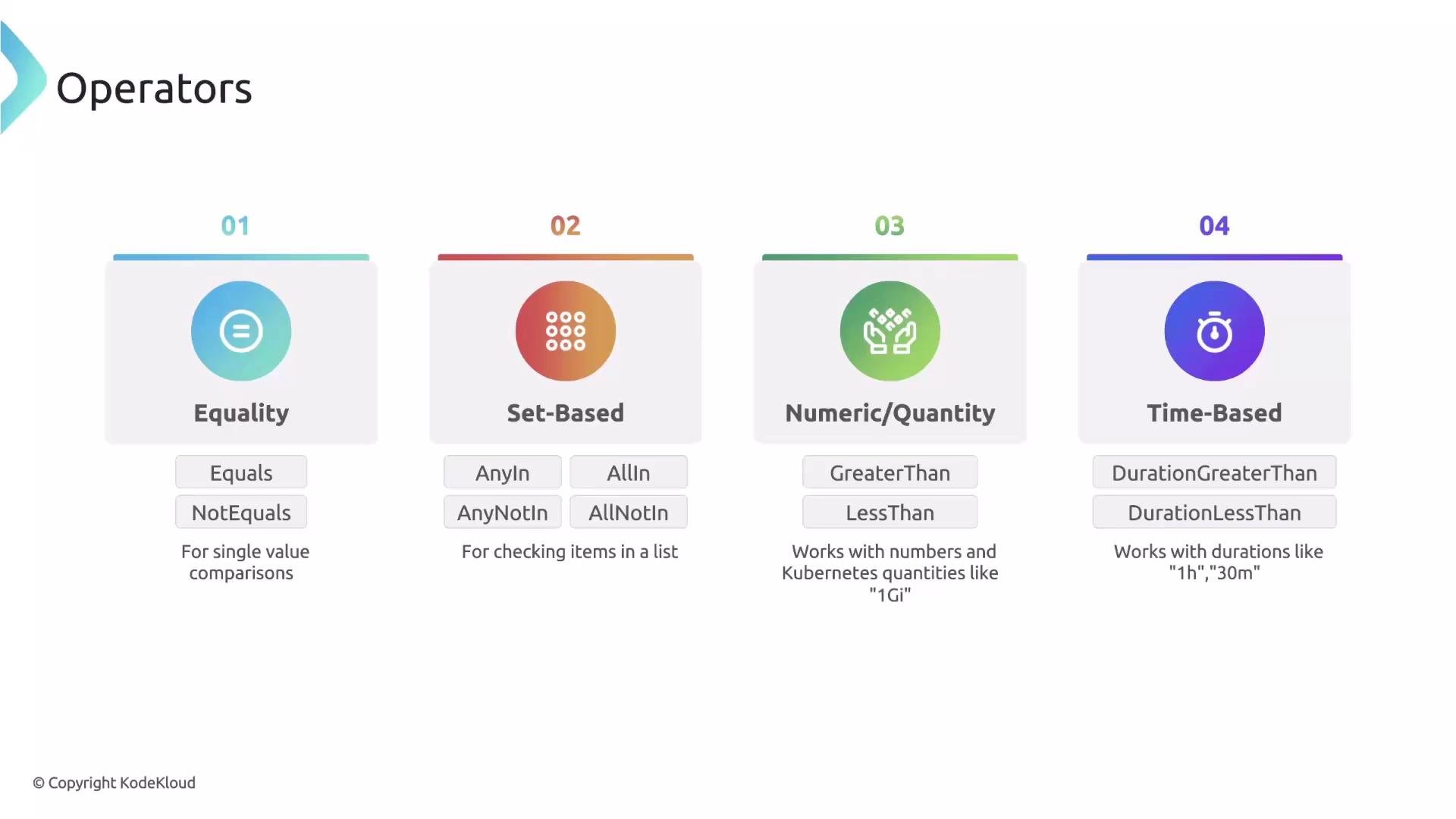
Operators fall into four broad types. Use the category and operator that best matches the shape of the data you’re comparing.
| Operator Category | Description | Example operators |
| ------------------ | ----------------------------------------------------------------------- | --------------------------------------- |
| Equality | Exact or negated equality checks | `Equals`, `NotEquals` |
| Set-based | Test membership in a list or array | `AnyIn`, `AllIn`, `NotIn` |
| Numeric / Quantity | Numeric comparisons that understand Kubernetes units (`Ki`, `Mi`, `Gi`) | `LessThan`, `GreaterThan`, `Equals` |
| Time / Duration | Compare timestamps or durations | `Before`, `After`, duration comparisons |
 ## AnyIn (set-based) example
Use `AnyIn` when you want a policy to apply only if a value appears in a predefined list. The example below restricts the rule to Namespace creation requests initiated by one of two service accounts.
* `match` selects `Namespace` resources.
* `preconditions` uses the predefined variable `{{serviceAccountName}}`.
* `AnyIn` verifies that the service account name is in the allowed list.
```yaml theme={null}
match:
any:
- resources:
kinds:
- Namespace
preconditions:
any:
- key: "{{serviceAccountName}}"
operator: AnyIn
value:
- build-default
- build-base
```
This evaluates to true only when the request originates from `build-default` or `build-base`, giving a simple, readable restriction to approved service accounts.
## Numeric / quantity example
Kyverno’s numeric/quantity operators understand Kubernetes resource units, letting you compare values like `512Mi` or `1Gi` directly. Use these operators to enforce policies based on resource requests or limits.
* `match` selects `Pod` resources.
* `preconditions` reads the first container’s memory request via a JMESPath-style variable.
* `LessThan` compares the memory request to `1Gi`.
```yaml theme={null}
match:
any:
- resources:
kinds:
- Pod
preconditions:
any:
- key: "{{request.object.spec.containers[0].resources.requests.memory}}"
operator: LessThan
value: "1Gi"
```
Numeric and quantity operators understand Kubernetes resource units such as `Ki`, `Mi`, `Gi`, etc., so you can compare memory/CPU values directly.
## Wildcard and regex string matching
Pattern matching is useful for fields like hostnames, image names, or labels. Use `Matches` / `NotMatches` with regular expressions to include or exclude patterns.
Example: apply a policy to any `Ingress` that points to an external (non-company) domain.
* `match` selects `Ingress` resources.
* `preconditions` evaluates the first rule host from `spec.rules[0].host`.
* `NotMatches` with a regex excludes hosts matching the company domain pattern `*.mycompany.com`.
```yaml theme={null}
match:
resources:
kinds:
- Ingress
preconditions:
all:
- key: "{{request.object.spec.rules[0].host}}"
operator: NotMatches
value: ".*\\.mycompany\\.com$"
```
Because the operator is `NotMatches` and the regex represents `*.mycompany.com`, the precondition is true only when the host does not match the company domain — effectively targeting external hosts.
When using regex in preconditions, remember to escape special characters (for example, `.` becomes `\\.` in YAML/regex) and validate your expression with a regex tester. Incorrect escaping can cause unexpected behavior or silent mismatches.
## Using `message` to debug failing preconditions
When policies have multiple preconditions (especially OR/AND combinations), it can be hard to know which one failed. Add a `message` to any precondition — if that expression evaluates to false, Kyverno prints the message in its logs. Think of this as a lightweight debug print for policy logic.
Example: a `ConfigMap` policy with two preconditions, each providing a clear failure message.
```yaml theme={null}
match:
any:
- resources:
kinds:
- ConfigMap
preconditions:
all:
- key: "{{request.object.data.food}}"
operator: Equals
value: "cheese"
message: The food is not cheese.
- key: "{{request.object.data.day}}"
operator: Equals
value: "monday"
message: The day is not Monday.
```
If `data.food` is `cheese` but `data.day` is `tuesday`, Kyverno logs will include "The day is not Monday." This quickly pinpoints the failing precondition and speeds troubleshooting.
## Quick reference: common patterns
| Use case | Key / expression example | Operator |
| ----------------------------- | ----------------------------------------------------------------- | --------------------- |
| Restrict by service account | `{{serviceAccountName}}` | `AnyIn` |
| Enforce small memory requests | `{{request.object.spec.containers[0].resources.requests.memory}}` | `LessThan` |
| Reject company-internal hosts | `{{request.object.spec.rules[0].host}}` | `NotMatches` |
| Exact string check | `{{request.object.metadata.labels.env}}` | `Equals`, `NotEquals` |
## Links and references
* [Kyverno documentation — Policy examples](https://kyverno.io/docs/writing-policies/)
* [Kubernetes resource quantities](https://kubernetes.io/docs/concepts/configuration/manage-resources-containers/#resource-units)
* [JMESPath syntax reference](https://jmespath.org/)
That’s it for this lesson — use these operators and patterns to make Kyverno preconditions precise, readable, and easier to debug.
## AnyIn (set-based) example
Use `AnyIn` when you want a policy to apply only if a value appears in a predefined list. The example below restricts the rule to Namespace creation requests initiated by one of two service accounts.
* `match` selects `Namespace` resources.
* `preconditions` uses the predefined variable `{{serviceAccountName}}`.
* `AnyIn` verifies that the service account name is in the allowed list.
```yaml theme={null}
match:
any:
- resources:
kinds:
- Namespace
preconditions:
any:
- key: "{{serviceAccountName}}"
operator: AnyIn
value:
- build-default
- build-base
```
This evaluates to true only when the request originates from `build-default` or `build-base`, giving a simple, readable restriction to approved service accounts.
## Numeric / quantity example
Kyverno’s numeric/quantity operators understand Kubernetes resource units, letting you compare values like `512Mi` or `1Gi` directly. Use these operators to enforce policies based on resource requests or limits.
* `match` selects `Pod` resources.
* `preconditions` reads the first container’s memory request via a JMESPath-style variable.
* `LessThan` compares the memory request to `1Gi`.
```yaml theme={null}
match:
any:
- resources:
kinds:
- Pod
preconditions:
any:
- key: "{{request.object.spec.containers[0].resources.requests.memory}}"
operator: LessThan
value: "1Gi"
```
Numeric and quantity operators understand Kubernetes resource units such as `Ki`, `Mi`, `Gi`, etc., so you can compare memory/CPU values directly.
## Wildcard and regex string matching
Pattern matching is useful for fields like hostnames, image names, or labels. Use `Matches` / `NotMatches` with regular expressions to include or exclude patterns.
Example: apply a policy to any `Ingress` that points to an external (non-company) domain.
* `match` selects `Ingress` resources.
* `preconditions` evaluates the first rule host from `spec.rules[0].host`.
* `NotMatches` with a regex excludes hosts matching the company domain pattern `*.mycompany.com`.
```yaml theme={null}
match:
resources:
kinds:
- Ingress
preconditions:
all:
- key: "{{request.object.spec.rules[0].host}}"
operator: NotMatches
value: ".*\\.mycompany\\.com$"
```
Because the operator is `NotMatches` and the regex represents `*.mycompany.com`, the precondition is true only when the host does not match the company domain — effectively targeting external hosts.
When using regex in preconditions, remember to escape special characters (for example, `.` becomes `\\.` in YAML/regex) and validate your expression with a regex tester. Incorrect escaping can cause unexpected behavior or silent mismatches.
## Using `message` to debug failing preconditions
When policies have multiple preconditions (especially OR/AND combinations), it can be hard to know which one failed. Add a `message` to any precondition — if that expression evaluates to false, Kyverno prints the message in its logs. Think of this as a lightweight debug print for policy logic.
Example: a `ConfigMap` policy with two preconditions, each providing a clear failure message.
```yaml theme={null}
match:
any:
- resources:
kinds:
- ConfigMap
preconditions:
all:
- key: "{{request.object.data.food}}"
operator: Equals
value: "cheese"
message: The food is not cheese.
- key: "{{request.object.data.day}}"
operator: Equals
value: "monday"
message: The day is not Monday.
```
If `data.food` is `cheese` but `data.day` is `tuesday`, Kyverno logs will include "The day is not Monday." This quickly pinpoints the failing precondition and speeds troubleshooting.
## Quick reference: common patterns
| Use case | Key / expression example | Operator |
| ----------------------------- | ----------------------------------------------------------------- | --------------------- |
| Restrict by service account | `{{serviceAccountName}}` | `AnyIn` |
| Enforce small memory requests | `{{request.object.spec.containers[0].resources.requests.memory}}` | `LessThan` |
| Reject company-internal hosts | `{{request.object.spec.rules[0].host}}` | `NotMatches` |
| Exact string check | `{{request.object.metadata.labels.env}}` | `Equals`, `NotEquals` |
## Links and references
* [Kyverno documentation — Policy examples](https://kyverno.io/docs/writing-policies/)
* [Kubernetes resource quantities](https://kubernetes.io/docs/concepts/configuration/manage-resources-containers/#resource-units)
* [JMESPath syntax reference](https://jmespath.org/)
That’s it for this lesson — use these operators and patterns to make Kyverno preconditions precise, readable, and easier to debug.