> ## Documentation Index
> Fetch the complete documentation index at: https://notes.kodekloud.com/llms.txt
> Use this file to discover all available pages before exploring further.
# Demo Failure Action
> Describes Kyverno failureAction modes Enforce and Audit plus allowExistingViolations and emitWarning to control namespace label validation and update behavior in Kubernetes.
In this lesson/article we will explore the `failureAction` field in Kyverno policies and how it controls policy behavior for create and update requests.
We begin with a simple ClusterPolicy that requires every Namespace to include a `purpose: production` label:
```yaml theme={null}
apiVersion: kyverno.io/v1
kind: ClusterPolicy
metadata:
name: require-ns-purpose-label
spec:
rules:
- name: require-ns-purpose-label
match:
any:
- resources:
kinds:
- Namespace
validate:
failureAction: Enforce
message: "You must have label `purpose` with value `production` set on all new namespaces."
pattern:
metadata:
labels:
purpose: production
```
This is a `ClusterPolicy` (applies cluster-wide). The rule is a `validate` rule that:
* matches resources of kind `Namespace`
* rejects non-conforming resources because `failureAction` is `Enforce`
* returns the provided `message` when validation fails
* enforces the `pattern` that requires `metadata.labels.purpose` to equal `production`
Apply the policy:
```bash theme={null}
kubectl apply -f enforce-ns-label.yaml
# Expected output
# clusterpolicy.kyverno.io/require-ns-purpose-label created
```
Confirm the policy is ready:
```bash theme={null}
kubectl get cpol require-ns-purpose-label
# NAME ADMISSION BACKGROUND READY AGE MESSAGE
# require-ns-purpose-label true true True 11s Ready
```
Try to create a namespace that does not include the required label:
```bash theme={null}
kubectl create ns bad-ns
```
With `failureAction: Enforce`, the admission webhook blocks the creation and returns a validation error:
```text theme={null}
Error from server: admission webhook "validate.kyverno.svc-fail" denied the request:
resource Namespace/bad-ns was blocked due to the following policies
require-ns-purpose-label: 'validation error: You must have label `purpose` with value `production` set on all new namespaces. rule require-ns-purpose-label failed at path /metadata/labels/purpose/'
```
This demonstrates that Enforce acts as a hard gate: non-compliant resources are rejected on creation.
***
Next, consider updates to pre-existing, non-compliant resources. By default, Kyverno will not block updates to resources that were already violating the policy when the policy was added. This is controlled by the `allowExistingViolations` field (defaults to `true`).
For example, list existing namespaces and their labels:
```bash theme={null}
kubectl get ns --show-labels
# NAME STATUS AGE LABELS
# default Active 21h env=default,kubernetes.io/metadata.name=default
# kube-system Active 21h kubernetes.io/metadata.name=kube-system
# kyverno Active 18m kubernetes.io/metadata.name=kyverno
# ...
```
Label an existing namespace `default` with `purpose=test` (an incorrect value according to our policy):
```bash theme={null}
kubectl label ns default purpose=test
# namespace/default labeled
```
Even though the `purpose` value is `test` (not `production`), the label operation succeeds because Kyverno allows updates to existing violations by default.
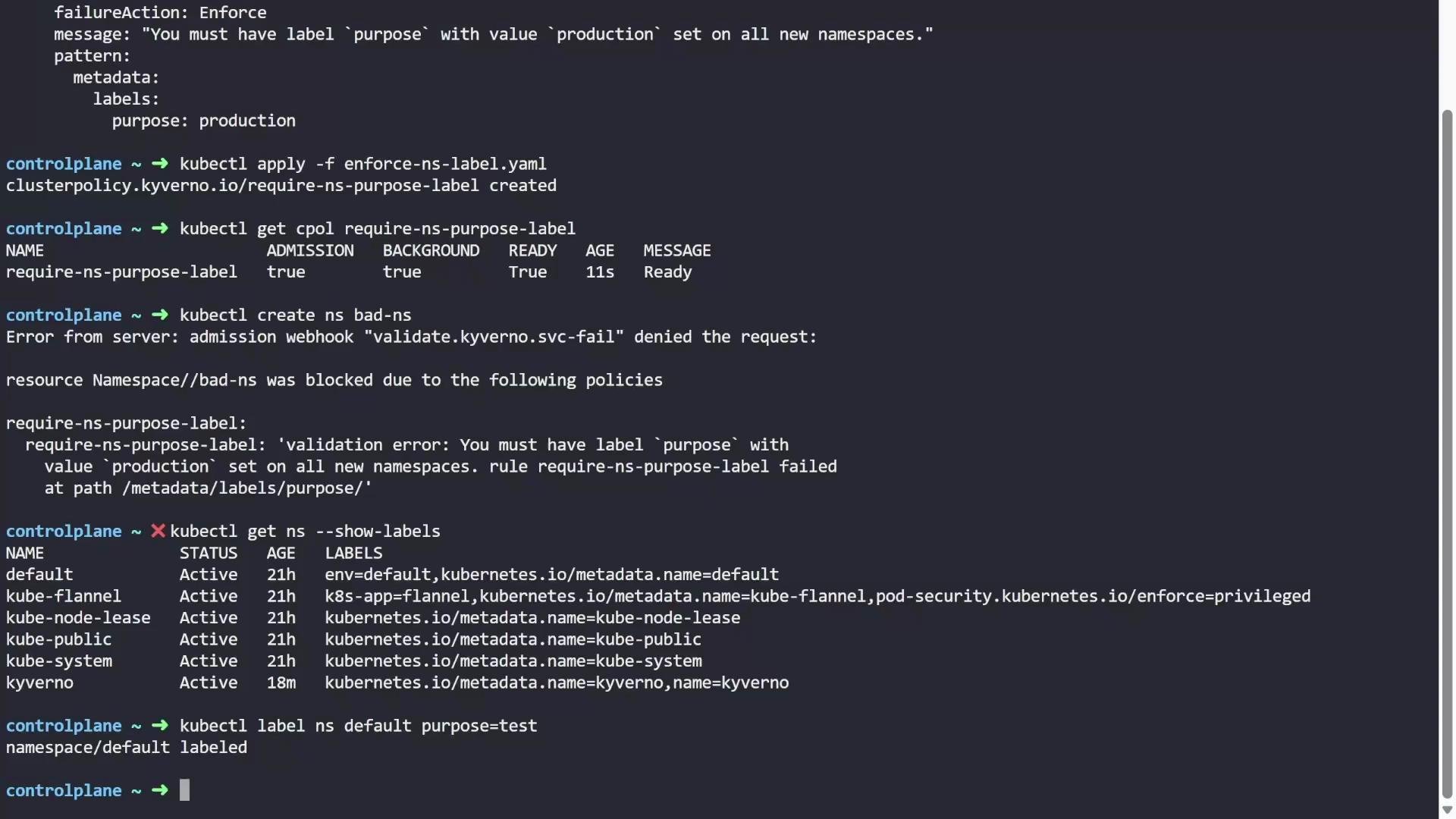 By default `allowExistingViolations: true` allows updates to resources that were non-compliant before the policy was added. This prevents sudden disruptions to an existing cluster.
***
If you want Kyverno to re-evaluate and block updates to already-violating resources, set `allowExistingViolations: false` in the policy `spec` and re-apply it. For example:
```yaml theme={null}
apiVersion: kyverno.io/v1
kind: ClusterPolicy
metadata:
name: require-ns-purpose-label
spec:
allowExistingViolations: false
rules:
- name: require-ns-purpose-label
match:
any:
- resources:
kinds:
- Namespace
validate:
failureAction: Enforce
message: "You must have label `purpose` with value `production` set on all new namespaces."
pattern:
metadata:
labels:
purpose: production
```
Apply the updated policy:
```bash theme={null}
kubectl apply -f enforce-ns-label.yaml
# clusterpolicy.kyverno.io/require-ns-purpose-label configured
```
Now attempt to modify the already-violating namespace:
```bash theme={null}
kubectl label ns default team=dev
```
The update will be rejected because Kyverno now enforces validation even on existing, non-compliant resources:
```text theme={null}
Error from server: admission webhook "validate.kyverno.svc-fail" denied the request:
resource Namespace/default was blocked due to the following policies
require-ns-purpose-label:
require-ns-purpose-label: 'validation error: You must have label `purpose` with value `production` set on all new namespaces. rule require-ns-purpose-label failed at path /metadata/labels/purpose/'
```
To make updates succeed you must fix the resource to be compliant (for example, set the correct `purpose` value). Overwrite the existing label:
```bash theme={null}
kubectl label ns default purpose=production --overwrite
# namespace/default labeled
```
***
Audit mode: if you change `failureAction` from `Enforce` to `Audit`, Kyverno will not block create or update operations. Instead it records violations in ClusterPolicyReport resources (useful for monitoring and auditing).
Policy example set to Audit:
```yaml theme={null}
apiVersion: kyverno.io/v1
kind: ClusterPolicy
metadata:
name: require-ns-purpose-label
spec:
rules:
- name: require-ns-purpose-label
match:
any:
- resources:
kinds:
- Namespace
validate:
failureAction: Audit
message: "You must have label `purpose` with value `production` set on all new namespaces."
pattern:
metadata:
labels:
purpose: production
```
Apply the updated policy:
```bash theme={null}
kubectl apply -f enforce-ns-label.yaml
# clusterpolicy.kyverno.io/require-ns-purpose-label configured
```
Create a non-compliant namespace:
```bash theme={null}
kubectl create namespace bad-ns
# namespace/bad-ns created
```
Since the policy is in audit mode the namespace creation succeeds. Kyverno records the violation in a `ClusterPolicyReport` (CPR). List CPRs:
```bash theme={null}
kubectl get cpolr
# NAME KIND NAME PASS FAIL WARN ERROR SKIP AGE
# 244dc0a3-4321-4105-b375-a0deef5140b7 Namespace bad-ns 0 1 0 0 0 12s
# ...
```
View the report details (truncated for brevity):
```bash theme={null}
kubectl get cpol 244dc0a3-4321-4105-b375-a0deef5140b7 -o yaml
```
Sample relevant parts of a CPR:
```yaml theme={null}
results:
- message: 'validation error: You must have label `purpose` with value `production` set on all new namespaces. rule require-ns-purpose-label failed at path /metadata/labels/purpose/'
policy: require-ns-purpose-label
properties:
process: background scan
result: fail
rule: require-ns-purpose-label
scored: true
source: kyverno
scope:
apiVersion: v1
kind: Namespace
name: bad-ns
summary:
fail: 1
pass: 0
```
These reports are useful to security and compliance teams because they allow monitoring policy compliance across the cluster without preventing operations.
***
emitWarning: immediate user feedback without blocking
If you want users to receive a warning message in their terminal when an operation violates an audit-rule, add `emitWarning: true` at the policy `spec` level. Example:
```yaml theme={null}
apiVersion: kyverno.io/v1
kind: ClusterPolicy
metadata:
name: require-ns-purpose-label
spec:
emitWarning: true
rules:
- name: require-ns-purpose-label
match:
any:
- resources:
kinds:
- Namespace
validate:
failureAction: Audit
message: "You must have label `purpose` with value `production` set on all new namespaces."
pattern:
metadata:
labels:
purpose: production
```
Apply and try creating another non-compliant namespace:
```bash theme={null}
kubectl apply -f enforce-ns-label.yaml
kubectl create namespace another-bad-ns
# Warning: policy require-ns-purpose-label.require-ns-purpose-label: validation error: You must have label `purpose` with value `production` set on a namespace. rule require-ns-purpose-label failed at path /metadata/labels/purpose/
# namespace/another-bad-ns created
```
The creation succeeds (audit mode), but the user receives an immediate warning in the terminal. This is a helpful compromise: operations are not blocked, but users get prompt feedback and can fix violations quickly.
***
Summary
* failureAction: Enforce — blocks creation/updates of non-compliant resources.
* allowExistingViolations (default true) — if true, updates to already-violating resources are allowed; set to false to enforce on updates as well.
* failureAction: Audit — allows the resource but records violations in ClusterPolicyReport objects.
* emitWarning: true — with audit mode, returns a warning to the user in the terminal while still allowing the operation.
By default `allowExistingViolations: true` allows updates to resources that were non-compliant before the policy was added. This prevents sudden disruptions to an existing cluster.
***
If you want Kyverno to re-evaluate and block updates to already-violating resources, set `allowExistingViolations: false` in the policy `spec` and re-apply it. For example:
```yaml theme={null}
apiVersion: kyverno.io/v1
kind: ClusterPolicy
metadata:
name: require-ns-purpose-label
spec:
allowExistingViolations: false
rules:
- name: require-ns-purpose-label
match:
any:
- resources:
kinds:
- Namespace
validate:
failureAction: Enforce
message: "You must have label `purpose` with value `production` set on all new namespaces."
pattern:
metadata:
labels:
purpose: production
```
Apply the updated policy:
```bash theme={null}
kubectl apply -f enforce-ns-label.yaml
# clusterpolicy.kyverno.io/require-ns-purpose-label configured
```
Now attempt to modify the already-violating namespace:
```bash theme={null}
kubectl label ns default team=dev
```
The update will be rejected because Kyverno now enforces validation even on existing, non-compliant resources:
```text theme={null}
Error from server: admission webhook "validate.kyverno.svc-fail" denied the request:
resource Namespace/default was blocked due to the following policies
require-ns-purpose-label:
require-ns-purpose-label: 'validation error: You must have label `purpose` with value `production` set on all new namespaces. rule require-ns-purpose-label failed at path /metadata/labels/purpose/'
```
To make updates succeed you must fix the resource to be compliant (for example, set the correct `purpose` value). Overwrite the existing label:
```bash theme={null}
kubectl label ns default purpose=production --overwrite
# namespace/default labeled
```
***
Audit mode: if you change `failureAction` from `Enforce` to `Audit`, Kyverno will not block create or update operations. Instead it records violations in ClusterPolicyReport resources (useful for monitoring and auditing).
Policy example set to Audit:
```yaml theme={null}
apiVersion: kyverno.io/v1
kind: ClusterPolicy
metadata:
name: require-ns-purpose-label
spec:
rules:
- name: require-ns-purpose-label
match:
any:
- resources:
kinds:
- Namespace
validate:
failureAction: Audit
message: "You must have label `purpose` with value `production` set on all new namespaces."
pattern:
metadata:
labels:
purpose: production
```
Apply the updated policy:
```bash theme={null}
kubectl apply -f enforce-ns-label.yaml
# clusterpolicy.kyverno.io/require-ns-purpose-label configured
```
Create a non-compliant namespace:
```bash theme={null}
kubectl create namespace bad-ns
# namespace/bad-ns created
```
Since the policy is in audit mode the namespace creation succeeds. Kyverno records the violation in a `ClusterPolicyReport` (CPR). List CPRs:
```bash theme={null}
kubectl get cpolr
# NAME KIND NAME PASS FAIL WARN ERROR SKIP AGE
# 244dc0a3-4321-4105-b375-a0deef5140b7 Namespace bad-ns 0 1 0 0 0 12s
# ...
```
View the report details (truncated for brevity):
```bash theme={null}
kubectl get cpol 244dc0a3-4321-4105-b375-a0deef5140b7 -o yaml
```
Sample relevant parts of a CPR:
```yaml theme={null}
results:
- message: 'validation error: You must have label `purpose` with value `production` set on all new namespaces. rule require-ns-purpose-label failed at path /metadata/labels/purpose/'
policy: require-ns-purpose-label
properties:
process: background scan
result: fail
rule: require-ns-purpose-label
scored: true
source: kyverno
scope:
apiVersion: v1
kind: Namespace
name: bad-ns
summary:
fail: 1
pass: 0
```
These reports are useful to security and compliance teams because they allow monitoring policy compliance across the cluster without preventing operations.
***
emitWarning: immediate user feedback without blocking
If you want users to receive a warning message in their terminal when an operation violates an audit-rule, add `emitWarning: true` at the policy `spec` level. Example:
```yaml theme={null}
apiVersion: kyverno.io/v1
kind: ClusterPolicy
metadata:
name: require-ns-purpose-label
spec:
emitWarning: true
rules:
- name: require-ns-purpose-label
match:
any:
- resources:
kinds:
- Namespace
validate:
failureAction: Audit
message: "You must have label `purpose` with value `production` set on all new namespaces."
pattern:
metadata:
labels:
purpose: production
```
Apply and try creating another non-compliant namespace:
```bash theme={null}
kubectl apply -f enforce-ns-label.yaml
kubectl create namespace another-bad-ns
# Warning: policy require-ns-purpose-label.require-ns-purpose-label: validation error: You must have label `purpose` with value `production` set on a namespace. rule require-ns-purpose-label failed at path /metadata/labels/purpose/
# namespace/another-bad-ns created
```
The creation succeeds (audit mode), but the user receives an immediate warning in the terminal. This is a helpful compromise: operations are not blocked, but users get prompt feedback and can fix violations quickly.
***
Summary
* failureAction: Enforce — blocks creation/updates of non-compliant resources.
* allowExistingViolations (default true) — if true, updates to already-violating resources are allowed; set to false to enforce on updates as well.
* failureAction: Audit — allows the resource but records violations in ClusterPolicyReport objects.
* emitWarning: true — with audit mode, returns a warning to the user in the terminal while still allowing the operation.